
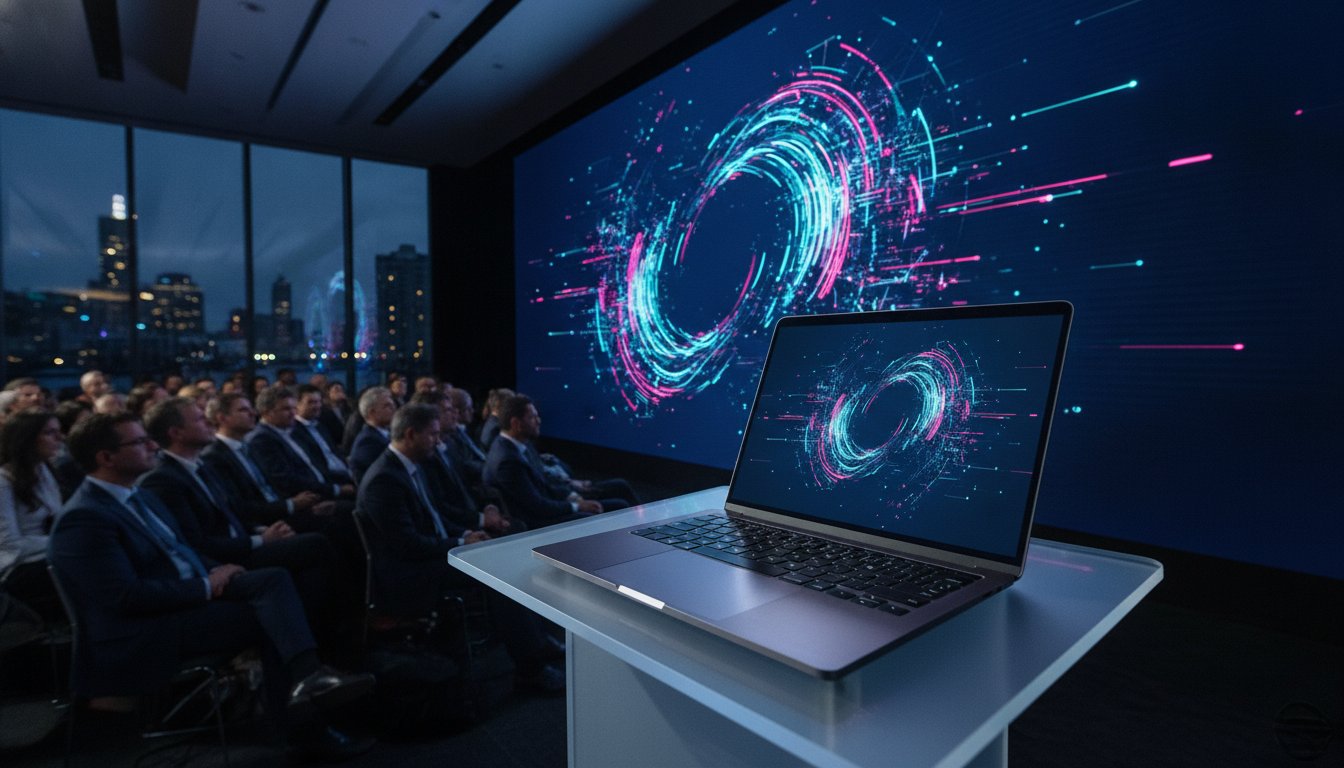
Imagine standing at the lectern in a packed Melbourne ballroom, your opening line delivered with poise, only for your laptop to trigger a mandatory twenty-minute software update across the massive LED wall behind you. This nightmare scenario is exactly why professional planners recognise that a standard office device simply isn’t enough for a high-stakes environment. To achieve a truly flawless corporate presentation av setup melbourne, your hardware must function as a mission-critical workstation, meticulously prepared to handle the unique pressures of a live stage.
We understand the quiet anxiety that comes with technical logistics, from incompatible ports to the fear of stuttering high-resolution video. You deserve total confidence that your media will play perfectly the moment you press “next”. This guide provides our professional 2026 checklist for hiring and configuring presentation-ready laptops that deliver a sleek, plug-and-play experience. We’ll cover everything from the latest MacBook Pro M3 and M4 specifications to the essential “hardening” steps that ensure your technology remains the invisible engine behind your success.
Key Takeaways
- Identify the high-performance hardware requirements, including dedicated GPUs and the latest MacBook Pro models, necessary to drive seamless 4K transitions and complex media.
- Implement a rigorous “presentation-ready” configuration that silences system notifications and overrides power-saving modes to ensure an uninterrupted visual experience.
- Optimise your corporate presentation av setup melbourne by mastering custom aspect ratios and stable signal clocking for large-format LED walls and seamless switchers.
- Leverage the “Melbourne CBD Advantage” with on-site technical rehearsals and rapid local support to mitigate the risks associated with interstate shipping and venue quirks.
- Transform your lectern setup from a standard rental into a mission-critical workstation that acts as the reliable technical brain of your entire event production.
Choosing the Right Hardware: Presentation Laptop Hire Essentials
The laptop resting on your lectern is the central nervous system of your entire event. It’s the engine that drives your narrative, and in a high-stakes environment, a standard consumer device simply won’t suffice. A professional corporate presentation av setup melbourne requires hardware that can breathe through demanding 4K renders and complex animations without breaking a sweat. We treat every rental as a mission-critical workstation, ensuring that the hardware reflects the prestige of your brand while providing the technical “heavy lifting” required for modern presentation technology.
Minimum Specifications for 2026 Corporate Events
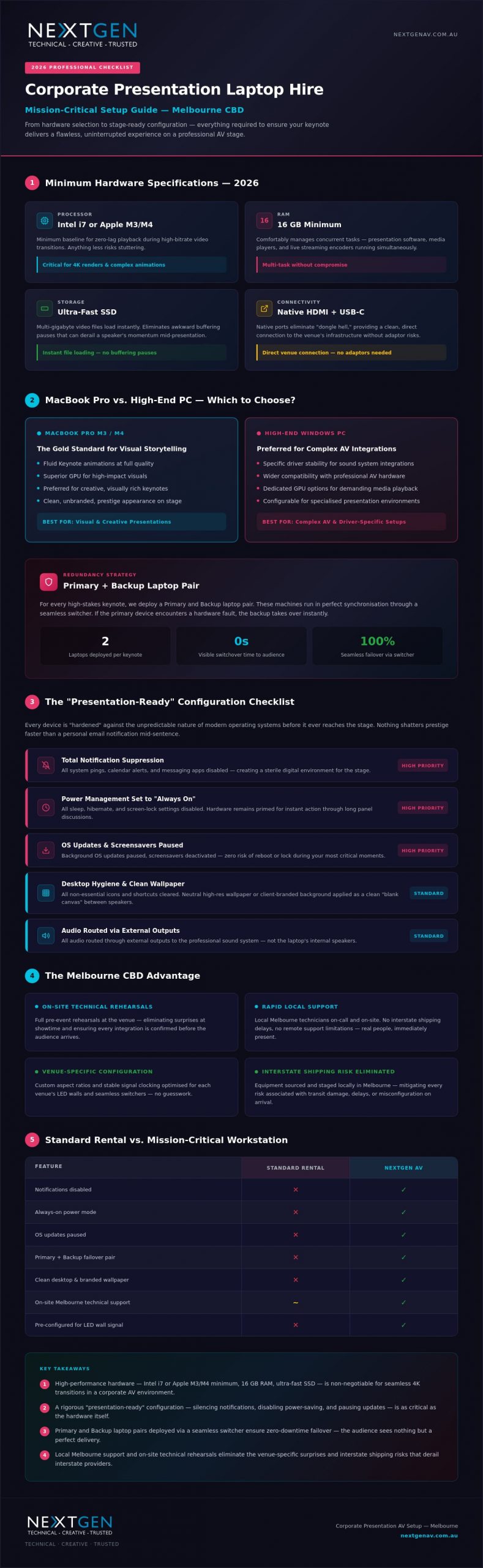
Power is non-negotiable. For 2026, we’ve set a strict baseline for our fleet to ensure zero-lag playback. Your processor must be an Intel i7 or Apple M3/M4 chip at minimum; anything less risks stuttering during high-bitrate video transitions. We pair this with at least 16GB of RAM to comfortably manage concurrent tasks, such as running the presentation software alongside media players and live streaming encoders. Finally, ultra-fast SSD storage is essential. It ensures that multi-gigabyte video files load instantly, removing those awkward “buffering” pauses that can derail a speaker’s momentum.
MacBook Pro vs. High-End PC
The choice of operating system often dictates the creative flow of the keynote. Apple’s MacBook Pro remains the gold standard for high-impact visual storytelling, particularly for speakers who rely on the fluid animations of Keynote. However, Windows PCs are frequently the preferred choice for complex professional sound system hire integrations where specific driver stability is paramount. Beyond the software, we consider the physical interface. We prioritise hardware with native HDMI and USB-C ports to eliminate “dongle hell,” providing a clean, direct connection to the venue’s infrastructure.
Aesthetics play a vital role in corporate prestige. We provide clean, unbranded, and meticulously maintained hardware that looks sophisticated on any stage. This professional appearance is backed by a rigorous redundancy strategy. For every high-stakes keynote, we deploy a “Primary and Backup” laptop pair. These machines run in perfect synchronisation through a seamless switcher. If the primary device encounters a rare hardware fault, the backup is ready to take over instantly. The audience sees nothing but a flawless transition. You take the credit for a perfect delivery; we provide the invisible expertise that makes it possible.
The “Presentation-Ready” Configuration Checklist
A powerful laptop is only half the equation for a successful corporate presentation av setup melbourne. To ensure your keynote survives the scrutiny of a live audience, the software environment must be “hardened” against the unpredictable nature of modern operating systems. Nothing shatters the prestige of a high-end LED video wall faster than a personal email notification or a system update prompt appearing mid-sentence. We follow a rigorous presentation-ready checklist to eliminate these technical interruptions before your device ever reaches the stage.
Our configuration process begins with total notification suppression. We disable all system pings, calendar alerts, and messaging apps to create a sterile digital environment. Power management is equally critical. We set every device to “Always On” mode, disabling all sleep, hibernate, and screen-lock settings. This ensures that even during a long panel discussion, your hardware remains primed for instant action. For a truly professional corporate presentation av setup melbourne, we also pause all background OS updates and deactivate screensavers, removing any risk of the system attempting to reboot or lock itself during your most critical moments.
Desktop hygiene provides the final touch for visual polish. We clear all non-essential icons and shortcuts, leaving a neutral, high-resolution wallpaper or a client-specific branded background. This provides a clean “blank canvas” during transitions, preventing the audience from seeing a cluttered workspace if the presentation software is minimised between speakers.
Audio and Visual Optimisation
We route all audio through external outputs by default, ensuring sound feeds directly to the venue’s professional mixer rather than the laptop’s internal speakers. Display scaling is meticulously adjusted so the output resolution perfectly matches the venue’s specific aspect ratio, whether it’s a standard 16:9 projection or a custom ultra-wide LED configuration. This prevents awkward black bars or stretched imagery that can detract from your visual impact. If you need assistance with these intricate settings, our team can optimise your technical workflow for any Melbourne venue.
Security and User Access
Rehearsals demand speed and agility. We remove password prompts and biometric locks to allow for instant resumes during fast-paced sound checks and technical run-throughs. For events with multiple guest speakers, we utilise clean guest account protocols to keep the OS environment fast and free of previous users’ cached files or temporary data. Once the event concludes, we perform a secure data wipe on all hire units. This ensures your corporate sensitive information is permanently and safely removed before the hardware returns to our Melbourne warehouse, providing you with total peace of mind.
Integration with Professional AV Infrastructure
The most powerful workstation is only as effective as the signal it sends to the rest of the room. In a high-stakes corporate presentation av setup melbourne, the laptop acts as the primary source for a complex visual ecosystem, requiring it to speak the same language as the venue’s professional infrastructure. We don’t treat our hire units as standalone computers. We treat them as mission-critical components that must integrate seamlessly with high-end hardware like the Barco Event Master or other professional seamless switchers. These systems require a stable, clocked signal to ensure that when the vision mixer cuts to your presentation, the transition is instantaneous and free of digital artifacts.
Modern events often move beyond the standard 16:9 aspect ratio. Whether you are driving a wide-format LED wall or a multi-screen configuration, your laptop must be capable of outputting custom resolutions that match the physical canvas of the stage. We manage these intricate settings during the pre-configuration phase, ensuring your content fills the screen perfectly without stretching or pixelation. To support the speaker’s movement, we also integrate remote presenter tools, such as long-range RF clickers and dedicated confidence monitors. These tools allow the presenter to maintain eye contact with the audience while receiving clear visual cues from the technical “brain” at the lectern.
Reliability extends to the digital realm, particularly for presentations involving live polling, Slido, or hybrid streaming elements. While Wi-Fi is convenient for the office, it is a liability in a room filled with hundreds of mobile devices. We insist on hardwired Ethernet connections for every corporate presentation av setup melbourne. This dedicated bandwidth ensures that interactive elements respond instantly, maintaining the momentum of the keynote without the frustration of connectivity lag.
The Visual Signal Chain
We utilise EDID emulators to maintain a constant “handshake” between the laptop and the display system. This prevents the dreaded resolution flicker that can occur when hot-swapping presenters or changing signal paths. Our fleet utilises HDMI 2.1 and DisplayPort connections to support 4K@60Hz performance, ensuring that high-motion video remains crisp and fluid. This visual precision is often synchronised with our stage and lighting hire Melbourne services, allowing for perfectly timed lighting changes that mirror the transitions on your slides.
Audio Signal Management
Clean audio is just as vital as a sharp image. We eliminate ground loop hum, a common issue with laptop power supplies, by using professional DI boxes between the device and the PA system. This ensures the audience hears only the intended media, not an underlying electrical buzz. We also manage embedded audio levels within your files to ensure consistent volume across different video clips. Our technicians liaise directly with the audio visual hire Melbourne team to verify that every signal path is clean, balanced, and ready for the first word of your keynote.
On-site Logistics and Melbourne Technical Support
Reliability in a high-stakes environment is not just about the hardware; it’s about proximity and professional presence. Relying on interstate shipping for your laptop hire introduces unnecessary risks, from transit delays to courier damage that might only be discovered minutes before a show. The “Melbourne CBD Advantage” means our team provides local delivery and professional setup, ensuring your hardware is on-site, tested, and ready long before your first guest arrives. This local presence is the cornerstone of a truly resilient corporate presentation av setup melbourne.
Venue Coordination
We understand the logistical intricacies of Melbourne’s premier event spaces. Whether you’re hosting at the Melbourne Convention and Exhibition Centre (MCEC) or a luxury CBD hotel, we manage the entire load-in process. We navigate security protocols and loading docks with the efficiency of seasoned veterans, allowing you to focus on your guests. Our team ensures meticulous cable management and dedicated power routing for a tidy, professional lectern that looks as sharp as your digital content.
Every high-profile keynote deserves a dedicated technical rehearsal. Your laptop hire should always include “bump-in” time for comprehensive content testing across the full visual signal chain. Transitioning from a simple “dry hire” to a managed service provides you with an on-site technician who acts as your technical safety net. If you need to ensure absolute reliability for your next event, you can book your technical support package to have an expert by your side throughout the entire programme.
The Technical Director’s Role
A Technical Director acts as the orchestrator of your event’s rhythm. They manage the “laptop op” to ensure every slide transition and high-resolution video is triggered with surgical precision. By handling last-minute content updates and USB transfers with calm authority, they ensure the full service event production feels effortless. This allows the client to take centre stage without a second thought, knowing the technical execution is in expert hands.
Even with the best preparation, hardware can be unpredictable in a live environment. Our local Melbourne warehouse provides the ultimate peace of mind: rapid replacement. With 30+ years of industry experience, we maintain a deep inventory of mission-ready workstations. If a rare hardware fault occurs, we don’t wait for a courier from another state; we deploy a replacement from our local stock immediately. This proactive stance and rapid response capability are what define a professional corporate presentation av setup melbourne.
Why NextGen AV is Your Presentation Technology Partner
Choosing a technology partner is about more than just securing a device; it’s about ensuring your vision is executed with absolute precision. With 30 years of industry experience, we understand the technical nuances of Melbourne’s major venues better than anyone else. We don’t just rent boxes; we deliver bespoke, mission-ready workstations that serve as the reliable heart of your corporate presentation av setup melbourne. Our team takes personal pride in seamless execution, allowing you to move past the logistical grind and focus on the prestige of your event.
Our “Invisible Expert” promise means that we handle the technical complexities behind the scenes so your presenters can own the stage with total confidence. We view the presentation laptop as the orchestrator of an integrated ecosystem. By connecting your hardware seamlessly with our high-end LED walls, professional audio, and precision lighting, we create a narrative flow that feels both structured and cinematic. This holistic approach transforms a simple slideshow into a high-stakes experience that resonates with your audience long after the final slide.
Beyond Hardware Hire
Our partnership extends far beyond the lectern. Clients gain access to our full inventory of professional event technology, including high-resolution LED video walls, professional audio systems, and custom staging. We provide end-to-end technical direction to polish your content and manage every visual cue with surgical accuracy. If your event needs to reach a wider audience, our hybrid event solutions enable you to stream your Melbourne presentation to a global stage with broadcast-quality stability. We provide the engine driving your success, ensuring every digital element aligns perfectly with your brand’s authority.
Secure Your Flawless Presentation
Every event has unique technical requirements, and our consultation process reflects that. We work closely with you to understand your specific hardware needs, from custom resolutions for wide-format screens to complex media playback demands. Whether you are planning a boardroom briefing or a large-scale conference, we provide a tailored strategy that guarantees a “plug-and-play” experience on the day. Our team is ready to help you navigate the technical landscape and deliver a result that is both aspirational and celebratory.
Ready to ensure your next keynote is delivered without a single technical hitch? Contact the NextGen AV team for a presentation laptop hire quote today.
Master Your Next Keynote Delivery
A flawless presentation is the culmination of meticulous preparation and elite technology. By prioritising high-performance hardware and implementing a rigorous configuration checklist, you transform the lectern from a potential point of failure into a position of absolute power. Integrating these mission-ready workstations into a professional corporate presentation av setup melbourne ensures that your visual and audio signals remain stable, crisp, and perfectly synchronised with the room’s energy.
With over 30 years of Melbourne event experience, NextGen AV provides the invisible expertise required to navigate the pressures of live production. We deliver high-performance hardware pre-configured specifically for the demands of the stage, backed by full-service technical direction and on-site support. You deserve to focus on your audience while we handle the technical orchestration behind the scenes. Take the stage with total confidence and let your narrative shine.
Secure Your Presentation Success – Get a Quote from NextGen AV
Frequently Asked Questions
Should I hire a PC or a Mac for my corporate presentation in Melbourne?
The choice depends on your specific software requirements and the visual style of your event. Apple MacBooks are the preferred choice for high-impact creative visuals using Keynote, while high-end PCs offer exceptional stability for complex driver integrations and specific PowerPoint versions. We maintain current stock of MacBook Pro M3 and M4 models to ensure your hardware matches the prestige of your presentation.
What is included in a professional presentation laptop hire package?
Our packages provide a mission-ready workstation equipped with high-speed processors and dedicated GPUs. Each hire includes a pre-configured operating system, essential high-bandwidth adapters, and a “hardened” software environment. We ensure every unit is ready for immediate integration into your corporate presentation av setup melbourne, removing the stress of technical troubleshooting on the day of your event.
Can you pre-load my presentation files and videos onto the rental laptops?
Absolutely. We encourage clients to provide their media files during the pre-configuration phase so our technicians can perform rigorous stress tests. This proactive approach ensures that 4K videos and complex animations play with zero lag. It also allows us to verify that all fonts and transitions render correctly before the hardware arrives at your Melbourne venue.
What happens if a laptop fails during my live event?
We eliminate the risk of failure through a robust redundancy strategy that includes synchronised primary and backup units. In the rare event of a hardware issue, our local Melbourne warehouse allows for rapid replacement within the CBD. Our on-site technicians are trained to handle these scenarios with absolute composure, ensuring your audience never sees a single technical glitch.
Do you provide on-site technical support for laptop hire in the Melbourne CBD?
Yes, we provide dedicated on-site technical support across the Melbourne CBD and surrounding event hubs. Our technicians don’t just deliver equipment; they manage the entire “laptop op” and signal chain. This hands-on guidance allows you to move past the logistical grind and focus entirely on delivering a powerful message to your audience without worrying about the tech.
How do I ensure my presentation laptop connects to the venue’s LED wall?
We manage the visual signal chain using EDID emulators and professional switchers to ensure a perfect handshake with any LED wall. Our team configures the laptop to output the specific custom resolutions required by wide-format or multi-screen setups. This technical precision is vital for a flawless corporate presentation av setup melbourne, preventing resolution flicker or stretched imagery during transitions.
Is it possible to rent a backup laptop for redundancy and peace of mind?
Redundancy is a standard feature of our high-stakes event packages. We always recommend a synchronised backup laptop to provide total peace of mind for keynote speakers. Both machines run the same content simultaneously through a seamless switcher, allowing for an instant transition if the primary source encounters any interruption during the live show. It’s the ultimate safety net for professional presenters.
How long before my event should I organise my laptop hire?
We recommend organising your hire at least two to four weeks before your event date. This timeframe provides our team with sufficient space for bespoke configuration, technical rehearsals, and coordination with venue logistics. For high-profile events at major hubs like the MCEC, early booking ensures we can lock in the latest MacBook Pro M3 or M4 stock for your specific dates.
Imagine standing at the lectern in a packed Melbourne ballroom, your opening line delivered with poise, only for your laptop to trigger a mandatory twenty-minute software update across the massive LED wall behind you. This nightmare scenario is exactly why professional planners recognise that a standard office device simply isn’t enough for a high-stakes environment. To achieve a truly flawless corporate presentation av setup melbourne, your hardware must function as a mission-critical workstation, meticulously prepared to handle the unique pressures of a live stage.
We understand the quiet anxiety that comes with technical logistics, from incompatible ports to the fear of stuttering high-resolution video. You deserve total confidence that your media will play perfectly the moment you press “next”. This guide provides our professional 2026 checklist for hiring and configuring presentation-ready laptops that deliver a sleek, plug-and-play experience. We’ll cover everything from the latest MacBook Pro M3 and M4 specifications to the essential “hardening” steps that ensure your technology remains the invisible engine behind your success.
Key Takeaways
- Identify the high-performance hardware requirements, including dedicated GPUs and the latest MacBook Pro models, necessary to drive seamless 4K transitions and complex media.
- Implement a rigorous “presentation-ready” configuration that silences system notifications and overrides power-saving modes to ensure an uninterrupted visual experience.
- Optimise your corporate presentation av setup melbourne by mastering custom aspect ratios and stable signal clocking for large-format LED walls and seamless switchers.
- Leverage the “Melbourne CBD Advantage” with on-site technical rehearsals and rapid local support to mitigate the risks associated with interstate shipping and venue quirks.
- Transform your lectern setup from a standard rental into a mission-critical workstation that acts as the reliable technical brain of your entire event production.
Choosing the Right Hardware: Presentation Laptop Hire Essentials
The laptop resting on your lectern is the central nervous system of your entire event. It’s the engine that drives your narrative, and in a high-stakes environment, a standard consumer device simply won’t suffice. A professional corporate presentation av setup melbourne requires hardware that can breathe through demanding 4K renders and complex animations without breaking a sweat. We treat every rental as a mission-critical workstation, ensuring that the hardware reflects the prestige of your brand while providing the technical “heavy lifting” required for modern presentation technology.
Minimum Specifications for 2026 Corporate Events
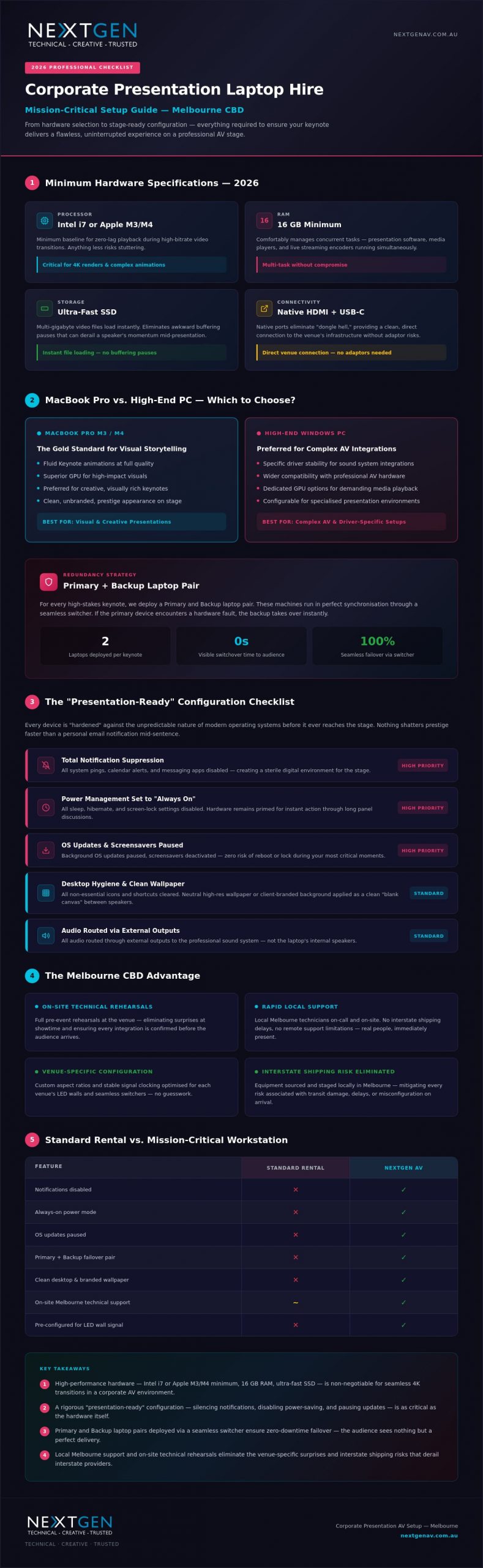
Power is non-negotiable. For 2026, we’ve set a strict baseline for our fleet to ensure zero-lag playback. Your processor must be an Intel i7 or Apple M3/M4 chip at minimum; anything less risks stuttering during high-bitrate video transitions. We pair this with at least 16GB of RAM to comfortably manage concurrent tasks, such as running the presentation software alongside media players and live streaming encoders. Finally, ultra-fast SSD storage is essential. It ensures that multi-gigabyte video files load instantly, removing those awkward “buffering” pauses that can derail a speaker’s momentum.
MacBook Pro vs. High-End PC
The choice of operating system often dictates the creative flow of the keynote. Apple’s MacBook Pro remains the gold standard for high-impact visual storytelling, particularly for speakers who rely on the fluid animations of Keynote. However, Windows PCs are frequently the preferred choice for complex professional sound system hire integrations where specific driver stability is paramount. Beyond the software, we consider the physical interface. We prioritise hardware with native HDMI and USB-C ports to eliminate “dongle hell,” providing a clean, direct connection to the venue’s infrastructure.
Aesthetics play a vital role in corporate prestige. We provide clean, unbranded, and meticulously maintained hardware that looks sophisticated on any stage. This professional appearance is backed by a rigorous redundancy strategy. For every high-stakes keynote, we deploy a “Primary and Backup” laptop pair. These machines run in perfect synchronisation through a seamless switcher. If the primary device encounters a rare hardware fault, the backup is ready to take over instantly. The audience sees nothing but a flawless transition. You take the credit for a perfect delivery; we provide the invisible expertise that makes it possible.
The “Presentation-Ready” Configuration Checklist
A powerful laptop is only half the equation for a successful corporate presentation av setup melbourne. To ensure your keynote survives the scrutiny of a live audience, the software environment must be “hardened” against the unpredictable nature of modern operating systems. Nothing shatters the prestige of a high-end LED video wall faster than a personal email notification or a system update prompt appearing mid-sentence. We follow a rigorous presentation-ready checklist to eliminate these technical interruptions before your device ever reaches the stage.
Our configuration process begins with total notification suppression. We disable all system pings, calendar alerts, and messaging apps to create a sterile digital environment. Power management is equally critical. We set every device to “Always On” mode, disabling all sleep, hibernate, and screen-lock settings. This ensures that even during a long panel discussion, your hardware remains primed for instant action. For a truly professional corporate presentation av setup melbourne, we also pause all background OS updates and deactivate screensavers, removing any risk of the system attempting to reboot or lock itself during your most critical moments.
Desktop hygiene provides the final touch for visual polish. We clear all non-essential icons and shortcuts, leaving a neutral, high-resolution wallpaper or a client-specific branded background. This provides a clean “blank canvas” during transitions, preventing the audience from seeing a cluttered workspace if the presentation software is minimised between speakers.
Audio and Visual Optimisation
We route all audio through external outputs by default, ensuring sound feeds directly to the venue’s professional mixer rather than the laptop’s internal speakers. Display scaling is meticulously adjusted so the output resolution perfectly matches the venue’s specific aspect ratio, whether it’s a standard 16:9 projection or a custom ultra-wide LED configuration. This prevents awkward black bars or stretched imagery that can detract from your visual impact. If you need assistance with these intricate settings, our team can optimise your technical workflow for any Melbourne venue.
Security and User Access
Rehearsals demand speed and agility. We remove password prompts and biometric locks to allow for instant resumes during fast-paced sound checks and technical run-throughs. For events with multiple guest speakers, we utilise clean guest account protocols to keep the OS environment fast and free of previous users’ cached files or temporary data. Once the event concludes, we perform a secure data wipe on all hire units. This ensures your corporate sensitive information is permanently and safely removed before the hardware returns to our Melbourne warehouse, providing you with total peace of mind.
Integration with Professional AV Infrastructure
The most powerful workstation is only as effective as the signal it sends to the rest of the room. In a high-stakes corporate presentation av setup melbourne, the laptop acts as the primary source for a complex visual ecosystem, requiring it to speak the same language as the venue’s professional infrastructure. We don’t treat our hire units as standalone computers. We treat them as mission-critical components that must integrate seamlessly with high-end hardware like the Barco Event Master or other professional seamless switchers. These systems require a stable, clocked signal to ensure that when the vision mixer cuts to your presentation, the transition is instantaneous and free of digital artifacts.
Modern events often move beyond the standard 16:9 aspect ratio. Whether you are driving a wide-format LED wall or a multi-screen configuration, your laptop must be capable of outputting custom resolutions that match the physical canvas of the stage. We manage these intricate settings during the pre-configuration phase, ensuring your content fills the screen perfectly without stretching or pixelation. To support the speaker’s movement, we also integrate remote presenter tools, such as long-range RF clickers and dedicated confidence monitors. These tools allow the presenter to maintain eye contact with the audience while receiving clear visual cues from the technical “brain” at the lectern.
Reliability extends to the digital realm, particularly for presentations involving live polling, Slido, or hybrid streaming elements. While Wi-Fi is convenient for the office, it is a liability in a room filled with hundreds of mobile devices. We insist on hardwired Ethernet connections for every corporate presentation av setup melbourne. This dedicated bandwidth ensures that interactive elements respond instantly, maintaining the momentum of the keynote without the frustration of connectivity lag.
The Visual Signal Chain
We utilise EDID emulators to maintain a constant “handshake” between the laptop and the display system. This prevents the dreaded resolution flicker that can occur when hot-swapping presenters or changing signal paths. Our fleet utilises HDMI 2.1 and DisplayPort connections to support 4K@60Hz performance, ensuring that high-motion video remains crisp and fluid. This visual precision is often synchronised with our stage and lighting hire Melbourne services, allowing for perfectly timed lighting changes that mirror the transitions on your slides.
Audio Signal Management
Clean audio is just as vital as a sharp image. We eliminate ground loop hum, a common issue with laptop power supplies, by using professional DI boxes between the device and the PA system. This ensures the audience hears only the intended media, not an underlying electrical buzz. We also manage embedded audio levels within your files to ensure consistent volume across different video clips. Our technicians liaise directly with the audio visual hire Melbourne team to verify that every signal path is clean, balanced, and ready for the first word of your keynote.
On-site Logistics and Melbourne Technical Support
Reliability in a high-stakes environment is not just about the hardware; it’s about proximity and professional presence. Relying on interstate shipping for your laptop hire introduces unnecessary risks, from transit delays to courier damage that might only be discovered minutes before a show. The “Melbourne CBD Advantage” means our team provides local delivery and professional setup, ensuring your hardware is on-site, tested, and ready long before your first guest arrives. This local presence is the cornerstone of a truly resilient corporate presentation av setup melbourne.
Venue Coordination
We understand the logistical intricacies of Melbourne’s premier event spaces. Whether you’re hosting at the Melbourne Convention and Exhibition Centre (MCEC) or a luxury CBD hotel, we manage the entire load-in process. We navigate security protocols and loading docks with the efficiency of seasoned veterans, allowing you to focus on your guests. Our team ensures meticulous cable management and dedicated power routing for a tidy, professional lectern that looks as sharp as your digital content.
Every high-profile keynote deserves a dedicated technical rehearsal. Your laptop hire should always include “bump-in” time for comprehensive content testing across the full visual signal chain. Transitioning from a simple “dry hire” to a managed service provides you with an on-site technician who acts as your technical safety net. If you need to ensure absolute reliability for your next event, you can book your technical support package to have an expert by your side throughout the entire programme.
The Technical Director’s Role
A Technical Director acts as the orchestrator of your event’s rhythm. They manage the “laptop op” to ensure every slide transition and high-resolution video is triggered with surgical precision. By handling last-minute content updates and USB transfers with calm authority, they ensure the full service event production feels effortless. This allows the client to take centre stage without a second thought, knowing the technical execution is in expert hands.
Even with the best preparation, hardware can be unpredictable in a live environment. Our local Melbourne warehouse provides the ultimate peace of mind: rapid replacement. With 30+ years of industry experience, we maintain a deep inventory of mission-ready workstations. If a rare hardware fault occurs, we don’t wait for a courier from another state; we deploy a replacement from our local stock immediately. This proactive stance and rapid response capability are what define a professional corporate presentation av setup melbourne.
Why NextGen AV is Your Presentation Technology Partner
Choosing a technology partner is about more than just securing a device; it’s about ensuring your vision is executed with absolute precision. With 30 years of industry experience, we understand the technical nuances of Melbourne’s major venues better than anyone else. We don’t just rent boxes; we deliver bespoke, mission-ready workstations that serve as the reliable heart of your corporate presentation av setup melbourne. Our team takes personal pride in seamless execution, allowing you to move past the logistical grind and focus on the prestige of your event.
Our “Invisible Expert” promise means that we handle the technical complexities behind the scenes so your presenters can own the stage with total confidence. We view the presentation laptop as the orchestrator of an integrated ecosystem. By connecting your hardware seamlessly with our high-end LED walls, professional audio, and precision lighting, we create a narrative flow that feels both structured and cinematic. This holistic approach transforms a simple slideshow into a high-stakes experience that resonates with your audience long after the final slide.
Beyond Hardware Hire
Our partnership extends far beyond the lectern. Clients gain access to our full inventory of professional event technology, including high-resolution LED video walls, professional audio systems, and custom staging. We provide end-to-end technical direction to polish your content and manage every visual cue with surgical accuracy. If your event needs to reach a wider audience, our hybrid event solutions enable you to stream your Melbourne presentation to a global stage with broadcast-quality stability. We provide the engine driving your success, ensuring every digital element aligns perfectly with your brand’s authority.
Secure Your Flawless Presentation
Every event has unique technical requirements, and our consultation process reflects that. We work closely with you to understand your specific hardware needs, from custom resolutions for wide-format screens to complex media playback demands. Whether you are planning a boardroom briefing or a large-scale conference, we provide a tailored strategy that guarantees a “plug-and-play” experience on the day. Our team is ready to help you navigate the technical landscape and deliver a result that is both aspirational and celebratory.
Ready to ensure your next keynote is delivered without a single technical hitch? Contact the NextGen AV team for a presentation laptop hire quote today.
Master Your Next Keynote Delivery
A flawless presentation is the culmination of meticulous preparation and elite technology. By prioritising high-performance hardware and implementing a rigorous configuration checklist, you transform the lectern from a potential point of failure into a position of absolute power. Integrating these mission-ready workstations into a professional corporate presentation av setup melbourne ensures that your visual and audio signals remain stable, crisp, and perfectly synchronised with the room’s energy.
With over 30 years of Melbourne event experience, NextGen AV provides the invisible expertise required to navigate the pressures of live production. We deliver high-performance hardware pre-configured specifically for the demands of the stage, backed by full-service technical direction and on-site support. You deserve to focus on your audience while we handle the technical orchestration behind the scenes. Take the stage with total confidence and let your narrative shine.
Secure Your Presentation Success – Get a Quote from NextGen AV
Frequently Asked Questions
Should I hire a PC or a Mac for my corporate presentation in Melbourne?
The choice depends on your specific software requirements and the visual style of your event. Apple MacBooks are the preferred choice for high-impact creative visuals using Keynote, while high-end PCs offer exceptional stability for complex driver integrations and specific PowerPoint versions. We maintain current stock of MacBook Pro M3 and M4 models to ensure your hardware matches the prestige of your presentation.
What is included in a professional presentation laptop hire package?
Our packages provide a mission-ready workstation equipped with high-speed processors and dedicated GPUs. Each hire includes a pre-configured operating system, essential high-bandwidth adapters, and a “hardened” software environment. We ensure every unit is ready for immediate integration into your corporate presentation av setup melbourne, removing the stress of technical troubleshooting on the day of your event.
Can you pre-load my presentation files and videos onto the rental laptops?
Absolutely. We encourage clients to provide their media files during the pre-configuration phase so our technicians can perform rigorous stress tests. This proactive approach ensures that 4K videos and complex animations play with zero lag. It also allows us to verify that all fonts and transitions render correctly before the hardware arrives at your Melbourne venue.
What happens if a laptop fails during my live event?
We eliminate the risk of failure through a robust redundancy strategy that includes synchronised primary and backup units. In the rare event of a hardware issue, our local Melbourne warehouse allows for rapid replacement within the CBD. Our on-site technicians are trained to handle these scenarios with absolute composure, ensuring your audience never sees a single technical glitch.
Do you provide on-site technical support for laptop hire in the Melbourne CBD?
Yes, we provide dedicated on-site technical support across the Melbourne CBD and surrounding event hubs. Our technicians don’t just deliver equipment; they manage the entire “laptop op” and signal chain. This hands-on guidance allows you to move past the logistical grind and focus entirely on delivering a powerful message to your audience without worrying about the tech.
How do I ensure my presentation laptop connects to the venue’s LED wall?
We manage the visual signal chain using EDID emulators and professional switchers to ensure a perfect handshake with any LED wall. Our team configures the laptop to output the specific custom resolutions required by wide-format or multi-screen setups. This technical precision is vital for a flawless corporate presentation av setup melbourne, preventing resolution flicker or stretched imagery during transitions.
Is it possible to rent a backup laptop for redundancy and peace of mind?
Redundancy is a standard feature of our high-stakes event packages. We always recommend a synchronised backup laptop to provide total peace of mind for keynote speakers. Both machines run the same content simultaneously through a seamless switcher, allowing for an instant transition if the primary source encounters any interruption during the live show. It’s the ultimate safety net for professional presenters.
How long before my event should I organise my laptop hire?
We recommend organising your hire at least two to four weeks before your event date. This timeframe provides our team with sufficient space for bespoke configuration, technical rehearsals, and coordination with venue logistics. For high-profile events at major hubs like the MCEC, early booking ensures we can lock in the latest MacBook Pro M3 or M4 stock for your specific dates.
Discover Valuable Insights
Unlock Expert Tips and Advice
Our blog is packed with valuable information to help you stay ahead. Whether you’re looking for expert advice, industry trends, or practical tips, you’ll find everything you need. Reach out today to learn more or get in touch with us for personalised support!