
A seamless event is planned before the first guest arrives. An event production run sheet template turns the plan into a chronological working document that shows what happens, when and where, who is responsible, and how to reach key contacts. It should cover the full production, from the first onsite arrival to the final supplier leaving.
A schedule alone is not enough: the production team also needs clear responsibilities, technical cues, setup notes and a plan for disruptions. With those details in one place, everyone can follow the same sequence and keep the event moving when timings shift.
This guide explains what to include, how to verify timings, bookings and contacts, and how to prepare for changes such as weather or late arrivals. You’ll also find a copy-and-paste template to adapt for a Melbourne event, from bump-in and technical checks through to guest departure and pack-down.
Key Takeaways
- Separate the broad event timeline from the detailed operational run sheet so each team member can see the tasks, cues and responsibilities they need.
- Give every action a named owner, then align timings, supplier bookings and contact details in one current version.
- Plan clear responses to likely disruptions, including where guests move if weather affects an outdoor event.
- Adapt the copy-and-paste template to your event, adding production cues and operational details that keep delivery coordinated from bump-in to pack-down.
What Is an Event Run Sheet?
A run sheet is the central operational document for an event, tracking tasks from the first onsite arrival to the final supplier leaving. Build it alongside the event timeline and production schedule so activities, responsibilities and technical cues stay connected.
-
Distinguish Run Sheets from Event Schedules
First, define what each document needs to manage. An event schedule gives attendees or stakeholders the broad program, while a timeline maps milestones across the planning period. A production schedule focuses on technical work, such as lighting setup and rehearsals. The run sheet brings operational details together: timings, locations, task owners, contacts and cues. Keep these documents distinct so each team has the level of detail it needs.
-
Arrange the Schedule Chronologically
Order each entry by time, beginning with the first person arriving onsite and ending with the last supplier leaving. Include venue access, supplier arrivals, bump-in, technical setup, rehearsals, registration, guest arrival, program activities and pack-down. For a smaller event, 15-minute blocks can make tasks easy to scan; a larger production may need 5-minute increments. Check that setup and pack-down appear, not just guest-facing moments.
- Shape the run sheet around the event format. A conference may need separate entries for speaker arrivals, session changes, stage cues, audience movement and meal service. Record each session’s start and finish, speaker, location and handover. For a webinar, list the host, presenters, content changes and live Q&A in order. A virtual conference also needs clear transitions between sessions, so everyone knows when to join and who is responsible.
- Use a chronological schedule as the run sheet’s framework, then add columns for location, task owner, contact and notes. For example, list venue access before supplier arrival, then technical setup before rehearsal and guest entry. Use one time format consistently and show dependencies: a speaker rehearsal should follow stage preparation. This sequence helps event teams spot clashes before they affect the live program.
Checking timings, contacts and supplier bookings
Use one working run sheet to align event details, bookings and responsibilities. Include columns for time, activity, location, owner, contact details, dependencies and notes, so each person can quickly find the information needed to act.
-
Check Timings and Event Details
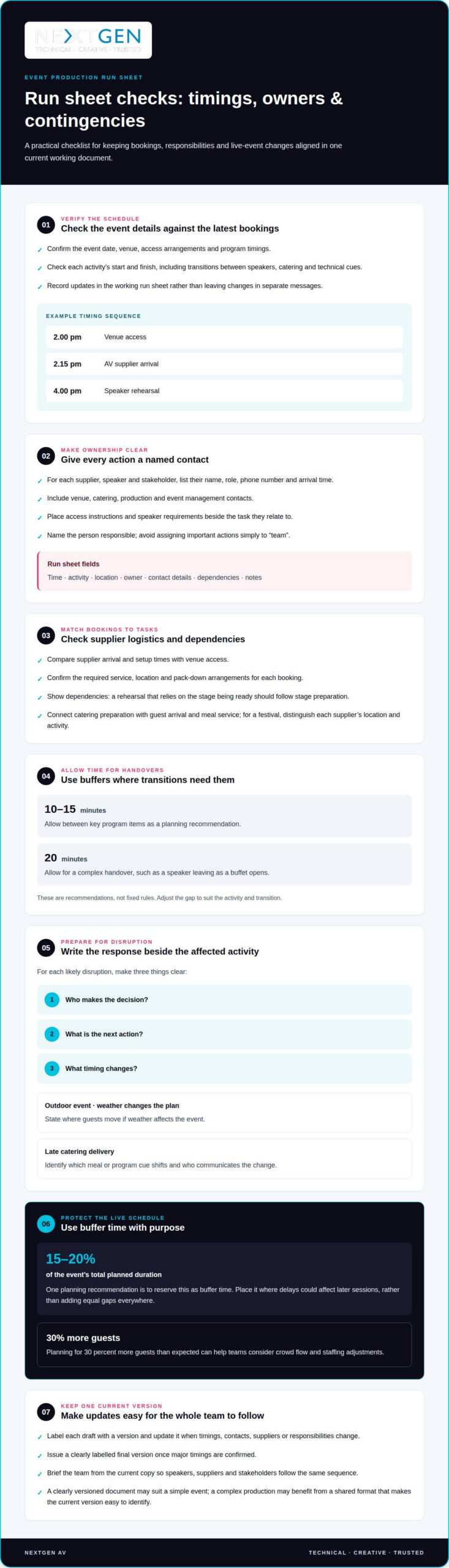
Confirm the event date, venue, access arrangements and program timings against the latest booking details. Then check each activity’s start and finish, including transitions between speakers, catering and technical cues. For example, a sample schedule places venue access at 2.00 pm, AV supplier arrival at 2.15 pm and speaker rehearsal at 4.00 pm. Record changes in the working copy, not separate messages.
-
Add Contacts and Notes
Name a contact for each supplier, speaker and stakeholder, and include their role, phone number and arrival time. Add venue, catering, production and event management contacts, then note access instructions or speaker requirements beside the relevant task. Avoid assigning important actions to “team”: name the person responsible so everyone knows who owns the next step.
- Match supplier bookings to the tasks they support. Check arrival and setup times against venue access, then confirm the required service, location and pack-down arrangements. If your schedule involves delegate shuttles or VIP transfers, liaising with passenger transport providers such as Euro Taxis ensures travel times align with program cues. For a dinner, connect catering preparation with guest arrival and meal service; for a festival, distinguish each supplier’s location and activity. Flag dependencies, such as a rehearsal that relies on the stage being ready.
- Build sensible gaps around critical handovers. Allow 10 to 15 minutes between key program items, and allow 20 minutes for a complex handover, such as a speaker leaving as a buffet opens. These are planning recommendations, not fixed rules; adjust them to the activity and transition involved.
- Label each draft with a version and update it whenever timings, contacts, suppliers or responsibilities change. Share the working run sheet during planning, then issue a clearly labelled final version once major timings are confirmed. Before the event, brief the team using that current copy, so speakers, suppliers and stakeholders follow the same sequence.
Contingency planning for event disruptions
Add each contingency beside the activity it could affect. A clear response names the decision-maker, the next action and the revised timing.
- Identify likely disruptions and their dependencies. For an outdoor activation, state where guests move if weather changes the plan. If catering arrives late, identify which meal or program cue shifts and who communicates the change. Planning for 30 percent more guests than expected can also help teams consider crowd flow and staffing adjustments.
- Set a practical buffer around critical activities. One planning recommendation is to reserve 15 to 20 percent of the event’s total planned duration as buffer time. Place that allowance where delays would affect later sessions, rather than adding equal gaps everywhere. A late delivery or extended speaker session can then be absorbed without silently pushing every activity back.
- Choose a format that makes updates easy to coordinate. A template provides a reusable structure for timings, owners and contingency notes; software can support shared updates across a team. For a simple event, a clearly versioned document may be enough. For a complex production with multiple stakeholders, use a shared format that makes the current version easy to identify.
- Build the run sheet in sequence: list activities, assign an owner, map dependencies, add a response for likely disruptions, then confirm the timing. For a virtual conference, include what to do if a speaker cannot join, such as moving to the next session while the host updates attendees. Each response should explain what happens next, not simply label an item “contingency”.
- Share the working run sheet with the people responsible for each task, then circulate a labelled final version when major details are settled. Update it when a supplier, timing or response changes, and brief the team using the same copy. For example, if rain moves a festival performance indoors, everyone needs the revised location and sequence.
Copy-and-paste event run sheet template
Use this event production run sheet template as a working example for a conference or corporate event. It links guest-facing moments with the technical and catering actions that keep transitions smooth.
- Copy these columns into your document: Time | Activity | Location | Owner | Contact | Cue or dependency | Notes. Keep one activity per row so the person scanning the sheet can quickly find their next action.
- Enter the event’s operational sequence, then replace example details with confirmed timings and names. A sample evening schedule could read: 5.15 pm | Registration ready | Foyer | Registration lead | Contact details | Desk prepared | Guest list available.
- Add the audience arrival and live program as separate rows. For example: 5.30 pm | Guest arrival | Foyer | Guest services | Contact details | Registration ready | Welcome guests. Then add: 6.25 pm | Five-minute warning | Stage | Show caller | Contact details | Speaker ready | Signal the start.
- Record the program start and transitions. For a corporate dinner, use: 6.30 pm | Event begins | Main room | MC | Contact details | Guests seated | Opening remarks. Add each speaker, meal service and entertainment as its own activity, with a named owner and location.
- Close the sample with: 8.45 pm | Final remarks | Main room | MC | Contact details | Previous item complete | Thank guests. Then add: 9.00 pm | Event concludes | Main room | Event lead | Contact details | Final cue complete | Guest departure. Schedule technical teardown at 21:00 only when it matches the confirmed event plan.
- Adapt the template to the event format. A conference needs session changes and speaker cues; a dinner needs catering handovers. Add bump-in and pack-down rows, then remove fields that do not help anyone act.
For an event with remote presenters or online attendees, plan virtual and hybrid event delivery around the same clear sequence of cues and owners.
NextGen AV: Virtual and Hybrid Event Solutions
NextGen AV helps bring a clear run sheet to life through Virtual and Hybrid Event Solutions. For a Melbourne conference with remote speakers, the schedule can align presenter handovers, content changes and audience-facing transitions with the onsite program.
LED Video Walls, Professional Audio Systems, and Lighting Design and Equipment can support the experience when they suit the event format. The run sheet connects these elements to the audience journey, with clear cues for screen content, sound and lighting changes. This coordination helps presenters and production teams follow the same sequence, whether guests are in the room or joining online.
For coordinated virtual or hybrid production, discuss your run sheet and event requirements with NextGen AV.
Shape the experience from the outset
Your run sheet can do more than organise the day. Treat it as the bridge between the experience you want guests to have and the production decisions that shape it. As plans develop, keep the creative intent alongside the live cues, so timing changes support the experience rather than disrupt it. An event production run sheet template gives the team a practical framework to refine as the event takes shape.
NextGen AV can help translate that intent into production with LED Video Walls, Professional Audio Systems and Lighting Design and Equipment. Consider each visual, sound and lighting transition in the context of the program, so it supports the event’s atmosphere and audience experience rather than feeling like a disconnected technical detail. This gives your planning conversation a clear creative and operational starting point.
Bring your plans and production priorities together. Contact NextGen AV about your event and take the next step towards an experience your guests can connect with.
Frequently Asked Questions
Can I create a new Run Sheet using AI?
Yes. AI can draft a run sheet from the event format, program and task list you provide. Treat the result as a starting document, not the live control copy: check names, venue details, dependencies and cue ownership against confirmed event information. For a Melbourne conference, a draft can organise session changes, but the production team still needs to validate each technical handover.
How Detailed Should a Time-Based Run Sheet Be?
Make each entry detailed enough for its assigned person to act without interpreting vague instructions. “Prepare stage” needs clarification: specify the task, location and completion point. Give more space to activities with several handovers, such as a panel moving into audience questions. Keep simple transitions concise so the document is quick to scan during a live event.
How often should a run sheet be updated?
Update the working copy whenever a change affects an action, owner or sequence. For example, if a presenter changes, revise their session entry and any linked introduction or presentation cue. Mark superseded copies clearly and circulate the current version to relevant team members. This helps prevent an outdated printout or saved file from directing someone to the wrong task.
What is an event production run sheet and what should it include?
An event production run sheet is the working document that coordinates an event’s operations. Include event and venue details, timings, locations, task owners, contact information, production cues, dependencies and relevant notes. A useful event production run sheet template also gives crew members a clear place to find their responsibilities, such as who releases presentation content or signals a speaker’s entrance.
Is there a free event production run sheet template Australia download?
This article includes a copy-and-paste template you can transfer into a spreadsheet or document and adapt for an Australian event. Add your event name, venue, local contact details and time format, then tailor the rows to your program. You can adapt the template to suit your event and preferred document format.
How detailed should event run sheet timings and cues be?
Write timings and cues to show the action, the trigger and the person responsible. For example, a cue might tell the vision operator to display a speaker’s presentation after the MC’s introduction. State what should happen if the trigger is delayed, too. Keep routine actions brief, but spell out cues that affect presenters, audience movement or transitions between program elements.
Discover Valuable Insights
Unlock Expert Tips and Advice
Our blog is packed with valuable information to help you stay ahead. Whether you’re looking for expert advice, industry trends, or practical tips, you’ll find everything you need. Reach out today to learn more or get in touch with us for personalised support!