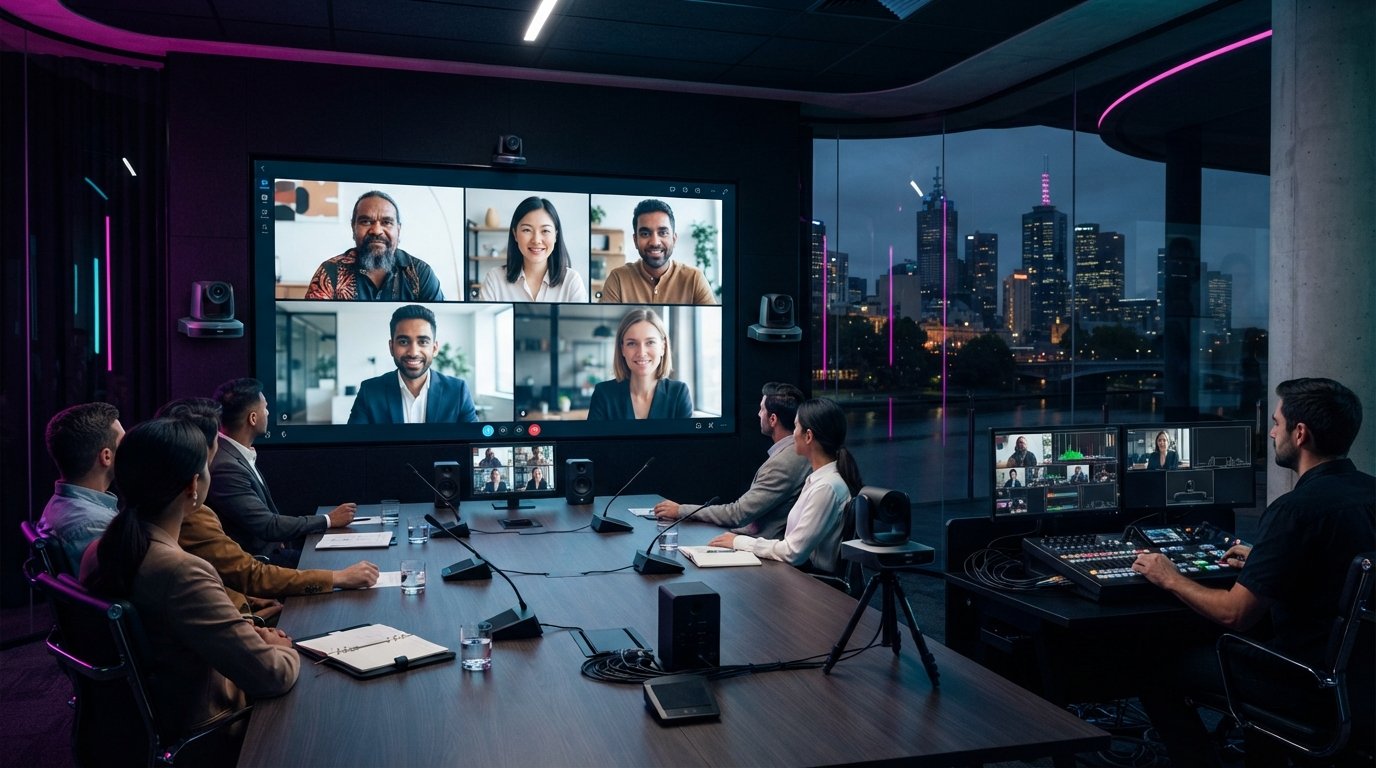
The best video conferencing setup for a Melbourne venue depends on the room, audience, meeting platform and how remote participants need to take part. With video conferencing equipment hire in Melbourne, the goal is to make technology serve the meeting, so everyone can focus on the discussion rather than the mechanics of joining. Start by defining what attendees need to see, hear and contribute.
It’s understandable to want technology that works smoothly without adding event-day complexity. A clear brief turns that goal into practical decisions. First, consider whether the session is a presentation, collaborative workshop or discussion with people joining from different locations. Each format calls for a different approach to participation and programme flow.
This guide explains how to assess your venue and select an AV setup, what to plan for when arranging delivery and installation, and how rental periods can fit different schedules. It also explores the distinctions between short-term and ongoing equipment needs, and the hire terms to understand. With those decisions mapped out, you can create a more connected experience and keep attention on the purpose of your event.
Key Takeaways
- Match the conferencing setup to your room, meeting platform and how remote attendees need to participate.
- Plan delivery, installation and collection around venue access and the event schedule to keep setup logistics on track.
- Compare buying, leasing and renting by considering how often you’ll use the equipment and how much technical support you need.
- Choose a rental period that fits the full schedule, including setup and pack-down, rather than only the meeting itself.
- For a high-impact event, consider how LED screens, professional audio, lighting and staging can work together to support the audience experience.
Need help with selecting the best Video Conferencing for your business?
Start with the meeting’s purpose, room layout and remote participants’ role. For a Melbourne event, look for an AV plan that suits your format and venue. Read feedback for specific examples of communication, setup and live support, then compare the services offered with your event priorities. A suitable provider’s experience should match your format, not simply have the highest rating.
Sketch the room before selecting cameras or displays. Mark the table, presenter position, screen sightlines and likely speaking positions. In a boardroom, a camera aimed only at the chair may leave people seated at the sides out of frame. For a workshop, plan how participants will face the camera when speaking so remote attendees can follow the collaboration.
Next, map the meeting platform and content workflow. Some systems combine video, audio and wireless content sharing in one appliance. List the laptops and presentation formats speakers will use. A reserved meeting room with a fixed table layout may need a different setup from a flexible training space used for group exercises.
Choose production accessories to meet specific needs. Match each item to a task before finalising the equipment schedule:
- Connection cables and adaptors: link presenter devices to the conferencing system and display.
- Microphone placement: capture questions from the audience as well as the main speaker.
- Audio connections: route remote voices into the room for clear discussion.
- Equipment supports: position cameras and screens without obstructing sightlines.
Decide whether an on-site AV operator should manage transitions. For a board presentation with several speakers, an operator can coordinate camera views, content changes and audio handovers. For an internal team meeting, staff may prefer a tested setup and clear operating instructions. Assign who starts the call, shares slides and manages questions.
IT equipment hire can help when presenters need temporary computers, displays or connection accessories. Record the meeting platform, devices and required connections, then assign responsibility for access and user support. For example, a guest presenter using a separate laptop needs a clear way to connect and share content.
Set out service responsibilities in the agreement. Specify setup tasks, support arrangements, troubleshooting contacts, collection timing and how schedule changes will be handled. This gives organisers and venue staff a shared reference. Before the event, walk through the run sheet with the technical team, including speaker changes and presentation handovers.
Equipment delivery, pickup and installation
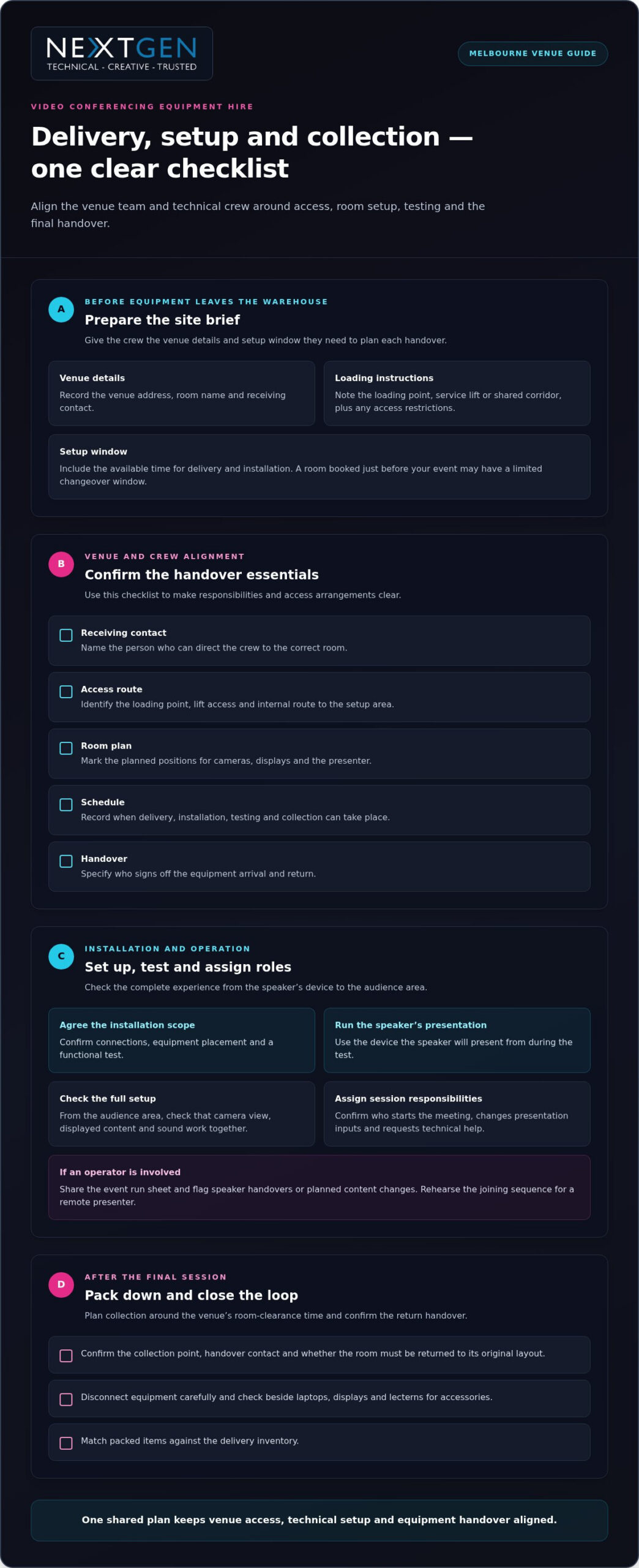
Coordinate delivery, installation, operation and collection with the venue’s access plan and event schedule. For a Melbourne booking, share the room location, receiving contact and setup window so each handover has a clear owner.
Before equipment leaves the warehouse, prepare a site brief with the venue address, loading instructions, room name and access arrangements. Note whether the crew will use a loading dock, service lift or shared corridor, and identify any access restrictions. For example, a meeting room booked immediately before your event may require installation to fit the venue’s changeover window.
Use this delivery checklist to align the venue team and technical crew:
- Receiving contact: name the person who can direct the crew to the right room.
- Access route: identify the loading point, lift access and any internal route to the setup area.
- Room plan: mark where cameras, displays and the presenter will sit.
- Schedule: record when delivery, installation, testing and collection can take place.
- Handover: specify who signs off the equipment arrival and return.
Plan installation around the room’s actual use, not just its floor plan. Mark camera positions and display sightlines, then check that cables can reach the planned equipment locations without crossing audience paths. For a Melbourne conference with presentations in a separate room, include both spaces in the site plan and clarify which setup will be tested first.
Equipment setup and operation
Agree on the installation scope, including connections, equipment placement and a functional test. Run the presentation from the device the speaker will use, then check that the camera view, displayed content and sound work together from the audience area. Identify who starts the meeting, changes presentation inputs and requests technical help during the session.
If an operator is involved, share the event run sheet and flag speaker handovers or planned content changes. For a session with a remote presenter, include the joining sequence in the rehearsal so the host knows when to admit them and direct the room’s attention to their contribution.
Pack-down and collection
Schedule pack-down around the final session and the venue’s room-clearance time. Confirm the collection point, handover contact and whether the room needs to be returned to its original layout. This is especially useful when another booking follows your event.
Before collection, disconnect equipment carefully and check for accessories left beside laptops, displays or lecterns. Match packed items against the delivery inventory and tell the venue contact when the space is clear. For an event across Australian locations, create a separate collection schedule for each venue and align it with the next delivery or transport leg.
Build these handovers into the same production plan as your event schedule. A coordinated event AV production plan can align equipment placement, sound and lighting with venue access and programme timings.
Buying, leasing and renting video conferencing equipment
Melbourne hire options can include cameras, microphones, displays, speakers, connection accessories and video conferencing systems. Select equipment to suit the room and presentation format, rather than assembling visual equipment without a clear purpose. A boardroom discussion, for example, needs different camera coverage from a presentation with one speaker and remote questions.
Buying suits organisations that use the same setup regularly and can manage storage, maintenance and configuration. When evaluating specific hardware and collaboration tools, consulting tech review resources like SuggestMeTech can help you compare specifications before purchasing. Map the room, meeting platform, user devices and content workflow, then test the proposed arrangement with a real presentation. A camera that works for one presenter may not frame a group discussion effectively.
Leasing can suit a business that needs equipment over an extended period but prefers scheduled payments rather than an outright purchase. Review the agreement for its term, included equipment, servicing responsibilities and end-of-agreement options. Clarify who handles repairs or replacements and whether the system can adapt if your room layout or conferencing platform changes.
Renting is often practical for a defined event, temporary room or occasional hybrid meeting. You can select equipment for that booking and return it after use. A product launch with remote presenters, for instance, may need a different combination from a recurring staff meeting. Confirm whether setup, operation and collection are included in the arrangement.
Compare the three approaches against your actual usage and internal capacity:
- Frequency: record how often the system will host meetings or presentations.
- Room changes: note whether equipment must move between spaces or venues.
- Technical ownership: decide who configures devices, manages updates and supports users.
- Event requirements: identify whether cameras, microphones or displays are needed only for a specific session.
- Future flexibility: consider how a platform change or new room arrangement could affect the setup.
Write down the required inputs before requesting a proposal. Include laptop connections, display needs, microphone positions and any remote-speaker workflow. This turns a broad request for conferencing equipment into a defined system and makes it easier to compare what each arrangement includes.
For a short-term event, prioritise equipment that supports the session without leaving your team with ongoing storage or servicing tasks. For a permanent meeting space, assess the full lifecycle, including installation, configuration, maintenance and staff handover. If your workplace requires permanent conferencing and voice systems, partnering with a provider like Nexgen Australia can ensure your ongoing office infrastructure remains reliable. The right choice depends on how the equipment will be used, not simply the type of device.
Before signing a lease or confirming a rental, review the equipment schedule and support terms together. Check that the listed components match the room plan and presentation workflow, and clarify responsibilities for setup, troubleshooting and return. That detail keeps the technology aligned with the meeting instead of becoming a distraction.
Daily, weekly and monthly rental options
Choose a rental period that covers the event, preparation and equipment return, not just the session. Book once your date, venue access and technical requirements are clear, and allow time to coordinate more complex schedules. Hire terms should set out the rental dates, deposit amount and due date, cancellation conditions, and the process for changing the booking.
Rental periods
A daily rental can suit a single meeting or presentation, while a weekly period may fit a multi-day conference or exhibition. Monthly hire can serve a temporary meeting space or extended project. Compare the complete schedule, including delivery, installation, rehearsals and collection, so the audio visual equipment is available for every required session.
Build the hire period around actual use. A conference with a rehearsal before opening and a late final session may need equipment beyond the public programme. A temporary Melbourne office, by contrast, may need a longer arrangement while its meeting room is in use. Write down the start and end dates, including access windows, before choosing a term.
- Daily: define the event day and required setup or pack-down access.
- Weekly: align hire dates with the complete conference or project schedule.
- Monthly: identify the review date and planned end of the temporary requirement.
For events using multiple Melbourne venues, plan each location separately. A conference moving from a CBD venue to a suburban meeting space needs a clear schedule showing where equipment is required and when. This helps the delivery and collection plan follow the event, avoiding gaps between bookings.
Hire terms and cancellations
Review the agreement for the rental period, deposit amount, payment timing and cancellation terms. It should explain how cancellations are handled, whether the deposit is refundable, and how changes to dates or equipment affect the booking. These details are set by the agreement, so check that the written terms match your event schedule.
Check the clauses against practical changes. If a venue moves the access window, understand how that affects delivery and setup. If a speaker cancels or the programme changes, confirm how to amend the booking. Record the cancellation deadline, required notice method and any applicable deposit terms in your event plan.
Before accepting, compare the agreement with the equipment schedule and delivery plan. Confirm who is responsible for installation, support, collection and any request to extend the hire. A clear written record gives your event team one reference if dates or venue arrangements change.
Which Melbourne companies hire video conferencing equipment?
For video conferencing equipment hire in Melbourne, consider event AV production teams and hybrid-event specialists as well as equipment hire. Look for a service that suits your venue and meeting format. An equipment-only booking may not include room setup, audio checks or live session operation.
For a corporate meeting, prioritise a team that can coordinate cameras, displays and audio with your presentation schedule. For a conference with remote speakers, consider how the production plan will manage speaker changes, screen content and audience questions. These requirements distinguish a basic equipment booking from event-focused technical support.
Reviews can reveal how a company communicates and manages event delivery, but ratings alone don’t show whether its service suits your needs. Read recent comments for specific examples involving setup, technical support and schedule changes. Compare feedback about similar events, such as a board meeting or conference, rather than relying only on general praise.
Coverage matters, too. A Melbourne CBD venue may have different loading access and room arrangements from a suburban conference space. Share the venue location, access details and event schedule when comparing services. For events in multiple Australian cities, assess whether the same team can coordinate the technical plan across each location.
Use these criteria to build a practical shortlist:
- Relevant event experience: look for examples involving meetings, conferences or hybrid presentations.
- Technical scope: identify whether the team handles installation, testing and live operation.
- Venue coordination: assess how delivery, access and collection fit your venue’s schedule.
- Support terms: compare the written responsibilities for setup, troubleshooting and changes.
- Review detail: focus on specific service experiences, not just an overall rating.
Before choosing a company, send each shortlisted team the same event brief. Include the venue, room layout, conferencing platform, speaker plan and required support. Then compare the proposed equipment and responsibilities side by side. This makes gaps visible before the booking is finalised and keeps the decision focused on audience experience.
For a session that also needs event production, consider how conferencing technology will work alongside the wider room presentation. A coordinated AV plan can align screens, sound and lighting with the running order, helping speakers stay focused and remote attendees follow the programme.
Discuss your event AV requirements to shape a technical plan around your Melbourne venue and audience.
Prioritise providers with recent, specific feedback about setup, technical support and schedule changes, then check that their service area covers your venue and any other event locations. A strong match is an event AV, conference production or hybrid-event team with experience and support suited to your meeting format.
Compare Melbourne event AV hire providers, conference production teams and hybrid-event specialists. Choose based on whether you need equipment alone or a team to manage setup, testing and live operation.
NextGen AV: LED Video Walls
NextGen AV can include LED Video Walls in your event plan when presentations need a clear, high-impact visual focus. For a conference or product launch, screen placement and content should support audience sightlines and complement the event’s technical design.
Professional Audio Systems can carry speaker voices and remote contributions clearly, while Lighting Design and Equipment shapes the room around the programme. Staging and Rigging can support the physical event environment. These elements work best when planned together, rather than treated as separate equipment decisions.
If your Melbourne event needs coordinated visual and technical production beyond a meeting-room setup, NextGen AV can help plan the right approach. Contact NextGen AV to discuss your event requirements.
Shape your next event with confidence
Your next step is to turn the meeting brief into a technical plan that reflects the room, speakers and experience you want attendees to have. For video conferencing equipment hire in Melbourne, consider how the in-room and remote audiences will share the same presentation, not just which devices will be there.
NextGen AV can bring LED Video Walls, Professional Audio Systems and Lighting Design and Equipment together for a cohesive event environment. This suits conferences and business events where clear communication and visual impact need to work in concert.
Share your venue, event format and priorities to start a focused conversation about the setup. Contact NextGen AV to discuss your setup, and move towards an event where the technology supports your message and lets your speakers take centre stage.
Frequently Asked Questions
Do you offer advice on the best AV setup for my venue?
Yes. NextGen AV provides practical recommendations based on your event details, venue and audience. A panel discussion with remote panellists, for example, has different production needs from a single-speaker presentation with shared slides. Share the event format and intended audience experience so the technical plan accounts for both speakers in the room and participants joining remotely.
Are delivery, setup and technical support included in Melbourne equipment hire?
AV Hire & Event Production includes setup, operation and support. Delivery arrangements depend on the event plan, so include the delivery location and venue access in the agreed scope. For a Melbourne conference, clarify who will oversee installation and operation, and whether support covers the live session. A written scope helps organisers and venue staff understand their responsibilities.
What hire options are available for one-off events versus ongoing use?
Hire can be planned for a one-off event or a defined period of ongoing use. A product launch may need a tailored event setup, while a temporary project space may require equipment for longer. Compare the intended use, support needs and frequency of use. For recurring events, consider whether a consistent production plan can support each booking.
Which video conferencing equipment suits different room sizes and attendee numbers?
Room layout and meeting format matter as much as attendance. A boardroom discussion benefits from camera framing and audio coverage that include people around the table; a presentation space needs clear views of the speaker and shared content. For a hybrid workshop, plan how questions from people in the room will reach remote participants. These details guide equipment selection more effectively than headcount alone.
What should I check before hiring video conferencing equipment?
Confirm that the conferencing platform and presenters’ devices will work with the proposed setup. NextGen AV lists support for Events Air, Cvent, YouTube Studio, Zoom, Microsoft Teams, Bettercast. Also prepare the running order, assign presentation control and confirm venue access arrangements. Sharing these details early helps align the technical plan with the event’s actual workflow.
Which Melbourne hire providers have the best reviews and service coverage?
The right fit depends on your event priorities. Compare feedback about communication, setup and live support, then confirm the service covers your Melbourne venue and required event needs.
The best video conferencing setup for a Melbourne venue depends on the room, audience, meeting platform and how remote participants need to take part. With video conferencing equipment hire in Melbourne, the goal is to make technology serve the meeting, so everyone can focus on the discussion rather than the mechanics of joining. Start by defining what attendees need to see, hear and contribute.
It’s understandable to want technology that works smoothly without adding event-day complexity. A clear brief turns that goal into practical decisions. First, consider whether the session is a presentation, collaborative workshop or discussion with people joining from different locations. Each format calls for a different approach to participation and programme flow.
This guide explains how to assess your venue and select an AV setup, what to plan for when arranging delivery and installation, and how rental periods can fit different schedules. It also explores the distinctions between short-term and ongoing equipment needs, and the hire terms to understand. With those decisions mapped out, you can create a more connected experience and keep attention on the purpose of your event.
Key Takeaways
- Match the conferencing setup to your room, meeting platform and how remote attendees need to participate.
- Plan delivery, installation and collection around venue access and the event schedule to keep setup logistics on track.
- Compare buying, leasing and renting by considering how often you’ll use the equipment and how much technical support you need.
- Choose a rental period that fits the full schedule, including setup and pack-down, rather than only the meeting itself.
- For a high-impact event, consider how LED screens, professional audio, lighting and staging can work together to support the audience experience.
Need help with selecting the best Video Conferencing for your business?
Start with the meeting’s purpose, room layout and remote participants’ role. For a Melbourne event, look for an AV plan that suits your format and venue. Read feedback for specific examples of communication, setup and live support, then compare the services offered with your event priorities. A suitable provider’s experience should match your format, not simply have the highest rating.
Sketch the room before selecting cameras or displays. Mark the table, presenter position, screen sightlines and likely speaking positions. In a boardroom, a camera aimed only at the chair may leave people seated at the sides out of frame. For a workshop, plan how participants will face the camera when speaking so remote attendees can follow the collaboration.
Next, map the meeting platform and content workflow. Some systems combine video, audio and wireless content sharing in one appliance. List the laptops and presentation formats speakers will use. A reserved meeting room with a fixed table layout may need a different setup from a flexible training space used for group exercises.
Choose production accessories to meet specific needs. Match each item to a task before finalising the equipment schedule:
- Connection cables and adaptors: link presenter devices to the conferencing system and display.
- Microphone placement: capture questions from the audience as well as the main speaker.
- Audio connections: route remote voices into the room for clear discussion.
- Equipment supports: position cameras and screens without obstructing sightlines.
Decide whether an on-site AV operator should manage transitions. For a board presentation with several speakers, an operator can coordinate camera views, content changes and audio handovers. For an internal team meeting, staff may prefer a tested setup and clear operating instructions. Assign who starts the call, shares slides and manages questions.
IT equipment hire can help when presenters need temporary computers, displays or connection accessories. Record the meeting platform, devices and required connections, then assign responsibility for access and user support. For example, a guest presenter using a separate laptop needs a clear way to connect and share content.
Set out service responsibilities in the agreement. Specify setup tasks, support arrangements, troubleshooting contacts, collection timing and how schedule changes will be handled. This gives organisers and venue staff a shared reference. Before the event, walk through the run sheet with the technical team, including speaker changes and presentation handovers.
Equipment delivery, pickup and installation
Coordinate delivery, installation, operation and collection with the venue’s access plan and event schedule. For a Melbourne booking, share the room location, receiving contact and setup window so each handover has a clear owner.
Before equipment leaves the warehouse, prepare a site brief with the venue address, loading instructions, room name and access arrangements. Note whether the crew will use a loading dock, service lift or shared corridor, and identify any access restrictions. For example, a meeting room booked immediately before your event may require installation to fit the venue’s changeover window.
Use this delivery checklist to align the venue team and technical crew:
- Receiving contact: name the person who can direct the crew to the right room.
- Access route: identify the loading point, lift access and any internal route to the setup area.
- Room plan: mark where cameras, displays and the presenter will sit.
- Schedule: record when delivery, installation, testing and collection can take place.
- Handover: specify who signs off the equipment arrival and return.
Plan installation around the room’s actual use, not just its floor plan. Mark camera positions and display sightlines, then check that cables can reach the planned equipment locations without crossing audience paths. For a Melbourne conference with presentations in a separate room, include both spaces in the site plan and clarify which setup will be tested first.
Equipment setup and operation
Agree on the installation scope, including connections, equipment placement and a functional test. Run the presentation from the device the speaker will use, then check that the camera view, displayed content and sound work together from the audience area. Identify who starts the meeting, changes presentation inputs and requests technical help during the session.
If an operator is involved, share the event run sheet and flag speaker handovers or planned content changes. For a session with a remote presenter, include the joining sequence in the rehearsal so the host knows when to admit them and direct the room’s attention to their contribution.
Pack-down and collection
Schedule pack-down around the final session and the venue’s room-clearance time. Confirm the collection point, handover contact and whether the room needs to be returned to its original layout. This is especially useful when another booking follows your event.
Before collection, disconnect equipment carefully and check for accessories left beside laptops, displays or lecterns. Match packed items against the delivery inventory and tell the venue contact when the space is clear. For an event across Australian locations, create a separate collection schedule for each venue and align it with the next delivery or transport leg.
Build these handovers into the same production plan as your event schedule. A coordinated event AV production plan can align equipment placement, sound and lighting with venue access and programme timings.
Buying, leasing and renting video conferencing equipment
Melbourne hire options can include cameras, microphones, displays, speakers, connection accessories and video conferencing systems. Select equipment to suit the room and presentation format, rather than assembling visual equipment without a clear purpose. A boardroom discussion, for example, needs different camera coverage from a presentation with one speaker and remote questions.
Buying suits organisations that use the same setup regularly and can manage storage, maintenance and configuration. Before purchasing, map the room, meeting platform, user devices and content workflow. Then test the proposed arrangement with a real presentation. A camera that works for one presenter may not frame a group discussion effectively.
Leasing can suit a business that needs equipment over an extended period but prefers scheduled payments rather than an outright purchase. Review the agreement for its term, included equipment, servicing responsibilities and end-of-agreement options. Clarify who handles repairs or replacements and whether the system can adapt if your room layout or conferencing platform changes.
Renting is often practical for a defined event, temporary room or occasional hybrid meeting. You can select equipment for that booking and return it after use. A product launch with remote presenters, for instance, may need a different combination from a recurring staff meeting. Confirm whether setup, operation and collection are included in the arrangement.
Compare the three approaches against your actual usage and internal capacity:
- Frequency: record how often the system will host meetings or presentations.
- Room changes: note whether equipment must move between spaces or venues.
- Technical ownership: decide who configures devices, manages updates and supports users.
- Event requirements: identify whether cameras, microphones or displays are needed only for a specific session.
- Future flexibility: consider how a platform change or new room arrangement could affect the setup.
Write down the required inputs before requesting a proposal. Include laptop connections, display needs, microphone positions and any remote-speaker workflow. This turns a broad request for conferencing equipment into a defined system and makes it easier to compare what each arrangement includes.
For a short-term event, prioritise equipment that supports the session without leaving your team with ongoing storage or servicing tasks. For a permanent meeting space, assess the full lifecycle, including installation, configuration, maintenance and staff handover. The right choice depends on how the equipment will be used, not simply the type of device.
Before signing a lease or confirming a rental, review the equipment schedule and support terms together. Check that the listed components match the room plan and presentation workflow, and clarify responsibilities for setup, troubleshooting and return. That detail keeps the technology aligned with the meeting instead of becoming a distraction.
Daily, weekly and monthly rental options
Choose a rental period that covers the event, preparation and equipment return, not just the session. Book once your date, venue access and technical requirements are clear, and allow time to coordinate more complex schedules. Hire terms should set out the rental dates, deposit amount and due date, cancellation conditions, and the process for changing the booking.
Rental periods
A daily rental can suit a single meeting or presentation, while a weekly period may fit a multi-day conference or exhibition. Monthly hire can serve a temporary meeting space or extended project. Compare the complete schedule, including delivery, installation, rehearsals and collection, so the audio visual equipment is available for every required session.
Build the hire period around actual use. A conference with a rehearsal before opening and a late final session may need equipment beyond the public programme. A temporary Melbourne office, by contrast, may need a longer arrangement while its meeting room is in use. Write down the start and end dates, including access windows, before choosing a term.
- Daily: define the event day and required setup or pack-down access.
- Weekly: align hire dates with the complete conference or project schedule.
- Monthly: identify the review date and planned end of the temporary requirement.
For events using multiple Melbourne venues, plan each location separately. A conference moving from a CBD venue to a suburban meeting space needs a clear schedule showing where equipment is required and when. This helps the delivery and collection plan follow the event, avoiding gaps between bookings.
Hire terms and cancellations
Review the agreement for the rental period, deposit amount, payment timing and cancellation terms. It should explain how cancellations are handled, whether the deposit is refundable, and how changes to dates or equipment affect the booking. These details are set by the agreement, so check that the written terms match your event schedule.
Check the clauses against practical changes. If a venue moves the access window, understand how that affects delivery and setup. If a speaker cancels or the programme changes, confirm how to amend the booking. Record the cancellation deadline, required notice method and any applicable deposit terms in your event plan.
Before accepting, compare the agreement with the equipment schedule and delivery plan. Confirm who is responsible for installation, support, collection and any request to extend the hire. A clear written record gives your event team one reference if dates or venue arrangements change.
Which Melbourne companies hire video conferencing equipment?
For video conferencing equipment hire in Melbourne, consider event AV production teams and hybrid-event specialists as well as equipment hire. Look for a service that suits your venue and meeting format. An equipment-only booking may not include room setup, audio checks or live session operation.
For a corporate meeting, prioritise a team that can coordinate cameras, displays and audio with your presentation schedule. For a conference with remote speakers, consider how the production plan will manage speaker changes, screen content and audience questions. These requirements distinguish a basic equipment booking from event-focused technical support.
Reviews can reveal how a company communicates and manages event delivery, but ratings alone don’t show whether its service suits your needs. Read recent comments for specific examples involving setup, technical support and schedule changes. Compare feedback about similar events, such as a board meeting or conference, rather than relying only on general praise.
Coverage matters, too. A Melbourne CBD venue may have different loading access and room arrangements from a suburban conference space. Share the venue location, access details and event schedule when comparing services. For events in multiple Australian cities, assess whether the same team can coordinate the technical plan across each location.
Use these criteria to build a practical shortlist:
- Relevant event experience: look for examples involving meetings, conferences or hybrid presentations.
- Technical scope: identify whether the team handles installation, testing and live operation.
- Venue coordination: assess how delivery, access and collection fit your venue’s schedule.
- Support terms: compare the written responsibilities for setup, troubleshooting and changes.
- Review detail: focus on specific service experiences, not just an overall rating.
Before choosing a company, send each shortlisted team the same event brief. Include the venue, room layout, conferencing platform, speaker plan and required support. Then compare the proposed equipment and responsibilities side by side. This makes gaps visible before the booking is finalised and keeps the decision focused on audience experience.
For a session that also needs event production, consider how conferencing technology will work alongside the wider room presentation. A coordinated AV plan can align screens, sound and lighting with the running order, helping speakers stay focused and remote attendees follow the programme.
Discuss your event AV requirements to shape a technical plan around your Melbourne venue and audience.
Prioritise providers with recent, specific feedback about setup, technical support and schedule changes, then check that their service area covers your venue and any other event locations. A strong match is an event AV, conference production or hybrid-event team with experience and support suited to your meeting format.
Compare Melbourne event AV hire providers, conference production teams and hybrid-event specialists. Choose based on whether you need equipment alone or a team to manage setup, testing and live operation.
NextGen AV: LED Video Walls
NextGen AV can include LED Video Walls in your event plan when presentations need a clear, high-impact visual focus. For a conference or product launch, screen placement and content should support audience sightlines and complement the event’s technical design.
Professional Audio Systems can carry speaker voices and remote contributions clearly, while Lighting Design and Equipment shapes the room around the programme. Staging and Rigging can support the physical event environment. These elements work best when planned together, rather than treated as separate equipment decisions.
If your Melbourne event needs coordinated visual and technical production beyond a meeting-room setup, NextGen AV can help plan the right approach. Contact NextGen AV to discuss your event requirements.
Shape your next event with confidence
Your next step is to turn the meeting brief into a technical plan that reflects the room, speakers and experience you want attendees to have. For video conferencing equipment hire in Melbourne, consider how the in-room and remote audiences will share the same presentation, not just which devices will be there.
NextGen AV can bring LED Video Walls, Professional Audio Systems and Lighting Design and Equipment together for a cohesive event environment. This suits conferences and business events where clear communication and visual impact need to work in concert.
Share your venue, event format and priorities to start a focused conversation about the setup. Contact NextGen AV to discuss your setup, and move towards an event where the technology supports your message and lets your speakers take centre stage.
Frequently Asked Questions
Do you offer advice on the best AV setup for my venue?
Yes. NextGen AV provides practical recommendations based on your event details, venue and audience. A panel discussion with remote panellists, for example, has different production needs from a single-speaker presentation with shared slides. Share the event format and intended audience experience so the technical plan accounts for both speakers in the room and participants joining remotely.
Are delivery, setup and technical support included in Melbourne equipment hire?
AV Hire & Event Production includes setup, operation and support. Delivery arrangements depend on the event plan, so include the delivery location and venue access in the agreed scope. For a Melbourne conference, clarify who will oversee installation and operation, and whether support covers the live session. A written scope helps organisers and venue staff understand their responsibilities.
What hire options are available for one-off events versus ongoing use?
Hire can be planned for a one-off event or a defined period of ongoing use. A product launch may need a tailored event setup, while a temporary project space may require equipment for longer. Compare the intended use, support needs and frequency of use. For recurring events, consider whether a consistent production plan can support each booking.
Which video conferencing equipment suits different room sizes and attendee numbers?
Room layout and meeting format matter as much as attendance. A boardroom discussion benefits from camera framing and audio coverage that include people around the table; a presentation space needs clear views of the speaker and shared content. For a hybrid workshop, plan how questions from people in the room will reach remote participants. These details guide equipment selection more effectively than headcount alone.
What should I check before hiring video conferencing equipment?
Confirm that the conferencing platform and presenters’ devices will work with the proposed setup. NextGen AV lists support for Events Air, Cvent, YouTube Studio, Zoom, Microsoft Teams, Bettercast. Also prepare the running order, assign presentation control and confirm venue access arrangements. Sharing these details early helps align the technical plan with the event’s actual workflow.
Which Melbourne hire providers have the best reviews and service coverage?
The right fit depends on your event priorities. Compare feedback about communication, setup and live support, then confirm the service covers your Melbourne venue and required event needs.
Discover Valuable Insights
Unlock Expert Tips and Advice
Our blog is packed with valuable information to help you stay ahead. Whether you’re looking for expert advice, industry trends, or practical tips, you’ll find everything you need. Reach out today to learn more or get in touch with us for personalised support!