
Tech Conference AV Production in Melbourne: Costs and Support

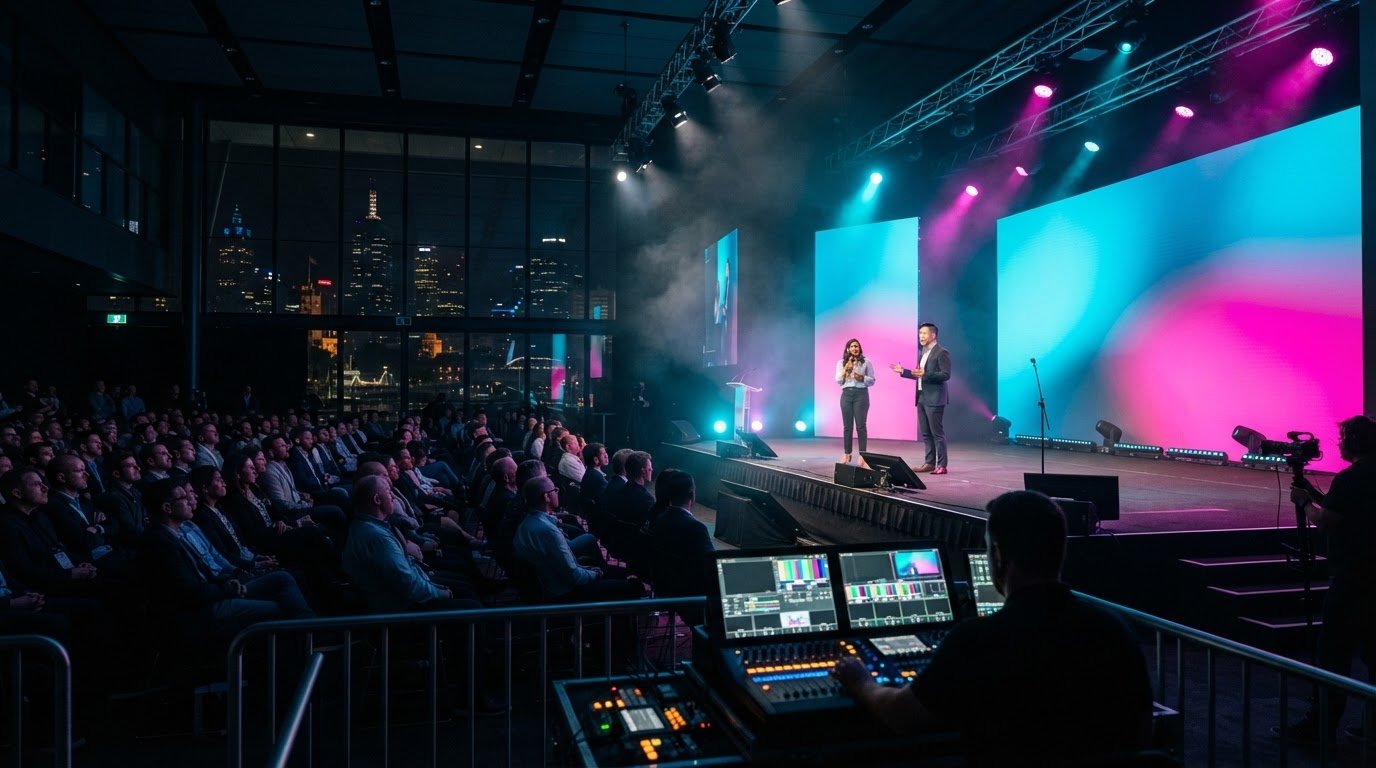
A conference succeeds through more than equipment alone. Tech conference AV production in Melbourne brings together pre-event planning, technical direction, professional audio, presentation displays, staging, lighting and on-site operation, so every element supports the programme and audience experience. For hybrid sessions, the plan also needs to connect the room with remote participants.

For a corporate technology conference, choosing microphones and screens is only part of the brief. Room size and acoustics, presentation formats, speaker needs and the event schedule all shape the production plan. Clear coordination helps keep transitions and technical cues on track.

This guide explains how to match audio and presentation equipment to your conference, what wider event support can involve, and which project details shape a quote. You’ll also see how a clear brief helps move the quoting process forward, so you can plan with confidence and focus on the event itself.

Key Takeaways

  • Match microphone choices to each speaker’s delivery style and the room’s acoustics to help every attendee hear clearly.
  • Choose projectors or LED displays around the room layout and presentation content, then plan how sources will switch between speakers.
  • Technical support can extend beyond equipment operation to planning cues, coordinating the run sheet and managing live transitions.
  • A clear event brief helps shape a quote around the venue, production requirements, programme and support needed.
  • Bring audio, displays, lighting and staging together under technical direction for a more cohesive corporate conference experience.

Conference audio equipment and microphone options

Choose microphones to suit the programme, presenters and room layout. A keynote speaker moving across the stage may prefer a headset or lapel microphone, while a panel may benefit from handheld microphones passed between speakers. Each option affects how naturally people can present and interact.

Room acoustics matter as much as microphone style. Hard surfaces can create reflections, while a wide room may need carefully positioned speakers for clear sound throughout. Match the sound system to the room, audience seating and stage position, then balance the mix from the audience area. A front-of-house engineer manages the sound mix listeners hear.

Build practical contingencies into the running plan. Keep a charged backup microphone close by, and test each microphone before presenters take the stage. A microphone failure in front of three hundred people can disrupt a session and break its momentum. A ready backup helps the operator respond quickly.

For a panel, assign each speaker a microphone and decide how audience questions will reach the stage. For a keynote, test the presenter’s movement and speaking level. These checks help the audio team set consistent levels and avoid abrupt changes between speakers. If the programme includes audience questions, plan how a microphone will reach attendees.

Audio is part of the wider visual experience. Lighting should keep presenters visible without washing out projected content, while staging should give speakers clear microphone access and room to move. Coordinating audio, lighting and video production around the run sheet helps technical cues land smoothly, from opening remarks to the final session.

For virtual or hybrid sessions, plan how room audio will reach remote participants. A microphone that sounds clear in the venue may not capture every panel voice for an online audience. Include the streaming audio path in rehearsal, and test transitions between presentations, discussion and audience questions.

When comparing Melbourne AV production companies, consider relevant conference experience, the scope of audio visual production and whether technical operation is included. Read reviews for specific evidence of communication, coordination and live-event problem-solving, rather than relying on star ratings alone.

What permits, safety rules or venue requirements apply to conference AV production in Melbourne? Venue technical documents set out requirements for access, equipment placement, power, staging and rigging. Use those documents to shape the production plan, and coordinate any proposed setup with the venue before event day.

Before confirming equipment, map each session’s speakers, microphones, playback sources and audience interactions. Then test the full setup in the room, with lighting and visual cues running in sequence. This keeps the audio plan connected to the event experience, not just the equipment list.

Projectors, displays and presentation switching

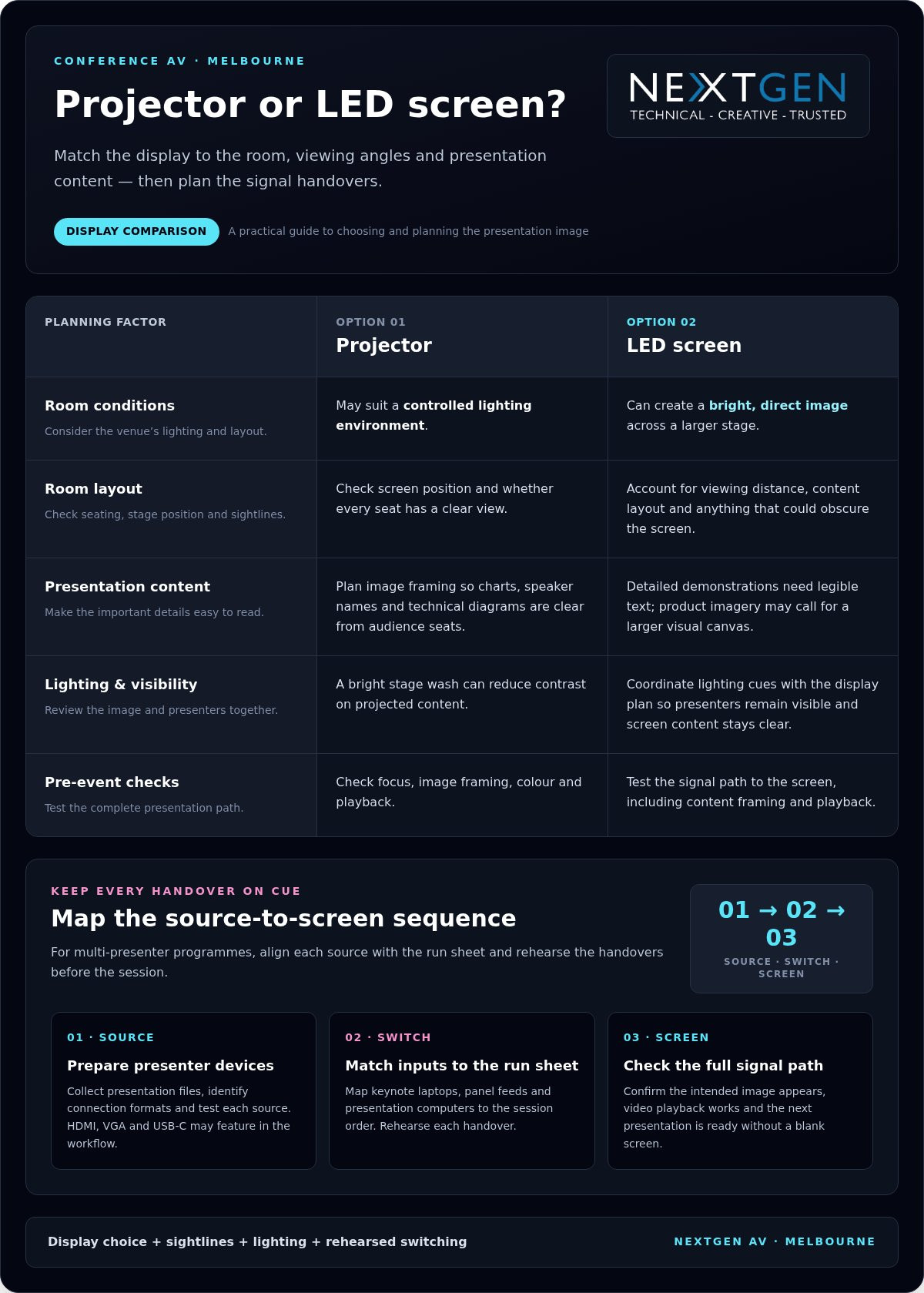
Choose a display to suit the room, viewing angles and presentation content. A projector may suit a controlled lighting environment, while LED screens can create a bright, direct image across a larger stage. The right choice helps delegates read charts, speaker names and technical diagrams from their seats.

Start with the venue plan. Note the screen position, audience layout, stage depth and any sightline obstructions. A screen hidden behind a lectern or stage feature weakens even a well-prepared presentation. In a long, wide room, consider whether one central display gives every seat a clear view or whether additional screens are needed.

Let the content guide the visual design. Detailed software demonstrations need legible text and clear interface views; product imagery may call for a larger, more immersive visual canvas. LED design should also account for viewing distance and content layout. Keep essential information away from the edges, where stage elements or presenter movement may obscure it.

Multi-presenter programmes need a reliable way to change sources. Presentation switchers can move between video sources during conference sessions, such as a keynote laptop, a panel discussion feed and a presentation computer. Map each source to the run sheet, then rehearse every handover so the right image appears with each speaker.

Prepare for different presenter devices by collecting presentation files and identifying connection formats in advance. HDMI, VGA and USB-C may all feature in a conference workflow, so plan suitable interfaces and test each source. Keep slide decks in the intended format, check embedded video playback, and confirm that video audio reaches the room sound system.

During setup, test the complete signal path from source to screen. Check focus, image framing, colour, playback and the return to the next presentation. A video processor can scale content, switch inputs and map signals to LED tiles. The operator can then manage transitions without leaving the audience looking at a desktop or blank screen.

Lighting affects screen visibility too. A bright stage wash can reduce contrast on projected content, while a dark stage can make presenters difficult to see. Coordinate lighting cues with the display plan, then review both from audience seating. For a virtual or hybrid conference, include the camera view so remote participants see a balanced image.

Use a source-by-source checklist to align presentation files, connections, switching cues and screen content. For an integrated conference display plan, review conference AV production options alongside the venue layout and programme.

Do you offer event support beyond AV equipment and operation?

Yes. On-site technical support can cover setup, cue coordination, live operation and troubleshooting. For a technology conference in Melbourne, choose a venue whose room, network access and technical facilities suit the programme and production plan.

On-site technical crew

An on-site technical crew coordinates the AV setup with the event schedule, presenters and venue team. At a conference with keynote presentations and a panel, operators can manage presentation cues, microphones, lighting changes and speaker handovers. This keeps technical decisions close to the stage, where timing and audience needs are clear.

Before booking support, map the crew’s responsibilities to the run sheet. Identify who calls each cue, manages presentation sources and responds to a fault. For streaming sessions, include an operator responsible for the stream alongside the room’s live production team. Clear roles help attendees in the room and online follow the same programme.

Technical rehearsals and backups

A rehearsal gives speakers and operators a chance to test the actual sequence, not just individual equipment. Run presentations, video playback, microphone handovers, lighting cues and streaming transitions in programme order. Melbourne conference organisers are advised to hold a full technical rehearsal at least 60 minutes before the first attendee arrives, allowing time to resolve issues before doors open.

Plan contingencies for power and essential equipment. AV planning can include backup batteries or UPS units to maintain operation during unexpected power loss. Also prepare spare presentation files and a backup playback source when the programme depends on video. Test the backup path during rehearsal so operators know how to switch without interrupting the session.

Setup and live support

During setup, technicians position equipment, connect signal paths and test each system in the room. A practical sequence is to check power and connections, test microphones and playback, then confirm lighting and streaming feeds. This can catch issues such as a laptop sending the wrong display output before presenters arrive and attendees take their seats.

Live support continues as the programme changes. An operator can cue the next presentation, adjust levels and respond to a source failure while the host maintains the session. For a hybrid panel, the crew should check that remote speakers can be heard in the room and audience questions reach the stream. Coordinated checks keep the event moving without distracting from its content.
Tech Conference AV Production in Melbourne: Costs and Support

AV hire costs and quote turnaround

A useful production quote starts with a clear picture of the conference, not a generic equipment list. The proposed setup needs to fit the venue, programme, access arrangements and support required. A single-room presentation and a multi-room conference call for different technical plans, crew coordination and preparation.

Begin planning your Melbourne conference AV production once the event date and venue are confirmed. This gives you time to coordinate venue requirements, session timings and production details before the event schedule is locked in.

Include the event dates, venue, room access times, session schedule and number of spaces in your brief. Describe each session format, such as a keynote, panel, demonstration or audience discussion. Then outline the required audio, displays, lighting, staging and on-site technical support. A keynote followed by a panel, for example, needs distinct operator cues and speaker transitions.

  • Programme: Share session formats, presentation changes, video playback and audience participation.
  • Venue: Provide room plans, access arrangements and relevant technical documents.
  • Production: Describe audio, display, lighting, staging and streaming requirements.
  • Support: Set out setup, rehearsal, live operation and pack-down needs.

These details help define the technical scope and identify the work needed before, during and after sessions. For a hybrid conference, include remote audience requirements in the brief so the production plan accounts for how presentations and speakers connect with online attendees.

Quote preparation is more straightforward when you provide the schedule, venue information and technical requirements together. Room plans and access details help clarify equipment positions and how the production team can work within the venue’s arrangements. If programme timings are still changing, mark them as provisional and share updates as they become available.

Send one organised brief with the latest event documents, then flag changes such as an added session, a new panel format or an additional room. This gives the production team a consistent reference for updating the proposed scope and keeps organisers, speakers and technical operators aligned as the event develops.

For a Melbourne conference, include venue-specific access and setup instructions from the outset. Note whether the programme spans multiple days or requires a rehearsal. A well-structured brief connects the technical plan to the conference schedule and gives the production team a clear starting point for preparing a considered quote.

Corporate conference AV production

For a tech conference in Melbourne, look for a corporate event production team that coordinates technical direction, AV operation and programme requirements. Choose a team that plans the conference as one production, rather than treating each screen, microphone and cue as a separate task.

Corporate programmes often move quickly between keynotes, panel discussions, demonstrations and audience questions. Each format brings different audio, visual and staging needs. A product demonstration, for example, may need a clear camera view and screen feed, while a panel requires managed speaker handovers. A unified run sheet connects these elements to the event’s timing.

Strong event production links the initial brief with the room plan, technical setup and live operation. The production team needs to understand the event’s purpose, audience, content and venue. That context shapes decisions such as stage layout, screen placement, lighting cues and the transitions operators prepare before doors open.

  • Programme: Map keynotes, panels, demonstrations and breaks to production cues.
  • Content: Identify presentations, video playback and live demonstrations.
  • Audience: Consider sightlines, room audio and opportunities for questions.
  • Delivery: Assign technical roles for setup, rehearsal and live operation.

For a corporate technology event, technical direction keeps production aligned as details change. If a speaker’s presentation order shifts, operators need updated cues and content. If a panel becomes a product demonstration, the team may need to adjust stage positions, screen content or lighting. A clear decision-making process helps manage changes without losing the programme’s polish.

Hybrid events add another production layer. Remote presenters, streamed sessions and in-room questions need coordinated audio and vision. Plan how each speaker joins, how their presentation appears and how questions move between online and in-person audiences. Rehearse those transitions in sequence, rather than testing equipment individually.

When assessing a production team, look for relevant corporate conference experience, clear planning, defined operator roles and support that matches the programme. Reviews can offer useful context when they describe communication, coordination or live-event problem-solving. Choose a team whose process connects technical detail to the experience delegates receive.

For your next Melbourne conference, bring the programme, venue details and production requirements into one conversation. That gives the planning team a foundation for coordinating the technical elements around your event’s objectives. Plan your corporate conference production with a team equipped to manage the moving parts behind the scenes.

NextGen AV: LED Video Walls

NextGen AV brings your conference visuals, sound and stage environment together in a coordinated production. Its LED Video Walls give presentations and brand content a strong visual focus, while Professional Audio Systems help deliver clear sound across the room.

For a product launch or corporate keynote, coordinate the screen content with Lighting Design and Equipment and Staging and Rigging. This joined-up approach helps technical cues, presenter movement and audience sightlines work together, with every detail serving the event programme.

Share your event brief, venue details and schedule to start planning a production shaped around your conference. Contact NextGen AV to discuss your event.

Set your conference in motion

Your production brief is more than a list of technical requirements. It’s a chance to define the impression your conference should leave, from the first welcome to the final session. For tech conference AV production in Melbourne, align the event’s purpose, audience and content with the experience you want to create.

Consider what delegates should notice, understand and remember. A clear creative direction gives the production team a strong foundation for shaping the visual environment and supporting the programme. It also keeps decisions focused as planning moves forward, so technical choices serve the conference rather than distract from it.

NextGen AV can help translate that direction into a considered production plan for your event. Share your conference brief and begin a conversation about the experience you want to create. Discuss your conference with NextGen AV and take the next step towards a polished event.

Frequently Asked Questions

Do you provide AV for conventions as well as corporate events?

Yes, AV production can support conventions as well as corporate events. A convention programme might combine a plenary, breakout sessions and exhibitor presentations, each with distinct technical cues. Share the event format and room use so the production plan reflects how attendees move between sessions. For Melbourne organisers, the venue’s room schedule can help coordinate production requirements across the convention programme.

How Can Hybrid Conference AV Improve Audience Engagement?

Hybrid AV can bring remote and in-person participants into a shared conversation. For example, a moderator can invite questions from online attendees during a panel, then direct questions from the room to the same speakers. Plan how the host will recognise each group and keep discussion moving. A clear participation plan helps remote viewers feel included, rather than simply watching a one-way presentation.

What Multi-Camera Streaming Solutions Are Available?

A multi-camera stream can combine a wide stage view with close shots of presenters or panel members. For a software demonstration, one camera can frame the presenter while the stream carries the relevant presentation content. Camera positions should suit the venue’s sightlines and stage layout. A planned shot sequence helps remote participants follow speaker handovers and discussion without relying on a static view.

What does conference AV hire include?

Conference AV hire can include equipment and the production work needed to prepare and operate it. The event brief defines the scope, which may cover setup, live operation and support alongside technical equipment. Review the written scope to distinguish what is supplied from the tasks performed by operators. A plenary and breakout rooms, for example, may need different operational arrangements.

What AV services do Melbourne tech conference production companies offer?

Services can include professional audio, LED Video Walls, lighting, staging and technical direction. Melbourne technology events may also use Virtual and Hybrid Event Solutions to connect room presentations with remote participants. The right combination depends on the programme and venue. A useful production plan links each service to an event need, such as clear speech for a panel or legible visuals for a software demonstration.

What information helps define the AV production brief for a Melbourne tech conference?

Provide the event date, venue, room plans, session formats and current schedule. Add details that affect delivery, such as presentation playback, live demonstrations, panel discussions and participation from remote speakers. If the programme is still evolving, identify which elements are settled and which may change. This gives the production team a practical basis for shaping the technical scope and updating it as plans develop.

Which production requirements should a Melbourne tech conference quote cover?

A quote should describe the proposed technical scope and the work attached to it. Check that it identifies relevant equipment, setup and pack-down, live operation, rehearsal needs and streaming requirements. For a conference with breakout sessions, confirm that the plan covers those rooms as well as the main stage. A clearly itemised scope helps organisers understand how each production element supports the programme.

What audio, lighting, staging and video equipment does a tech conference need?

The programme and room layout determine the equipment plan. A keynote may need a presenter microphone, display and stage lighting, while a panel needs a way to manage several speakers and audience questions. A product demonstration may call for visuals that make interface details easy to follow. Consider sightlines, presenter movement and stage access together, so equipment supports the session without obstructing the audience’s view.

A conference succeeds through more than equipment alone. Tech conference AV production in Melbourne brings together pre-event planning, technical direction, professional audio, presentation displays, staging, lighting and on-site operation, so every element supports the programme and audience experience. For hybrid sessions, the plan also needs to connect the room with remote participants.

For a corporate technology conference, choosing microphones and screens is only part of the brief. Room size and acoustics, presentation formats, speaker needs and the event schedule all shape the production plan. Clear coordination helps keep transitions and technical cues on track.

This guide explains how to match audio and presentation equipment to your conference, what wider event support can involve, and which project details shape a quote. You’ll also see how a clear brief helps move the quoting process forward, so you can plan with confidence and focus on the event itself.

Key Takeaways

  • Match microphone choices to each speaker’s delivery style and the room’s acoustics to help every attendee hear clearly.
  • Choose projectors or LED displays around the room layout and presentation content, then plan how sources will switch between speakers.
  • Technical support can extend beyond equipment operation to planning cues, coordinating the run sheet and managing live transitions.
  • A clear event brief helps shape a quote around the venue, production requirements, programme and support needed.
  • Bring audio, displays, lighting and staging together under technical direction for a more cohesive corporate conference experience.

Conference audio equipment and microphone options

Choose microphones to suit the programme, presenters and room layout. A keynote speaker moving across the stage may prefer a headset or lapel microphone, while a panel may benefit from handheld microphones passed between speakers. Each option affects how naturally people can present and interact.

Room acoustics matter as much as microphone style. Hard surfaces can create reflections, while a wide room may need carefully positioned speakers for clear sound throughout. Match the sound system to the room, audience seating and stage position, then balance the mix from the audience area. A front-of-house engineer manages the sound mix listeners hear.

Build practical contingencies into the running plan. Keep a charged backup microphone close by, and test each microphone before presenters take the stage. A microphone failure in front of three hundred people can disrupt a session and break its momentum. A ready backup helps the operator respond quickly.

For a panel, assign each speaker a microphone and decide how audience questions will reach the stage. For a keynote, test the presenter’s movement and speaking level. These checks help the audio team set consistent levels and avoid abrupt changes between speakers. If the programme includes audience questions, plan how a microphone will reach attendees.

Audio is part of the wider visual experience. Lighting should keep presenters visible without washing out projected content, while staging should give speakers clear microphone access and room to move. Coordinating audio, lighting and video production around the run sheet helps technical cues land smoothly, from opening remarks to the final session.

For virtual or hybrid sessions, plan how room audio will reach remote participants. A microphone that sounds clear in the venue may not capture every panel voice for an online audience. Include the streaming audio path in rehearsal, and test transitions between presentations, discussion and audience questions.

When comparing Melbourne AV production companies, consider relevant conference experience, the scope of audio visual production and whether technical operation is included. Read reviews for specific evidence of communication, coordination and live-event problem-solving, rather than relying on star ratings alone.

What permits, safety rules or venue requirements apply to conference AV production in Melbourne? Venue technical documents set out requirements for access, equipment placement, power, staging and rigging. Use those documents to shape the production plan, and coordinate any proposed setup with the venue before event day.

Before confirming equipment, map each session’s speakers, microphones, playback sources and audience interactions. Then test the full setup in the room, with lighting and visual cues running in sequence. This keeps the audio plan connected to the event experience, not just the equipment list.

Projectors, displays and presentation switching

Choose a display to suit the room, viewing angles and presentation content. A projector may suit a controlled lighting environment, while LED screens can create a bright, direct image across a larger stage. The right choice helps delegates read charts, speaker names and technical diagrams from their seats.

Start with the venue plan. Note the screen position, audience layout, stage depth and any sightline obstructions. A screen hidden behind a lectern or stage feature weakens even a well-prepared presentation. In a long, wide room, consider whether one central display gives every seat a clear view or whether additional screens are needed.

Let the content guide the visual design. Detailed software demonstrations need legible text and clear interface views; product imagery may call for a larger, more immersive visual canvas. LED design should also account for viewing distance and content layout. Keep essential information away from the edges, where stage elements or presenter movement may obscure it.

Multi-presenter programmes need a reliable way to change sources. Presentation switchers can move between video sources during conference sessions, such as a keynote laptop, a panel discussion feed and a presentation computer. Map each source to the run sheet, then rehearse every handover so the right image appears with each speaker.

Prepare for different presenter devices by collecting presentation files and identifying connection formats in advance. HDMI, VGA and USB-C may all feature in a conference workflow, so plan suitable interfaces and test each source. Keep slide decks in the intended format, check embedded video playback, and confirm that video audio reaches the room sound system.

During setup, test the complete signal path from source to screen. Check focus, image framing, colour, playback and the return to the next presentation. A video processor can scale content, switch inputs and map signals to LED tiles. The operator can then manage transitions without leaving the audience looking at a desktop or blank screen.

Lighting affects screen visibility too. A bright stage wash can reduce contrast on projected content, while a dark stage can make presenters difficult to see. Coordinate lighting cues with the display plan, then review both from audience seating. For a virtual or hybrid conference, include the camera view so remote participants see a balanced image.

Use a source-by-source checklist to align presentation files, connections, switching cues and screen content. For an integrated conference display plan, review conference AV production options alongside the venue layout and programme.

Do you offer event support beyond AV equipment and operation?

Yes. On-site technical support can cover setup, cue coordination, live operation and troubleshooting. For a technology conference in Melbourne, choose a venue whose room, network access and technical facilities suit the programme and production plan.

On-site technical crew

An on-site technical crew coordinates the AV setup with the event schedule, presenters and venue team. At a conference with keynote presentations and a panel, operators can manage presentation cues, microphones, lighting changes and speaker handovers. This keeps technical decisions close to the stage, where timing and audience needs are clear.

Before booking support, map the crew’s responsibilities to the run sheet. Identify who calls each cue, manages presentation sources and responds to a fault. For streaming sessions, include an operator responsible for the stream alongside the room’s live production team. Clear roles help attendees in the room and online follow the same programme.

Technical rehearsals and backups

A rehearsal gives speakers and operators a chance to test the actual sequence, not just individual equipment. Run presentations, video playback, microphone handovers, lighting cues and streaming transitions in programme order. Melbourne conference organisers are advised to hold a full technical rehearsal at least 60 minutes before the first attendee arrives, allowing time to resolve issues before doors open.

Plan contingencies for power and essential equipment. AV planning can include backup batteries or UPS units to maintain operation during unexpected power loss. Also prepare spare presentation files and a backup playback source when the programme depends on video. Test the backup path during rehearsal so operators know how to switch without interrupting the session.

Setup and live support

During setup, technicians position equipment, connect signal paths and test each system in the room. A practical sequence is to check power and connections, test microphones and playback, then confirm lighting and streaming feeds. This can catch issues such as a laptop sending the wrong display output before presenters arrive and attendees take their seats.

Live support continues as the programme changes. An operator can cue the next presentation, adjust levels and respond to a source failure while the host maintains the session. For a hybrid panel, the crew should check that remote speakers can be heard in the room and audience questions reach the stream. Coordinated checks keep the event moving without distracting from its content.

AV hire costs and quote turnaround

A useful production quote starts with a clear picture of the conference, not a generic equipment list. The proposed setup needs to fit the venue, programme, access arrangements and support required. A single-room presentation and a multi-room conference call for different technical plans, crew coordination and preparation.

Begin planning your Melbourne conference AV production once the event date and venue are confirmed. This gives you time to coordinate venue requirements, session timings and production details before the event schedule is locked in.

Include the event dates, venue, room access times, session schedule and number of spaces in your brief. Describe each session format, such as a keynote, panel, demonstration or audience discussion. Then outline the required audio, displays, lighting, staging and on-site technical support. A keynote followed by a panel, for example, needs distinct operator cues and speaker transitions.

  • Programme: Share session formats, presentation changes, video playback and audience participation.
  • Venue: Provide room plans, access arrangements and relevant technical documents.
  • Production: Describe audio, display, lighting, staging and streaming requirements.
  • Support: Set out setup, rehearsal, live operation and pack-down needs.

These details help define the technical scope and identify the work needed before, during and after sessions. For a hybrid conference, include remote audience requirements in the brief so the production plan accounts for how presentations and speakers connect with online attendees.

Quote preparation is more straightforward when you provide the schedule, venue information and technical requirements together. Room plans and access details help clarify equipment positions and how the production team can work within the venue’s arrangements. If programme timings are still changing, mark them as provisional and share updates as they become available.

Send one organised brief with the latest event documents, then flag changes such as an added session, a new panel format or an additional room. This gives the production team a consistent reference for updating the proposed scope and keeps organisers, speakers and technical operators aligned as the event develops.

For a Melbourne conference, include venue-specific access and setup instructions from the outset. Note whether the programme spans multiple days or requires a rehearsal. A well-structured brief connects the technical plan to the conference schedule and gives the production team a clear starting point for preparing a considered quote.

Corporate conference AV production

For a tech conference in Melbourne, look for a corporate event production team that coordinates technical direction, AV operation and programme requirements. Choose a team that plans the conference as one production, rather than treating each screen, microphone and cue as a separate task.

Corporate programmes often move quickly between keynotes, panel discussions, demonstrations and audience questions. Each format brings different audio, visual and staging needs. A product demonstration, for example, may need a clear camera view and screen feed, while a panel requires managed speaker handovers. A unified run sheet connects these elements to the event’s timing.

Strong event production links the initial brief with the room plan, technical setup and live operation. The production team needs to understand the event’s purpose, audience, content and venue. That context shapes decisions such as stage layout, screen placement, lighting cues and the transitions operators prepare before doors open.

  • Programme: Map keynotes, panels, demonstrations and breaks to production cues.
  • Content: Identify presentations, video playback and live demonstrations.
  • Audience: Consider sightlines, room audio and opportunities for questions.
  • Delivery: Assign technical roles for setup, rehearsal and live operation.

For a corporate technology event, technical direction keeps production aligned as details change. If a speaker’s presentation order shifts, operators need updated cues and content. If a panel becomes a product demonstration, the team may need to adjust stage positions, screen content or lighting. A clear decision-making process helps manage changes without losing the programme’s polish.

Hybrid events add another production layer. Remote presenters, streamed sessions and in-room questions need coordinated audio and vision. Plan how each speaker joins, how their presentation appears and how questions move between online and in-person audiences. Rehearse those transitions in sequence, rather than testing equipment individually.

When assessing a production team, look for relevant corporate conference experience, clear planning, defined operator roles and support that matches the programme. Reviews can offer useful context when they describe communication, coordination or live-event problem-solving. Choose a team whose process connects technical detail to the experience delegates receive.

For your next Melbourne conference, bring the programme, venue details and production requirements into one conversation. That gives the planning team a foundation for coordinating the technical elements around your event’s objectives. Plan your corporate conference production with a team equipped to manage the moving parts behind the scenes.

NextGen AV: LED Video Walls

NextGen AV brings your conference visuals, sound and stage environment together in a coordinated production. Its LED Video Walls give presentations and brand content a strong visual focus, while Professional Audio Systems help deliver clear sound across the room.

For a product launch or corporate keynote, coordinate the screen content with Lighting Design and Equipment and Staging and Rigging. This joined-up approach helps technical cues, presenter movement and audience sightlines work together, with every detail serving the event programme.

Share your event brief, venue details and schedule to start planning a production shaped around your conference. Contact NextGen AV to discuss your event.

Set your conference in motion

Your production brief is more than a list of technical requirements. It’s a chance to define the impression your conference should leave, from the first welcome to the final session. For tech conference AV production in Melbourne, align the event’s purpose, audience and content with the experience you want to create.

Consider what delegates should notice, understand and remember. A clear creative direction gives the production team a strong foundation for shaping the visual environment and supporting the programme. It also keeps decisions focused as planning moves forward, so technical choices serve the conference rather than distract from it.

NextGen AV can help translate that direction into a considered production plan for your event. Share your conference brief and begin a conversation about the experience you want to create. Discuss your conference with NextGen AV and take the next step towards a polished event.

Frequently Asked Questions

Do you provide AV for conventions as well as corporate events?

Yes, AV production can support conventions as well as corporate events. A convention programme might combine a plenary, breakout sessions and exhibitor presentations, each with distinct technical cues. Share the event format and room use so the production plan reflects how attendees move between sessions. For Melbourne organisers, the venue’s room schedule can help coordinate production requirements across the convention programme.

How Can Hybrid Conference AV Improve Audience Engagement?

Hybrid AV can bring remote and in-person participants into a shared conversation. For example, a moderator can invite questions from online attendees during a panel, then direct questions from the room to the same speakers. Plan how the host will recognise each group and keep discussion moving. A clear participation plan helps remote viewers feel included, rather than simply watching a one-way presentation.

What Multi-Camera Streaming Solutions Are Available?

A multi-camera stream can combine a wide stage view with close shots of presenters or panel members. For a software demonstration, one camera can frame the presenter while the stream carries the relevant presentation content. Camera positions should suit the venue’s sightlines and stage layout. A planned shot sequence helps remote participants follow speaker handovers and discussion without relying on a static view.

What does conference AV hire include?

Conference AV hire can include equipment and the production work needed to prepare and operate it. The event brief defines the scope, which may cover setup, live operation and support alongside technical equipment. Review the written scope to distinguish what is supplied from the tasks performed by operators. A plenary and breakout rooms, for example, may need different operational arrangements.

What AV services do Melbourne tech conference production companies offer?

Services can include professional audio, LED Video Walls, lighting, staging and technical direction. Melbourne technology events may also use Virtual and Hybrid Event Solutions to connect room presentations with remote participants. The right combination depends on the programme and venue. A useful production plan links each service to an event need, such as clear speech for a panel or legible visuals for a software demonstration.

What information helps define the AV production brief for a Melbourne tech conference?

Provide the event date, venue, room plans, session formats and current schedule. Add details that affect delivery, such as presentation playback, live demonstrations, panel discussions and participation from remote speakers. If the programme is still evolving, identify which elements are settled and which may change. This gives the production team a practical basis for shaping the technical scope and updating it as plans develop.

Which production requirements should a Melbourne tech conference quote cover?

A quote should describe the proposed technical scope and the work attached to it. Check that it identifies relevant equipment, setup and pack-down, live operation, rehearsal needs and streaming requirements. For a conference with breakout sessions, confirm that the plan covers those rooms as well as the main stage. A clearly itemised scope helps organisers understand how each production element supports the programme.

What audio, lighting, staging and video equipment does a tech conference need?

The programme and room layout determine the equipment plan. A keynote may need a presenter microphone, display and stage lighting, while a panel needs a way to manage several speakers and audience questions. A product demonstration may call for visuals that make interface details easy to follow. Consider sightlines, presenter movement and stage access together, so equipment supports the session without obstructing the audience’s view.

Back to Articles

Discover Valuable Insights

Unlock Expert Tips and Advice

Our blog is packed with valuable information to help you stay ahead. Whether you’re looking for expert advice, industry trends, or practical tips, you’ll find everything you need. Reach out today to learn more or get in touch with us for personalised support!

Contact Us

Request A Quote

Make an
Enquiry

Let’s Get Your Event Sorted

Complete the enquiry form with your event date, venue, audience size, event type and budget. Our Melbourne AV team will review your requirements and recommend the right PA, screen, lighting, staging or production setup for your event.

What happens next?


1.We review your event details
Tell us your date, venue, audience size and event type.

2.We recommend the right setup
From PA hire to screens, lighting, staging and full AV production.

3. We come back with clear advice
You’ll receive practical recommendations and a fast quote from our Melbourne team.

Need help urgently?
Call 1300 792 922.

Resource Download

Tell us a bit about yourself to download our resources.

7