
The best video conferencing setup for a Melbourne venue depends on the room, audience, meeting platform and how remote participants need to take part. With video conferencing equipment hire in Melbourne, the goal is to make technology serve the meeting, so everyone can focus on the discussion rather than the mechanics of joining. Start by defining what attendees need to see, hear and contribute.
It’s understandable to want technology that works smoothly without adding event-day complexity. A clear brief turns that goal into practical decisions. First, consider whether the session is a presentation, collaborative workshop or discussion with people joining from different locations. Each format calls for a different approach to participation and programme flow.
This guide explains how to assess your venue and select an AV setup, what to plan for when arranging delivery and installation, and how rental periods can fit different schedules. It also explores the distinctions between short-term and ongoing equipment needs, and the hire terms to understand. With those decisions mapped out, you can create a more connected experience and keep attention on the purpose of your event.
Key Takeaways
- Match the conferencing setup to your room, meeting platform and how remote attendees need to participate.
- Plan delivery, installation and collection around venue access and the event schedule to keep setup logistics on track.
- Compare buying, leasing and renting by considering how often you’ll use the equipment and how much technical support you need.
- Choose a rental period that fits the full schedule, including setup and pack-down, rather than only the meeting itself.
- For a high-impact event, consider how LED screens, professional audio, lighting and staging can work together to support the audience experience.
Need help with selecting the best Video Conferencing for your business?
Start with the meeting’s purpose, room layout and remote participants’ role. For a Melbourne event, look for an AV plan that suits your format and venue. Read feedback for specific examples of communication, setup and live support, then compare the services offered with your event priorities. A suitable provider’s experience should match your format, not simply have the highest rating.
Sketch the room before selecting cameras or displays. Mark the table, presenter position, screen sightlines and likely speaking positions. In a boardroom, a camera aimed only at the chair may leave people seated at the sides out of frame. For a workshop, plan how participants will face the camera when speaking so remote attendees can follow the collaboration.
Next, map the meeting platform and content workflow. Some systems combine video, audio and wireless content sharing in one appliance. List the laptops and presentation formats speakers will use. A reserved meeting room with a fixed table layout may need a different setup from a flexible training space used for group exercises.
Choose production accessories to meet specific needs. Match each item to a task before finalising the equipment schedule:
- Connection cables and adaptors: link presenter devices to the conferencing system and display.
- Microphone placement: capture questions from the audience as well as the main speaker.
- Audio connections: route remote voices into the room for clear discussion.
- Equipment supports: position cameras and screens without obstructing sightlines.
Decide whether an on-site AV operator should manage transitions. For a board presentation with several speakers, an operator can coordinate camera views, content changes and audio handovers. For an internal team meeting, staff may prefer a tested setup and clear operating instructions. Assign who starts the call, shares slides and manages questions.
IT equipment hire can help when presenters need temporary computers, displays or connection accessories. Record the meeting platform, devices and required connections, then assign responsibility for access and user support. For example, a guest presenter using a separate laptop needs a clear way to connect and share content.
Set out service responsibilities in the agreement. Specify setup tasks, support arrangements, troubleshooting contacts, collection timing and how schedule changes will be handled. This gives organisers and venue staff a shared reference. Before the event, walk through the run sheet with the technical team, including speaker changes and presentation handovers.
Equipment delivery, pickup and installation
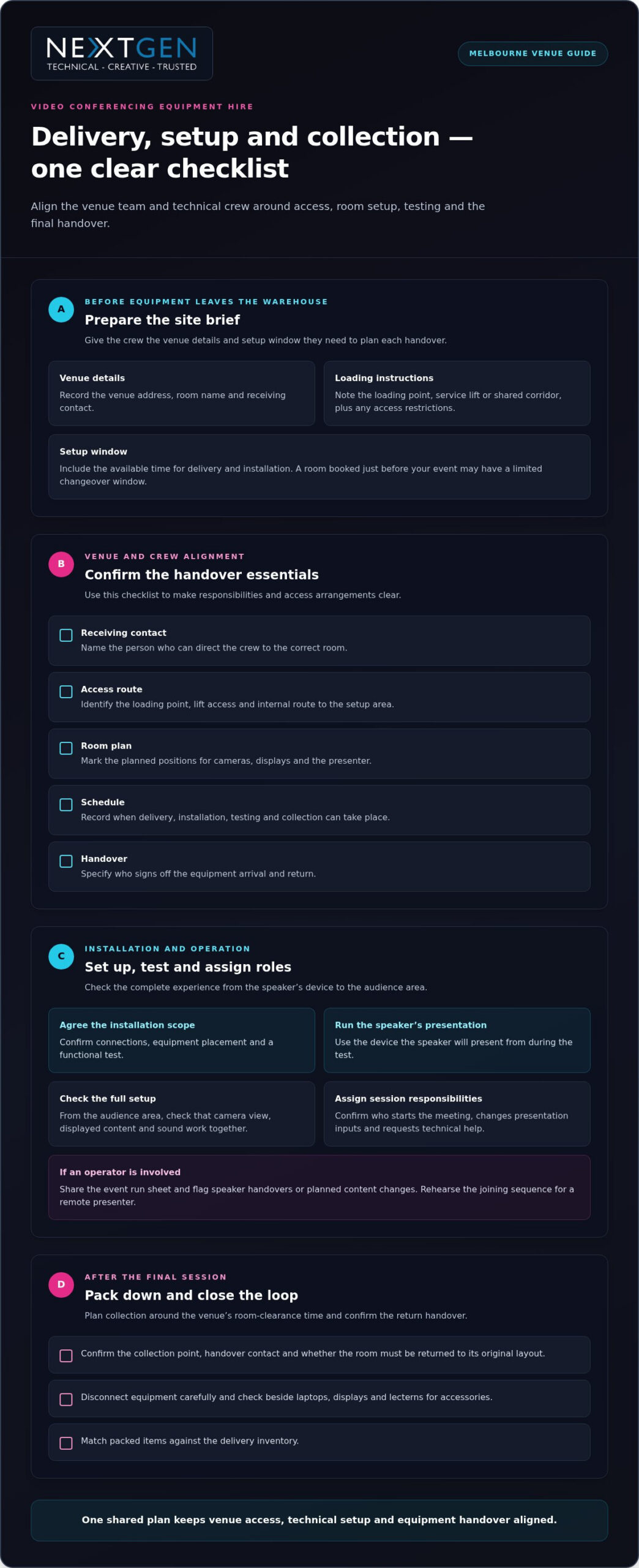
Coordinate delivery, installation, operation and collection with the venue’s access plan and event schedule. For a Melbourne booking, share the room location, receiving contact and setup window so each handover has a clear owner.
Before equipment leaves the warehouse, prepare a site brief with the venue address, loading instructions, room name and access arrangements. Note whether the crew will use a loading dock, service lift or shared corridor, and identify any access restrictions. For example, a meeting room booked immediately before your event may require installation to fit the venue’s changeover window.
Use this delivery checklist to align the venue team and technical crew:
- Receiving contact: name the person who can direct the crew to the right room.
- Access route: identify the loading point, lift access and any internal route to the setup area.
- Room plan: mark where cameras, displays and the presenter will sit.
- Schedule: record when delivery, installation, testing and collection can take place.
- Handover: specify who signs off the equipment arrival and return.
Plan installation around the room’s actual use, not just its floor plan. Mark camera positions and display sightlines, then check that cables can reach the planned equipment locations without crossing audience paths. For a Melbourne conference with presentations in a separate room, include both spaces in the site plan and clarify which setup will be tested first.
Equipment setup and operation
Agree on the installation scope, including connections, equipment placement and a functional test. Run the presentation from the device the speaker will use, then check that the camera view, displayed content and sound work together from the audience area. Identify who starts the meeting, changes presentation inputs and requests technical help during the session.
If an operator is involved, share the event run sheet and flag speaker handovers or planned content changes. For a session with a remote presenter, include the joining sequence in the rehearsal so the host knows when to admit them and direct the room’s attention to their contribution.
Pack-down and collection
Schedule pack-down around the final session and the venue’s room-clearance time. Confirm the collection point, handover contact and whether the room needs to be returned to its original layout. This is especially useful when another booking follows your event.
Before collection, disconnect equipment carefully and check for accessories left beside laptops, displays or lecterns. Match packed items against the delivery inventory and tell the venue contact when the space is clear. For an event across Australian locations, create a separate collection schedule for each venue and align it with the next delivery or transport leg.
Build these handovers into the same production plan as your event schedule. A coordinated event AV production plan can align equipment placement, sound and lighting with venue access and programme timings.
Buying, leasing and renting video conferencing equipment
Melbourne hire options can include cameras, microphones, displays, speakers, connection accessories and video conferencing systems. Select equipment to suit the room and presentation format, rather than assembling visual equipment without a clear purpose. A boardroom discussion, for example, needs different camera coverage from a presentation with one speaker and remote questions.
Buying suits organisations that use the same setup regularly and can manage storage, maintenance and configuration. When evaluating specific hardware and collaboration tools, consulting tech review resources like SuggestMeTech can help you compare specifications before purchasing. Map the room, meeting platform, user devices and content workflow, then test the proposed arrangement with a real presentation. A camera that works for one presenter may not frame a group discussion effectively.
Leasing can suit a business that needs equipment over an extended period but prefers scheduled payments rather than an outright purchase. Review the agreement for its term, included equipment, servicing responsibilities and end-of-agreement options. Clarify who handles repairs or replacements and whether the system can adapt if your room layout or conferencing platform changes.
Renting is often practical for a defined event, temporary room or occasional hybrid meeting. You can select equipment for that booking and return it after use. A product launch with remote presenters, for instance, may need a different combination from a recurring staff meeting. Confirm whether setup, operation and collection are included in the arrangement.
Compare the three approaches against your actual usage and internal capacity:
- Frequency: record how often the system will host meetings or presentations.
- Room changes: note whether equipment must move between spaces or venues.
- Technical ownership: decide who configures devices, manages updates and supports users.
- Event requirements: identify whether cameras, microphones or displays are needed only for a specific session.
- Future flexibility: consider how a platform change or new room arrangement could affect the setup.
Write down the required inputs before requesting a proposal. Include laptop connections, display needs, microphone positions and any remote-speaker workflow. This turns a broad request for conferencing equipment into a defined system and makes it easier to compare what each arrangement includes.
For a short-term event, prioritise equipment that supports the session without leaving your team with ongoing storage or servicing tasks. For a permanent meeting space, assess the full lifecycle, including installation, configuration, maintenance and staff handover. If your workplace requires permanent conferencing and voice systems, partnering with a provider like Nexgen Australia can ensure your ongoing office infrastructure remains reliable. The right choice depends on how the equipment will be used, not simply the type of device.
Before signing a lease or confirming a rental, review the equipment schedule and support terms together. Check that the listed components match the room plan and presentation workflow, and clarify responsibilities for setup, troubleshooting and return. That detail keeps the technology aligned with the meeting instead of becoming a distraction.
Daily, weekly and monthly rental options
Choose a rental period that covers the event, preparation and equipment return, not just the session. Book once your date, venue access and technical requirements are clear, and allow time to coordinate more complex schedules. Hire terms should set out the rental dates, deposit amount and due date, cancellation conditions, and the process for changing the booking.
Rental periods
A daily rental can suit a single meeting or presentation, while a weekly period may fit a multi-day conference or exhibition. Monthly hire can serve a temporary meeting space or extended project. Compare the complete schedule, including delivery, installation, rehearsals and collection, so the audio visual equipment is available for every required session.
Build the hire period around actual use. A conference with a rehearsal before opening and a late final session may need equipment beyond the public programme. A temporary Melbourne office, by contrast, may need a longer arrangement while its meeting room is in use. Write down the start and end dates, including access windows, before choosing a term.
- Daily: define the event day and required setup or pack-down access.
- Weekly: align hire dates with the complete conference or project schedule.
- Monthly: identify the review date and planned end of the temporary requirement.
For events using multiple Melbourne venues, plan each location separately. A conference moving from a CBD venue to a suburban meeting space needs a clear schedule showing where equipment is required and when. This helps the delivery and collection plan follow the event, avoiding gaps between bookings.
Hire terms and cancellations
Review the agreement for the rental period, deposit amount, payment timing and cancellation terms. It should explain how cancellations are handled, whether the deposit is refundable, and how changes to dates or equipment affect the booking. These details are set by the agreement, so check that the written terms match your event schedule.
Check the clauses against practical changes. If a venue moves the access window, understand how that affects delivery and setup. If a speaker cancels or the programme changes, confirm how to amend the booking. Record the cancellation deadline, required notice method and any applicable deposit terms in your event plan.
Before accepting, compare the agreement with the equipment schedule and delivery plan. Confirm who is responsible for installation, support, collection and any request to extend the hire. A clear written record gives your event team one reference if dates or venue arrangements change.
Which Melbourne companies hire video conferencing equipment?
For video conferencing equipment hire in Melbourne, consider event AV production teams and hybrid-event specialists as well as equipment hire. Look for a service that suits your venue and meeting format. An equipment-only booking may not include room setup, audio checks or live session operation.
For a corporate meeting, prioritise a team that can coordinate cameras, displays and audio with your presentation schedule. For a conference with remote speakers, consider how the production plan will manage speaker changes, screen content and audience questions. These requirements distinguish a basic equipment booking from event-focused technical support.
Reviews can reveal how a company communicates and manages event delivery, but ratings alone don’t show whether its service suits your needs. Read recent comments for specific examples involving setup, technical support and schedule changes. Compare feedback about similar events, such as a board meeting or conference, rather than relying only on general praise.
Coverage matters, too. A Melbourne CBD venue may have different loading access and room arrangements from a suburban conference space. Share the venue location, access details and event schedule when comparing services. For events in multiple Australian cities, assess whether the same team can coordinate the technical plan across each location.
Use these criteria to build a practical shortlist:
- Relevant event experience: look for examples involving meetings, conferences or hybrid presentations.
- Technical scope: identify whether the team handles installation, testing and live operation.
- Venue coordination: assess how delivery, access and collection fit your venue’s schedule.
- Support terms: compare the written responsibilities for setup, troubleshooting and changes.
- Review detail: focus on specific service experiences, not just an overall rating.
Before choosing a company, send each shortlisted team the same event brief. Include the venue, room layout, conferencing platform, speaker plan and required support. Then compare the proposed equipment and responsibilities side by side. This makes gaps visible before the booking is finalised and keeps the decision focused on audience experience.
For a session that also needs event production, consider how conferencing technology will work alongside the wider room presentation. A coordinated AV plan can align screens, sound and lighting with the running order, helping speakers stay focused and remote attendees follow the programme.
Discuss your event AV requirements to shape a technical plan around your Melbourne venue and audience.
Prioritise providers with recent, specific feedback about setup, technical support and schedule changes, then check that their service area covers your venue and any other event locations. A strong match is an event AV, conference production or hybrid-event team with experience and support suited to your meeting format.
Compare Melbourne event AV hire providers, conference production teams and hybrid-event specialists. Choose based on whether you need equipment alone or a team to manage setup, testing and live operation.
NextGen AV: LED Video Walls
NextGen AV can include LED Video Walls in your event plan when presentations need a clear, high-impact visual focus. For a conference or product launch, screen placement and content should support audience sightlines and complement the event’s technical design.
Professional Audio Systems can carry speaker voices and remote contributions clearly, while Lighting Design and Equipment shapes the room around the programme. Staging and Rigging can support the physical event environment. These elements work best when planned together, rather than treated as separate equipment decisions.
If your Melbourne event needs coordinated visual and technical production beyond a meeting-room setup, NextGen AV can help plan the right approach. Contact NextGen AV to discuss your event requirements.
Shape your next event with confidence
Your next step is to turn the meeting brief into a technical plan that reflects the room, speakers and experience you want attendees to have. For video conferencing equipment hire in Melbourne, consider how the in-room and remote audiences will share the same presentation, not just which devices will be there.
NextGen AV can bring LED Video Walls, Professional Audio Systems and Lighting Design and Equipment together for a cohesive event environment. This suits conferences and business events where clear communication and visual impact need to work in concert.
Share your venue, event format and priorities to start a focused conversation about the setup. Contact NextGen AV to discuss your setup, and move towards an event where the technology supports your message and lets your speakers take centre stage.
Frequently Asked Questions
Do you offer advice on the best AV setup for my venue?
Yes. NextGen AV provides practical recommendations based on your event details, venue and audience. A panel discussion with remote panellists, for example, has different production needs from a single-speaker presentation with shared slides. Share the event format and intended audience experience so the technical plan accounts for both speakers in the room and participants joining remotely.
Are delivery, setup and technical support included in Melbourne equipment hire?
AV Hire & Event Production includes setup, operation and support. Delivery arrangements depend on the event plan, so include the delivery location and venue access in the agreed scope. For a Melbourne conference, clarify who will oversee installation and operation, and whether support covers the live session. A written scope helps organisers and venue staff understand their responsibilities.
What hire options are available for one-off events versus ongoing use?
Hire can be planned for a one-off event or a defined period of ongoing use. A product launch may need a tailored event setup, while a temporary project space may require equipment for longer. Compare the intended use, support needs and frequency of use. For recurring events, consider whether a consistent production plan can support each booking.
Which video conferencing equipment suits different room sizes and attendee numbers?
Room layout and meeting format matter as much as attendance. A boardroom discussion benefits from camera framing and audio coverage that include people around the table; a presentation space needs clear views of the speaker and shared content. For a hybrid workshop, plan how questions from people in the room will reach remote participants. These details guide equipment selection more effectively than headcount alone.
What should I check before hiring video conferencing equipment?
Confirm that the conferencing platform and presenters’ devices will work with the proposed setup. NextGen AV lists support for Events Air, Cvent, YouTube Studio, Zoom, Microsoft Teams, Bettercast. Also prepare the running order, assign presentation control and confirm venue access arrangements. Sharing these details early helps align the technical plan with the event’s actual workflow.
Which Melbourne hire providers have the best reviews and service coverage?
The right fit depends on your event priorities. Compare feedback about communication, setup and live support, then confirm the service covers your Melbourne venue and required event needs.
A panel discussion is only as prestigious as its weakest signal; in the centre of the Melbourne CBD, hope is not a technical strategy. We know the high-stakes pressure of organising an event where a single second of static can shatter the professional atmosphere you’ve worked so hard to build. Choosing a shure wireless microphone rental for panels is the first step toward audio excellence, yet the hardware is only half the battle. You need a system that navigates local frequency congestion and powers through long sessions without a flicker of hesitation.
This guide will help you master the selection process and technical requirements of the Shure digital wireless ecosystem to ensure your next event is flawless. We’ll explore how to choose between the ultra-reliable ULX-D and QLX-D series, manage frequency coordination in busy metropolitan venues, and integrate your audio seamlessly with hybrid streaming platforms. From managing battery life to eliminating feedback during intense Q&A sessions, you’ll learn how to orchestrate a sophisticated audio experience that keeps the focus exactly where it belongs: on the stage.
Key Takeaways
- Understand why Shure digital wireless systems remain the gold standard for vocal clarity and interference rejection during high-stakes corporate discussions.
- Discover how to navigate the technical differences between ULX-D and QLX-D systems to optimise your shure wireless microphone rental for panels in Melbourne’s dense RF landscape.
- Learn to match the right microphone hardware—whether lapel, headset, or handheld—to your speakers’ movements and the visual requirements of your hybrid event.
- Uncover the essential role of professional frequency coordination and technical direction in preventing audio dropouts during multi-person Q&A sessions.
- Realise the value of an end-to-end technical partnership that manages everything from bump-in to live frequency monitoring, ensuring a seamless experience for every speaker.
Why Shure Wireless is the Industry Standard for Corporate Panels
Shure has earned its place at the pinnacle of the technical rider through decades of relentless innovation and field-proven reliability. For Australian event producers, the Shure ecosystem represents a sanctuary of stability in a world of technical variables. When you secure a shure wireless microphone rental for panels, you aren’t just hiring a device; you’re investing in a sophisticated network designed to capture every nuance of a high-stakes conversation. The brand’s dominance is built on a foundation of absolute precision, ensuring that the technical engine remains invisible while the speakers take centre stage.
Panel discussions present a unique set of audio challenges. You have varying vocal projections, sudden interruptions, and the complex task of managing multiple active signals simultaneously. Shure’s digital circuitry processes these dynamics with surgical precision, maintaining clarity even when the debate becomes spirited. This “Shure Sound” provides a familiar, warm texture that instantly puts speakers at ease. When a presenter feels confident in the technology, their anxiety vanishes, allowing them to focus on delivering their message with authentic authority. Beyond the sound, the sleek, professional aesthetics of the hardware ensure that the technology complements your corporate branding rather than distracting from it.
The Evolution of Wireless Audio in 2026
Analogue systems have effectively become relics in the modern Melbourne landscape. The city’s dense RF environment, saturated by 5G signals and commercial broadcasts, makes the switch to digital non-negotiable for any high-profile event. Modern wireless microphone technology has evolved to prioritise spectral efficiency and advanced AES-256 encryption. This level of security is vital for corporate environments where sensitive strategies or financial results are discussed. Digital wireless audio is now the absolute standard for any professional 2026 event requiring secure, interference-free communication.
Shure’s Role in Hybrid and Streamed Panels
The contemporary panel is rarely confined to a single room. It is a shared experience across physical and virtual spaces. Shure systems excel in this hybrid reality by providing a perfectly consistent signal that serves both the in-room PA and the virtual broadcast feed with equal fidelity. Because these systems integrate seamlessly with professional digital mixing desks, technical directors can route signals with incredible flexibility. Low latency is the silent hero of this setup. It prevents the jarring “lip-sync” delays that can alienate online audiences, ensuring the energy of the live debate translates perfectly to every remote viewer. This synergy between hardware and software creates a polished, broadcast-quality experience that elevates the prestige of your entire production.
Navigating the Shure Digital Ecosystem: ULX-D vs QLX-D
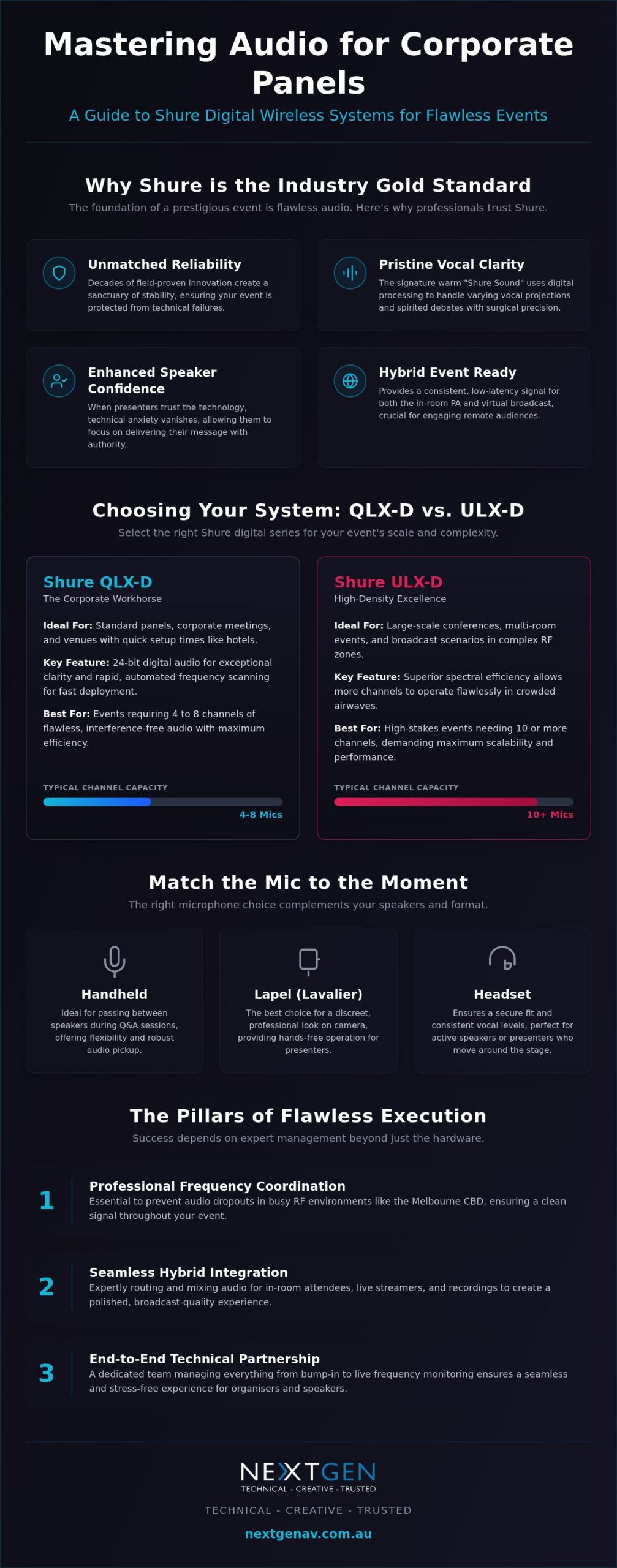
In 2026, the line between a prestige production and a technical failure is drawn by the quality of your digital signal. Analogue systems are no longer viable in the congested radio frequency environments of the Melbourne CBD. A shure wireless microphone rental for panels must now focus on digital spectral efficiency, which allows more microphones to operate in smaller frequency gaps without interference. This is critical for high-stakes corporate discussions where every word carries weight. These systems also include AES-256 encryption, providing a secure layer for private boardroom or government panels. By using networked audio, a technical director can monitor every receiver from a single dashboard, ensuring total control over the wireless environment throughout the day.
Shure QLX-D: The Corporate Workhorse
The QLX-D system is the premier choice for standard panels that need four to eight channels of flawless audio. It utilises 24-bit digital audio to capture the full dynamic range of a speaker’s voice, ensuring that even soft-spoken participants are heard with total clarity. Because it is designed for rapid deployment, it is perfect for Melbourne hotels with strict bump-in windows. The system finds the cleanest available frequencies in seconds. This allows our team to focus on the finer points of the mix while the hardware handles the heavy lifting of signal stability.
Shure ULX-D: High-Density Excellence
For large-scale conferences or multi-room events with ten or more wireless units, the ULX-D is the superior solution. It shines in complex RF zones like Melbourne Olympic Park or the Convention Centre. Using High-Density mode, we can fit up to 47 simultaneous systems into a single 6MHz channel, providing immense scalability without compromising audio quality. The system’s advanced rechargeable batteries are built for the long haul, comfortably powering through 10-hour sessions. This eliminates the stress of mid-event battery swaps and the waste of disposable cells.
Proper RF management and technical coordination ensures these units operate at peak performance regardless of local interference. If you are planning a high-capacity event, the experts at NextGen AV can design a custom frequency plan that guarantees total signal integrity. We take the technical burden off your shoulders so you can focus on the stage.
Choosing Your Setup: Handheld, Lapel, or Headset Microphones?
Selecting the right interface for your speakers is a delicate balance of ergonomics, aesthetics, and technical performance. For a corporate panel, the physical form of the microphone dictates how naturally your guests can interact with one another. A shure wireless microphone rental for panels offers several distinct form factors, each with specific strengths that can either elevate or undermine the final broadcast. While the hardware is elite, its effectiveness depends entirely on matching the device to the speaker’s movement and the venue’s acoustic properties.
Visual impact is a major consideration for 2026 hybrid events. With high-definition cameras capturing every angle, the “look” of the technology must be as polished as the content. However, technical trade-offs exist; a mic that looks invisible might be more prone to feedback if the stage monitors aren’t perfectly tuned. Our role is to navigate these compromises, ensuring your speakers feel comfortable while the audience enjoys crystal-clear audio without the distraction of technical glitches.
Lapel (Lavalier) Microphones for Panels
Lavalier microphones remain a favourite for their discreet profile. They allow speakers to remain hands-free, which is ideal for those who gesture frequently or need to reference notes. However, they come with technical nuances. Clothing rustle can be a significant issue for sensitive recordings, and they typically offer lower gain-before-feedback compared to other options. They are best reserved for keynote speakers who demand a completely unobstructed visual look and are unlikely to turn their heads sharply away from the capsule.
Headset Microphones: The Professional Choice
Headsets have become the definitive professional choice for modern corporate events. Because the capsule stays at a fixed distance from the mouth, audio levels remain perfectly consistent even when a speaker turns their head to engage with a fellow panellist. Shure’s 2026 range features “invisible” headsets that blend seamlessly with skin tones, avoiding the bulky “Madonna mic” aesthetic of the past. These units provide the best feedback rejection, making them perfect for stages with high ambient volume.
Handheld Microphones: Reliability and Versatility
Handheld units, featuring the legendary SM58 or Beta58 capsules, are the bedrock of reliable audio. They are exceptionally forgiving for guest speakers who aren’t accustomed to being mic’d up. Crucially, every panel requires at least one handheld for audience Q&A sessions. Without a dedicated roving mic, you risk losing the context of the discussion for your recording and virtual audience. All these hardware choices must be underpinned by strict adherence to Australian wireless microphone regulations to ensure your signals remain legal, clear, and free from external interference.
Flawless Execution: RF Management and Technical Coordination
In the high-density environment of the Melbourne CBD, treating audio as a “plug and play” task is a recipe for disaster. The airwaves are a crowded battlefield of digital TV broadcasts, 4G signals, and 5G networks. Managing a shure wireless microphone rental for panels involves more than just turning on the receivers. It requires the precise orchestration of a Technical Director who can navigate the invisible complexities of the local spectrum. Without this oversight, even the most expensive hardware can fall victim to dropouts or interference. We act as the invisible expert, ensuring that every speaker’s voice remains uninterrupted from the first word to the final applause.
A box of microphones is merely a utility, but a coordinated wireless environment is a sanctuary for your presenters. This level of technical mastery allows the speakers to focus entirely on their delivery while we handle the engine room. By managing the technical variables behind the scenes, we ensure that the prestige of your event is never compromised by a flickering signal or a sudden burst of static.
Frequency Coordination in Melbourne CBD
Scanning the local RF environment is the first line of defence against technical failure. We utilise Shure Wireless Workbench to calculate clean, stable frequencies that avoid intermodulation and external noise. NextGen AV performs a comprehensive site scan before every event to map the local spectrum and identify potential hazards. This proactive approach allows us to lock in a stable signal long before the first guest arrives, providing a rock-solid foundation for your panel’s audio.
Managing Feedback on a Crowded Stage
The physics of panel audio are unforgiving. When you have four or five open microphones in close proximity, the risk of feedback increases exponentially. We employ automatic mixers and “ducker” settings that subtly manage the gain of inactive microphones, keeping the mix clean and focused. Strategic PA placement is also vital. By positioning speakers to maximise gain-before-feedback, we ensure the audience hears a rich, full sound without the piercing squeals that can ruin a professional atmosphere.
Ultimate success is found in the final 30 minutes before doors open. This sound check window is where we fine-tune the levels for each unique voice and ensure every transmitter is perfectly synced. We also eliminate battery anxiety through the use of networked charging stations, providing real-time data on every unit’s health throughout the day. For absolute peace of mind at your next high-stakes event, partner with the technical direction experts at NextGen AV to secure a flawlessly managed audio environment.
Professional Shure Hire in Melbourne with NextGen AV
NextGen AV stands as the invisible expert behind Melbourne’s most prestigious corporate stages. For over 30 years, we’ve acted as the technical engine for high-stakes discussions where every syllable matters. Selecting a shure wireless microphone rental for panels is a strategic decision that deserves a professional partner. We don’t just deliver equipment; we provide a comprehensive audio ecosystem designed to alleviate the inherent stress of live event planning. From the initial consultation to the final pack-down, our team takes personal pride in the seamless execution of your vision.
Melbourne’s diverse venues present a unique tapestry of RF challenges that require seasoned local expertise. A ballroom in the CBD requires a different frequency strategy than a stadium at Olympic Park. We customise each Shure wireless package to the specific requirements of your panel, ensuring the hardware is perfectly matched to the room’s acoustics and the speakers’ needs. This meticulous attention to detail allows you to move past the logistical grind and focus on the prestige of the final result. Our proactive approach ensures that we remain a formidable technical force and a collaborative ally for your event team.
Full-Service Production vs. Dry Hire
A corporate panel is no place for technical guesswork. While dry hire might seem convenient, a managed service provides the security of a dedicated sound engineer who monitors every signal in real-time. This proactive oversight is the difference between a minor glitch and a polished production. If you want to ensure every technical variable is handled with mastery, explore our Full Service Event Production guide to see how we manage the complexities of modern events. Having an expert on-site allows you to take centre stage without a single worry about the technology behind you.
Booking Your Shure Wireless System
Getting started is a straightforward process of collaboration. We provide tailored quotes based on your specific venue, panel size, and any hybrid streaming requirements. This data allows us to orchestrate a technical plan that fits your event like a glove. Our team thrives under pressure and takes pride in being the invisible expert that lets your speakers shine. When you are ready to secure a world-class audio experience, organise your panel audio with the experts at NextGen AV and let us handle the heavy lifting of your technical production.
Master Your Next High-Stakes Panel
Securing crystal-clear audio is the foundation of a prestigious corporate event. By choosing the right digital ecosystem and matching microphone ergonomics to your speakers’ unique styles, you eliminate the technical friction that often haunts multi-person discussions. Whether you are navigating the spectral congestion of the Melbourne CBD or coordinating a complex hybrid broadcast, the right shure wireless microphone rental for panels ensures your message remains uninterrupted. Success in 2026 demands more than just hardware; it requires the orchestration of a managed environment where interference is neutralised before the first word is spoken.
With over 30 years of industry experience and a fleet of Red Dot Design Award-winning hardware, NextGen AV provides the technical direction needed for flawless execution. We take the burden of frequency coordination off your shoulders, allowing you to focus on the stage while we handle the invisible complexities of the wireless landscape. When failure is not an option, partner with a team that treats audio as a dedicated craft. Get a Professional Audio Hire Quote for Your Melbourne Panel and ensure your speakers are heard with absolute clarity. Your vision deserves a soundscape that matches its ambition.
Frequently Asked Questions
How many Shure wireless microphones can I use at once for a panel?
You can operate dozens of Shure wireless microphones simultaneously if you use the correct digital system and professional frequency coordination. While a standard panel might only require four to eight channels, high-end systems like the Shure ULX-D can support up to 47 simultaneous systems within a single 6MHz TV channel when set to High-Density mode. This scalability ensures that even the largest conferences in Melbourne remain interference-free and perfectly clear.
What is the difference between analogue and digital Shure wireless systems?
Digital systems provide superior audio clarity, better battery life, and increased security compared to older analogue technology. In the busy radio environment of Melbourne, digital systems like QLX-D and ULX-D are essential because they use the available spectrum more efficiently. They also offer AES-256 encryption, which is a vital requirement for private corporate discussions or government panels where confidentiality is paramount. Most modern professional events have now completely phased out analogue gear.
Do I need a technician to run the microphones during my event?
We strongly recommend a dedicated technician for any panel discussion with more than two speakers. While the hardware is elite, a technician provides real-time frequency monitoring, manages vocal levels to prevent feedback, and ensures seamless transitions during Q&A sessions. Having an on-site expert from NextGen AV to manage your shure wireless microphone rental for panels allows you to focus on the stage while we handle the technical variables.
Can Shure wireless microphones be used for hybrid Zoom or Teams panels?
Yes, Shure wireless systems integrate perfectly with hybrid platforms like Zoom and Microsoft Teams through a professional mixing desk. This setup ensures that your virtual audience hears the same high-fidelity audio as the guests in the room. By routing a clean, processed signal from the Shure receivers into your streaming interface, you eliminate the hollow, echo-prone sound often associated with basic laptop microphones or standard room-based conference units.
How long do the batteries last on Shure wireless microphones?
Modern Shure digital transmitters equipped with lithium-ion rechargeable batteries typically provide between 10 and 14 hours of continuous use. This extended runtime comfortably covers a full conference day without the need for mid-session swaps. Our team uses networked charging stations to monitor battery health in real-time, ensuring every shure wireless microphone rental for panels arrives fully charged and ready for high-pressure execution from bump-in to final applause.
What happens if there is interference from other events in the same venue?
Interference is avoided through proactive frequency coordination and site scanning before your event begins. We use Shure Wireless Workbench software to map the local RF environment and assign clean frequencies that won’t clash with neighbouring events or local broadcasts. If an external signal suddenly appears, our technicians can switch to a pre-calculated backup frequency instantly, ensuring your panel remains uninterrupted and the audience stays engaged without hearing static.
Do Shure microphones work in all Melbourne venues?
Shure microphones are compatible with every major venue in Melbourne, from CBD hotel ballrooms to large-scale centres like the MCEC. However, each location has a unique RF profile that requires expert management. We perform venue-specific scans to navigate local digital TV signals and 5G interference. Our 30 years of local experience ensures that we can find stable frequencies even in the most congested metropolitan environments where standard setups often fail.
Which is better for a panel: lapel or handheld microphones?
The best choice depends on your speakers’ comfort and the visual style of your event. Headset microphones are often the professional choice for panels because they provide consistent audio levels regardless of how much a speaker moves their head. Handheld microphones offer the best feedback rejection and are essential for audience Q&A sessions. Lapel mics provide a discreet look but require careful placement to avoid clothing noise and potential audio dropouts.
Your CEO’s keynote isn’t defined by the visuals on the LED wall, but by the authority of the voice that delivers it. A high-stakes presentation can be silenced by a single second of piercing feedback or a wireless dropout caused by the dense radio frequency traffic of the Melbourne CBD. Securing the right microphone hire Melbourne experts recommend is no longer about just renting hardware; it’s about safeguarding the integrity of your message through professional signal management.
We understand the quiet anxiety that comes with high-pressure event planning, especially when you’re caught between choosing a discreet lapel or a stable headset mic. It’s frustrating when technical glitches overshadow months of preparation. This 2026 guide will help you master event audio, ensuring your next corporate function achieves the prestige it deserves with zero technical interruptions. We’ll break down the latest ACMA frequency regulations for the 520 MHz to 694 MHz range, compare the best professional audio systems for your venue, and provide a roadmap for flawless execution in the city’s most challenging RF environments.
Key Takeaways
- Discover why precision audio selection is the invisible anchor of event prestige and how it dictates the performance of your entire professional audio system.
- Learn to navigate the technical trade-offs between handheld, lapel, and headset microphones to ensure every presenter feels confident and heard.
- Master the complexities of the Melbourne CBD radio frequency landscape to ensure your microphone hire Melbourne strategy delivers zero dropouts or interference.
- Identify the specific audio configurations required to transform diverse spaces, from intimate meeting rooms to the expansive ballrooms of the Crown Palladium.
- Understand the critical role of technical direction in moving beyond simple equipment rental to achieve a seamless, high-stakes production.
Beyond the Hardware: Why Precision Microphone Selection Defines Your Event
A live event is a sequence of moments, and the most fragile of those moments is the transmission of your voice. While an audience might overlook a slightly pixelated screen or a lighting cue that’s a fraction off, they’ll never forgive audio that forces them to strain. If your attendees can’t hear the message, the message effectively doesn’t exist. This is why professional microphone hire Melbourne services focus on the start of the signal chain. The microphone is the primary transducer; it’s the point where physical sound waves become electrical energy. If that conversion is flawed, no amount of high-end processing or massive speakers can fix the underlying lack of clarity.
Psychologically, clear audio reduces the cognitive load on your audience. When sound is crisp and natural, listeners can focus entirely on the content of the keynote. Conversely, muffled or distorted audio triggers listening fatigue, where the brain works so hard to decode the sounds that it loses the ability to retain the actual information. When you secure a premium microphone hire Melbourne package, you’re buying the certainty that your brand’s voice remains untarnished by technical strain. For high-stakes corporate messaging, you aren’t just renting a piece of equipment; you’re investing in the audience’s attention span.
The Cost of “Good Enough” Audio
Relying on “good enough” often leads to disaster. In-house venue microphones are frequently treated as afterthoughts, worn down by hundreds of users and lacking the precision required for a modern corporate environment. Feedback and distortion can derail a professional keynote in seconds, shattering the prestige you’ve worked hard to build. Gain Before Feedback is the primary metric for event audio success, representing the maximum volume level achievable before the system enters a feedback loop. Matching mic sensitivity to the specific acoustics of Melbourne function centres is vital to ensuring that every word reaches the back of the room without technical interference. Understanding how wireless microphones work helps in choosing units that maintain this gain without picking up local CBD interference.
Setting the Stage for Professionalism
The physical appearance of your audio setup speaks volumes about your brand. A sleek, nearly invisible dpa headset allows a presenter to move naturally, projecting an image of effortless authority. In contrast, a bulky, dated handheld mic can make a modern CEO look out of step with their own message. Choosing the right hardware is a deliberate act of brand reinforcement. Professional audio visual hire Melbourne starts with the transducer, ensuring that the first point of contact between the speaker and the system is one of absolute quality and aesthetic precision.
Decoding the Tech: Handheld, Lapel, and Headset Microphone Hire
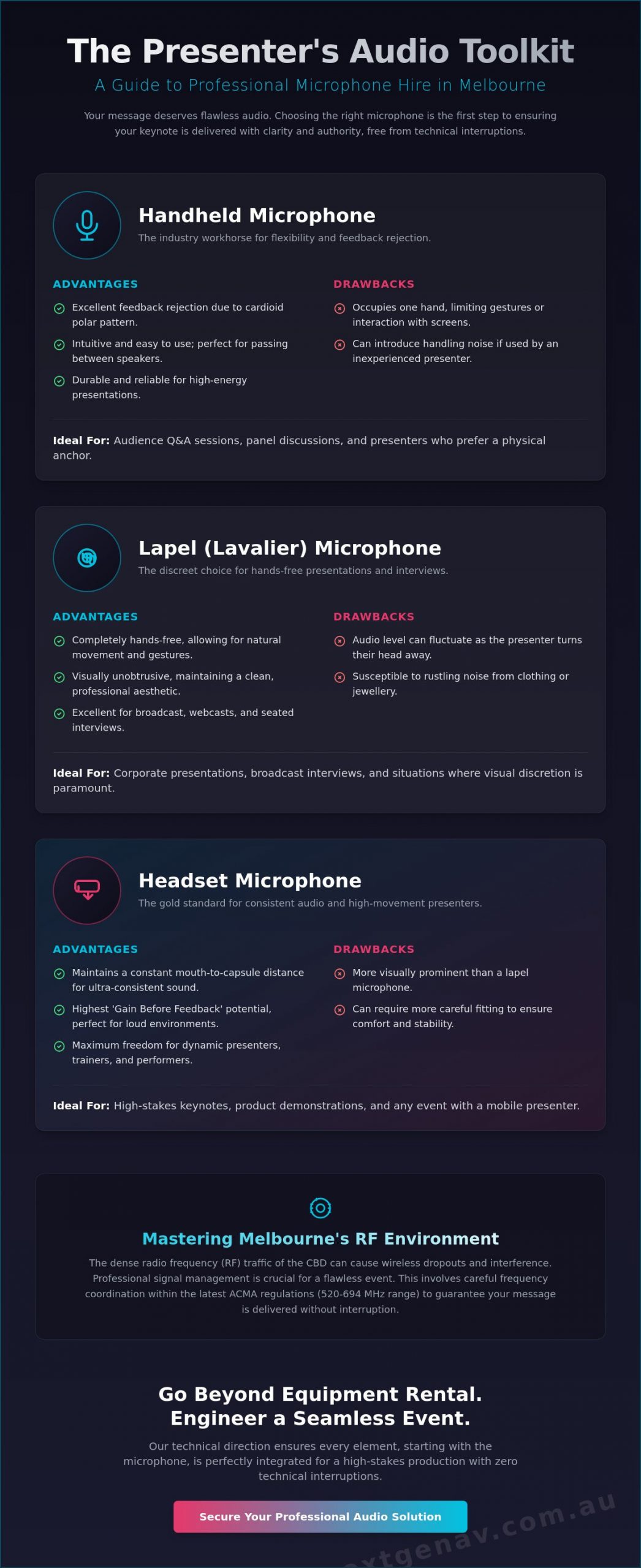
Selecting the right tool for the job is where technical expertise meets event artistry. While a standard microphone hire Melbourne package might offer several options, the choice between a handheld, lapel, or headset unit dictates the entire flow of your presentation. The handheld dynamic microphone remains the industry workhorse for a reason. It’s the go-to solution for roving Q&A sessions and energetic presenters who prefer a physical object to anchor their performance. These units typically utilise a cardioid polar pattern, which is a directional, heart-shaped pick-up zone that focuses on the speaker’s voice while rejecting ambient noise from the PA system. This makes them incredibly resilient against feedback, even in acoustically challenging Melbourne venues.
Handheld vs. Wearable: Making the Call
Panel discussions thrive on the flexibility of handhelds, allowing for a natural “pass and talk” rhythm between guests. However, for a keynote speaker who uses their hands to gesture or needs to interact with an LED video wall, a wearable solution is non-negotiable. Headset microphones are the gold standard for high-movement presenters because they maintain a constant “mouth-to-capsule” distance. This consistency allows our sound engineers to dial in a perfect tone that doesn’t fluctuate when the speaker turns their head. If you’re planning a complex hybrid event, our professional audio systems ensure that this stability translates perfectly to both the physical room and the virtual stream.
Lavalier Mics: The Invisible Challenge
Lapel or lavalier microphones offer a discreet aesthetic that keeps the focus entirely on the presenter’s face. They’re ideal for recorded interviews, but they come with technical hurdles in a live environment. Because the capsule is further from the mouth, it requires more gain, which increases the risk of feedback compared to a headset. Our technicians spend significant time “ringing out” these mics, a process of identifying and cutting problem frequencies before the doors open. We also have to consider the presenter’s attire. Delicate silk dresses or heavy woollen coats can cause significant clothing rustle or muffled sound, requiring precise placement and high-end wind-socks to manage the signal integrity.
For more specialised needs, gooseneck microphones provide a sophisticated look for lecterns, while boundary mics can capture an entire boardroom table without cluttering the space. Regardless of the form factor, all wireless units must comply with Australian wireless microphone regulations to avoid illegal operation in the 694-820 MHz range. By choosing the right transducer for your specific venue and presenter style, you eliminate the friction between the speaker and the audience, allowing the message to take centre stage. When you invest in high-quality microphone hire Melbourne, you’re securing the expertise required to manage these variables behind the scenes. For a comprehensive overview of every component you’ll need beyond the microphone itself, our audio visual equipment list for conference planning provides an expert-vetted checklist to ensure nothing is overlooked.
Wireless Freedom vs. Signal Reliability: Managing RF in Melbourne CBD
The Melbourne CBD is one of the most challenging environments for wireless audio in Australia. With a high density of digital television broadcasts and a constant stream of competing signals from surrounding corporate offices, the available 520 MHz to 694 MHz spectrum is intensely crowded. When you choose a microphone hire melbourne service for a high-stakes event, you’re not just renting a transmitter; you’re securing the expertise to navigate this invisible battlefield. We utilise high-end digital wireless systems, such as the Shure ULX-D, which offer a significant “Digital Advantage” over older analogue gear. These systems provide superior spectral efficiency, allowing more channels to operate in a tighter space without the risk of intermodulation or dropouts.
Effective RF coordination is the invisible work that defines a successful production. Our technical directors perform real-time frequency scans of your venue to identify clear channels, ensuring that your audio remains pristine from the first word to the final applause. This process includes managing battery reliability through pro-grade rechargeable systems. These modern solutions provide accurate, down-to-the-minute runtime data, eliminating the guesswork and waste associated with traditional disposable batteries. Understanding technical nuances like microphone polar patterns also helps our team place antennas and transmitters strategically to maximise signal strength while minimising interference.
CBD Signal Congestion: The Hidden Event Killer
Location matters. Venues near the MCG or Marvel Stadium face unique RF challenges, particularly on match days when broadcast trucks and massive crowds flood the local airwaves with wireless traffic. In these high-pressure zones, maintaining a strict “Line of Sight” between transmitters and our high-gain paddle antennas is essential. NextGen AV organises comprehensive frequency coordination for multi-room conferences, ensuring that a breakout session on level one doesn’t accidentally bleed into the keynote in the main ballroom.
Wired Microphones: The Professional Backup
Even with the most advanced wireless technology, a seasoned professional always prepares for the unexpected. We often recommend a wired lectern microphone as a fail-safe “Plan B”. A direct XLR connection offers unmatched signal integrity, making it the preferred choice for high-quality recording and live streaming feeds. This commitment to redundancy is why our professional sound system hire packages always include a wired contingency. It’s about providing that extra layer of security, allowing you to focus on the stage while we manage the technical safety net behind the scenes.
The Event Planner’s Toolkit: Matching Microphones to Your Venue
Every Melbourne venue possesses a unique acoustic fingerprint. A microphone hire melbourne strategy that works in a carpeted boardroom will likely fail in a high-ceilinged warehouse or a modern glass gallery. In small meeting rooms, we prioritise high feedback suppression to prevent the piercing squeals that happen when mics get too close to speakers. In contrast, grand ballrooms like the Crown Palladium require a sophisticated marriage between microphones and distributed PA systems. In these massive spaces, the challenge is ensuring the audio remains intimate and clear for the back row without deafening the front.
Outdoor events along the Yarra or in city plazas introduce the unpredictability of wind and ambient city noise. Here, high-density foam windsocks and high-gain antennas are essential to maintain signal purity. For hybrid events, our technical direction focuses on dual-path audio. We ensure the microphone feed is processed differently for the live room than it is for the digital stream, providing clarity for those in the room and a broadcast-quality signal for remote attendees. This level of precision ensures that your message isn’t lost in the digital translation. Event organisers who want to approach their conference logistics with confidence will find our complete audio visual equipment list for conference production an invaluable resource for planning every technical layer of their event.
Venue-Specific Audio Strategies
Highly reflective venues, such as Melbourne’s modern art galleries, demand microphones with tight pick-up patterns to reject “slap-back” echoes from glass walls. The interaction between your choice of microphone and your stage and lighting hire Melbourne setup is also critical. Bright LED video walls or certain lighting rigs can introduce electrical hums if the audio cables aren’t properly shielded or if the mic capsules are overly sensitive. We organise the layout to ensure these elements work in harmony, rather than competition, protecting the integrity of your signal chain.
Audience Q&A: The Logistics of Engagement
Engagement shouldn’t be an afterthought. Choosing between a soft, throwable Catchbox and a traditional handheld depends on your event’s vibe. For formal summits, a disciplined “runner” system ensures that staff deliver mics to attendees quickly, preventing the awkward silence of a speaker waiting to be heard. Crucially, the sound engineer should always maintain control of the mute state from the desk. This prevents the “hot mic” accidents that can occur when a nervous attendee fumbles with a physical switch. Ready to elevate your next production? Explore our range of professional audio systems to find the perfect fit for your venue.
Seamless Execution: Why NextGen AV is Melbourne’s Premier Audio Partner
Navigating the technical landscape of Melbourne’s premier venues requires more than just an equipment list; it demands a legacy of expertise. For three decades, NextGen AV has served as the silent engine behind the city’s most prestigious corporate gatherings. Our approach to microphone hire melbourne goes beyond the simple delivery of hardware. We provide a comprehensive technical direction service, ensuring that every component of your professional audio system is calibrated for the specific acoustic and RF challenges of your chosen space. We don’t just “dry hire” gear because we believe the success of your event depends on the synergy between elite technology and seasoned human insight.
We maintain an elite inventory of industry-standard brands, including Shure, Sennheiser, and DPA, with every unit maintained to exacting standards. By integrating these high-performance transducers with our LED video walls and bespoke lighting designs, we create a unified sensory experience. This holistic view of production prevents the technical silos that often lead to on-site friction. When audio, visual, and lighting elements are orchestrated by a single expert team, your event unfolds with cinematic precision and absolute reliability.
The Invisible Expert at Your Side
Our technicians pre-configure every wireless rack to the specific frequency map of your venue long before the first guest arrives. This proactive coordination eliminates the risk of interference, providing the peace of mind that only comes with a dedicated audio engineer at the mixing console. A thorough sound check for corporate event production is a critical part of this process, ensuring every microphone, speaker, and signal path is verified before your audience takes their seats. We provide 24/7 technical support for Melbourne events to ensure that our expertise is always available should your production requirements shift mid-programme. This commitment to on-site support means you can focus on your presenters while we manage the complexities of the signal chain.
Ready to Elevate Your Event Sound?
The path to flawless audio begins with a conversation. Early planning allows our team to conduct thorough RF coordination and secure the specific equipment required for your venue’s unique layout. Getting a tailored audio quote is a straightforward process designed to respect your timeline and the prestige of your brand. Securing your date early ensures that our most advanced digital systems and technical directors are reserved for your keynote. Contact NextGen AV today for a professional microphone hire consultation.
Secure Your Message with Absolute Clarity
Masterful audio isn’t a luxury; it’s the foundation of your event’s prestige. You now understand that the right transducer choice and proactive RF coordination are what separate a seamless keynote from a technical disaster. By securing your microphone hire melbourne through a partner who understands the intricate frequency landscape of the CBD, you protect your brand from the unexpected and ensure your message carries its intended weight.
When you collaborate with NextGen AV, you’re gaining more than just an elite inventory of Shure digital wireless systems. You’re securing 30 years of local expertise and the unwavering commitment of a dedicated on-site technical support team. We take pride in being the invisible engine that allows your presenters to shine without the shadow of technical doubt. Let’s work together to transform your technical requirements into a polished, professional reality that resonates with every attendee.
Partner with Melbourne’s Audio Experts for Your Next Event
Frequently Asked Questions
How much does it cost to hire a wireless microphone in Melbourne?
Market rates for professional audio equipment in Melbourne vary based on the specific technology and model required. You can typically find standard wired microphones starting from $10 per day, while high-end wireless systems like the Shure QLX-D generally range between $35 and $90 per day. It is important to remember that these figures often reflect the hardware alone; the true value lies in the technical coordination and frequency management that ensure the equipment performs flawlessly in a CBD environment.
Do I need a lapel mic or a headset mic for my presentation?
Headset microphones are the gold standard for presenters who move frequently or use their hands for gesturing. Because the capsule remains at a fixed distance from the mouth, the audio volume remains perfectly consistent regardless of where the speaker turns. Lapel microphones offer a discreet, professional aesthetic for seated interviews or stationary speeches, but they require more intensive technical management to prevent clothing rustle and feedback in a live room.
What is the difference between an analogue and a digital wireless microphone?
Digital wireless systems convert your voice into a data stream, which eliminates the background hiss and signal interference common with older analogue technology. They are significantly more efficient in the crowded Melbourne radio frequency spectrum, allowing our team to squeeze more channels into a tight space without the risk of dropouts. When you choose a digital microphone hire melbourne solution, you are securing a cleaner, more reliable signal that is better suited to high-stakes corporate environments.
Will a wireless microphone work through walls or in a different room?
Professional wireless systems perform most reliably when there is a clear line of sight between the transmitter and the receiver antennas. While signals can sometimes penetrate thin partitions, doing so introduces a high risk of signal degradation and unpredictable dropouts. To ensure absolute reliability for a keynote or presentation, we always position our receivers and high-gain paddle antennas in the same room as the presenters.
How do I prevent feedback from my microphone during a speech?
Preventing feedback starts with correct physical placement and professional audio processing. You should always ensure the presenter stays behind the main PA speakers and that the microphone is held at a consistent distance from the mouth. Our technical directors perform a process called “ringing out” the room before your event starts, using precision EQ to identify and neutralise the specific frequencies that trigger feedback loops in your venue.
Can I use multiple wireless microphones at the same time without interference?
You can operate dozens of wireless microphones simultaneously, provided you have a professional frequency coordination plan in place. Every transmitter requires its own dedicated channel that does not conflict with other mics or local Melbourne television broadcasts. We use specialised RF scanning software to map the local environment and assign clean, stable frequencies to every unit in your professional audio system.
Do you provide a technician to set up the microphones?
We provide comprehensive technical direction and on-site support as a core part of our service. Our team manages the entire process from the initial frequency scan and hardware setup to the live mixing of the audio during your event. This “Invisible Expert” approach ensures that any technical variables are managed behind the scenes, allowing you to focus entirely on the execution of your programme while we maintain the integrity of the sound.
What happens if the microphone batteries die during my event?
We eliminate the risk of power failure by using pro-grade rechargeable battery systems that provide minute-by-minute telemetry to our mixing desk. This allows our technicians to monitor the exact remaining runtime of every microphone in real time. We perform proactive battery swaps during scheduled breaks or transitions, ensuring that no presenter is ever left with a “dead” microphone during a critical moment of their delivery.
