
A remote presenter can join your Melbourne event from elsewhere and feel part of the room, rather than like a video call dropped onto a screen. Successful remote presenter integration for events depends on planning the connection, audio and stage handoffs as one production, then testing the presenter’s actual setup before show day.
It’s natural to focus on whether the speaker can connect. The bigger challenge is making sure they know when they’re live, can see and hear what they need, and appear clearly to the audience. A dropped connection, frozen image or poorly timed handoff can interrupt the programme, so preparation must account for both the presenter’s experience and the live room.
This guide explains how to plan the technical workflow, prepare the presenter, rehearse the full segment and support it live. Careful screen framing, audio routing and clear communication help remote speakers contribute with confidence and give your audience a seamless event experience.
Key Takeaways
- Map the venue, audience, event format and remote participation needs before shaping the technical workflow.
- Prepare the presenter’s internet, camera and audio setup so they can connect clearly with the room.
- Rehearse the joining process and stage handoffs, then keep technical support aligned throughout the live segment.
- Plan for both in-room and online audiences with clear screen framing, moderation and ways to take part.
What makes remote presenters risky at live events?
Hybrid events connect a remote presenter to a live room, but the presenter’s feed also depends on technology outside the venue. Plan the platform, audience format and technical workflow together to reduce production surprises.
Presenter Location Testing
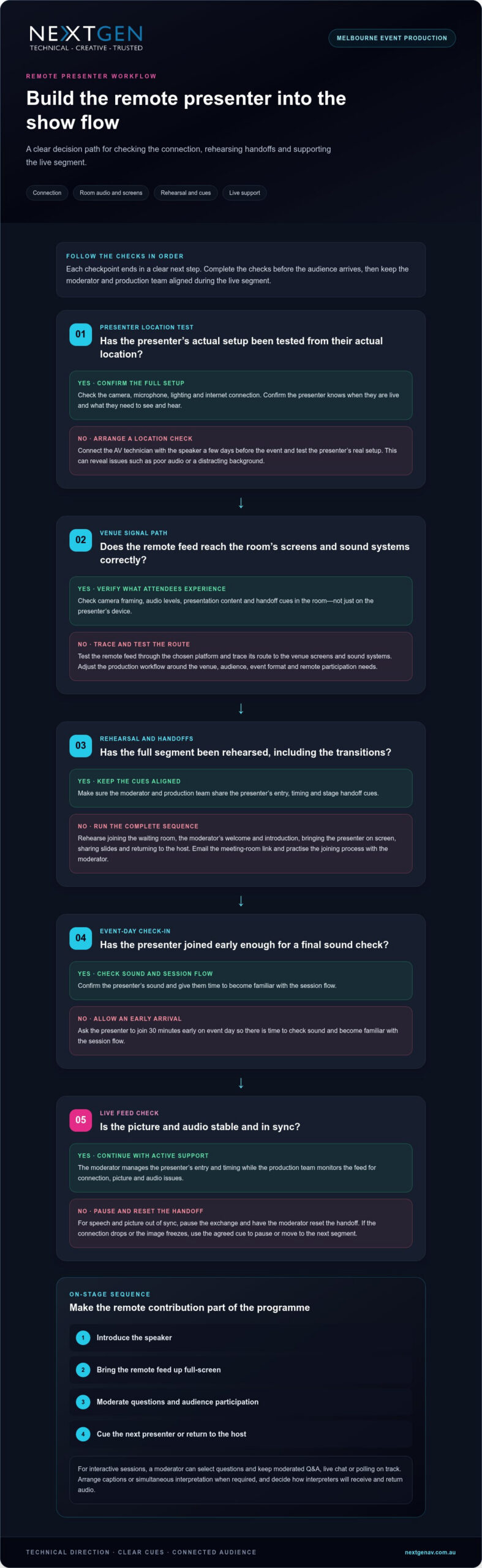
Test the presenter’s actual setup from their actual location, including their camera, microphone, lighting and internet connection. This reveals issues that a venue-only check can’t catch, such as a distracting background or poor audio. Connect the AV technician with the speaker a few days before the event, then confirm the presenter knows when they’re live and what they need to see and hear.
Pre-event Technical Checks
Before the event, test the remote feed through the chosen platform and trace its route to the room’s screens and sound systems. Confirm camera framing, audio levels, presentation content and handoff cues. Plan the venue, audience, event format, remote participation needs and preferred platform together before designing the production system.
A live webinar needs active technical operation, not just a meeting link. Assign a moderator to manage the presenter’s entry and timing, while the production team monitors for a dropped connection, frozen image or audio desynchronisation. Treat the remote feed as a production dependency, with a clear cue for pausing or moving to the next segment if it fails.
For a recording, tell the presenter in advance whether the session will be recorded, why it will be used, who can access it and how it will be shared. Obtain consent and limit access to authorised people. In Australia, consider privacy and data handling when recordings identify a person or capture personal information.
Across Melbourne, specialist event-production companies like NextGen AV with virtual and hybrid event capability coordinate remote feeds with in-room audio, screens and live production. Look for an integrated workflow that includes presenter testing, technical direction and support during sessions, rather than treating the connection as a standalone webinar.
How do you make a remote presenter feel integrated on stage?
Build the presenter’s connection, audio and stage cues into the running order. A clear workflow helps speakers engage with the room instead of simply appearing on screen.
Audio, Internet and Workspace Setup
Ask the presenter to use a wired internet connection where possible, along with headphones with a built-in microphone. If Wi-Fi is needed, choose the strongest signal in a quiet, well-lit room. Position the camera at eye level and frame the head and shoulders. Close windows and silence distracting devices to keep speech clear.
Integration Beyond a Video Call
A simple video call puts a speaker on screen; event integration connects their segment to the stage, audience and show cues. Plan the sequence: introduce the speaker, bring their feed up full-screen, manage questions, then cue the next presenter. A moderator can relay audience questions while the remote speaker sees the room and reads its reactions.
Make the remote feed part of the production mix, with a deliberate screen layout and audio route. This gives the audience a clear view and helps the presenter feel included. For interactive sessions, use moderated Q&A, live chat or polling, with a moderator selecting questions and keeping the exchange on track.
Managing Latency and Technical Failures
To limit audio feedback, avoid sending the room’s amplified sound back through the remote microphone. Coordinate mute cues and audio routing between the presenter and venue team. If speech and picture drift out of sync, pause the exchange and have the moderator reset the handoff instead of letting confusing audio continue.
Plan accessibility before the session: arrange captions or simultaneous interpretation when required, and decide how interpreters will receive and return audio. Congress Australia describes an event using interpretation and captioning for 9 languages, and provided seven simultaneous interpretation channels for the ASEAN – Australia Special Summit. Recording can support replay, training or future marketing; explain its purpose and obtain the presenter’s consent before recording.
Remote presenter testing, rehearsals and live event support
A rehearsal makes the presenter’s connection a planned part of the running order. Test the joining process, platform and stage handoffs before the live audience arrives.
Presenter Joining and Moderator Rehearsals
Send the meeting-room link by email and rehearse the presenter’s entry into the waiting room with the moderator. The moderator should practise welcoming the speaker, confirming they’re ready and cueing their introduction. Ask the presenter to join 30 minutes early on event day, allowing time to check their sound and become familiar with the session flow.
Platforms and AV Equipment
Microsoft Teams, Zoom, YouTube, Vimeo, Facebook Live and custom streaming platforms can carry remote sessions. The production setup may include cameras, streaming infrastructure, audio routing and systems to manage presentation content. Select the platform around the audience and event format, then test how its feed reaches the venue screen and sound systems. That lets technical operators monitor the picture and audio together.
Connection and Pre-event Testing
Connect the presenter using the event’s chosen platform, then test their actual camera, microphone and presentation content. Run the full segment, including the host’s introduction, the presenter’s speaking cues and the handoff back to the stage. Check the streaming feed in the room, not just on the presenter’s device, so operators can assess what attendees will see and hear.
Include transitions in the technical rehearsal. Practise bringing the presenter on screen, sharing slides and returning to the host; clear cues prevent dead air between speakers. The moderator and production team should agree on a pause signal if the feed freezes or drops.
During live streaming, assign an operator to monitor the connection, picture and audio while the moderator manages the speaker. If a technical failure interrupts the segment, the host can hold the room and follow the agreed running-order response. This coordinated support helps keep the session clear for attendees in Australia and online.
Remote and virtual speakers for hybrid conferences
A hybrid conference serves people in the room and participants joining virtually, so plan both experiences together. Choose a format that suits the meeting’s purpose, the speaker’s role and how each audience will participate.
For an investor relations event, a remote executive can address a Melbourne audience while other stakeholders join online. Set the speaking order, screen layout and question process in advance. Keep slides legible on smaller devices, and show the speaker clearly in the venue so their contribution feels connected to the meeting.
Hybrid formats can include a live in-room conference with remote speakers, a streamed stage programme or sessions designed for both audiences. Match the format to the content: a presentation may need a clear visual feed and slides, while a panel needs orderly turn-taking and a way for online participants to contribute. The production plan should coordinate camera coverage, audio, presentation management and streaming.
Moderated Q&A gives both audiences a way into the discussion. A moderator can collect questions from the room and online channels, group similar topics and direct them to the speaker. Explain how attendees can submit questions before the session begins, and give the moderator a clear view of the remote speaker and running order.
Online access can extend an organisation’s audience beyond those able to attend in person. Registration, passwords or private access links can control entry to a stream. To connect locations visually, show the remote speaker full-screen while they speak, then return to slides or a panel view as the programme moves on. These cues help remote and in-room participants follow the same conversation.
NextGen AV’s virtual and hybrid event solutions can bring the stage, speakers and streaming workflow together for conferences and investor events. Plan your hybrid event production around the experience you want both audiences to share.
NextGen AV: LED Video Walls
NextGen AV integrates remote presenters into the room with LED Video Walls planned around clear sightlines and the stage design. A well-framed presenter feed helps in-person attendees follow the conversation, while coordinated Professional Audio Systems keep speech clear across the venue.
For a hybrid conference or product launch, NextGen AV can coordinate these elements with Lighting Design and Equipment, Staging and Rigging, and technical production planning. The aim is a considered experience where the remote speaker’s image, audio and stage cues support the programme instead of feeling like separate elements.
If you’re planning a Melbourne event with remote speakers, contact NextGen AV to discuss your production requirements.
Design the next event around connection
Before finalising the running order, decide what the remote presenter should contribute to your event. A keynote, live product announcement and panel discussion each call for a different rhythm, visual treatment and relationship with the room. Shape the production around that purpose so the technology supports the message rather than becoming the focus.
That creative decision also gives your event team a clear brief: what the audience should see, how the speaker joins the conversation and what the moment needs to achieve. Strong remote presenter integration for events is more than putting a feed on screen. It makes distance feel intentional and gives the speaker a meaningful role in the experience.
For a Melbourne event, NextGen AV can help translate that vision into a coordinated production. Contact NextGen AV about your event to discuss the experience you want to create. Your next event can bring every speaker into the story.
Frequently Asked Questions
Can presenters join from different locations?
Yes. Speakers in different cities or countries can join the same event programme remotely, with each appearance scheduled into the running order. Supported platforms include Events Air, Cvent, YouTube Studio, Zoom, Microsoft Teams, Bettercast. For a Melbourne conference with interstate panellists, a moderator can coordinate each speaker’s turn while the production team switches between their feeds.
Can remote attendees participate in Q&A?
Yes. Remote attendees can submit questions through the event’s chosen participation channel, while a moderator selects and directs them to the speaker. For a product briefing, the moderator can group questions on the same topic and read them aloud, giving online contributors a voice alongside people in the room. Explain the process before the session starts.
How do you ensure a reliable connection for a remote presenter?
Match the presenter’s connection to the selected platform and planned video quality, then assess upload stability under realistic working conditions. Reduce competing network activity during the presentation, such as large file uploads. An independent backup connection, such as mobile data, can provide another route if the primary service fails. Test the switch so the team knows how to recover.
What is remote presenter integration for events?
Remote presenter integration for events is the planned connection between an off-site speaker and the live programme. It brings the presenter’s contribution into the event’s visual, audio and session flow, rather than treating it as a separate call. For example, a virtual panellist can join a discussion with an in-room chair and remote participants.
What internet bandwidth and backup connectivity are needed for remote presentations?
Bandwidth needs depend on the platform’s requirements, video quality, audio, screen sharing and other activity on the presenter’s network. Follow the platform’s published guidance, then test the actual connection with the presenter’s camera and presentation running. Plan an independent backup route, such as mobile data, based on local coverage and the presenter’s setup, and rehearse the switch.
What if the biggest risk to your live event isn’t the equipment, but how well it’s planned and operated? Choosing broadcast av equipment hire melbourne involves more than selecting cameras, screens or sound systems. Audio dropouts, unclear visuals and missed cues can disrupt the programme and distract both in-person and remote audiences.
Reliable equipment matters, but a production partner also needs to coordinate the technical details behind the scenes. A clear brief, careful planning and live technical direction help keep each part of the event working together, so you can focus on your speakers, guests and message.
This guide explains how to define your AV requirements, compare equipment-only hire with managed production support, and assess a partner’s approach to setup and live delivery. You’ll also learn what to discuss when planning a hybrid event. Melbourne-based NextGen AV offers professional audio, LED video walls, virtual and hybrid event solutions, staging and technical direction to help manage event production.
Key Takeaways
- Match your AV brief to the event format, content, venue and audience rather than relying on a standard equipment checklist.
- Consider how sound systems, displays, lighting and staging work together, and clarify who will manage the audience sound mix.
- When comparing broadcast av equipment hire melbourne partners, ask who plans the technical setup, coordinates the crew, operates the production and manages pack-down.
- Prepare a stronger brief by sharing your event objectives, programme needs, room plans, access information and venue technical requirements.
- Consider how a Melbourne-based partner and its ability to deliver events across Australia fit your production needs.
Broadcast AV equipment hire in Melbourne: what does your event actually need?
Broadcast AV equipment hire in Melbourne means planning event technology around the programme, venue and audience, then coordinating its setup and operation. It isn’t a fixed package or a standard checklist. The right mix of professional audio systems, LED video walls, lighting, staging and technical support depends on what you’re presenting, where the event is happening and how audiences will take part.
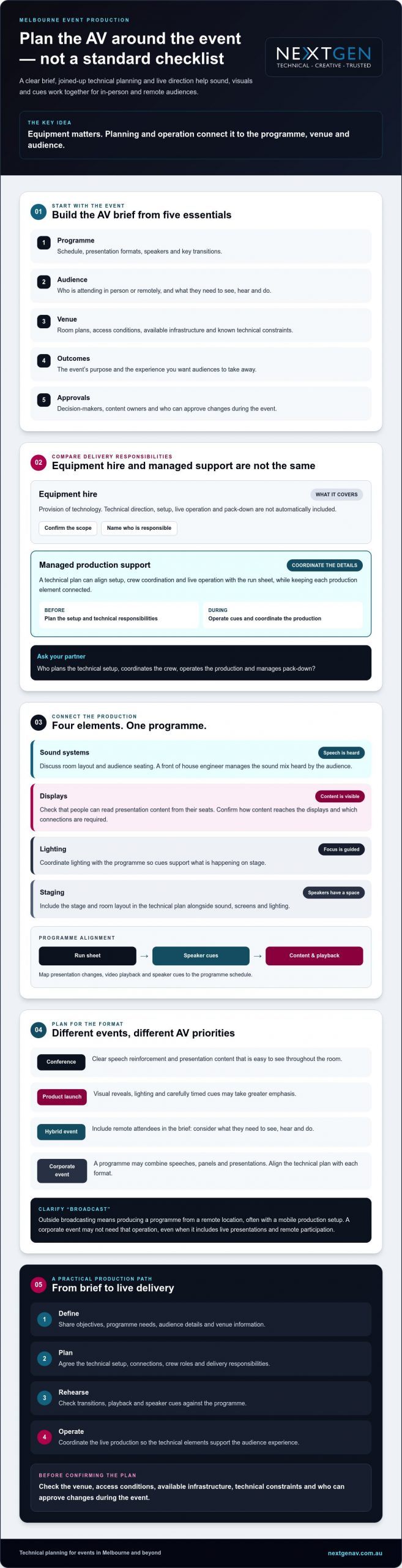
The word “broadcast” can mean different things. Outside broadcasting (OB) describes producing a programme from a remote location, often with a mobile production setup. A corporate event may not require that kind of broadcast operation, but it may still need coordinated live presentations and remote participation. Clarify what “broadcast” means for your event before deciding which technology and crew roles to discuss.
Equipment hire covers the provision of technology. It doesn’t automatically include technical direction, setup, live operation or pack-down. Confirm which parts of delivery your partner will manage and who is responsible for coordinating the technical plan. Clear responsibilities help the production team align each element with the run sheet, so people can hear speakers, follow content and participate without distraction.
Which event formats call for broadcast AV support?
A conference may need clear speech reinforcement and presentation content that’s easy to see throughout the room. A product launch may place greater emphasis on visual reveals, lighting and carefully timed cues. A corporate event could combine speeches, panels and presentations. A hybrid programme adds remote attendees to the brief, so consider what they need to see, hear and do. Your answers help define the equipment and crew roles to discuss.
What should a broadcast AV brief include?
Give your production partner enough detail to shape a plan around the event. Include:
- Programme: Schedule, presentation formats, speakers and key transitions.
- Audience: Who’s attending in person or remotely, and what they need to see, hear and do.
- Venue: Room plans, access conditions, available infrastructure and known technical constraints.
- Outcomes: The event’s purpose and the experience you want audiences to take away.
- Approvals: Decision-makers, content owners and who can approve changes during the event.
A precise brief gives your technical partner a reliable starting point for planning and operation. It also helps identify gaps early, so the production can support the programme and keep the audience experience in focus.
How Melbourne broadcast AV production brings sound, screens and live content together
A polished event feels like one continuous experience, not separate audio, screen and lighting elements competing for attention. Sound systems carry speech, displays make presentation content visible, lighting guides focus, and staging gives speakers a defined space. The technical plan connects these elements to the run sheet, so each cue supports the programme.
A front of house engineer manages the sound mix heard by the audience, adjusting it to suit the room and what’s happening on stage. The production team also needs to coordinate presentation files, playback and speaker cues. Ask your provider to explain the proposed signal flow, how content reaches the displays, and which equipment and connections are required. Confirm that the proposed setup suits your event rather than assuming it supports every format.
For broader planning context, explore this Melbourne AV hire and event production guide. The Australian Government’s event-production competency also identifies technical services such as audio-visual, lighting, sound and staging as areas production teams may need to coordinate. Its outline of national standards for event production offers context for discussing responsibilities with a supplier.
How do sound and visuals support the programme?
Room layout shapes both sound and sightlines. Discuss where the audience will sit, where speakers will present and whether people can hear speech and read content from their seats. Then map presentation changes, video playback and speaker cues to the programme schedule. A technical rehearsal lets the team check transitions, confirm content appears as intended and address issues before attendees arrive.
When should LED screens or hybrid elements be considered?
Consider LED screens when the room, viewing distances or content call for a display plan beyond a single presentation surface. Base the choice on the venue and material, not a specification chosen in isolation. For practical display-planning considerations, see the LED video wall planning guide.
If remote participants will join, plan their experience alongside the in-room programme. Confirm what content they need to follow and how their participation fits the event flow, then discuss the technical requirements with your production team. The hybrid event services guide can help you frame that conversation. For broadcast av equipment hire melbourne, a joined-up plan helps sound, visuals and live content serve the same audience experience. Explore event production support as you shape the technical brief.
How to compare broadcast AV hire partners in Melbourne
For broadcast av equipment hire melbourne, compare more than equipment lists. Look for a partner who asks about your programme, venue and audience, then explains how the technical plan will support them. You should also know who is responsible for each part of delivery and how updates or changes will be handled.
Use this framework to compare proposed scopes, then ask for details specific to your event.
| Area | What to clarify |
|---|---|
| Planning | How will the team learn about your programme, audience, venue conditions and technical constraints? |
| Equipment coordination | How will the proposed audio, screens, lighting and staging work together? Ask the supplier to confirm that the specified equipment suits your content and venue. |
| Crew | Which roles are included, and who is your point of contact before and during the event? |
| Live operation | Who runs the technical cues and responds to changes during the programme? |
| Pack-down | Who is responsible for dismantling and removing the supplied production equipment, and how does that fit the venue’s access arrangements? |
Equipment-only hire or managed production?
Equipment-only hire may suit an event team with the expertise and people to plan, install, operate and pack down the system. Managed production can include technical direction and on-site event management, helping coordinate the technical plan with the live programme. Neither approach suits every event. Match the support to your team’s capabilities, the programme’s complexity and the responsibilities you want the supplier to take on. Confirm each responsibility in writing.
What evidence demonstrates reliable technical delivery?
Ask for examples related to your event format, scale and intended audience experience. Find out how the team coordinates sound, visuals, lighting and event cues, and what venue information it needs before finalising the plan. A knowledgeable partner should explain how venue constraints could affect the technical approach.
NextGen AV has over 30 years of industry experience and delivers events throughout Australia. Ask how its experience applies to your venue and production requirements. Discuss your event brief with NextGen AV to clarify the technical direction, equipment coordination and on-site support your programme calls for.
Planning broadcast AV for Melbourne: briefing checklist
A clear brief gives your production team the information to shape technical delivery around the event, venue and audience. For broadcast av equipment hire melbourne, work through these steps before confirming the production plan:
- Set the event objectives. Define what the event needs to achieve and the experience you want attendees to have.
- Describe the audience. Note who will attend in person and remotely, and what they need to see, hear or take part in.
- Share the programme. Provide the schedule, presentation formats, speaker details, playback content and key cues.
- Provide venue information. Share the location, room plans, access arrangements, available infrastructure and any technical documents supplied by the venue.
- Confirm responsibilities. Identify decision-makers, content owners, approval processes and who will communicate changes to the production team.
- Agree the delivery plan. Confirm rehearsal arrangements, communication channels, setup, live operation and pack-down responsibilities.
For wider planning considerations, see the full-service event production guide. It can help you consider how technical delivery fits within the broader event plan.
What venue information should you prepare?
Send the production team the room layout, venue access information and any available technical documentation, then introduce the relevant venue contact. Ask how the team will coordinate with the venue and what additional details it needs. Access arrangements and technical conditions vary, so confirm venue-specific requirements directly. Early coordination can identify constraints that may affect the proposed setup.
How should rehearsals and event-day roles be organised?
Agree on rehearsal timing and what presenters need to do, including when presentation content must be handed over and who approves cues or changes. Name the person who will relay programme updates to technicians during the event, and establish a clear communication channel. Document who is responsible for setup, live operation and pack-down, so there’s no uncertainty about handovers or event-day decisions.
With a shared brief and agreed responsibilities, your production team can focus on delivery while you concentrate on the programme. Discuss your event requirements with NextGen AV to start shaping a technical plan around your venue and audience.
Choose a Melbourne broadcast AV partner to manage the whole experience
A confident supplier decision comes from more than a suitable equipment list. Look for a team that understands your brief, translates it into a clear technical plan, explains who will deliver each part and coordinates with your venue. When planning broadcast av equipment hire melbourne, this joined-up approach helps you assess whether the proposed support fits your event, from preparation through live operation.
NextGen AV is based in Melbourne and delivers events throughout Australia. Its event production services include professional audio, LED video walls, lighting design and equipment, staging and rigging, virtual and hybrid event solutions, and technical direction. Discuss how those services could support your programme rather than assuming every event needs the same setup or crew.
What does an end-to-end production partner contribute?
Technical direction connects your creative objectives to practical production decisions. It helps shape how audio, visuals, lighting and staging support the programme, while clarifying how the team will coordinate cues and venue requirements. With roles and responsibilities agreed in advance, presenters and organisers have a clear point of contact for technical questions and changes. Confirm the scope for your event, including what the production team will plan, set up, operate and pack down.
That clarity can reduce uncertainty during preparation, but each venue, programme and audience brings different requirements. A capable partner should explain its approach and identify what still needs confirmation.
What are the next steps for your Melbourne event?
Prepare a concise overview before speaking with a production team. Include:
- Your event date and venue, plus any room plans or venue technical information available.
- The event format, programme outline and key presentation or playback requirements.
- Audience needs, including whether people will participate remotely.
- Known technical constraints, outstanding venue questions and the decisions you need the supplier to help resolve.
Use the first discussion to confirm responsibilities, venue coordination, technical direction and the level of on-site support required. Share your brief with NextGen AV to discuss your event and explore a production plan shaped around your Melbourne venue, programme and audience.
Set your Melbourne event up for confident delivery
The right broadcast AV equipment hire melbourne partner starts with your event brief, then shapes the technical plan around the programme, venue and audience. Confirm who will coordinate equipment, crew, live operation and venue communication, so responsibilities are clear before event day.
NextGen AV brings over 30 years of industry experience and delivers events throughout Australia. Its technical direction and on-site event management can support a coordinated production using professional audio, LED video walls, lighting, staging and virtual or hybrid event solutions. Confirm the scope that fits your event and the support your team needs.
Bring your event date, venue, programme outline and audience requirements to the conversation. Discuss your Melbourne event with the NextGen AV team and take the next step towards a polished event experience.
Frequently Asked Questions
What does broadcast AV equipment hire include for an event?
Broadcast AV equipment hire can include event technology selected to suit your programme, venue and audience, with the level of planning and operation agreed in advance. Depending on the brief, this may involve professional audio systems, LED video walls, lighting, staging or hybrid event solutions. Confirm whether your supplier is providing equipment only or also technical direction, setup, live operation and pack-down, so responsibilities are clear.
Do I need a broadcast AV crew as well as equipment hire?
You need a crew if your event requires people to set up, coordinate or operate the technical production and your own team can’t take on those responsibilities. A conference with timed presentations and multiple cues may benefit from technical direction and on-site event management, while a simpler format may need less support. Ask which crew roles are proposed, what they’ll manage and how their work fits your run sheet.
How do I choose a broadcast AV hire company in Melbourne?
Choose a Melbourne partner that listens to your brief, asks about venue conditions and explains how it will coordinate equipment, crew and live operation. Ask for relevant event experience and a clear breakdown of responsibilities, including setup and pack-down. For broadcast av equipment hire melbourne, a local base can support planning conversations. NextGen AV has over 30 years of industry experience and delivers events throughout Australia.
What information should I provide when requesting broadcast AV hire?
Share your event date, venue, format, programme outline and audience requirements. Include available room plans, venue access information, technical documentation, presentation formats and any remote participation needs. Identify decision-makers, content owners and who will approve changes during the event. If some venue details are unknown, list them as questions to confirm. A clear brief helps the production team recommend a suitable scope and identify what needs follow-up.
Can broadcast AV equipment support a hybrid event?
Yes, AV production can support a hybrid format, but the technical plan should account for both in-room and remote participants. Explain what remote attendees need to see, hear and take part in, then confirm which virtual and hybrid event solutions and production responsibilities are included. Ask the supplier to clarify how the planned setup supports your programme and what information or content your team must provide before the event.
Why consider a Melbourne-based AV production partner?
A Melbourne-based partner can bring local knowledge into planning and coordinate around the conditions of your chosen venue. NextGen AV is based in Melbourne and delivers events throughout Australia. Ask how the team will apply its experience to your room, access arrangements and programme, and confirm the venue-specific plan.
When should I book broadcast AV equipment hire for an event?
Start discussions once you have an event date, venue and programme outline, then confirm availability and planning milestones directly with potential suppliers. The right timing depends on the event’s scope, venue arrangements and production requirements, so there isn’t one booking window that suits every event. Sharing your brief early gives the production team context to assess the technical plan and flag details that need confirmation.
What is the difference between AV equipment hire and event production?
AV equipment hire provides the technology; event production coordinates how the technical elements support and operate within the programme. Depending on the agreed scope, production may include planning, technical direction, setup, live operation and pack-down. NextGen AV provides professional audio systems, LED video walls, lighting design and equipment, staging and rigging, virtual and hybrid event solutions, technical direction and on-site event management. Confirm exactly which services your event requires.
Your high-stakes event isn’t just a presentation; it’s your professional reputation on the line. The difference between a standing ovation and a technical blackout often comes down to a single person you haven’t met yet. You likely understand the mounting pressure of managing multiple vendors while deciphering complex AV jargon. This guide clarifies exactly what is a technical director for events and how they act as the master architect behind your production.
A Technical Director is far more than a senior technician; they are the bridge between your creative ambition and flawless execution. They transform a chaotic list of LED video walls and audio systems into a polished, high-impact experience. By serving as your single point of contact, they absorb the stress of logistics so you can focus on your stakeholders. We will explore how these invisible experts ensure absolute technical certainty for your 2026 events, from staging and rigging to the latest hybrid solutions. It’s time to move past the logistical grind and achieve a result that commands respect.
Key Takeaways
- Master the fundamental definition of what is a technical director for events and how this senior lead acts as the vital translator between your creative vision and the technical crew.
- Distinguish between standard AV management and high-level technical direction to ensure your next project benefits from strategic leadership rather than just equipment hire.
- Explore the pre-production lifecycle; meticulous site inspections across Australian venues identify potential power and rigging constraints months before the doors open.
- Learn how a dedicated director orchestrates complex systems, from LED video walls to professional audio, into a single, seamless experience that impresses every stakeholder.
- Discover the “Invisible Expert” advantage of having a single point of contact who manages multiple vendors; it’s the surest way to eliminate technical failure risk.
Defining the Role: What is a Technical Director for Events?
In the high-pressure world of live production, the difference between a visionary success and a technical disaster often rests on one individual. When asking what is a technical director for events, it’s best to view them as the master architect of the technical lifecycle. They don’t just manage equipment; they orchestrate the entire technical ecosystem from the first site visit to the final pack-down. In the Australian market, we refer to this role as the “Invisible Expert,” the person who ensures every signal flow is perfect so that the audience only sees the magic on stage.
A Technical Director acts as the senior lead, synchronising LED video walls, professional audio systems, lighting design, and complex rigging into one unified performance. They are the ultimate safeguard against live-event failure, providing the technical certainty that allows planners to breathe easy. By overseeing every department, they ensure that the technology serves the message rather than distracting from it. Their presence transforms a collection of gear into a high-stakes, cinematic experience.
The Bridge Between Creative and Technical
Creative directors often speak in the language of “feel” and “impact,” using mood boards to define an atmosphere. A Technical Director is the primary translator who converts these abstract concepts into a precise technical equipment list. They ensure that your artistic intent is never compromised by hardware limitations. Whether it is finding innovative ways to fit a massive LED display into a heritage-listed ballroom or ensuring the sound carries perfectly in a cavernous exhibition centre, they find the solution. This mastery ensures the final result looks exactly as you imagined, only better.
The “Single Point of Truth” for Your Event
Managing multiple vendors can lead to “finger-pointing” when a signal drops or a light flickers. A Technical Director eliminates this friction by serving as the single point of truth for all technical departments. They take full accountability for the master technical run-sheet, coordinating the timing of every cue to the second. For event planners, this means a significant reduction in pre-show anxiety. Instead of chasing four different department heads, you have one elite partner who understands the entire machine. This streamlined communication creates a sense of momentum and absolute confidence, allowing you to focus on your stakeholders while the “Invisible Expert” handles the engine room.
Core Responsibilities: From Pre-Production to the Final Pack-Down
A successful production is won or lost in the weeks preceding the event. When considering what is a technical director for events, many planners overlook the extensive pre-production phase. This journey begins with the director conducting rigorous site inspections at Melbourne venues to uncover hidden constraints. They assess everything from floor load capacities to the specific power requirements of your equipment. This proactive approach ensures that the creative vision is physically possible within the chosen space, preventing costly last-minute adjustments.
The director serves as the technical architect, translating your concepts into actionable blueprints. They develop detailed floor plans and signal flow diagrams, which are essential for integrating high-resolution LED video walls with complex lighting rigs. Beyond the visuals, they organise the technical budget with precision, ensuring every dollar spent on staging and rigging contributes to a high-impact result. They also act as your liaison with venue management, ensuring all installations comply with Australian safety and electrical standards. This meticulous planning eliminates the “jargon gap” between you and the venue’s house technicians.
On-Site Management and Show Calling
Once the event moves on-site, the director shifts into the role of the “Confident Orchestrator.” They lead the bump-in, ensuring every piece of professional audio gear is positioned correctly and every cable is neatly dressed and labelled. This level of detail prevents technical glitches and maintains a professional aesthetic for your brand. During technical rehearsals, they guide presenters through sound checks, calming nerves and perfecting the delivery environment. Their presence ensures that the technical team is proactive rather than reactive.
The true mastery of what is a technical director for events is most visible during the “show call.” This is where they direct every cue, synchronising lighting, audio, and video transitions with cinematic precision. Their voice in the headsets is the steady rhythm that keeps the entire crew in perfect harmony. The responsibility doesn’t end when the applause fades. The director oversees the safe and efficient pack-down, ensuring the venue is returned in pristine condition and all assets are accounted for. This end-to-end stewardship is why many leading brands seek professional technical direction to safeguard their most important moments. It turns a stressful logistical exercise into a triumphant, polished success.
Technical Director vs. AV Manager: Understanding the Difference
One manages the tools; the other orchestrates the experience. While these titles are often used interchangeably in casual conversation, the distinction is critical for your budget and your peace of mind. An AV Manager typically focuses on the tactical operation of a specific set of equipment or a small, single-department crew. In contrast, understanding what is a technical director for events involves looking at high-level strategy and multi-departmental leadership. The Technical Director doesn’t just ensure the gear works; they design the entire technical environment to ensure every department moves in lockstep.
Think of the manager as the lead violinist and the Technical Director as the conductor. While a boardroom presentation might only require a manager to monitor a slide deck, a high-stakes gala dinner demands a TD to synchronise the lighting, audio, and video cues into a seamless performance. The TD takes responsibility for the “big picture” risk assessment, ensuring that the creative vision translates into a safe, functional reality. They are the engine driving the success, allowing the client to take centre stage without worry.
When Should You Upgrade to a Technical Director?
As your event scales, you hit a complexity threshold where standard AV management is no longer sufficient. This is particularly true for corporate event production Melbourne or Melbourne roadshows where multiple vendors must integrate perfectly. If your project involves hybrid streaming, complex LED mapping, or high-level stakeholder presentations, a TD is essential. They add immense value by managing the intricate data and signal paths required for modern virtual solutions, ensuring the remote audience has the same prestige experience as those in the room. For productions that demand total ownership of every technical element, exploring a model of full service event production is the most effective way to eliminate vendor friction and guarantee a flawless result.
Risk Mitigation and The “Plan B” Specialist
A Technical Director is your ultimate insurance policy against the unexpected. They don’t just hope for the best; they build redundancies into every mission-critical system. If a primary signal fails, the TD is trained to troubleshoot and switch to a backup in real-time, often without the audience or the client ever noticing a flicker. This “Plan B” specialisation is what separates elite productions from amateur efforts. By identifying potential failure points during the planning phase, they provide a level of technical certainty that allows you to take centre stage with absolute confidence. This proactive mastery ensures that technical hitches never become public failures.
Why High-Stakes Events Demand Professional Technical Direction
High-impact visuals and crystal-clear audio are no longer luxury additions for major Australian brands. They are the baseline for professional communication. When asking what is a technical director for events, the answer lies in the protection of your brand’s prestige. A TD ensures your professional sound system hire is not just installed, but meticulously tuned to the specific acoustics of the room. They handle the complex logistics of stage and lighting hire Melbourne, managing rigging plots and electrical loads that would otherwise overwhelm a generalist planner.
The primary value of a Technical Director is the gift of focus. While they manage the signal paths and crew schedules, you are free to engage with your guests and stakeholders. This partnership alleviates the inherent stress of high-stakes planning by projecting absolute competence. They navigate the specific challenges of Melbourne venues, from the narrow loading docks of the CBD to the strict heritage requirements of historic ballrooms, ensuring no logistical hurdle slows your momentum. Their mastery ensures that the technical elements feel like a natural extension of your brand story.
Protecting Your Brand Reputation
Technical glitches can quickly overshadow the most successful product launch or AGM. The TD ensures that every transition is polished and every visual is sharp, maintaining the “prestige” of the event through flawless execution. This is especially vital for national roadshows where consistency across multiple Australian cities is non-negotiable. They act as the invisible shield, ensuring that the technology enhances your message rather than distracting from it. By maintaining a high standard of front-of-house excellence, they allow your brand to shine without the shadow of technical failure. When evaluating the best event production companies Melbourne has available, look for those who embed a dedicated Technical Director into every production to guarantee this level of brand protection.
Budget Optimisation and Efficiency
A seasoned Technical Director provides a significant financial ROI by identifying unnecessary equipment on vendor quotes. They understand the nuances of event production costs Australia and can help you maximise your impact without overspending. By streamlining the labour schedule, they also help you avoid expensive Melbourne weekend penalties and overtime rates. This strategic oversight ensures that your budget is spent on high-impact experiences rather than logistical waste. They act as your advocate, ensuring you only pay for the solutions that truly elevate your event.
If you want to secure your next production with a dedicated expert, enquire about our technical direction services today.
Partnering with NextGen AV for Seamless Technical Execution
Achieving a flawless production requires more than just high-end hardware; it demands a navigator who understands the “why” behind every signal path. NextGen AV provides seasoned Technical Directors who bring over 30 years of industry experience to your project. When you choose to work with our team, you aren’t just hiring a crew. You are gaining a partner who defines what is a technical director for events through action, precision, and a deep commitment to your brand’s success. Our “Invisible Experts” integrate seamlessly with your planning team, absorbing the technical complexity so you can focus on your guests.
We specialise in managing the entire technical ecosystem, from high-resolution LED video walls to bespoke lighting design and professional audio. This holistic approach ensures that every department moves in perfect synchronisation. You will experience the “quiet power” of a production where every cue is met with absolute precision and technical hitches are eliminated before they ever reach the stage. Our goal is to move you past the logistical grind and into a space where you can celebrate the prestige of a truly polished result.
The NextGen AV Difference in Melbourne
Our team possesses an intimate knowledge of Melbourne’s leading event spaces and their specific technical quirks. Whether you are planning a gala in a historic ballroom or a high-tech conference in a modern exhibition centre, we understand the local power constraints, rigging points, and loading dock requirements. This local mastery allows us to proactively solve challenges that often catch interstate vendors off guard. We maintain a premium inventory of high-end AV hardware, all managed by expert TDs who follow our “Confident Orchestrator” model. This ensures your equipment isn’t just delivered; it’s engineered into a high-impact experience tailored to your specific venue.
Get Started with Your Technical Consultation
Engaging a NextGen AV Technical Director for your next project is a straightforward, collaborative process. Our journey begins with a comprehensive pre-production consultation where we listen to your vision and identify the technical requirements needed to bring it to life. We move quickly from identifying challenges to presenting polished solutions, creating a sense of momentum that carries through to the final pack-down. This methodical approach provides the technical certainty required for high-stakes corporate environments and national roadshows. If you are ready to elevate your production and secure a single point of contact for all your AV logistics, we are here to lead the way.
Enquire about Technical Direction for your next Melbourne event and discover the difference that elite technical leadership makes to your brand reputation.
Elevate Your Production with Technical Certainty
Mastering the technical landscape of a modern event requires more than just high-end gear. It demands a senior lead who can harmonise every signal path and department into a single, high-impact experience. Understanding exactly what is a technical director for events empowers you to move beyond basic equipment hire and into the realm of elite production design. By serving as your single point of truth, these experts eliminate vendor friction and provide the “Plan B” security that high-stakes environments demand.
NextGen AV brings over 30 years of industry mastery to your planning team. We offer Melbourne’s leading high-end AV inventory and are trusted by Australia’s major brands and government bodies to deliver flawless results. Our directors ensure your creative vision is never compromised by hardware limitations or venue constraints. It’s time to stop managing the logistical grind and start focusing on the prestige of your successful event. Secure an Expert Technical Director for Your Next Melbourne Event and experience the quiet power of absolute technical precision. Your reputation deserves nothing less than a perfect execution.
Frequently Asked Questions
Do I need a Technical Director for a small corporate meeting?
Small meetings with basic requirements, such as a single projector and a couple of microphones, typically don’t require this level of oversight. An AV technician or manager is usually sufficient for these tactical tasks. You should consider what is a technical director for events when your production involves multiple departments, complex LED video walls, or high-stakes presentations where failure is not an option.
What is the difference between an Event Producer and a Technical Director?
An Event Producer focuses on the creative narrative, guest experience, and overall project logistics. The Technical Director is the engineering lead who ensures that the producer’s vision is physically and technically achievable. While the producer manages the “what” and the “why,” the TD is responsible for the “how,” overseeing the technical crew and the precision of the hardware execution.
How much does it cost to hire a Technical Director in Australia?
Investment levels for technical direction in Australia vary significantly based on the project’s scale, the length of the pre-production phase, and the complexity of the systems involved. Factors such as site inspections, CAD drawing requirements, and the number of technical departments to be managed will influence the final cost. You should check with a specialist production partner for a tailored quote that reflects your specific event needs.
Can a Technical Director help with hybrid or virtual event streaming?
Yes, a TD is essential for the success of modern hybrid events. They manage the critical signal paths between the physical venue and the digital broadcast platform to ensure a seamless experience for both audiences. By synchronising the in-room audio and visuals with the remote stream, they prevent the lag and quality drops that can undermine a professional virtual production.
At what stage of planning should I involve a Technical Director?
You should involve a Technical Director as early as possible, ideally during the initial concept phase or at least three to six months before the event date. Early engagement allows the TD to conduct venue site inspections and identify potential power or rigging constraints. This proactive approach ensures that your creative designs are technically feasible before you commit to venue contracts or stage builds.
What technical skills should a qualified Event TD possess?
A qualified TD must possess a deep mastery of signal flow engineering, CAD software for technical renders, and multi-disciplinary expertise across audio, lighting, and video systems. Beyond technical knowledge, they need strong leadership and problem-solving skills to manage diverse crews under pressure. Understanding what is a technical director for events means recognising them as both a technical powerhouse and a strategic project manager.
Does the Technical Director bring their own crew or manage the venue’s team?
They can perform either role with equal precision. A TD acts as the “Single Point of Truth” on-site, whether they are leading a dedicated NextGen AV crew or coordinating with venue-supplied technicians. Their primary objective is to ensure that every person on-site, regardless of their employer, adheres to the master technical run-sheet and maintains the highest standards of execution.
How does a Technical Director ensure event safety and compliance?
Safety is a cornerstone of the TD’s responsibilities. They oversee rigging certifications, electrical testing and tagging, and ensure all technical installations comply with Australian safety standards and venue-specific regulations. By performing rigorous risk assessments and managing the technical load requirements, they protect your guests, the crew, and your professional reputation from the risks associated with live productions.
