
A conference succeeds through more than equipment alone. Tech conference AV production in Melbourne brings together pre-event planning, technical direction, professional audio, presentation displays, staging, lighting and on-site operation, so every element supports the programme and audience experience. For hybrid sessions, the plan also needs to connect the room with remote participants.
For a corporate technology conference, choosing microphones and screens is only part of the brief. Room size and acoustics, presentation formats, speaker needs and the event schedule all shape the production plan. Clear coordination helps keep transitions and technical cues on track.
This guide explains how to match audio and presentation equipment to your conference, what wider event support can involve, and which project details shape a quote. You’ll also see how a clear brief helps move the quoting process forward, so you can plan with confidence and focus on the event itself.
Key Takeaways
- Match microphone choices to each speaker’s delivery style and the room’s acoustics to help every attendee hear clearly.
- Choose projectors or LED displays around the room layout and presentation content, then plan how sources will switch between speakers.
- Technical support can extend beyond equipment operation to planning cues, coordinating the run sheet and managing live transitions.
- A clear event brief helps shape a quote around the venue, production requirements, programme and support needed.
- Bring audio, displays, lighting and staging together under technical direction for a more cohesive corporate conference experience.
Conference audio equipment and microphone options
Choose microphones to suit the programme, presenters and room layout. A keynote speaker moving across the stage may prefer a headset or lapel microphone, while a panel may benefit from handheld microphones passed between speakers. Each option affects how naturally people can present and interact.
Room acoustics matter as much as microphone style. Hard surfaces can create reflections, while a wide room may need carefully positioned speakers for clear sound throughout. Match the sound system to the room, audience seating and stage position, then balance the mix from the audience area. A front-of-house engineer manages the sound mix listeners hear.
Build practical contingencies into the running plan. Keep a charged backup microphone close by, and test each microphone before presenters take the stage. A microphone failure in front of three hundred people can disrupt a session and break its momentum. A ready backup helps the operator respond quickly.
For a panel, assign each speaker a microphone and decide how audience questions will reach the stage. For a keynote, test the presenter’s movement and speaking level. These checks help the audio team set consistent levels and avoid abrupt changes between speakers. If the programme includes audience questions, plan how a microphone will reach attendees.
Audio is part of the wider visual experience. Lighting should keep presenters visible without washing out projected content, while staging should give speakers clear microphone access and room to move. Coordinating audio, lighting and video production around the run sheet helps technical cues land smoothly, from opening remarks to the final session.
For virtual or hybrid sessions, plan how room audio will reach remote participants. A microphone that sounds clear in the venue may not capture every panel voice for an online audience. Include the streaming audio path in rehearsal, and test transitions between presentations, discussion and audience questions.
When comparing Melbourne AV production companies, consider relevant conference experience, the scope of audio visual production and whether technical operation is included. Read reviews for specific evidence of communication, coordination and live-event problem-solving, rather than relying on star ratings alone.
What permits, safety rules or venue requirements apply to conference AV production in Melbourne? Venue technical documents set out requirements for access, equipment placement, power, staging and rigging. Use those documents to shape the production plan, and coordinate any proposed setup with the venue before event day.
Before confirming equipment, map each session’s speakers, microphones, playback sources and audience interactions. Then test the full setup in the room, with lighting and visual cues running in sequence. This keeps the audio plan connected to the event experience, not just the equipment list.
Projectors, displays and presentation switching
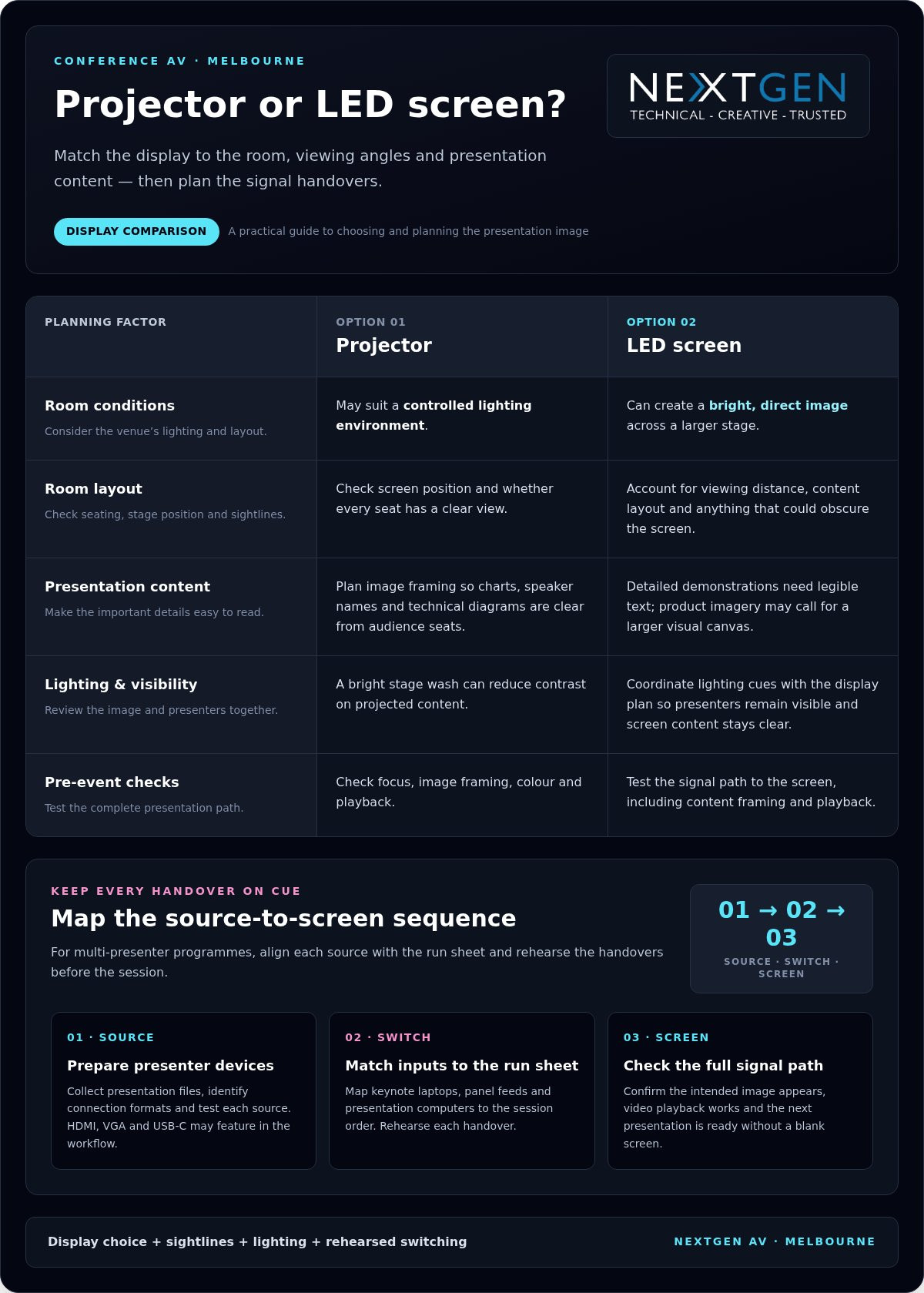
Choose a display to suit the room, viewing angles and presentation content. A projector may suit a controlled lighting environment, while LED screens can create a bright, direct image across a larger stage. The right choice helps delegates read charts, speaker names and technical diagrams from their seats.
Start with the venue plan. Note the screen position, audience layout, stage depth and any sightline obstructions. A screen hidden behind a lectern or stage feature weakens even a well-prepared presentation. In a long, wide room, consider whether one central display gives every seat a clear view or whether additional screens are needed.
Let the content guide the visual design. Detailed software demonstrations need legible text and clear interface views; product imagery may call for a larger, more immersive visual canvas. LED design should also account for viewing distance and content layout. Keep essential information away from the edges, where stage elements or presenter movement may obscure it.
Multi-presenter programmes need a reliable way to change sources. Presentation switchers can move between video sources during conference sessions, such as a keynote laptop, a panel discussion feed and a presentation computer. Map each source to the run sheet, then rehearse every handover so the right image appears with each speaker.
Prepare for different presenter devices by collecting presentation files and identifying connection formats in advance. HDMI, VGA and USB-C may all feature in a conference workflow, so plan suitable interfaces and test each source. Keep slide decks in the intended format, check embedded video playback, and confirm that video audio reaches the room sound system.
During setup, test the complete signal path from source to screen. Check focus, image framing, colour, playback and the return to the next presentation. A video processor can scale content, switch inputs and map signals to LED tiles. The operator can then manage transitions without leaving the audience looking at a desktop or blank screen.
Lighting affects screen visibility too. A bright stage wash can reduce contrast on projected content, while a dark stage can make presenters difficult to see. Coordinate lighting cues with the display plan, then review both from audience seating. For a virtual or hybrid conference, include the camera view so remote participants see a balanced image.
Use a source-by-source checklist to align presentation files, connections, switching cues and screen content. For an integrated conference display plan, review conference AV production options alongside the venue layout and programme.
Do you offer event support beyond AV equipment and operation?
Yes. On-site technical support can cover setup, cue coordination, live operation and troubleshooting. For a technology conference in Melbourne, choose a venue whose room, network access and technical facilities suit the programme and production plan.
On-site technical crew
An on-site technical crew coordinates the AV setup with the event schedule, presenters and venue team. At a conference with keynote presentations and a panel, operators can manage presentation cues, microphones, lighting changes and speaker handovers. This keeps technical decisions close to the stage, where timing and audience needs are clear.
Before booking support, map the crew’s responsibilities to the run sheet. Identify who calls each cue, manages presentation sources and responds to a fault. For streaming sessions, include an operator responsible for the stream alongside the room’s live production team. Clear roles help attendees in the room and online follow the same programme.
Technical rehearsals and backups
A rehearsal gives speakers and operators a chance to test the actual sequence, not just individual equipment. Run presentations, video playback, microphone handovers, lighting cues and streaming transitions in programme order. Melbourne conference organisers are advised to hold a full technical rehearsal at least 60 minutes before the first attendee arrives, allowing time to resolve issues before doors open.
Plan contingencies for power and essential equipment. AV planning can include backup batteries or UPS units to maintain operation during unexpected power loss. Also prepare spare presentation files and a backup playback source when the programme depends on video. Test the backup path during rehearsal so operators know how to switch without interrupting the session.
Setup and live support
During setup, technicians position equipment, connect signal paths and test each system in the room. A practical sequence is to check power and connections, test microphones and playback, then confirm lighting and streaming feeds. This can catch issues such as a laptop sending the wrong display output before presenters arrive and attendees take their seats.
Live support continues as the programme changes. An operator can cue the next presentation, adjust levels and respond to a source failure while the host maintains the session. For a hybrid panel, the crew should check that remote speakers can be heard in the room and audience questions reach the stream. Coordinated checks keep the event moving without distracting from its content.
AV hire costs and quote turnaround
A useful production quote starts with a clear picture of the conference, not a generic equipment list. The proposed setup needs to fit the venue, programme, access arrangements and support required. A single-room presentation and a multi-room conference call for different technical plans, crew coordination and preparation.
Begin planning your Melbourne conference AV production once the event date and venue are confirmed. This gives you time to coordinate venue requirements, session timings and production details before the event schedule is locked in.
Include the event dates, venue, room access times, session schedule and number of spaces in your brief. Describe each session format, such as a keynote, panel, demonstration or audience discussion. Then outline the required audio, displays, lighting, staging and on-site technical support. A keynote followed by a panel, for example, needs distinct operator cues and speaker transitions.
- Programme: Share session formats, presentation changes, video playback and audience participation.
- Venue: Provide room plans, access arrangements and relevant technical documents.
- Production: Describe audio, display, lighting, staging and streaming requirements.
- Support: Set out setup, rehearsal, live operation and pack-down needs.
These details help define the technical scope and identify the work needed before, during and after sessions. For a hybrid conference, include remote audience requirements in the brief so the production plan accounts for how presentations and speakers connect with online attendees.
Quote preparation is more straightforward when you provide the schedule, venue information and technical requirements together. Room plans and access details help clarify equipment positions and how the production team can work within the venue’s arrangements. If programme timings are still changing, mark them as provisional and share updates as they become available.
Send one organised brief with the latest event documents, then flag changes such as an added session, a new panel format or an additional room. This gives the production team a consistent reference for updating the proposed scope and keeps organisers, speakers and technical operators aligned as the event develops.
For a Melbourne conference, include venue-specific access and setup instructions from the outset. Note whether the programme spans multiple days or requires a rehearsal. A well-structured brief connects the technical plan to the conference schedule and gives the production team a clear starting point for preparing a considered quote.
Corporate conference AV production
For a tech conference in Melbourne, look for a corporate event production team that coordinates technical direction, AV operation and programme requirements. Choose a team that plans the conference as one production, rather than treating each screen, microphone and cue as a separate task.
Corporate programmes often move quickly between keynotes, panel discussions, demonstrations and audience questions. Each format brings different audio, visual and staging needs. A product demonstration, for example, may need a clear camera view and screen feed, while a panel requires managed speaker handovers. A unified run sheet connects these elements to the event’s timing.
Strong event production links the initial brief with the room plan, technical setup and live operation. The production team needs to understand the event’s purpose, audience, content and venue. That context shapes decisions such as stage layout, screen placement, lighting cues and the transitions operators prepare before doors open.
- Programme: Map keynotes, panels, demonstrations and breaks to production cues.
- Content: Identify presentations, video playback and live demonstrations.
- Audience: Consider sightlines, room audio and opportunities for questions.
- Delivery: Assign technical roles for setup, rehearsal and live operation.
For a corporate technology event, technical direction keeps production aligned as details change. If a speaker’s presentation order shifts, operators need updated cues and content. If a panel becomes a product demonstration, the team may need to adjust stage positions, screen content or lighting. A clear decision-making process helps manage changes without losing the programme’s polish.
Hybrid events add another production layer. Remote presenters, streamed sessions and in-room questions need coordinated audio and vision. Plan how each speaker joins, how their presentation appears and how questions move between online and in-person audiences. Rehearse those transitions in sequence, rather than testing equipment individually.
When assessing a production team, look for relevant corporate conference experience, clear planning, defined operator roles and support that matches the programme. Reviews can offer useful context when they describe communication, coordination or live-event problem-solving. Choose a team whose process connects technical detail to the experience delegates receive.
For your next Melbourne conference, bring the programme, venue details and production requirements into one conversation. That gives the planning team a foundation for coordinating the technical elements around your event’s objectives. Plan your corporate conference production with a team equipped to manage the moving parts behind the scenes.
NextGen AV: LED Video Walls
NextGen AV brings your conference visuals, sound and stage environment together in a coordinated production. Its LED Video Walls give presentations and brand content a strong visual focus, while Professional Audio Systems help deliver clear sound across the room.
For a product launch or corporate keynote, coordinate the screen content with Lighting Design and Equipment and Staging and Rigging. This joined-up approach helps technical cues, presenter movement and audience sightlines work together, with every detail serving the event programme.
Share your event brief, venue details and schedule to start planning a production shaped around your conference. Contact NextGen AV to discuss your event.
Set your conference in motion
Your production brief is more than a list of technical requirements. It’s a chance to define the impression your conference should leave, from the first welcome to the final session. For tech conference AV production in Melbourne, align the event’s purpose, audience and content with the experience you want to create.
Consider what delegates should notice, understand and remember. A clear creative direction gives the production team a strong foundation for shaping the visual environment and supporting the programme. It also keeps decisions focused as planning moves forward, so technical choices serve the conference rather than distract from it.
NextGen AV can help translate that direction into a considered production plan for your event. Share your conference brief and begin a conversation about the experience you want to create. Discuss your conference with NextGen AV and take the next step towards a polished event.
Frequently Asked Questions
Do you provide AV for conventions as well as corporate events?
Yes, AV production can support conventions as well as corporate events. A convention programme might combine a plenary, breakout sessions and exhibitor presentations, each with distinct technical cues. Share the event format and room use so the production plan reflects how attendees move between sessions. For Melbourne organisers, the venue’s room schedule can help coordinate production requirements across the convention programme.
How Can Hybrid Conference AV Improve Audience Engagement?
Hybrid AV can bring remote and in-person participants into a shared conversation. For example, a moderator can invite questions from online attendees during a panel, then direct questions from the room to the same speakers. Plan how the host will recognise each group and keep discussion moving. A clear participation plan helps remote viewers feel included, rather than simply watching a one-way presentation.
What Multi-Camera Streaming Solutions Are Available?
A multi-camera stream can combine a wide stage view with close shots of presenters or panel members. For a software demonstration, one camera can frame the presenter while the stream carries the relevant presentation content. Camera positions should suit the venue’s sightlines and stage layout. A planned shot sequence helps remote participants follow speaker handovers and discussion without relying on a static view.
What does conference AV hire include?
Conference AV hire can include equipment and the production work needed to prepare and operate it. The event brief defines the scope, which may cover setup, live operation and support alongside technical equipment. Review the written scope to distinguish what is supplied from the tasks performed by operators. A plenary and breakout rooms, for example, may need different operational arrangements.
What AV services do Melbourne tech conference production companies offer?
Services can include professional audio, LED Video Walls, lighting, staging and technical direction. Melbourne technology events may also use Virtual and Hybrid Event Solutions to connect room presentations with remote participants. The right combination depends on the programme and venue. A useful production plan links each service to an event need, such as clear speech for a panel or legible visuals for a software demonstration.
What information helps define the AV production brief for a Melbourne tech conference?
Provide the event date, venue, room plans, session formats and current schedule. Add details that affect delivery, such as presentation playback, live demonstrations, panel discussions and participation from remote speakers. If the programme is still evolving, identify which elements are settled and which may change. This gives the production team a practical basis for shaping the technical scope and updating it as plans develop.
Which production requirements should a Melbourne tech conference quote cover?
A quote should describe the proposed technical scope and the work attached to it. Check that it identifies relevant equipment, setup and pack-down, live operation, rehearsal needs and streaming requirements. For a conference with breakout sessions, confirm that the plan covers those rooms as well as the main stage. A clearly itemised scope helps organisers understand how each production element supports the programme.
What audio, lighting, staging and video equipment does a tech conference need?
The programme and room layout determine the equipment plan. A keynote may need a presenter microphone, display and stage lighting, while a panel needs a way to manage several speakers and audience questions. A product demonstration may call for visuals that make interface details easy to follow. Consider sightlines, presenter movement and stage access together, so equipment supports the session without obstructing the audience’s view.
A conference’s AV is only as reliable as the plan behind it. A Melbourne conference centre AV supplier coordinates the equipment, delivery, setup and technical support that bring projection, sound and PA systems together for your event. Schedule a full technical rehearsal at least 60 minutes before the first attendee arrives, so the team can test the systems before the room fills.
You already know that clear presentations and consistent sound shape how delegates experience a conference. But coordinating venue requirements, content, microphones and technical cues can add pressure to an already demanding event plan. The right production approach brings those moving parts together in one considered setup, with technical support to keep the programme on track.
This guide explains what conference AV services can include, how delivery and setup work, and what to consider when planning projection, sound and PA systems in Melbourne. You’ll also learn how technical support fits into an event and how to assess your venue and programme requirements, so you can make informed decisions with the audience experience in mind.
Key Takeaways
- Map the event programme, venue layout and audience needs before selecting AV equipment, so each technical choice serves a clear purpose.
- Coordinate delivery, installation and technical direction as one production plan to keep setup organised and transitions smooth.
- Match projection or LED display choices to the room, content and viewing positions for clear, engaging visuals.
- Plan microphones, mixing and PA systems around the speakers and audience, with sound checks built into production.
- Consider how LED Video Walls, professional audio, lighting and staging can work together to create a cohesive conference experience.
Audio-visual equipment and technical support
Conference AV brings visual displays, sound, staging and technical operation into one event plan. Your room, programme and audience determine which equipment and support will work best.
Technical rehearsals and backup equipment
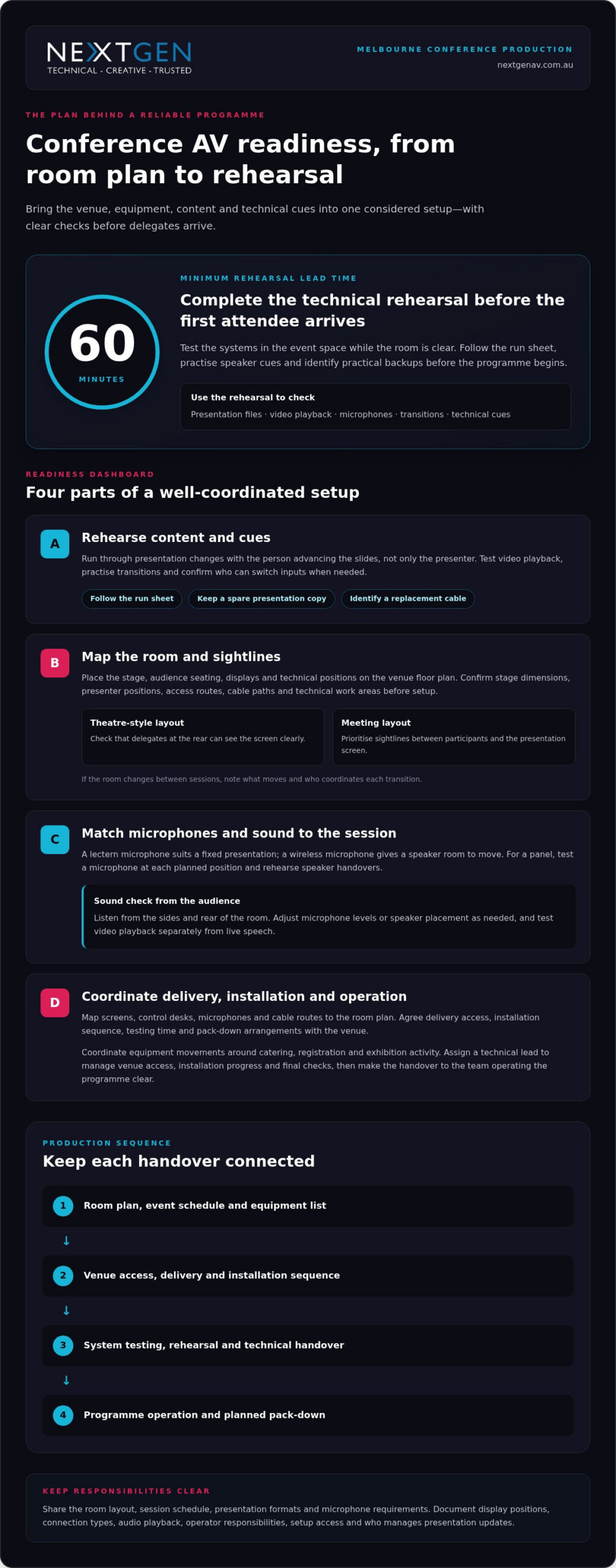
Use a rehearsal to test presentation files, video playback, microphones and transitions in the event space. Follow the run sheet so each speaker can practise their cues. Test the primary signal path and identify practical backups, such as a spare presentation copy or replacement cable. Record who can switch inputs and respond to technical issues during each session.
For a panel discussion, test every microphone from its planned position and rehearse speaker handovers. Check presentation changes with the person advancing the slides, not just the presenter. This can reveal unclear cues before delegates arrive. Keep backup files accessible to the technical operator, and agree how to switch to them without interrupting the session.
Flexible spaces and staging equipment
Room configuration affects sightlines, screen placement and sound coverage. Before choosing equipment, map the stage, audience seating, displays and technical positions onto the venue floor plan. A theatre-style layout, for example, needs clear views from the rear seats. A meeting layout may instead prioritise sightlines between participants and a central presentation screen.
Confirm stage dimensions, presenter positions, access routes and locations for lighting or displays. Include cable paths and technical work areas in the layout rather than leaving them until setup. If the room changes between sessions, note what needs to move and who will coordinate each transition. A precise floor plan helps keep the event space functional and visually coherent.
Conference audio equipment
Conference audio equipment can include microphones, mixing consoles, amplifiers and sound systems. Match the microphone to each session: a lectern microphone suits a fixed presentation, while a wireless microphone allows the speaker to move. A panel may need a microphone for each speaker and a clear handover plan. Test speech from the positions speakers will actually use.
Check how sound reaches delegates at the sides and rear of the room. During rehearsal, listen from audience seats and adjust microphone levels or speaker placement as needed. Test video playback separately from live speech, since each source has different cues. These checks help keep spoken content intelligible without distracting changes in volume.
Technical requirements and hire considerations
Give a Melbourne conference centre AV supplier the room layout, session schedule, presentation formats and microphone requirements. Confirm display positions, connection types, audio playback, operator responsibilities and setup access. These details help align the equipment plan with the venue systems and event programme. Document who is responsible for each technical decision.
Common risks include incompatible connections, unclear responsibilities and rushed setup. List what the production plan covers, who handles each task and how changes will be recorded. For example, document whether the organiser or operator manages presentation updates. Written inclusions and exclusions make scope changes clear before approval and give the event team a useful reference during delivery.
AV delivery, installation and technical support
Delivery and installation planning connects venue access, equipment placement and technical operation. In Melbourne, coordinate these details with the venue team before finalising the event schedule.
AV delivery and installation
Start with the room plan, event schedule and equipment list. Map each item to its position, including screens, control desks, microphones and cable routes. Then agree on delivery access, installation sequence, testing time and pack-down arrangements with the venue. This helps prevent equipment movements from clashing with catering, registration or exhibition activity.
At Melbourne Convention and Exhibition Centre, a full HD platform was designed and installed for the plenary. This shows why installation planning must account for the room’s technical setup, not just the equipment arriving onsite. Assign a technical lead to coordinate venue access, installation progress and final checks. Keep the current schedule and room plan available to the event team.
Melbourne venues can have different room layouts and operating arrangements. At the Melbourne Marriott Hotel, event spaces have modern AV technology, including projection equipment. Build the plan around the selected room and event content rather than assuming every space uses the same configuration. Include a clear handover between installation and operation so the team running the programme knows which systems are ready.
Approved convention centre suppliers
At Melbourne Convention and Exhibition Centre, the in-house AV team is the venue’s AV support point, and the Plenary has sound equipment and projection systems. Treat the venue team as the reference for how external production work will connect with installed systems. Agree on responsibilities, access arrangements and equipment connections as part of the event plan.
There is no single Melbourne-wide AV supplier rule or booking deadline for every venue. Access and scheduling depend on the venue, room, event timetable and installation requirements. Put the delivery window, installation sequence, operating roles and pack-down plan in writing with the venue. Confirm who can access each space, when equipment can arrive and which technical tasks each team will manage.
For an exhibition or a conference across several rooms, coordinate equipment movements with the venue schedule. A named technical lead can track room readiness, resolve handover questions and keep the production plan current. If you need help shaping that plan, event AV planning can connect technical requirements with the event schedule.
Melbourne Convention and Exhibition Centre is surrounded by 10,000 hotel rooms. This setting can help organisers consider accommodation alongside delivery and installation planning, while keeping venue access, equipment movements and technical handovers coordinated.
Conference projection and sound systems
Projection choices should suit the conference venue, content and audience sightlines. In Melbourne, compare the room’s installed systems with the event’s visual and audio requirements before finalising the production plan.
Match displays to the room
Melbourne Convention and Exhibition Centre has four LED walls around its main foyer. These serve a different purpose from a presentation screen inside a meeting room. Consider whether delegates need to read detailed slides, view video or follow event information from a distance. Let the content and viewing position guide your display choice—for specialised events such as clinical symposia requiring diagnostic-level image accuracy, providers such as synergymedco.com offer dedicated medical display and video distribution systems.
Projectors and screens can suit presentations when controlled lighting and a clear projection surface are available. Check screen position against the stage and seating plan, then make sure sightlines remain clear from the sides and rear. Room lighting also affects image visibility, so plan how lighting cues will change during slides, video and speaker presentations.
Plan projection and content
Before an event at Crown Melbourne’s Palladium, match the presentation format to the venue’s projection setup. Check file types, aspect ratio, playback audio and connection needs with the technical team. Organise presentation files by session and test videos from the device intended for the live programme. This helps catch display or playback issues before delegates enter.
Pullman Melbourne on the Park’s conference spaces have high-definition projectors and sound systems. If your venue has projectors, decide whether one screen gives every seat a clear view or whether the room needs additional displays. Place screens to support the speaker, not compete with the stage. A consistent visual plan helps delegates follow both slides and the live presentation.
Coordinate sound with visuals
Video sound needs to reach the room through the conference audio system, not just the presenter’s laptop speakers. Confirm the playback source, audio connection and operator cue for each video. For a panel, keep speaker microphones clear of the screen and presentation area. This helps delegates follow spoken content and visuals without competing signals.
At Crown Melbourne’s Palladium, the venue has sound systems and projection capabilities. Treat both as parts of one show plan: list each visual cue beside its related audio cue in the run sheet. For example, a product video may need a screen change, playback audio and a lighting adjustment. A technical operator can coordinate these transitions smoothly.
Check the complete signal path
Finish by checking slide text, video playback and audio levels from audience positions. Melbourne conference organisers can use rehearsal to confirm that every screen shows the intended content and spoken material remains clear. This final, joined-up check brings projection and sound together for the audience.
PA systems, mixers and amplifiers
A PA system shapes how speech and playback reach a conference audience. Its design starts with the programme: a keynote, panel and audience discussion each have different demands. Plan speaker positions and microphone handovers before assigning inputs. This helps the operator keep voices distinct and the session moving smoothly.
The mixing console brings those sources together. Give each microphone and playback device a clearly labelled channel, then organise channels in run-sheet order. For a panel, labels such as “chair” and “panellist” are more useful than generic channel numbers. The front-of-house engineer can follow changes more easily.
Set input levels carefully so speakers sound consistent without pushing the system into distortion. Check a wireless microphone for handling noise and level changes as the speaker moves. Keep microphones muted when they’re not in use, especially during transitions. If the console has onboard effects, use them carefully so speech stays natural and clear.
- Keynote: Set the lectern microphone for a natural speaking level and give the presenter a clear mute and unmute process.
- Panel: Label each microphone by speaker role and agree who manages handovers.
- Audience questions: Plan how a microphone reaches the questioner and returns to its holding point.
- Playback: Give video or walk-on audio a separate channel and a named cue in the run sheet.
Amplifiers support loudspeakers in a PA system, while some loudspeakers have amplification built in. System design and speaker placement should suit the room, not simply produce more volume. Uneven coverage can make speech difficult to follow in some seats. Consider how the stage position, audience layout and room surfaces affect sound.
Lighting cues can affect the sound operator’s view of the stage and timing of audio changes. Include transitions in the run sheet, such as lowering music before a speaker begins or restoring it after a presentation. Clear cues help the audio and lighting teams work in sequence without competing for the audience’s attention.
Before the event, prepare an input list showing each source, its channel label and the person responsible. Keep the latest version with the run sheet, and update it when speakers or session formats change. This gives the operator a reliable reference and helps the PA system support the programme without distracting from it.
Conference and meeting production
Conference production aligns the programme, room layout and technology for delegates onsite and online. In Melbourne, start by defining how speakers, in-room attendees and remote participants will share each session.
There isn’t one fixed AV package for every Melbourne conference, hybrid event or livestream. Build the setup around the format: an in-room meeting may need presentation visuals and microphones, while a hybrid session also needs camera coverage, streaming and a way to manage remote contributions.
Start with the run sheet. Mark each speaker, presentation, video, panel and audience question, then assign a technical cue to each moment. For example, a panel may need microphone handovers and a camera change, while a keynote may require slide playback and a live stream feed. A cue-by-cue plan gives operators a shared reference during delivery.
The Melbourne Convention and Exhibition Centre Plenary can be configured as one theatre accommodating over 5,000 seats. A large audience changes production priorities: stage visibility, sound coverage and camera positions must work together. For a smaller meeting, a more contained layout can keep speakers and visuals prominent without making the room feel impersonal. Match the technical plan to the intended audience experience.
Hybrid production adds a second audience to each session. Plan how remote delegates will hear presenters, view slides and take part in questions. Assign someone to monitor online contributions and pass them to the room moderator. For a streamed panel, rehearse camera framing, speaker handovers and transitions between live discussion and presentation content.
- Before production: Share the agenda, room plan, speaker order and presentation materials with the technical team.
- During setup: Test the stream, microphones, slides and camera views in their planned positions.
- At each transition: Use the run sheet to cue speakers, visual content and remote participation.
Melbourne Town Hall is a heritage-listed venue updated with AV technology. In a venue with distinctive architecture, plan production to respect the room while maintaining practical camera views, clear audio and useful screen positions. Confirm how each session will use the space, then rehearse transitions in the chosen layout.
For meetings with changing formats, build one production plan covering plenary sessions, breakouts and online access. Keep the agenda, operator cues and speaker materials aligned as changes arise. This coordination helps the event run smoothly and gives every participant a clear way to follow the programme.
NextGen AV: LED Video Walls
NextGen AV can bring a conference’s visual direction into focus with LED Video Walls. They suit events where presenters need a strong visual backdrop or key content should remain visible across the room. Shape the display plan around your programme, stage layout and audience sightlines.
Consider the role of each screen before finalising the event design. A clear content hierarchy helps delegates distinguish speaker visuals from supporting information, while coordinated placement keeps the stage composed and purposeful.
Shape the experience from the first cue
Turn your event brief into a production plan: define the audience experience, identify moments that need visual or audio emphasis, and map those decisions to the venue layout. A Melbourne conference centre AV supplier can connect those priorities with the technical direction needed to bring each session together.
NextGen AV provides LED Video Walls, Professional Audio Systems and Lighting Design and Equipment for events. These elements can be coordinated around your content and room design, creating a considered experience rather than a collection of separate technical components.
Bring your event concept, programme and venue details into the conversation, then explore the production approach that best supports your goals. Contact NextGen AV about your event and take the next step towards a polished conference experience.
Frequently Asked Questions
Which conference centres in Melbourne have in-house or preferred AV suppliers?
Melbourne Convention and Exhibition Centre has an in-house AV team. Other Melbourne venues, including the Melbourne Marriott Hotel and Pullman Melbourne on the Park, have AV equipment in their event spaces, but this does not establish whether they have preferred suppliers. When shortlisting venues, compare installed systems and ask how external production teams coordinate with venue technical staff. This helps you choose a space suited to your programme.
What AV equipment and services do Melbourne conference centre suppliers provide?
Conference AV suppliers can coordinate displays, projection, microphones, PA sound, lighting, staging and technical operation. The right combination depends on the event format: a board meeting may need clear presentation visuals and discussion audio, while a product launch could call for a stronger visual focus. For a hybrid programme, include the equipment and technical direction needed to connect in-room speakers with remote participants.
Can event organisers use an external AV supplier at Melbourne conference centres?
External AV arrangements depend on venue policies and event requirements. Melbourne Convention and Exhibition Centre has an in-house AV team, so establish how any external production crew will coordinate with venue systems and staff. Set out responsibilities for equipment connections, room access, installation and operation in the production plan. This gives each team a clear role and supports a coordinated setup.
What are the risks and extra fees when hiring AV for a Melbourne conference venue?
Risks include incompatible connections, unclear responsibilities and rushed setup. Confirm the written scope, task owners, access, installation sequence and pack-down plan; no extra-fee information is provided.
How do Melbourne conference centre AV suppliers compare on service, equipment and pricing?
MCEC has an in-house AV team, and its Plenary has sound equipment and projection systems. Crown Melbourne’s Palladium has sound and projection, while Pullman Melbourne on the Park has high-definition projectors and sound systems; no pricing comparison is available.
A panel can have an impressive stage and still lose the room if panellists are hard to hear or handovers feel awkward. For audio visual for panel discussions melbourne, clear speech and confident transitions should guide every production decision, with screens and lighting adding value rather than distraction.
If you’re weighing microphone choices, audience sound coverage and the right visuals, you’re asking the questions that shape a polished discussion. NextGen AV brings planning, technical direction and on-site production together, so the moderator, panellists and audience can stay connected while the technical details are managed behind the scenes.
This 2026 planning guide explains how to shape audio around your panel format, coordinate smooth transitions and choose visual elements that suit the room. You’ll also see how a tailored Melbourne AV plan can account for venue layout, audience questions and any virtual component. With those details covered, you can focus on the conversation and feel confident that your event is in capable hands.
Key Takeaways
- Shape your panel AV plan around speech clarity, room coverage and smooth handovers, not equipment alone.
- Match microphones, screens and technical direction to the panel format and the audience’s needs.
- Compare venue-provided AV, equipment-only hire and end-to-end production by who manages planning, operation and pack-down.
- Build a useful brief for audio visual for panel discussions melbourne with the event date, venue, audience size and event type.
- See how NextGen AV’s 1200+ successful audio-visual hires and 85+ years of combined AV technical expertise support a well-managed panel.
Why panel discussion AV in Melbourne needs more than a microphone
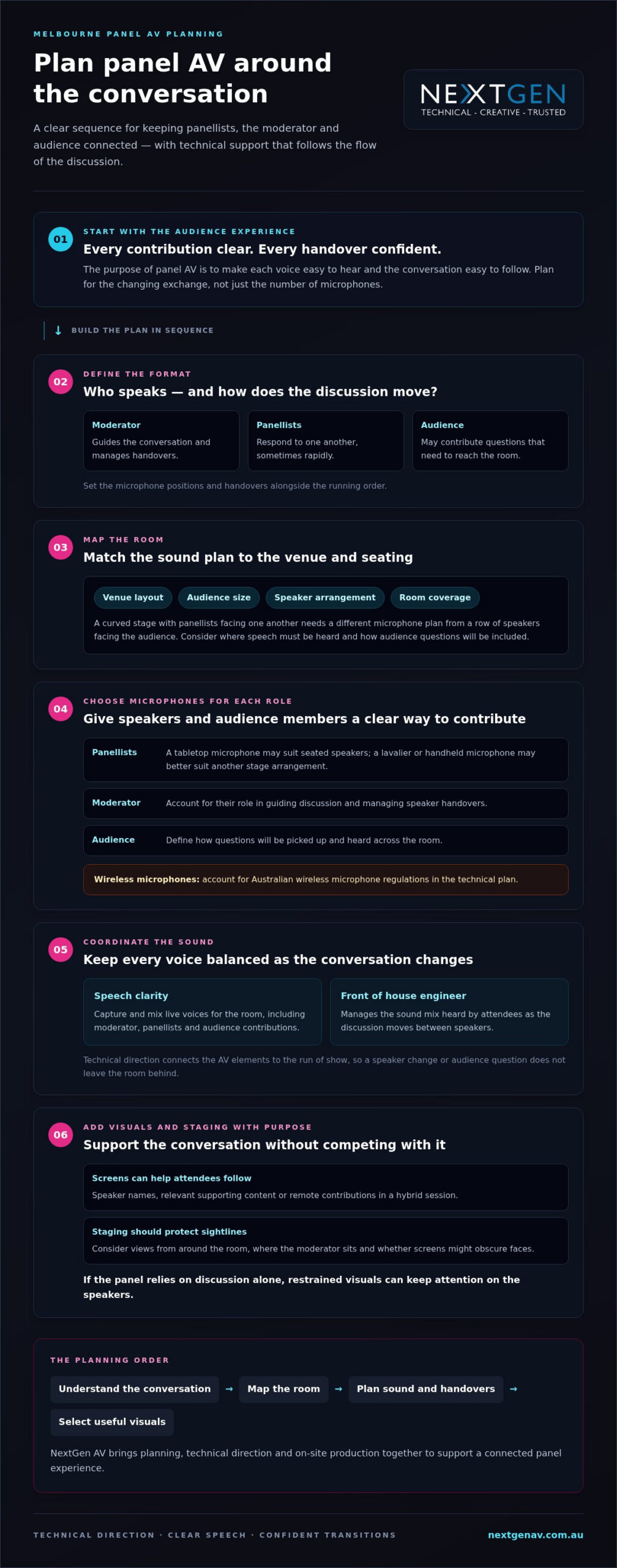
A panel is a live exchange, not a sequence of speeches. The moderator introduces ideas, panellists respond to one another, and audience members may contribute questions. Panel discussion AV coordinates sound, visuals and technical support around that changing conversation, so each voice can be heard and every shift in focus feels natural.
The purpose of panel AV is to make every contribution clear, every transition confident and the conversation easy for the audience to follow. That means planning beyond microphone quantity. A handover that interrupts a response, an audience question that can’t be heard across the room, or a visual that pulls attention from the speakers can break the discussion’s momentum.
A single-speaker presentation has a more predictable audio pattern: one person holds the floor, often supported by slides. A panel moves between speakers, sometimes rapidly, and may open the floor to audience participation. The technical plan needs to account for who speaks, when they speak and how the room stays connected throughout. For a foundational definition of a panel discussion, consider how its conversational format differs from a lecture.
What makes panel AV different from a presentation?
Each role creates a different audio need. The moderator must be heard while guiding the conversation; panellists need to respond without losing the thread; audience participants need a clear way to ask questions. Planning microphone positions and handovers alongside the running order helps the technical team support those changes, rather than treating each speaker as a separate presentation.
That coordination shapes what attendees can follow. When the moderator moves from a panellist’s response to an audience question, the sound plan should carry the question into the room, not leave people guessing. Visuals can support the conversation by identifying speakers or displaying relevant material, without competing with the people on stage.
What should a Melbourne organiser prioritise first?
Begin with the event format, venue, audience size and speaker arrangement. A curved stage with panellists facing one another calls for a different microphone plan from a row of speakers facing the audience. The room layout also affects where sound needs to reach and how audience questions can be included.
Set the essentials first: intelligible speech, suitable coverage for the room and orderly transitions. Then decide whether screens or other visual elements will help attendees see speaker names, supporting information or remote participants. Those choices should serve the programme, not simply fill the stage. For broader context on production planning, the Melbourne AV hire and event production guide can help connect panel requirements with the wider event setup.
For audio visual for panel discussions melbourne, this order keeps decisions grounded in the audience experience: understand the conversation, map the room, then select technical support that makes both work together.
How sound, screens and technical direction support a panel
A well-planned panel brings several technical roles into one clear experience. Microphones support intelligibility, sound systems carry speech across the room, screens help attendees see information, and staging gives the conversation a visible focus. Technical direction connects these elements to the run of show, so a change of speaker or shift to audience questions doesn’t leave the room behind.
Technical direction turns separate AV elements into one coordinated flow, keeping the conversation clear as speakers and audience contributions change. Audio has its own priorities: each voice must be captured and mixed for the room. LED video screens and staging serve different needs, such as displaying names or improving sightlines. Treating them as distinct parts of the plan helps prevent a visual decision from being mistaken for a sound solution.
How should microphones support panellists and audience questions?
Microphone choices depend on the format, speaker arrangement and who needs to contribute. A tabletop option may suit seated panellists, while a lavalier or handheld microphone may better support a different stage arrangement. The moderator’s role needs separate attention: they guide the discussion and may need to manage handovers between speakers. Audience questions also need a defined microphone plan, so contributions can be heard throughout the room rather than only near the person asking.
A front of house engineer manages the sound mix heard by attendees, balancing live voices as the discussion moves between moderator, panellists and audience. For wireless microphone use, planning should account for Australian wireless microphone regulations as part of the technical plan. Washington State University offers a related reference to wireless audio-visual collaboration systems in academic settings, where technology supports shared discussion.
When do screens and staging improve a panel?
Screens earn their place when they help attendees follow the conversation: displaying speaker names, relevant supporting content or remote contributions in a hybrid session. If the panel relies on discussion alone, restrained visuals may keep attention on the speakers. The Melbourne LED video wall planning can help organisers consider how screen content and placement serve the event experience.
Staging affects how well the audience can see each speaker and how naturally panellists can address one another. Consider sightlines from different parts of the room, the position of the moderator and whether screens might obscure faces. The aim is not to prescribe a stage size, but to create a layout that supports both conversation and visibility.
For audio visual for panel discussions melbourne, coordinate these decisions before event day. NextGen AV can bring professional audio systems, LED video walls, staging and technical direction into a tailored production plan, aligning the technical details with the discussion.
How to Compare AV Options for Melbourne Panel Discussions
The right production model depends on how much responsibility your team can manage and what the panel requires. Venue-provided AV, equipment-only hire and end-to-end production can each suit different event plans. Compare them by who handles each task, rather than assuming access to equipment also includes planning or event-day operation.
A panel can appear simple on paper: speakers take their seats and begin talking. In practice, microphone changes, audience questions and visual cues need to work in step with the run sheet. Equipment alone doesn’t coordinate those moments. Before settling on an approach, map the responsibilities that need to be covered:
Planning: Venue-provided AV may be planned around the venue’s available setup; with equipment-only hire, your team coordinates requirements; end-to-end production brings planning and technical direction together.
Setup: Clarify who installs and prepares the system. With equipment-only hire, setup sits with your team; a production partner manages setup as part of event delivery.
Operation: Establish who manages sound and visual cues during the session. Responsibilities can differ between venue services, equipment hire and end-to-end production.
Speaker support: Decide who briefs speakers and coordinates microphone handovers or audience questions as the discussion moves through its programme.
Pack-down: Identify who is responsible for removing and packing equipment after the event, so this task doesn’t become an unplanned organiser responsibility.
What does end-to-end panel production change?
With end-to-end production, one team can coordinate preparation, setup, operation and pack-down as connected stages of delivery. Technical direction links the AV plan to the running order, helping keep speaker changes, audience participation and visual cues aligned. That frees you to focus on the moderator, panellists and attendees rather than overseeing separate technical tasks.
The recommendation should still follow the event’s actual requirements. A straightforward discussion may need a different level of support from a hybrid panel with remote contributions or a programme featuring several visual elements. A tailored plan keeps production focused on what the event needs.
Which questions reveal the right level of support?
Use practical questions to find gaps in responsibility before event day. Who plans the setup and coordinates it with the venue? Who operates the system during the session? How will a change to the speaker order be handled? Where do audience questions and visual content sit in the run sheet?
For deeper audio planning, consider how the professional sound system hire guide fits with your panel’s venue, format and audience needs. With audio visual for panel discussions melbourne, NextGen AV can manage planning through event delivery and pack-down, tailoring technical direction and support to the session rather than treating the brief as a request for equipment alone.
How to prepare your Melbourne panel AV brief
A clear AV brief turns the panel concept into production decisions the technical team can act on. It doesn’t need to prescribe equipment or specifications. Instead, describe the event, the room, the people taking part and how the session should flow. With those essentials in place, your AV recommendation can respond to the programme and audience experience.
The event date, venue, audience size, panel format and run sheet give an AV team the context to shape a suitable production plan. Build the brief in sequence:
- Record the event date, Melbourne venue, expected audience size and event type, such as a conference session, industry forum or corporate panel.
- Describe the format: who is moderating, how many panellists are involved, how they’ll be arranged and whether audience members will ask questions.
- List the content requirements, including speaker names or titles to display, presentation material, video or other visual content, and any remote participation.
- Share the run sheet, noting introductions, speaker changes, audience Q&A and planned content cues so the technical plan follows the session’s rhythm.
What event details should your AV brief include?
Be specific about how the panel will work, not just what the session is called. For example, explain whether the moderator will introduce each speaker, direct questions around the panel or invite audience participation. Note planned changes to slides or other screen content, and whether remote guests will speak or appear visually. These details help shape support around the programme rather than assumptions.
If some information is still developing, mark it as provisional and identify what may change, such as the final speaker order or presentation content. That gives the production team a useful planning picture while keeping the brief clear and easy to update.
How do venue and run-sheet details shape the setup?
Venue and stage information helps translate the brief into a room-specific plan. Describe the panel’s position, the audience layout and any sightline considerations you already know. This informs where speech needs to carry and whether screen content will be useful across the room. Avoid guessing venue capabilities or specifying technical requirements before the production plan is tailored to the space.
Use the run sheet to mark moments that affect technical flow: opening remarks, moderator introductions, speaker handovers, audience questions and changes to displayed content. If a question period follows the discussion, make that transition visible in the schedule. The team can then align operation with the programme and keep cues clear for speakers and organisers.
A focused brief makes planning more efficient and gives your technical partner a stronger basis for recommendations. Share your Melbourne panel AV brief with NextGen AV to develop a production plan around your venue, format and event-day flow.
How NextGen AV supports panel discussions in Melbourne
For a panel, the AV plan needs to connect preparation with what happens live: speakers need a clear experience on stage, the audience needs to follow the conversation, and the organiser needs a production team managing the moving parts. NextGen AV works as a technical partner, coordinating planning, production and event-day support around your requirements.
That approach is grounded in 1200+ successful audio-visual hires and 85+ years of combined AV technical expertise. NextGen AV holds the Trustindex Top Rated Service 2026 certification (review score > 4.5). These credentials support a considered process, while recommendations are shaped by your venue, programme and panel format.
For audio visual for panel discussions melbourne, the goal is to make the technology work in service of the conversation. Planning can account for professional audio systems, screens, lighting and staging where they fit the session, with technical direction keeping production aligned with the run sheet. You get a coordinated partner from the first event details through delivery and pack-down, rather than being left to manage disconnected technical tasks.
What happens after you share your event details?
Share the core information and NextGen AV can shape recommendations around the event itself. The process moves from understanding the brief, to matching a setup to your needs, to returning practical advice. This keeps the next steps clear and gives the production team a foundation for planning the technical details.
- We review your event details: Tell us your date, venue, audience size and event type.
- We recommend the right setup: From PA hire to screens, lighting, staging and full AV production.
- We come back with clear advice: You’ll receive practical recommendations and a fast quote from our Melbourne team.
The sequence is straightforward, but it’s built around the specific demands of your panel. A discussion with audience questions may call for a different plan from a session with prepared presentations or remote contributions. The recommendations reflect those details, so the technical production supports the event’s format rather than adding unnecessary complexity.
How can organisers take the next step?
To begin, share your event date, venue, audience size and panel format, along with key run-sheet details. A quote usually takes 1-2 days to prepare, depending on the event. This gives the team useful context to develop practical recommendations for your Melbourne panel.
Bring the event plan into focus with NextGen AV. Discuss your Melbourne panel discussion and outline the support you need, from technical direction to event-day production.
When you’re ready to progress, Plan your panel discussion with NextGen AV and put a coordinated AV approach in place for your speakers and audience.
Shape the conversation before event day
The strongest panel experience starts with a clear idea of what you want the audience to take away. Use that outcome to guide the conversation’s tone, the moderator’s role and the moments that deserve emphasis. When the purpose is clear, technical production can support the story without competing with it.
As you move from planning into delivery, keep the speaker experience in view. A well-prepared moderator and panellists can focus on listening, responding and connecting with the room, while coordinated production supports the pace of the discussion. That shared focus is what turns audio visual for panel discussions melbourne into an experience that feels considered from the first introduction to the final exchange.
NextGen AV can help translate your event vision into a tailored production plan, with technical direction and event-day support shaped around your panel. Plan your Melbourne panel discussion with NextGen AV and take the next step towards a polished, engaging event. Your speakers can focus on the conversation, and your audience can stay with it.
Frequently Asked Questions
What audio visual equipment is needed for a panel discussion?
A panel discussion typically needs professional sound systems, microphones suited to the speaker arrangement and an audio mix managed for the room. The setup depends on the format: seated panellists may need a different microphone arrangement from a moderator moving between speakers. Screens, staging and lighting can support the session where they serve a clear purpose, such as displaying speaker details or helping attendees see the stage.
How many microphones do you need for a panel discussion?
Plan for the moderator and each panellist who may speak at the same time, then consider how audience members will ask questions. If speakers are likely to respond quickly to one another, sharing a microphone may interrupt the exchange. A separate audience microphone can make questions easier for the whole room to hear. Match the final count to the format and planned handovers.
How do you prevent audio feedback during a panel discussion?
Feedback is best managed through careful microphone and speaker placement, appropriate sound levels and active audio mixing. Keep microphones away from loudspeakers where the room layout allows, and avoid leaving unused microphones open during the discussion. A front of house engineer can monitor the mix and respond to changes as speakers take turns. The room, stage arrangement and sound system all inform the approach.
Are LED screens necessary for a Melbourne panel discussion?
No, LED screens aren’t essential for every Melbourne panel. They’re useful when attendees need to see speaker names, presentation material or remote contributors, particularly if the room layout makes details difficult to follow. For a discussion centred on conversation, a screen may add little. Base the decision on audience sightlines and the content planned for the session, rather than treating a screen as a default requirement.
How far in advance should I arrange AV for a panel discussion?
Start planning as soon as your event date and venue are taking shape. Early discussion gives the production team time to understand the room, panel format and programme before technical decisions are finalised. It also leaves room to update the plan if speakers or content change. If your event is already booked, share the details promptly so planning can move forward with a clear brief.
What information should I include when requesting a panel AV quote?
Along with the event basics, describe how the session will run: the moderator and panellist arrangement, audience Q&A, presentation material and any remote participation. Include a draft run sheet and note what support you need on the day, such as setup, operation or pack-down. If you have a room layout or venue information, share it to help the team tailor its recommendations to the event.
Can NextGen AV provide audio visual support for panel discussions in Melbourne?
Yes. NextGen AV provides panel AV planning and event production in Melbourne, with professional audio systems, LED video walls, staging and technical direction shaped around your event. The team coordinates technical details from preparation through event-day support and pack-down, so you can focus on your speakers and audience. For audio visual for panel discussions melbourne, share your format and event details to get practical guidance.
A speaker’s confidence is often shaped before the first word is spoken. With confidence monitor hire Melbourne event organisers can give presenters a clear, well-timed reference on stage, helping them stay on track without turning away from the audience.
It’s natural for speakers to worry about losing their place or missing a cue. A monitor is most useful when its content, position and timing are planned around the presentation. Depending on the session, it might show the current or next slide, a timing reference, a handover prompt or audience questions.
This guide explains how confidence monitors work, how to choose their content and placement, and how to coordinate them with the run sheet and stage environment. NextGen AV brings more than 30 years of experience in Melbourne event production, combining technical direction with practical planning so the technology supports both the speaker and the audience. The aim is a composed presentation, a smooth programme and an event that keeps attention on the message.
Key Takeaways
- A confidence monitor can help presenters keep their place and stay connected with the audience when its content is matched to their needs.
- Coordinate monitor cues with the run sheet so slide changes, speaker handovers and stage transitions feel smooth.
- For confidence monitor hire melbourne, plan placement around the format, whether it’s a lectern talk, panel discussion or multi-speaker session.
- Prepare the running order, presentation files, speaker positions and agreed cues before the technical test and presenter briefing.
- Include monitor planning in the wider production plan, with technical direction and venue knowledge supporting a composed presentation.
Confidence monitor hire in Melbourne: why speaker confidence starts backstage
A presenter can know their subject inside out and still worry about losing the thread on stage. A missed cue, unexpected transition or uncertainty about what comes next can pull attention away from the audience. Thoughtful confidence monitor hire melbourne planning addresses that concern before the room fills, giving the speaker useful visual information in a position that suits the stage.
A confidence monitor is a display placed on or near the stage so a presenter can see agreed information while speaking. Its role is to support, not distract. The right content can help the speaker follow a presentation cue or programme transition without repeatedly looking away from the audience. The stage monitor system overview explains the general role of on-stage monitoring in helping performers hear or see information they need during a live event.
That support starts backstage. Organisers and the production team decide what information will help, where the presenter will stand and how the display fits the stage design. A monitor does not replace rehearsal, clear cues or a well-managed run sheet. It can reduce avoidable uncertainty, leaving the speaker more room to concentrate on delivery and connection.
What a confidence monitor helps a speaker do
A well-planned display keeps agreed presentation cues within the speaker’s natural view. A presenter at a lectern may need a discreet prompt for the next part of a talk, while someone moving across the stage may need information positioned where it remains easy to glance at. Specify what appears and when in the production brief, so cues support the talk rather than compete with it.
Preparation makes the difference. When presenters understand the display and have an opportunity to rehearse with it, it feels like part of the stage plan rather than a surprise. This can support a more composed delivery, but it does not remove nerves or guarantee a flawless presentation. Clear preparation and confident technical direction remain essential.
The presenter experience comes first
Speaker height, position and sightlines determine where a monitor can sit and how easily it can be read. A display that works for a seated panellist may not suit a standing presenter, and a lectern can change the speaker’s natural eyeline. Include these details in the production brief, alongside the session format and agreed cues, so the setup reflects how people will use the stage.
Placement should also protect the audience’s view. The monitor needs to be useful to the presenter without becoming an unnecessary visual obstacle. Consider the speaker’s movements, stage layout and audience sightlines together, then review the proposed position from both the stage and the seating area. This helps the production team support confident delivery while keeping the event in clear view.
How confidence monitors support speakers through a live presentation
A confidence monitor works best as part of a planned presentation workflow, not as an isolated screen. Before event day, the organiser and production team agree what the presenter needs to see, prepare the relevant content, test how it appears on stage and brief the speaker. This sequence aligns the display with the talk instead of leaving the presenter to interpret unfamiliar cues live.
Plan what the speaker needs to see
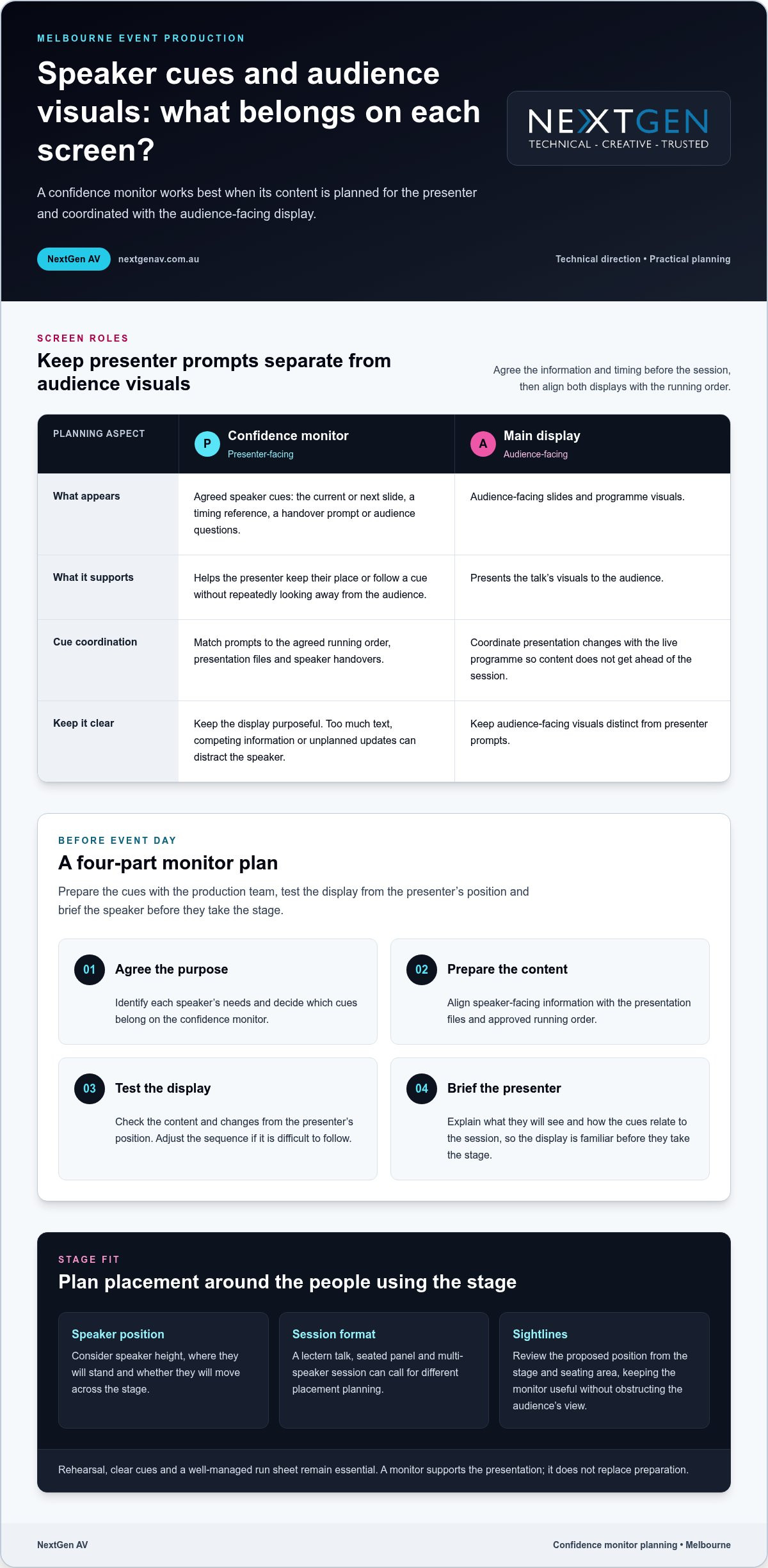
Start with the session format and identify what will genuinely help each presenter stay oriented. Speaker-facing cues might include the current or next slide, a timing reference or a handover prompt. Audience-facing slides and programme visuals belong on the main display. Keep names, timings and cue wording consistent with the approved event materials to reduce avoidable confusion.
- Agree the purpose. Identify each speaker’s needs and decide which cues belong on the confidence monitor.
- Prepare the content. Align speaker-facing information with the presentation files and approved running order.
- Test the display. Check the planned content and changes from the presenter’s position. Adjust the sequence if it is difficult to follow.
- Brief the presenter. Explain what they will see and how the cues relate to the session, so the display is familiar before they take the stage.
Keep the screen purposeful. Too much text, competing visual information or unplanned updates can draw a speaker’s attention away from delivery. Decide the content and technical arrangement based on the event format, presentation material and stage environment, rather than applying a one-size-fits-all template.
Coordinate content and cues
Map slide changes, speaker handovers and stage transitions against the running order. A cue for the next presenter should follow the agreed programme sequence, and each transition should match the correct presentation file and speaker. A clear cue plan gives the technical team a shared reference and helps prevent content from getting ahead of the live programme.
Technical direction brings these moving parts together. The team can coordinate confidence monitor content with presentation changes and stage cues, while keeping audience-facing visuals distinct from presenter prompts. This is part of sound event operations best practices, where planning and communication connect production decisions to the live experience.
For a Melbourne conference, confidence monitor hire melbourne planning should reflect the session’s demands. A single keynote and a sequence of speakers may need different cue timing and content. Monitor decisions also sit alongside audio planning. Clear speech and well-timed visual prompts work together, so organisers considering professional sound system hire should align the audio plan with presenter changes and the run sheet.
NextGen AV’s technical direction brings these details into one coordinated production plan. Explore how NextGen AV supports event production as you shape speaker cues, presentation content and the wider stage experience.
Confidence monitor hire Melbourne: compare the setup with the stage
The right confidence monitor arrangement depends on how speakers use the stage. A presenter fixed behind a lectern has different sightlines from panellists seated across a stage, while a multi-speaker programme adds handovers and changing cues. For confidence monitor hire melbourne, compare the session format, speaker positions and cue requirements before deciding what the display should show and where it should sit.
Match the monitor plan to the event format
Start with how people will present. At a lectern, the speaker’s position is relatively fixed, so the display should make agreed information easy to glance at without pulling focus from the audience. In a panel, speakers may look in different directions or take turns talking. Decide whether everyone needs the same cues and how each person will see them. A multi-session programme calls for consistent cue conventions and deliberate transitions between presenters.
| Event format | Speaker position | Content purpose | Programme complexity |
|---|---|---|---|
| Lectern presentation | One main, fixed position | Support the speaker with agreed presentation cues | Usually centred on one presenter and their talk |
| Panel discussion | Several seated or standing positions | Provide useful cues for speakers as they contribute | Includes changes in speaker and conversation flow |
| Multi-speaker session | Positions may change between presenters | Keep cues relevant to each speaker and presentation | Requires coordinated handovers and content transitions |
Use the comparison as a planning prompt, not a fixed formula. A short panel with a simple running order may need a different approach from a conference session with several presentations and speaker changes. Keep the display relevant to the person on stage at that moment. Unnecessary or competing information can make cues harder to follow.
Balance sightlines and stage design
Placement needs to work for the speaker and the room. Consider the stage layout, the presenter’s natural eyeline and the audience’s view from different parts of the venue. A monitor positioned for one speaker should not obstruct attendees or interfere with the intended set design. Reviewing the stage from the audience area as well as the presenter’s position can reveal conflicts early.
Screen placement also belongs within the wider stage and lighting plan. Lecterns, furniture, presentation screens and lighting positions all shape the available sightlines, so treating the monitor as a late addition can create avoidable compromises. Coordinating these elements helps the presenter access cues while preserving a clear, composed stage picture.
Include stage and lighting hire in Melbourne considerations in the same production conversation. Technical direction can bring monitor placement, set design and lighting decisions together, guided by the event format. This joined-up planning supports the presenter without asking the audience to look past unnecessary visual clutter.
How to prepare a confidence monitor plan before event day
A clear plan gives the presenter and production team a shared reference before the event begins. For confidence monitor hire melbourne, start with the programme and the people using the stage, then build the cue plan around approved content. This reduces last-minute uncertainty and gives the technical team a practical sequence to test.
Build the brief with the speaker in mind
Give the production team the running order, presentation files, speaker positions and agreed visual prompts. Record presenter names and speaking order, and note where each person will stand or sit. One format will not suit every speaker, so capture specific needs in the brief and identify who approves content and communicates changes.
- Gather the event details. Share the current running order, presentation files, speaker names and planned stage positions. Flag lectern talks, panels and speaker handovers.
- Agree the cues. Decide what each presenter should see and when. Keep cue wording, names and timings consistent with approved event materials, and distinguish speaker prompts from audience-facing slides.
- Set the change process. Name the person who approves presentation content and the channel for communicating updates to the production team. This gives late changes a clear owner.
- Walk through the stage. Give presenters an opportunity to stand or sit in their intended positions, view the cues and practise transitions. A walkthrough can reveal an awkward eyeline or unclear prompt while there is still time to refine the plan.
- Run the technical test. Check the approved content against the event sequence, then complete a final run-through with the organiser and production team before doors open.
Test and brief before doors open
During the test, follow the running order rather than checking each slide in isolation. Confirm that the intended content appears at the right point and that speaker handovers match the agreed cues. Invite presenters to view the display from their stage positions and explain how it supports their talks. Speakers should know what to expect before they are in front of an audience.
Include a simple contingency discussion in the production briefing. Agree who communicates a delayed speaker, a changed running order or an updated presentation, and how the team will keep the programme moving if a cue changes. Clear roles and concise updates help avoid conflicting instructions. The aim is not to script every possibility, but to give the organiser and technical team a calm, shared response.
NextGen AV brings technical direction and on-site event management into the planning process, aligning presenter needs with production cues. Plan your confidence monitor setup with a team focused on the speaker experience and the flow of your event.
Confidence monitor hire Melbourne: bring speaker support into event production
A confidence monitor has the greatest value when it is planned alongside the rest of the event, rather than added as a standalone screen. Technical direction brings speaker cues, presentation content and stage requirements into one production plan, so each element supports the live programme. For organisers planning confidence monitor hire melbourne, this joined-up approach keeps the presenter’s needs in view while the audience experiences a smooth, coherent event.
One production plan, from brief to stage
The monitor plan connects with sound, lighting, stage layout and presentation content. A cue may need to appear as a speaker takes position, while a handover depends on the running order and the next presentation being ready. Technical direction coordinates these decisions with the production team, helping presenters focus on their message instead of working out what happens next.
Melbourne venue knowledge adds practical context. Room layouts, stage arrangements and sightlines vary, so a plan should account for the actual space and how speakers will move through it. NextGen AV’s experience with Victorian venues informs planning from the initial brief through to the on-site details that shape the speaker experience.
Consider monitor placement as part of the wider audio visual hire in Melbourne plan. Sound systems need to serve the room, lighting needs to support the stage environment, and visual cues need to fit the programme. Coordinating these elements helps prevent decisions in one area from creating distractions or conflicts in another. The result is a considered stage and a production team working from a shared plan.
Take the next step with NextGen AV
To prepare for a production discussion, bring together the event format, venue, programme and speaker requirements. Include the presentation approach, planned stage positions and agreed cues, along with the key transitions in the running order. This gives the technical team a clear picture of how the monitor should support each session and connect with the wider event plan.
NextGen AV works as a proactive production partner, managing technical complexity behind the scenes and aligning the details with your event’s aims. Discuss your Melbourne event’s production requirements with NextGen AV, including its format, venue, programme and speaker needs, to shape a coordinated plan for the stage and audience.
Set your speakers up for the stage
A well-planned monitor setup gives presenters a clear reference point while they focus on delivering their message. Bring speaker support into the event brief early, so the production plan reflects the programme and the experience you want to create. For confidence monitor hire melbourne, thoughtful coordination helps the technology feel seamless on stage.
Consider what each presenter needs to feel prepared, how their session fits the event’s flow and what will help the audience stay engaged. Sharing those priorities with the production team gives them a practical foundation for shaping the technical details around your event.
Plan speaker support for your Melbourne event with NextGen AV and take the next step towards a composed, connected presentation.
Frequently Asked Questions
What does a confidence monitor show a speaker?
A confidence monitor shows information selected to support the speaker during their session. Depending on the plan, that may include a handover cue, a prompt tied to a key moment or a time reference. Decide what is genuinely useful for each presenter instead of filling the display with every available detail. The aim is a clear reference that complements the talk without competing for attention.
Can a confidence monitor help a nervous speaker?
Yes. It can give a nervous speaker a useful point of reference, though it will not remove nerves or replace preparation. Knowing where to look for an agreed cue may help a presenter feel less concerned about missing a transition. Let them see the display from their speaking position and explain each prompt before the session. Familiarity can make the technology feel like part of the plan, not another unknown.
Is a confidence monitor visible to the audience?
It may be visible from some audience seats, depending on its position and the stage layout. During planning, review the stage from the audience’s perspective as well as the presenter’s, including views around the room. The display should give the speaker a practical reference without drawing attention away from the talk. A venue walkthrough helps the production team assess sightlines and refine placement for the room.
How early should a speaker practise with a confidence monitor?
Give the speaker a chance to practise once the stage and monitor arrangement can be viewed in its intended configuration, ideally before the audience enters. There is no universal amount of rehearsal time. Allow enough for the presenter to check their eyeline, follow a cue and ask questions. If the programme changes, revisit affected prompts so the speaker is not relying on an outdated sequence.
Can a confidence monitor support a panel discussion?
Yes. A panel plan can provide shared information, such as a discussion transition cue, or prompts tailored to the moderator’s role. Consider who needs to see each cue and when, especially if panellists are seated at different angles or speakers take turns contributing. A briefing before the session helps everyone understand which prompts apply to them and keeps the display from becoming a distraction during conversation.
What should organisers do if monitor content changes on event day?
Route the change through the person responsible for approving presentation content, then notify the production team using the agreed communication channel. Confirm which speaker and cue are affected, update the approved material and test the changed moment in sequence. Brief the presenter on the revision before they go on stage. This clear handover helps the team respond calmly while keeping the programme on track.
The room is set, the audience is arriving, and a last-minute layout change reveals that the AV team and venue crew have been working from different plans. Coordinating with venue and av teams means more than sharing a run sheet. It means agreeing who owns access, power, rigging, room layouts and technical decisions before bump-in begins.
A polished event depends on every team knowing what is happening, when it is happening and who is responsible. Pressure builds when details arrive late or assumptions surface during bump-in and rehearsal. A shared plan, agreed deadlines and clear handovers can prevent avoidable clashes and create a more seamless experience for presenters and guests.
This guide explains how to bring venue operations and AV production into one coordinated plan, from confirming responsibilities and technical requirements to managing changes and preparing for rehearsals. With more than 30 years of experience navigating Victorian event venues, NextGen AV helps manage the complexity behind the scenes, so your team can focus on delivering an event that feels polished, confident and memorable.
Key Takeaways
- Assign clear owners for venue access, room information, technical decisions and event-day handovers.
- Choose a coordination structure that suits the event, with one production lead or connected venue and AV leads.
- Use a step-by-step workflow from the initial brief through technical planning, rehearsal and live operation.
- Give every team a shared reference point for decisions, updates and open questions.
- Technical direction connects the agreed plan to a polished experience for presenters and attendees.
Why coordinating venue and AV teams early matters in Melbourne
Several teams working to a tightly sequenced schedule leave little room for conflicting assumptions. The venue team may be planning room access and operational requirements while the AV team develops staging, sound and screen plans. If those decisions happen in isolation, a layout change or unclear handover can affect setup, rehearsal and the experience guests have when they arrive.
Effective coordinating with venue and av teams means making shared decisions, naming who owns each one and exchanging accurate information in time for others to act. Start with the event’s purpose and audience, then connect those needs to the room and technical approach. Event management often involves coordinating audio-visual production and logistics. A shared event brief gives venue and production teams one working reference as plans develop.
A shared event brief is the source of truth for venue and AV teams. It records agreed decisions, outstanding questions, owners and deadlines in one place.
What belongs in a shared event brief?
Start with the experience you’re creating, not an equipment list. Record the event format, audience expectations, programme timing and presenter requirements. Whether planning a corporate conference, luxury yacht hospitality with Chris Dodd Magic, or an intimate panel discussion, each format demands distinct room arrangements, transitions and technical support, even when sharing the same overall programme.
Capture the practical information the teams need to build a coordinated plan:
- Room layout, stage position, audience configuration and access points.
- Confirmed venue information, including relevant room conditions and event timings.
- Programme milestones, presenter needs and planned rehearsal activity.
- Open items, each assigned to an owner and due date.
Separate confirmed decisions from unresolved questions. The AV team can then plan against reliable details, while venue or organiser input still needed remains visible. When a decision changes, update the shared brief, identify the revision and make sure teams are not working from separate versions.
Why Melbourne venue context changes the plan
Room access, loading arrangements and venue schedules shape the order and timing of production work. These details affect when equipment can arrive, how it moves into the event space and how setup fits around other activity. Aligning them early helps teams create a realistic sequence for setup and rehearsal, instead of discovering a timing conflict on arrival.
Melbourne Convention and Exhibition Centre is one example of why venue context belongs in the brief. The event space and operational arrangements need to be understood alongside the proposed layout and production plan. Don’t assume every venue works the same way. Record the details relevant to your chosen venue, and assign an owner and due date to any outstanding access or timing questions.
Once venue details and event goals are aligned, technical planning can move forward with fewer assumptions. For a broader view of how production elements fit into event planning, explore the full-service event production guide.
How venue and AV teams align roles, information and handovers
Clear roles turn a shared event plan into practical action. The venue team holds key information about access, room conditions, venue processes and site arrangements. The AV team uses that information to shape technical direction, plan systems, coordinate setup and manage live operation. As organiser, connect both teams with presenters and stakeholders, keeping decisions, deadlines and programme changes visible to everyone who needs them.
That connection matters because one decision can affect several parts of the event. A room layout change may alter stage placement or the audience’s view; a revised programme can affect technical cues and rehearsal timing. Effective communication and collaboration between event organisers and venues are essential to overcome planning challenges. Give each decision an owner, then share the outcome with everyone whose work depends on it.
Map ownership without leaving gaps
Use a responsibility list to show who leads each decision, who supplies information and who needs the final update. One person should own the decision, even when several teams contribute. This prevents questions from sitting between teams without an accountable next step.
- Venue access: The venue representative provides confirmed access information; the organiser shares the schedule with the AV lead.
- Power details: The venue supplies relevant site information, while the AV lead outlines technical requirements for planning.
- Event rigging: The AV lead identifies the production requirement, and the venue team provides relevant site information for coordination.
- Room layout: The organiser owns the approved layout, with venue and AV input. The AV plan depends on that decision.
Record the decision owner, contributors, people to notify, due date and dependencies beside each item. If the room layout is still open, mark the related AV plan as dependent on approval. This makes the next handover clear and helps prevent teams from working from different assumptions.
Named decision owners mean fewer unresolved questions on event day.
Make technical handovers useful
Send the AV team the current floor plan, stage position, programme and presenter requirements in a version everyone can identify. Share updates when these details change and flag what has changed, so the technical plan can be reviewed against the latest information. The front of house engineer guides audience-facing audio decisions, connecting sound planning to what attendees hear across the room.
For sound systems planning, align presenter needs, programme cues and room information before setup, so technical choices support clear delivery. This is where NextGen AV’s technical direction connects venue information with production decisions. A disciplined handover gives the crew a usable plan and presenters a more assured experience.
Which coordination approach works best for a Melbourne event?
The right structure depends on the event’s scope, the venue’s processes and how many stakeholders need to make or receive decisions. A focused event may work well with separate venue and AV leads who share updates directly. A production with several technical elements, multiple presenters or frequent programme changes may benefit from one production lead connecting those workstreams.
Neither model removes the need for clear ownership. The aim is to make decisions visible, route questions to the right person and prevent venue operations and technical planning from drifting apart. Use this comparison to identify where your event needs a single point of coordination and where distinct leads can work effectively together.
| Working arrangement | Decision speed | Communication clarity | Best suited to |
|---|---|---|---|
| One production lead | Can streamline connected technical decisions through one coordination point. | Creates a clear route for updates across production, presenters and stakeholders. | Events with several technical elements or frequent programme changes. |
| Separate venue and AV leads | Works well when each lead can resolve decisions within their area and share dependencies promptly. | Clear when both leads use the same plan and agree how updates are communicated. | Events with defined responsibilities and manageable coordination needs. |
One production lead across the event
A single production lead can connect venue information with AV decisions, giving the organiser one technical direction point for coordinating with venue and av teams. This can be especially useful when programme timing changes affect multiple technical elements. The lead can trace the impact across the production plan and communicate the resulting updates. Venue approvals and venue-side responsibilities remain with their designated contacts; the production lead coordinates the technical response without replacing venue authority.
Separate leads with a shared coordination plan
Distinct venue and AV leads can work effectively when responsibilities are well defined and both teams use the same plan. Keep the current programme, room plan, decision log and open actions accessible to both leads, then schedule check-ins around key planning milestones and changes. Each lead can manage their area while shared decisions reach everyone affected. An integrated event production guide can help you understand how production elements fit together.
Whichever model you choose, make the escalation path explicit: who resolves an overlap, who approves the final decision and who must be notified. If the stage position affects venue operations and AV sightlines, bring the relevant decision-makers together before treating that choice as settled. A clear structure reduces crossed messages and supports confident delivery for presenters and attendees.
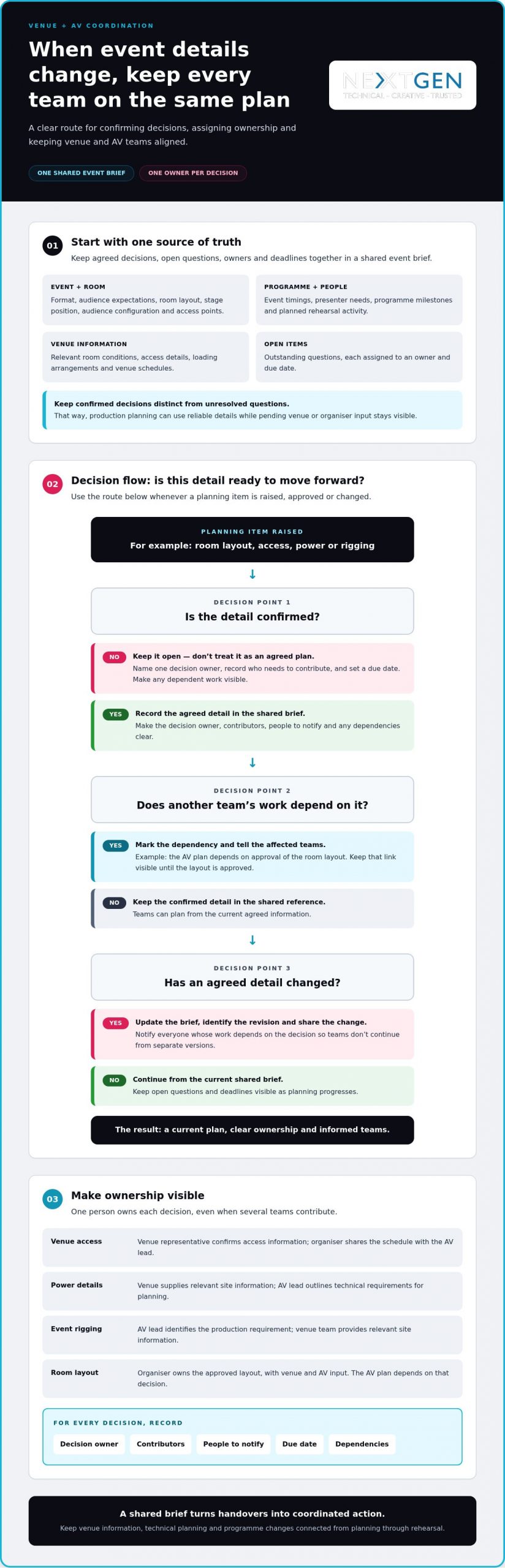
How to coordinate venue and AV teams before event day
Reliable event-day delivery starts with a sequence of handovers, not a last-minute email thread. For coordinating with venue and av teams, use one working schedule and document so each decision, deadline and update reaches the next person who needs it. Give every checkpoint an owner, record the information required and state what happens next.
Set the planning checkpoints
Move from the event brief to venue information, technical planning and the final production schedule. At each stage, the owner closes decisions or records what remains open, then hands the current information to the next team. Keep one version-controlled event document so venue, AV and organising teams can identify which details are current.
- Align the brief. The organiser gathers the event format, programme, audience needs and presenter requirements. Share these with the venue and AV leads so room planning and technical direction start from the same objectives.
- Gather venue information. The venue contact provides current room details, access arrangements, site information and relevant venue processes. The organiser records these in the event document and passes them to the AV lead, who identifies technical questions that need resolution.
- Develop the technical plan. The AV lead maps the agreed room layout and programme to technical requirements, content needs and cue planning. Presenters or content owners supply materials by agreed deadlines; the organiser tracks outstanding items and shares updates with affected teams.
- Align production schedules. The organiser brings venue timings and AV requirements into one schedule. Agree bump-in and bump-out timing with the relevant venue and production contacts, and show when access, setup, rehearsal and pack-down are planned. Don’t assume these timings are already arranged.
- Review changes. If a presenter, programme cue or room arrangement changes, the decision owner updates the document and notifies affected teams. The AV lead reviews the technical impact, while the organiser coordinates related programme or stakeholder updates.
Prepare the final handover
Before event operation, circulate the current run sheet, named contact roles, cue sequence and escalation path. Confirm rehearsal timing, presenter arrival arrangements and access to the content required for each cue. If staging or lighting is part of the production, include its agreed setup and schedule dependencies in the same handover.
Every technical change needs an owner and a communicated update. This keeps teams working from the same instructions when plans shift, instead of relying on assumptions during bump-in or rehearsal. A clear final handover also gives presenters a more predictable path from arrival to performance.
For coordinated technical direction, setup and event operation, plan your event production with NextGen AV.
How a Melbourne AV production partner brings the plan together
A clear brief becomes a live event through precise technical direction, active communication and coordinated delivery. NextGen AV works with organisers and venue teams to translate event goals and site information into a practical production plan, then supports setup, technical operation and pack-down. Each decision connects back to the programme, helping technical details serve the experience you want presenters and attendees to have.
NextGen AV has supported events ranging from local community festivals to high-profile corporate galas. That breadth of experience informs a considered approach to different event formats and production needs. For outdoor activations and unique community gatherings, modular setups from providers such as Smart Spaces NZ illustrate how expandable structures can effectively define a temporary venue before technical setup begins. The team works from the agreed brief and venue information, shaping the technical plan around the event rather than relying on assumptions.
From planning decisions to event operation
During pre-production, the team turns programme requirements, room information and presenter needs into technical direction. Sound systems support clear communication with the audience; lighting helps shape the room and focus attention; LED displays carry visual content; and staging gives presenters a defined platform. Each element is planned in relation to the event’s purpose, layout and schedule, rather than as a standalone item.
Proactive communication keeps venue information connected to production decisions. A revised room layout, access detail or programme cue can affect setup and technical operation. Sharing relevant updates with the people responsible allows the production plan to respond and helps prevent teams from working with conflicting information. On event day, coordinated setup and operation put those decisions into practice, followed by an organised pack-down.
This approach supports events with different creative and technical demands. It keeps the organiser connected to the decisions that matter while experienced production professionals manage technical details behind the scenes, so the programme can take centre stage.
Plan your Melbourne event with NextGen AV
With planning, technical direction, setup, operation and pack-down aligned, you have a production partner focused on connecting venue requirements with your event’s creative vision. The Melbourne audio visual hire guide offers broader context on production choices and how AV elements contribute to an event. NextGen AV brings those elements together as part of coordinated production, not simply an equipment list.
If you’re planning an event in Melbourne, share your event brief and coordination requirements with NextGen AV. The team can discuss how technical direction and production planning support your venue, programme and audience needs, giving you a clear path from early decisions to confident delivery.
Turn your event plan into a confident experience
Bring the event brief and the people responsible for delivery into the same conversation. When coordinating with venue and av teams, clear production direction turns practical decisions into an experience that feels considered from the first arrival to the final cue. You can focus on the purpose of the event while experienced technical professionals connect venue requirements with the production details that bring it to life.
NextGen AV brings more than 10 years in the corporate event space and experience delivering events throughout Australia. That perspective supports a thoughtful approach to technical planning, communication and event delivery, shaped around your programme, presenters and audience.
Start with the essentials: your event goals, venue information, programme and the coordination questions you want resolved. Plan your Melbourne event with NextGen AV and put the right production conversations in motion. With a clear brief and a proactive team alongside you, your event is ready to move from planning into a polished experience.
Frequently Asked Questions
How early should venue and AV teams coordinate?
Start coordinating as soon as the event brief and venue plans begin to take shape. Early discussion lets teams flag dependencies, such as whether a draft room layout is needed before technical planning can progress. For a Melbourne event, the schedule depends on the production scope and the venue’s processes, so set checkpoints around actual decisions rather than relying on a fixed lead-time rule.
Can an external AV team work with a venue’s in-house AV team?
Yes. An external AV team and a venue’s in-house team can work together when responsibilities, access arrangements and technical handovers are clear. Share the latest programme and room information with both teams, then document which team is handling each production task. Agree how their work connects without assuming one team replaces or directs the other.
What should I do if the venue changes the room layout?
Send the revised layout to the AV lead and treat it as a production change that needs review. Depending on the plan, the update may affect screen placement, speaker positions, sightlines or cable paths. Identify who approves the new arrangement, replace outdated floor plans in shared documents and tell affected teams when the revision takes effect. Don’t rely on a verbal update alone.
Is a venue site visit always necessary for event AV planning?
No, a site visit isn’t necessary for every event. Consider one when the production is complex, access details are unclear, the team is unfamiliar with the room or available plans don’t resolve a practical question. A visit can help clarify conditions that are hard to judge from documents alone. Record any remaining uncertainties and assign someone to resolve them through the planning process.
Who should own the event run sheet when venue and AV teams are involved?
The event organiser or nominated programme owner should maintain the authoritative run sheet. The AV lead contributes technical cues, while the venue contact provides relevant operational timings. If a speaker’s presentation slot moves, for example, the programme owner updates the master schedule and shares the new version with both teams. This keeps one person accountable for programme changes while preserving each team’s separate responsibilities.
What happens if the event schedule changes on the day?
Use the agreed contact path, identify who has authority to approve the change and update the run sheet so everyone works from the same direction. The AV lead can assess effects on cues, while the venue contact considers operational impacts. If a session is shortened, the organiser should communicate which items are removed and confirm the revised sequence with affected presenters and crews.
A polished corporate presentation is built before the first slide appears. Planning corporate presentation av hire melbourne around your message, audience and run sheet helps every technical choice serve a clear purpose, from intelligible audio to visuals that hold attention.
You already know how much is riding on the event: presenters need to feel confident, content must display as intended, and technical issues shouldn’t pull focus from the message. Coordinating speakers, venue access and timings can add pressure, especially when the room’s AV needs aren’t yet clear.
This guide explains how to shape a presentation-led AV plan for a Melbourne event, so the room, technology and production schedule work together. You’ll learn how to plan sound systems, screens, staging and technical direction around your audience and content, rather than treating each element as a separate hire decision.
With more than 30 years of experience across Victorian venues, NextGen AV manages the technical detail from planning through live delivery and pack-down. The aim is simple: give presenters a steady platform, keep the audience connected and let your team focus on delivering the event.
Key Takeaways
- Start with the presentation format, venue and audience to shape an AV plan around what attendees need to see, hear and follow.
- Match sound, display and staging choices to the content instead of relying on a standard equipment package.
- For corporate presentation av hire melbourne, plan beyond the equipment list by coordinating content, cues, operators and event timing.
- Use a clear organiser workflow to align the event brief, presenters, venue access and production schedule.
- See how technical direction and on-site management bring production details together from planning through pack-down.
Why corporate presentation AV hire in Melbourne shapes the audience experience
Your presentation may contain a sharp strategy, an important announcement or a product story worth remembering. But if people at the back can’t hear the speaker, a key slide is difficult to read or a changeover breaks the presenter’s flow, the technology becomes a distraction instead of support. The task is to make the message easy to see, hear and follow, while keeping the event moving with confidence.
Presentation AV is the coordinated use of sound, visuals, lighting and technical delivery to support a live event’s message. It brings the room, content and production cues into one considered plan. For a broader overview of audiovisual technology, the key principle is that audio and visual elements work together. At a corporate event, careful coordination helps attendees follow the speaker instead of working around the setup.
Start with the presentation outcome
Begin by identifying the event’s centrepiece: a keynote, conference session, internal briefing or product presentation. Then define what the audience should understand or remember. That outcome guides decisions about what must be clear on screen, how speech should carry across the room and whether lighting needs to support a speaker or a visual reveal.
Separate essential requirements from enhancements. Clear speech, legible content and smooth transitions are foundational. Additional lighting effects or scenic elements can add impact, but they should reinforce the presentation, not compete with it. For example, a product reveal may call for a deliberate lighting cue, while a data-heavy briefing needs screen content that remains easy to follow.
Plan for the room and audience
Room shape, seating position and sightlines all affect how people experience a presentation. A screen that works from the front may be obscured from the sides; a presenter who moves across the stage needs consistent visibility and sound coverage. Ambient light and the venue layout also influence how clearly slides appear and how evenly speech reaches attendees.
Melbourne venues each bring their own spaces and practical conditions. With more than 30 years of experience navigating Victorian event venues, NextGen AV plans with the room in view, aligning the setup with audience positions, presenter movement and the event format.
That is why corporate presentation av hire melbourne should begin with the experience you want attendees to have, not a standard equipment list. Give every technical choice a clear job: carry the speaker’s voice, make essential content readable or support a well-timed moment. When those elements are aligned, technology recedes into the background and the message takes centre stage.
The AV elements that make a corporate presentation clear and engaging
Choose each AV element for the job it needs to do. A keynote built around a speaker and a few slides has different priorities from a product presentation with multiple content changes or audience questions. For corporate presentation av hire melbourne, the right combination depends on the event format, venue, content and audience, not a fixed equipment package.
| Presentation need | AV element | Audience benefit |
|---|---|---|
| Speech reaches the room | Professional sound systems and a suitable microphone | Attendees can follow the speaker without straining to hear. |
| Slides and visuals read clearly | Display selected for the venue and content | Key information stays visible across the audience. |
| Presenter holds attention | Staging and considered lighting | The speaker is easy to see, with a setting that supports the event tone. |
This table is a starting point, not a specification. Room dimensions, seating arrangement, ambient light, presentation format and content all shape the production plan. For instance, compare the visibility of a representative slide from the front, sides and rear of the room, and consider whether the presenter will remain at a lectern or move across the stage. NextGen AV coordinates the screen, audio and stage so they support one another and keep attention on the presentation.
Match sound and microphones to speakers
Professional sound systems distribute speech across the room so attendees can listen comfortably from different seating positions. A wireless microphone can give a presenter freedom to move or support audience interaction. Microphone choice and placement should suit the speaker, the room and the session format.
During the event, a front of house engineer manages the sound mix heard by the audience. Live adjustments help maintain clear, consistent speech as speakers change or the programme moves between segments.
Choose screens and staging for the message
LED video walls can give presentation content a prominent visual presence when the event format and room call for them. Screen placement should account for sightlines, so attendees can see slides without losing sight of the speaker. Content matters too: a presentation built around detailed charts has different viewing needs from one using bold imagery or concise headlines. Review representative slides at the intended display size to catch small labels or dense layouts that may be hard to read from a distance.
Staging and set design shape how the presenter appears in the room. A layout that gives the speaker clear visibility and a natural place to present supports confidence, while lighting can keep attention on the stage without making visuals harder to read.
These decisions work best as one production plan, with technical direction connecting the content, operators and live cues. Melbourne corporate AV production brings those choices together around the presentation, helping your team keep the focus on the message.
Why presentation AV needs more than equipment hire
A list of microphones, screens and lights describes what’s in the room, but not how the presentation will run. Equipment alone can’t coordinate a late slide change, cue a speaker’s entrance or keep a session on sequence. The production plan needs to connect those moving parts, with assigned operators and a shared understanding of what the audience should experience.
Technical direction is the link between an event’s intent and the AV decisions and live cues that bring it to the room. It translates the brief into an operating plan, coordinates production teams and helps presenters understand how the technology will support their delivery. For corporate presentation av hire melbourne, this joined-up approach puts clear responsibility and communication alongside the equipment plan.
- An equipment list records what needs to be supplied.
- An integrated plan connects content, presenters, cues, operators and the audience experience.
- Live technical direction keeps those elements aligned as the programme unfolds.
Coordinate content, cues and presenters
Slide changes, speaker handovers, video playback and microphone adjustments should follow a shared run of show. For example, a presenter transition can identify who is speaking next, what content appears and which production cue supports the change. When presenters and crew receive the same sequence in advance, they can prepare for their part and reduce uncertainty on event day.
That preparation also creates a clear route for updates. If presentation content changes, the organiser and production team can communicate the revision and its effect on the sequence, rather than leaving the operator to guess during a live session. NextGen AV’s technical direction connects those planning details to on-site delivery, with decisions tied to the event brief.
Keep the technical plan precise and safe
Production planning should account for safe installation as well as smooth delivery. A Job Safety Analysis helps structure attention around tasks and their risks; power planning can include a circuit breaker where appropriate. Test and Tag supports checks of electrical equipment. These considerations belong in preparation, not as an afterthought during setup.
Where event rigging is part of the production, a qualified rigger and the relevant High-Risk Work Licence are important considerations. If an engineered structure is involved, a structural engineering certificate may form part of the project documentation. The requirements depend on the work and structure, so the technical plan should bring the relevant details together before delivery.
With an integrated plan, your team can focus on presenters and attendees while technical decisions, cues and setup are coordinated behind the scenes. NextGen AV technical direction brings that production oversight to corporate presentations, from planning through live delivery.
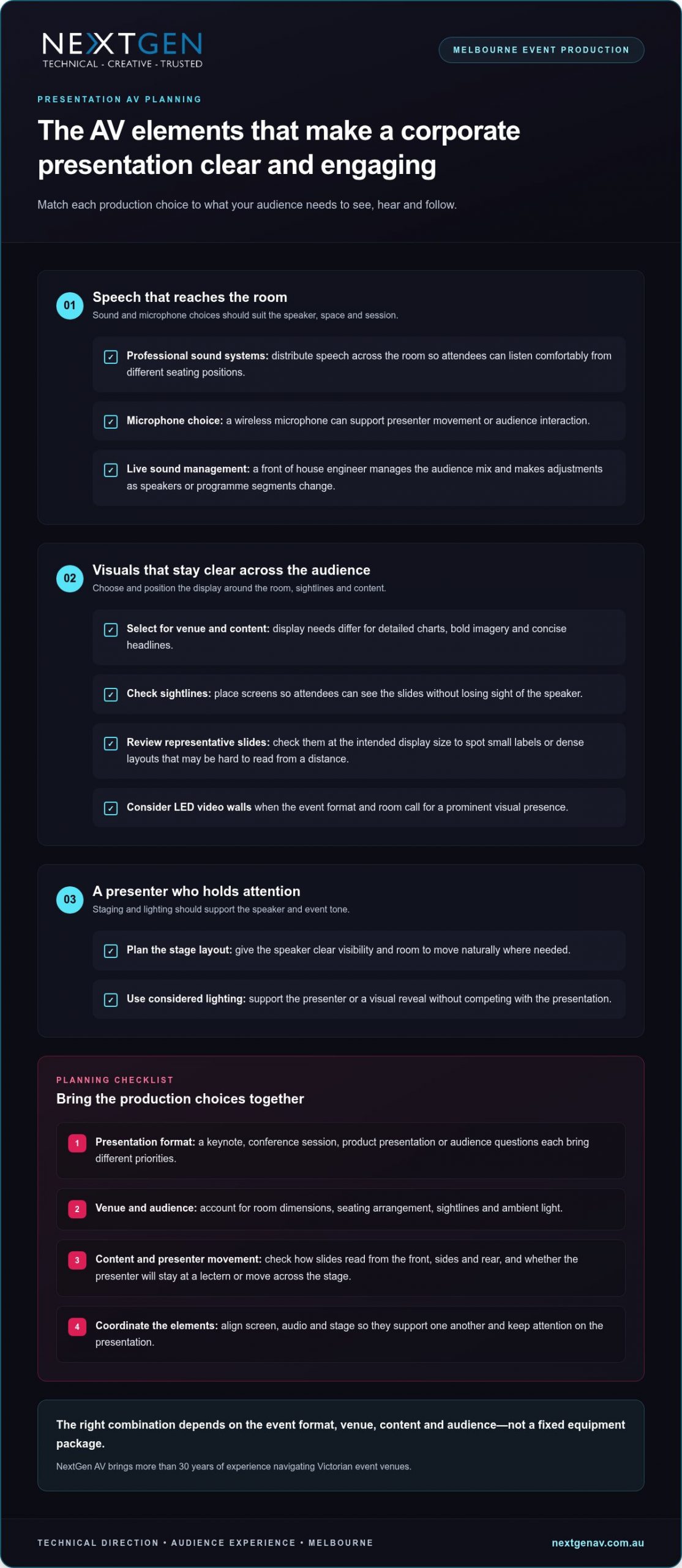
How to prepare for corporate presentation AV in Melbourne
A well-prepared production starts with useful information, not assumptions about a standard setup. Share the event format, content and run of show early. This gives the production team a clear basis for planning, while project-specific decisions about sound, displays, staging and technical delivery are managed as part of the production.
Brief the production team early
Bring the essential details together before plans are locked in: event purpose, audience profile, presentation format and venue information. Include Melbourne venue access windows, room layout and event timings in the early conversation. These details help the production team understand the practical conditions, coordinate setup and shape an AV plan around how the event will run.
- Set the brief. Describe the event objective, audience and format, whether it’s a keynote, briefing, conference session or product presentation. Note what attendees need to take away so production decisions support that outcome.
- Map the venue. Share the venue and room details, audience arrangement, access windows and known setup constraints. Flag the planned stage position and presenter movement so the production team can account for them in the technical setup.
- Outline the programme. Provide event timings, speaker numbers, session order and key moments that need cues, such as video playback, a speaker handover or audience interaction. A clear sequence helps align production activity with the agenda.
- Gather presentation needs. Identify content types, slide requirements and any planned audience participation. Name who is coordinating files and who can approve or communicate changes, so updates have a clear path.
- Align the run of show. Bring presenters and event stakeholders onto the same sequence of introductions, content changes and transitions. Share updates as the programme develops, rather than relying on last-minute verbal instructions.
Prepare presenters and content
Presentation files and speaker changes should follow the agreed running order. Give presenters a chance to become familiar with the stage and microphone before doors open, and allow time for a technical check in the event schedule. This helps speakers understand the setup and gives the crew an opportunity to work through planned cues.
- Run a technical check. Coordinate the check with the production team and presenters. Review the content and transitions in sequence, and clarify how any changes will be relayed during the event.
- Close out the event. Include pack-down and venue access arrangements in the production schedule, so equipment removal follows the event timing and site requirements.
For corporate presentation av hire melbourne, a clear brief and coordinated preparation turn a complex setup into a manageable process. Plan your Melbourne presentation AV with NextGen AV, from the first production conversation through to pack-down.
How NextGen AV delivers corporate presentation production in Melbourne
A successful presentation needs more than a collection of technical elements. NextGen AV works as a production partner, bringing technical direction, planning and on-site management together so the AV supports your purpose and presenters can stay focused on their audience. With more than 10 years in corporate events and over 30 years of industry experience, the team guides each project from the initial brief through live delivery and pack-down.
From event brief to live delivery
Planning begins with your objectives, presentation format and venue information. NextGen AV uses that context to develop a coordinated technical plan, aligning the production with the room and run of show. Each element has a clear role: professional audio carries the speakers, LED video walls present content when they suit the format, and lighting or staging supports presenter visibility and the event atmosphere.
As the event approaches, the production team coordinates the technical details and prepares for on-site delivery. During the presentation, technical management keeps operation aligned with the agreed sequence, including speaker transitions and content cues. The crew then manages pack-down as part of the production, so responsibility doesn’t stop when the final slide appears.
- Technical direction connects event objectives with production decisions and the live sequence.
- Planning brings venue details, content needs and presentation timing into one coordinated approach.
- On-site management supports delivery in line with the run of show and agreed cues.
- Pack-down completes the production process after the event.
Plan your Melbourne presentation with confidence
Local knowledge makes planning specific to the event. NextGen AV operates from a Melbourne-based warehouse and brings experience across Victorian venues, while also delivering events throughout Australia. That combination supports a venue-aware approach for Melbourne organisers and a production partner for teams presenting in other locations.
Corporate presentation AV hire in Melbourne can be tailored to the content, audience and event format, rather than built around a generic package. Share your presentation goals, venue information and run of show, and NextGen AV will shape the technical plan around what the audience needs to experience. For broader production planning, the full-service event production guide can help you consider how technical delivery fits into the wider event.
Ready to plan your presentation? Discuss your event goals with NextGen AV and start shaping a coordinated production plan for your Melbourne event.
Put your presentation message first
Your next planning decision can be simple: identify the one idea you want attendees to carry with them after the event. Let that priority guide the atmosphere, pacing and production choices, so each detail strengthens the experience rather than pulling focus from the message.
A useful brief doesn’t need to answer every technical question. For corporate presentation av hire melbourne, make your priorities clear: what the audience needs to understand, what the presenters need to deliver with confidence and which moments deserve particular attention. From there, NextGen AV can shape the technical approach around your goals and keep planning focused.
That clarity also gives your internal team room to concentrate on the people and purpose behind the event. With an experienced production team managing the technical detail, you can approach the day with confidence and give presenters space to connect with the audience.
Plan your Melbourne corporate presentation with NextGen AV and start shaping an event that puts your message in the spotlight. A clear first conversation can set the whole production in motion.
Frequently Asked Questions
What AV equipment is needed for a corporate presentation?
The right AV setup depends on what attendees need to take in and how the presentation is delivered. A speaker-led briefing may centre on voice reinforcement, while a session with demonstrations may call for displays that carry changing content. Microphones, staging and technical operation can also form part of the solution. Map each proposed element to a specific audience or presenter need, rather than adding equipment without a clear purpose.
How do I plan AV for a corporate presentation in Melbourne?
Give the production team a working brief that includes the event objective, venue, audience, presenters and running order. Add useful planning material, such as a room plan, a sample slide deck and notes on content that needs to appear on screen. For a Melbourne event, venue experience helps interpret the room details. Name an organiser who can approve changes, so decisions don’t get caught between stakeholders.
Do corporate presentations need a front of house engineer?
A front of house engineer shapes the audience-facing audio mix during the live programme. Their involvement is especially useful for sessions with several presenters, changing microphone handovers or audience questions, as sound needs can shift as the session progresses. The production plan determines the right technical support for the event. Agree in advance how cue changes will reach the engineer and who can communicate adjustments from the organiser’s team.
Are LED video walls suitable for corporate presentations?
LED video walls can suit a presentation where large-format visuals play a central role, such as a product reveal or a sequence of bold campaign images. The choice should account for the room, audience viewing positions and the material being displayed. For slide-heavy content, review a representative slide at the intended display scale so small labels or dense charts don’t undermine readability. The LED video wall planning guide offers more on display considerations.
What should presenters prepare before an AV rehearsal?
Presenters can make rehearsal more useful by checking that their files are the approved versions, media plays as intended and slide changes match the spoken delivery. Prepare a short cue script for moments such as a video start, demonstration or handover, and note any audience participation. This gives the presenter and crew specific details to work through together. Confirm one person is responsible for passing on final content amendments.
Can one AV team manage sound, screens and staging for a corporate presentation?
NextGen AV coordinates the elements required for a presentation, with the scope shaped by the event brief. A practical advantage is having a clear communication path for changes: the organiser can nominate who approves a revised slide or altered speaker order, while the production lead distributes the update to the relevant crew. This reduces conflicting instructions and keeps technical decisions connected to the programme.
How far in advance should I organise presentation AV?
There’s no single lead time that suits every presentation; the right planning window depends on the venue, scale, content and production requirements. Start the production conversation as the event format takes shape, then build key planning milestones into the organiser’s schedule. These might include confirming the room plan, agreeing the running order and circulating approved presentation files. Share changes promptly so the production plan can keep pace.
The room is ready, the speaker is introduced, and the opening video stays black. Troubleshooting video playback issues at events can feel like a race against the audience’s patience, but changing equipment at random can add confusion instead of restoring the picture.
A misplaced image, stretched format or frozen screen doesn’t automatically mean the file has failed. The fault could sit anywhere along the playback chain, from the source device and video processor to the connection or display. A calm, methodical check helps pinpoint the cause and limit disruption while the programme continues.
This guide explains how to trace common playback faults, check content and signal settings, and restore planned visuals with precision. You’ll also learn how pre-event testing and a clear recovery plan can reduce risk before guests arrive. With technical direction and careful signal checks, NextGen AV helps Melbourne event teams manage complexity behind the scenes and keep attention on the experience in the room.
Key Takeaways
- Record what appears on screen and when the fault occurs to give your troubleshooting a clear starting point.
- Trace the playback route from media file to display, changing one setting or connection at a time.
- Use the symptom to narrow down the likely fault area and decide what to check or escalate next.
- Keep the programme moving with a planned holding slide or presenter-led transition while the team checks the affected route.
- Effective troubleshooting video playback issues at events starts before doors open, with clear file handover, cue order, rehearsal and assigned operator roles.
Troubleshooting video playback issues at events: start with the symptoms
A black screen, frozen image or missing video can each point to a different fault. Stay calm and observe before changing settings or swapping equipment. Note exactly what appears on screen, whether the problem starts immediately or part-way through playback, and whether anything changes when the video is cued again. These details give the playback operator a useful starting point and help avoid changes that obscure the original cause.
The event playback signal chain is the route a video takes from its source file and playback device, through settings, connections and a video processor, to the final display. A fault can arise at any point along that route, so the symptom helps narrow down where to investigate.
What does the screen behaviour tell you?
For a black screen, first check whether the display is powered and what it shows. An input or signal message suggests the screen is active but may not be receiving the expected feed. A completely dark display calls for a different check. Record any message rather than guessing at its meaning.
If playback freezes or stutters, establish whether the file itself is paused or the playback device is struggling to keep it moving. Check whether the playback controls respond and whether the same issue appears at the same point when the clip is cued again. Visible video with no sound is a separate audio-path symptom, not proof that the video signal has failed. Keeping the observations separate helps the technical team direct checks to the right system.
For streamed content, the platform and delivery method add another part of the route to consider. This overview of Online Video Platform (OVP) technology provides background on how online platforms deliver video.
What changed just before playback failed?
Think back to the last successful cue. Was the source device, cable, input selection, content file or display configuration changed? Even a small change can help locate the fault, particularly if the issue began straight afterwards. Record what changed and when, without making several new adjustments at once.
Next, establish the scope: does the fault affect one screen, one input or every display? A single affected screen can point towards its connection or display route, while a fault across all displays may call for attention further upstream. These are clues, not conclusions. The next section traces the route systematically.
Pass the observations to the person managing event playback in a calm, concise handover: what the audience sees, when it happens, which screens are affected and what changed beforehand. This symptom-led approach makes troubleshooting video playback issues at events more controlled and gives the operator a clearer path to restore the planned visuals with minimal disruption.
Trace the event video signal from media source to display
Once you’ve identified where the fault appears, trace the signal route in order. This keeps troubleshooting video playback issues at events controlled: check one point, make one change, then confirm whether the picture responds before moving on. Avoid changing several settings at once, or you may lose the clue that identifies the cause.
- Media file: Confirm the intended file is selected, opens correctly and matches the cue. Check that it isn’t paused, muted, outside the intended cue or waiting for a user action.
- Playback device: Confirm the device is responsive and playing the selected content. If it can be done without interrupting the live programme, test a known-good file to help distinguish a file issue from a device issue.
- Output settings: Check that the playback device is sending its output to the intended display or video processor input. Avoid changing resolution or other output settings until you’ve recorded the current configuration.
- Connection: Check the relevant cable and connection points, then confirm whether the receiving input reports a signal. Change or reseat one connection at a time.
- Video processor: Confirm the correct input and output route are selected. A video processor scales content, switches inputs and maps signals to LED tiles, so an incorrect route or scaling setup can affect what appears on screen.
- Display: Check the selected input and the display’s visible signal status. If the processor is receiving a signal but the display isn’t showing the expected image, focus checks on the route between them.
EDID, or Extended Display Identification Data, is information a display provides about its capabilities, which can influence the playback device’s output settings. If a source sends a format the downstream display or processing path can’t handle as expected, the result may be no image or an incorrectly formatted picture. Record any output-setting changes and check the signal again after each adjustment.
Keep the route clear
For an LED wall, distinguish the signal arriving at the video processor from the image mapped across the display. This helps the operator narrow down whether to investigate the source, input selection, scaling or display route, rather than resetting the whole system. For planning considerations specific to this display type, read the guide to LED video walls for events.
A clear signal path is easier to test when technical direction and content routing are planned together. For Melbourne event teams, NextGen AV’s event technical direction brings those details into the production plan, helping keep the audience experience in focus while the team resolves the fault.
Match common playback faults to the right corrective action
Symptoms narrow the search, but they don’t prove the cause. Use the checks below to guide the next step, changing one thing at a time and recording the original setting before you adjust it. This makes troubleshooting video playback issues at events more precise and gives the playback operator a clear point for escalation.
| Symptom | Likely fault area | First check | Escalation point |
|---|---|---|---|
| No picture or a black screen | Source output, selected input, connection, video processor or display | Check that the display is powered, note its signal status, then confirm the source is routed to the intended input. | If the input and route are correct but no signal reaches the display, have the playback operator trace the connection and processor path. |
| Picture is on the wrong display, cropped or incorrectly formatted | Output routing, scaling, aspect ratio or processor mapping | Compare the source output settings with the intended display or processor configuration. | If the source is routed correctly but the image remains wrong, escalate to the person managing video processing and display mapping. |
| File won’t play or playback is unsupported | Content file, playback device or compatibility along the signal path | Confirm the intended file is selected and check whether it plays on the same device outside the live cue, if the programme allows. | If a known-good file plays but the event file doesn’t, escalate for a content and playback compatibility check. |
| Playback freezes, stutters or drops in and out | File or playback device performance, connection or signal route | Check whether the issue repeats with a known-good file on the same device, and inspect the relevant connection and signal status. | If it continues across files or affects more than one display, ask the technical operator to trace the shared signal route. |
Check before changing settings
For a black screen or misplaced image, confirm the selected input and signal status before restarting equipment. Then verify that the source output is routed to the intended display or video processor input. If only one display is affected, compare its route with a working display where practical. That comparison can help isolate the affected path without changing the whole system.
For freezing, stuttering or an incorrect format, compare playback using a known-good file on the same device when it won’t disrupt the programme. Check the source output against the intended display and processor configuration. Don’t alter several settings at once: note the original values, test a single adjustment and confirm the result.
HDCP and EDID can affect compatibility between content sources, processing and displays, but they aren’t automatic explanations for every fault. Treat them as controlled checks: record the current configuration and involve the playback operator before making changes, particularly during a live programme. If the symptom persists after the relevant route has been checked, escalate with a concise report of what you observed and tested.
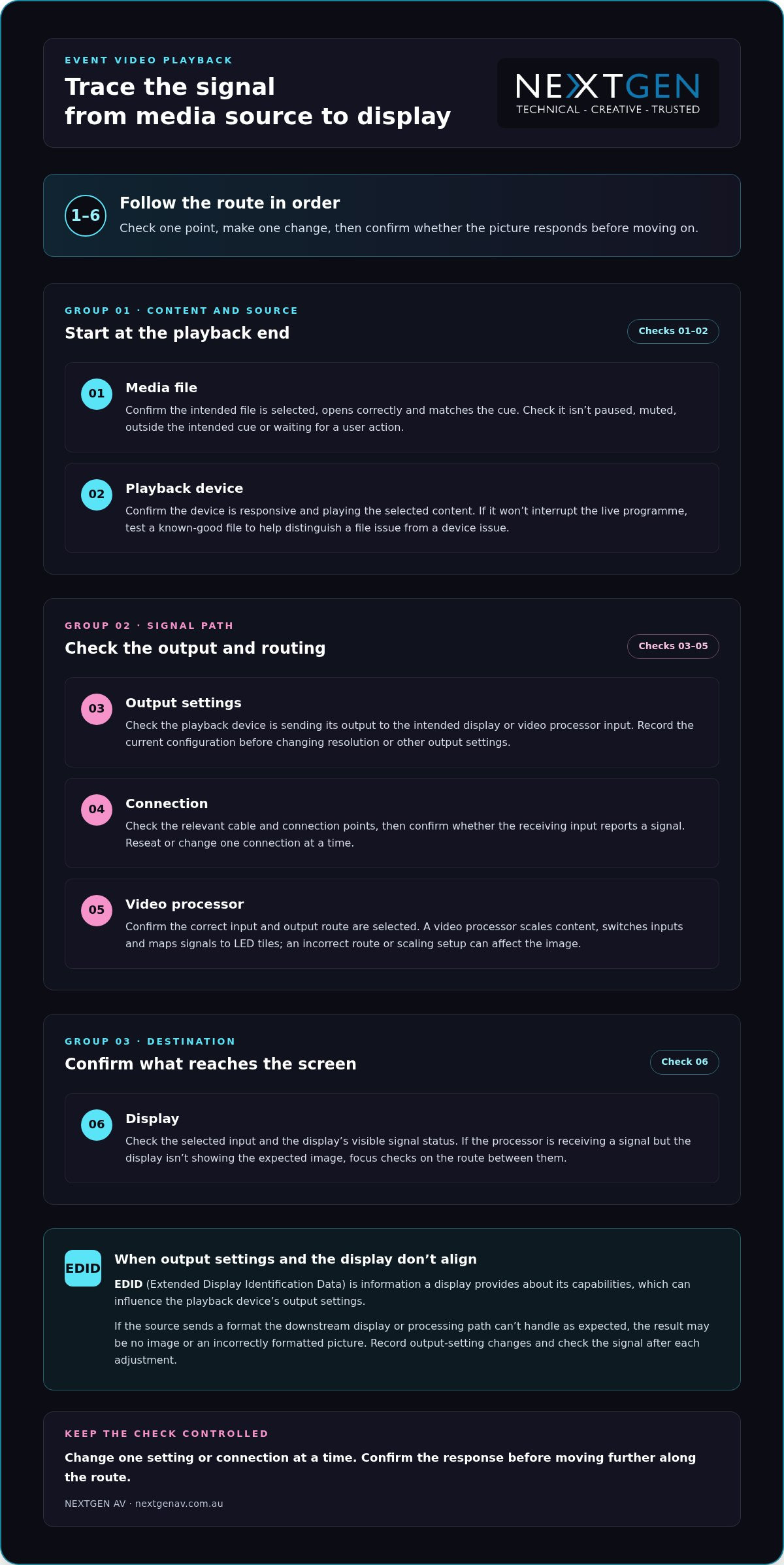
Restore playback during the event without adding disruption
A live fault needs a measured response, not a flurry of resets. Repeatedly restarting devices or changing several settings at once can interrupt the cue further and make the original problem harder to identify. Keep the response coordinated: protect the programme, isolate the affected route, test one change, then confirm the picture before resuming.
Use a controlled live recovery sequence
The event lead should communicate with the presenter and playback operator before changing the programme. If the event plan allows, move to a prepared holding slide or a presenter-led transition while the operator investigates. This gives the audience a clear point of focus and creates space for a controlled check behind the scenes.
- Protect programme flow: agree on the holding slide or transition with the presenter.
- Identify the affected route: confirm which source, input or display is involved.
- Test one change: use a known working source or planned alternate input if it’s available in the production setup.
- Confirm the picture: check that the image is stable on the intended display before returning to the planned cue.
If the first adjustment doesn’t resolve the fault, pause before trying another. Tell the operator what changed and what the screen now shows. That concise handover keeps troubleshooting video playback issues at events focused on evidence, rather than adding uncertainty through untracked changes.
Plan backups before doors open
Recovery is faster when the team has rehearsed the fallback. Test the final media files on the actual playback setup during event preparation, following the planned cue order and checking the complete source-to-screen route. This can expose a file or routing issue before it reaches the audience.
Where it suits the event plan, prepare duplicate content or an alternate playback route. Make sure the operator knows which option to use and how the presenter will be briefed if the programme needs a short transition. For the wider production picture, see this guide to full-service event production.
Coordinated technical support brings playback, content cues and programme decisions together, so the team can resolve faults without losing sight of the audience experience. Talk with NextGen AV about event technical direction for a considered approach to live playback planning and support.
Prevent event video playback issues with precise production planning
The most effective response to a playback fault often begins before the venue fills. Turn troubleshooting video playback issues at events into a practical pre-show plan: agree how files are handed over, confirm cue order, test the complete route and make sure every operator knows their role. A clear escalation path means the right person can act without delaying decisions or disrupting the audience experience.
Rehearse the complete playback path in the Melbourne venue
A full signal-path rehearsal checks every handover, from the media file and playback device through connections and processor routing to each event display, before audiences arrive. Use the planned configuration in the Melbourne venue, rather than relying on a check of the file alone.
- File handover: identify the final approved versions and make sure the playback operator can locate each one.
- Cue order: run presentation changes and video cues in programme order with the relevant event team.
- Source-to-screen test: confirm each final file plays through the intended device, connections, processor route and display.
- Operator notes: record the working input, routing and agreed recovery approach for the team running playback.
Testing in sequence helps reveal handover issues, such as the correct file being available but assigned to the wrong cue, before they reach the stage. Working with professional media production teams such as The Photography Co also ensures visual assets are rendered in standard, compatible formats well before showtime.
Coordinate the people behind a seamless visual experience
Technical preparation also depends on clear responsibilities. Establish who cues content, who monitors the displays and who communicates with the event lead if a fault appears. Set out an escalation path in advance, including who makes the call to switch to an alternate source or adjust the programme. This keeps updates concise and avoids multiple people making conflicting changes.
Experienced technical direction brings the content, signal route and programme team together. NextGen AV’s technical direction and on-site production management help coordinate the details behind the scenes, so any issue is handled with precision and the event remains focused on its audience.
Make the playback plan part of the wider production process, not a last-minute equipment check. Plan your next event with NextGen AV.
Make playback reliability part of the plan
Reliable event visuals come from a clear process: read the symptoms, trace the signal from source to screen, and make one controlled change at a time. If a fault occurs live, protect the programme while the playback team checks the affected route. Before the event, test final files in the planned setup and agree on operator roles and a recovery path. That preparation makes troubleshooting video playback issues at events more manageable and helps keep attention where it belongs, on the experience in the room.
NextGen AV brings more than 30 years of industry experience to event production, managing 1,200+ events annually from a Melbourne-based warehouse and supporting events throughout Australia. With technical direction and production management coordinating the details behind the scenes, your visuals can serve the wider event with precision and confidence.
Plan your next event with NextGen AV and create a considered production plan for a seamless audience experience.
Frequently Asked Questions
Why is there no picture from my laptop at an event?
A blank screen can result from the display being on the wrong input, the laptop sending output to another screen, a connection issue or incompatible output settings. Check whether the display shows an input or signal message, then confirm the laptop’s output is routed to the intended processor or display. Note what you observe before adjusting settings. If other screens work, compare their signal routes with the affected one.
What should I check when a video freezes during an event?
First check whether playback is paused, waiting for a cue or stuck at a specific point in the file. Confirm the playback device is responding, then see whether the problem repeats with a known-good file if testing won’t interrupt the programme. If it does, the device or signal route may need attention. If not, the content file or cue may be involved. Change one thing at a time and tell the operator what you’ve tested.
Can an HDMI connection cause event video playback problems?
Yes. A loose or damaged HDMI cable, an incorrect input selection or a connection that isn’t carrying the expected signal can contribute to playback problems. Check the cable and the selected input, then confirm whether the receiving device reports a signal. If the route includes a video processor, verify that its selected input matches the connected source. Avoid changing multiple connections at once, so the team can identify which check affects the picture.
How do you troubleshoot an LED display that is showing the wrong image?
Start by confirming which source and input are selected, then check whether the source is routed to the intended display. If the issue affects one screen, compare its route with a working display where practical. For an LED wall, the video processor scales content, switches inputs and maps signals to LED tiles, so its routing or mapping may need review. Record any changes and confirm the image on the intended display before continuing.
What is EDID, and how can it affect video playback?
EDID, or Extended Display Identification Data, is information a display provides about its capabilities. That information can influence the output settings selected by a connected source, such as a laptop. If source and display settings don’t align, the image may not appear or may display in an unexpected format. Treat EDID as one possible compatibility factor, not an assumed cause. Record current settings and make controlled checks with the playback operator.
How can event organisers prevent playback issues before guests arrive?
Test the final media files using the actual playback device, connections, video processor and displays in the planned event configuration. Run presentation changes and video cues in programme order, and confirm the image reaches each intended screen. Agree who cues content, who monitors displays and who escalates a fault. For Melbourne events, a venue-based rehearsal helps the team check the complete route and document working inputs and a recovery approach before guests arrive.
What should a team do if video playback fails during a live presentation?
Protect the programme first. The event lead should coordinate with the presenter and playback operator, using a prepared holding slide or presenter-led transition if the plan allows. The operator can identify the affected route, test one controlled change and confirm the image is stable before returning to the cue. Avoid repeated restarts or several simultaneous setting changes. This measured approach to troubleshooting video playback issues at events helps limit disruption and keep the audience experience in focus.
What if an AV quote looks complete but leaves key event responsibilities unclear? Learning how to read an AV quote means looking beyond the equipment list to understand what happens before, during and after your event. A screen or sound system is only part of the picture. Planning, technical direction, crew, safe installation and pack-down all shape the result.
Comparing proposals can be difficult when each describes a different scope or uses technical line items without explaining their purpose. To compare them fairly, identify what’s included, who owns each task and how the production supports your event goals.
This guide explains how to assess AV proposals in plain language, compare equivalent deliverables and responsibilities, and spot details that can reduce event-day risk. We’ll cover production scope, technical roles, safety planning and the link between equipment choices and audience experience. With more than 30 years of experience navigating Victorian event venues, NextGen AV understands why access, timing and site requirements belong in the conversation from the start. The result is a clearer basis for choosing a production partner and a smoother path from planning to a polished event.
Key Takeaways
- Learn how to read an av quote by focusing on the production outcome, deliverables and responsibilities behind each line item.
- Separate equipment provision from the planning, crew and operation needed to bring the production together.
- Compare proposals against the same event brief, weighing suitability and audience coverage rather than equipment counts alone.
- Factor Melbourne venue access, schedules and site requirements into your assessment of production readiness.
- Use a clear approval sequence to align scope, resolve assumptions and establish who manages each stage of delivery.
How to Read an AV Quote: Start with the Event Outcome
An AV quote should describe the production solution your event needs, not just name the gear being supplied. An AV quote is a scoped proposal that sets out the technical deliverables, event requirements and responsibilities needed to deliver the planned experience. Start by checking whether it explains how the production supports your event, from the first presentation to the final pack-down.
Begin with the event format, audience and programme. A conference with keynote presentations, panel discussions and audience questions has different audio and screen needs from a product launch built around a reveal moment. The proposal should connect each major element, such as sound systems, lighting or LED video walls, to a specific purpose. For a useful overview of how staging, sound, lighting and video fit together, see this guide to live event support.
Match the scope to the event brief
Compare the proposal with your event brief. Does it reflect the format, running order and experience you want the audience to have? For a conference, microphones and screens should support clear presentations and smooth speaker transitions. For a launch, lighting and visuals may focus attention on a key moment. Each major technical choice should serve a defined part of the programme.
Read beyond the equipment list
Equipment names alone don’t explain who plans the setup, installs and operates the systems, or packs them down. Look for responsibilities across each stage, including who coordinates technical requirements before the event and who manages live delivery. Clear ownership helps prevent gaps between a list of supplied equipment and a working production.
When planning and technical direction sit alongside equipment, crew and delivery responsibilities, the quote gives you a clearer picture of the complete production. You can then assess whether the proposal is built to support the event outcome you’ve briefed.
Decode AV Quote Line Items, Labour and Responsibilities
Line items are easier to assess when you group them by the work they represent: equipment, crew, planning, operation and logistics. Equipment describes the technical tools; labour and responsibilities explain how those tools are prepared, installed, operated and packed down. To understand how to read an av quote in practical terms, trace each item to the task it supports and the person or team responsible.
| Line item | What it means | Scope question it answers |
|---|---|---|
| Sound systems, screens, lighting or staging | Technical elements that support audience audibility, presentation visibility, atmosphere or the event environment. | What part of the programme or audience experience does each element serve? |
| Pre-production and technical direction | Planning and coordination that shape how technical elements work together. | Who develops the production plan and coordinates requirements? |
| Setup and pack-down crew | Labour to install, connect and remove equipment at the venue. | Are installation and pack-down responsibilities included? |
| Live technical operation | On-site expertise to manage systems during the programme. | Who operates the production as the event unfolds? |
| Logistics and access | Coordination of equipment movement and venue timing. | Are access arrangements and bump-in timing accounted for? |
Separate equipment from labour
A screen in the scope doesn’t, by itself, explain its installation, content feed or live operation. Sound systems support clear speech, while lighting and staging help shape the room and focus attention. A front of house engineer is a distinct role from the equipment: they manage the sound mix heard by the audience. Clear labour roles connect technical provision with a well-run programme. AVIXA’s audiovisual industry standards provide context for the professional standards that can inform system design.
Check assumptions and dependencies
Read for venue access, bump-in timing and pack-down arrangements, as these affect how the production can be delivered on site. Note dependencies on supplied presentation content, venue facilities or other event suppliers, and identify who coordinates each handover. The scope should also explain how changes to the programme or production requirements are recorded, so responsibilities remain clear as plans develop.
This framework helps you see whether the proposal connects equipment, people and logistics into a managed production. For a broader view of how planning and technical delivery work together, explore NextGen AV’s AV production guide.
Compare AV Quotes Fairly by Scope, Not by Equipment Count
A longer equipment list doesn’t automatically mean a stronger production. The real test is whether each proposal can deliver the same event outcomes, with suitable technical choices and clear responsibility for delivery. Proposals are comparable only when they define equivalent deliverables, crew, planning and responsibilities against the same event brief.
Start with one shared brief that records the event format, venue, audience, programme and intended experience. Assess each proposal against the same requirements. A conference with keynote presentations and panel discussions, for example, needs a technical plan that supports clear speech, visible content and smooth speaker transitions, not simply a larger quantity of equipment. Considering AV alongside event objectives is part of strategic event planning.
Build a like-for-like comparison
Create a comparison sheet and mark each requirement as included, excluded or dependent on another party. Record the assumptions beside each item. If one proposal relies on venue-provided facilities while another includes them in its scope, they aren’t equivalent until that difference is clear.
- Deliverables: What technical outcomes and systems are covered?
- Crew: Which roles are assigned to the production?
- Planning: What pre-event coordination and technical direction are described?
- Operation: Who manages the systems during the programme?
- Logistics: Are delivery, access, setup and pack-down responsibilities defined?
- Exclusions: What is outside the scope, or depends on the venue or another supplier?
This structure makes gaps visible and prevents different assumptions from being treated as matching deliverables. It also gives you a practical record of what each proposal commits to support.
Assess technical fit and accountability
Consider suitability, not just quantity. Do the audio, visual, lighting and staging choices fit the venue and programme? Will they support the audience throughout the event, including transitions between presentations, panels or other segments? A system’s value lies in how effectively it serves its role, not in how many line items describe it.
Look for clear coordination of technical decisions and live delivery. The proposal should show how planning connects the elements, who manages the production on the day, and how the team accounts for timing changes or contingencies. If a quote describes equipment but leaves operation or transitions undefined, record that as a difference in scope. Comparing on this basis helps you select a coordinated production solution, not simply the longest list.
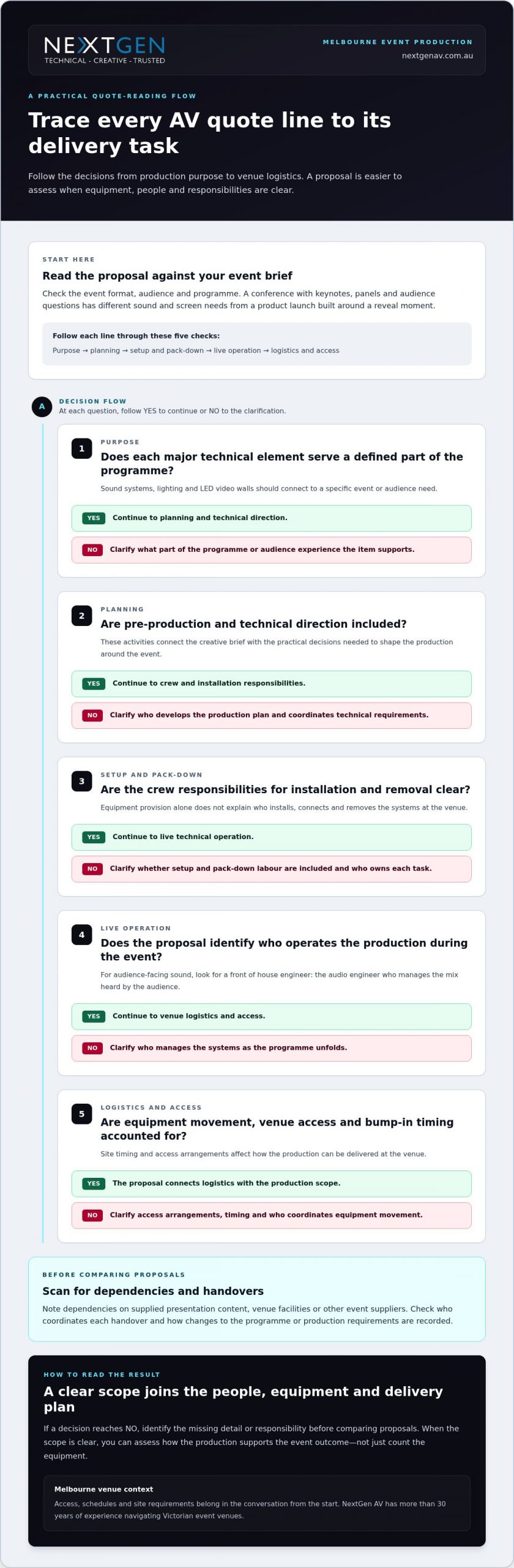
Check Melbourne Venue Logistics, Safety and Production Readiness
A production plan has to work in the venue, not just on paper. When learning how to read an av quote, check that the scope accounts for site access, timing, safety planning and the people coordinating delivery. This is especially relevant for Melbourne CBD events, where venue arrangements and access windows can shape how equipment and crew reach the event space.
Review site logistics and timing
Trace the schedule from arrival through pack-down. The proposal should make clear how its production plan accounts for:
- Access: How the AV team coordinates entry and equipment movement with the venue and organiser.
- Bump-in: When setup can take place, and how that timing fits the event schedule and venue requirements.
- Live operation: Who manages technical delivery during the programme.
- Pack-down: How equipment removal is planned within the agreed site schedule.
Check that the quote reflects known venue requirements and the event running order. Identify coordination points between the AV team, venue and organiser, including who shares schedule updates and site information. With more than 30 years of experience navigating Victorian event venues, NextGen AV understands how early coordination helps align production plans with venue conditions.
Look for safety planning and technical oversight
Safety responsibilities should be visible in the production scope. Look for relevant Job Safety Analysis and Test and Tag arrangements, along with clear ownership of the associated planning and checks. Where staging or event rigging is part of the production, the proposal should identify qualified personnel and applicable structural documentation.
A structural engineering certificate provides documented evidence that a structure has been independently assessed for compliance and safety. Where relevant to the proposed structure, it clarifies the engineering documentation included in the production plan. These details connect the technical design with safe, considered delivery rather than leaving important responsibilities implicit.
Before approval, align the venue schedule, access arrangements, site requirements and named production responsibilities. This gives the venue and event teams a shared picture of how the technical plan will be delivered, from setup to pack-down.
For ideas on coordinating staging and lighting as part of a complete event environment, explore our stage and lighting production guide.
Turn the AV Quote into a Confident Production Decision
Once you’ve compared the proposals, make your decision through a clear sequence: align the scope with your event outcomes, resolve assumptions, assign responsibilities and confirm the final brief. This turns quote review into a practical production plan, with everyone working towards the same result.
Prepare a clear AV production brief
Bring the essential details into one place so technical planning starts with the right context. Include:
- Event format and audience: Describe the type of event and who will be attending.
- Programme: Outline key sessions, transitions and important moments.
- Venue and schedule: Share the location, known site requirements and timing details.
- Intended experience: Explain what you want guests to see, hear and feel.
- Deliverables and open decisions: Separate confirmed requirements from elements still being developed.
A clear brief helps connect technical choices to the event experience. It also makes it easier to resolve remaining assumptions before the scope is agreed.
Move from proposal to managed delivery
With the brief aligned, confirm who owns each part of the agreed scope, from pre-production planning and technical direction through on-site management and pack-down. NextGen AV coordinates these stages so equipment, crew and production decisions work together, supporting precise delivery for the audience rather than leaving separate tasks disconnected.
Melbourne venue experience can bring added confidence to local planning, where site requirements and schedules need careful coordination. NextGen AV also delivers events throughout Australia, bringing a consistent production approach to events across the country.
To make the decision, confirm the scope, document resolved assumptions, assign responsibilities and approve the event brief. You’ll then have a shared plan to guide delivery from preparation through pack-down.
Make Your Next Production Decision with Confidence
The clearest way to read an AV quote is to look past the equipment count and assess the full production picture: whether the scope supports your event brief, responsibilities are assigned, and venue logistics and safety planning are accounted for. Knowing how to read an av quote helps you compare proposals on equivalent deliverables and choose a partner focused on both the audience experience and technical execution.
NextGen AV brings more than 30 years of experience navigating Victorian event venues, with a Melbourne-based team delivering events throughout Australia. Production planning can include Job Safety Analysis, Test and Tag and qualified riggers, connecting technical decisions with considered delivery from setup through pack-down.
Your event deserves a production plan built around its purpose, not a generic equipment list. Plan your event production with NextGen AV to move forward with a team ready to manage the technical detail behind a seamless experience.
Frequently Asked Questions
What should an AV quote include?
An AV quote should set out the production scope, deliverables, responsibilities and event requirements, not just list equipment. Look for the technical systems, planning, crew, setup, live operation, logistics and pack-down relevant to your event. Each major item should support a clear programme need, such as clear speech, visible presentations or a planned lighting atmosphere. This makes it easier to understand what the proposal will deliver and how the work will be managed.
How do I compare two AV quotes fairly?
Compare both proposals against the same event brief and required outcomes. Use consistent categories such as deliverables, crew, planning, operation, logistics and exclusions, then mark each as included, excluded or dependent on another party. Consider whether the technical choices suit the venue and programme, and who coordinates decisions and live delivery. A longer equipment list doesn’t necessarily mean a stronger production if responsibilities or audience needs are left unclear.
Why does an AV quote list labour separately from equipment?
Equipment and labour describe different parts of production. Systems such as sound, screens, lighting and staging provide technical capability, while crew plan, install, operate and pack down those systems. Live operation also requires relevant technical expertise. For example, a front of house engineer manages the sound mix heard by the audience. Clear labour details show how equipment will become a coordinated event experience, rather than simply being supplied to the venue.
What does an AV quote exclusion mean?
An exclusion identifies work, equipment or responsibility that sits outside the proposal’s stated scope. It may also show that part of the delivery depends on the venue, organiser or another supplier. Read exclusions alongside included items to spot gaps and dependencies. For example, if a proposal relies on venue facilities or supplied presentation content, establish how that handover fits the production plan before approving the scope.
Should an AV quote cover event safety documentation?
The quote should make relevant safety planning and documentation responsibilities clear for the proposed production. Depending on the work, this may include Job Safety Analysis, Test and Tag arrangements, qualified riggers and applicable structural documentation. Where a structure requires it, a structural engineering certificate records that it has been independently assessed for compliance and safety. Clear documentation and ownership help connect technical planning with considered event delivery.
What details should I provide for an AV quote in Melbourne?
Provide the event format, audience, programme, venue, schedule and intended audience experience. Include known venue requirements, access arrangements, bump-in and pack-down timing, and details of other suppliers or content handovers that affect production. For Melbourne events, local venue coordination and CBD access can shape site planning, so sharing those details early gives the technical team useful context for developing a suitable scope.
Can an AV quote include technical direction and on-site management?
Yes. An AV production proposal can include pre-production planning, technical direction, on-site management and post-event pack-down alongside equipment and crew. NextGen AV coordinates these elements to connect the agreed scope with live delivery. With more than 30 years of experience navigating Victorian event venues, a Melbourne-based team and events delivered throughout Australia, NextGen AV supports a coordinated production from planning through pack-down.
Ready to turn your event brief into a coordinated production plan? Discuss your event with NextGen AV.
For hybrid conference production melbourne, the best starting point is not the platform with the longest feature list. It’s the audience journey: how people onsite and online will watch, participate and connect. A platform may offer plenty of functions, but if they don’t support your event plan, they can add complexity without improving engagement.
Look beyond streaming quality. Remote attendees need a practical way to take part, and your team needs clear coordination between the platform, venue AV and live production. A structured evaluation can help you make those decisions before the technical plan is locked in.
This guide explains how to compare platform capabilities with your audience needs, session format and production requirements. You’ll learn what to confirm with platform providers, what to check during Melbourne venue scoping, and how technical direction can connect the online experience with the room. NextGen AV provides end-to-end event production and equipment hire, including planning, technical direction and on-site management, to help bring those elements together.
Key Takeaways
- Start with the audience journey, then shortlist platforms that fit your conference format and participation needs.
- Compare meeting-style, webinar-style and event-platform approaches against session flow, interaction and production integration.
- For hybrid conference production melbourne, assess the platform alongside venue AV, camera coverage, audio and presenter cues.
- Document your requirements and confirm platform features, integrations and accessibility tools directly with the provider.
- Clarify technical responsibilities early so your production team can connect platform decisions with live delivery in Melbourne.
Hybrid conference production in Melbourne starts with the audience journey
Hybrid conference production in Melbourne brings the in-room event and the live remote experience together, so both audiences can follow the programme and participate. The platform is important, but it’s one part of a wider production plan. A format that works for a small, conversational meeting may not suit a conference with multiple sessions or different kinds of interaction. Start by defining what each audience needs to do, then assess platform functions against that journey.
A Hybrid event brings in-person and remote participation together. For a conference, that connection needs to be planned rather than assumed. Choose a hybrid conference platform based on the functions it needs to provide for each audience. Confirm features, integrations and accessibility tools directly with the provider, then check that they fit your event format and production workflow.
Map the experience for both audiences
List what onsite attendees, remote attendees, speakers and moderators need at each stage. Consider registration and joining, how people will follow sessions and ask questions, and whether post-session access is part of the plan. A video meeting format may suit direct conversation, while a conference-focused experience may better support a scheduled programme. Compare the actual functions on offer instead of relying on the format label.
Plan how presenters will acknowledge questions from the room and online. A moderator can manage the flow, select questions and cue speakers, rather than asking presenters to monitor competing channels while delivering their session. Confirm that the platform supports the participation approach you intend to use.
Separate the platform from the production system
The platform carries the remote experience, but it doesn’t manage every part of the live event. Camera coverage shapes what remote attendees see, while sound systems and microphones help them hear presenters. Lighting supports visibility on camera, and the stream connects the room to the online audience. Confirm the venue’s connectivity, room layout and technical requirements during event scoping.
Involve the people planning and delivering onsite AV and technical direction in platform selection. Early coordination clarifies how cameras, audio, lighting, screen content and presenter cues will work together, and who is responsible for each part of the workflow. For a broader look at production planning, see our guide to hybrid event services in Australia. NextGen AV’s Melbourne-based team provides professional audio, lighting, LED video walls, staging and technical direction, helping align platform decisions with the practical needs of the room.
Compare hybrid conference platforms by the experience they support
Compare platforms against your programme, not just their feature lists. A meeting-style tool may suit a discussion-led session, while a webinar-style format may fit a presentation with managed audience participation. An event platform may support a broader programme, but you’ll still need to verify its specific functions with the provider. The right platform is the one that meets your event’s confirmed requirements.
| Approach | Event format | Audience interaction | Session flow | Production integration |
|---|---|---|---|---|
| Meeting-style | Consider for panel discussions or direct conversation. | Check how attendees can speak, submit questions or participate. | Confirm how speakers and moderators move between sessions. | Test how the platform fits the planned audio and video workflow. |
| Webinar-style | Consider for presentations with a more managed audience experience. | Verify available question and engagement functions. | Check how presenters, moderators and sessions are controlled. | Confirm how the stream and content connect with onsite production. |
| Event platform | Assess for conferences with multiple sessions or tracks. | Verify the functions needed for remote participation. | Check navigation between sessions and any planned follow-up. | Confirm integrations and technical requirements with the provider. |
Match format to sessions
Map the programme before shortlisting platforms. A panel discussion, a presentation followed by questions, and simultaneous tracks place different demands on speakers, moderators and remote participants. Consider how people will enter each session, how questions will reach the stage, and who will guide transitions. Don’t assume every conference needs the same level of interaction or platform complexity. Select functions that support the sessions you’re actually running.
Test interaction and access
Walk through the attendee journey, from invitation and login to live participation. If you plan to use audience engagement software for polls or questions, confirm those functions, moderation controls and required integrations directly with the platform provider. Verify recording options and access controls too, rather than assuming they’re included. For broader delivery considerations, read our guide to full-service event production.
For hybrid conference production melbourne, platform testing should be part of the production plan, including how session content and audience interaction will be managed onsite and online. If you’re aligning platform decisions with onsite AV and technical direction, explore NextGen AV’s event production services.
Will the platform alone deliver a seamless hybrid conference?
No. A platform can carry the online experience, but it can’t manage every onsite production requirement. Remote viewers rely on what the room sends them: clear presenter audio, useful camera framing, readable screen content and well-timed cues. If a presenter is difficult to hear or the camera misses a key moment, platform features alone won’t fix the experience.
That’s why hybrid conference production melbourne needs a coordinated plan for the platform and the production system. Agree early how the room, speakers and remote audience will connect, then assign responsibility for each part of delivery.
Connect the room to the remote audience
Plan audio for online listeners as well as people in the room. The sound system and microphones need to capture presenter speech clearly for the stream, while camera framing should help remote attendees follow the speaker, panel or relevant activity. Discuss room audio requirements with your production team, and see our guide to professional sound system hire for more on how audio shapes the audience experience.
Coordinate screen content as well. Where event displays are part of the setup, a video processor can manage content signals for those displays. Confirm how slides, playback and other planned visuals will appear both in the venue and on the stream, so remote attendees can follow the same key information.
Plan for ownership and failure points
Make responsibilities explicit across the organiser, platform provider, venue and production team. Name who handles platform administration, monitors the stream, supports speakers, and coordinates venue connectivity and room access. Confirm each responsibility with the relevant party instead of assuming it sits with another team.
- Organiser: Own the run sheet, speaker information and decisions about recording and post-event access.
- Platform provider: Confirm platform functions, access controls, recording options and relevant integrations.
- Venue: Confirm connectivity, room layout and available technical information during event scoping.
- Production team: Coordinate onsite audio, cameras, screen content and presenter cues with the agreed workflow.
Rehearse hand-offs and agree how teams will communicate if a connection, presentation file or speaker cue doesn’t go to plan. Set out who to contact and how an issue will be escalated, without assuming every problem can be prevented. Before selecting a platform, confirm who receives recordings, how content will be handed over and what post-event access is expected. A background technical production reference can support planning, but your event requirements and assigned responsibilities should guide the final workflow. For help aligning onsite AV and technical direction, learn about NextGen AV’s production services.
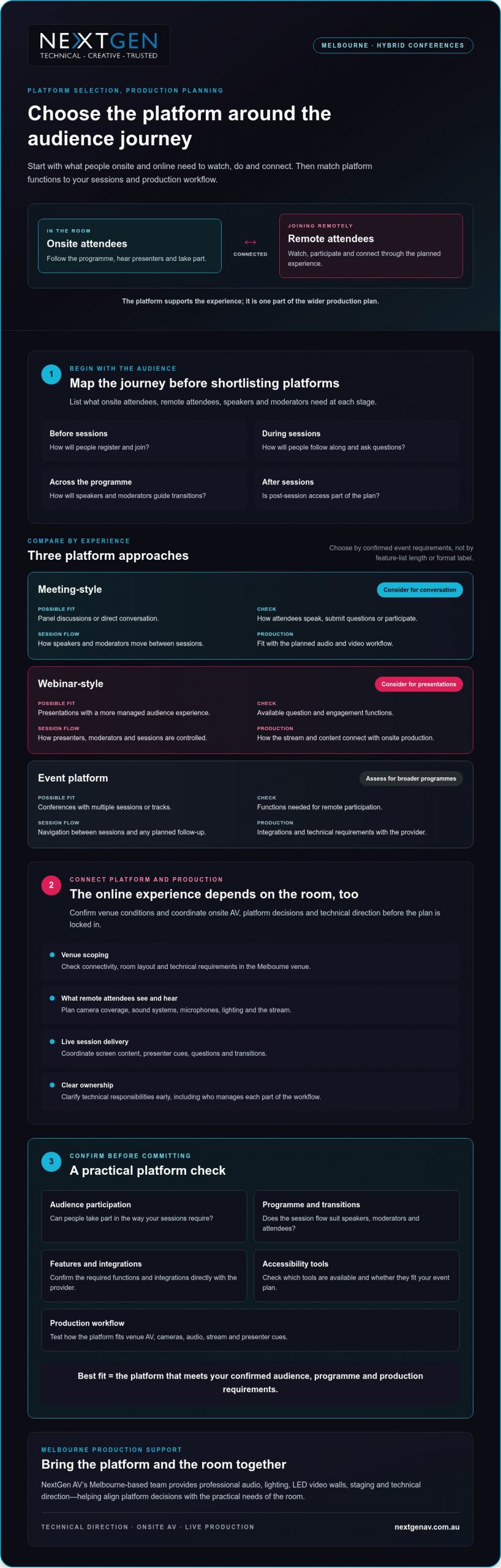
Use this Melbourne hybrid conference platform selection checklist
A clear selection process keeps platform decisions connected to the event you’re producing. For hybrid conference production melbourne, assess the attendee journey, platform functions and onsite technical workflow together, then confirm who owns each part of delivery.
Build a requirements brief before comparing providers
Start with a written brief. Record who will attend, how sessions will run, what remote participants need to do and what content they’ll see. Separate essential requirements from optional functions so a long feature list doesn’t distract from what the conference needs.
- Document the audience and programme. List onsite and remote audience groups, session formats, speakers, moderators, panel discussions, tracks and question periods.
- Define participation and content. Note planned polls, questions, presentations, video playback, recording or post-event access. Confirm directly with each provider which platform functions support these requirements.
- Map the production workflow. Identify how the platform needs to connect with onsite sound systems, screens and cameras. Confirm requirements with the production team and platform provider, including how presenters and content will move through the programme.
- Scope the Melbourne venue. Ask the venue team to confirm room layout, access arrangements, connectivity and relevant technical requirements. Share these details with production leads so the proposed workflow fits the room.
Validate the workflow before event day
A provider’s feature list isn’t a substitute for testing your planned event. Arrange a technical rehearsal with presenters, moderators and relevant production leads. Use it to check attendee access, content playback, speaker transitions and the audience interactions you intend to run.
- 5. Test the full sequence. Rehearse a representative session from joining through to questions and transitions. Check that the platform workflow and onsite production elements work together as intended.
- 6. Assign ownership. Name who administers the platform, supports speakers, monitors the stream and coordinates onsite production. Agree how issues will be communicated and escalated during rehearsal and live sessions.
- 7. Make the selection. Compare providers against the requirements brief, note any gaps, and verify outstanding features, integrations and access needs directly before confirming your choice.
In short: document requirements, check compatibility, rehearse the workflow and assign clear ownership. This gives your team a practical basis for selecting a platform and coordinating its role in the live event. If you’re planning a Melbourne conference, review NextGen AV’s hybrid production services.
Choose a Melbourne partner to bring the platform to life
A platform demonstration can confirm what the software does. It can’t show how well the platform will connect with your venue, speakers, event content and onsite AV. For hybrid conference production melbourne, assess whether the production partner can bring those moving parts into one coordinated plan, with clear responsibilities from preparation through to pack-down.
Assess experience beyond the platform demonstration
Ask how the team will coordinate platform requirements with room audio, cameras, screens and presenter cues. Clarify who leads technical direction, supports rehearsals, manages live operation and handles pack-down. Clear answers help you see whether the partner is planning for the audience experience, not simply supplying equipment.
NextGen AV is based in Melbourne and provides event production and equipment hire across Australia. Its services include professional audio systems, lighting design and equipment, LED video walls, staging and rigging, virtual and hybrid event solutions, and technical direction. Discuss your specific venue requirements during event scoping.
Look for a partner who raises dependencies early. Platform functions may need to align with the session schedule, content hand-offs and production workflow. Ask how decisions will be documented, how responsibilities will be shared between the organiser, venue, platform provider and production team, and how changes will be communicated before event day.
Turn your shortlist into an event-ready plan
Prepare a concise brief before your first production discussion. Include the event date, format, audience mix, venue and session outline, along with known platform requirements and content needs. This gives the production team a useful starting point to identify what needs confirmation, which decisions depend on others, and who owns each action.
Use the discussion to clarify how planning, setup, technical direction, live operation and pack-down fit together. Ask what information is still needed from the venue or platform provider, and how the agreed workflow will be checked before the conference. Early coordination keeps responsibilities visible and helps create a more connected experience for presenters and attendees.
NextGen AV can bring virtual and hybrid event solutions together with professional audio, lighting, LED video walls, staging and technical direction. Plan your hybrid conference production with NextGen AV by sharing your brief and aligning the platform with the live event from the outset.
Bring your hybrid conference plan together
The right platform fits your audience, programme and production workflow, not simply your preferred feature list. Confirm its functions with the provider, then test how it connects with the venue, onsite AV and remote attendee experience. Clear ownership and a technical rehearsal help your team prepare for live delivery.
For hybrid conference production melbourne, a production partner can connect platform decisions with the practical needs of the room. NextGen AV provides planning, technical direction, live operation and event AV, with a Melbourne base and event services across Australia.
Share your event format, audience mix, venue and session outline to start shaping a coordinated plan. Discuss your hybrid conference production with NextGen AV and plan for a connected experience for presenters and attendees, onsite and online.
Frequently Asked Questions
Is a dedicated platform necessary for a hybrid conference?
No, a dedicated conference platform isn’t necessary for every hybrid event. A meeting platform may suit a smaller or simpler programme, while a conference-focused platform may better support structured sessions or planned attendee interaction. Base the decision on your audience, event format and production requirements. Confirm current features with the provider, then check how the platform will connect with your in-room AV and live production workflow.
How do you choose a platform for a hybrid conference?
Start by documenting who will attend, how sessions will run and what participants need to do. Compare shortlisted platforms against those requirements, including access, interaction, content and production integration. Ask providers to confirm relevant functions rather than assuming they’re included. Before finalising the event plan, rehearse the complete workflow with speakers and production leads to check that the platform and onsite AV support the experience you’ve planned.
Can one platform serve both in-person and remote conference attendees?
A platform can support remote participation, but it can’t manage the entire in-room experience by itself. Onsite attendees rely on the venue’s AV, staging and event flow, while online viewers need clear audio, useful camera coverage and well-timed content. Plan how presenters, questions and session content will connect across both audiences. Confirm platform capabilities with the provider and assign responsibility for the online and onsite parts of delivery.
What equipment is needed for hybrid conference production?
The equipment depends on your room, event format and chosen platform workflow. A production plan may include sound systems, microphones, cameras, displays, lighting and equipment to deliver the online programme. Select these as part of a connected system, not as isolated items. During planning, confirm venue conditions, platform requirements and presenter needs with the production team so the setup supports clear communication for both audiences.
How do you test a hybrid conference platform before the event?
Rehearse the planned workflow with presenters, moderators and production leads. Check attendee access, content playback, speaker transitions and any planned audience interaction, such as questions or polls. Confirm who monitors the platform and onsite production, and agree how issues will be communicated and escalated. Make the rehearsal reflect the event format as closely as practical, so the team can identify gaps and clarify responsibilities before live delivery.
Why use a Melbourne production partner for a hybrid conference?
A Melbourne production partner can help coordinate venue planning, onsite AV and production responsibilities for a local event. When comparing teams, ask about technical direction, rehearsal planning, live operation and how they’ll work with your platform provider and other stakeholders. For hybrid conference production melbourne, look for a partner who connects platform decisions with the room’s production requirements, rather than treating AV as a separate equipment list.
When should a hybrid conference platform be selected?
Select a platform after defining the audience journey and session requirements, but early enough to coordinate it with production planning. This gives your team time to verify features with the provider, check the workflow against venue requirements and arrange a technical rehearsal. Confirm timing and dependencies with the platform provider, venue and production team. Early coordination helps clarify responsibilities before the event plan is locked in.
What if the room and the screen felt like one meeting, rather than two separate audiences? Knowing how to run a seamless hybrid meeting starts with treating every attendee as part of the same experience. Clear audio, a view of the people speaking and a genuine chance to contribute matter just as much online as they do in the room. When these basics fail, remote participants can lose the thread, while organisers get pulled away from facilitating to fix technical issues.
You can avoid many disruptions with careful preparation and active facilitation. This guide explains how to plan the room and technology, test audio and visuals, set clear participation expectations and keep the discussion inclusive from start to finish. You’ll also see when professional technical direction can take pressure off your team. NextGen AV provides audio-visual production and equipment hire from Melbourne, including professional sound systems, lighting, LED video walls, staging and hybrid event solutions. Considered planning and production support can help keep the technology working in the background, so you can focus on the meeting and the people in it.
Key Takeaways
- Start with a shared meeting purpose and plan for equal access to discussion, visuals and questions.
- Set outcomes, attendance and meeting roles before choosing the room layout and AV approach.
- Match microphones, camera views and presentation setup to the meeting format and room.
- To learn how to run a seamless hybrid meeting, test the platform and AV from a remote attendee’s perspective before you begin.
- Review participation and technical issues afterwards, and consider technical direction when room or production needs become more complex.
Start with one shared purpose for your hybrid meeting
A hybrid meeting brings in-room and remote participants into one shared discussion. But connecting a video call is only the starting point. If people joining online can’t hear a question, see the presenter or follow how the room responds, they’re connected technically but excluded from parts of the conversation.
A seamless hybrid meeting gives every participant a clear view of the discussion and a meaningful way to contribute, wherever they’re joining from. That takes more than a platform: it calls for a clear purpose, deliberate room planning and facilitation that keeps both audiences in view. For background on the systems behind the experience, read about videoconferencing technology.
Start by matching the production approach to the meeting. A routine team discussion may need a straightforward room layout and a clear process for taking turns. A larger hybrid event, with presenters moving around, several visual elements or audience interaction, needs more considered AV planning and technical direction. For meetings in Melbourne, confirm venue-specific details early, since the room layout, available equipment and access can affect the setup.
What makes a hybrid meeting feel seamless?
Participants in the room and online should be able to hear each speaker, see the presenter and relevant materials, and understand when they can respond. Clear speaking turns help prevent people talking over one another. A visible presenter and an agreed way to signal questions help remote attendees follow the room. The aim is shared attention, not simply a live connection.
Set the meeting outcome before choosing the setup
Decide what the meeting must achieve before arranging chairs or selecting AV. Is the group sharing information, discussing an issue or reaching a decision? The answer shapes how people need to interact and what the facilitator must keep track of. Identify who will attend in person, who will join remotely and who will guide the discussion.
- For information-sharing: plan clear presentation visibility and a way to ask questions.
- For discussion: establish speaking turns so remote and in-room voices are heard.
- For a decision: explain how options will be considered and how the outcome will be confirmed.
This purpose-first approach is the foundation of how to run a seamless hybrid meeting. The steps that follow build on it: set outcomes, design the room, test the setup, facilitate in real time, then follow up with decisions and action owners.
Plan the room, people and AV before meeting day
Once the meeting outcome is clear, map the people and production around it. A room that works for a small discussion may not suit a presenter-led session with remote questions, screen content and movement across a stage. Planning these details early helps prevent avoidable changes on the day and gives every participant a clearer view of the conversation.
- Confirm the outcome and attendance: note what the meeting needs to achieve, who will be in the room and who will join remotely.
- Assign the roles: name the meeting chair, a facilitator to track online contributions, and someone to manage the platform and presentation handovers.
- Match the room to the agenda: consider seating, presenter movement, sightlines and how attendees will ask questions or take part in a decision.
- Confirm the AV plan: discuss sound systems, microphones, cameras, screens and presentation connections with the venue or AV team.
Assign clear roles before the call begins
The chair can lead the agenda while a facilitator watches for raised hands, questions and signs that remote participants have been missed. A separate platform operator can manage presentation sharing and handovers, allowing the chair to stay focused on the discussion. For larger or technically complex meetings, a front of house engineer can manage the audience sound mix, while a technical director coordinates the production plan.
Plan the room around clear communication
Microphone placement should support clear speech from the people who need to contribute, not just the main presenter. Check that remote participants can see both the presenter and the relevant presentation content, and that people in the room can follow remote contributions. Seating should support the agenda: a discussion needs visible faces and clear speaking turns, while a presenter-led session needs unobstructed views of the speaker and screen.
Confirm venue access, power, connectivity and equipment requirements directly with the venue before the event. If room conditions or sightlines are uncertain, arrange a walkthrough or a technical conversation to confirm the plan. For a Melbourne meeting, include these checks in the venue conversation rather than assuming every space has the same facilities.
For a broader production plan, explore hybrid event services. If the meeting calls for more than a straightforward room setup, NextGen AV’s technical direction and hybrid event solutions can help coordinate the AV around the participant experience, so you can focus on leading the meeting.
Make audio, video and presentations work for both audiences
The right AV setup depends on how the meeting will run. A small discussion needs clear speech and a camera view that captures the people contributing. A presenter-led session needs the speaker and slides to remain visible to both audiences. In a larger room, sound coverage, screen placement and camera framing need closer coordination so participants aren’t left trying to follow incomplete views or unclear audio.
Clear audio is what lets remote participants follow the conversation and take part, not just watch it. The room’s microphones and sound systems need to capture questions and responses as well as the main presenter. If only the presenter can be heard, the online audience misses the exchange that gives a discussion its meaning.
Choose sound that carries every contribution
A wireless microphone may suit a presenter who moves around the room, while a seated discussion calls for a plan that captures contributions from different positions. Decide how in-room attendees will ask questions: will a microphone be passed around, or will the facilitator repeat each question clearly for online participants? Ask an audio specialist to assess the room and recommend sound systems for the audience and meeting format.
Room acoustics, speaker positions and microphone placement all affect what remote attendees hear. A considered audio plan helps make speech intelligible without asking online participants to guess who is talking. For more guidance on planning event audio, see the professional sound system hire guide.
Keep presenters and shared content visible
Frame cameras so remote attendees can identify the active speaker and follow changes in the discussion. If the presenter moves, check whether the camera view still works; if several people contribute, consider how the online audience will see them. Place room screens where attendees can read presentation content without losing sight of the speaker, and check that slides remain legible in the online meeting as well.
An LED display can support visibility in a larger room, but it isn’t automatically the right choice for every meeting. Consider the room’s scale, the content being shown and the viewing conditions. The goal is a clear, balanced view for both audiences, not more equipment for its own sake.
These decisions are central to how to run a seamless hybrid meeting: match the audio and visuals to the way people will participate. If you’d like technical guidance for your room and audience, NextGen AV’s professional audio systems and hybrid event solutions can help shape the production plan around a clear participant experience.
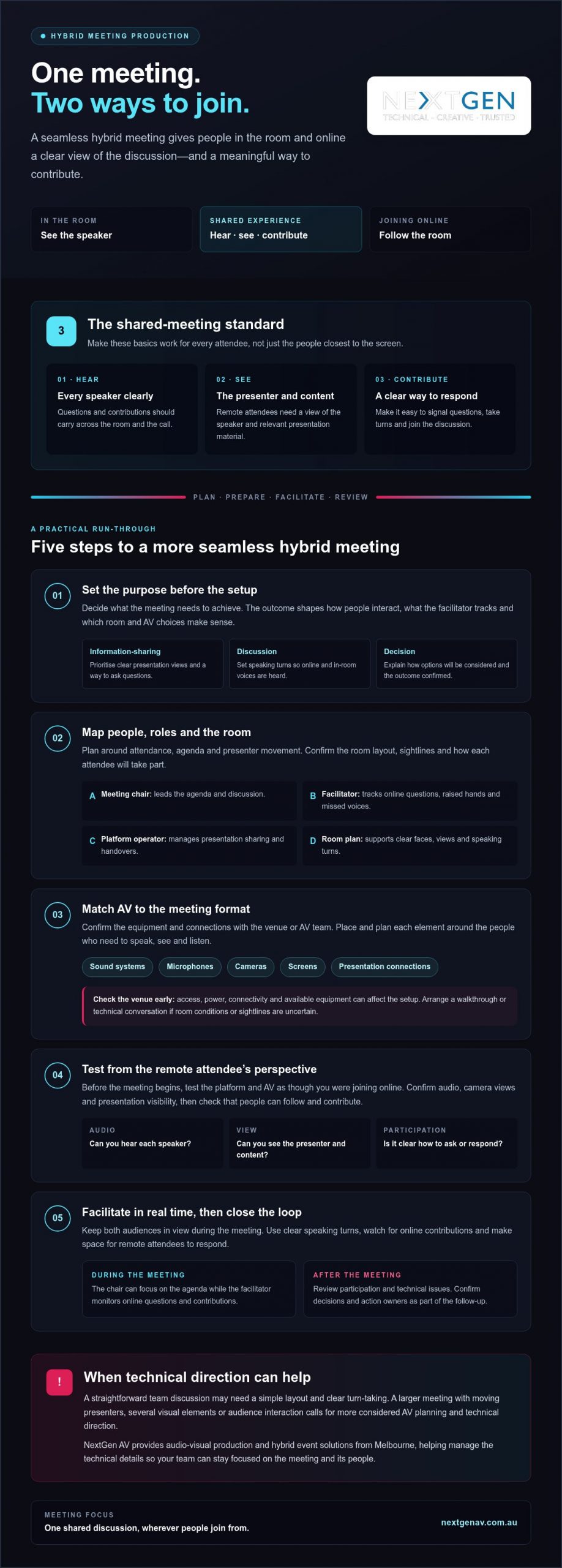
Test the setup and facilitate the meeting in real time
A planned setup still needs a live rehearsal. Test the full signal path before attendees arrive, then check the meeting from the perspective of someone joining remotely. A microphone can sound clear in the room but still be too quiet or unclear online, so don’t rely on the in-room view alone.
Run a practical rehearsal
Work through each part of the meeting in the order it will happen. Confirm platform access, test each microphone, check camera views, share the presentation and listen to the room sound through the online connection. Rehearse presenter handovers too, and confirm who will handle questions and technical changes while the meeting is under way.
- Check access: confirm the meeting link opens and remote attendees can join.
- Test speech and sound: speak from each planned position and check what the remote audience hears.
- Review camera views: make sure the active speaker is visible and remains in frame when moving.
- Share presentation content: confirm slides appear correctly online and on the room display.
- Practise handovers: run through speaker changes and question management.
Invite a remote colleague to join from their own device and report what they can hear and see. Ask them to confirm that speech is clear, slides are readable and the presenter is visible. This perspective check can reveal issues that aren’t apparent from the meeting room.
Keep remote participants in the conversation
Open by explaining how everyone can contribute. For example: “Please use the raise-hand function or add your question in the chat. We’ll pause between topics to bring in online questions, and I’ll repeat questions from the room so everyone can hear them.” Adapt the wording to the platform and participation methods you’ve confirmed.
During the discussion, pause between topics so the facilitator can check for online questions and responses. If someone in the room asks a question, repeat it clearly before answering when remote attendees may not have heard it. Small facilitation cues keep the conversation connected and give online participants a clear opening to speak.
If a technical issue interrupts the discussion, pause rather than talking over the problem. The facilitator can explain what’s happening, while the person managing the platform checks the issue. If the connection can’t be restored promptly, use a backup communication method agreed before the meeting, such as a phone call, and confirm how participants will rejoin or receive missed information.
Knowing how to run a seamless hybrid meeting means preparing both the technical response and the human one. For coordinated event production support, read the audio-visual hire guide, or discuss hybrid event solutions and technical direction with NextGen AV.
Close the loop and know when production support helps
The meeting isn’t finished when the call ends. A short review helps turn decisions into action and makes the next hybrid session easier to plan. Use your organisation’s usual process to record outcomes, responsibilities and next steps, then check whether the experience worked for people joining from both locations.
Turn meeting outcomes into clear follow-up
Ask participants whether they could hear speakers, see the presenter and presentation content, and contribute without difficulty. Record recurring AV issues, such as questions being hard to hear online or slides being difficult to read, so they can be addressed in the next setup. Assign an owner to each action and confirm how progress will be followed up through your established meeting process.
This review closes the loop between production and purpose. If remote participants couldn’t follow a discussion or had limited chances to speak, adjust the facilitation plan as well as the technical setup. A clear record helps distinguish a one-off problem from something that needs attention before the next meeting.
Recognise when an AV production partner can help
A straightforward meeting in a familiar room, with one presenter and simple screen sharing, may only need a basic setup and a focused test. Technical direction becomes more valuable when the venue, audience or presentation format adds coordination demands, such as multiple speakers, presenter movement, staging or several display requirements. The aim is to keep production working behind the scenes while the meeting stays focused.
A production partner can help coordinate sound, displays, staging and presenter transitions as one plan, rather than leaving the organiser to manage each technical detail during the meeting. For broader event requirements, see the full-service event production guide.
For Melbourne organisers, NextGen AV’s Melbourne base offers a local point of contact for discussing venue and production requirements. The company also provides event solutions across Australia. Share the details of the space, agenda and participant experience when planning a more complex hybrid meeting, so the technical approach can be matched to the event.
Make your next hybrid meeting count
Knowing how to run a seamless hybrid meeting comes down to planning one shared experience. Set a clear purpose, match the room and AV to the agenda, then test the setup from a remote participant’s perspective. During the meeting, make space for both in-room and online contributions. Afterwards, capture decisions, action owners and any technical issues to address next time.
A simple meeting may need only a focused setup and a careful test. More involved rooms, presentations or transitions can call for technical direction to keep production coordinated while you lead the conversation. NextGen AV offers professional audio systems, lighting, LED video walls, staging and technical direction, with hybrid event solutions for more involved requirements.
Discuss your hybrid meeting requirements with NextGen AV and plan the technical details around the people and outcomes that matter. With the right preparation and support, you can create a confident, inclusive meeting experience for everyone.
Frequently Asked Questions
How do you run a seamless hybrid meeting?
To run a seamless hybrid meeting, agree on the outcome, attendee roles and ways to contribute before choosing the setup. Arrange the room so speakers can be heard and shared content can be seen, then test platform access, microphones, camera views and presentation sharing from both sides. During the meeting, invite remote input, pause for questions and assign someone to manage technical issues. Review feedback and actions afterwards.
What equipment do you need for a hybrid meeting?
The equipment you need depends on the room, audience and agenda. A meeting may require a platform-enabled computer, microphones, a camera, room sound and a display for shared content. Larger or more complex spaces can need additional audio-visual planning. Confirm what the venue provides and test the complete setup with someone joining remotely. Choose equipment to suit the actual room and participant experience, rather than selecting items by category alone.
How can remote participants feel included in a hybrid meeting?
Give remote attendees clear ways to ask questions and take turns, and assign a facilitator to monitor their contributions. Check they can hear room speakers and see the presenter and relevant content. Pause after questions to allow online responses, and repeat in-room contributions if they weren’t clear through the connection. Keep side conversations from becoming the main discussion. Inclusion depends on deliberate facilitation as well as technology.
Why is audio important in a hybrid meeting?
Remote attendees rely on transmitted room audio to follow speakers and know when to contribute. If microphones miss questions or speech is difficult to understand, online participants can lose the thread of the discussion. Test the sound from a remote participant’s device, including questions from around the room. If the venue or meeting format makes it difficult to cover the audience clearly, ask an audio specialist to assess the room and sound systems.
How do you test a hybrid meeting before it starts?
Rehearse the meeting sequence before attendees join. Check platform access, each microphone, room sound, camera framing, presentation sharing and speaker transitions. Ask someone joining remotely to confirm what they can hear and see, including whether slides are readable. Confirm who will manage technical changes and participant questions, then resolve any issues before the meeting begins. Include venue-specific checks if access, connectivity or available equipment needs confirmation.
Can one person manage a hybrid meeting and its technology?
One person may manage a simple meeting, but chairing the discussion while monitoring platform controls, remote questions and room AV can divide their attention. Assigning a facilitator or technical support role helps keep the conversation moving while issues are handled. For a larger meeting, a complex venue or several presentation handovers, clarify responsibilities and production needs in advance. This lets the chair focus on the meeting outcome and participants.
What should a hybrid meeting run sheet include?
A hybrid meeting run sheet should include the objective, agenda, presenter order, start and finish times, participant roles and planned interaction points. Note when slides or other content will be shared, who will manage remote questions and who will handle technical changes. Include pre-start tests and any venue coordination required. Keep the document clear enough for the chair, facilitator and technical support team to follow together throughout the meeting.
When should you use professional AV support for a hybrid meeting?
Consider professional AV support when room acoustics, audience size, staging, multiple presenters or technical handovers make the setup difficult to manage alongside the agenda. A production team can help plan and coordinate audio-visual requirements and support the live meeting. Discuss the venue, format, content and participant experience early so the plan fits the event. For Melbourne meetings, NextGen AV can provide professional audio systems, technical direction and hybrid event solutions to support production planning.
What if the right speaker brand still left people at the back of your Melbourne venue struggling to hear? If you’re considering d&b audiotechnik speaker hire melbourne, a model list alone won’t answer the key question: will the system provide clear, even coverage for your audience? Confirm availability for your event date before specifying D&B equipment.
Confidence depends on both the sound plan and the people responsible for delivering it. Venue layout, audience size, programme and staging all shape the system design, while setup, operation and pack-down need to fit the wider production plan. A conference in a hotel ballroom and a product launch in an exhibition space can have very different acoustic and operational demands. NextGen AV provides professional audio systems and technical direction to help coordinate these moving parts.
This guide explains what details to share when planning event audio, how to assess venue coverage and system design, and what to ask providers about on-site technical delivery. You’ll be better equipped to compare proposals on more than brand names and plan an event where presentations and performances reach the audience clearly.
Key Takeaways
- Start with your event programme, audience layout and venue conditions so the sound system is designed around real coverage needs.
- When assessing d&b audiotechnik speaker hire melbourne, confirm equipment availability for your event and ask how the proposed design will serve the room.
- Compare providers on their system-design process, operator, setup plan and event-day management, not just the brand or equipment list.
- Prepare venue details, audience layout, run sheet and access arrangements to help coordinate audio with staging, lighting and screens.
- Consider a production partner such as NextGen AV for professional audio systems and technical direction, while confirming D&B equipment availability before specifying it.
D&B Audiotechnik Speaker Hire in Melbourne: Start with the Event
Before choosing speakers, define the event they need to serve. A conference in a Melbourne CBD function space, a presentation in an exhibition hall and an outdoor event each place different demands on sound coverage. Audience size, seating or standing layout, programme content and venue conditions should guide the system-design conversation. Start with the brief, then consider the brand.
Event sound coverage means delivering clear, intelligible audio to the intended audience across the areas where they’ll listen. A recognised speaker brand alone can’t confirm that coverage will be even, speech will remain clear throughout the room or the system will be operated reliably on event day. Those outcomes depend on a suitable design, considered equipment placement and capable technical operation.
This is a temporary event production brief, not a permanent venue installation. Plan the system around the event’s audience and programme, then coordinate it with the venue and wider production requirements. For background on the manufacturer, see this overview of d&b audiotechnik. For your event, the practical question is whether the proposed system and delivery plan suit the room.
What the D&B Audiotechnik Search Confirms, and What It Does Not
A search for d&b audiotechnik speaker hire melbourne can help you identify a preferred brand, but it doesn’t confirm local stock or availability on your event date. It also doesn’t establish that a particular system suits your venue. Ask the provider to confirm availability for your date, describe the proposed system and explain how it will serve the audience’s listening areas. Don’t assume a specific model or component is included until the provider confirms it.
Build the Brief Around Audience and Venue
Give the production team a practical picture of the event. These details help them assess the sound requirements before recommending equipment:
- Audience: Share expected attendance and where people will sit or stand, including any areas beyond the main room.
- Room and listening areas: Provide the layout and identify where speech or performance needs to be heard clearly.
- Programme: Note whether the focus is speeches, panels, music or a mix, as each affects the design discussion.
- Site logistics: Include access details, load-in timing and available venue information the production team needs to plan delivery.
With this brief in place, you can assess d&b audiotechnik speaker hire melbourne against the event’s actual requirements, rather than treating a brand name as a guarantee of sound quality or operational readiness.
How to Specify D&B Audiotechnik Speakers for a Melbourne Event
A clear specification follows a practical sequence: define the programme, map the audience, assess the venue, confirm equipment supply, then plan operation. This keeps the conversation focused on the experience you need to deliver, rather than starting with a list of speaker components. As a simple rule, sound-system selection should follow the event brief and venue assessment.
For a Melbourne event, room shape and audience position matter as much as event format. A long room, wide seating plan or separate audience zones can affect where sound needs to reach and how the production team approaches coverage. Speeches and panel discussions call for intelligible spoken audio, while performances and playback introduce different requirements. Share the run sheet and available venue information during your enquiry so the proposed system can be assessed against the actual programme.
Translate the Run Sheet into Audio Requirements
Mark each audio element in the schedule: spoken-word sessions, panel discussions, performances and playback. Note transitions, such as a move from a presentation into a performance, and flag sessions happening at the same time in separate spaces. These details help the production team plan what needs to be heard, where and when. For a useful overview of the wider discipline, Berklee College of Music outlines key elements of live event sound engineering, including room acoustics.
Include your run sheet, venue plan, expected audience layout and known access or load-in details in the enquiry. A prepared brief gives the provider a practical basis for discussing the system and event-day operation. NextGen AV’s professional sound system hire guide offers further guidance on planning event audio.
Plan Coverage Before Confirming Equipment
Ask how the production team will consider audience zones and listening positions, including areas furthest from the stage and any side sections. A site discussion can help identify practical constraints before event day, such as room layout, possible equipment positions and venue information still needed to confirm a design. Check specific components and suitability directly with the provider. A search for d&b audiotechnik speaker hire melbourne doesn’t establish availability or confirm that a system fits your event.
Clarify who will manage the audience-facing mix. A front of house engineer balances and monitors the sound heard by attendees, responding to the programme as it unfolds. Confirm the proposed operator’s role and how audio operation fits the event schedule. If you’re developing an event brief, share these details with NextGen AV’s production team to inform a discussion about professional audio systems and technical direction.
Compare Melbourne D&B Speaker Hire on Delivery, Not Brand Alone
A provider comparison should reveal more than whether a preferred brand might be available. Separate confirmed D&B equipment for your event date from the provider’s broader professional audio and production capability. Then check how the system will be designed, operated and coordinated. Those details shape what your audience hears and how smoothly the programme runs.
Use these neutral questions with every prospective provider:
| Area | What to ask | What to confirm |
|---|---|---|
| Equipment | Which equipment is confirmed for our event date? | Get confirmation of D&B availability and the proposed system components. Don’t treat a general brand listing as confirmation. |
| Design process | How will you plan sound for our venue and audience layout? | Look for a clear explanation of how the design responds to the event brief and listening areas. |
| Operator | Who will manage the audience-facing mix? | Clarify the operator’s role and how they’ll work with the run sheet. |
| Setup and pack-down | What support is included for setup, sound checks and pack-down? | Agree on responsibilities and how these activities fit the venue schedule. |
| Event-day management | How will changes and communication be handled during the event? | Establish a clear contact point and process for programme adjustments. |
Questions to Ask About Equipment and Operation
Ask the provider to distinguish confirmed equipment from options that still need checking. Then clarify who operates the system, what sound checks are planned, and whether live operation and pack-down support are included in the proposed delivery. A capable operator can respond as sessions change, while clear communication supports continuity if the run sheet shifts. Confirm these responsibilities in advance rather than relying on assumptions.
What Technical Assurance Looks Like
Reliable delivery also depends on practical planning. Ask how the provider will coordinate venue access, equipment handling and worksite safety, and what information they need from your venue team. If event rigging is involved, check who is responsible, whether suitably qualified personnel will undertake the work and which safety documents are relevant to the scope. These questions help clarify accountability before the crew arrives.
Ask which safety measures and documentation apply to your specific production, and how they’ll be coordinated with the venue. With more than 30 years of industry experience, NextGen AV can discuss professional audio systems and technical direction as part of event delivery. To assess d&b audiotechnik speaker hire melbourne, confirm D&B availability separately, then compare the proposed design, operator and on-site plan. You can discuss professional audio planning with NextGen AV as you prepare your event brief.
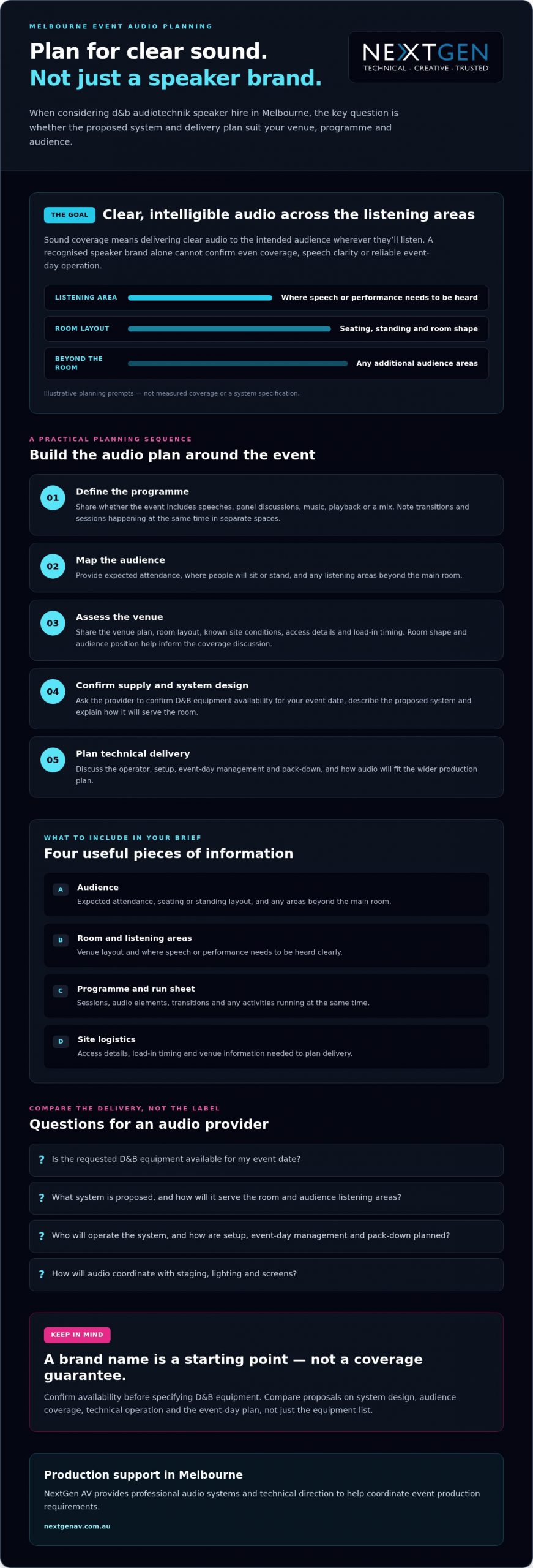
Prepare a Melbourne Venue and Event-Day Sound Plan
Good event-day delivery starts before the production team arrives on site. Agree the sound plan with your provider in advance, including venue access, timings, technical responsibilities and how audio will fit the wider production. This is especially useful for outdoor or CBD events, where site conditions and access arrangements can affect the team’s plan. Keep the plan specific to your venue and confirm details with the relevant venue contacts.
Use this checklist to prepare the information the production team needs:
- Venue details: Share the venue plan, access instructions, known room constraints and relevant site information.
- Audience layout: Mark the main listening areas, seating or standing arrangements and any separate audience zones.
- Programme: Provide event timings, the current run sheet and details of sessions taking place at the same time.
- Access arrangements: Confirm the agreed load-in timing and any instructions the team needs to follow when arriving and moving equipment.
Information to Share Before the Site Plan
Small programme changes can affect the technical plan. If a panel becomes a performance, a session moves rooms or another area is added, tell the production team promptly so they can review the implications. Early communication gives everyone time to confirm responsibilities and adjust the plan before event day, rather than leaving key decisions until the crew is setting up.
Coordinate Sound with the Wider Production
Audio works alongside other elements of the event. Discuss how sound systems and microphones will interface with staging, lighting and screens, and identify who leads technical communication during setup and live operation. For example, a change to the stage layout or screen position may need to be shared across the production team so the event remains coherent for the audience. NextGen AV’s Melbourne audio visual hire guide offers broader guidance on coordinating production elements.
Keep safety planning clear. Where event rigging is part of the production, confirm who is responsible and ensure the work is planned with suitably qualified personnel. Agree on relevant documentation and coordination steps with the production team and venue before the event. This keeps technical responsibilities visible and avoids leaving important details to chance.
A clear plan is particularly valuable when assessing d&b audiotechnik speaker hire melbourne: confirm brand-specific equipment separately, then align the event schedule, site information and production responsibilities. For a coordinated discussion about professional audio systems and technical direction, share your Melbourne event brief with NextGen AV.
Book Event Audio Production with NextGen AV in Melbourne
For event audio, the right partner does more than discuss equipment. NextGen AV is a Melbourne-based production partner providing event solutions across Australia, with more than 30 years of industry experience. The team can discuss your brief, technical direction and event-day management needs so the audio plan fits the production as a whole.
If you’re considering d&b audiotechnik speaker hire melbourne, confirm availability for your specific event before treating D&B equipment as part of the proposed system. NextGen AV’s D&B inventory has not been confirmed, so equipment, components and suitability need to be checked directly. A clear conversation about your requirements lets the team discuss the production approach without making assumptions about brand availability.
What to Include in Your Enquiry
Give the production team enough detail to understand the event and its technical priorities. Include:
- Event details: The date, Melbourne venue, format and expected audience, along with relevant venue or access information.
- Programme: A run sheet or outline that identifies speeches, panels, performances, playback and significant transitions.
- Audio request: State that you’re seeking D&B Audiotechnik and ask the team to confirm availability for your date before proposing a system.
- Production needs: Note whether you’re discussing technical direction, sound operation, staging, lighting or screens as part of the wider event plan.
These details help focus the discussion on what the audience needs to hear and how audio fits the run of show. If your programme or venue plan changes, pass on the update so the proposed approach can be reviewed.
From Enquiry to Event Delivery
Once the brief is shared, the team can review the event requirements and discuss a suitable production approach. Confirm which elements are included, who will coordinate technical communication and how on-site management will keep agreed details aligned during delivery. This gives you a clearer picture of responsibilities before the production reaches the venue, while leaving the system specification subject to confirmed equipment and event requirements.
NextGen AV’s professional audio systems and technical direction support a production-led approach, rather than treating a brand name as a plan. For a considered discussion about your Melbourne event, discuss your Melbourne event audio requirements with NextGen AV. Share the date, venue, audience and programme, and ask the team to confirm D&B availability alongside your event’s technical requirements.
Plan Your Event Sound with Confidence
Clear event audio starts with the brief, not the brand name. Match the system design to your programme, audience and Melbourne venue, then confirm whether D&B equipment is available for your event date. If you’re weighing up d&b audiotechnik speaker hire melbourne, assess the proposed coverage, who will operate the sound and how event-day responsibilities will be coordinated.
NextGen AV brings more than 30 years of industry experience and provides event solutions across Australia from its Melbourne base. With planning and technical direction in place, you can focus on delivering a polished experience while the production details are coordinated behind the scenes.
Share your event date, venue, audience details and run sheet to start a practical conversation. Discuss your Melbourne event audio requirements with NextGen AV, including D&B availability and the technical support your programme calls for. With a clear plan and the right production partner, your audience can enjoy sound designed around the event.
Frequently Asked Questions
Can I hire D&B audiotechnik speakers in Melbourne?
D&B Audiotechnik availability must be confirmed for your specific event date. A provider’s general audio capability or a search result doesn’t confirm local stock or that a system is available for your booking. NextGen AV offers professional audio systems and technical direction, but its D&B inventory has not been confirmed. If you’re researching d&b audiotechnik speaker hire melbourne, state your preferred brand in your enquiry and ask the provider to confirm availability and suitability.
How do I choose D&B speakers for my event venue?
Choose a system based on your programme, audience layout and venue, then confirm which equipment is available. Share the room plan, audience positions and key listening areas with the production team. Explain whether the event centres on speeches, panels, music or mixed content, as this shapes the design discussion. Ask how the proposal addresses coverage and intelligibility across the intended audience, rather than relying on a brand name alone.
Do I need an audio engineer as well as speakers?
An audio engineer can manage the sound during the event, not just the equipment setup. For a conference, product launch or live performance, an operator can work with the run sheet, balance audio for the audience and respond as programme elements change. Ask whether live operation is included, who is responsible for sound checks and how the technical team will coordinate with your event lead. The right support helps keep audio delivery aligned with the programme.
What information should I provide when enquiring about speaker hire in Melbourne?
Provide your event date, Melbourne venue, format and expected audience, plus a run sheet or programme outline. Include a venue plan if available, audience layout, key listening areas and known access or load-in details. Note whether you prefer D&B Audiotechnik and ask the provider to confirm availability for your date. If you need technical direction or audio operation, include that in the enquiry so the discussion covers delivery as well as equipment.
Can one sound system cover speeches and live music?
A system can be planned for an event with both speeches and live music, but the production team needs to assess the programme and venue before confirming a suitable design. Share details about spoken-word sessions, performances, playback and transitions, along with the room layout and audience positions. Ask how the proposed system and operation will address each part of the programme. Don’t assume one equipment list will suit every venue or event format.
What does a front of house engineer do at an event?
A front of house engineer manages the sound mix heard by the audience. During an event, they monitor and adjust audio in response to speakers, panels, music and other programme elements, helping maintain clarity as the schedule progresses. Confirm who will fill this role, whether they’ll attend sound checks and how they’ll communicate with the event team. Their work connects the technical setup to the audience’s experience in the room.
How early should I enquire about D&B audiotechnik speaker hire?
Enquire as soon as you know the event date and venue, particularly if D&B Audiotechnik is your preferred brand. There’s no confirmed lead-time figure to rely on, and availability needs to be checked for the specific booking. Sharing details early also gives the provider time to review the programme, venue information and operational requirements with you. If your run sheet or layout changes, share updates promptly so the proposed technical plan can be reviewed.
What if the biggest risk to your live event isn’t the equipment, but how well it’s planned and operated? Choosing broadcast av equipment hire melbourne involves more than selecting cameras, screens or sound systems. Audio dropouts, unclear visuals and missed cues can disrupt the programme and distract both in-person and remote audiences.
Reliable equipment matters, but a production partner also needs to coordinate the technical details behind the scenes. A clear brief, careful planning and live technical direction help keep each part of the event working together, so you can focus on your speakers, guests and message.
This guide explains how to define your AV requirements, compare equipment-only hire with managed production support, and assess a partner’s approach to setup and live delivery. You’ll also learn what to discuss when planning a hybrid event. Melbourne-based NextGen AV offers professional audio, LED video walls, virtual and hybrid event solutions, staging and technical direction to help manage event production.
Key Takeaways
- Match your AV brief to the event format, content, venue and audience rather than relying on a standard equipment checklist.
- Consider how sound systems, displays, lighting and staging work together, and clarify who will manage the audience sound mix.
- When comparing broadcast av equipment hire melbourne partners, ask who plans the technical setup, coordinates the crew, operates the production and manages pack-down.
- Prepare a stronger brief by sharing your event objectives, programme needs, room plans, access information and venue technical requirements.
- Consider how a Melbourne-based partner and its ability to deliver events across Australia fit your production needs.
Broadcast AV equipment hire in Melbourne: what does your event actually need?
Broadcast AV equipment hire in Melbourne means planning event technology around the programme, venue and audience, then coordinating its setup and operation. It isn’t a fixed package or a standard checklist. The right mix of professional audio systems, LED video walls, lighting, staging and technical support depends on what you’re presenting, where the event is happening and how audiences will take part.
The word “broadcast” can mean different things. Outside broadcasting (OB) describes producing a programme from a remote location, often with a mobile production setup. A corporate event may not require that kind of broadcast operation, but it may still need coordinated live presentations and remote participation. Clarify what “broadcast” means for your event before deciding which technology and crew roles to discuss.
Equipment hire covers the provision of technology. It doesn’t automatically include technical direction, setup, live operation or pack-down. Confirm which parts of delivery your partner will manage and who is responsible for coordinating the technical plan. Clear responsibilities help the production team align each element with the run sheet, so people can hear speakers, follow content and participate without distraction.
Which event formats call for broadcast AV support?
A conference may need clear speech reinforcement and presentation content that’s easy to see throughout the room. A product launch may place greater emphasis on visual reveals, lighting and carefully timed cues. A corporate event could combine speeches, panels and presentations. A hybrid programme adds remote attendees to the brief, so consider what they need to see, hear and do. Your answers help define the equipment and crew roles to discuss.
What should a broadcast AV brief include?
Give your production partner enough detail to shape a plan around the event. Include:
- Programme: Schedule, presentation formats, speakers and key transitions.
- Audience: Who’s attending in person or remotely, and what they need to see, hear and do.
- Venue: Room plans, access conditions, available infrastructure and known technical constraints.
- Outcomes: The event’s purpose and the experience you want audiences to take away.
- Approvals: Decision-makers, content owners and who can approve changes during the event.
A precise brief gives your technical partner a reliable starting point for planning and operation. It also helps identify gaps early, so the production can support the programme and keep the audience experience in focus.
How Melbourne broadcast AV production brings sound, screens and live content together
A polished event feels like one continuous experience, not separate audio, screen and lighting elements competing for attention. Sound systems carry speech, displays make presentation content visible, lighting guides focus, and staging gives speakers a defined space. The technical plan connects these elements to the run sheet, so each cue supports the programme.
A front of house engineer manages the sound mix heard by the audience, adjusting it to suit the room and what’s happening on stage. The production team also needs to coordinate presentation files, playback and speaker cues. Ask your provider to explain the proposed signal flow, how content reaches the displays, and which equipment and connections are required. Confirm that the proposed setup suits your event rather than assuming it supports every format.
For broader planning context, explore this Melbourne AV hire and event production guide. The Australian Government’s event-production competency also identifies technical services such as audio-visual, lighting, sound and staging as areas production teams may need to coordinate. Its outline of national standards for event production offers context for discussing responsibilities with a supplier.
How do sound and visuals support the programme?
Room layout shapes both sound and sightlines. Discuss where the audience will sit, where speakers will present and whether people can hear speech and read content from their seats. Then map presentation changes, video playback and speaker cues to the programme schedule. A technical rehearsal lets the team check transitions, confirm content appears as intended and address issues before attendees arrive.
When should LED screens or hybrid elements be considered?
Consider LED screens when the room, viewing distances or content call for a display plan beyond a single presentation surface. Base the choice on the venue and material, not a specification chosen in isolation. For practical display-planning considerations, see the LED video wall planning guide.
If remote participants will join, plan their experience alongside the in-room programme. Confirm what content they need to follow and how their participation fits the event flow, then discuss the technical requirements with your production team. The hybrid event services guide can help you frame that conversation. For broadcast av equipment hire melbourne, a joined-up plan helps sound, visuals and live content serve the same audience experience. Explore event production support as you shape the technical brief.
How to compare broadcast AV hire partners in Melbourne
For broadcast av equipment hire melbourne, compare more than equipment lists. Look for a partner who asks about your programme, venue and audience, then explains how the technical plan will support them. You should also know who is responsible for each part of delivery and how updates or changes will be handled.
Use this framework to compare proposed scopes, then ask for details specific to your event.
| Area | What to clarify |
|---|---|
| Planning | How will the team learn about your programme, audience, venue conditions and technical constraints? |
| Equipment coordination | How will the proposed audio, screens, lighting and staging work together? Ask the supplier to confirm that the specified equipment suits your content and venue. |
| Crew | Which roles are included, and who is your point of contact before and during the event? |
| Live operation | Who runs the technical cues and responds to changes during the programme? |
| Pack-down | Who is responsible for dismantling and removing the supplied production equipment, and how does that fit the venue’s access arrangements? |
Equipment-only hire or managed production?
Equipment-only hire may suit an event team with the expertise and people to plan, install, operate and pack down the system. Managed production can include technical direction and on-site event management, helping coordinate the technical plan with the live programme. Neither approach suits every event. Match the support to your team’s capabilities, the programme’s complexity and the responsibilities you want the supplier to take on. Confirm each responsibility in writing.
What evidence demonstrates reliable technical delivery?
Ask for examples related to your event format, scale and intended audience experience. Find out how the team coordinates sound, visuals, lighting and event cues, and what venue information it needs before finalising the plan. A knowledgeable partner should explain how venue constraints could affect the technical approach.
NextGen AV has over 30 years of industry experience and delivers events throughout Australia. Ask how its experience applies to your venue and production requirements. Discuss your event brief with NextGen AV to clarify the technical direction, equipment coordination and on-site support your programme calls for.
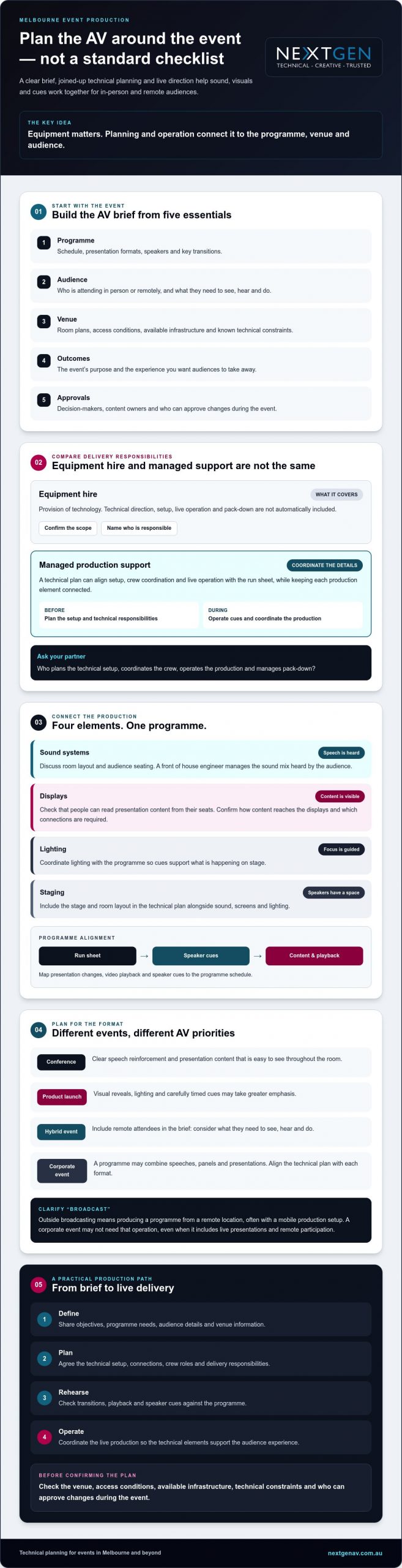
Planning broadcast AV for Melbourne: briefing checklist
A clear brief gives your production team the information to shape technical delivery around the event, venue and audience. For broadcast av equipment hire melbourne, work through these steps before confirming the production plan:
- Set the event objectives. Define what the event needs to achieve and the experience you want attendees to have.
- Describe the audience. Note who will attend in person and remotely, and what they need to see, hear or take part in.
- Share the programme. Provide the schedule, presentation formats, speaker details, playback content and key cues.
- Provide venue information. Share the location, room plans, access arrangements, available infrastructure and any technical documents supplied by the venue.
- Confirm responsibilities. Identify decision-makers, content owners, approval processes and who will communicate changes to the production team.
- Agree the delivery plan. Confirm rehearsal arrangements, communication channels, setup, live operation and pack-down responsibilities.
For wider planning considerations, see the full-service event production guide. It can help you consider how technical delivery fits within the broader event plan.
What venue information should you prepare?
Send the production team the room layout, venue access information and any available technical documentation, then introduce the relevant venue contact. Ask how the team will coordinate with the venue and what additional details it needs. Access arrangements and technical conditions vary, so confirm venue-specific requirements directly. Early coordination can identify constraints that may affect the proposed setup.
How should rehearsals and event-day roles be organised?
Agree on rehearsal timing and what presenters need to do, including when presentation content must be handed over and who approves cues or changes. Name the person who will relay programme updates to technicians during the event, and establish a clear communication channel. Document who is responsible for setup, live operation and pack-down, so there’s no uncertainty about handovers or event-day decisions.
With a shared brief and agreed responsibilities, your production team can focus on delivery while you concentrate on the programme. Discuss your event requirements with NextGen AV to start shaping a technical plan around your venue and audience.
Choose a Melbourne broadcast AV partner to manage the whole experience
A confident supplier decision comes from more than a suitable equipment list. Look for a team that understands your brief, translates it into a clear technical plan, explains who will deliver each part and coordinates with your venue. When planning broadcast av equipment hire melbourne, this joined-up approach helps you assess whether the proposed support fits your event, from preparation through live operation.
NextGen AV is based in Melbourne and delivers events throughout Australia. Its event production services include professional audio, LED video walls, lighting design and equipment, staging and rigging, virtual and hybrid event solutions, and technical direction. Discuss how those services could support your programme rather than assuming every event needs the same setup or crew.
What does an end-to-end production partner contribute?
Technical direction connects your creative objectives to practical production decisions. It helps shape how audio, visuals, lighting and staging support the programme, while clarifying how the team will coordinate cues and venue requirements. With roles and responsibilities agreed in advance, presenters and organisers have a clear point of contact for technical questions and changes. Confirm the scope for your event, including what the production team will plan, set up, operate and pack down.
That clarity can reduce uncertainty during preparation, but each venue, programme and audience brings different requirements. A capable partner should explain its approach and identify what still needs confirmation.
What are the next steps for your Melbourne event?
Prepare a concise overview before speaking with a production team. Include:
- Your event date and venue, plus any room plans or venue technical information available.
- The event format, programme outline and key presentation or playback requirements.
- Audience needs, including whether people will participate remotely.
- Known technical constraints, outstanding venue questions and the decisions you need the supplier to help resolve.
Use the first discussion to confirm responsibilities, venue coordination, technical direction and the level of on-site support required. Share your brief with NextGen AV to discuss your event and explore a production plan shaped around your Melbourne venue, programme and audience.
Set your Melbourne event up for confident delivery
The right broadcast AV equipment hire melbourne partner starts with your event brief, then shapes the technical plan around the programme, venue and audience. Confirm who will coordinate equipment, crew, live operation and venue communication, so responsibilities are clear before event day.
NextGen AV brings over 30 years of industry experience and delivers events throughout Australia. Its technical direction and on-site event management can support a coordinated production using professional audio, LED video walls, lighting, staging and virtual or hybrid event solutions. Confirm the scope that fits your event and the support your team needs.
Bring your event date, venue, programme outline and audience requirements to the conversation. Discuss your Melbourne event with the NextGen AV team and take the next step towards a polished event experience.
Frequently Asked Questions
What does broadcast AV equipment hire include for an event?
Broadcast AV equipment hire can include event technology selected to suit your programme, venue and audience, with the level of planning and operation agreed in advance. Depending on the brief, this may involve professional audio systems, LED video walls, lighting, staging or hybrid event solutions. Confirm whether your supplier is providing equipment only or also technical direction, setup, live operation and pack-down, so responsibilities are clear.
Do I need a broadcast AV crew as well as equipment hire?
You need a crew if your event requires people to set up, coordinate or operate the technical production and your own team can’t take on those responsibilities. A conference with timed presentations and multiple cues may benefit from technical direction and on-site event management, while a simpler format may need less support. Ask which crew roles are proposed, what they’ll manage and how their work fits your run sheet.
How do I choose a broadcast AV hire company in Melbourne?
Choose a Melbourne partner that listens to your brief, asks about venue conditions and explains how it will coordinate equipment, crew and live operation. Ask for relevant event experience and a clear breakdown of responsibilities, including setup and pack-down. For broadcast av equipment hire melbourne, a local base can support planning conversations. NextGen AV has over 30 years of industry experience and delivers events throughout Australia.
What information should I provide when requesting broadcast AV hire?
Share your event date, venue, format, programme outline and audience requirements. Include available room plans, venue access information, technical documentation, presentation formats and any remote participation needs. Identify decision-makers, content owners and who will approve changes during the event. If some venue details are unknown, list them as questions to confirm. A clear brief helps the production team recommend a suitable scope and identify what needs follow-up.
Can broadcast AV equipment support a hybrid event?
Yes, AV production can support a hybrid format, but the technical plan should account for both in-room and remote participants. Explain what remote attendees need to see, hear and take part in, then confirm which virtual and hybrid event solutions and production responsibilities are included. Ask the supplier to clarify how the planned setup supports your programme and what information or content your team must provide before the event.
Why consider a Melbourne-based AV production partner?
A Melbourne-based partner can bring local knowledge into planning and coordinate around the conditions of your chosen venue. NextGen AV is based in Melbourne and delivers events throughout Australia. Ask how the team will apply its experience to your room, access arrangements and programme, and confirm the venue-specific plan.
When should I book broadcast AV equipment hire for an event?
Start discussions once you have an event date, venue and programme outline, then confirm availability and planning milestones directly with potential suppliers. The right timing depends on the event’s scope, venue arrangements and production requirements, so there isn’t one booking window that suits every event. Sharing your brief early gives the production team context to assess the technical plan and flag details that need confirmation.
What is the difference between AV equipment hire and event production?
AV equipment hire provides the technology; event production coordinates how the technical elements support and operate within the programme. Depending on the agreed scope, production may include planning, technical direction, setup, live operation and pack-down. NextGen AV provides professional audio systems, LED video walls, lighting design and equipment, staging and rigging, virtual and hybrid event solutions, technical direction and on-site event management. Confirm exactly which services your event requires.
