
A poll is only useful when the audience can take part and the result can shape what happens next. Live polling gathers responses during an event and displays the results in real time, while Q&A gives attendees a way to put questions to speakers. The right live polling and Q&A systems for events make both interactions work smoothly across in-person, virtual and hybrid formats.
It’s understandable to want more than a feature list: your event format, audience and programme all affect which options will work smoothly for attendees. A well-planned approach can help speakers gauge understanding, respond to questions and adapt the discussion to audience feedback.
This guide explains what live polling is, how real-time results work and how polling and Q&A can suit different event formats. It also covers managing audience questions and making participation accessible, so you can decide what experience best fits your event.
Key Takeaways
- Plan how attendees can submit questions, vote for the ones they want answered and have a moderator select relevant topics for the live discussion.
- Match the response tool to your audience and event format, prioritising an accessible way to join and participate.
- Use live results as a cue for speakers to clarify a point or adjust the conversation to audience feedback.
- Coordinate polling and Q&A with the event’s audio, screens and virtual or hybrid production so participation feels seamless across the room and online.
Moderating and curating audience questions
A professional moderator reviews submissions, removes spam or inappropriate content and prioritises questions relevant to the session. Before the event, the team agrees on the Q&A format, tests how attendees submit questions and decides how selected questions will reach the presenter.
Moderated audience questions
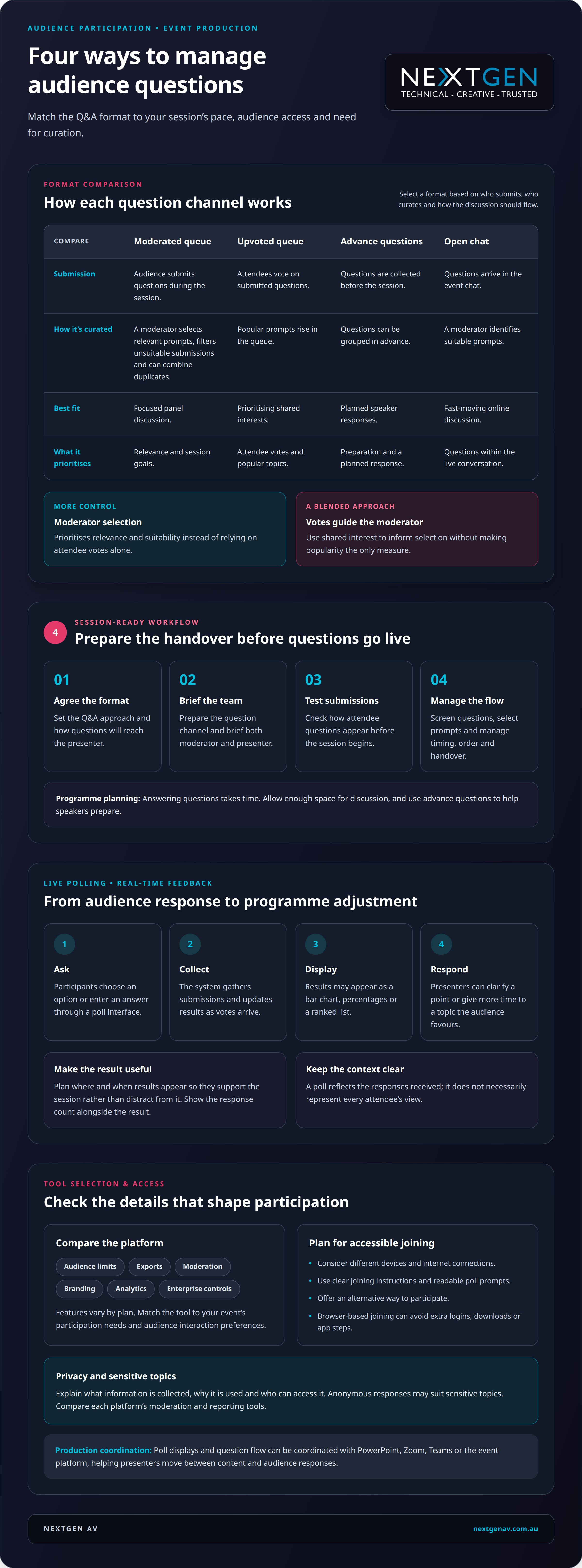
Moderated Q&A adds a human review before questions reach the speaker. A moderator filters irrelevant or unsuitable submissions, combines duplicates and selects questions that support the discussion. Unlike an upvoted queue, this approach prioritises relevance and session goals, rather than relying on attendee votes alone. For example, the moderator can combine several questions on one topic into a single prompt.
Running live Q&A sessions
To run a session, the team prepares the question channel, briefs the moderator and presenter, and tests how submissions appear. During the event, the moderator screens incoming questions and passes selected prompts to the speaker or panel. This goes beyond collecting questions: it manages timing, order and handover, helping keep answers connected to the programme.
| Option | Submission | Curation | Best fit |
|---|---|---|---|
| Moderated queue | Audience submits questions | Moderator selects relevant prompts | Focused panel discussion |
| Upvoted queue | Attendees vote on questions | Popular prompts rise | Prioritising shared interests |
| Advance questions | Collected before the session | Questions grouped in advance | Planned speaker responses |
| Open chat | Questions arrive in chat | Moderator identifies suitable prompts | Fast-moving online discussion |
Choose a format by considering audience access, session pace and how much curation the topic requires. Upvoting highlights shared interest, while moderator selection gives greater control over relevance and suitability. A combined approach lets votes guide the moderator without making popularity the only measure.
Organisers can invite questions in advance and use live polls to gauge audience understanding. Polls and Q&A provide immediate feedback on audience sentiment, but answering questions takes time. Allow enough space in the programme for the discussion.
Audience engagement software for live polling and Q&A
Audience engagement software brings polls, questions and responses into the event workflow. Compare how each option handles participation, moderation and reporting, and how well it fits your event format.
Polling for immediate feedback
An interactive poll collects audience responses during a session, giving presenters immediate feedback. For example, a speaker can ask attendees to choose a topic for further discussion. Responses can show whether the audience understands a point or wants more detail.
Compare tools by audience limits, exports, moderation, branding, analytics and enterprise controls. Features vary by plan, so match your selection to the event’s participation needs. Consider audience and interaction preferences too: a short multiple-choice poll may suit a large conference, while an open discussion prompt may work better with a smaller group.
Questions through chat or Sli.do
Attendees can submit questions through event chat or Sli.do, then follow answers in the same channel or during a moderated session. Chat keeps interaction within a virtual event platform, while a dedicated Q&A tool separates questions from general discussion.
For Australian audiences, explain what information is collected, why it is used and who can access it. Anonymous responses may suit sensitive topics. When comparing platforms, consider how each supports moderation and reporting, including the tools available to manage questions and review audience responses.
Virtual audience engagement and accessibility
Browser-based joining can reduce friction for virtual attendees by avoiding extra logins, downloads or app steps. A professional team can coordinate the poll display and question flow with PowerPoint, Zoom, Teams or the event platform, so presenters can move smoothly between content and audience responses.
Plan for attendees using different devices and internet connections. Clear joining instructions, readable poll prompts and an alternative way to participate can support a wider audience. The right format depends on the event, so compare how each tool handles access, moderation and feedback before choosing one.
Real-time poll results
Participants submit responses through a poll interface by selecting an option or entering an answer. The system collects submissions and updates results as votes arrive. For example, a conference poll asking which topic needs more discussion can group responses by option, giving the presenter a live view of audience priorities. Live polling and Q&A systems for events make this feedback visible during the session.
Results may appear as a bar chart, percentages or a ranked list on the presenter’s screen or event display. The production team plans where and when results appear, so they support the session rather than distract from it. For example, a poll about preferred breakout topics can show the leading choice before the next session is introduced.
Organisers can use live response patterns to adjust event content. If a poll shows uncertainty about a key concept, a speaker can pause to explain it again. If participants favour a particular topic, the moderator can direct more discussion towards it. Results offer immediate feedback that can help the programme respond to audience needs.
Interpret results in context. A poll represents the responses received, not necessarily the views of every attendee. Showing the response count alongside the result helps speakers understand how much audience participation informed it. Clear labels also make results easier to interpret on screen, especially when a question has several answer options.
Before the session, the event team links each poll to a decision or learning objective, then checks its wording and display. During the event, the operator follows the speaker’s cues, confirms when voting opens and closes, and displays the result at the agreed moment. This coordination keeps polling connected to the programme and gives presenters a clear basis for adjusting the discussion.
Live polls for hybrid, virtual and in-person events
At an in-person conference, attendees can respond to a live poll on their own devices during a session. Virtual participants can use a browser-based joining page, avoiding extra logins, downloads or app steps. In a hybrid room, one poll can collect responses from both groups. The right live polling and Q&A systems for events keep the prompt consistent across formats.
Participation should be clear in every setting. In the venue, the host can display joining instructions on the event screen; online, the same instructions can appear beside the presentation. For example, attendees in the room can follow the displayed access details while remote guests use the virtual event link. A consistent route helps everyone focus on the question, not on finding it.
Consider a conference session asking which topic attendees want explored further. In-person and remote guests answer the same poll, and the presenter uses the combined response to guide discussion. At a product briefing, a poll could ask which feature needs more explanation. Write questions and answer options that suit the session and make sense to every audience group.
Before the event, the production team plans how the poll will appear and when it will run on the room display and virtual feed. The team tests the audience view, presenter view and instructions in both formats. During the session, the host introduces the poll, allows time for responses, then signals when results are ready to discuss. This planned handover keeps the programme moving and includes remote attendees.
The key decision is how every attendee will participate. For live polling and Q&A systems for events, choose a shared response route for hybrid conferences, then align instructions, timing and presentation across both audiences. For in-person sessions, make access clear in the room; for virtual events, keep browser-based entry straightforward. Participation works best when the method fits the format.
NextGen AV: Professional Audio Systems
NextGen AV supports event teams with Professional Audio Systems, Virtual and Hybrid Event Solutions, LED Video Walls, and Lighting Design and Equipment. Involve the team when participation needs to fit naturally into a well-produced conference, launch or corporate event, rather than feeling like a separate feature.
Clear audio helps presenters introduce a poll, explain its response options and discuss the result with the room. LED Video Walls can make prompts and results visible to in-person attendees, while considered lighting helps keep focus on the stage and screen. Each element supports the audience experience when planned around the programme.
For a hybrid conference, Virtual and Hybrid Event Solutions can help connect the in-room and online experience. The production plan can account for how a presenter moves between slides, poll prompts and audience responses, presenting relevant content to attendees in each setting. Professional Audio Systems support clear communication as speakers address both audiences.
Early planning brings these elements together. Share the event format, programme, venue details and how you want attendees to participate. The team can shape the technical approach around your content and audience, coordinating audio, screens, lighting and virtual production as one experience. This joined-up planning helps presenters focus on their message while the production details are managed behind the scenes.
For a Melbourne event where polling and Q&A need to work alongside the wider production, contact NextGen AV to discuss your event requirements.
Frequently Asked Questions
Will this work in my setting?
Polling and Q&A can be planned for in-person, virtual and hybrid events. For a Melbourne conference in a tiered venue, the production plan can account for where attendees see prompts and how presenters receive responses. A virtual town hall may need a different workflow, particularly when remote speakers and audience questions share the programme. The event format shapes the technical design.
What are the best live polling and Q&A platforms for events in Australia?
The best option depends on your audience, event format and interaction goals. Chat within a virtual event platform may suit questions during online sessions, while a dedicated tool such as Sli.do can support structured audience interaction. For an Australian conference, compare how each option fits the programme and presenter workflow, rather than choosing by name alone.
How do popular event polling and Q&A tools compare on features and ease of use?
Compare tools by following the attendee journey: how people join, find the current question and submit a response. Then consider how presenters view incoming results and how moderators manage questions. A tool integrated into an event platform can keep participation in one environment; a separate response tool can create a dedicated interaction space. Walk through the full session flow before deciding.
How should you compare live polling and Q&A tools?
Compare platforms by reviewing their audience capacity, poll and Q&A features, moderation controls, export options, branding and analytics. Consider whether the tool suits your session format and supports the presenter and moderator workflows. A conference may require more than basic response collection, so assess each option against your event’s requirements and the experience you want to create.
Discover Valuable Insights
Unlock Expert Tips and Advice
Our blog is packed with valuable information to help you stay ahead. Whether you’re looking for expert advice, industry trends, or practical tips, you’ll find everything you need. Reach out today to learn more or get in touch with us for personalised support!