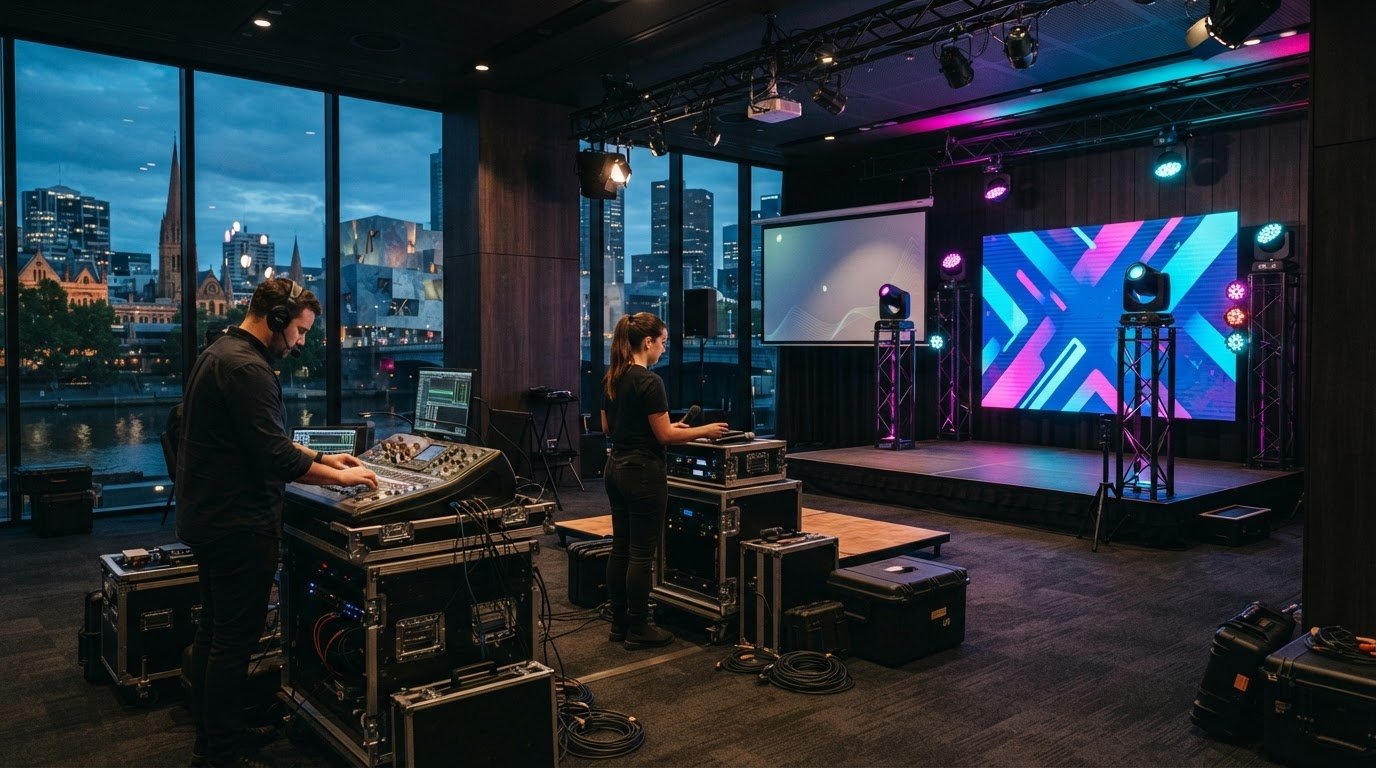
Last minute av hire melbourne

The fastest route to last-minute AV hire in Melbourne is to identify the event’s essential production needs, then match them to the venue, schedule and audience experience. Start with clear audio and visibility, then consider lighting, staging and the technical direction the programme requires. This keeps urgent decisions focused on what will make the event work, rather than on a disconnected equipment list.

When plans change close to event day, it’s natural to worry that technical details will distract from your guests and presenters. A clear production plan helps you identify what needs coordinating and where professional support can help. This guide covers the key decisions for arranging AV at short notice in Melbourne, from setting priorities and planning venue logistics to bringing production elements together. You’ll be better equipped to move quickly while keeping the event polished, clear and professional.

Key Takeaways

  • Prioritise the event’s essential AV needs first, so urgent planning stays focused on what your audience must see and hear.
  • Match audio and visual equipment to the venue, room layout and programme to support clear communication throughout the event.
  • Review hire terms carefully, including booking conditions and what applies if plans change.
  • Plan how technical issues will be managed during the event, with suitable support and a clear response process.

Last-minute deals and promotions

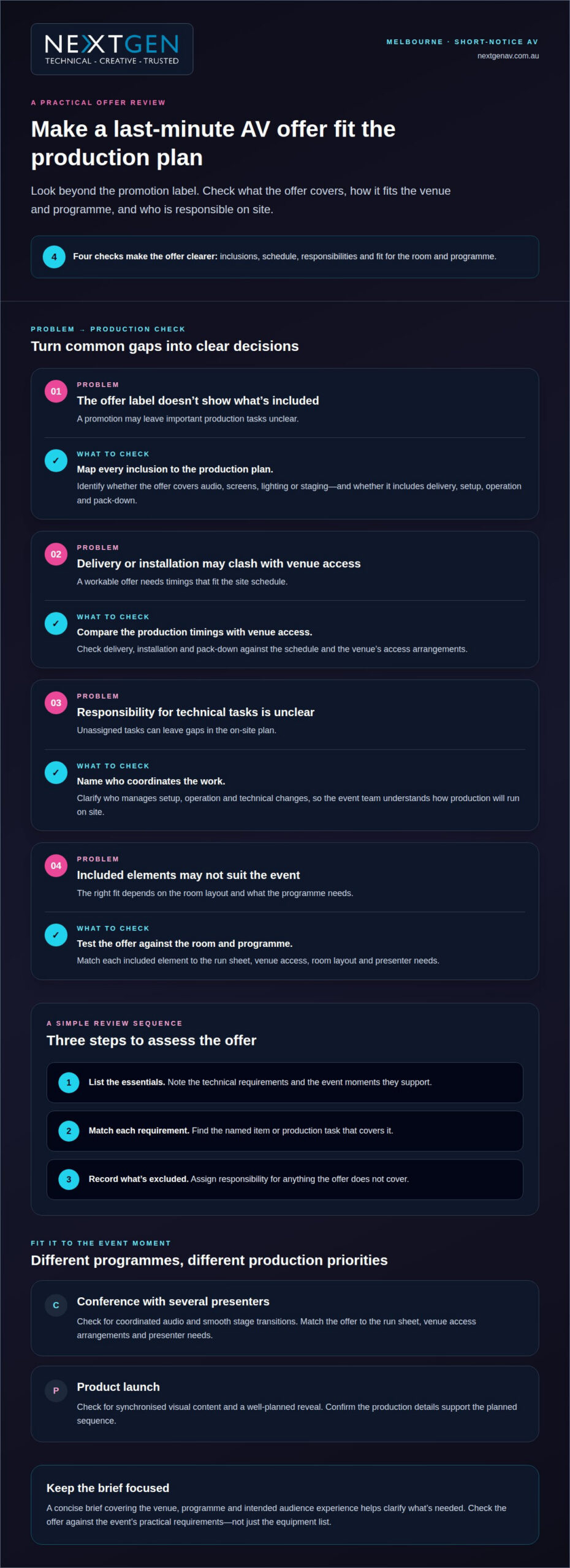
A last-minute promotion is useful when its inclusions match the event’s production plan. In Melbourne, assess the proposed arrangement against the venue, schedule and audience experience. Look beyond the promotion label and identify which production elements it covers, such as equipment, delivery, setup, operation or pack-down. These details show whether the offer supports the event from arrival through to the final session.

Use this three-step review to assess an offer. First, list the essential technical requirements and the moments they support. Second, match each requirement to a named item or production task in the offer. Third, note anything excluded and assign responsibility for it. This gives your event team a clear picture of how the arrangement will work on site.

  • Map the inclusions: identify the audio, screens, lighting or staging covered by the offer.
  • Check the schedule: compare delivery, installation and pack-down timings with venue access.
  • Review responsibilities: establish who coordinates setup, operation and technical changes.
  • Test the fit: assess whether the included elements suit the room layout and programme.

For example, a conference with several presenters may need coordinated audio and smooth stage transitions. A product launch may depend on synchronised visual content and a well-planned reveal. In either case, map the offer’s inclusions against the run sheet, venue access arrangements and presenter needs. The offer is most useful when it covers those practical requirements, rather than leaving key production tasks unassigned. A concise brief covering the venue, programme and intended audience experience helps clarify what’s needed.

What AV equipment can be hired at short notice in Melbourne, such as speakers, microphones, projectors and screens?

For last-minute AV hire in Melbourne, define the event’s essential technical needs before selecting equipment. A conference with guest speakers needs clear speech throughout the room. A product presentation needs images that remain visible from audience seating. These outcomes guide equipment choices more effectively than a general request for AV.

Common equipment categories include audio, microphones, projection and display screens. Match each item to the programme and venue. A panel discussion, for example, needs microphones for presenters and suitable sound coverage for attendees. A slide presentation needs a projector or screen arrangement suited to the room’s layout and lighting.

  • Speakers: plan coverage around the audience area, seating arrangement and spoken-word requirements.
  • Microphones: identify who speaks, whether they move around, and how audience questions will be heard.
  • Projectors: consider the presentation content, projection surface and available placement within the room.
  • Screens: assess sightlines from the back and sides, not only the front rows.

Prepare a concise brief with the venue name, room layout, event schedule and purpose of the equipment. Include the presentation format and any planned video or audio playback. These details help align connections, positioning and setup with the programme. For example, a presenter using slides and video needs a coordinated display and playback plan.

Lighting also affects how clearly attendees see presenters and screens. Strong ambient light can reduce the visibility of projected images, while stage lighting helps define the presentation area. Consider Lighting Design and Equipment as part of the overall room plan, so visual elements support rather than distract from the content. A clear technical brief turns a rushed request into practical production priorities.
Last minute av hire melbourne

Are there minimum hire periods, deposits, cancellation fees or late-booking surcharges?

For a Melbourne AV booking, clarify the hire schedule and process for changes before finalising the event plan. The agreed schedule should set out when equipment access begins and ends, including delivery, setup, rehearsals and pack-down where relevant. Record these timings alongside venue access arrangements so everyone works from the same production schedule.

Cancellation and postponement arrangements also need clear communication. Identify who must be notified, how changes should be recorded and which event details need updating. If a conference date moves, the organiser may need to revise the run sheet, venue access plan, presenter schedule and technical requirements. Keeping a current written record helps prevent outdated instructions reaching the production team.

For a short-notice booking, share the event date, venue, access window and programme status in one clear brief. Record any later changes in the same place. This gives organisers, venue staff and technical crew a reliable reference, especially when details shift close to delivery.

  • Hire schedule: record the agreed access, setup, event and pack-down timings.
  • Change process: note who communicates updates and how the revised details are documented.
  • Cancellation process: identify the notification steps and information the organiser must provide.
  • Late changes: update the run sheet, venue arrangements and production instructions together.

Before confirming the event plan, compare the written schedule with the venue’s access arrangements and the latest programme. A postponed product launch, for example, may need a revised presenter sequence and updated technical cues, while a change to venue access can affect installation timing. Keep one current version of the schedule available to everyone coordinating the event. Clear change control keeps production organised and helps the team respond consistently as plans evolve.

Ask the provider to state whether a minimum hire period applies, whether a deposit is required, and how cancellation charges are handled; confirm any late-booking surcharge before agreeing. Booking a rental car well in advance is recommended to access the best rates. Keep the confirmed terms with the event schedule, and check that any subsequent booking change is reflected in the written arrangement before relying on it.

What backup equipment and support are available if hired AV gear fails during an event?

A useful contingency plan identifies the potential failure, an immediate workaround and who will act. At a conference, a microphone fault could interrupt a speaker’s address, while a display issue could make presentation slides unavailable. Before doors open, identify the critical equipment and the person responsible for responding, so the event team can act without confusion.

Build simple alternatives into the event plan. A spare wired microphone can provide a fallback if a wireless microphone stops working. A second presentation source, such as a laptop with the slides loaded, can help if the primary computer fails. Keep essential adapters and connection cables accessible, and test alternatives during setup rather than waiting for a fault.

Agree on a practical response sequence with the technical team:

  1. Identify the fault: tell the technician whether audio, visuals or lighting have stopped working.
  2. Protect the programme: pause or adjust the segment while the issue is assessed.
  3. Switch to the fallback: use the agreed spare equipment or alternate presentation source.
  4. Confirm the recovery: test the restored signal before resuming the affected segment.

On-site technical support can help distinguish a faulty device from a connection or signal problem. For example, a blank screen may come from the playback source, a cable or the display path. A technician can work through those points systematically, while an event organiser keeps presenters informed and adjusts the run sheet if needed.

Include access arrangements, the event schedule and escalation roles in the production plan. For a hybrid event, also account for the online audience if a camera, audio feed or streaming connection is affected. A planned fallback helps maintain communication across both audiences. Plan technical support for your event as part of the production brief, including who responds and how the programme continues during a fault.

NextGen AV: LED Video Walls

NextGen AV can incorporate LED Video Walls into your event plan when presenters, visuals or brand content need a strong focal point. At a conference, a well-positioned display helps attendees follow presentations; at a product launch, it can carry visual content that supports the reveal. Screen size, placement and content format all affect how clearly the audience experiences the moment.

Combining LED Video Walls with Professional Audio Systems, Lighting Design and Equipment, or Staging and Rigging can create a coordinated event environment. The right combination depends on your venue, programme and audience layout. Share those details with NextGen AV when discussing your production requirements.

Contact NextGen AV to discuss LED Video Walls for your Melbourne event.

Set your event in motion

For last-minute AV hire in Melbourne, turn your event plan into a clear production brief. Share the venue, schedule, audience layout and the moments that need to land, such as a keynote, product reveal or live discussion. This gives NextGen AV a practical foundation for planning around your programme, rather than treating each element as a separate task.

NextGen AV brings LED Video Walls, Professional Audio Systems and Lighting Design and Equipment together as part of event production, aligning technical choices with what attendees need to see, hear and remember. Discuss your event with the team to set priorities and plan a clear path from preparation through to delivery.

Contact NextGen AV about your event and take the next step towards a polished, engaging experience. Your event can still make a confident impression.

The fastest route to last-minute AV hire in Melbourne is to identify the event’s essential production needs, then match them to the venue, schedule and audience experience. Start with clear audio and visibility, then consider lighting, staging and the technical direction the programme requires. This keeps urgent decisions focused on what will make the event work, rather than on a disconnected equipment list.

When plans change close to event day, it’s natural to worry that technical details will distract from your guests and presenters. A clear production plan helps you identify what needs coordinating and where professional support can help. This guide covers the key decisions for arranging AV at short notice in Melbourne, from setting priorities and planning venue logistics to bringing production elements together. You’ll be better equipped to move quickly while keeping the event polished, clear and professional.

Key Takeaways

  • Prioritise the event’s essential AV needs first, so urgent planning stays focused on what your audience must see and hear.
  • Match audio and visual equipment to the venue, room layout and programme to support clear communication throughout the event.
  • Review hire terms carefully, including booking conditions and what applies if plans change.
  • Plan how technical issues will be managed during the event, with suitable support and a clear response process.

Last-minute deals and promotions

A last-minute promotion is useful when its inclusions match the event’s production plan. In Melbourne, assess the proposed arrangement against the venue, schedule and audience experience. Look beyond the promotion label and identify which production elements it covers, such as equipment, delivery, setup, operation or pack-down. These details show whether the offer supports the event from arrival through to the final session.

Use this three-step review to assess an offer. First, list the essential technical requirements and the moments they support. Second, match each requirement to a named item or production task in the offer. Third, note anything excluded and assign responsibility for it. This gives your event team a clear picture of how the arrangement will work on site.

  • Map the inclusions: identify the audio, screens, lighting or staging covered by the offer.
  • Check the schedule: compare delivery, installation and pack-down timings with venue access.
  • Review responsibilities: establish who coordinates setup, operation and technical changes.
  • Test the fit: assess whether the included elements suit the room layout and programme.

For example, a conference with several presenters may need coordinated audio and smooth stage transitions. A product launch may depend on synchronised visual content and a well-planned reveal. In either case, map the offer’s inclusions against the run sheet, venue access arrangements and presenter needs. The offer is most useful when it covers those practical requirements, rather than leaving key production tasks unassigned. A concise brief covering the venue, programme and intended audience experience helps clarify what’s needed.

What AV equipment can be hired at short notice in Melbourne, such as speakers, microphones, projectors and screens?

For last-minute AV hire in Melbourne, define the event’s essential technical needs before selecting equipment. A conference with guest speakers needs clear speech throughout the room. A product presentation needs images that remain visible from audience seating. These outcomes guide equipment choices more effectively than a general request for AV.

Common equipment categories include audio, microphones, projection and display screens. Match each item to the programme and venue. A panel discussion, for example, needs microphones for presenters and suitable sound coverage for attendees. A slide presentation needs a projector or screen arrangement suited to the room’s layout and lighting.

  • Speakers: plan coverage around the audience area, seating arrangement and spoken-word requirements.
  • Microphones: identify who speaks, whether they move around, and how audience questions will be heard.
  • Projectors: consider the presentation content, projection surface and available placement within the room.
  • Screens: assess sightlines from the back and sides, not only the front rows.

Prepare a concise brief with the venue name, room layout, event schedule and purpose of the equipment. Include the presentation format and any planned video or audio playback. These details help align connections, positioning and setup with the programme. For example, a presenter using slides and video needs a coordinated display and playback plan.

Lighting also affects how clearly attendees see presenters and screens. Strong ambient light can reduce the visibility of projected images, while stage lighting helps define the presentation area. Consider Lighting Design and Equipment as part of the overall room plan, so visual elements support rather than distract from the content. A clear technical brief turns a rushed request into practical production priorities.

Are there minimum hire periods, deposits, cancellation fees or late-booking surcharges?

For a Melbourne AV booking, clarify the hire schedule and process for changes before finalising the event plan. The agreed schedule should set out when equipment access begins and ends, including delivery, setup, rehearsals and pack-down where relevant. Record these timings alongside venue access arrangements so everyone works from the same production schedule.

Cancellation and postponement arrangements also need clear communication. Identify who must be notified, how changes should be recorded and which event details need updating. If a conference date moves, the organiser may need to revise the run sheet, venue access plan, presenter schedule and technical requirements. Keeping a current written record helps prevent outdated instructions reaching the production team.

For a short-notice booking, share the event date, venue, access window and programme status in one clear brief. Record any later changes in the same place. This gives organisers, venue staff and technical crew a reliable reference, especially when details shift close to delivery.

  • Hire schedule: record the agreed access, setup, event and pack-down timings.
  • Change process: note who communicates updates and how the revised details are documented.
  • Cancellation process: identify the notification steps and information the organiser must provide.
  • Late changes: update the run sheet, venue arrangements and production instructions together.

Before confirming the event plan, compare the written schedule with the venue’s access arrangements and the latest programme. A postponed product launch, for example, may need a revised presenter sequence and updated technical cues, while a change to venue access can affect installation timing. Keep one current version of the schedule available to everyone coordinating the event. Clear change control keeps production organised and helps the team respond consistently as plans evolve.

Ask the provider to state whether a minimum hire period applies, whether a deposit is required, and how cancellation charges are handled; confirm any late-booking surcharge before agreeing. Booking a rental car well in advance is recommended to access the best rates. Keep the confirmed terms with the event schedule, and check that any subsequent booking change is reflected in the written arrangement before relying on it.

What backup equipment and support are available if hired AV gear fails during an event?

A useful contingency plan identifies the potential failure, an immediate workaround and who will act. At a conference, a microphone fault could interrupt a speaker’s address, while a display issue could make presentation slides unavailable. Before doors open, identify the critical equipment and the person responsible for responding, so the event team can act without confusion.

Build simple alternatives into the event plan. A spare wired microphone can provide a fallback if a wireless microphone stops working. A second presentation source, such as a laptop with the slides loaded, can help if the primary computer fails. Keep essential adapters and connection cables accessible, and test alternatives during setup rather than waiting for a fault.

Agree on a practical response sequence with the technical team:

  1. Identify the fault: tell the technician whether audio, visuals or lighting have stopped working.
  2. Protect the programme: pause or adjust the segment while the issue is assessed.
  3. Switch to the fallback: use the agreed spare equipment or alternate presentation source.
  4. Confirm the recovery: test the restored signal before resuming the affected segment.

On-site technical support can help distinguish a faulty device from a connection or signal problem. For example, a blank screen may come from the playback source, a cable or the display path. A technician can work through those points systematically, while an event organiser keeps presenters informed and adjusts the run sheet if needed.

Include access arrangements, the event schedule and escalation roles in the production plan. For a hybrid event, also account for the online audience if a camera, audio feed or streaming connection is affected. A planned fallback helps maintain communication across both audiences. Plan technical support for your event as part of the production brief, including who responds and how the programme continues during a fault.

NextGen AV: LED Video Walls

NextGen AV can incorporate LED Video Walls into your event plan when presenters, visuals or brand content need a strong focal point. At a conference, a well-positioned display helps attendees follow presentations; at a product launch, it can carry visual content that supports the reveal. Screen size, placement and content format all affect how clearly the audience experiences the moment.

Combining LED Video Walls with Professional Audio Systems, Lighting Design and Equipment, or Staging and Rigging can create a coordinated event environment. The right combination depends on your venue, programme and audience layout. Share those details with NextGen AV when discussing your production requirements.

Contact NextGen AV to discuss LED Video Walls for your Melbourne event.

Set your event in motion

For last-minute AV hire in Melbourne, turn your event plan into a clear production brief. Share the venue, schedule, audience layout and the moments that need to land, such as a keynote, product reveal or live discussion. This gives NextGen AV a practical foundation for planning around your programme, rather than treating each element as a separate task.

NextGen AV brings LED Video Walls, Professional Audio Systems and Lighting Design and Equipment together as part of event production, aligning technical choices with what attendees need to see, hear and remember. Discuss your event with the team to set priorities and plan a clear path from preparation through to delivery.

Contact NextGen AV about your event and take the next step towards a polished, engaging experience. Your event can still make a confident impression.

Back to Articles

Discover Valuable Insights

Unlock Expert Tips and Advice

Our blog is packed with valuable information to help you stay ahead. Whether you’re looking for expert advice, industry trends, or practical tips, you’ll find everything you need. Reach out today to learn more or get in touch with us for personalised support!

Contact Us

Request A Quote

Make an
Enquiry

Let’s Get Your Event Sorted

Complete the enquiry form with your event date, venue, audience size, event type and budget. Our Melbourne AV team will review your requirements and recommend the right PA, screen, lighting, staging or production setup for your event.

What happens next?


1.We review your event details
Tell us your date, venue, audience size and event type.

2.We recommend the right setup
From PA hire to screens, lighting, staging and full AV production.

3. We come back with clear advice
You’ll receive practical recommendations and a fast quote from our Melbourne team.

Need help urgently?
Call 1300 792 922.

Resource Download

Tell us a bit about yourself to download our resources.

7