For hybrid conference production melbourne, the best starting point is not the platform with the longest feature list. It’s the audience journey: how people onsite and online will watch, participate and connect. A platform may offer plenty of functions, but if they don’t support your event plan, they can add complexity without improving engagement.
Look beyond streaming quality. Remote attendees need a practical way to take part, and your team needs clear coordination between the platform, venue AV and live production. A structured evaluation can help you make those decisions before the technical plan is locked in.
This guide explains how to compare platform capabilities with your audience needs, session format and production requirements. You’ll learn what to confirm with platform providers, what to check during Melbourne venue scoping, and how technical direction can connect the online experience with the room. NextGen AV provides end-to-end event production and equipment hire, including planning, technical direction and on-site management, to help bring those elements together.
Key Takeaways
- Start with the audience journey, then shortlist platforms that fit your conference format and participation needs.
- Compare meeting-style, webinar-style and event-platform approaches against session flow, interaction and production integration.
- For hybrid conference production melbourne, assess the platform alongside venue AV, camera coverage, audio and presenter cues.
- Document your requirements and confirm platform features, integrations and accessibility tools directly with the provider.
- Clarify technical responsibilities early so your production team can connect platform decisions with live delivery in Melbourne.
Hybrid conference production in Melbourne starts with the audience journey
Hybrid conference production in Melbourne brings the in-room event and the live remote experience together, so both audiences can follow the programme and participate. The platform is important, but it’s one part of a wider production plan. A format that works for a small, conversational meeting may not suit a conference with multiple sessions or different kinds of interaction. Start by defining what each audience needs to do, then assess platform functions against that journey.
A Hybrid event brings in-person and remote participation together. For a conference, that connection needs to be planned rather than assumed. Choose a hybrid conference platform based on the functions it needs to provide for each audience. Confirm features, integrations and accessibility tools directly with the provider, then check that they fit your event format and production workflow.
Map the experience for both audiences
List what onsite attendees, remote attendees, speakers and moderators need at each stage. Consider registration and joining, how people will follow sessions and ask questions, and whether post-session access is part of the plan. A video meeting format may suit direct conversation, while a conference-focused experience may better support a scheduled programme. Compare the actual functions on offer instead of relying on the format label.
Plan how presenters will acknowledge questions from the room and online. A moderator can manage the flow, select questions and cue speakers, rather than asking presenters to monitor competing channels while delivering their session. Confirm that the platform supports the participation approach you intend to use.
Separate the platform from the production system
The platform carries the remote experience, but it doesn’t manage every part of the live event. Camera coverage shapes what remote attendees see, while sound systems and microphones help them hear presenters. Lighting supports visibility on camera, and the stream connects the room to the online audience. Confirm the venue’s connectivity, room layout and technical requirements during event scoping.
Involve the people planning and delivering onsite AV and technical direction in platform selection. Early coordination clarifies how cameras, audio, lighting, screen content and presenter cues will work together, and who is responsible for each part of the workflow. For a broader look at production planning, see our guide to hybrid event services in Australia. NextGen AV’s Melbourne-based team provides professional audio, lighting, LED video walls, staging and technical direction, helping align platform decisions with the practical needs of the room.
Compare hybrid conference platforms by the experience they support
Compare platforms against your programme, not just their feature lists. A meeting-style tool may suit a discussion-led session, while a webinar-style format may fit a presentation with managed audience participation. An event platform may support a broader programme, but you’ll still need to verify its specific functions with the provider. The right platform is the one that meets your event’s confirmed requirements.
| Approach | Event format | Audience interaction | Session flow | Production integration |
|---|---|---|---|---|
| Meeting-style | Consider for panel discussions or direct conversation. | Check how attendees can speak, submit questions or participate. | Confirm how speakers and moderators move between sessions. | Test how the platform fits the planned audio and video workflow. |
| Webinar-style | Consider for presentations with a more managed audience experience. | Verify available question and engagement functions. | Check how presenters, moderators and sessions are controlled. | Confirm how the stream and content connect with onsite production. |
| Event platform | Assess for conferences with multiple sessions or tracks. | Verify the functions needed for remote participation. | Check navigation between sessions and any planned follow-up. | Confirm integrations and technical requirements with the provider. |
Match format to sessions
Map the programme before shortlisting platforms. A panel discussion, a presentation followed by questions, and simultaneous tracks place different demands on speakers, moderators and remote participants. Consider how people will enter each session, how questions will reach the stage, and who will guide transitions. Don’t assume every conference needs the same level of interaction or platform complexity. Select functions that support the sessions you’re actually running.
Test interaction and access
Walk through the attendee journey, from invitation and login to live participation. If you plan to use audience engagement software for polls or questions, confirm those functions, moderation controls and required integrations directly with the platform provider. Verify recording options and access controls too, rather than assuming they’re included. For broader delivery considerations, read our guide to full-service event production.
For hybrid conference production melbourne, platform testing should be part of the production plan, including how session content and audience interaction will be managed onsite and online. If you’re aligning platform decisions with onsite AV and technical direction, explore NextGen AV’s event production services.
Will the platform alone deliver a seamless hybrid conference?
No. A platform can carry the online experience, but it can’t manage every onsite production requirement. Remote viewers rely on what the room sends them: clear presenter audio, useful camera framing, readable screen content and well-timed cues. If a presenter is difficult to hear or the camera misses a key moment, platform features alone won’t fix the experience.
That’s why hybrid conference production melbourne needs a coordinated plan for the platform and the production system. Agree early how the room, speakers and remote audience will connect, then assign responsibility for each part of delivery.
Connect the room to the remote audience
Plan audio for online listeners as well as people in the room. The sound system and microphones need to capture presenter speech clearly for the stream, while camera framing should help remote attendees follow the speaker, panel or relevant activity. Discuss room audio requirements with your production team, and see our guide to professional sound system hire for more on how audio shapes the audience experience.
Coordinate screen content as well. Where event displays are part of the setup, a video processor can manage content signals for those displays. Confirm how slides, playback and other planned visuals will appear both in the venue and on the stream, so remote attendees can follow the same key information.
Plan for ownership and failure points
Make responsibilities explicit across the organiser, platform provider, venue and production team. Name who handles platform administration, monitors the stream, supports speakers, and coordinates venue connectivity and room access. Confirm each responsibility with the relevant party instead of assuming it sits with another team.
- Organiser: Own the run sheet, speaker information and decisions about recording and post-event access.
- Platform provider: Confirm platform functions, access controls, recording options and relevant integrations.
- Venue: Confirm connectivity, room layout and available technical information during event scoping.
- Production team: Coordinate onsite audio, cameras, screen content and presenter cues with the agreed workflow.
Rehearse hand-offs and agree how teams will communicate if a connection, presentation file or speaker cue doesn’t go to plan. Set out who to contact and how an issue will be escalated, without assuming every problem can be prevented. Before selecting a platform, confirm who receives recordings, how content will be handed over and what post-event access is expected. A background technical production reference can support planning, but your event requirements and assigned responsibilities should guide the final workflow. For help aligning onsite AV and technical direction, learn about NextGen AV’s production services.
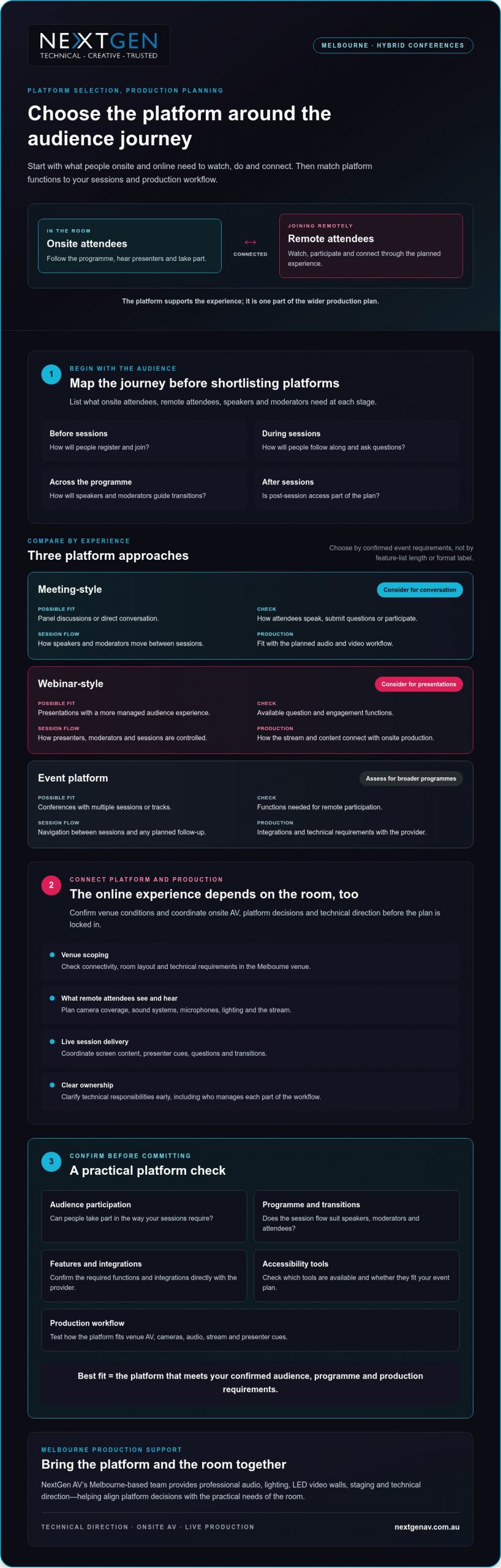
Use this Melbourne hybrid conference platform selection checklist
A clear selection process keeps platform decisions connected to the event you’re producing. For hybrid conference production melbourne, assess the attendee journey, platform functions and onsite technical workflow together, then confirm who owns each part of delivery.
Build a requirements brief before comparing providers
Start with a written brief. Record who will attend, how sessions will run, what remote participants need to do and what content they’ll see. Separate essential requirements from optional functions so a long feature list doesn’t distract from what the conference needs.
- Document the audience and programme. List onsite and remote audience groups, session formats, speakers, moderators, panel discussions, tracks and question periods.
- Define participation and content. Note planned polls, questions, presentations, video playback, recording or post-event access. Confirm directly with each provider which platform functions support these requirements.
- Map the production workflow. Identify how the platform needs to connect with onsite sound systems, screens and cameras. Confirm requirements with the production team and platform provider, including how presenters and content will move through the programme.
- Scope the Melbourne venue. Ask the venue team to confirm room layout, access arrangements, connectivity and relevant technical requirements. Share these details with production leads so the proposed workflow fits the room.
Validate the workflow before event day
A provider’s feature list isn’t a substitute for testing your planned event. Arrange a technical rehearsal with presenters, moderators and relevant production leads. Use it to check attendee access, content playback, speaker transitions and the audience interactions you intend to run.
- 5. Test the full sequence. Rehearse a representative session from joining through to questions and transitions. Check that the platform workflow and onsite production elements work together as intended.
- 6. Assign ownership. Name who administers the platform, supports speakers, monitors the stream and coordinates onsite production. Agree how issues will be communicated and escalated during rehearsal and live sessions.
- 7. Make the selection. Compare providers against the requirements brief, note any gaps, and verify outstanding features, integrations and access needs directly before confirming your choice.
In short: document requirements, check compatibility, rehearse the workflow and assign clear ownership. This gives your team a practical basis for selecting a platform and coordinating its role in the live event. If you’re planning a Melbourne conference, review NextGen AV’s hybrid production services.
Choose a Melbourne partner to bring the platform to life
A platform demonstration can confirm what the software does. It can’t show how well the platform will connect with your venue, speakers, event content and onsite AV. For hybrid conference production melbourne, assess whether the production partner can bring those moving parts into one coordinated plan, with clear responsibilities from preparation through to pack-down.
Assess experience beyond the platform demonstration
Ask how the team will coordinate platform requirements with room audio, cameras, screens and presenter cues. Clarify who leads technical direction, supports rehearsals, manages live operation and handles pack-down. Clear answers help you see whether the partner is planning for the audience experience, not simply supplying equipment.
NextGen AV is based in Melbourne and provides event production and equipment hire across Australia. Its services include professional audio systems, lighting design and equipment, LED video walls, staging and rigging, virtual and hybrid event solutions, and technical direction. Discuss your specific venue requirements during event scoping.
Look for a partner who raises dependencies early. Platform functions may need to align with the session schedule, content hand-offs and production workflow. Ask how decisions will be documented, how responsibilities will be shared between the organiser, venue, platform provider and production team, and how changes will be communicated before event day.
Turn your shortlist into an event-ready plan
Prepare a concise brief before your first production discussion. Include the event date, format, audience mix, venue and session outline, along with known platform requirements and content needs. This gives the production team a useful starting point to identify what needs confirmation, which decisions depend on others, and who owns each action.
Use the discussion to clarify how planning, setup, technical direction, live operation and pack-down fit together. Ask what information is still needed from the venue or platform provider, and how the agreed workflow will be checked before the conference. Early coordination keeps responsibilities visible and helps create a more connected experience for presenters and attendees.
NextGen AV can bring virtual and hybrid event solutions together with professional audio, lighting, LED video walls, staging and technical direction. Plan your hybrid conference production with NextGen AV by sharing your brief and aligning the platform with the live event from the outset.
Bring your hybrid conference plan together
The right platform fits your audience, programme and production workflow, not simply your preferred feature list. Confirm its functions with the provider, then test how it connects with the venue, onsite AV and remote attendee experience. Clear ownership and a technical rehearsal help your team prepare for live delivery.
For hybrid conference production melbourne, a production partner can connect platform decisions with the practical needs of the room. NextGen AV provides planning, technical direction, live operation and event AV, with a Melbourne base and event services across Australia.
Share your event format, audience mix, venue and session outline to start shaping a coordinated plan. Discuss your hybrid conference production with NextGen AV and plan for a connected experience for presenters and attendees, onsite and online.
Frequently Asked Questions
Is a dedicated platform necessary for a hybrid conference?
No, a dedicated conference platform isn’t necessary for every hybrid event. A meeting platform may suit a smaller or simpler programme, while a conference-focused platform may better support structured sessions or planned attendee interaction. Base the decision on your audience, event format and production requirements. Confirm current features with the provider, then check how the platform will connect with your in-room AV and live production workflow.
How do you choose a platform for a hybrid conference?
Start by documenting who will attend, how sessions will run and what participants need to do. Compare shortlisted platforms against those requirements, including access, interaction, content and production integration. Ask providers to confirm relevant functions rather than assuming they’re included. Before finalising the event plan, rehearse the complete workflow with speakers and production leads to check that the platform and onsite AV support the experience you’ve planned.
Can one platform serve both in-person and remote conference attendees?
A platform can support remote participation, but it can’t manage the entire in-room experience by itself. Onsite attendees rely on the venue’s AV, staging and event flow, while online viewers need clear audio, useful camera coverage and well-timed content. Plan how presenters, questions and session content will connect across both audiences. Confirm platform capabilities with the provider and assign responsibility for the online and onsite parts of delivery.
What equipment is needed for hybrid conference production?
The equipment depends on your room, event format and chosen platform workflow. A production plan may include sound systems, microphones, cameras, displays, lighting and equipment to deliver the online programme. Select these as part of a connected system, not as isolated items. During planning, confirm venue conditions, platform requirements and presenter needs with the production team so the setup supports clear communication for both audiences.
How do you test a hybrid conference platform before the event?
Rehearse the planned workflow with presenters, moderators and production leads. Check attendee access, content playback, speaker transitions and any planned audience interaction, such as questions or polls. Confirm who monitors the platform and onsite production, and agree how issues will be communicated and escalated. Make the rehearsal reflect the event format as closely as practical, so the team can identify gaps and clarify responsibilities before live delivery.
Why use a Melbourne production partner for a hybrid conference?
A Melbourne production partner can help coordinate venue planning, onsite AV and production responsibilities for a local event. When comparing teams, ask about technical direction, rehearsal planning, live operation and how they’ll work with your platform provider and other stakeholders. For hybrid conference production melbourne, look for a partner who connects platform decisions with the room’s production requirements, rather than treating AV as a separate equipment list.
When should a hybrid conference platform be selected?
Select a platform after defining the audience journey and session requirements, but early enough to coordinate it with production planning. This gives your team time to verify features with the provider, check the workflow against venue requirements and arrange a technical rehearsal. Confirm timing and dependencies with the platform provider, venue and production team. Early coordination helps clarify responsibilities before the event plan is locked in.
For hybrid conference production melbourne, the best starting point is not the platform with the longest feature list. It’s the audience journey: how people onsite and online will watch, participate and connect. A platform may offer plenty of functions, but if they don’t support your event plan, they can add complexity without improving engagement.
Look beyond streaming quality. Remote attendees need a practical way to take part, and your team needs clear coordination between the platform, venue AV and live production. A structured evaluation can help you make those decisions before the technical plan is locked in.
This guide explains how to compare platform capabilities with your audience needs, session format and production requirements. You’ll learn what to confirm with platform providers, what to check during Melbourne venue scoping, and how technical direction can connect the online experience with the room. NextGen AV provides end-to-end event production and equipment hire, including planning, technical direction and on-site management, to help bring those elements together.
Key Takeaways
- Start with the audience journey, then shortlist platforms that fit your conference format and participation needs.
- Compare meeting-style, webinar-style and event-platform approaches against session flow, interaction and production integration.
- For hybrid conference production melbourne, assess the platform alongside venue AV, camera coverage, audio and presenter cues.
- Document your requirements and confirm platform features, integrations and accessibility tools directly with the provider.
- Clarify technical responsibilities early so your production team can connect platform decisions with live delivery in Melbourne.
Hybrid conference production in Melbourne starts with the audience journey
Hybrid conference production in Melbourne brings the in-room event and the live remote experience together, so both audiences can follow the programme and participate. The platform is important, but it’s one part of a wider production plan. A format that works for a small, conversational meeting may not suit a conference with multiple sessions or different kinds of interaction. Start by defining what each audience needs to do, then assess platform functions against that journey.
A Hybrid event brings in-person and remote participation together. For a conference, that connection needs to be planned rather than assumed. Choose a hybrid conference platform based on the functions it needs to provide for each audience. Confirm features, integrations and accessibility tools directly with the provider, then check that they fit your event format and production workflow.
Map the experience for both audiences
List what onsite attendees, remote attendees, speakers and moderators need at each stage. Consider registration and joining, how people will follow sessions and ask questions, and whether post-session access is part of the plan. A video meeting format may suit direct conversation, while a conference-focused experience may better support a scheduled programme. Compare the actual functions on offer instead of relying on the format label.
Plan how presenters will acknowledge questions from the room and online. A moderator can manage the flow, select questions and cue speakers, rather than asking presenters to monitor competing channels while delivering their session. Confirm that the platform supports the participation approach you intend to use.
Separate the platform from the production system
The platform carries the remote experience, but it doesn’t manage every part of the live event. Camera coverage shapes what remote attendees see, while sound systems and microphones help them hear presenters. Lighting supports visibility on camera, and the stream connects the room to the online audience. Confirm the venue’s connectivity, room layout and technical requirements during event scoping.
Involve the people planning and delivering onsite AV and technical direction in platform selection. Early coordination clarifies how cameras, audio, lighting, screen content and presenter cues will work together, and who is responsible for each part of the workflow. For a broader look at production planning, see our guide to hybrid event services in Australia. NextGen AV’s Melbourne-based team provides professional audio, lighting, LED video walls, staging and technical direction, helping align platform decisions with the practical needs of the room.
Compare hybrid conference platforms by the experience they support
Compare platforms against your programme, not just their feature lists. A meeting-style tool may suit a discussion-led session, while a webinar-style format may fit a presentation with managed audience participation. An event platform may support a broader programme, but you’ll still need to verify its specific functions with the provider. The right platform is the one that meets your event’s confirmed requirements.
| Approach | Event format | Audience interaction | Session flow | Production integration |
|---|---|---|---|---|
| Meeting-style | Consider for panel discussions or direct conversation. | Check how attendees can speak, submit questions or participate. | Confirm how speakers and moderators move between sessions. | Test how the platform fits the planned audio and video workflow. |
| Webinar-style | Consider for presentations with a more managed audience experience. | Verify available question and engagement functions. | Check how presenters, moderators and sessions are controlled. | Confirm how the stream and content connect with onsite production. |
| Event platform | Assess for conferences with multiple sessions or tracks. | Verify the functions needed for remote participation. | Check navigation between sessions and any planned follow-up. | Confirm integrations and technical requirements with the provider. |
Match format to sessions
Map the programme before shortlisting platforms. A panel discussion, a presentation followed by questions, and simultaneous tracks place different demands on speakers, moderators and remote participants. Consider how people will enter each session, how questions will reach the stage, and who will guide transitions. Don’t assume every conference needs the same level of interaction or platform complexity. Select functions that support the sessions you’re actually running.
Test interaction and access
Walk through the attendee journey, from invitation and login to live participation. If you plan to use audience engagement software for polls or questions, confirm those functions, moderation controls and required integrations directly with the platform provider. Verify recording options and access controls too, rather than assuming they’re included. For broader delivery considerations, read our guide to full-service event production.
For hybrid conference production melbourne, platform testing should be part of the production plan, including how session content and audience interaction will be managed onsite and online. If you’re aligning platform decisions with onsite AV and technical direction, explore NextGen AV’s event production services.
Will the platform alone deliver a seamless hybrid conference?
No. A platform can carry the online experience, but it can’t manage every onsite production requirement. Remote viewers rely on what the room sends them: clear presenter audio, useful camera framing, readable screen content and well-timed cues. If a presenter is difficult to hear or the camera misses a key moment, platform features alone won’t fix the experience.
That’s why hybrid conference production melbourne needs a coordinated plan for the platform and the production system. Agree early how the room, speakers and remote audience will connect, then assign responsibility for each part of delivery.
Connect the room to the remote audience
Plan audio for online listeners as well as people in the room. The sound system and microphones need to capture presenter speech clearly for the stream, while camera framing should help remote attendees follow the speaker, panel or relevant activity. Discuss room audio requirements with your production team, and see our guide to professional sound system hire for more on how audio shapes the audience experience.
Coordinate screen content as well. Where event displays are part of the setup, a video processor can manage content signals for those displays. Confirm how slides, playback and other planned visuals will appear both in the venue and on the stream, so remote attendees can follow the same key information.
Plan for ownership and failure points
Make responsibilities explicit across the organiser, platform provider, venue and production team. Name who handles platform administration, monitors the stream, supports speakers, and coordinates venue connectivity and room access. Confirm each responsibility with the relevant party instead of assuming it sits with another team.
- Organiser: Own the run sheet, speaker information and decisions about recording and post-event access.
- Platform provider: Confirm platform functions, access controls, recording options and relevant integrations.
- Venue: Confirm connectivity, room layout and available technical information during event scoping.
- Production team: Coordinate onsite audio, cameras, screen content and presenter cues with the agreed workflow.
Rehearse hand-offs and agree how teams will communicate if a connection, presentation file or speaker cue doesn’t go to plan. Set out who to contact and how an issue will be escalated, without assuming every problem can be prevented. Before selecting a platform, confirm who receives recordings, how content will be handed over and what post-event access is expected. A background technical production reference can support planning, but your event requirements and assigned responsibilities should guide the final workflow. For help aligning onsite AV and technical direction, learn about NextGen AV’s production services.

Use this Melbourne hybrid conference platform selection checklist
A clear selection process keeps platform decisions connected to the event you’re producing. For hybrid conference production melbourne, assess the attendee journey, platform functions and onsite technical workflow together, then confirm who owns each part of delivery.
Build a requirements brief before comparing providers
Start with a written brief. Record who will attend, how sessions will run, what remote participants need to do and what content they’ll see. Separate essential requirements from optional functions so a long feature list doesn’t distract from what the conference needs.
- 1. Document the audience and programme. List onsite and remote audience groups, session formats, speakers, moderators, panel discussions, tracks and question periods.
- 2. Define participation and content. Note planned polls, questions, presentations, video playback, recording or post-event access. Confirm directly with each provider which platform functions support these requirements.
- 3. Map the production workflow. Identify how the platform needs to connect with onsite sound systems, screens and cameras. Confirm requirements with the production team and platform provider, including how presenters and content will move through the programme.
- 4. Scope the Melbourne venue. Ask the venue team to confirm room layout, access arrangements, connectivity and relevant technical requirements. Share these details with production leads so the proposed workflow fits the room.
Validate the workflow before event day
A provider’s feature list isn’t a substitute for testing your planned event. Arrange a technical rehearsal with presenters, moderators and relevant production leads. Use it to check attendee access, content playback, speaker transitions and the audience interactions you intend to run.
- 5. Test the full sequence. Rehearse a representative session from joining through to questions and transitions. Check that the platform workflow and onsite production elements work together as intended.
- 6. Assign ownership. Name who administers the platform, supports speakers, monitors the stream and coordinates onsite production. Agree how issues will be communicated and escalated during rehearsal and live sessions.
- 7. Make the selection. Compare providers against the requirements brief, note any gaps, and verify outstanding features, integrations and access needs directly before confirming your choice.
In short: document requirements, check compatibility, rehearse the workflow and assign clear ownership. This gives your team a practical basis for selecting a platform and coordinating its role in the live event. If you’re planning a Melbourne conference, review NextGen AV’s hybrid production services.
Choose a Melbourne partner to bring the platform to life
A platform demonstration can confirm what the software does. It can’t show how well the platform will connect with your venue, speakers, event content and onsite AV. For hybrid conference production melbourne, assess whether the production partner can bring those moving parts into one coordinated plan, with clear responsibilities from preparation through to pack-down.
Assess experience beyond the platform demonstration
Ask how the team will coordinate platform requirements with room audio, cameras, screens and presenter cues. Clarify who leads technical direction, supports rehearsals, manages live operation and handles pack-down. Clear answers help you see whether the partner is planning for the audience experience, not simply supplying equipment.
NextGen AV is based in Melbourne and provides event production and equipment hire across Australia. Its services include professional audio systems, lighting design and equipment, LED video walls, staging and rigging, virtual and hybrid event solutions, and technical direction. Discuss your specific venue requirements during event scoping.
Look for a partner who raises dependencies early. Platform functions may need to align with the session schedule, content hand-offs and production workflow. Ask how decisions will be documented, how responsibilities will be shared between the organiser, venue, platform provider and production team, and how changes will be communicated before event day.
Turn your shortlist into an event-ready plan
Prepare a concise brief before your first production discussion. Include the event date, format, audience mix, venue and session outline, along with known platform requirements and content needs. This gives the production team a useful starting point to identify what needs confirmation, which decisions depend on others, and who owns each action.
Use the discussion to clarify how planning, setup, technical direction, live operation and pack-down fit together. Ask what information is still needed from the venue or platform provider, and how the agreed workflow will be checked before the conference. Early coordination keeps responsibilities visible and helps create a more connected experience for presenters and attendees.
NextGen AV can bring virtual and hybrid event solutions together with professional audio, lighting, LED video walls, staging and technical direction. Plan your hybrid conference production with NextGen AV by sharing your brief and aligning the platform with the live event from the outset.
Bring your hybrid conference plan together
The right platform fits your audience, programme and production workflow, not simply your preferred feature list. Confirm its functions with the provider, then test how it connects with the venue, onsite AV and remote attendee experience. Clear ownership and a technical rehearsal help your team prepare for live delivery.
For hybrid conference production melbourne, a production partner can connect platform decisions with the practical needs of the room. NextGen AV provides planning, technical direction, live operation and event AV, with a Melbourne base and event services across Australia.
Share your event format, audience mix, venue and session outline to start shaping a coordinated plan. Discuss your hybrid conference production with NextGen AV and plan for a connected experience for presenters and attendees, onsite and online.
Frequently Asked Questions
Is a dedicated platform necessary for a hybrid conference?
No, a dedicated conference platform isn’t necessary for every hybrid event. A meeting platform may suit a smaller or simpler programme, while a conference-focused platform may better support structured sessions or planned attendee interaction. Base the decision on your audience, event format and production requirements. Confirm current features with the provider, then check how the platform will connect with your in-room AV and live production workflow.
How do you choose a platform for a hybrid conference?
Start by documenting who will attend, how sessions will run and what participants need to do. Compare shortlisted platforms against those requirements, including access, interaction, content and production integration. Ask providers to confirm relevant functions rather than assuming they’re included. Before finalising the event plan, rehearse the complete workflow with speakers and production leads to check that the platform and onsite AV support the experience you’ve planned.
Can one platform serve both in-person and remote conference attendees?
A platform can support remote participation, but it can’t manage the entire in-room experience by itself. Onsite attendees rely on the venue’s AV, staging and event flow, while online viewers need clear audio, useful camera coverage and well-timed content. Plan how presenters, questions and session content will connect across both audiences. Confirm platform capabilities with the provider and assign responsibility for the online and onsite parts of delivery.
What equipment is needed for hybrid conference production?
The equipment depends on your room, event format and chosen platform workflow. A production plan may include sound systems, microphones, cameras, displays, lighting and equipment to deliver the online programme. Select these as part of a connected system, not as isolated items. During planning, confirm venue conditions, platform requirements and presenter needs with the production team so the setup supports clear communication for both audiences.
How do you test a hybrid conference platform before the event?
Rehearse the planned workflow with presenters, moderators and production leads. Check attendee access, content playback, speaker transitions and any planned audience interaction, such as questions or polls. Confirm who monitors the platform and onsite production, and agree how issues will be communicated and escalated. Make the rehearsal reflect the event format as closely as practical, so the team can identify gaps and clarify responsibilities before live delivery.
Why use a Melbourne production partner for a hybrid conference?
A Melbourne production partner can help coordinate venue planning, onsite AV and production responsibilities for a local event. When comparing teams, ask about technical direction, rehearsal planning, live operation and how they’ll work with your platform provider and other stakeholders. For hybrid conference production melbourne, look for a partner who connects platform decisions with the room’s production requirements, rather than treating AV as a separate equipment list.
When should a hybrid conference platform be selected?
Select a platform after defining the audience journey and session requirements, but early enough to coordinate it with production planning. This gives your team time to verify features with the provider, check the workflow against venue requirements and arrange a technical rehearsal. Confirm timing and dependencies with the platform provider, venue and production team. Early coordination helps clarify responsibilities before the event plan is locked in.
Discover Valuable Insights
Unlock Expert Tips and Advice
Our blog is packed with valuable information to help you stay ahead. Whether you’re looking for expert advice, industry trends, or practical tips, you’ll find everything you need. Reach out today to learn more or get in touch with us for personalised support!