
How to Run a Seamless Hybrid Meeting: A Practical Guide

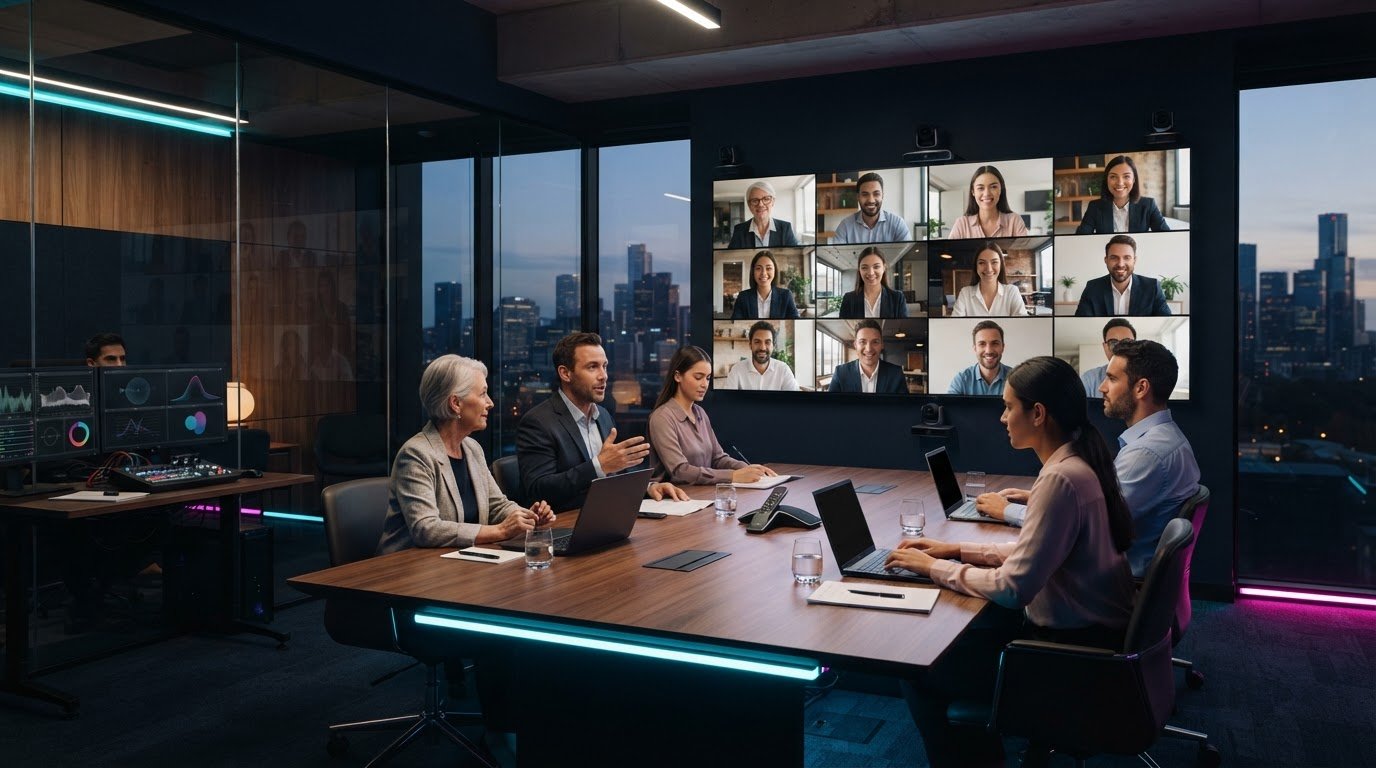
What if the room and the screen felt like one meeting, rather than two separate audiences? Knowing how to run a seamless hybrid meeting starts with treating every attendee as part of the same experience. Clear audio, a view of the people speaking and a genuine chance to contribute matter just as much online as they do in the room. When these basics fail, remote participants can lose the thread, while organisers get pulled away from facilitating to fix technical issues.

You can avoid many disruptions with careful preparation and active facilitation. This guide explains how to plan the room and technology, test audio and visuals, set clear participation expectations and keep the discussion inclusive from start to finish. You’ll also see when professional technical direction can take pressure off your team. NextGen AV provides audio-visual production and equipment hire from Melbourne, including professional sound systems, lighting, LED video walls, staging and hybrid event solutions. Considered planning and production support can help keep the technology working in the background, so you can focus on the meeting and the people in it.

Key Takeaways

  • Start with a shared meeting purpose and plan for equal access to discussion, visuals and questions.
  • Set outcomes, attendance and meeting roles before choosing the room layout and AV approach.
  • Match microphones, camera views and presentation setup to the meeting format and room.
  • To learn how to run a seamless hybrid meeting, test the platform and AV from a remote attendee’s perspective before you begin.
  • Review participation and technical issues afterwards, and consider technical direction when room or production needs become more complex.

Start with one shared purpose for your hybrid meeting

A hybrid meeting brings in-room and remote participants into one shared discussion. But connecting a video call is only the starting point. If people joining online can’t hear a question, see the presenter or follow how the room responds, they’re connected technically but excluded from parts of the conversation.

A seamless hybrid meeting gives every participant a clear view of the discussion and a meaningful way to contribute, wherever they’re joining from. That takes more than a platform: it calls for a clear purpose, deliberate room planning and facilitation that keeps both audiences in view. For background on the systems behind the experience, read about videoconferencing technology.

Start by matching the production approach to the meeting. A routine team discussion may need a straightforward room layout and a clear process for taking turns. A larger hybrid event, with presenters moving around, several visual elements or audience interaction, needs more considered AV planning and technical direction. For meetings in Melbourne, confirm venue-specific details early, since the room layout, available equipment and access can affect the setup.

What makes a hybrid meeting feel seamless?

Participants in the room and online should be able to hear each speaker, see the presenter and relevant materials, and understand when they can respond. Clear speaking turns help prevent people talking over one another. A visible presenter and an agreed way to signal questions help remote attendees follow the room. The aim is shared attention, not simply a live connection.

Set the meeting outcome before choosing the setup

Decide what the meeting must achieve before arranging chairs or selecting AV. Is the group sharing information, discussing an issue or reaching a decision? The answer shapes how people need to interact and what the facilitator must keep track of. Identify who will attend in person, who will join remotely and who will guide the discussion.

  • For information-sharing: plan clear presentation visibility and a way to ask questions.
  • For discussion: establish speaking turns so remote and in-room voices are heard.
  • For a decision: explain how options will be considered and how the outcome will be confirmed.

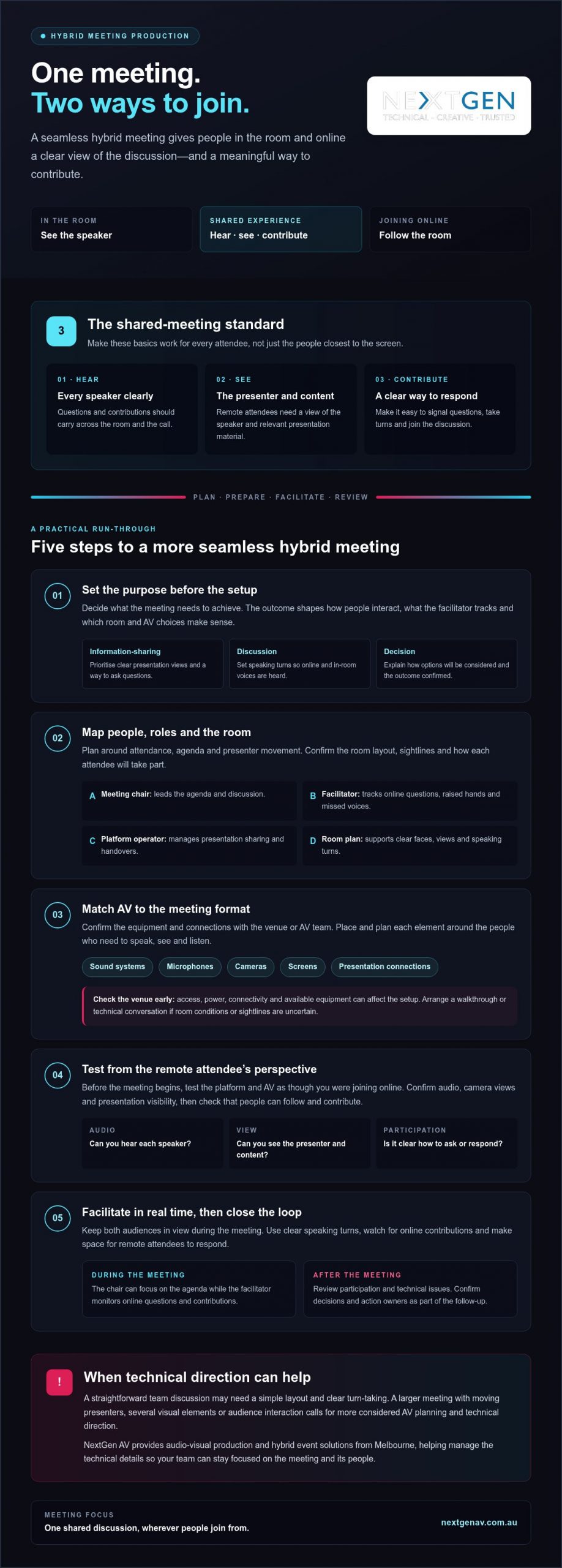
This purpose-first approach is the foundation of how to run a seamless hybrid meeting. The steps that follow build on it: set outcomes, design the room, test the setup, facilitate in real time, then follow up with decisions and action owners.

Plan the room, people and AV before meeting day

Once the meeting outcome is clear, map the people and production around it. A room that works for a small discussion may not suit a presenter-led session with remote questions, screen content and movement across a stage. Planning these details early helps prevent avoidable changes on the day and gives every participant a clearer view of the conversation.

  • Confirm the outcome and attendance: note what the meeting needs to achieve, who will be in the room and who will join remotely.
  • Assign the roles: name the meeting chair, a facilitator to track online contributions, and someone to manage the platform and presentation handovers.
  • Match the room to the agenda: consider seating, presenter movement, sightlines and how attendees will ask questions or take part in a decision.
  • Confirm the AV plan: discuss sound systems, microphones, cameras, screens and presentation connections with the venue or AV team.

Assign clear roles before the call begins

The chair can lead the agenda while a facilitator watches for raised hands, questions and signs that remote participants have been missed. A separate platform operator can manage presentation sharing and handovers, allowing the chair to stay focused on the discussion. For larger or technically complex meetings, a front of house engineer can manage the audience sound mix, while a technical director coordinates the production plan.

Plan the room around clear communication

Microphone placement should support clear speech from the people who need to contribute, not just the main presenter. Check that remote participants can see both the presenter and the relevant presentation content, and that people in the room can follow remote contributions. Seating should support the agenda: a discussion needs visible faces and clear speaking turns, while a presenter-led session needs unobstructed views of the speaker and screen.

Confirm venue access, power, connectivity and equipment requirements directly with the venue before the event. If room conditions or sightlines are uncertain, arrange a walkthrough or a technical conversation to confirm the plan. For a Melbourne meeting, include these checks in the venue conversation rather than assuming every space has the same facilities.

For a broader production plan, explore hybrid event services. If the meeting calls for more than a straightforward room setup, NextGen AV’s technical direction and hybrid event solutions can help coordinate the AV around the participant experience, so you can focus on leading the meeting.

Make audio, video and presentations work for both audiences

The right AV setup depends on how the meeting will run. A small discussion needs clear speech and a camera view that captures the people contributing. A presenter-led session needs the speaker and slides to remain visible to both audiences. In a larger room, sound coverage, screen placement and camera framing need closer coordination so participants aren’t left trying to follow incomplete views or unclear audio.

Clear audio is what lets remote participants follow the conversation and take part, not just watch it. The room’s microphones and sound systems need to capture questions and responses as well as the main presenter. If only the presenter can be heard, the online audience misses the exchange that gives a discussion its meaning.

Choose sound that carries every contribution

A wireless microphone may suit a presenter who moves around the room, while a seated discussion calls for a plan that captures contributions from different positions. Decide how in-room attendees will ask questions: will a microphone be passed around, or will the facilitator repeat each question clearly for online participants? Ask an audio specialist to assess the room and recommend sound systems for the audience and meeting format.

Room acoustics, speaker positions and microphone placement all affect what remote attendees hear. A considered audio plan helps make speech intelligible without asking online participants to guess who is talking. For more guidance on planning event audio, see the professional sound system hire guide.

Keep presenters and shared content visible

Frame cameras so remote attendees can identify the active speaker and follow changes in the discussion. If the presenter moves, check whether the camera view still works; if several people contribute, consider how the online audience will see them. Place room screens where attendees can read presentation content without losing sight of the speaker, and check that slides remain legible in the online meeting as well.

An LED display can support visibility in a larger room, but it isn’t automatically the right choice for every meeting. Consider the room’s scale, the content being shown and the viewing conditions. The goal is a clear, balanced view for both audiences, not more equipment for its own sake.

These decisions are central to how to run a seamless hybrid meeting: match the audio and visuals to the way people will participate. If you’d like technical guidance for your room and audience, NextGen AV’s professional audio systems and hybrid event solutions can help shape the production plan around a clear participant experience.
How to Run a Seamless Hybrid Meeting: A Practical Guide

Test the setup and facilitate the meeting in real time

A planned setup still needs a live rehearsal. Test the full signal path before attendees arrive, then check the meeting from the perspective of someone joining remotely. A microphone can sound clear in the room but still be too quiet or unclear online, so don’t rely on the in-room view alone.

Run a practical rehearsal

Work through each part of the meeting in the order it will happen. Confirm platform access, test each microphone, check camera views, share the presentation and listen to the room sound through the online connection. Rehearse presenter handovers too, and confirm who will handle questions and technical changes while the meeting is under way.

  • Check access: confirm the meeting link opens and remote attendees can join.
  • Test speech and sound: speak from each planned position and check what the remote audience hears.
  • Review camera views: make sure the active speaker is visible and remains in frame when moving.
  • Share presentation content: confirm slides appear correctly online and on the room display.
  • Practise handovers: run through speaker changes and question management.

Invite a remote colleague to join from their own device and report what they can hear and see. Ask them to confirm that speech is clear, slides are readable and the presenter is visible. This perspective check can reveal issues that aren’t apparent from the meeting room.

Keep remote participants in the conversation

Open by explaining how everyone can contribute. For example: “Please use the raise-hand function or add your question in the chat. We’ll pause between topics to bring in online questions, and I’ll repeat questions from the room so everyone can hear them.” Adapt the wording to the platform and participation methods you’ve confirmed.

During the discussion, pause between topics so the facilitator can check for online questions and responses. If someone in the room asks a question, repeat it clearly before answering when remote attendees may not have heard it. Small facilitation cues keep the conversation connected and give online participants a clear opening to speak.

If a technical issue interrupts the discussion, pause rather than talking over the problem. The facilitator can explain what’s happening, while the person managing the platform checks the issue. If the connection can’t be restored promptly, use a backup communication method agreed before the meeting, such as a phone call, and confirm how participants will rejoin or receive missed information.

Knowing how to run a seamless hybrid meeting means preparing both the technical response and the human one. For coordinated event production support, read the audio-visual hire guide, or discuss hybrid event solutions and technical direction with NextGen AV.

Close the loop and know when production support helps

The meeting isn’t finished when the call ends. A short review helps turn decisions into action and makes the next hybrid session easier to plan. Use your organisation’s usual process to record outcomes, responsibilities and next steps, then check whether the experience worked for people joining from both locations.

Turn meeting outcomes into clear follow-up

Ask participants whether they could hear speakers, see the presenter and presentation content, and contribute without difficulty. Record recurring AV issues, such as questions being hard to hear online or slides being difficult to read, so they can be addressed in the next setup. Assign an owner to each action and confirm how progress will be followed up through your established meeting process.

This review closes the loop between production and purpose. If remote participants couldn’t follow a discussion or had limited chances to speak, adjust the facilitation plan as well as the technical setup. A clear record helps distinguish a one-off problem from something that needs attention before the next meeting.

Recognise when an AV production partner can help

A straightforward meeting in a familiar room, with one presenter and simple screen sharing, may only need a basic setup and a focused test. Technical direction becomes more valuable when the venue, audience or presentation format adds coordination demands, such as multiple speakers, presenter movement, staging or several display requirements. The aim is to keep production working behind the scenes while the meeting stays focused.

A production partner can help coordinate sound, displays, staging and presenter transitions as one plan, rather than leaving the organiser to manage each technical detail during the meeting. For broader event requirements, see the full-service event production guide.

For Melbourne organisers, NextGen AV’s Melbourne base offers a local point of contact for discussing venue and production requirements. The company also provides event solutions across Australia. Share the details of the space, agenda and participant experience when planning a more complex hybrid meeting, so the technical approach can be matched to the event.

Make your next hybrid meeting count

Knowing how to run a seamless hybrid meeting comes down to planning one shared experience. Set a clear purpose, match the room and AV to the agenda, then test the setup from a remote participant’s perspective. During the meeting, make space for both in-room and online contributions. Afterwards, capture decisions, action owners and any technical issues to address next time.

A simple meeting may need only a focused setup and a careful test. More involved rooms, presentations or transitions can call for technical direction to keep production coordinated while you lead the conversation. NextGen AV offers professional audio systems, lighting, LED video walls, staging and technical direction, with hybrid event solutions for more involved requirements.

Discuss your hybrid meeting requirements with NextGen AV and plan the technical details around the people and outcomes that matter. With the right preparation and support, you can create a confident, inclusive meeting experience for everyone.

Frequently Asked Questions

How do you run a seamless hybrid meeting?

To run a seamless hybrid meeting, agree on the outcome, attendee roles and ways to contribute before choosing the setup. Arrange the room so speakers can be heard and shared content can be seen, then test platform access, microphones, camera views and presentation sharing from both sides. During the meeting, invite remote input, pause for questions and assign someone to manage technical issues. Review feedback and actions afterwards.

What equipment do you need for a hybrid meeting?

The equipment you need depends on the room, audience and agenda. A meeting may require a platform-enabled computer, microphones, a camera, room sound and a display for shared content. Larger or more complex spaces can need additional audio-visual planning. Confirm what the venue provides and test the complete setup with someone joining remotely. Choose equipment to suit the actual room and participant experience, rather than selecting items by category alone.

How can remote participants feel included in a hybrid meeting?

Give remote attendees clear ways to ask questions and take turns, and assign a facilitator to monitor their contributions. Check they can hear room speakers and see the presenter and relevant content. Pause after questions to allow online responses, and repeat in-room contributions if they weren’t clear through the connection. Keep side conversations from becoming the main discussion. Inclusion depends on deliberate facilitation as well as technology.

Why is audio important in a hybrid meeting?

Remote attendees rely on transmitted room audio to follow speakers and know when to contribute. If microphones miss questions or speech is difficult to understand, online participants can lose the thread of the discussion. Test the sound from a remote participant’s device, including questions from around the room. If the venue or meeting format makes it difficult to cover the audience clearly, ask an audio specialist to assess the room and sound systems.

How do you test a hybrid meeting before it starts?

Rehearse the meeting sequence before attendees join. Check platform access, each microphone, room sound, camera framing, presentation sharing and speaker transitions. Ask someone joining remotely to confirm what they can hear and see, including whether slides are readable. Confirm who will manage technical changes and participant questions, then resolve any issues before the meeting begins. Include venue-specific checks if access, connectivity or available equipment needs confirmation.

Can one person manage a hybrid meeting and its technology?

One person may manage a simple meeting, but chairing the discussion while monitoring platform controls, remote questions and room AV can divide their attention. Assigning a facilitator or technical support role helps keep the conversation moving while issues are handled. For a larger meeting, a complex venue or several presentation handovers, clarify responsibilities and production needs in advance. This lets the chair focus on the meeting outcome and participants.

What should a hybrid meeting run sheet include?

A hybrid meeting run sheet should include the objective, agenda, presenter order, start and finish times, participant roles and planned interaction points. Note when slides or other content will be shared, who will manage remote questions and who will handle technical changes. Include pre-start tests and any venue coordination required. Keep the document clear enough for the chair, facilitator and technical support team to follow together throughout the meeting.

When should you use professional AV support for a hybrid meeting?

Consider professional AV support when room acoustics, audience size, staging, multiple presenters or technical handovers make the setup difficult to manage alongside the agenda. A production team can help plan and coordinate audio-visual requirements and support the live meeting. Discuss the venue, format, content and participant experience early so the plan fits the event. For Melbourne meetings, NextGen AV can provide professional audio systems, technical direction and hybrid event solutions to support production planning.

What if the room and the screen felt like one meeting, rather than two separate audiences? Knowing how to run a seamless hybrid meeting starts with treating every attendee as part of the same experience. Clear audio, a view of the people speaking and a genuine chance to contribute matter just as much online as they do in the room. When these basics fail, remote participants can lose the thread, while organisers get pulled away from facilitating to fix technical issues.

You can avoid many disruptions with careful preparation and active facilitation. This guide explains how to plan the room and technology, test audio and visuals, set clear participation expectations and keep the discussion inclusive from start to finish. You’ll also see when professional technical direction can take pressure off your team. NextGen AV provides audio-visual production and equipment hire from Melbourne, including professional sound systems, lighting, LED video walls, staging and hybrid event solutions. Considered planning and production support can help keep the technology working in the background, so you can focus on the meeting and the people in it.

Key Takeaways

  • Start with a shared meeting purpose and plan for equal access to discussion, visuals and questions.
  • Set outcomes, attendance and meeting roles before choosing the room layout and AV approach.
  • Match microphones, camera views and presentation setup to the meeting format and room.
  • To learn how to run a seamless hybrid meeting, test the platform and AV from a remote attendee’s perspective before you begin.
  • Review participation and technical issues afterwards, and consider technical direction when room or production needs become more complex.

Start with one shared purpose for your hybrid meeting

A hybrid meeting brings in-room and remote participants into one shared discussion. But connecting a video call is only the starting point. If people joining online can’t hear a question, see the presenter or follow how the room responds, they’re connected technically but excluded from parts of the conversation.

A seamless hybrid meeting gives every participant a clear view of the discussion and a meaningful way to contribute, wherever they’re joining from. That takes more than a platform: it calls for a clear purpose, deliberate room planning and facilitation that keeps both audiences in view. For background on the systems behind the experience, read about videoconferencing technology.

Start by matching the production approach to the meeting. A routine team discussion may need a straightforward room layout and a clear process for taking turns. A larger hybrid event, with presenters moving around, several visual elements or audience interaction, needs more considered AV planning and technical direction. For meetings in Melbourne, confirm venue-specific details early, since the room layout, available equipment and access can affect the setup.

What makes a hybrid meeting feel seamless?

Participants in the room and online should be able to hear each speaker, see the presenter and relevant materials, and understand when they can respond. Clear speaking turns help prevent people talking over one another. A visible presenter and an agreed way to signal questions help remote attendees follow the room. The aim is shared attention, not simply a live connection.

Set the meeting outcome before choosing the setup

Decide what the meeting must achieve before arranging chairs or selecting AV. Is the group sharing information, discussing an issue or reaching a decision? The answer shapes how people need to interact and what the facilitator must keep track of. Identify who will attend in person, who will join remotely and who will guide the discussion.

  • For information-sharing: plan clear presentation visibility and a way to ask questions.
  • For discussion: establish speaking turns so remote and in-room voices are heard.
  • For a decision: explain how options will be considered and how the outcome will be confirmed.

This purpose-first approach is the foundation of how to run a seamless hybrid meeting. The steps that follow build on it: set outcomes, design the room, test the setup, facilitate in real time, then follow up with decisions and action owners.

Plan the room, people and AV before meeting day

Once the meeting outcome is clear, map the people and production around it. A room that works for a small discussion may not suit a presenter-led session with remote questions, screen content and movement across a stage. Planning these details early helps prevent avoidable changes on the day and gives every participant a clearer view of the conversation.

  • Confirm the outcome and attendance: note what the meeting needs to achieve, who will be in the room and who will join remotely.
  • Assign the roles: name the meeting chair, a facilitator to track online contributions, and someone to manage the platform and presentation handovers.
  • Match the room to the agenda: consider seating, presenter movement, sightlines and how attendees will ask questions or take part in a decision.
  • Confirm the AV plan: discuss sound systems, microphones, cameras, screens and presentation connections with the venue or AV team.

Assign clear roles before the call begins

The chair can lead the agenda while a facilitator watches for raised hands, questions and signs that remote participants have been missed. A separate platform operator can manage presentation sharing and handovers, allowing the chair to stay focused on the discussion. For larger or technically complex meetings, a front of house engineer can manage the audience sound mix, while a technical director coordinates the production plan.

Plan the room around clear communication

Microphone placement should support clear speech from the people who need to contribute, not just the main presenter. Check that remote participants can see both the presenter and the relevant presentation content, and that people in the room can follow remote contributions. Seating should support the agenda: a discussion needs visible faces and clear speaking turns, while a presenter-led session needs unobstructed views of the speaker and screen.

Confirm venue access, power, connectivity and equipment requirements directly with the venue before the event. If room conditions or sightlines are uncertain, arrange a walkthrough or a technical conversation to confirm the plan. For a Melbourne meeting, include these checks in the venue conversation rather than assuming every space has the same facilities.

For a broader production plan, explore hybrid event services. If the meeting calls for more than a straightforward room setup, NextGen AV’s technical direction and hybrid event solutions can help coordinate the AV around the participant experience, so you can focus on leading the meeting.

Make audio, video and presentations work for both audiences

The right AV setup depends on how the meeting will run. A small discussion needs clear speech and a camera view that captures the people contributing. A presenter-led session needs the speaker and slides to remain visible to both audiences. In a larger room, sound coverage, screen placement and camera framing need closer coordination so participants aren’t left trying to follow incomplete views or unclear audio.

Clear audio is what lets remote participants follow the conversation and take part, not just watch it. The room’s microphones and sound systems need to capture questions and responses as well as the main presenter. If only the presenter can be heard, the online audience misses the exchange that gives a discussion its meaning.

Choose sound that carries every contribution

A wireless microphone may suit a presenter who moves around the room, while a seated discussion calls for a plan that captures contributions from different positions. Decide how in-room attendees will ask questions: will a microphone be passed around, or will the facilitator repeat each question clearly for online participants? Ask an audio specialist to assess the room and recommend sound systems for the audience and meeting format.

Room acoustics, speaker positions and microphone placement all affect what remote attendees hear. A considered audio plan helps make speech intelligible without asking online participants to guess who is talking. For more guidance on planning event audio, see the professional sound system hire guide.

Keep presenters and shared content visible

Frame cameras so remote attendees can identify the active speaker and follow changes in the discussion. If the presenter moves, check whether the camera view still works; if several people contribute, consider how the online audience will see them. Place room screens where attendees can read presentation content without losing sight of the speaker, and check that slides remain legible in the online meeting as well.

An LED display can support visibility in a larger room, but it isn’t automatically the right choice for every meeting. Consider the room’s scale, the content being shown and the viewing conditions. The goal is a clear, balanced view for both audiences, not more equipment for its own sake.

These decisions are central to how to run a seamless hybrid meeting: match the audio and visuals to the way people will participate. If you’d like technical guidance for your room and audience, NextGen AV’s professional audio systems and hybrid event solutions can help shape the production plan around a clear participant experience.

Test the setup and facilitate the meeting in real time

A planned setup still needs a live rehearsal. Test the full signal path before attendees arrive, then check the meeting from the perspective of someone joining remotely. A microphone can sound clear in the room but still be too quiet or unclear online, so don’t rely on the in-room view alone.

Run a practical rehearsal

Work through each part of the meeting in the order it will happen. Confirm platform access, test each microphone, check camera views, share the presentation and listen to the room sound through the online connection. Rehearse presenter handovers too, and confirm who will handle questions and technical changes while the meeting is under way.

  • Check access: confirm the meeting link opens and remote attendees can join.
  • Test speech and sound: speak from each planned position and check what the remote audience hears.
  • Review camera views: make sure the active speaker is visible and remains in frame when moving.
  • Share presentation content: confirm slides appear correctly online and on the room display.
  • Practise handovers: run through speaker changes and question management.

Invite a remote colleague to join from their own device and report what they can hear and see. Ask them to confirm that speech is clear, slides are readable and the presenter is visible. This perspective check can reveal issues that aren’t apparent from the meeting room.

Keep remote participants in the conversation

Open by explaining how everyone can contribute. For example: “Please use the raise-hand function or add your question in the chat. We’ll pause between topics to bring in online questions, and I’ll repeat questions from the room so everyone can hear them.” Adapt the wording to the platform and participation methods you’ve confirmed.

During the discussion, pause between topics so the facilitator can check for online questions and responses. If someone in the room asks a question, repeat it clearly before answering when remote attendees may not have heard it. Small facilitation cues keep the conversation connected and give online participants a clear opening to speak.

If a technical issue interrupts the discussion, pause rather than talking over the problem. The facilitator can explain what’s happening, while the person managing the platform checks the issue. If the connection can’t be restored promptly, use a backup communication method agreed before the meeting, such as a phone call, and confirm how participants will rejoin or receive missed information.

Knowing how to run a seamless hybrid meeting means preparing both the technical response and the human one. For coordinated event production support, read the audio-visual hire guide, or discuss hybrid event solutions and technical direction with NextGen AV.

Close the loop and know when production support helps

The meeting isn’t finished when the call ends. A short review helps turn decisions into action and makes the next hybrid session easier to plan. Use your organisation’s usual process to record outcomes, responsibilities and next steps, then check whether the experience worked for people joining from both locations.

Turn meeting outcomes into clear follow-up

Ask participants whether they could hear speakers, see the presenter and presentation content, and contribute without difficulty. Record recurring AV issues, such as questions being hard to hear online or slides being difficult to read, so they can be addressed in the next setup. Assign an owner to each action and confirm how progress will be followed up through your established meeting process.

This review closes the loop between production and purpose. If remote participants couldn’t follow a discussion or had limited chances to speak, adjust the facilitation plan as well as the technical setup. A clear record helps distinguish a one-off problem from something that needs attention before the next meeting.

Recognise when an AV production partner can help

A straightforward meeting in a familiar room, with one presenter and simple screen sharing, may only need a basic setup and a focused test. Technical direction becomes more valuable when the venue, audience or presentation format adds coordination demands, such as multiple speakers, presenter movement, staging or several display requirements. The aim is to keep production working behind the scenes while the meeting stays focused.

A production partner can help coordinate sound, displays, staging and presenter transitions as one plan, rather than leaving the organiser to manage each technical detail during the meeting. For broader event requirements, see the full-service event production guide.

For Melbourne organisers, NextGen AV’s Melbourne base offers a local point of contact for discussing venue and production requirements. The company also provides event solutions across Australia. Share the details of the space, agenda and participant experience when planning a more complex hybrid meeting, so the technical approach can be matched to the event.

Make your next hybrid meeting count

Knowing how to run a seamless hybrid meeting comes down to planning one shared experience. Set a clear purpose, match the room and AV to the agenda, then test the setup from a remote participant’s perspective. During the meeting, make space for both in-room and online contributions. Afterwards, capture decisions, action owners and any technical issues to address next time.

A simple meeting may need only a focused setup and a careful test. More involved rooms, presentations or transitions can call for technical direction to keep production coordinated while you lead the conversation. NextGen AV offers professional audio systems, lighting, LED video walls, staging and technical direction, with hybrid event solutions for more involved requirements.

Discuss your hybrid meeting requirements with NextGen AV and plan the technical details around the people and outcomes that matter. With the right preparation and support, you can create a confident, inclusive meeting experience for everyone.

Frequently Asked Questions

How do you run a seamless hybrid meeting?

To run a seamless hybrid meeting, agree on the outcome, attendee roles and ways to contribute before choosing the setup. Arrange the room so speakers can be heard and shared content can be seen, then test platform access, microphones, camera views and presentation sharing from both sides. During the meeting, invite remote input, pause for questions and assign someone to manage technical issues. Review feedback and actions afterwards.

What equipment do you need for a hybrid meeting?

The equipment you need depends on the room, audience and agenda. A meeting may require a platform-enabled computer, microphones, a camera, room sound and a display for shared content. Larger or more complex spaces can need additional audio-visual planning. Confirm what the venue provides and test the complete setup with someone joining remotely. Choose equipment to suit the actual room and participant experience, rather than selecting items by category alone.

How can remote participants feel included in a hybrid meeting?

Give remote attendees clear ways to ask questions and take turns, and assign a facilitator to monitor their contributions. Check they can hear room speakers and see the presenter and relevant content. Pause after questions to allow online responses, and repeat in-room contributions if they weren’t clear through the connection. Keep side conversations from becoming the main discussion. Inclusion depends on deliberate facilitation as well as technology.

Why is audio important in a hybrid meeting?

Remote attendees rely on transmitted room audio to follow speakers and know when to contribute. If microphones miss questions or speech is difficult to understand, online participants can lose the thread of the discussion. Test the sound from a remote participant’s device, including questions from around the room. If the venue or meeting format makes it difficult to cover the audience clearly, ask an audio specialist to assess the room and sound systems.

How do you test a hybrid meeting before it starts?

Rehearse the meeting sequence before attendees join. Check platform access, each microphone, room sound, camera framing, presentation sharing and speaker transitions. Ask someone joining remotely to confirm what they can hear and see, including whether slides are readable. Confirm who will manage technical changes and participant questions, then resolve any issues before the meeting begins. Include venue-specific checks if access, connectivity or available equipment needs confirmation.

Can one person manage a hybrid meeting and its technology?

One person may manage a simple meeting, but chairing the discussion while monitoring platform controls, remote questions and room AV can divide their attention. Assigning a facilitator or technical support role helps keep the conversation moving while issues are handled. For a larger meeting, a complex venue or several presentation handovers, clarify responsibilities and production needs in advance. This lets the chair focus on the meeting outcome and participants.

What should a hybrid meeting run sheet include?

A hybrid meeting run sheet should include the objective, agenda, presenter order, start and finish times, participant roles and planned interaction points. Note when slides or other content will be shared, who will manage remote questions and who will handle technical changes. Include pre-start tests and any venue coordination required. Keep the document clear enough for the chair, facilitator and technical support team to follow together throughout the meeting.

When should you use professional AV support for a hybrid meeting?

Consider professional AV support when room acoustics, audience size, staging, multiple presenters or technical handovers make the setup difficult to manage alongside the agenda. A production team can help plan and coordinate audio-visual requirements and support the live meeting. Discuss the venue, format, content and participant experience early so the plan fits the event. For Melbourne meetings, NextGen AV can provide professional audio systems, technical direction and hybrid event solutions to support production planning.

Back to Articles

Discover Valuable Insights

Unlock Expert Tips and Advice

Our blog is packed with valuable information to help you stay ahead. Whether you’re looking for expert advice, industry trends, or practical tips, you’ll find everything you need. Reach out today to learn more or get in touch with us for personalised support!

Contact Us

Request A Quote

Make an
Enquiry

Let’s Get Your Event Sorted

Complete the enquiry form with your event date, venue, audience size, event type and budget. Our Melbourne AV team will review your requirements and recommend the right PA, screen, lighting, staging or production setup for your event.

What happens next?


1.We review your event details
Tell us your date, venue, audience size and event type.

2.We recommend the right setup
From PA hire to screens, lighting, staging and full AV production.

3. We come back with clear advice
You’ll receive practical recommendations and a fast quote from our Melbourne team.

Need help urgently?
Call 1300 792 922.

Resource Download

Tell us a bit about yourself to download our resources.

7