
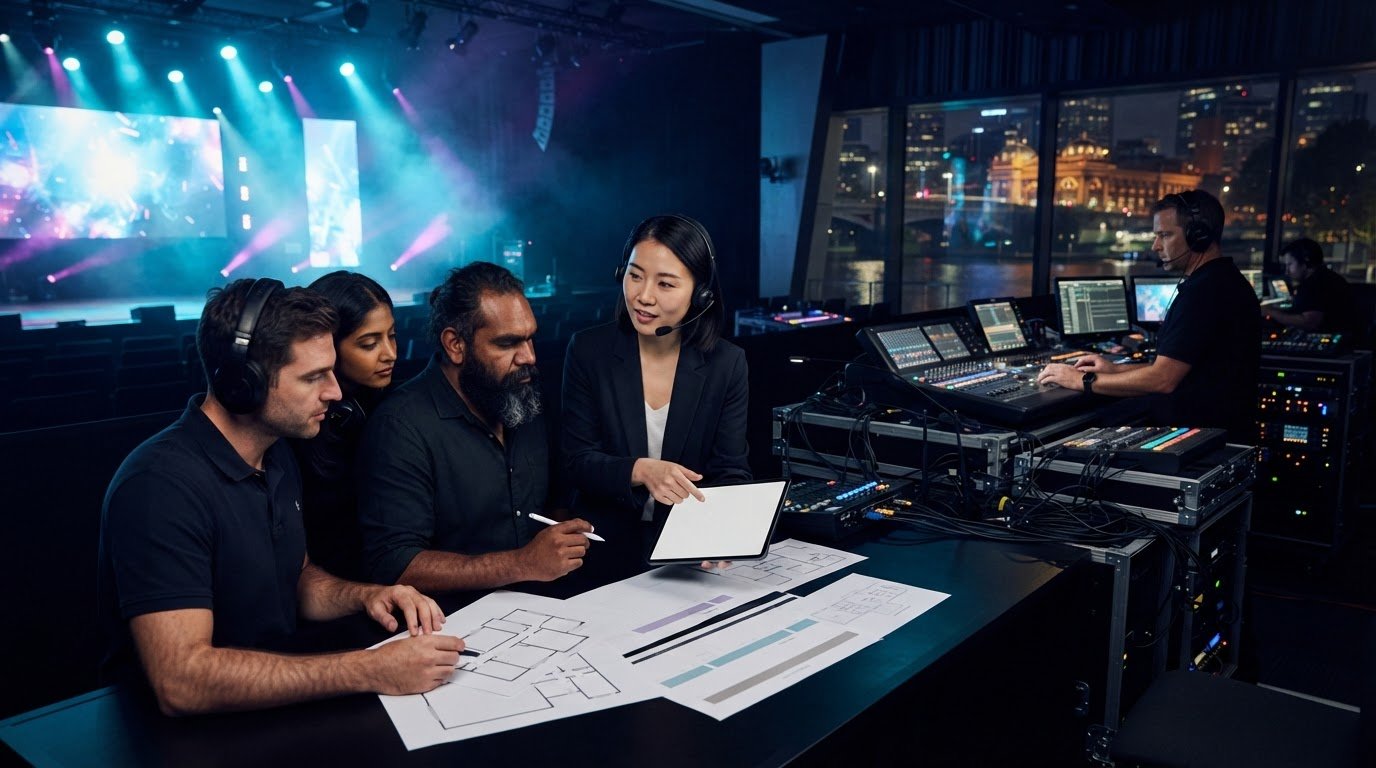
What if a better event experience begins before anyone chooses a screen, microphone or lighting cue? Knowing how to brief an av company effectively means starting with what your audience needs to see, hear and feel, then giving your production team the details to make it happen. You don’t need to arrive with technical answers. You do need a clear picture of the event and the experience you want to create.
An incomplete brief can affect planning, timing and delivery. A useful one connects your goals with practical production decisions early, giving your AV partner the context to plan around the programme, venue and audience instead of filling gaps at the last minute.
This guide explains what to include about your event format, run sheet, audience experience, venue and safety requirements, and how those details shape sound systems, LED displays, lighting, staging and technical direction. NextGen AV manages the production details behind the scenes, so you can focus on delivering an event that feels polished and runs with confidence.
Key Takeaways
- To understand how to brief an av company effectively, start with your event’s purpose and the experience you want the audience to have.
- Give your production team a clear sequence of event details, including the audience, programme, venue and key delivery contacts.
- Describe what each event moment should achieve rather than trying to specify technical solutions yourself.
- Share Melbourne venue information, access details and event timings early to support precise production planning.
- Use your brief as the starting point for a coordinated plan that aligns content, cues, crew and audience experience.
Why an effective AV brief starts with the event experience
An AV brief connects your event goals, the experience you want attendees to have and the production requirements that can bring it to life. It gives your production team a clear basis for technical decisions, from how speech is heard across the room to how key content appears on screen. For a foundational overview of the technology involved, see What is Audiovisual (AV)?.
Begin with the outcome, not a shopping list. Asking for screens and microphones identifies some equipment, but doesn’t explain how it should support the programme or audience. A conference might need delegates to follow presentations, take part in live questions and stay connected to a hybrid session. Those goals guide decisions about professional audio systems, visuals, lighting and technical direction. The result is a coordinated production plan, not a collection of disconnected items.
A strong AV brief turns your event purpose and audience needs into clear production decisions, so the technical plan supports every important moment. That’s the practical heart of how to brief an av company effectively: describe what success should look and feel like, then give your production partner the context to plan precisely.
Start with the audience, not the equipment
Describe what attendees should see, hear, understand or do. Note the expected audience size and whether the event is in person, hybrid or designed for active participation, such as polling or audience questions. Connect those details to an objective: for example, help conference delegates understand a new strategy, or give product-launch guests a clear view of a reveal. If attendance or format is still being finalised, label it as provisional.
Give the brief a clear purpose
State the event type, purpose, date and planned Melbourne location, then identify the decision-makers and main production contact. Separate confirmed details from items still in development, such as a draft programme or pending speaker list. This gives the brief practical value from the outset without presenting early assumptions as final instructions.
Make the purpose specific enough to guide decisions. “Annual conference” names the format; “bring members together to share industry updates and take part in discussion” describes the intended experience. Add what attendees should take away and flag moments that need particular focus, such as a keynote, award presentation or launch reveal. Your AV partner can use that direction to prioritise technical planning while keeping the wider event coherent.
How to build an AV brief step by step
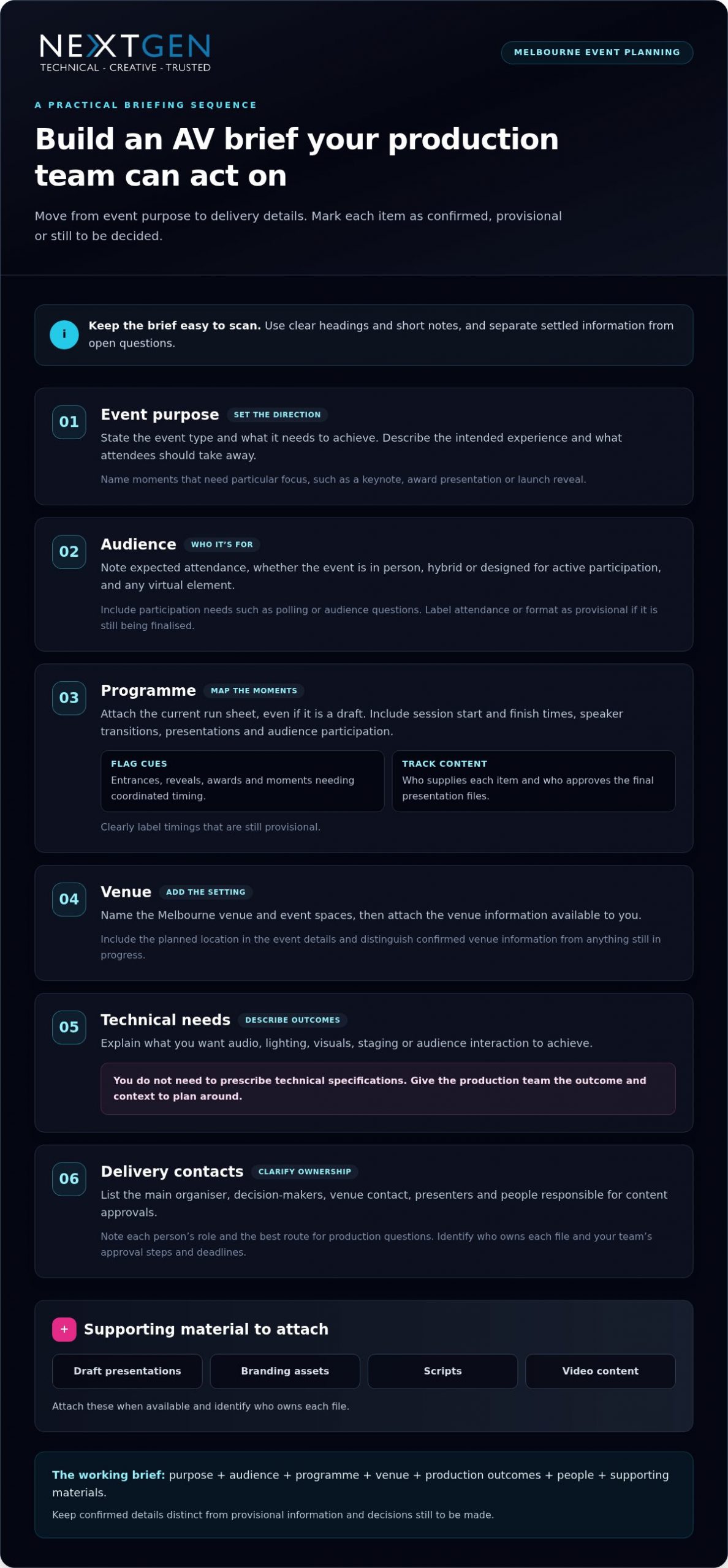
Turn your event information into a working document the production team can act on. A practical brief moves from the reason for the event to the people, timings and materials needed to deliver it. If you’re working out how to brief an av company effectively, label each detail as confirmed, provisional or still to be decided. This gives the team useful direction without treating open questions as final instructions.
- Event purpose: State the event type and what it needs to achieve.
- Audience: Note expected attendance, format and participation needs, including any virtual or hybrid element.
- Programme: Attach the current run sheet, even if it’s a draft, and highlight moments requiring close coordination.
- Venue: Name the Melbourne venue and event spaces, then attach available venue information.
- Technical needs: Describe intended outcomes for audio, lighting, visuals, staging or audience interaction. You don’t need to prescribe technical specifications.
- Delivery contacts: List the main organiser, decision-makers, venue contact and people responsible for content approvals.
Keep the document easy to scan. Use headings, short notes and clear labels rather than burying an important change in an email chain. The AACP’s Principles of Effective Brief Writing offers useful guidance on concise, evidence-led briefing. For event production, that means stating what matters, what action or decision is needed, and which supporting material will help the team plan.
Set out the programme and key moments
Include session start and finish times, speaker transitions, presentations and audience participation. Flag entrances, reveals, awards or other cues that need coordinated timing. For each key item, note who supplies the content and who approves the final presentation files. Label provisional timings clearly so technical planning can progress as the programme develops.
Share the people and materials involved
List organisers, presenters, venue contacts and relevant suppliers, along with each person’s role and the best route for production questions. Attach draft presentations, branding assets, scripts or video content when available, and identify who owns each file. Note your team’s approval steps and deadlines. This gives the production team a clearer view of dependencies and helps keep content, cues and delivery aligned.
A useful AV brief brings together the event purpose, audience, programme, venue, production outcomes, people and supporting materials, with confirmed details distinguished from decisions still in progress. As the plan takes shape, your production partner can turn that information into a coordinated approach. For Melbourne event production planning, work with NextGen AV to connect your programme and creative direction with precise technical planning.
Describe AV requirements through outcomes, not jargon
You don’t need to specify equipment models or technical settings to give your production team useful direction. Describe what should happen for the audience at each important moment, then let technical direction shape the production approach. A clear priority, such as making every speaker easy to hear or ensuring guests can follow a product reveal, helps coordinate sound systems, lighting, staging and visuals around one intended experience.
Use a simple table to turn those priorities into practical planning notes. This example describes the result you want without prescribing the technical solution:
| Event moment | Audience outcome | Content or cue | Open questions |
|---|---|---|---|
| Keynote | Delegates hear and follow the speaker | Presentation and speaker introduction | Is audience Q&A planned? |
| Product reveal | Guests focus on the reveal and its key details | Video, reveal cue or presenter narration | Is the content final? |
| Networking | Guests can talk comfortably and move around | Background music | Which areas need coverage? |
Mark unresolved details as open questions rather than leaving the production team to interpret gaps. If speech clarity is a priority, describe the room, audience and speaking format. A professional sound system hire guide can also help explain the audio considerations behind a clear, comfortable listening experience.
Brief sound, visuals and lighting by purpose
For sound, note whether the programme includes speeches, music playback, video audio, audience questions or a mix. For visuals, explain what attendees need to see, such as a presentation, close-up detail or video during a key moment. Describe the atmosphere and visibility that lighting should support, from an energetic arrival to a focused presentation. These outcomes help your production team coordinate the elements rather than plan them in isolation.
Flag staging, rigging and content dependencies
Share any stage plans, set design concepts, suspended equipment plans or known access constraints. Include relevant structural information or a structural engineering certificate with the venue material so it can inform planning. Identify who supplies each presentation, video or script, and where it sits in the programme. Mark content still being developed and note approval responsibilities to help align final material with production cues.
The more clearly you describe the audience outcome, the more precisely the production team can shape its response. That’s how to brief an av company effectively without technical shorthand: connect each event moment to what people should experience, provide the content and context you have, and flag what remains undecided. Your technical partner can bring audio, visuals, lighting and staging into a coherent plan, with each decision serving the event.
Prepare Melbourne venue and delivery details early
A venue name alone won’t tell the production team how an event space will work on the day. Share the exact Melbourne venue and rooms in use, plus access information, known site constraints and the schedule for bringing production in and out. These details help shape a practical plan around the space as well as the creative vision.
Include timings that affect production: bump-in, setup, rehearsal, doors-open, programme start and pack-down. If timings are still being coordinated with the venue, label them as provisional and identify who is managing that discussion. Changes to room access or rehearsal time can affect the production schedule, so share updates as soon as they arise.
Give the production team useful venue context
Attach available floor plans, room layouts, site photographs and venue guidelines. Mark the event spaces in use, outdoor areas, audience layouts and planned movement between rooms. Note known access windows and venue coordination requirements, along with questions still awaiting an answer. This helps the production team plan for how people, content and technical elements will move through the event.
Separate practical details from assumptions. Identify a confirmed loading access window, for example, or note that access arrangements are still being finalised. Share information about power locations or staging restrictions provided by the venue. Don’t guess technical specifications; pass on what you know so the production team can assess requirements and coordinate the next steps.
Make safety and responsibilities visible
State who coordinates venue approvals and site access, who can make event-day decisions, and where production questions should go. Include relevant Job Safety Analysis, Test and Tag or rigging information with the venue material. If planned work involves event rigging, flag whether a qualified rigger or a High-Risk Work Licence is relevant so safety and technical planning can account for it.
- Venue: Name the location and each event space in use.
- Access: Share known loading, setup and pack-down windows, plus any access questions.
- Schedule: Provide bump-in, rehearsal, doors-open and pack-down timings, marking provisional items clearly.
- Site material: Attach available plans, photographs, venue guidelines and relevant safety documents.
- Responsibilities: Identify venue and organiser contacts for approvals, access and event-day decisions.
Melbourne venue experience helps make these details actionable. NextGen AV has more than 30 years of experience navigating Victorian event venues, bringing local knowledge to production planning. A clear site picture also helps align access, staging and technical delivery. For a closer look at local production considerations, explore this audio visual hire in Melbourne guide.
Knowing how to brief an av company effectively includes sharing the venue plan early, with confirmed details and open questions clearly marked. Share your venue information and schedule with NextGen AV’s production team to shape a precise, coordinated plan for your Melbourne event.
Turn the brief into a confident production partnership
A useful brief is the starting point, not the finished production plan. Your production partner can review your event goals, audience priorities, programme and venue details, then shape them into a coordinated technical approach. Technical direction brings the moving parts together, aligning content, crew, cues and production decisions so the event feels intentional from the first moment to the last.
The first review should turn assumptions and open questions into clear next steps. The team can identify dependencies, such as a presenter change affecting a cue or content approval affecting rehearsal planning. This is how to brief an av company effectively without arriving with technical answers: bring the context, then work through the production implications together.
Use the first production conversation well
Bring the event purpose, key audience outcomes, major programme moments and venue information to the discussion. Highlight decisions needing early attention and raise dependencies, such as who supplies a video or approves a final cue. You don’t need to know AV jargon. Agree how updates will be shared, who owns each action and when revised materials should be circulated.
A practical review sequence keeps planning focused:
- Review the brief: Align on event objectives, audience experience and the moments that matter most.
- Resolve open decisions: Assign an owner and next step to each item that could affect content, timing or delivery.
- Shape the production plan: Coordinate technical direction, crew, content handovers and programme cues.
- Confirm the working version: Record agreed responsibilities, current timings and the process for sharing changes.
This shared review gives everyone a clear reference point. If plans change, record what changed, who approved it and which programme or production details it affects. One current version helps prevent presenters, organisers and production crew from working from different information.
Keep the plan aligned through event day
Before the event, confirm who communicates programme changes, how presenters hand over content and when rehearsals or cue checks take place. Make sure responsibilities are clear to the organiser, presenters and production team. Defined communication points help the crew respond in step with the running order and keep the audience experience at the centre of each decision.
NextGen AV manages production complexity behind the scenes, bringing technical planning and event delivery together so you can focus on your guests and programme. If you’re planning a Melbourne event, discuss your event brief with NextGen AV and turn it into a coordinated production plan. You can also explore full-service event production to see how creative intent and technical delivery work together across an event.
Make your next event plan with confidence
A strong production partnership keeps the event’s purpose in view as details evolve. Treat the brief as a working reference: update it when decisions change, make ownership clear and keep the latest version accessible to the people delivering the event. This lets the team assess new ideas against the experience you want to create, instead of dealing with last-minute surprises.
Knowing how to brief an av company effectively isn’t about having every technical answer at the outset. It’s about giving your production partner a clear direction and making room for expert collaboration. NextGen AV’s Melbourne-based team supports events throughout Australia, coordinating production details behind the scenes so you can focus on the impact you want your event to make.
Ready to move from event vision to a considered production plan? Plan your next event with NextGen AV and take the next step with confidence.
Frequently Asked Questions
What should I include in an AV brief for an event?
Alongside the core event details, include anything that could affect production, such as accessibility considerations, language needs or a sensitive announcement that requires careful timing. If you’re drawing on a previous event, note what worked well and what caused difficulty rather than assuming the same approach will suit this one. This context helps the production team shape a considered plan.
How detailed does an event AV brief need to be?
Make it easy to review, with a short overview supported by relevant attachments rather than a long document that buries key decisions. Add a date or version label so everyone can identify the current file, and keep background material separate from actions requiring a response. If a detail is unknown, say who is investigating it and when you expect an update. That keeps planning moving without suggesting the answer is settled.
Can I brief an AV company if I do not know the technical terms?
Yes. Use everyday language and share references that explain your intent, such as a marked-up image, sample video or feedback from a previous event. If something was difficult before, describe what happened and who it affected. This gives your production team a useful starting point for focused questions and a suitable solution, without requiring you to diagnose the technical cause.
When should I brief an AV production company?
Bring production into the conversation before locking in choices that could shape the event experience, such as a room layout, stage concept or hybrid format. This gives the team an opportunity to consider technical implications while there’s still room to adjust the plan. If those decisions are already made, share them promptly with the current event information so the team can work from the actual constraints.
What venue information should I send with my AV brief?
Include the source and date of venue documents, especially if you’ve received more than one version. Point out discrepancies you’ve noticed, such as a room name that differs between the venue schedule and your event plan, rather than trying to resolve them yourself. This helps prevent planning against outdated or mismatched information and directs questions to the right venue contact.
How do I brief an AV company for a hybrid event?
Describe how remote attendees will join and take part, who will welcome them, and how their questions or contributions will reach the in-room programme. Identify any presenters joining remotely and who is responsible for communicating with them. If the online component has its own agenda or host, include that alongside the event schedule. These details help the production team coordinate the experience for both audiences.
What happens if my event programme changes after I send the brief?
Send the revised programme with changes clearly marked, then flag anything that could affect sequence, duration or a planned transition. A change to a speaker’s title may only need a content update, while moving a session can affect cue order and rehearsal priorities. Distinguishing a minor edit from a running-order change helps the production team focus its review where it matters most.
What if a better event experience begins before anyone chooses a screen, microphone or lighting cue? Knowing how to brief an av company effectively means starting with what your audience needs to see, hear and feel, then giving your production team the details to make it happen. You don’t need to arrive with technical answers. You do need a clear picture of the event and the experience you want to create.
An incomplete brief can affect planning, timing and delivery. A useful one connects your goals with practical production decisions early, giving your AV partner the context to plan around the programme, venue and audience instead of filling gaps at the last minute.
This guide explains what to include about your event format, run sheet, audience experience, venue and safety requirements, and how those details shape sound systems, LED displays, lighting, staging and technical direction. NextGen AV manages the production details behind the scenes, so you can focus on delivering an event that feels polished and runs with confidence.
Key Takeaways
- To understand how to brief an av company effectively, start with your event’s purpose and the experience you want the audience to have.
- Give your production team a clear sequence of event details, including the audience, programme, venue and key delivery contacts.
- Describe what each event moment should achieve rather than trying to specify technical solutions yourself.
- Share Melbourne venue information, access details and event timings early to support precise production planning.
- Use your brief as the starting point for a coordinated plan that aligns content, cues, crew and audience experience.
Why an effective AV brief starts with the event experience
An AV brief connects your event goals, the experience you want attendees to have and the production requirements that can bring it to life. It gives your production team a clear basis for technical decisions, from how speech is heard across the room to how key content appears on screen. For a foundational overview of the technology involved, see What is Audiovisual (AV)?.
Begin with the outcome, not a shopping list. Asking for screens and microphones identifies some equipment, but doesn’t explain how it should support the programme or audience. A conference might need delegates to follow presentations, take part in live questions and stay connected to a hybrid session. Those goals guide decisions about professional audio systems, visuals, lighting and technical direction. The result is a coordinated production plan, not a collection of disconnected items.
A strong AV brief turns your event purpose and audience needs into clear production decisions, so the technical plan supports every important moment. That’s the practical heart of how to brief an av company effectively: describe what success should look and feel like, then give your production partner the context to plan precisely.
Start with the audience, not the equipment
Describe what attendees should see, hear, understand or do. Note the expected audience size and whether the event is in person, hybrid or designed for active participation, such as polling or audience questions. Connect those details to an objective: for example, help conference delegates understand a new strategy, or give product-launch guests a clear view of a reveal. If attendance or format is still being finalised, label it as provisional.
Give the brief a clear purpose
State the event type, purpose, date and planned Melbourne location, then identify the decision-makers and main production contact. Separate confirmed details from items still in development, such as a draft programme or pending speaker list. This gives the brief practical value from the outset without presenting early assumptions as final instructions.
Make the purpose specific enough to guide decisions. “Annual conference” names the format; “bring members together to share industry updates and take part in discussion” describes the intended experience. Add what attendees should take away and flag moments that need particular focus, such as a keynote, award presentation or launch reveal. Your AV partner can use that direction to prioritise technical planning while keeping the wider event coherent.
How to build an AV brief step by step
Turn your event information into a working document the production team can act on. A practical brief moves from the reason for the event to the people, timings and materials needed to deliver it. If you’re working out how to brief an av company effectively, label each detail as confirmed, provisional or still to be decided. This gives the team useful direction without treating open questions as final instructions.
- Event purpose: State the event type and what it needs to achieve.
- Audience: Note expected attendance, format and participation needs, including any virtual or hybrid element.
- Programme: Attach the current run sheet, even if it’s a draft, and highlight moments requiring close coordination.
- Venue: Name the Melbourne venue and event spaces, then attach available venue information.
- Technical needs: Describe intended outcomes for audio, lighting, visuals, staging or audience interaction. You don’t need to prescribe technical specifications.
- Delivery contacts: List the main organiser, decision-makers, venue contact and people responsible for content approvals.
Keep the document easy to scan. Use headings, short notes and clear labels rather than burying an important change in an email chain. The AACP’s Principles of Effective Brief Writing offers useful guidance on concise, evidence-led briefing. For event production, that means stating what matters, what action or decision is needed, and which supporting material will help the team plan.
Set out the programme and key moments
Include session start and finish times, speaker transitions, presentations and audience participation. Flag entrances, reveals, awards or other cues that need coordinated timing. For each key item, note who supplies the content and who approves the final presentation files. Label provisional timings clearly so technical planning can progress as the programme develops.
Share the people and materials involved
List organisers, presenters, venue contacts and relevant suppliers, along with each person’s role and the best route for production questions. Attach draft presentations, branding assets, scripts or video content when available, and identify who owns each file. Note your team’s approval steps and deadlines. This gives the production team a clearer view of dependencies and helps keep content, cues and delivery aligned.
A useful AV brief brings together the event purpose, audience, programme, venue, production outcomes, people and supporting materials, with confirmed details distinguished from decisions still in progress. As the plan takes shape, your production partner can turn that information into a coordinated approach. For Melbourne event production planning, work with NextGen AV to connect your programme and creative direction with precise technical planning.
Describe AV requirements through outcomes, not jargon
You don’t need to specify equipment models or technical settings to give your production team useful direction. Describe what should happen for the audience at each important moment, then let technical direction shape the production approach. A clear priority, such as making every speaker easy to hear or ensuring guests can follow a product reveal, helps coordinate sound systems, lighting, staging and visuals around one intended experience.
Use a simple table to turn those priorities into practical planning notes. This example describes the result you want without prescribing the technical solution:
| Event moment | Audience outcome | Content or cue | Open questions |
|---|---|---|---|
| Keynote | Delegates hear and follow the speaker | Presentation and speaker introduction | Is audience Q&A planned? |
| Product reveal | Guests focus on the reveal and its key details | Video, reveal cue or presenter narration | Is the content final? |
| Networking | Guests can talk comfortably and move around | Background music | Which areas need coverage? |
Mark unresolved details as open questions rather than leaving the production team to interpret gaps. If speech clarity is a priority, describe the room, audience and speaking format. A professional sound system hire guide can also help explain the audio considerations behind a clear, comfortable listening experience.
Brief sound, visuals and lighting by purpose
For sound, note whether the programme includes speeches, music playback, video audio, audience questions or a mix. For visuals, explain what attendees need to see, such as a presentation, close-up detail or video during a key moment. Describe the atmosphere and visibility that lighting should support, from an energetic arrival to a focused presentation. These outcomes help your production team coordinate the elements rather than plan them in isolation.
Flag staging, rigging and content dependencies
Share any stage plans, set design concepts, suspended equipment plans or known access constraints. Include relevant structural information or a structural engineering certificate with the venue material so it can inform planning. Identify who supplies each presentation, video or script, and where it sits in the programme. Mark content still being developed and note approval responsibilities to help align final material with production cues.
The more clearly you describe the audience outcome, the more precisely the production team can shape its response. That’s how to brief an av company effectively without technical shorthand: connect each event moment to what people should experience, provide the content and context you have, and flag what remains undecided. Your technical partner can bring audio, visuals, lighting and staging into a coherent plan, with each decision serving the event.

Prepare Melbourne venue and delivery details early
A venue name alone won’t tell the production team how an event space will work on the day. Share the exact Melbourne venue and rooms in use, plus access information, known site constraints and the schedule for bringing production in and out. These details help shape a practical plan around the space as well as the creative vision.
Include timings that affect production: bump-in, setup, rehearsal, doors-open, programme start and pack-down. If timings are still being coordinated with the venue, label them as provisional and identify who is managing that discussion. Changes to room access or rehearsal time can affect the production schedule, so share updates as soon as they arise.
Give the production team useful venue context
Attach available floor plans, room layouts, site photographs and venue guidelines. Mark the event spaces in use, outdoor areas, audience layouts and planned movement between rooms. Note known access windows and venue coordination requirements, along with questions still awaiting an answer. This helps the production team plan for how people, content and technical elements will move through the event.
Separate practical details from assumptions. Identify a confirmed loading access window, for example, or note that access arrangements are still being finalised. Share information about power locations or staging restrictions provided by the venue. Don’t guess technical specifications; pass on what you know so the production team can assess requirements and coordinate the next steps.
Make safety and responsibilities visible
State who coordinates venue approvals and site access, who can make event-day decisions, and where production questions should go. Include relevant Job Safety Analysis, Test and Tag or rigging information with the venue material. If planned work involves event rigging, flag whether a qualified rigger or a High-Risk Work Licence is relevant so safety and technical planning can account for it.
- Venue: Name the location and each event space in use.
- Access: Share known loading, setup and pack-down windows, plus any access questions.
- Schedule: Provide bump-in, rehearsal, doors-open and pack-down timings, marking provisional items clearly.
- Site material: Attach available plans, photographs, venue guidelines and relevant safety documents.
- Responsibilities: Identify venue and organiser contacts for approvals, access and event-day decisions.
Melbourne venue experience helps make these details actionable. NextGen AV has more than 30 years of experience navigating Victorian event venues, bringing local knowledge to production planning. A clear site picture also helps align access, staging and technical delivery. For a closer look at local production considerations, explore this audio visual hire in Melbourne guide.
Knowing how to brief an av company effectively includes sharing the venue plan early, with confirmed details and open questions clearly marked. Share your venue information and schedule with NextGen AV’s production team to shape a precise, coordinated plan for your Melbourne event.
Turn the brief into a confident production partnership
A useful brief is the starting point, not the finished production plan. Your production partner can review your event goals, audience priorities, programme and venue details, then shape them into a coordinated technical approach. Technical direction brings the moving parts together, aligning content, crew, cues and production decisions so the event feels intentional from the first moment to the last.
The first review should turn assumptions and open questions into clear next steps. The team can identify dependencies, such as a presenter change affecting a cue or content approval affecting rehearsal planning. This is how to brief an av company effectively without arriving with technical answers: bring the context, then work through the production implications together.
Use the first production conversation well
Bring the event purpose, key audience outcomes, major programme moments and venue information to the discussion. Highlight decisions needing early attention and raise dependencies, such as who supplies a video or approves a final cue. You don’t need to know AV jargon. Agree how updates will be shared, who owns each action and when revised materials should be circulated.
A practical review sequence keeps planning focused:
- Review the brief: Align on event objectives, audience experience and the moments that matter most.
- Resolve open decisions: Assign an owner and next step to each item that could affect content, timing or delivery.
- Shape the production plan: Coordinate technical direction, crew, content handovers and programme cues.
- Confirm the working version: Record agreed responsibilities, current timings and the process for sharing changes.
This shared review gives everyone a clear reference point. If plans change, record what changed, who approved it and which programme or production details it affects. One current version helps prevent presenters, organisers and production crew from working from different information.
Keep the plan aligned through event day
Before the event, confirm who communicates programme changes, how presenters hand over content and when rehearsals or cue checks take place. Make sure responsibilities are clear to the organiser, presenters and production team. Defined communication points help the crew respond in step with the running order and keep the audience experience at the centre of each decision.
NextGen AV manages production complexity behind the scenes, bringing technical planning and event delivery together so you can focus on your guests and programme. If you’re planning a Melbourne event, discuss your event brief with NextGen AV and turn it into a coordinated production plan. You can also explore full-service event production to see how creative intent and technical delivery work together across an event.
Make your next event plan with confidence
A strong production partnership keeps the event’s purpose in view as details evolve. Treat the brief as a working reference: update it when decisions change, make ownership clear and keep the latest version accessible to the people delivering the event. This lets the team assess new ideas against the experience you want to create, instead of dealing with last-minute surprises.
Knowing how to brief an av company effectively isn’t about having every technical answer at the outset. It’s about giving your production partner a clear direction and making room for expert collaboration. NextGen AV’s Melbourne-based team supports events throughout Australia, coordinating production details behind the scenes so you can focus on the impact you want your event to make.
Ready to move from event vision to a considered production plan? Plan your next event with NextGen AV and take the next step with confidence.
Frequently Asked Questions
What should I include in an AV brief for an event?
Alongside the core event details, include anything that could affect production, such as accessibility considerations, language needs or a sensitive announcement that requires careful timing. If you’re drawing on a previous event, note what worked well and what caused difficulty rather than assuming the same approach will suit this one. This context helps the production team shape a considered plan.
How detailed does an event AV brief need to be?
Make it easy to review, with a short overview supported by relevant attachments rather than a long document that buries key decisions. Add a date or version label so everyone can identify the current file, and keep background material separate from actions requiring a response. If a detail is unknown, say who is investigating it and when you expect an update. That keeps planning moving without suggesting the answer is settled.
Can I brief an AV company if I do not know the technical terms?
Yes. Use everyday language and share references that explain your intent, such as a marked-up image, sample video or feedback from a previous event. If something was difficult before, describe what happened and who it affected. This gives your production team a useful starting point for focused questions and a suitable solution, without requiring you to diagnose the technical cause.
When should I brief an AV production company?
Bring production into the conversation before locking in choices that could shape the event experience, such as a room layout, stage concept or hybrid format. This gives the team an opportunity to consider technical implications while there’s still room to adjust the plan. If those decisions are already made, share them promptly with the current event information so the team can work from the actual constraints.
What venue information should I send with my AV brief?
Include the source and date of venue documents, especially if you’ve received more than one version. Point out discrepancies you’ve noticed, such as a room name that differs between the venue schedule and your event plan, rather than trying to resolve them yourself. This helps prevent planning against outdated or mismatched information and directs questions to the right venue contact.
How do I brief an AV company for a hybrid event?
Describe how remote attendees will join and take part, who will welcome them, and how their questions or contributions will reach the in-room programme. Identify any presenters joining remotely and who is responsible for communicating with them. If the online component has its own agenda or host, include that alongside the event schedule. These details help the production team coordinate the experience for both audiences.
What happens if my event programme changes after I send the brief?
Send the revised programme with changes clearly marked, then flag anything that could affect sequence, duration or a planned transition. A change to a speaker’s title may only need a content update, while moving a session can affect cue order and rehearsal priorities. Distinguishing a minor edit from a running-order change helps the production team focus its review where it matters most.
Discover Valuable Insights
Unlock Expert Tips and Advice
Our blog is packed with valuable information to help you stay ahead. Whether you’re looking for expert advice, industry trends, or practical tips, you’ll find everything you need. Reach out today to learn more or get in touch with us for personalised support!