
Digital signage for conferences in Melbourne: social posts and attendee engagement

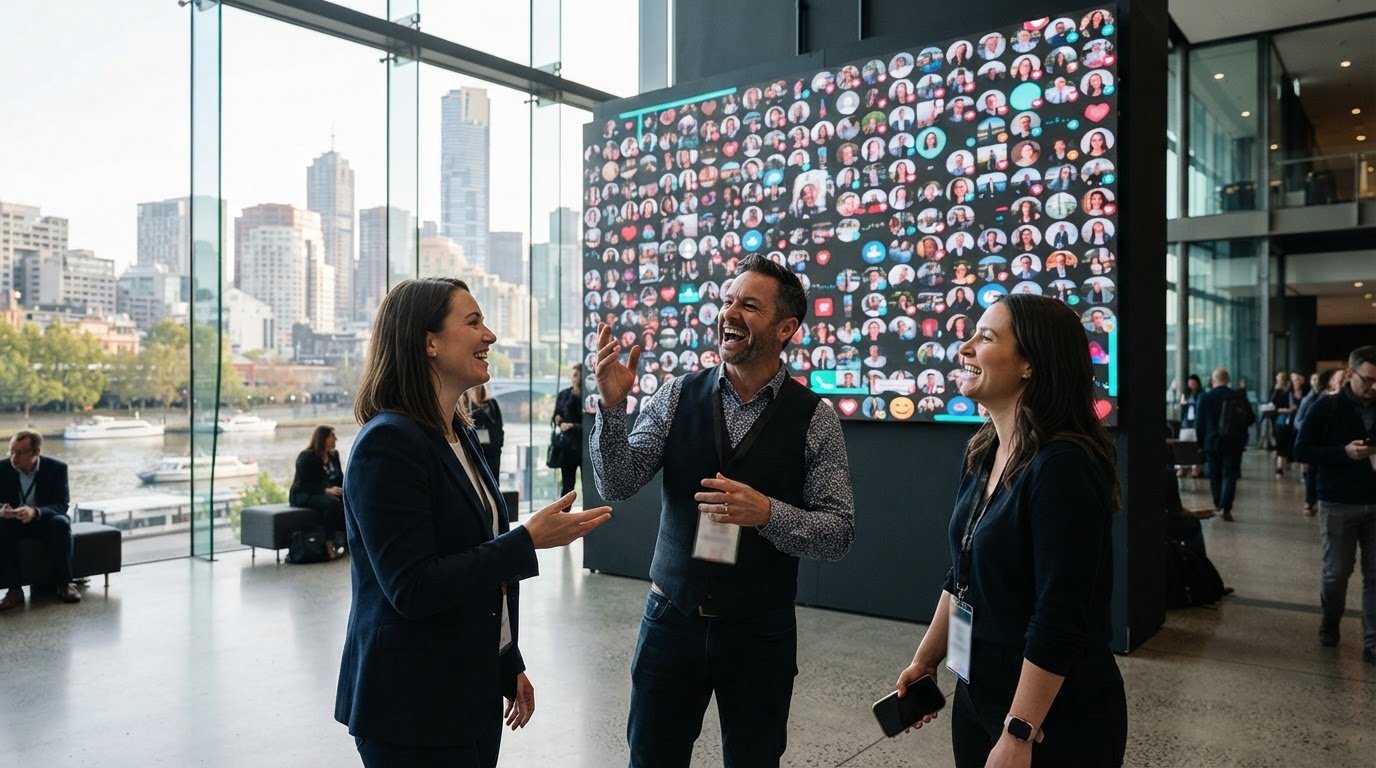
A conference hashtag works harder when it becomes part of the room. Digital signage for conferences in Melbourne can display selected social posts and event hashtag content on screens, giving attendees and delegates a shared way to follow the conversation and contribute digitally.

Digital signage for conferences in Melbourne is a practical way to bring online activity into a live event, but the experience depends on more than placing a hashtag on a screen. Content should feel relevant, remain legible in the venue and fit the program.

This guide explains how social posts can support attendee engagement, what to consider when planning conference screens in Melbourne, and how professional AV production can bring the elements together. Thoughtful content planning and well-positioned LED displays can make digital participation feel like a natural part of the event while keeping technical details coordinated.

Key Takeaways

  • Plan how event hashtags and selected social posts will appear so digital participation feels connected to the conference programme.
  • Match screen type and placement to the venue’s lighting, layout and viewing distances to keep content clear for attendees.
  • Coordinate with the venue about its existing AV setup, then plan any additional production around the event’s needs.
  • Bring screens, staging and technical direction together through a considered AV plan that supports a seamless attendee experience.

Digital engagement for attendees and delegates

At a Melbourne conference, digital displays can bring selected social posts into the room. An event hashtag gives attendees a shared way to join the conversation, while approved posts let delegates see contributions beyond their own networks. This creates a visible digital layer alongside the live program.

Unlike printed signs, digital displays can be updated during an event. Print, however, works well for fixed messages such as room names. If a session room changes, for example, the screen message can be revised, while a printed sign needs replacing. Many conferences combine both for flexible updates and clear wayfinding.

During a conference break, attendees might post using the event hashtag, with selected posts appearing on a screen near the networking area. A moderator reviews submissions before they are displayed, keeping the shared feed relevant. This approval step supports participation without putting every post on screen.

For screens inside Melbourne conference venues, coordinate placement, access, cabling and power with venue staff. Installation and access arrangements vary by space and event setup, so include these details in the production schedule.

Professional planning starts with the program, audience sightlines and venue layout. The production team maps screen positions, considers lighting and power access, then coordinates installation with venue staff. Preparing content formats and a social moderation process helps ensure posts appear legibly and at the right moments.

Outages and glare can interrupt the experience. Before doors open, the technical team can test signal paths and content playback and prepare a fallback slide in case the social feed drops. In a sunlit atrium, assess ambient light and viewing angles during setup, then adjust screen position and content contrast to improve visibility.

A social wall can also suit conferences, campaigns, venues and education programs. Displaying approved social content lets participants see their contributions as part of a shared experience, connecting individual posts with the wider gathering. In each setting, this content can complement the live program and make participation visible to others.

Which Melbourne companies hire or supply conference digital signage?

Melbourne conference organisers may work with an event production company, an LED display specialist or a venue AV team. These teams can supply screens and coordinate signal routing, content playback and installation. The right arrangement depends on whether the event needs a single information display or screens integrated with stage presentations and audience content.

A venue AV team can explain the room’s built-in systems and access arrangements. An event production company can coordinate additional displays with staging, lighting and presentation cues, while a screen specialist may focus on display hardware and setup. For a conference with a main-stage screen and foyer displays, clear coordination between the venue, content team and production crew is essential.

Imagine a Melbourne association conference with a social feed planned for its busy networking foyer. Delegates need to see event updates between sessions. The production team maps screen locations, confirms the content source with the organiser and tests playback before doors open. A planned display can support the program without obstructing registration or attendee movement.

Before production begins, the organiser shares the event schedule, venue plans, screen content and social moderation process. The production team coordinates technical requirements with venue staff, including access, power and installation timing. This is especially important when a conference spans multiple rooms, as inconsistent content or delayed setup can disrupt session transitions.

For digital signage at a Melbourne conference, assess the complete production workflow, not just screen supply. Ask how the team will manage content formats, signal distribution, installation and on-site operation. A coordinated plan is particularly useful when screens need to show both scheduled presentations and changing event information.

For an event requiring integrated screens and staging, conference AV production planning can help align the technical setup with the delegate experience.
Digital signage for conferences in Melbourne: social posts and attendee engagement

What types of digital displays work best for conference venues and events?

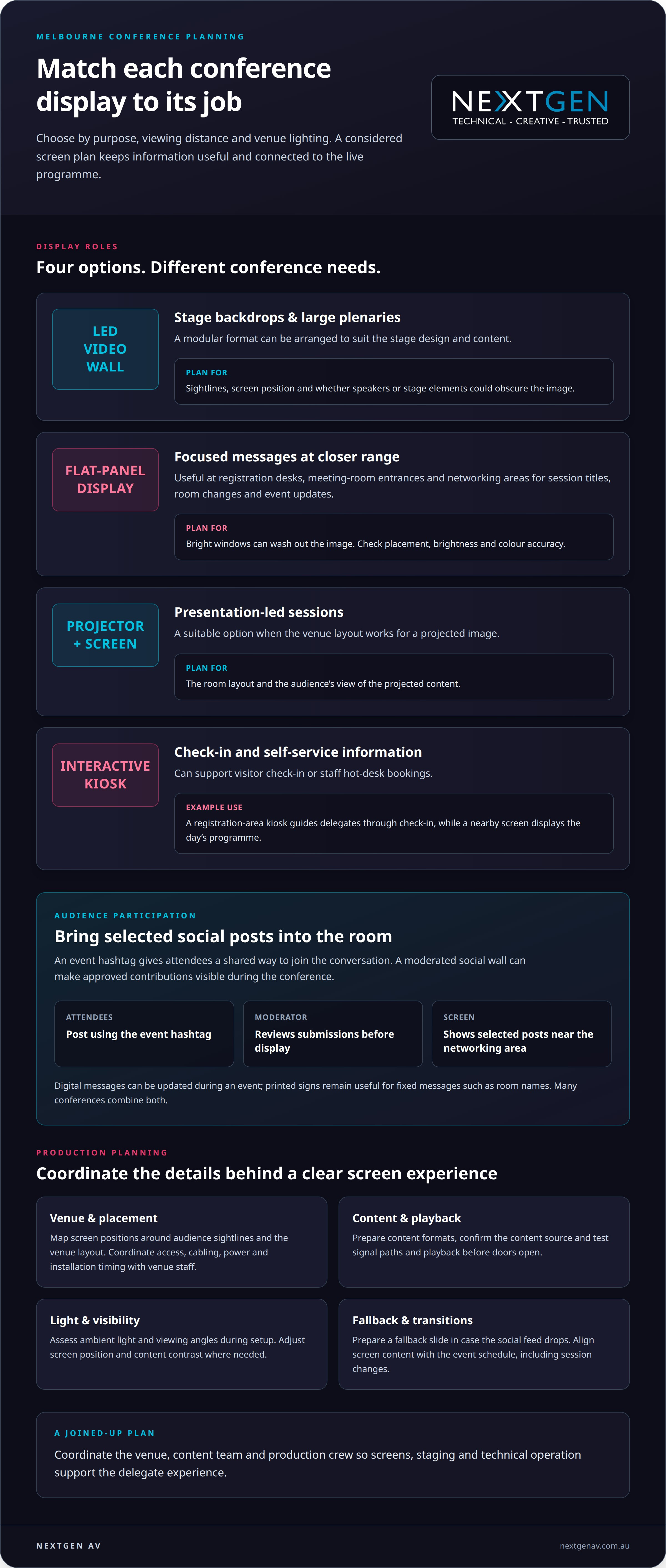
Choose each display according to its purpose, viewing distance and venue lighting. A main-stage screen needs to show presentations and visual content across the room. Foyer displays can prioritise wayfinding, session changes and approved event updates. Matching each screen to its location keeps information useful rather than competing for attention.

LED video walls suit stage backdrops and large conference plenaries, where delegates need prominent visuals. Their modular format can be arranged to suit the stage design and content. For a Melbourne conference in a broad auditorium, production planning should consider sightlines, screen position and whether speakers or stage elements could obscure the image.

Commercial flat-panel displays can work well at registration desks, meeting-room entrances and networking areas. They suit focused messages viewed at closer range, such as a session title or room change. Commercial displays should maintain brightness and colour accuracy after thousands of hours of use. Placement still matters: a screen facing bright windows may appear washed out.

Projectors and projection screens can support presentation-led sessions when the venue layout suits a projected image. Interactive kiosks are another option for visitor check-in or staff hot-desk bookings. For example, a conference registration area could use a kiosk to guide delegates through check-in, while a nearby screen displays the day’s program.

For a panel session, the screen may need to show both speaker names and presentation content. The production team can plan the layout around these needs, reserving clear areas for names and visuals. This gives delegates useful context without crowding every message into the same frame.

For social posts and event hashtags, choose a display large enough for shared viewing and keep each post readable from the intended audience area. Match content inputs to the screen system and test playback before attendees arrive. This coordination helps presentations, wayfinding and audience content feel like parts of one coherent event.

At stadiums and outdoor event venues, digital signs can provide close-up or complete event coverage. A site assessment should account for lighting conditions to avoid displays appearing washed out in a sunlit atrium. Digital signage can also be configured to display emergency alerts when a fire alarm is activated.

Do Melbourne venues have digital signage or AV equipment?

Melbourne conference venues may provide built-in AV equipment or digital displays, but what is available varies by venue and room. A meeting room might support presentations, while a foyer display may be intended for venue information rather than live event content. Include the existing setup in production planning to identify gaps early.

Start with the venue’s technical specifications and room plan. The production team can map existing screens, connections, power access and viewing positions against the conference schedule. A screen near registration, for example, may suit welcome messages but not audience posts if delegates cannot see it from the networking area.

Venue AV systems can affect how event content is delivered. A presentation display may use a different input or signal path from a foyer screen. The technical plan should align content formats and playback with the room’s systems, allowing time for testing before delegates arrive. This helps prevent delays between venue equipment and event content.

Some digital signage systems can display room-availability data from Outlook or Microsoft 365. For a conference with changing room assignments, that connection can help keep room information current. The venue’s system and event requirements determine whether this approach fits; content ownership and update responsibilities should be established during planning.

A Melbourne conference might use a venue screen for session updates and a separate display for approved social posts. Because the two areas need different content, the production team coordinates each screen’s purpose, playback and location with venue staff. This gives delegates clearer information without assuming every existing display can carry every feed.

Venue signage may also run through a content management system that controls who can update screens and how branding is managed. The production team can coordinate the content workflow with venue staff, separating event messages from venue-controlled information. Clear responsibilities help prevent competing updates and keep delegates oriented throughout the program.

Plan your conference AV setup around the venue’s screens, room layout and content requirements.

NextGen AV

NextGen AV helps Melbourne conference organisers turn digital signage plans into a coordinated event experience. Share the venue layout, program and intended screen content during planning so the team can align technical direction with audience needs.

LED Video Walls can carry prominent event visuals, while Professional Audio Systems support clear communication across the room. Lighting Design and Equipment and Staging and Rigging can also be coordinated as part of the wider production, helping screens fit naturally into the stage environment. The focus is a considered setup, not simply placing equipment in a venue.

Involve NextGen AV when planning conference screens, coordinating venue systems or integrating displays with the stage program. Contact NextGen AV to discuss your conference requirements.

Shape the next conference experience

Planning digital signage for conferences in Melbourne is an opportunity to make audience participation part of the event design, not an afterthought. Decide how social content will connect with the program, where delegates will see it and how screen messages will support the atmosphere you want to create.

NextGen AV can bring the production elements together through LED Video Walls, Professional Audio Systems, and Lighting Design and Equipment. Coordinating these elements around your event’s content and venue helps create a cohesive experience, with technical details managed behind the scenes so your team can focus on the conference.

Contact NextGen AV to discuss your conference and the production approach that fits your event. With a clear plan, your screens can invite delegates into the conversation and help make the conference memorable.

Frequently Asked Questions

What digital signage options are available for conferences in Melbourne?

Conference options include LED video walls and event screens for session content, branded visuals and selected social posts. For a hybrid conference, screens can support the in-room presentation alongside virtual event production. The right configuration depends on the venue, program and content needs. NextGen AV can coordinate display planning with technical direction to keep the visual experience consistent across conference spaces.

A conference hashtag works harder when it becomes part of the room. Digital signage for conferences in Melbourne can display selected social posts and event hashtag content on screens, giving attendees and delegates a shared way to follow the conversation and contribute digitally.

Digital signage for conferences in Melbourne is a practical way to bring online activity into a live event, but the experience depends on more than placing a hashtag on a screen. Content should feel relevant, remain legible in the venue and fit the program.

This guide explains how social posts can support attendee engagement, what to consider when planning conference screens in Melbourne, and how professional AV production can bring the elements together. Thoughtful content planning and well-positioned LED displays can make digital participation feel like a natural part of the event while keeping technical details coordinated.

Key Takeaways

  • Plan how event hashtags and selected social posts will appear so digital participation feels connected to the conference programme.
  • Match screen type and placement to the venue’s lighting, layout and viewing distances to keep content clear for attendees.
  • Coordinate with the venue about its existing AV setup, then plan any additional production around the event’s needs.
  • Bring screens, staging and technical direction together through a considered AV plan that supports a seamless attendee experience.

Digital engagement for attendees and delegates

At a Melbourne conference, digital displays can bring selected social posts into the room. An event hashtag gives attendees a shared way to join the conversation, while approved posts let delegates see contributions beyond their own networks. This creates a visible digital layer alongside the live program.

Unlike printed signs, digital displays can be updated during an event. Print, however, works well for fixed messages such as room names. If a session room changes, for example, the screen message can be revised, while a printed sign needs replacing. Many conferences combine both for flexible updates and clear wayfinding.

During a conference break, attendees might post using the event hashtag, with selected posts appearing on a screen near the networking area. A moderator reviews submissions before they are displayed, keeping the shared feed relevant. This approval step supports participation without putting every post on screen.

For screens inside Melbourne conference venues, coordinate placement, access, cabling and power with venue staff. Installation and access arrangements vary by space and event setup, so include these details in the production schedule.

Professional planning starts with the program, audience sightlines and venue layout. The production team maps screen positions, considers lighting and power access, then coordinates installation with venue staff. Preparing content formats and a social moderation process helps ensure posts appear legibly and at the right moments.

Outages and glare can interrupt the experience. Before doors open, the technical team can test signal paths and content playback and prepare a fallback slide in case the social feed drops. In a sunlit atrium, assess ambient light and viewing angles during setup, then adjust screen position and content contrast to improve visibility.

A social wall can also suit conferences, campaigns, venues and education programs. Displaying approved social content lets participants see their contributions as part of a shared experience, connecting individual posts with the wider gathering. In each setting, this content can complement the live program and make participation visible to others.

Which Melbourne companies hire or supply conference digital signage?

Melbourne conference organisers may work with an event production company, an LED display specialist or a venue AV team. These teams can supply screens and coordinate signal routing, content playback and installation. The right arrangement depends on whether the event needs a single information display or screens integrated with stage presentations and audience content.

A venue AV team can explain the room’s built-in systems and access arrangements. An event production company can coordinate additional displays with staging, lighting and presentation cues, while a screen specialist may focus on display hardware and setup. For a conference with a main-stage screen and foyer displays, clear coordination between the venue, content team and production crew is essential.

Imagine a Melbourne association conference with a social feed planned for its busy networking foyer. Delegates need to see event updates between sessions. The production team maps screen locations, confirms the content source with the organiser and tests playback before doors open. A planned display can support the program without obstructing registration or attendee movement.

Before production begins, the organiser shares the event schedule, venue plans, screen content and social moderation process. The production team coordinates technical requirements with venue staff, including access, power and installation timing. This is especially important when a conference spans multiple rooms, as inconsistent content or delayed setup can disrupt session transitions.

For digital signage at a Melbourne conference, assess the complete production workflow, not just screen supply. Ask how the team will manage content formats, signal distribution, installation and on-site operation. A coordinated plan is particularly useful when screens need to show both scheduled presentations and changing event information.

For an event requiring integrated screens and staging, conference AV production planning can help align the technical setup with the delegate experience.

What types of digital displays work best for conference venues and events?

Choose each display according to its purpose, viewing distance and venue lighting. A main-stage screen needs to show presentations and visual content across the room. Foyer displays can prioritise wayfinding, session changes and approved event updates. Matching each screen to its location keeps information useful rather than competing for attention.

LED video walls suit stage backdrops and large conference plenaries, where delegates need prominent visuals. Their modular format can be arranged to suit the stage design and content. For a Melbourne conference in a broad auditorium, production planning should consider sightlines, screen position and whether speakers or stage elements could obscure the image.

Commercial flat-panel displays can work well at registration desks, meeting-room entrances and networking areas. They suit focused messages viewed at closer range, such as a session title or room change. Commercial displays should maintain brightness and colour accuracy after thousands of hours of use. Placement still matters: a screen facing bright windows may appear washed out.

Projectors and projection screens can support presentation-led sessions when the venue layout suits a projected image. Interactive kiosks are another option for visitor check-in or staff hot-desk bookings. For example, a conference registration area could use a kiosk to guide delegates through check-in, while a nearby screen displays the day’s program.

For a panel session, the screen may need to show both speaker names and presentation content. The production team can plan the layout around these needs, reserving clear areas for names and visuals. This gives delegates useful context without crowding every message into the same frame.

For social posts and event hashtags, choose a display large enough for shared viewing and keep each post readable from the intended audience area. Match content inputs to the screen system and test playback before attendees arrive. This coordination helps presentations, wayfinding and audience content feel like parts of one coherent event.

At stadiums and outdoor event venues, digital signs can provide close-up or complete event coverage. A site assessment should account for lighting conditions to avoid displays appearing washed out in a sunlit atrium. Digital signage can also be configured to display emergency alerts when a fire alarm is activated.

Do Melbourne venues have digital signage or AV equipment?

Melbourne conference venues may provide built-in AV equipment or digital displays, but what is available varies by venue and room. A meeting room might support presentations, while a foyer display may be intended for venue information rather than live event content. Include the existing setup in production planning to identify gaps early.

Start with the venue’s technical specifications and room plan. The production team can map existing screens, connections, power access and viewing positions against the conference schedule. A screen near registration, for example, may suit welcome messages but not audience posts if delegates cannot see it from the networking area.

Venue AV systems can affect how event content is delivered. A presentation display may use a different input or signal path from a foyer screen. The technical plan should align content formats and playback with the room’s systems, allowing time for testing before delegates arrive. This helps prevent delays between venue equipment and event content.

Some digital signage systems can display room-availability data from Outlook or Microsoft 365. For a conference with changing room assignments, that connection can help keep room information current. The venue’s system and event requirements determine whether this approach fits; content ownership and update responsibilities should be established during planning.

A Melbourne conference might use a venue screen for session updates and a separate display for approved social posts. Because the two areas need different content, the production team coordinates each screen’s purpose, playback and location with venue staff. This gives delegates clearer information without assuming every existing display can carry every feed.

Venue signage may also run through a content management system that controls who can update screens and how branding is managed. The production team can coordinate the content workflow with venue staff, separating event messages from venue-controlled information. Clear responsibilities help prevent competing updates and keep delegates oriented throughout the program.

Plan your conference AV setup around the venue’s screens, room layout and content requirements.

NextGen AV

NextGen AV helps Melbourne conference organisers turn digital signage plans into a coordinated event experience. Share the venue layout, program and intended screen content during planning so the team can align technical direction with audience needs.

LED Video Walls can carry prominent event visuals, while Professional Audio Systems support clear communication across the room. Lighting Design and Equipment and Staging and Rigging can also be coordinated as part of the wider production, helping screens fit naturally into the stage environment. The focus is a considered setup, not simply placing equipment in a venue.

Involve NextGen AV when planning conference screens, coordinating venue systems or integrating displays with the stage program. Contact NextGen AV to discuss your conference requirements.

Shape the next conference experience

Planning digital signage for conferences in Melbourne is an opportunity to make audience participation part of the event design, not an afterthought. Decide how social content will connect with the program, where delegates will see it and how screen messages will support the atmosphere you want to create.

NextGen AV can bring the production elements together through LED Video Walls, Professional Audio Systems, and Lighting Design and Equipment. Coordinating these elements around your event’s content and venue helps create a cohesive experience, with technical details managed behind the scenes so your team can focus on the conference.

Contact NextGen AV to discuss your conference and the production approach that fits your event. With a clear plan, your screens can invite delegates into the conversation and help make the conference memorable.

Frequently Asked Questions

What digital signage options are available for conferences in Melbourne?

Conference options include LED video walls and event screens for session content, branded visuals and selected social posts. For a hybrid conference, screens can support the in-room presentation alongside virtual event production. The right configuration depends on the venue, program and content needs. NextGen AV can coordinate display planning with technical direction to keep the visual experience consistent across conference spaces.

Back to Articles

Discover Valuable Insights

Unlock Expert Tips and Advice

Our blog is packed with valuable information to help you stay ahead. Whether you’re looking for expert advice, industry trends, or practical tips, you’ll find everything you need. Reach out today to learn more or get in touch with us for personalised support!

Contact Us

Request A Quote

Make an
Enquiry

Let’s Get Your Event Sorted

Complete the enquiry form with your event date, venue, audience size, event type and budget. Our Melbourne AV team will review your requirements and recommend the right PA, screen, lighting, staging or production setup for your event.

What happens next?


1.We review your event details
Tell us your date, venue, audience size and event type.

2.We recommend the right setup
From PA hire to screens, lighting, staging and full AV production.

3. We come back with clear advice
You’ll receive practical recommendations and a fast quote from our Melbourne team.

Need help urgently?
Call 1300 792 922.

Resource Download

Tell us a bit about yourself to download our resources.

7