
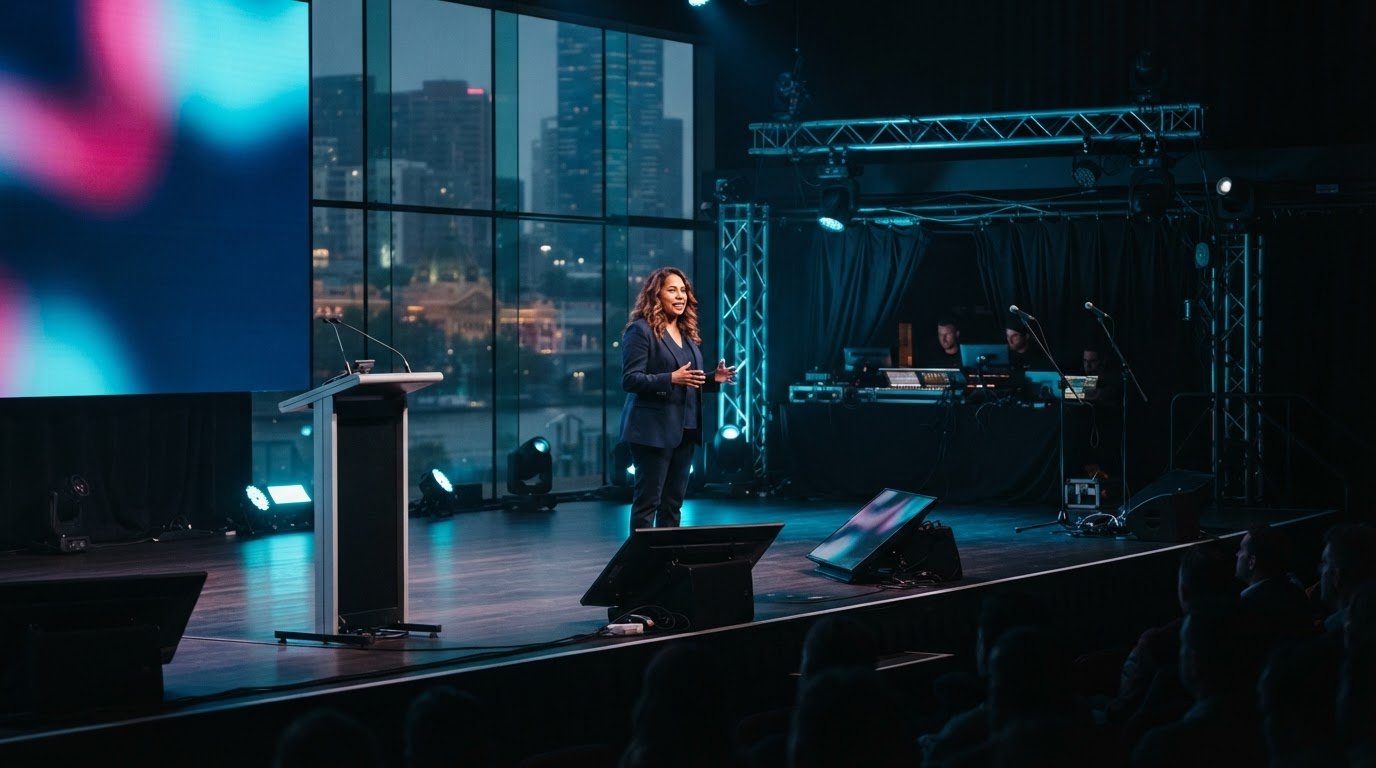
A speaker’s confidence is often shaped before the first word is spoken. With confidence monitor hire Melbourne event organisers can give presenters a clear, well-timed reference on stage, helping them stay on track without turning away from the audience.
It’s natural for speakers to worry about losing their place or missing a cue. A monitor is most useful when its content, position and timing are planned around the presentation. Depending on the session, it might show the current or next slide, a timing reference, a handover prompt or audience questions.
This guide explains how confidence monitors work, how to choose their content and placement, and how to coordinate them with the run sheet and stage environment. NextGen AV brings more than 30 years of experience in Melbourne event production, combining technical direction with practical planning so the technology supports both the speaker and the audience. The aim is a composed presentation, a smooth programme and an event that keeps attention on the message.
Key Takeaways
- A confidence monitor can help presenters keep their place and stay connected with the audience when its content is matched to their needs.
- Coordinate monitor cues with the run sheet so slide changes, speaker handovers and stage transitions feel smooth.
- For confidence monitor hire melbourne, plan placement around the format, whether it’s a lectern talk, panel discussion or multi-speaker session.
- Prepare the running order, presentation files, speaker positions and agreed cues before the technical test and presenter briefing.
- Include monitor planning in the wider production plan, with technical direction and venue knowledge supporting a composed presentation.
Confidence monitor hire in Melbourne: why speaker confidence starts backstage
A presenter can know their subject inside out and still worry about losing the thread on stage. A missed cue, unexpected transition or uncertainty about what comes next can pull attention away from the audience. Thoughtful confidence monitor hire melbourne planning addresses that concern before the room fills, giving the speaker useful visual information in a position that suits the stage.
A confidence monitor is a display placed on or near the stage so a presenter can see agreed information while speaking. Its role is to support, not distract. The right content can help the speaker follow a presentation cue or programme transition without repeatedly looking away from the audience. The stage monitor system overview explains the general role of on-stage monitoring in helping performers hear or see information they need during a live event.
That support starts backstage. Organisers and the production team decide what information will help, where the presenter will stand and how the display fits the stage design. A monitor does not replace rehearsal, clear cues or a well-managed run sheet. It can reduce avoidable uncertainty, leaving the speaker more room to concentrate on delivery and connection.
What a confidence monitor helps a speaker do
A well-planned display keeps agreed presentation cues within the speaker’s natural view. A presenter at a lectern may need a discreet prompt for the next part of a talk, while someone moving across the stage may need information positioned where it remains easy to glance at. Specify what appears and when in the production brief, so cues support the talk rather than compete with it.
Preparation makes the difference. When presenters understand the display and have an opportunity to rehearse with it, it feels like part of the stage plan rather than a surprise. This can support a more composed delivery, but it does not remove nerves or guarantee a flawless presentation. Clear preparation and confident technical direction remain essential.
The presenter experience comes first
Speaker height, position and sightlines determine where a monitor can sit and how easily it can be read. A display that works for a seated panellist may not suit a standing presenter, and a lectern can change the speaker’s natural eyeline. Include these details in the production brief, alongside the session format and agreed cues, so the setup reflects how people will use the stage.
Placement should also protect the audience’s view. The monitor needs to be useful to the presenter without becoming an unnecessary visual obstacle. Consider the speaker’s movements, stage layout and audience sightlines together, then review the proposed position from both the stage and the seating area. This helps the production team support confident delivery while keeping the event in clear view.
How confidence monitors support speakers through a live presentation
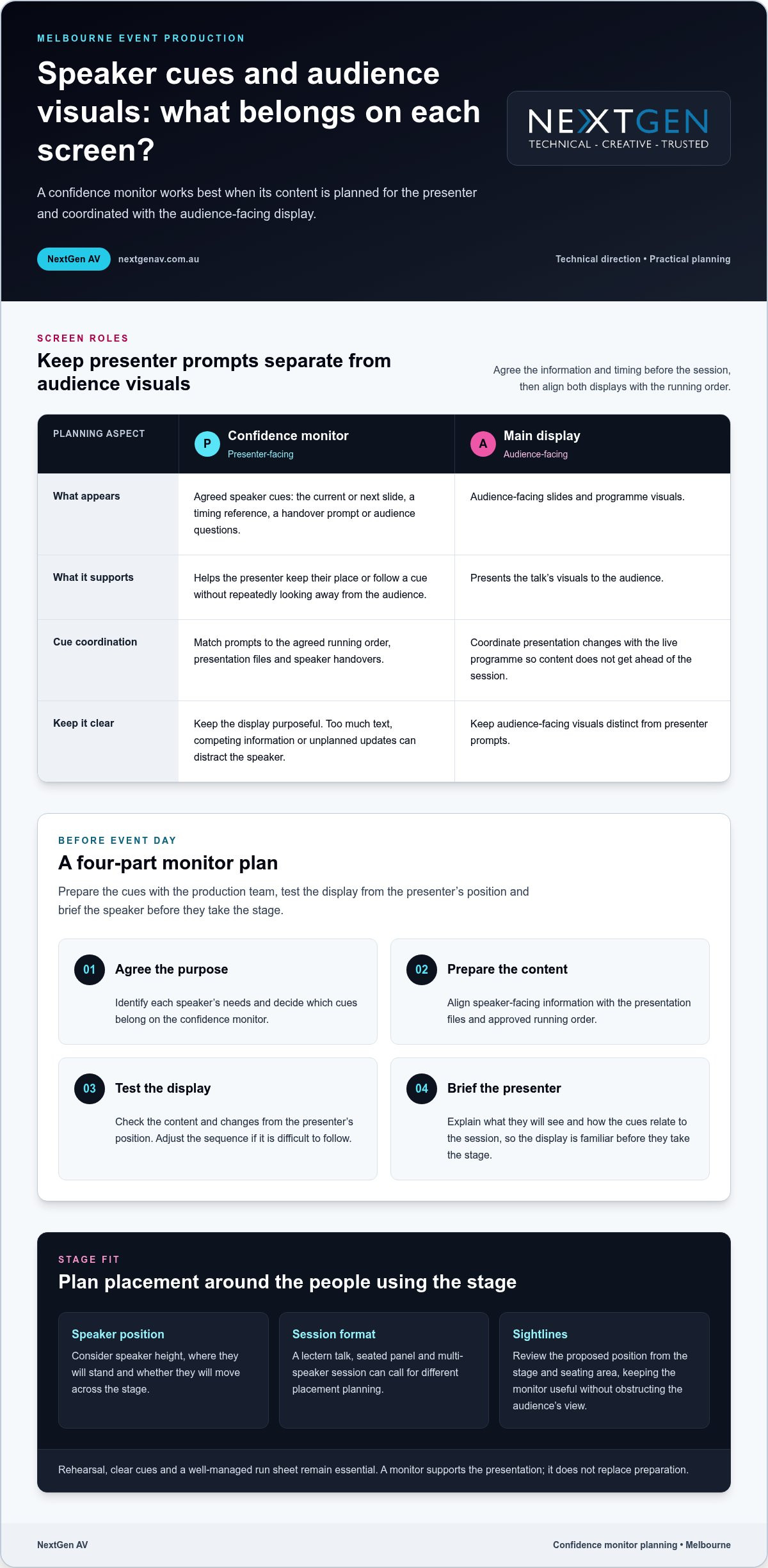
A confidence monitor works best as part of a planned presentation workflow, not as an isolated screen. Before event day, the organiser and production team agree what the presenter needs to see, prepare the relevant content, test how it appears on stage and brief the speaker. This sequence aligns the display with the talk instead of leaving the presenter to interpret unfamiliar cues live.
Plan what the speaker needs to see
Start with the session format and identify what will genuinely help each presenter stay oriented. Speaker-facing cues might include the current or next slide, a timing reference or a handover prompt. Audience-facing slides and programme visuals belong on the main display. Keep names, timings and cue wording consistent with the approved event materials to reduce avoidable confusion.
- Agree the purpose. Identify each speaker’s needs and decide which cues belong on the confidence monitor.
- Prepare the content. Align speaker-facing information with the presentation files and approved running order.
- Test the display. Check the planned content and changes from the presenter’s position. Adjust the sequence if it is difficult to follow.
- Brief the presenter. Explain what they will see and how the cues relate to the session, so the display is familiar before they take the stage.
Keep the screen purposeful. Too much text, competing visual information or unplanned updates can draw a speaker’s attention away from delivery. Decide the content and technical arrangement based on the event format, presentation material and stage environment, rather than applying a one-size-fits-all template.
Coordinate content and cues
Map slide changes, speaker handovers and stage transitions against the running order. A cue for the next presenter should follow the agreed programme sequence, and each transition should match the correct presentation file and speaker. A clear cue plan gives the technical team a shared reference and helps prevent content from getting ahead of the live programme.
Technical direction brings these moving parts together. The team can coordinate confidence monitor content with presentation changes and stage cues, while keeping audience-facing visuals distinct from presenter prompts. This is part of sound event operations best practices, where planning and communication connect production decisions to the live experience.
For a Melbourne conference, confidence monitor hire melbourne planning should reflect the session’s demands. A single keynote and a sequence of speakers may need different cue timing and content. Monitor decisions also sit alongside audio planning. Clear speech and well-timed visual prompts work together, so organisers considering professional sound system hire should align the audio plan with presenter changes and the run sheet.
NextGen AV’s technical direction brings these details into one coordinated production plan. Explore how NextGen AV supports event production as you shape speaker cues, presentation content and the wider stage experience.
Confidence monitor hire Melbourne: compare the setup with the stage
The right confidence monitor arrangement depends on how speakers use the stage. A presenter fixed behind a lectern has different sightlines from panellists seated across a stage, while a multi-speaker programme adds handovers and changing cues. For confidence monitor hire melbourne, compare the session format, speaker positions and cue requirements before deciding what the display should show and where it should sit.
Match the monitor plan to the event format
Start with how people will present. At a lectern, the speaker’s position is relatively fixed, so the display should make agreed information easy to glance at without pulling focus from the audience. In a panel, speakers may look in different directions or take turns talking. Decide whether everyone needs the same cues and how each person will see them. A multi-session programme calls for consistent cue conventions and deliberate transitions between presenters.
| Event format | Speaker position | Content purpose | Programme complexity |
|---|---|---|---|
| Lectern presentation | One main, fixed position | Support the speaker with agreed presentation cues | Usually centred on one presenter and their talk |
| Panel discussion | Several seated or standing positions | Provide useful cues for speakers as they contribute | Includes changes in speaker and conversation flow |
| Multi-speaker session | Positions may change between presenters | Keep cues relevant to each speaker and presentation | Requires coordinated handovers and content transitions |
Use the comparison as a planning prompt, not a fixed formula. A short panel with a simple running order may need a different approach from a conference session with several presentations and speaker changes. Keep the display relevant to the person on stage at that moment. Unnecessary or competing information can make cues harder to follow.
Balance sightlines and stage design
Placement needs to work for the speaker and the room. Consider the stage layout, the presenter’s natural eyeline and the audience’s view from different parts of the venue. A monitor positioned for one speaker should not obstruct attendees or interfere with the intended set design. Reviewing the stage from the audience area as well as the presenter’s position can reveal conflicts early.
Screen placement also belongs within the wider stage and lighting plan. Lecterns, furniture, presentation screens and lighting positions all shape the available sightlines, so treating the monitor as a late addition can create avoidable compromises. Coordinating these elements helps the presenter access cues while preserving a clear, composed stage picture.
Include stage and lighting hire in Melbourne considerations in the same production conversation. Technical direction can bring monitor placement, set design and lighting decisions together, guided by the event format. This joined-up planning supports the presenter without asking the audience to look past unnecessary visual clutter.
How to prepare a confidence monitor plan before event day
A clear plan gives the presenter and production team a shared reference before the event begins. For confidence monitor hire melbourne, start with the programme and the people using the stage, then build the cue plan around approved content. This reduces last-minute uncertainty and gives the technical team a practical sequence to test.
Build the brief with the speaker in mind
Give the production team the running order, presentation files, speaker positions and agreed visual prompts. Record presenter names and speaking order, and note where each person will stand or sit. One format will not suit every speaker, so capture specific needs in the brief and identify who approves content and communicates changes.
- Gather the event details. Share the current running order, presentation files, speaker names and planned stage positions. Flag lectern talks, panels and speaker handovers.
- Agree the cues. Decide what each presenter should see and when. Keep cue wording, names and timings consistent with approved event materials, and distinguish speaker prompts from audience-facing slides.
- Set the change process. Name the person who approves presentation content and the channel for communicating updates to the production team. This gives late changes a clear owner.
- Walk through the stage. Give presenters an opportunity to stand or sit in their intended positions, view the cues and practise transitions. A walkthrough can reveal an awkward eyeline or unclear prompt while there is still time to refine the plan.
- Run the technical test. Check the approved content against the event sequence, then complete a final run-through with the organiser and production team before doors open.
Test and brief before doors open
During the test, follow the running order rather than checking each slide in isolation. Confirm that the intended content appears at the right point and that speaker handovers match the agreed cues. Invite presenters to view the display from their stage positions and explain how it supports their talks. Speakers should know what to expect before they are in front of an audience.
Include a simple contingency discussion in the production briefing. Agree who communicates a delayed speaker, a changed running order or an updated presentation, and how the team will keep the programme moving if a cue changes. Clear roles and concise updates help avoid conflicting instructions. The aim is not to script every possibility, but to give the organiser and technical team a calm, shared response.
NextGen AV brings technical direction and on-site event management into the planning process, aligning presenter needs with production cues. Plan your confidence monitor setup with a team focused on the speaker experience and the flow of your event.
Confidence monitor hire Melbourne: bring speaker support into event production
A confidence monitor has the greatest value when it is planned alongside the rest of the event, rather than added as a standalone screen. Technical direction brings speaker cues, presentation content and stage requirements into one production plan, so each element supports the live programme. For organisers planning confidence monitor hire melbourne, this joined-up approach keeps the presenter’s needs in view while the audience experiences a smooth, coherent event.
One production plan, from brief to stage
The monitor plan connects with sound, lighting, stage layout and presentation content. A cue may need to appear as a speaker takes position, while a handover depends on the running order and the next presentation being ready. Technical direction coordinates these decisions with the production team, helping presenters focus on their message instead of working out what happens next.
Melbourne venue knowledge adds practical context. Room layouts, stage arrangements and sightlines vary, so a plan should account for the actual space and how speakers will move through it. NextGen AV’s experience with Victorian venues informs planning from the initial brief through to the on-site details that shape the speaker experience.
Consider monitor placement as part of the wider audio visual hire in Melbourne plan. Sound systems need to serve the room, lighting needs to support the stage environment, and visual cues need to fit the programme. Coordinating these elements helps prevent decisions in one area from creating distractions or conflicts in another. The result is a considered stage and a production team working from a shared plan.
Take the next step with NextGen AV
To prepare for a production discussion, bring together the event format, venue, programme and speaker requirements. Include the presentation approach, planned stage positions and agreed cues, along with the key transitions in the running order. This gives the technical team a clear picture of how the monitor should support each session and connect with the wider event plan.
NextGen AV works as a proactive production partner, managing technical complexity behind the scenes and aligning the details with your event’s aims. Discuss your Melbourne event’s production requirements with NextGen AV, including its format, venue, programme and speaker needs, to shape a coordinated plan for the stage and audience.
Set your speakers up for the stage
A well-planned monitor setup gives presenters a clear reference point while they focus on delivering their message. Bring speaker support into the event brief early, so the production plan reflects the programme and the experience you want to create. For confidence monitor hire melbourne, thoughtful coordination helps the technology feel seamless on stage.
Consider what each presenter needs to feel prepared, how their session fits the event’s flow and what will help the audience stay engaged. Sharing those priorities with the production team gives them a practical foundation for shaping the technical details around your event.
Plan speaker support for your Melbourne event with NextGen AV and take the next step towards a composed, connected presentation.
Frequently Asked Questions
What does a confidence monitor show a speaker?
A confidence monitor shows information selected to support the speaker during their session. Depending on the plan, that may include a handover cue, a prompt tied to a key moment or a time reference. Decide what is genuinely useful for each presenter instead of filling the display with every available detail. The aim is a clear reference that complements the talk without competing for attention.
Can a confidence monitor help a nervous speaker?
Yes. It can give a nervous speaker a useful point of reference, though it will not remove nerves or replace preparation. Knowing where to look for an agreed cue may help a presenter feel less concerned about missing a transition. Let them see the display from their speaking position and explain each prompt before the session. Familiarity can make the technology feel like part of the plan, not another unknown.
Is a confidence monitor visible to the audience?
It may be visible from some audience seats, depending on its position and the stage layout. During planning, review the stage from the audience’s perspective as well as the presenter’s, including views around the room. The display should give the speaker a practical reference without drawing attention away from the talk. A venue walkthrough helps the production team assess sightlines and refine placement for the room.
How early should a speaker practise with a confidence monitor?
Give the speaker a chance to practise once the stage and monitor arrangement can be viewed in its intended configuration, ideally before the audience enters. There is no universal amount of rehearsal time. Allow enough for the presenter to check their eyeline, follow a cue and ask questions. If the programme changes, revisit affected prompts so the speaker is not relying on an outdated sequence.
Can a confidence monitor support a panel discussion?
Yes. A panel plan can provide shared information, such as a discussion transition cue, or prompts tailored to the moderator’s role. Consider who needs to see each cue and when, especially if panellists are seated at different angles or speakers take turns contributing. A briefing before the session helps everyone understand which prompts apply to them and keeps the display from becoming a distraction during conversation.
What should organisers do if monitor content changes on event day?
Route the change through the person responsible for approving presentation content, then notify the production team using the agreed communication channel. Confirm which speaker and cue are affected, update the approved material and test the changed moment in sequence. Brief the presenter on the revision before they go on stage. This clear handover helps the team respond calmly while keeping the programme on track.
Discover Valuable Insights
Unlock Expert Tips and Advice
Our blog is packed with valuable information to help you stay ahead. Whether you’re looking for expert advice, industry trends, or practical tips, you’ll find everything you need. Reach out today to learn more or get in touch with us for personalised support!