
Conference microphone etiquette for audible talks and speaker conduct

A polished talk depends on more than confident delivery. Good conference microphone etiquette for speakers starts with holding a handheld microphone about 10-15 cm from your mouth, angling it slightly upwards and speaking naturally. Respecting the programme and fellow speakers matters just as much.

It’s easy to assume the microphone will take care of the sound, but small habits affect how clearly your message reaches the room. A calm handover, well-timed presentation and professional use of others’ material all help create a more considered audience experience.

This guide covers practical microphone technique, preparation and handovers, as well as speaker conduct and ethics. Professional Speakers Australia’s Code of Professional Conduct says members should understand a client’s organisation, approach and goals, speak professionally, and use others’ material with permission or appropriate copyright recognition. Clear audio planning also supports a smooth conference, from the first introduction to audience questions.

Key Takeaways

  • Keep the microphone directed towards your mouth as you speak, and avoid tapping or blowing into it during a sound check.
  • Plan speaker transitions in advance, including who manages microphone levels and how each speaker will receive a microphone.
  • Stay within your allotted time so the programme runs smoothly and fellow speakers retain their time.
  • Prepare with your audience and client in mind, and use other people’s material with appropriate permission or copyright recognition.

1. Holding a handheld microphone close to the mouth

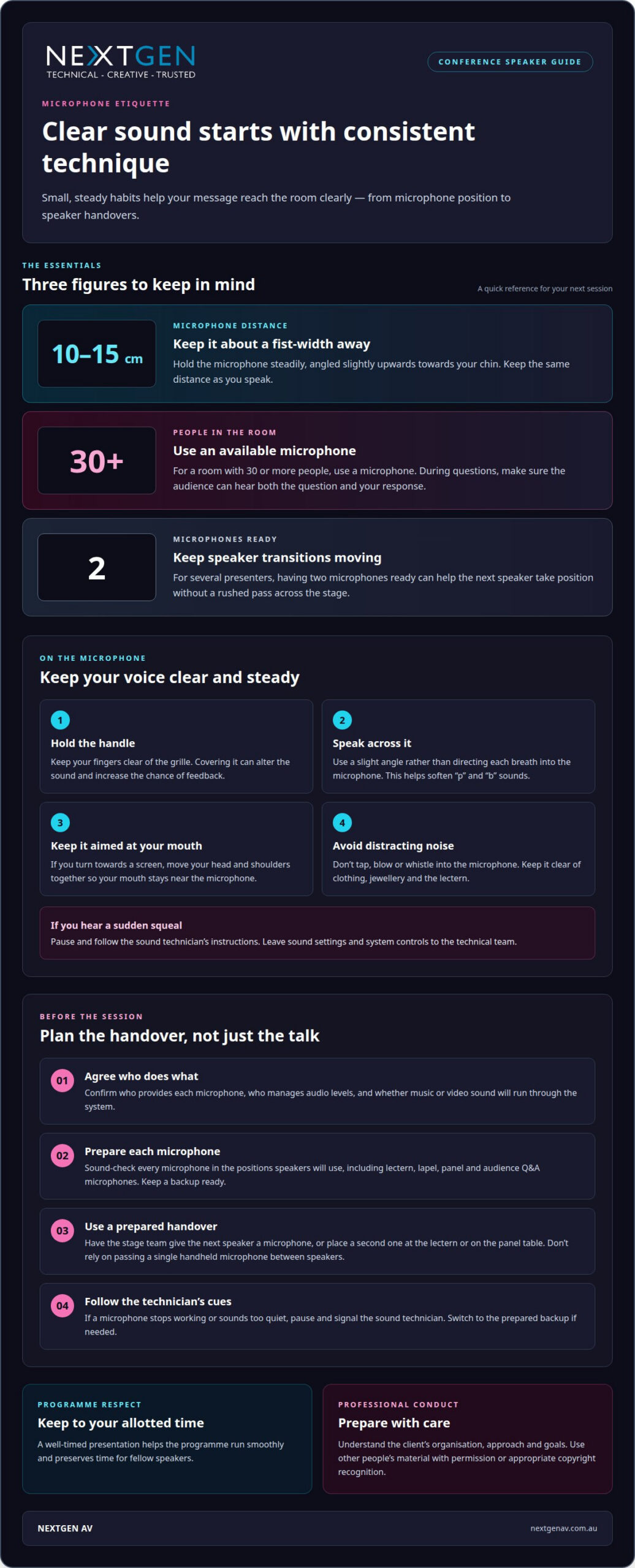
Hold a handheld microphone about 4-6 inches (10-15 cm) from your mouth, roughly a fist-width away. Angle it slightly upwards towards your chin, keeping the same distance as you speak. This position gives your voice a clear path to the microphone without requiring you to raise your volume. During a presentation, keep the microphone steady rather than moving it towards and away from your face between sentences.

For clearer sound, grip the handle and keep your fingers clear of the grille. Covering it can alter the sound and increase the chance of feedback. Speak across the microphone at a slight angle rather than directing each breath into it, which helps soften plosive sounds such as “p” and “b”. Don’t tap, blow or whistle into the microphone to test it. Follow the sound technician’s direction during the check.

To reduce feedback, point the microphone towards your mouth and away from loudspeakers. Avoid unnecessary handling, and don’t let it brush against clothing, jewellery or a lectern, as these can create distracting noise. If you hear a sudden squeal, pause and follow the technician’s instructions instead of changing the sound settings yourself.

During audience questions and Q&A, use a microphone so everyone can hear both the question and your response. If someone asks a question without a microphone, the moderator should repeat it or invite them to use one. Wait until the question is clear before answering, and keep your own microphone in position throughout the exchange.

In Australia, these practical etiquette steps help speakers deliver audible talks, but they don’t replace rules governing equipment. Wireless microphone operation must follow Australian wireless microphone regulations. Ask the event team how to handle the microphone during your presentation, including when to mute it, and follow the sound technician’s cues. Good conference microphone etiquette for speakers means maintaining a consistent microphone position and behaving calmly and considerately.

2. Keeping the microphone aligned with your mouth

Consistent alignment helps your voice reach the audience clearly throughout your presentation. Keep the microphone pointed towards your mouth rather than your chest or across the room. If you turn to address a screen, move your head and shoulders together so your mouth stays near the microphone’s pickup area. Face the audience again before continuing.

Rehearse the movements your talk requires. If you refer to a slide on your left, for example, practise turning briefly and then facing the room again. Avoid speaking while looking down at your notes for a long passage, as this can make your voice less clear. Place notes where you can glance at them without turning away from the microphone.

With a lectern or gooseneck microphone, adjust the stem before speaking so the microphone head points towards your mouth. Speak from a steady position, and avoid leaning back or shifting sideways mid-sentence. Don’t bend or reposition the stem during your speech. Pause between sections if you need to adjust it.

In a panel discussion, keep your position consistent when responding to the chair or another panellist. Face the audience while speaking rather than addressing the person beside you directly. If you need to move away from a lectern, use the microphone provided for that purpose and keep it aimed towards your mouth.

During rehearsal, ask the sound technician to listen as you speak from your presentation position and repeat a line while facing different parts of the room. This can reveal level changes caused by turning or moving. Follow the technician’s direction and remember which movements worked during your talk.

For a room with 30 or more people, use an available microphone. If a microphone swings while you speak, alert the sound technician and follow their instructions to keep it correctly positioned. With sensitive microphones, use a natural speaking volume and leave volume adjustments to sound technicians.
Conference microphone etiquette for audible talks and speaker conduct

3. Planning microphone handovers between speakers

A smooth session handover starts with a clear plan, not an improvised pass across the stage. Before the conference, agree who provides each microphone, who manages audio levels, and whether music or video sound will run through the system. If several people are presenting, having two microphones ready can keep the transition moving as the next speaker takes position.

Don’t rely on speakers passing a single handheld microphone between them. The exchange can interrupt the programme, and someone might accidentally switch the microphone off. Instead, arrange for the stage team to give the next speaker a prepared microphone, or place a second one at the lectern or on the panel table.

A lavalier microphone, also called a lapel microphone, should be clipped securely to clothing where it can pick up your voice. Thread the cord through a shirt and tuck any excess into trousers or a skirt so it doesn’t flap or distract the audience. Before the session, practise taking your position and turning naturally without pulling the clip or cord.

Use the sound check to test every microphone planned for the conference, including lectern, lapel, panel and audience Q&A microphones. Speak from the positions you’ll use, then confirm that each microphone is on and the level works for normal delivery. Keep a backup ready, such as another lapel or handheld microphone.

If your microphone stops working or sounds too quiet, pause and signal the sound technician rather than adjusting system controls. Check simple user controls, such as mute or power, only if the technician directs you. If the problem continues, switch to the prepared backup instead of spending the session troubleshooting an issue the technical team can address.

For a panel with a video clip, confirm the handover cue and who will start playback before the session begins. Coordinating this in advance prevents a speaker change, microphone adjustment and audio playback from competing for attention.

4. Professional conduct and speaker ethics

Professional conduct shapes how your message lands, from preparation through to the final sentence. Respect the programme, treat the audience and other speakers courteously, and stay within your allotted timeslot. Finishing a little early gives the chair room to manage questions or introduce the next speaker without cutting into another presentation.

Professional Speakers Australia’s Code of Professional Conduct sets practical expectations for members. Clause 3 says members should understand a client’s organisation, approaches and goals before presenting. Use that preparation to shape relevant examples and terminology, rather than delivering a generic talk that could belong at any conference. Clause 2 calls for professional speech and behaviour that avoids offending others or discrediting the speaking profession.

Ethics also apply to the material on your slides. Clause 4 of the Code says members should use others’ materials only with appropriate permission or copyright recognition. Credit a quoted author, image creator or research source clearly, and secure permission where required. For example, don’t present another speaker’s framework as your original work.

Respect the room’s shared attention. If you’re on a panel, listen without interrupting, save side conversations for the break, and avoid checking your phone while another speaker has the floor. During questions, let the chair manage turns and respond to the question asked. A concise answer leaves time for other audience members.

Professional conduct includes cooperating with the event team. Follow the session chair’s timing cues, use the agreed microphone handover, and alert the organiser to special presentation requirements in advance. For conferences where clear speech supports the whole programme, plan conference audio with NextGen AV and its Professional Audio Systems. Coordinated audio planning helps speakers stay focused on their message while the audience follows each contribution.

NextGen AV

NextGen AV helps conference teams put speaker etiquette into practice with coordinated event production. For Melbourne conferences, its technical planning can bring microphone requirements, speaker transitions and audience coverage into the wider production plan. Professional Audio Systems support clear speech, while LED Video Walls and staging help presenters connect with the room and their content.

Involve the team during planning if the programme includes multiple speakers, panel discussions, audience questions or video playback. Coordinating these elements early aligns technical direction with the run sheet, so speakers can focus on their delivery and audiences can follow each session.

Contact NextGen AV to discuss the technical needs of your conference.

Set the stage for confident delivery

Conference microphone etiquette for speakers is one part of a polished event. Bring the technical plan into the earliest planning conversations so the room, programme and presenter needs work together from the outset.

For a Melbourne conference, a clear production brief helps turn these decisions into a coordinated experience, giving speakers space to focus on their message and audiences a reason to stay engaged.

Shape the technical plan for your next conference with NextGen AV, and move towards a more considered event experience.

Frequently Asked Questions

Rules for Speakers: A Code of Conduct and Ethics?

Professional Speakers Australia’s Code of Professional Conduct offers a reference point for ethical decisions before and during a talk. If you’re adapting a presentation for a different client, for example, choose examples that fit that organisation rather than assuming the same material suits every audience. Use the code as a prompt to prepare thoughtfully and represent the speaking profession with care.

What are the basic microphone etiquette rules for conference speakers?

Match the microphone style to the format and follow the agreed sound plan. In a small-group discussion with tabletop microphones, each participant should switch theirs off after speaking; leaving several open can add background noise. If you’re presenting away from a lectern, use the lapel or roving microphone provided. These choices help keep speech clear without distracting from the discussion.

How should speakers hold and position a handheld microphone?

Choose a microphone style that suits your delivery. A handheld microphone can work well when speakers take turns, while a headset suits presenters who need both hands free or move around. A properly fitted lapel microphone can suit formal, seated or lectern-style speaking. Follow the sound team’s setup for the format.

What should speakers do when sharing or passing a microphone?

For audience questions in a small or medium room, organisers can arrange for a microphone aide to bring a microphone to each questioner. This avoids making audience members walk to the stage or pass a microphone along a row. The moderator can manage the order of questions while the aide returns the microphone to its designated place between speakers.

A polished talk depends on more than confident delivery. Good conference microphone etiquette for speakers starts with holding a handheld microphone about 10-15 cm from your mouth, angling it slightly upwards and speaking naturally. Respecting the programme and fellow speakers matters just as much.

It’s easy to assume the microphone will take care of the sound, but small habits affect how clearly your message reaches the room. A calm handover, well-timed presentation and professional use of others’ material all help create a more considered audience experience.

This guide covers practical microphone technique, preparation and handovers, as well as speaker conduct and ethics. Professional Speakers Australia’s Code of Professional Conduct says members should understand a client’s organisation, approach and goals, speak professionally, and use others’ material with permission or appropriate copyright recognition. Clear audio planning also supports a smooth conference, from the first introduction to audience questions.

Key Takeaways

  • Keep the microphone directed towards your mouth as you speak, and avoid tapping or blowing into it during a sound check.
  • Plan speaker transitions in advance, including who manages microphone levels and how each speaker will receive a microphone.
  • Stay within your allotted time so the programme runs smoothly and fellow speakers retain their time.
  • Prepare with your audience and client in mind, and use other people’s material with appropriate permission or copyright recognition.

1. Holding a handheld microphone close to the mouth

Hold a handheld microphone about 4-6 inches (10-15 cm) from your mouth, roughly a fist-width away. Angle it slightly upwards towards your chin, keeping the same distance as you speak. This position gives your voice a clear path to the microphone without requiring you to raise your volume. During a presentation, keep the microphone steady rather than moving it towards and away from your face between sentences.

For clearer sound, grip the handle and keep your fingers clear of the grille. Covering it can alter the sound and increase the chance of feedback. Speak across the microphone at a slight angle rather than directing each breath into it, which helps soften plosive sounds such as “p” and “b”. Don’t tap, blow or whistle into the microphone to test it. Follow the sound technician’s direction during the check.

To reduce feedback, point the microphone towards your mouth and away from loudspeakers. Avoid unnecessary handling, and don’t let it brush against clothing, jewellery or a lectern, as these can create distracting noise. If you hear a sudden squeal, pause and follow the technician’s instructions instead of changing the sound settings yourself.

During audience questions and Q&A, use a microphone so everyone can hear both the question and your response. If someone asks a question without a microphone, the moderator should repeat it or invite them to use one. Wait until the question is clear before answering, and keep your own microphone in position throughout the exchange.

In Australia, these practical etiquette steps help speakers deliver audible talks, but they don’t replace rules governing equipment. Wireless microphone operation must follow Australian wireless microphone regulations. Ask the event team how to handle the microphone during your presentation, including when to mute it, and follow the sound technician’s cues. Good conference microphone etiquette for speakers means maintaining a consistent microphone position and behaving calmly and considerately.

2. Keeping the microphone aligned with your mouth

Consistent alignment helps your voice reach the audience clearly throughout your presentation. Keep the microphone pointed towards your mouth rather than your chest or across the room. If you turn to address a screen, move your head and shoulders together so your mouth stays near the microphone’s pickup area. Face the audience again before continuing.

Rehearse the movements your talk requires. If you refer to a slide on your left, for example, practise turning briefly and then facing the room again. Avoid speaking while looking down at your notes for a long passage, as this can make your voice less clear. Place notes where you can glance at them without turning away from the microphone.

With a lectern or gooseneck microphone, adjust the stem before speaking so the microphone head points towards your mouth. Speak from a steady position, and avoid leaning back or shifting sideways mid-sentence. Don’t bend or reposition the stem during your speech. Pause between sections if you need to adjust it.

In a panel discussion, keep your position consistent when responding to the chair or another panellist. Face the audience while speaking rather than addressing the person beside you directly. If you need to move away from a lectern, use the microphone provided for that purpose and keep it aimed towards your mouth.

During rehearsal, ask the sound technician to listen as you speak from your presentation position and repeat a line while facing different parts of the room. This can reveal level changes caused by turning or moving. Follow the technician’s direction and remember which movements worked during your talk.

For a room with 30 or more people, use an available microphone. If a microphone swings while you speak, alert the sound technician and follow their instructions to keep it correctly positioned. With sensitive microphones, use a natural speaking volume and leave volume adjustments to sound technicians.

3. Planning microphone handovers between speakers

A smooth session handover starts with a clear plan, not an improvised pass across the stage. Before the conference, agree who provides each microphone, who manages audio levels, and whether music or video sound will run through the system. If several people are presenting, having two microphones ready can keep the transition moving as the next speaker takes position.

Don’t rely on speakers passing a single handheld microphone between them. The exchange can interrupt the programme, and someone might accidentally switch the microphone off. Instead, arrange for the stage team to give the next speaker a prepared microphone, or place a second one at the lectern or on the panel table.

A lavalier microphone, also called a lapel microphone, should be clipped securely to clothing where it can pick up your voice. Thread the cord through a shirt and tuck any excess into trousers or a skirt so it doesn’t flap or distract the audience. Before the session, practise taking your position and turning naturally without pulling the clip or cord.

Use the sound check to test every microphone planned for the conference, including lectern, lapel, panel and audience Q&A microphones. Speak from the positions you’ll use, then confirm that each microphone is on and the level works for normal delivery. Keep a backup ready, such as another lapel or handheld microphone.

If your microphone stops working or sounds too quiet, pause and signal the sound technician rather than adjusting system controls. Check simple user controls, such as mute or power, only if the technician directs you. If the problem continues, switch to the prepared backup instead of spending the session troubleshooting an issue the technical team can address.

For a panel with a video clip, confirm the handover cue and who will start playback before the session begins. Coordinating this in advance prevents a speaker change, microphone adjustment and audio playback from competing for attention.

4. Professional conduct and speaker ethics

Professional conduct shapes how your message lands, from preparation through to the final sentence. Respect the programme, treat the audience and other speakers courteously, and stay within your allotted timeslot. Finishing a little early gives the chair room to manage questions or introduce the next speaker without cutting into another presentation.

Professional Speakers Australia’s Code of Professional Conduct sets practical expectations for members. Clause 3 says members should understand a client’s organisation, approaches and goals before presenting. Use that preparation to shape relevant examples and terminology, rather than delivering a generic talk that could belong at any conference. Clause 2 calls for professional speech and behaviour that avoids offending others or discrediting the speaking profession.

Ethics also apply to the material on your slides. Clause 4 of the Code says members should use others’ materials only with appropriate permission or copyright recognition. Credit a quoted author, image creator or research source clearly, and secure permission where required. For example, don’t present another speaker’s framework as your original work.

Respect the room’s shared attention. If you’re on a panel, listen without interrupting, save side conversations for the break, and avoid checking your phone while another speaker has the floor. During questions, let the chair manage turns and respond to the question asked. A concise answer leaves time for other audience members.

Professional conduct includes cooperating with the event team. Follow the session chair’s timing cues, use the agreed microphone handover, and alert the organiser to special presentation requirements in advance. For conferences where clear speech supports the whole programme, plan conference audio with NextGen AV and its Professional Audio Systems. Coordinated audio planning helps speakers stay focused on their message while the audience follows each contribution.

NextGen AV

NextGen AV helps conference teams put speaker etiquette into practice with coordinated event production. For Melbourne conferences, its technical planning can bring microphone requirements, speaker transitions and audience coverage into the wider production plan. Professional Audio Systems support clear speech, while LED Video Walls and staging help presenters connect with the room and their content.

Involve the team during planning if the programme includes multiple speakers, panel discussions, audience questions or video playback. Coordinating these elements early aligns technical direction with the run sheet, so speakers can focus on their delivery and audiences can follow each session.

Contact NextGen AV to discuss the technical needs of your conference.

Set the stage for confident delivery

Conference microphone etiquette for speakers is one part of a polished event. Bring the technical plan into the earliest planning conversations so the room, programme and presenter needs work together from the outset.

For a Melbourne conference, a clear production brief helps turn these decisions into a coordinated experience, giving speakers space to focus on their message and audiences a reason to stay engaged.

Shape the technical plan for your next conference with NextGen AV, and move towards a more considered event experience.

Frequently Asked Questions

Rules for Speakers: A Code of Conduct and Ethics?

Professional Speakers Australia’s Code of Professional Conduct offers a reference point for ethical decisions before and during a talk. If you’re adapting a presentation for a different client, for example, choose examples that fit that organisation rather than assuming the same material suits every audience. Use the code as a prompt to prepare thoughtfully and represent the speaking profession with care.

What are the basic microphone etiquette rules for conference speakers?

Match the microphone style to the format and follow the agreed sound plan. In a small-group discussion with tabletop microphones, each participant should switch theirs off after speaking; leaving several open can add background noise. If you’re presenting away from a lectern, use the lapel or roving microphone provided. These choices help keep speech clear without distracting from the discussion.

How should speakers hold and position a handheld microphone?

Choose a microphone style that suits your delivery. A handheld microphone can work well when speakers take turns, while a headset suits presenters who need both hands free or move around. A properly fitted lapel microphone can suit formal, seated or lectern-style speaking. Follow the sound team’s setup for the format.

What should speakers do when sharing or passing a microphone?

For audience questions in a small or medium room, organisers can arrange for a microphone aide to bring a microphone to each questioner. This avoids making audience members walk to the stage or pass a microphone along a row. The moderator can manage the order of questions while the aide returns the microphone to its designated place between speakers.

Back to Articles

Discover Valuable Insights

Unlock Expert Tips and Advice

Our blog is packed with valuable information to help you stay ahead. Whether you’re looking for expert advice, industry trends, or practical tips, you’ll find everything you need. Reach out today to learn more or get in touch with us for personalised support!

Contact Us

Request A Quote

Make an
Enquiry

Let’s Get Your Event Sorted

Complete the enquiry form with your event date, venue, audience size, event type and budget. Our Melbourne AV team will review your requirements and recommend the right PA, screen, lighting, staging or production setup for your event.

What happens next?


1.We review your event details
Tell us your date, venue, audience size and event type.

2.We recommend the right setup
From PA hire to screens, lighting, staging and full AV production.

3. We come back with clear advice
You’ll receive practical recommendations and a fast quote from our Melbourne team.

Need help urgently?
Call 1300 792 922.

Resource Download

Tell us a bit about yourself to download our resources.

7