
A breakout room can sound right on its own and still disrupt the session next door. Well-planned AV solutions for breakout rooms account for sound spilling through airwall gaps and over partitions, not just the microphones and screens inside each space. The best-case staffing approach is one operator in each room; for simpler sessions, one AV operator can move between rooms. The right coverage depends on session complexity and how quickly technical support may be needed.
Hybrid sessions add another layer: remote participants need clear audio, useful camera coverage and a reliable way to follow shared content. Training spaces bring their own demands, from layouts that suit different activities to systems that can be reset efficiently between sessions. This guide explains how to limit sound leakage, include remote participants and adapt AV to each room’s purpose, as well as what to consider when assigning technicians. With the technical details coordinated behind the scenes, presenters can focus on the session and attendees can stay engaged.
Key Takeaways
- Plan speaker direction and sound levels around neighbouring sessions to help limit spill through airwall gaps and over partitions.
- Design hybrid rooms for clear microphone pickup, camera coverage, two-way audio and reliable content sharing so remote attendees can participate.
- Set up training spaces to suit each activity, with consistent room systems that support efficient changeovers.
- Match technician coverage to session complexity, and arrange in-room support where presenters or attendees need help managing AV.
Sound leakage between breakout rooms
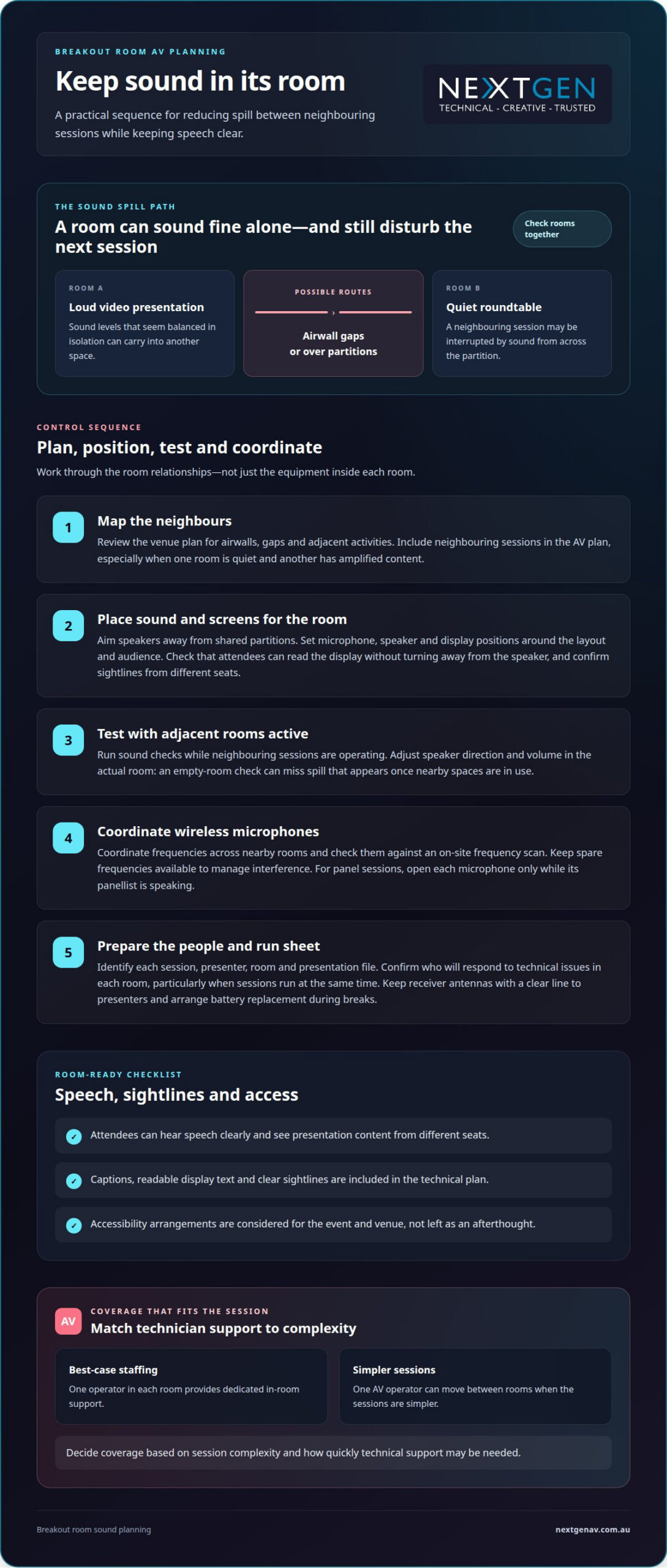
Sound from one breakout room can cross ballroom airwalls through gaps or travel over the partition. A loud video presentation may interrupt a quiet roundtable next door, even when both rooms sound balanced individually. Include neighbouring sessions in the AV plan, then test sound levels while adjacent rooms are operating. This reveals spill that an empty-room sound check can miss.
Plan microphone, speaker and display placement around the room layout and audience positions. Aim speakers away from shared partitions, then set levels during a live test with the neighbouring session running. Place the display where attendees can read presentation content without turning away from the speaker, and check sightlines from different seats. For wireless microphones, coordinate nearby room frequencies and check them against an on-site frequency scan. Keep spare frequencies available to manage interference.
For Australian meeting rooms, plan for attendees to hear speech clearly, see presentation content and follow spoken material in an accessible format. Consider captions, readable display text and clear sightlines as part of the room design. The arrangements depend on the event and venue, so include accessibility needs in the technical plan rather than treating them as an afterthought.
When assessing AV suppliers and installers for an event in Melbourne, look for a process that accounts for room plans, adjacent sessions, microphone coordination and testing. A clear run sheet should identify each session, presenter, room and presentation file. Confirm who will respond to technical issues in each room, especially when sessions run at the same time.
- Review the venue plan for airwalls, gaps and neighbouring activities.
- Test speaker direction and volume while adjacent rooms are active.
- Coordinate wireless microphone frequencies across nearby rooms.
For panel sessions, open each microphone only while its panellist is speaking to limit room noise and feedback. Keep receiver antennas with a clear line to presenters, and assign someone to replace batteries during breaks. Testing these details in the actual room helps contain sound spill while keeping speech clear for attendees.
Hybrid and remote participation
Hybrid sessions need AV plans that let remote participants see, hear and contribute clearly. Effective AV solutions for breakout rooms connect the in-room experience with the online meeting.
Video conferencing systems
Plan camera coverage around who needs to be seen, such as presenters, panellists and participants contributing from the room. A facilitated discussion needs wider coverage than a single-speaker presentation. Remote speakers also need return video so they can see the room and follow the conversation. Match microphone pickup to audience participation, then manage echo between room speakers and microphones. Test cameras, remote connections and two-way audio before attendees arrive.
Wireless presentation systems
Wireless presentation systems let presenters share slides without passing cables between participants. Choose a setup that supports the content and keeps it visible to both the room and remote attendees. Test actual presentation files and connections in advance. A prepared copy on a room computer can provide a fallback if a presenter’s connection fails.
Good AV solutions for breakout rooms also account for moderation and connectivity. Assign someone to manage remote questions and bring online participants into the discussion. Plan for wired internet and backup connectivity; for organisations investing in robust network infrastructure, checking resources such as Cisco switch price Dubai offers helpful benchmarks when budgeting for enterprise networking hardware. Test that shared content appears correctly in the meeting and that room microphones capture audience questions. This helps remote attendees follow the same conversation as people onsite.
- Test camera framing from the remote viewer’s perspective.
- Confirm remote attendees can hear room contributions.
- Rehearse transitions between speakers, slides and questions.
For a coordinated setup, hybrid event production can bring room audio, video and content sharing into one plan.
Multi-purpose training and breakout spaces
Training rooms need AV layouts that adapt to different activities and room configurations. Consistent technical baselines make screens, connections and changeovers easier to manage.
Connections between rooms
To connect breakout rooms with a main meeting room, map the planned audio and visual paths between spaces. The design should account for the venue layout, movable airwalls and each room’s purpose. For example, a main-room presentation may need to appear on breakout screens, while a workshop may need independent content. Clear room assignments and connection labels help operators route the right material to the right audience.
Switching between rooms
Professionals configure switching around the programme: which room receives each presentation, when a shared feed is needed and when rooms operate independently. They test each switching path with the actual presentation content before attendees arrive. A technical operator can then coordinate transitions, reducing the risk of a screen showing the wrong session or a room losing its presentation during a changeover.
Room layouts should match the activity. Classroom seating supports laptops and note-taking; small-group tables suit team exercises; a U-shape favours facilitated discussion. The AV plan should account for these changes, including screen sightlines and lighting that keeps faces and notes visible without washing out projected content.
Similar rooms are easier to reset when they share a baseline for:
- Display connections and presentation aspect ratio.
- Microphone type, speaker setup and presentation remote.
- Cables, adapters, signage and backup procedures.
Before each session, test presentation equipment with the actual slides, laptop, adapters, clicker, video and video sound. Allow time for attendees to move, presenters to change over and technicians to reset equipment. For a gamified exercise, check that on-screen questions are readable and that the host’s microphone and cues for sound or screen changes are ready. These planned checks help each room shift smoothly from training to discussion.
What are the best AV solutions for small and large breakout rooms?
The best setup follows the session format, room size and level of audience participation. A 30-person workshop with frequent contributions needs different audio from a 150-person presentation led by one keynote speaker.
For a small, discussion-led session, plan microphone pickup around where participants speak. A skilled audio engineer can manage wireless microphones, room levels and changes during the discussion. In a properly set-up room without an operator, a podium microphone or wired table microphones may suit a presenter-led session. Check screen readability and sightlines from attendee seats, not only from the lectern.
For a larger presentation, prioritise clear speech throughout the room and legible content from the back rows. The audio plan should reflect presenter movement, installed speakers, video playback and whether attendees will ask questions. A computer in each room avoids most adapter surprises. If the session uses only one visual presentation, an operator may not be needed to switch content.
- Workshop: match microphone pickup to participant discussion and room layout.
- Keynote: focus sound and screen visibility on the full audience.
- Single presentation: prepare the room computer and test the supplied content.
Technician coverage should match the programme’s complexity. Having one operator in each room is the best-case approach for conference sessions. Where staffing needs require a leaner plan, one AV operator can move between rooms, with room hosts knowing how to escalate problems. When several sessions start together, clear responsibility is especially important.
Before attendees enter, test microphones, speakers, displays, laptop inputs, presentation remotes and video sound in each room. Rehearse with the actual slides and allow changeover time for microphone fitting and file cues. For professionally coordinated breakout room AV production, align room requirements, session schedules and technical coverage in one plan.
NextGen AV: Virtual and Hybrid Event Solutions
NextGen AV coordinates Virtual and Hybrid Event Solutions for breakout programmes in Melbourne that need clear communication between in-room and remote participants. Its team aligns technical direction with each session’s format, bringing together Professional Audio Systems, LED Video Walls and Lighting Design and Equipment where they support the audience experience.
Involve NextGen AV during planning when multiple rooms, remote speakers or changing session formats need a unified technical approach. A shared plan can account for venue layouts, content flow and operator coverage, helping presenters move between sessions while remote attendees remain part of the experience.
Contact NextGen AV to discuss the technical requirements for your breakout rooms.
Shape your next event with confidence
Bring the programme, room plan and audience experience into one production conversation. Treat the breakout schedule as part of event design from the outset, so technical direction supports presenters and transitions rather than simply responding on event day. Early alignment gives the production team a clear brief for shaping a coherent experience across your event.
NextGen AV provides LED Video Walls, Professional Audio Systems and Lighting Design and Equipment for event production. Each can support the experience you want to create, from clear content and intelligible speech to lighting suited to the room’s purpose. A coordinated approach to AV solutions for breakout rooms gives your team a considered foundation as sessions and room formats take shape.
Share your event format, venue plans and session requirements when you Contact NextGen AV to discuss technical planning. With the details aligned, you can focus on the conversations and outcomes that make your event matter.
Frequently Asked Questions
Do breakout rooms need their own AV technician?
Not always; technician coverage should reflect the session’s complexity and support needs. A room with a single presentation and simple playback may need less hands-on operation than a panel with audience questions, recordings or hybrid contributions. For simultaneous sessions, assign responsibility for each room’s technical issues in advance, whether through an in-room operator or a clearly coordinated roving technician and room host.
What are the most common breakout room AV mistakes?
Common mistakes include late presentation files, untested presenter laptops and insufficient changeover time. A USB-C port or cable may not carry video, so test a presenter’s laptop with the actual connection and slides. Notification sounds or software updates can also interrupt playback. Collect files centrally, label them by presenter, session and room, and prepare laptops before the event begins.
What should a provider’s breakout room AV checklist include?
A useful checklist covers room assignment, session timing, presenter details and exact presentation file names. It should also record what needs testing, who handles technical issues and which backup files or spare equipment are available. For recorded sessions, include responsibility for collecting footage from each room. If another team is streaming or recording, account for its audio and camera needs during planning.
What AV equipment should a professional specify for a breakout room?
Equipment should suit the session, not simply the room label. A facilitated discussion may need microphones that capture participant contributions, while a keynote presentation places greater emphasis on speech reinforcement and clear content playback. The specification can also include a display, presentation computer, remote, adapters and suitable sound systems. Room dimensions, seating, presenter movement and recording needs shape the final selection.
How can a provider design breakout room AV to be easy to use and manage?
Use a consistent setup across similar rooms, with familiar connections, presentation remotes and backup procedures. Label room equipment and match the instructions to the actual system, so presenters can identify the correct input without interrupting the session. A short rehearsal lets each presenter practise starting slides, playing video and using microphones. Consistent layouts also help technical staff diagnose issues and reset rooms efficiently.
What are common breakout room AV problems, and how can a production team prevent them?
Typical problems include wireless microphone interference, missing video connections, poor remote audio and unavailable presentation files. Coordinate nearby microphone frequencies, test laptops with their actual cables, and rehearse two-way sound for hybrid sessions. Keep backup presentation files and essential spare equipment ready. A named escalation contact for internet issues helps the team respond promptly when connectivity disrupts a remote contribution.
A remote presenter can join your Melbourne event from elsewhere and feel part of the room, rather than like a video call dropped onto a screen. Successful remote presenter integration for events depends on planning the connection, audio and stage handoffs as one production, then testing the presenter’s actual setup before show day.
It’s natural to focus on whether the speaker can connect. The bigger challenge is making sure they know when they’re live, can see and hear what they need, and appear clearly to the audience. A dropped connection, frozen image or poorly timed handoff can interrupt the programme, so preparation must account for both the presenter’s experience and the live room.
This guide explains how to plan the technical workflow, prepare the presenter, rehearse the full segment and support it live. Careful screen framing, audio routing and clear communication help remote speakers contribute with confidence and give your audience a seamless event experience.
Key Takeaways
- Map the venue, audience, event format and remote participation needs before shaping the technical workflow.
- Prepare the presenter’s internet, camera and audio setup so they can connect clearly with the room.
- Rehearse the joining process and stage handoffs, then keep technical support aligned throughout the live segment.
- Plan for both in-room and online audiences with clear screen framing, moderation and ways to take part.
What makes remote presenters risky at live events?
Hybrid events connect a remote presenter to a live room, but the presenter’s feed also depends on technology outside the venue. Plan the platform, audience format and technical workflow together to reduce production surprises.
Presenter Location Testing
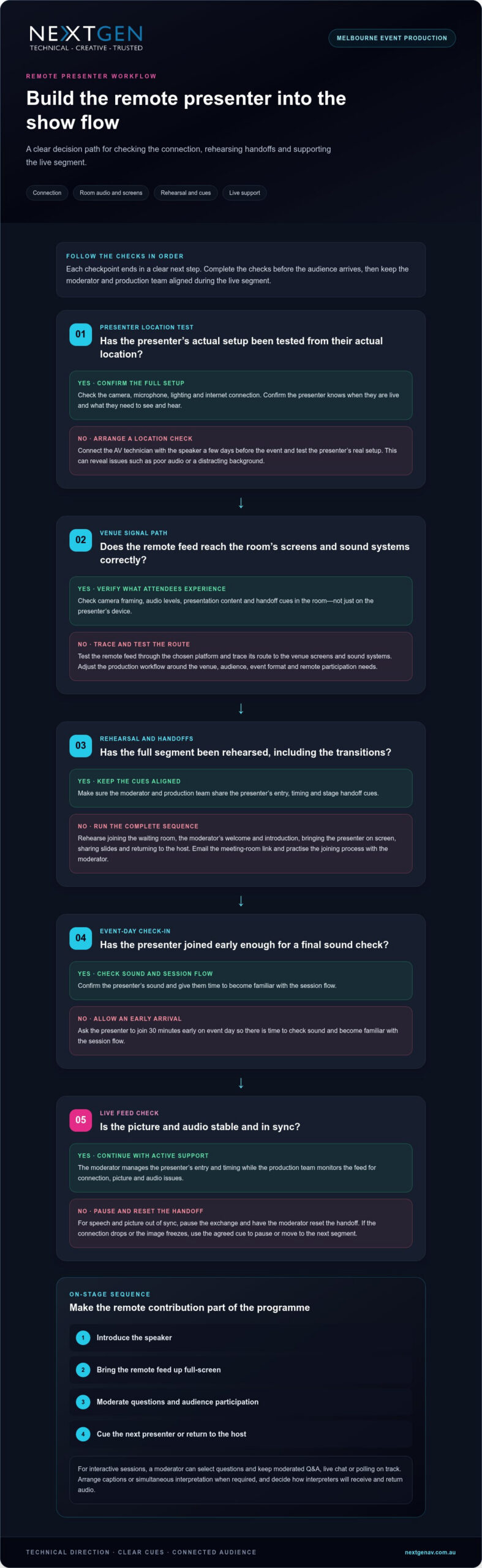
Test the presenter’s actual setup from their actual location, including their camera, microphone, lighting and internet connection. This reveals issues that a venue-only check can’t catch, such as a distracting background or poor audio. Connect the AV technician with the speaker a few days before the event, then confirm the presenter knows when they’re live and what they need to see and hear.
Pre-event Technical Checks
Before the event, test the remote feed through the chosen platform and trace its route to the room’s screens and sound systems. Confirm camera framing, audio levels, presentation content and handoff cues. Plan the venue, audience, event format, remote participation needs and preferred platform together before designing the production system.
A live webinar needs active technical operation, not just a meeting link. Assign a moderator to manage the presenter’s entry and timing, while the production team monitors for a dropped connection, frozen image or audio desynchronisation. Treat the remote feed as a production dependency, with a clear cue for pausing or moving to the next segment if it fails.
For a recording, tell the presenter in advance whether the session will be recorded, why it will be used, who can access it and how it will be shared. Obtain consent and limit access to authorised people. In Australia, consider privacy and data handling when recordings identify a person or capture personal information.
Across Melbourne, specialist event-production companies like NextGen AV with virtual and hybrid event capability coordinate remote feeds with in-room audio, screens and live production. Look for an integrated workflow that includes presenter testing, technical direction and support during sessions, rather than treating the connection as a standalone webinar.
How do you make a remote presenter feel integrated on stage?
Build the presenter’s connection, audio and stage cues into the running order. A clear workflow helps speakers engage with the room instead of simply appearing on screen.
Audio, Internet and Workspace Setup
Ask the presenter to use a wired internet connection where possible, along with headphones with a built-in microphone. If Wi-Fi is needed, choose the strongest signal in a quiet, well-lit room. Position the camera at eye level and frame the head and shoulders. Close windows and silence distracting devices to keep speech clear.
Integration Beyond a Video Call
A simple video call puts a speaker on screen; event integration connects their segment to the stage, audience and show cues. Plan the sequence: introduce the speaker, bring their feed up full-screen, manage questions, then cue the next presenter. A moderator can relay audience questions while the remote speaker sees the room and reads its reactions.
Make the remote feed part of the production mix, with a deliberate screen layout and audio route. This gives the audience a clear view and helps the presenter feel included. For interactive sessions, use moderated Q&A, live chat or polling, with a moderator selecting questions and keeping the exchange on track.
Managing Latency and Technical Failures
To limit audio feedback, avoid sending the room’s amplified sound back through the remote microphone. Coordinate mute cues and audio routing between the presenter and venue team. If speech and picture drift out of sync, pause the exchange and have the moderator reset the handoff instead of letting confusing audio continue.
Plan accessibility before the session: arrange captions or simultaneous interpretation when required, and decide how interpreters will receive and return audio. Congress Australia describes an event using interpretation and captioning for 9 languages, and provided seven simultaneous interpretation channels for the ASEAN – Australia Special Summit. Recording can support replay, training or future marketing; explain its purpose and obtain the presenter’s consent before recording.
Remote presenter testing, rehearsals and live event support
A rehearsal makes the presenter’s connection a planned part of the running order. Test the joining process, platform and stage handoffs before the live audience arrives.
Presenter Joining and Moderator Rehearsals
Send the meeting-room link by email and rehearse the presenter’s entry into the waiting room with the moderator. The moderator should practise welcoming the speaker, confirming they’re ready and cueing their introduction. Ask the presenter to join 30 minutes early on event day, allowing time to check their sound and become familiar with the session flow.
Platforms and AV Equipment
Microsoft Teams, Zoom, YouTube, Vimeo, Facebook Live and custom streaming platforms can carry remote sessions. The production setup may include cameras, streaming infrastructure, audio routing and systems to manage presentation content. Select the platform around the audience and event format, then test how its feed reaches the venue screen and sound systems. That lets technical operators monitor the picture and audio together.
Connection and Pre-event Testing
Connect the presenter using the event’s chosen platform, then test their actual camera, microphone and presentation content. Run the full segment, including the host’s introduction, the presenter’s speaking cues and the handoff back to the stage. Check the streaming feed in the room, not just on the presenter’s device, so operators can assess what attendees will see and hear.
Include transitions in the technical rehearsal. Practise bringing the presenter on screen, sharing slides and returning to the host; clear cues prevent dead air between speakers. The moderator and production team should agree on a pause signal if the feed freezes or drops.
During live streaming, assign an operator to monitor the connection, picture and audio while the moderator manages the speaker. If a technical failure interrupts the segment, the host can hold the room and follow the agreed running-order response. This coordinated support helps keep the session clear for attendees in Australia and online.
Remote and virtual speakers for hybrid conferences
A hybrid conference serves people in the room and participants joining virtually, so plan both experiences together. Choose a format that suits the meeting’s purpose, the speaker’s role and how each audience will participate.
For an investor relations event, a remote executive can address a Melbourne audience while other stakeholders join online. Set the speaking order, screen layout and question process in advance. Keep slides legible on smaller devices, and show the speaker clearly in the venue so their contribution feels connected to the meeting.
Hybrid formats can include a live in-room conference with remote speakers, a streamed stage programme or sessions designed for both audiences. Match the format to the content: a presentation may need a clear visual feed and slides, while a panel needs orderly turn-taking and a way for online participants to contribute. The production plan should coordinate camera coverage, audio, presentation management and streaming.
Moderated Q&A gives both audiences a way into the discussion. A moderator can collect questions from the room and online channels, group similar topics and direct them to the speaker. Explain how attendees can submit questions before the session begins, and give the moderator a clear view of the remote speaker and running order.
Online access can extend an organisation’s audience beyond those able to attend in person. Registration, passwords or private access links can control entry to a stream. To connect locations visually, show the remote speaker full-screen while they speak, then return to slides or a panel view as the programme moves on. These cues help remote and in-room participants follow the same conversation.
NextGen AV’s virtual and hybrid event solutions can bring the stage, speakers and streaming workflow together for conferences and investor events. Plan your hybrid event production around the experience you want both audiences to share.
NextGen AV: LED Video Walls
NextGen AV integrates remote presenters into the room with LED Video Walls planned around clear sightlines and the stage design. A well-framed presenter feed helps in-person attendees follow the conversation, while coordinated Professional Audio Systems keep speech clear across the venue.
For a hybrid conference or product launch, NextGen AV can coordinate these elements with Lighting Design and Equipment, Staging and Rigging, and technical production planning. The aim is a considered experience where the remote speaker’s image, audio and stage cues support the programme instead of feeling like separate elements.
If you’re planning a Melbourne event with remote speakers, contact NextGen AV to discuss your production requirements.
Design the next event around connection
Before finalising the running order, decide what the remote presenter should contribute to your event. A keynote, live product announcement and panel discussion each call for a different rhythm, visual treatment and relationship with the room. Shape the production around that purpose so the technology supports the message rather than becoming the focus.
That creative decision also gives your event team a clear brief: what the audience should see, how the speaker joins the conversation and what the moment needs to achieve. Strong remote presenter integration for events is more than putting a feed on screen. It makes distance feel intentional and gives the speaker a meaningful role in the experience.
For a Melbourne event, NextGen AV can help translate that vision into a coordinated production. Contact NextGen AV about your event to discuss the experience you want to create. Your next event can bring every speaker into the story.
Frequently Asked Questions
Can presenters join from different locations?
Yes. Speakers in different cities or countries can join the same event programme remotely, with each appearance scheduled into the running order. Supported platforms include Events Air, Cvent, YouTube Studio, Zoom, Microsoft Teams, Bettercast. For a Melbourne conference with interstate panellists, a moderator can coordinate each speaker’s turn while the production team switches between their feeds.
Can remote attendees participate in Q&A?
Yes. Remote attendees can submit questions through the event’s chosen participation channel, while a moderator selects and directs them to the speaker. For a product briefing, the moderator can group questions on the same topic and read them aloud, giving online contributors a voice alongside people in the room. Explain the process before the session starts.
How do you ensure a reliable connection for a remote presenter?
Match the presenter’s connection to the selected platform and planned video quality, then assess upload stability under realistic working conditions. Reduce competing network activity during the presentation, such as large file uploads. An independent backup connection, such as mobile data, can provide another route if the primary service fails. Test the switch so the team knows how to recover.
What is remote presenter integration for events?
Remote presenter integration for events is the planned connection between an off-site speaker and the live programme. It brings the presenter’s contribution into the event’s visual, audio and session flow, rather than treating it as a separate call. For example, a virtual panellist can join a discussion with an in-room chair and remote participants.
What internet bandwidth and backup connectivity are needed for remote presentations?
Bandwidth needs depend on the platform’s requirements, video quality, audio, screen sharing and other activity on the presenter’s network. Follow the platform’s published guidance, then test the actual connection with the presenter’s camera and presentation running. Plan an independent backup route, such as mobile data, based on local coverage and the presenter’s setup, and rehearse the switch.
What if the most ambitious brand activation of your career was silenced by a single faulty connection or a misunderstood council permit? You’ve likely poured months into the creative vision, yet that familiar knot of anxiety remains regarding the actual live execution. It’s a justified concern in the high-pressure realm of experiential marketing av melbourne, where the gap between a legendary brand moment and a technical stumble is often just a matter of precise planning.
We understand that you’re not just looking for equipment; you’re looking for the absolute certainty that your vision will translate perfectly into the physical world. This guide provides the technical backbone you need to command your next Melbourne activation with total confidence. We’ll explore everything from navigating the City of Melbourne’s updated 2026 public event fees to the seamless integration of LED video walls and professional audio systems that define world-class immersion. Consider this your roadmap to orchestrating a flawless production where the technology serves as the invisible engine of your brand’s success.
Key Takeaways
- Learn how technical precision serves as the “invisible engine” that facilitates the 2026 shift from passive viewing to active audience immersion.
- Understand why a dedicated Technical Director and rigorous pre-production testing are essential for ensuring a flawless execution during high-stakes product launches.
- Master the technical backbone of your campaign by using experiential marketing av melbourne strategies that integrate bespoke staging with surgical lighting design.
- Navigate Melbourne’s unique logistical landscape with confidence by mastering permit requirements and power assessments for outdoor public spaces.
- Discover the value of an end-to-end production partnership that manages every detail from the first site visit to the final pack-down.
The Essential Experiential Marketing AV Checklist for Melbourne Activations
Technical precision isn’t just a logistical detail; it’s the invisible engine driving every successful brand activation. While the creative concept grabs the initial attention, the technical execution sustains the magic and ensures the brand’s message is delivered without interruption. When orchestrated correctly, experiential marketing av melbourne creates a seamless environment where the brand story feels tangible and inevitable. By 2026, the industry has moved decisively away from passive viewing toward active immersion. In the context of experiential marketing, audiences now demand a responsive digital ecosystem where they are participants rather than just observers.
Determining your technical requirements starts with your venue’s footprint. A small pop-up in an inner-city laneway requires a different set of “must-haves” than a massive activation at the Melbourne Convention and Exhibition Centre. For intimate spaces, focus on high-fidelity audio and ultra-high-resolution visuals that stand up to close scrutiny. For larger sites, rigging, staging, and complex signal distribution become the priorities. By defining these technical requirements early, you ensure your experiential marketing av melbourne remains both high-impact and logistically sound. Most importantly, your AV team must collaborate with your fabrication partners from the initial design phase. If your builders don’t account for cable paths, cooling for hardware, or weight loads for rigging, your activation risks delays or expensive on-site modifications.
Visual Impact: High-Resolution LED and Projection Mapping
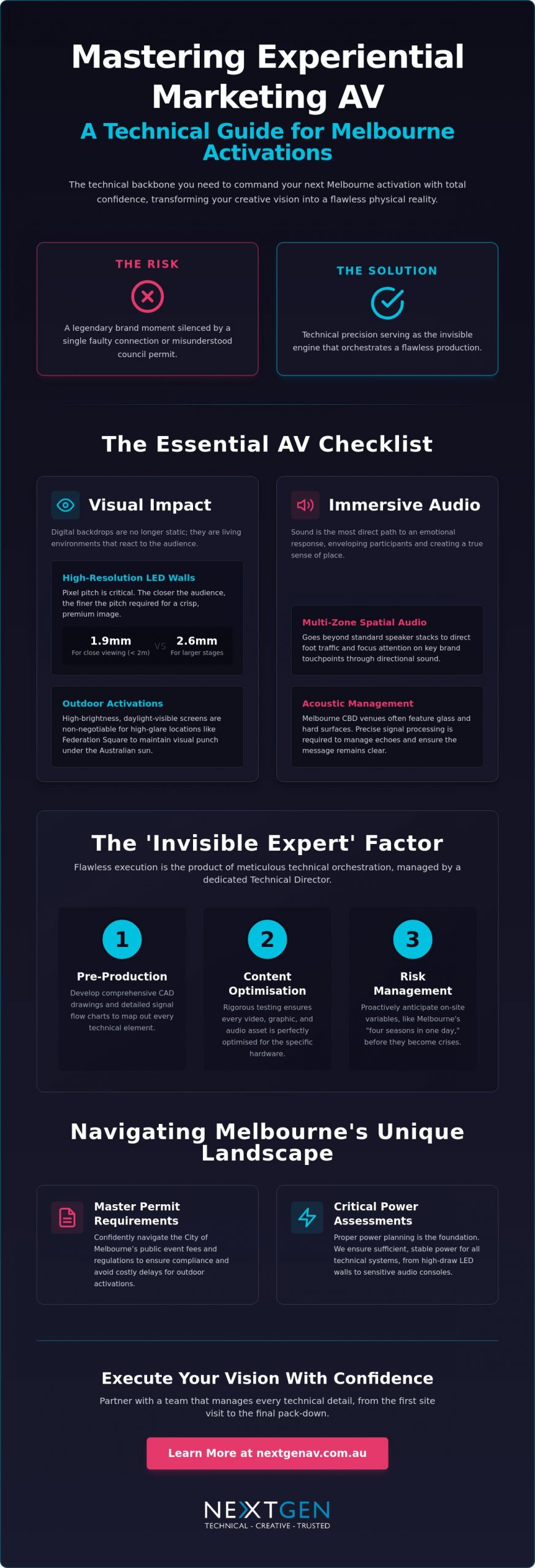
Digital backdrops are no longer static; they are living environments that react to the audience. Choosing the right pixel pitch is critical for brand interactions. If guests are standing within two metres of the display, a 1.9mm pitch ensures a crisp, premium image without visible pixels, whereas a 2.6mm pitch may suffice for larger stages. Using LED video walls allows you to create “infinite” horizons that wrap around the audience, creating a truly transportive experience. For outdoor activations in high-glare locations like Federation Square or Southbank, high-brightness, daylight-visible screens are non-negotiable to maintain visual punch under the Australian sun.
Immersive Audio: Creating 360-Degree Soundscapes
Sound is the most direct path to an emotional response. We’ve moved beyond standard speaker stacks toward multi-zone spatial audio that envelops the participant and creates a sense of place. Strategic professional sound system hire does more than play music; it directs foot traffic and focuses attention on key brand touchpoints through directional audio. Many Melbourne CBD venues feature extensive glass and hard surfaces, which create difficult acoustic reflections. Managing these challenges requires precise speaker placement and signal processing to ensure your message remains clear and impactful, rather than lost in a wash of echoes.
Technical Production & Management: The ‘Invisible Expert’ Factor
A flawless brand activation is rarely the result of luck; it is the product of meticulous technical orchestration. For high-stakes product launches, a Technical Director is non-negotiable. This “invisible expert” acts as the navigator, ensuring every technical element aligns with the creative vision. While the audience sees a seamless spectacle, the Technical Director is managing a complex web of signal flows and timing cues behind the scenes. This level of oversight is what separates a standard event from world-class experiential marketing av melbourne.
Success is forged in the pre-production phase. We move beyond simple equipment lists to develop comprehensive CAD drawings and detailed signal flow charts. This phase involves rigorous content testing to ensure every asset is optimised for the specific display hardware. In a city famous for “four seasons in one day,” on-site management in Melbourne requires a proactive approach to risk. Whether it’s sudden temperature shifts affecting outdoor LED calibrations or unexpected rain at a Southbank activation, a seasoned technical team anticipates these variables before they become crises. Once the event concludes, the AV infrastructure continues to provide value through post-event analytics. By measuring touchpoint interactions and dwell times, we transform a live moment into actionable brand data.
The Role of Technical Direction
Precision is everything. The Technical Director coordinates lighting cues, video playback, and audio transitions with surgical accuracy. They manage the run sheet with a firm hand, ensuring the brand story unfolds exactly as planned. If a glitch occurs, it is identified and resolved in real-time, often before the client is even aware of a potential issue. This proactive troubleshooting maintains the prestige of the event, allowing the brand to remain the centre of attention. To achieve this level of control, many planners look to partner with an experienced technical team early in the design process.
Content Synchronisation and Playback
Visual impact depends on the synergy between content and hardware. We ensure your 4K content looks crisp and vibrant across all audio visual hire Melbourne systems. By using advanced media servers, we can synchronise lighting design with video playback, creating a unified “brand pulse” that ripples through the entire environment. This synergy is a critical gap often missed by less experienced providers. To guarantee reliability, we always employ a “hot backup” for live video. This redundancy planning means a secondary system is running in perfect sync, ready to take over instantly if the primary feed encounters a hiccup, ensuring experiential marketing av melbourne activations never miss a beat.
Lighting and Staging: Crafting the Physical Brand Environment
A successful activation requires more than just high-resolution screens; it demands a physical environment that commands attention. While many focus solely on digital content, the structural and atmospheric elements of your build determine how a brand is perceived. Strategic stage and lighting hire Melbourne transforms a temporary pop-up into a prestigious destination, creating a sense of permanence and intent. By treating the physical stage as a canvas, we ensure every angle of your experiential marketing av melbourne activation reflects your brand’s elite status.
Precision is the hallmark of professional production. We use dynamic LED lighting to match corporate palettes with surgical accuracy, ensuring your brand colours remain consistent across every surface. This level of control is essential when navigating Melbourne’s diverse venue landscape. Whether you’re setting up on the uneven lawns of the Royal Botanic Gardens or inside a heritage-listed ballroom in the CBD, our staging solutions adapt to the environment without compromising on aesthetics. Safety remains the non-negotiable foundation of this process. Every installation adheres to strict Australian rigging and electrical standards, specifically AS/NZS 3000, providing the peace of mind that your high-stakes activation is as secure as it is spectacular.
Atmospheric Lighting Design
Lighting does the heavy lifting in setting the emotional tone. We utilise “wash” lighting to define the overall mood and “spot” lighting to guide the eye toward specific product hero shots. For high-energy activations, intelligent moving head lights add a layer of dynamic movement that keeps the audience engaged. In retail spaces where cables pose a tripping hazard or aesthetic distraction, battery-powered uplighting offers a sophisticated, flexible solution. These tools allow us to sculpt the environment, ensuring the experiential marketing av melbourne campaign feels vibrant and alive from every perspective.
Custom Staging and Rigging
Structure meets artistry in our staging designs. We deploy modular staging that effortlessly scales to fit different Melbourne footprints, from compact laneway activations to expansive exhibition halls. When overhead displays are required, we work exclusively with venue-approved riggers to ensure total compliance and safety. For brands looking to push boundaries, integrating LED floor panels creates a truly 3D immersive experience. This allows the digital story to flow beneath the feet of your guests, turning a simple walk-through into a cinematic journey that leaves a lasting impression.
Melbourne Logistics: Navigating Local Venues and Regulations
Melbourne is an iconic backdrop for brand stories, but its logistical landscape is famously complex. Successfully executing experiential marketing av melbourne requires more than just creative flair; it demands a forensic understanding of the city’s infrastructure. Your first step is a rigorous power assessment. While CBD venues may offer existing three-phase power, many are legacy systems with limited capacity. If your activation is set for an outdoor space like Treasury Gardens or Kings Domain, you’ll likely find no fixed power at all, necessitating a calculated approach to external distribution that won’t disrupt the local environment.
Securing the right permits is the second pillar of a successful activation. For 2026, the City of Melbourne has maintained a tiered fee structure for public event applications, with costs ranging from $68.00 to $3,022.00 depending on your expected attendee numbers. If your vision requires a major road closure, expect a fee of $1,087.00, while even a simple footpath occupation incurs a $106.00 charge. Navigating these requirements early prevents costly delays and ensures your experiential marketing av melbourne campaign remains compliant with local council expectations. We manage these details as your “invisible expert,” allowing you to focus on the brand impact rather than the paperwork.
The physical “bump-in” and “bump-out” phases require surgical timing, especially in Melbourne’s narrow laneways. Access is often restricted to tight windows, and the transition from truck to site must be orchestrated with absolute precision to avoid blocking thoroughfares. Finally, you must weather-proof your technology for the city’s unpredictable climate. Even a summer activation can face sudden temperature drops or driving rain. We utilise high-grade protective housing and climate-controlled racks to ensure your hardware remains operational through every atmospheric shift.
Venue-Specific Technical Challenges
Outdoor Activation Essentials
Outdoor environments require a specialized technical kit. We deploy IP-rated (weatherproof) LED screens and lighting that can withstand the elements, particularly for winter activations where moisture is a constant factor. To maintain the prestige of the experience without the drone of machinery, we use silent generator solutions that are perfect for quiet Melbourne neighbourhoods. For large-scale outdoor LED walls, wind-load calculations are a critical safety requirement. We ensure every structure is engineered to withstand local gusts, providing a stable and secure environment for your guests. To ensure your logistics are as flawless as your creative vision, partner with our Melbourne production team for a site-specific technical consultation.
Executing Your Vision with NextGen AV’s Expert Production
Bringing a visionary concept to life in a city as dynamic as Melbourne requires more than just high-end hardware; it requires a partner who understands the rhythm of the local industry. With over 30 years of experience in the Melbourne event landscape, we’ve seen the evolution of brand activations from simple displays to the complex, multi-sensory environments of 2026. This legacy of expertise means we don’t just react to challenges; we anticipate them. Whether it’s navigating the specific load-in requirements of a CBD laneway or ensuring your experiential marketing av melbourne activation remains operational during a sudden Port Phillip Bay weather front, our history is your greatest asset.
We pride ourselves on being the engine behind the scenes. We partner closely with creative agencies to take “impossible” briefs and turn them into technically sound, high-impact realities. Our team thrives on the challenge of engineering solutions that push the boundaries of what’s possible, allowing your brand to take centre stage with absolute prestige. From the initial site visit where we assess power and permit requirements to the final pack-down after a successful campaign, our end-to-end approach ensures every detail is managed with surgical precision. This commitment to technical mastery is the NextGen AV promise, ensuring your brand story is told without a single glitch or technical distraction.
Our Full-Service Production Model
Vendor friction is often the primary cause of stress in high-stakes planning. By consolidating your full service event production with a single, elite partner, you eliminate the communication gaps that lead to technical errors. Our expert technicians are specialists in the nuances of experiential marketing, understanding that a product launch requires a different level of finesse than a standard corporate meeting. You gain direct access to Australia’s most advanced inventory of LED video walls, professional audio systems, and intelligent lighting, all maintained to the highest industry standards. This unified approach ensures that your experiential marketing av melbourne campaign feels cohesive, polished, and powerful.
Ready to Organise a Flawless Activation?
Your 2026 product launch deserves a technical backbone that is as ambitious as your creative vision. We invite you to a technical consultation where we can explore the specific requirements of your upcoming project and showcase our recent Melbourne success stories. Whether you’re planning an immersive pop-up in the heart of the CBD or a large-scale outdoor spectacle, our team is ready to provide the “invisible expert” support you need to succeed. Contact NextGen AV today to discuss your technical requirements and ensure your next activation is remembered for all the right reasons.
Command the Stage for Your Next Melbourne Activation
Masterful brand activations are defined by the seamless synergy between creative ambition and technical precision. We’ve explored how a rigorous pre-production phase, combined with local logistical mastery, transforms a standard event into a legendary brand moment. By prioritising the “invisible expert” factor and navigating the nuances of Melbourne’s permit and power requirements, you ensure your experiential marketing av melbourne strategy is built on a foundation of absolute reliability. Success in 2026 demands this technical-first approach, where the technology doesn’t just support the story; it becomes the environment itself.
With over 30 years of industry experience and a proven track record with major Australian brands, our team provides the end-to-end technical management and direction required to bring your most complex ideas to life. We handle the orchestration so you can focus on the impact. Partner with Melbourne’s AV experts for your next activation and let’s build something truly extraordinary together. Your vision is ready for the spotlight, and we’re ready to make it shine.
Frequently Asked Questions
What is the best type of LED wall for a Melbourne outdoor brand activation?
High-brightness, IP65-rated LED panels are the gold standard for outdoor Melbourne activations. These units feature a brightness level of at least 5,000 nits to remain visible under direct Australian sunlight; the IP65 rating ensures total protection against dust and sudden rainfall. For close-up interactions at Federation Square or Southbank, we recommend a pixel pitch between 3.9mm and 4.8mm to balance visual clarity with the durability required in high-traffic public zones.
How do I choose the right AV company for a high-stakes product launch?
Prioritise companies that offer dedicated Technical Direction and a proven track record with high-stakes experiential marketing av melbourne. A premium partner should provide more than just hardware; they should act as a “Confident Orchestrator” who manages pre-production CAD drawings and content testing. Ask for recent case studies involving major Australian brands to verify their ability to maintain prestige and reliability under the pressure of a live brand moment.
Do I need a technical director for a small-scale experiential activation?
Even small-scale activations benefit from a Technical Director to manage the “invisible engine” of the production. While the equipment list might be shorter, the risk of a technical glitch ruining a brand moment remains high. A director ensures that lighting cues, audio levels, and video playback are perfectly synchronised. This allows you to focus on guest engagement rather than troubleshooting equipment or coordinating multiple vendors on a tight Melbourne footprint.
What are the power requirements for a large-scale LED wall in the Melbourne CBD?
Large-scale LED walls typically require a dedicated three-phase power supply, often 32A or 63A depending on the total screen surface area. Many heritage venues in the Melbourne CBD lack this modern infrastructure, which may necessitate the use of silent, high-output generators. It’s essential to conduct a site-specific power audit during the pre-production phase to ensure your experiential marketing av melbourne activation has a stable, uninterrupted energy source without overloading local circuits.
How can I integrate social media feeds into my event’s visual displays?
You can integrate real-time social media feeds by using dedicated media servers paired with moderation software. This setup allows you to curate and display user-generated content, such as photos or tagged posts, directly onto your LED video walls or projection surfaces. This “phygital” integration encourages audience participation and ensures your event’s digital footprint extends far beyond the physical venue, creating a dynamic, community-driven experience that resonates with 2026 consumers.
What happens if it rains during our outdoor experiential event in Melbourne?
We prepare for Melbourne’s unpredictable climate by using IP-rated, weatherproof hardware and custom protective housing for all sensitive electronics. Our technical teams monitor real-time Bureau of Meteorology updates and implement pre-arranged contingency plans, such as relocating key elements or deploying aesthetic weather shielding. This proactive approach ensures that a sudden downpour doesn’t halt your activation, maintaining the professional standard of your brand even when the weather turns.
How far in advance should I book AV production for a major brand activation?
For a major brand activation, you should ideally book your AV production team three to six months in advance. This lead time is critical for securing high-demand hardware, conducting thorough site visits, and navigating the City of Melbourne’s public event permit timelines. Early engagement also allows for a more collaborative design process, where our technical experts can work with your creative agency to engineer the most impactful and logistically sound solutions for your vision.
