
The room is ready, the speaker is introduced, and the opening video stays black. Troubleshooting video playback issues at events can feel like a race against the audience’s patience, but changing equipment at random can add confusion instead of restoring the picture.
A misplaced image, stretched format or frozen screen doesn’t automatically mean the file has failed. The fault could sit anywhere along the playback chain, from the source device and video processor to the connection or display. A calm, methodical check helps pinpoint the cause and limit disruption while the programme continues.
This guide explains how to trace common playback faults, check content and signal settings, and restore planned visuals with precision. You’ll also learn how pre-event testing and a clear recovery plan can reduce risk before guests arrive. With technical direction and careful signal checks, NextGen AV helps Melbourne event teams manage complexity behind the scenes and keep attention on the experience in the room.
Key Takeaways
- Record what appears on screen and when the fault occurs to give your troubleshooting a clear starting point.
- Trace the playback route from media file to display, changing one setting or connection at a time.
- Use the symptom to narrow down the likely fault area and decide what to check or escalate next.
- Keep the programme moving with a planned holding slide or presenter-led transition while the team checks the affected route.
- Effective troubleshooting video playback issues at events starts before doors open, with clear file handover, cue order, rehearsal and assigned operator roles.
Troubleshooting video playback issues at events: start with the symptoms
A black screen, frozen image or missing video can each point to a different fault. Stay calm and observe before changing settings or swapping equipment. Note exactly what appears on screen, whether the problem starts immediately or part-way through playback, and whether anything changes when the video is cued again. These details give the playback operator a useful starting point and help avoid changes that obscure the original cause.
The event playback signal chain is the route a video takes from its source file and playback device, through settings, connections and a video processor, to the final display. A fault can arise at any point along that route, so the symptom helps narrow down where to investigate.
What does the screen behaviour tell you?
For a black screen, first check whether the display is powered and what it shows. An input or signal message suggests the screen is active but may not be receiving the expected feed. A completely dark display calls for a different check. Record any message rather than guessing at its meaning.
If playback freezes or stutters, establish whether the file itself is paused or the playback device is struggling to keep it moving. Check whether the playback controls respond and whether the same issue appears at the same point when the clip is cued again. Visible video with no sound is a separate audio-path symptom, not proof that the video signal has failed. Keeping the observations separate helps the technical team direct checks to the right system.
For streamed content, the platform and delivery method add another part of the route to consider. This overview of Online Video Platform (OVP) technology provides background on how online platforms deliver video.
What changed just before playback failed?
Think back to the last successful cue. Was the source device, cable, input selection, content file or display configuration changed? Even a small change can help locate the fault, particularly if the issue began straight afterwards. Record what changed and when, without making several new adjustments at once.
Next, establish the scope: does the fault affect one screen, one input or every display? A single affected screen can point towards its connection or display route, while a fault across all displays may call for attention further upstream. These are clues, not conclusions. The next section traces the route systematically.
Pass the observations to the person managing event playback in a calm, concise handover: what the audience sees, when it happens, which screens are affected and what changed beforehand. This symptom-led approach makes troubleshooting video playback issues at events more controlled and gives the operator a clearer path to restore the planned visuals with minimal disruption.
Trace the event video signal from media source to display
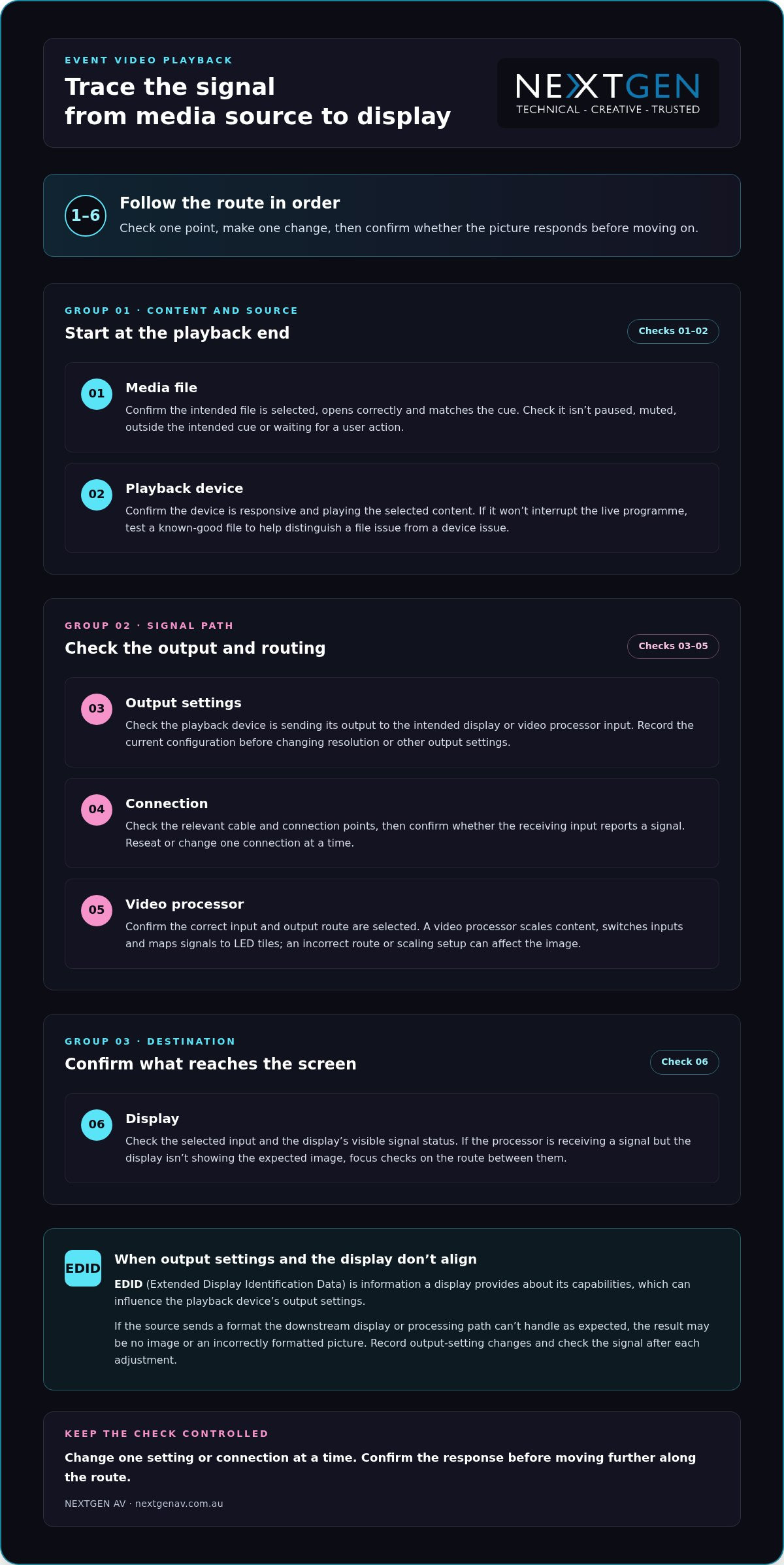
Once you’ve identified where the fault appears, trace the signal route in order. This keeps troubleshooting video playback issues at events controlled: check one point, make one change, then confirm whether the picture responds before moving on. Avoid changing several settings at once, or you may lose the clue that identifies the cause.
- Media file: Confirm the intended file is selected, opens correctly and matches the cue. Check that it isn’t paused, muted, outside the intended cue or waiting for a user action.
- Playback device: Confirm the device is responsive and playing the selected content. If it can be done without interrupting the live programme, test a known-good file to help distinguish a file issue from a device issue.
- Output settings: Check that the playback device is sending its output to the intended display or video processor input. Avoid changing resolution or other output settings until you’ve recorded the current configuration.
- Connection: Check the relevant cable and connection points, then confirm whether the receiving input reports a signal. Change or reseat one connection at a time.
- Video processor: Confirm the correct input and output route are selected. A video processor scales content, switches inputs and maps signals to LED tiles, so an incorrect route or scaling setup can affect what appears on screen.
- Display: Check the selected input and the display’s visible signal status. If the processor is receiving a signal but the display isn’t showing the expected image, focus checks on the route between them.
EDID, or Extended Display Identification Data, is information a display provides about its capabilities, which can influence the playback device’s output settings. If a source sends a format the downstream display or processing path can’t handle as expected, the result may be no image or an incorrectly formatted picture. Record any output-setting changes and check the signal again after each adjustment.
Keep the route clear
For an LED wall, distinguish the signal arriving at the video processor from the image mapped across the display. This helps the operator narrow down whether to investigate the source, input selection, scaling or display route, rather than resetting the whole system. For planning considerations specific to this display type, read the guide to LED video walls for events.
A clear signal path is easier to test when technical direction and content routing are planned together. For Melbourne event teams, NextGen AV’s event technical direction brings those details into the production plan, helping keep the audience experience in focus while the team resolves the fault.
Match common playback faults to the right corrective action
Symptoms narrow the search, but they don’t prove the cause. Use the checks below to guide the next step, changing one thing at a time and recording the original setting before you adjust it. This makes troubleshooting video playback issues at events more precise and gives the playback operator a clear point for escalation.
| Symptom | Likely fault area | First check | Escalation point |
|---|---|---|---|
| No picture or a black screen | Source output, selected input, connection, video processor or display | Check that the display is powered, note its signal status, then confirm the source is routed to the intended input. | If the input and route are correct but no signal reaches the display, have the playback operator trace the connection and processor path. |
| Picture is on the wrong display, cropped or incorrectly formatted | Output routing, scaling, aspect ratio or processor mapping | Compare the source output settings with the intended display or processor configuration. | If the source is routed correctly but the image remains wrong, escalate to the person managing video processing and display mapping. |
| File won’t play or playback is unsupported | Content file, playback device or compatibility along the signal path | Confirm the intended file is selected and check whether it plays on the same device outside the live cue, if the programme allows. | If a known-good file plays but the event file doesn’t, escalate for a content and playback compatibility check. |
| Playback freezes, stutters or drops in and out | File or playback device performance, connection or signal route | Check whether the issue repeats with a known-good file on the same device, and inspect the relevant connection and signal status. | If it continues across files or affects more than one display, ask the technical operator to trace the shared signal route. |
Check before changing settings
For a black screen or misplaced image, confirm the selected input and signal status before restarting equipment. Then verify that the source output is routed to the intended display or video processor input. If only one display is affected, compare its route with a working display where practical. That comparison can help isolate the affected path without changing the whole system.
For freezing, stuttering or an incorrect format, compare playback using a known-good file on the same device when it won’t disrupt the programme. Check the source output against the intended display and processor configuration. Don’t alter several settings at once: note the original values, test a single adjustment and confirm the result.
HDCP and EDID can affect compatibility between content sources, processing and displays, but they aren’t automatic explanations for every fault. Treat them as controlled checks: record the current configuration and involve the playback operator before making changes, particularly during a live programme. If the symptom persists after the relevant route has been checked, escalate with a concise report of what you observed and tested.
Restore playback during the event without adding disruption
A live fault needs a measured response, not a flurry of resets. Repeatedly restarting devices or changing several settings at once can interrupt the cue further and make the original problem harder to identify. Keep the response coordinated: protect the programme, isolate the affected route, test one change, then confirm the picture before resuming.
Use a controlled live recovery sequence
The event lead should communicate with the presenter and playback operator before changing the programme. If the event plan allows, move to a prepared holding slide or a presenter-led transition while the operator investigates. This gives the audience a clear point of focus and creates space for a controlled check behind the scenes.
- Protect programme flow: agree on the holding slide or transition with the presenter.
- Identify the affected route: confirm which source, input or display is involved.
- Test one change: use a known working source or planned alternate input if it’s available in the production setup.
- Confirm the picture: check that the image is stable on the intended display before returning to the planned cue.
If the first adjustment doesn’t resolve the fault, pause before trying another. Tell the operator what changed and what the screen now shows. That concise handover keeps troubleshooting video playback issues at events focused on evidence, rather than adding uncertainty through untracked changes.
Plan backups before doors open
Recovery is faster when the team has rehearsed the fallback. Test the final media files on the actual playback setup during event preparation, following the planned cue order and checking the complete source-to-screen route. This can expose a file or routing issue before it reaches the audience.
Where it suits the event plan, prepare duplicate content or an alternate playback route. Make sure the operator knows which option to use and how the presenter will be briefed if the programme needs a short transition. For the wider production picture, see this guide to full-service event production.
Coordinated technical support brings playback, content cues and programme decisions together, so the team can resolve faults without losing sight of the audience experience. Talk with NextGen AV about event technical direction for a considered approach to live playback planning and support.
Prevent event video playback issues with precise production planning
The most effective response to a playback fault often begins before the venue fills. Turn troubleshooting video playback issues at events into a practical pre-show plan: agree how files are handed over, confirm cue order, test the complete route and make sure every operator knows their role. A clear escalation path means the right person can act without delaying decisions or disrupting the audience experience.
Rehearse the complete playback path in the Melbourne venue
A full signal-path rehearsal checks every handover, from the media file and playback device through connections and processor routing to each event display, before audiences arrive. Use the planned configuration in the Melbourne venue, rather than relying on a check of the file alone.
- File handover: identify the final approved versions and make sure the playback operator can locate each one.
- Cue order: run presentation changes and video cues in programme order with the relevant event team.
- Source-to-screen test: confirm each final file plays through the intended device, connections, processor route and display.
- Operator notes: record the working input, routing and agreed recovery approach for the team running playback.
Testing in sequence helps reveal handover issues, such as the correct file being available but assigned to the wrong cue, before they reach the stage. Working with professional media production teams such as The Photography Co also ensures visual assets are rendered in standard, compatible formats well before showtime.
Coordinate the people behind a seamless visual experience
Technical preparation also depends on clear responsibilities. Establish who cues content, who monitors the displays and who communicates with the event lead if a fault appears. Set out an escalation path in advance, including who makes the call to switch to an alternate source or adjust the programme. This keeps updates concise and avoids multiple people making conflicting changes.
Experienced technical direction brings the content, signal route and programme team together. NextGen AV’s technical direction and on-site production management help coordinate the details behind the scenes, so any issue is handled with precision and the event remains focused on its audience.
Make the playback plan part of the wider production process, not a last-minute equipment check. Plan your next event with NextGen AV.
Make playback reliability part of the plan
Reliable event visuals come from a clear process: read the symptoms, trace the signal from source to screen, and make one controlled change at a time. If a fault occurs live, protect the programme while the playback team checks the affected route. Before the event, test final files in the planned setup and agree on operator roles and a recovery path. That preparation makes troubleshooting video playback issues at events more manageable and helps keep attention where it belongs, on the experience in the room.
NextGen AV brings more than 30 years of industry experience to event production, managing 1,200+ events annually from a Melbourne-based warehouse and supporting events throughout Australia. With technical direction and production management coordinating the details behind the scenes, your visuals can serve the wider event with precision and confidence.
Plan your next event with NextGen AV and create a considered production plan for a seamless audience experience.
Frequently Asked Questions
Why is there no picture from my laptop at an event?
A blank screen can result from the display being on the wrong input, the laptop sending output to another screen, a connection issue or incompatible output settings. Check whether the display shows an input or signal message, then confirm the laptop’s output is routed to the intended processor or display. Note what you observe before adjusting settings. If other screens work, compare their signal routes with the affected one.
What should I check when a video freezes during an event?
First check whether playback is paused, waiting for a cue or stuck at a specific point in the file. Confirm the playback device is responding, then see whether the problem repeats with a known-good file if testing won’t interrupt the programme. If it does, the device or signal route may need attention. If not, the content file or cue may be involved. Change one thing at a time and tell the operator what you’ve tested.
Can an HDMI connection cause event video playback problems?
Yes. A loose or damaged HDMI cable, an incorrect input selection or a connection that isn’t carrying the expected signal can contribute to playback problems. Check the cable and the selected input, then confirm whether the receiving device reports a signal. If the route includes a video processor, verify that its selected input matches the connected source. Avoid changing multiple connections at once, so the team can identify which check affects the picture.
How do you troubleshoot an LED display that is showing the wrong image?
Start by confirming which source and input are selected, then check whether the source is routed to the intended display. If the issue affects one screen, compare its route with a working display where practical. For an LED wall, the video processor scales content, switches inputs and maps signals to LED tiles, so its routing or mapping may need review. Record any changes and confirm the image on the intended display before continuing.
What is EDID, and how can it affect video playback?
EDID, or Extended Display Identification Data, is information a display provides about its capabilities. That information can influence the output settings selected by a connected source, such as a laptop. If source and display settings don’t align, the image may not appear or may display in an unexpected format. Treat EDID as one possible compatibility factor, not an assumed cause. Record current settings and make controlled checks with the playback operator.
How can event organisers prevent playback issues before guests arrive?
Test the final media files using the actual playback device, connections, video processor and displays in the planned event configuration. Run presentation changes and video cues in programme order, and confirm the image reaches each intended screen. Agree who cues content, who monitors displays and who escalates a fault. For Melbourne events, a venue-based rehearsal helps the team check the complete route and document working inputs and a recovery approach before guests arrive.
What should a team do if video playback fails during a live presentation?
Protect the programme first. The event lead should coordinate with the presenter and playback operator, using a prepared holding slide or presenter-led transition if the plan allows. The operator can identify the affected route, test one controlled change and confirm the image is stable before returning to the cue. Avoid repeated restarts or several simultaneous setting changes. This measured approach to troubleshooting video playback issues at events helps limit disruption and keep the audience experience in focus.
What technical AV setup guarantees zero dropouts when institutional investors are scrutinising your balance sheet? When you are presenting high-stakes forecasts across Melbourne boardrooms and interstate stops, leaving presentation execution to unvetted venue staff invites immediate risk. An audio dropout during an analyst Q&A or a stuttering video stream to offshore fund managers doesn’t just interrupt momentum; it chips away at executive polish. Securing specialised financial roadshow av services ensures your mission-critical slides display with absolute clarity while your executive team maintains uninterrupted presentation uptime.
You already recognise that a successful roadshow demands total consistency, precision timing, and freedom from logistical distractions. In this guide, discover how to evaluate and select technical production partners to execute flawless investor roadshows across every boardroom and conference centre. Ahead, we outline the technical standards, redundancy protocols, and compliance benchmarks required to safeguard your delivery from the opening slide to the final question.
Key Takeaways
- How to evaluate dedicated financial roadshow av services to eliminate single-point failure risks and protect executive credibility.
- The exact video processor and display specifications required to render fine-print financial models with absolute visual clarity.
- Critical compliance safeguards, including hot-swappable hardware redundancy and strict alignment with Australian wireless microphone regulations.
- Strategic coordination methods to master Melbourne CBD loading dock constraints and tight multi-venue setup windows.
- Why certified technical direction behind the scenes frees your leadership team to focus entirely on investor engagement.
Technical Demands of Financial Roadshow AV Services
High-stakes deal tours leave zero margin for technical hesitation. When an executive team pitches an initial public offering or debt refinancing, enterprise credibility hinges directly on absolute presentation uptime. In the high-pressure environment of strategic investor relations, a single blacked-out display or muted executive mic can derail weeks of pitch preparation. Selecting purpose-built financial roadshow av services replaces the uncertainty of unvetted venue equipment with engineered stability, ensuring that every financial forecast lands with authority.
High-Stakes Investor Presentations and Zero Failure Tolerances
Corporate access demands immediate responsiveness. Standard hotel meeting gear frequently buckles under multi-source video switching, complex audio feeds, and simultaneous live streaming. If a boardroom monitor loses sync during an earnings projection, the resulting delay fractures the presenter’s focus and tests analyst patience. Precision technical direction manages these risks proactively behind the scenes. Dedicated production specialists oversee signal paths, coordinate backup systems, and protect your leadership team so the CEO and CFO can address institutional investors with complete confidence.
Visual Precision for Complex Financial Modelling and Data
Dense financial tables, waterfall charts, and valuation models demand extreme visual clarity. Standard corporate projectors wash out under daytime ambient lighting, blurring decimal points and distorting vital data. Delivering seamless financial roadshow av services requires high-resolution display infrastructure engineered to present complex spreadsheets legibly from the front row to the back of the room.
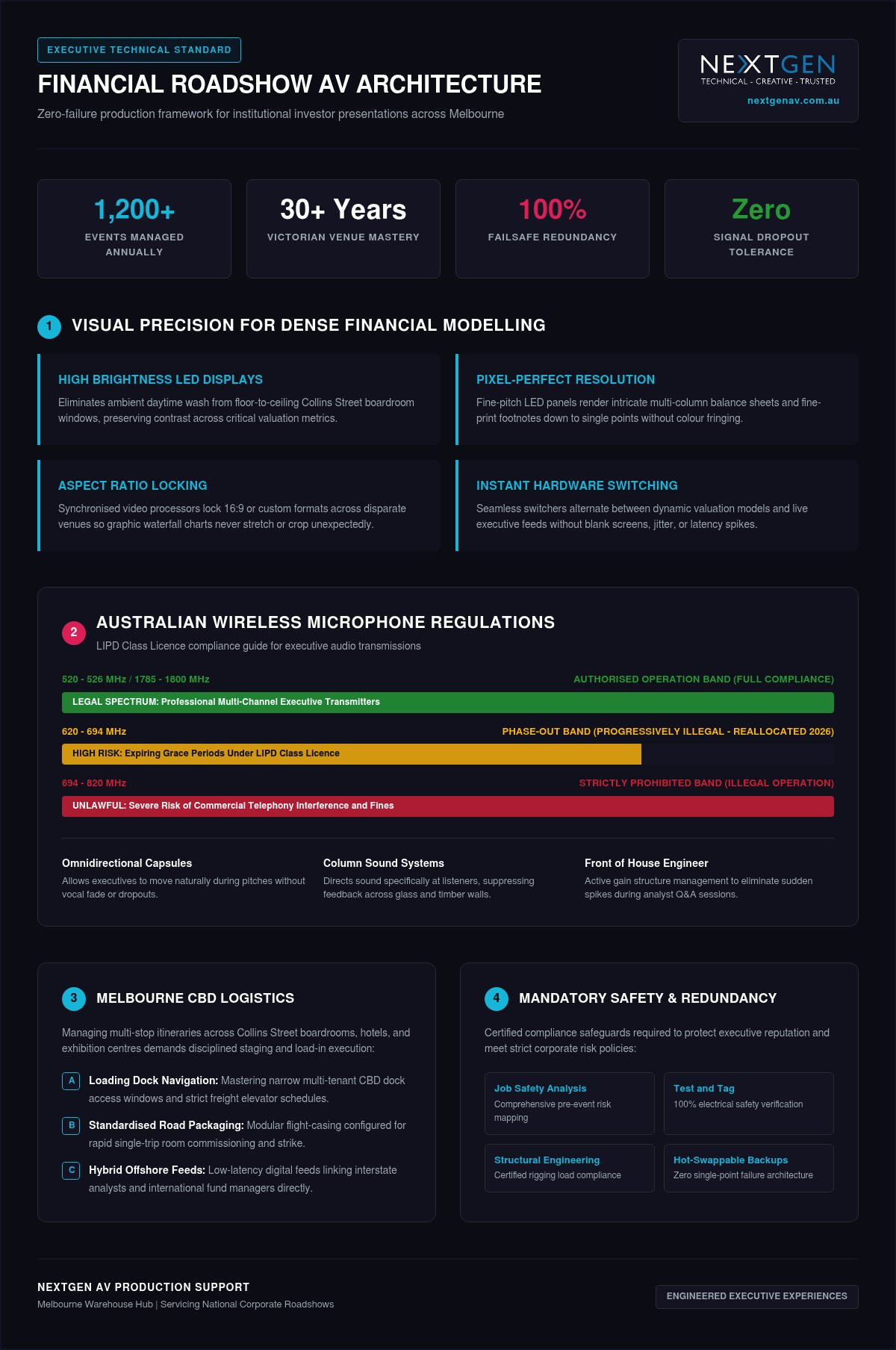
- Ultra-High Contrast: Using high brightness LED displays eliminates ambient wash from floor-to-ceiling boardroom windows, preserving sharp contrast across numerical models.
- Pixel-Perfect Resolution: Fine-pitch LED panels render intricate multi-column balance sheets and font sizes down to single points without blur or colour fringing.
- Aspect Ratio Locking: Synchronised video processors preserve uniform 16:9 or custom wide formats across disparate Melbourne venues, ensuring graphic charts never stretch or crop unexpectedly.
- Instant Source Switching: Seamless hardware switchers let operators alternate between dynamic valuation models and live executive feeds without blank screens or latency spikes.
Multi-stop schedules across Melbourne also demand rapid technical deployment and teardown cycles. As executive itineraries move between Collins Street boardrooms and dockside conference facilities, consistent hardware packaging ensures setups complete smoothly within narrow access windows. Concurrently, enterprise-grade hybrid connectivity links international fund managers directly to the room, giving offshore capital equal, latency-free access to executive leadership.
Essential Technical Specifications for Executive Roadshow Production
Procuring production infrastructure for an investor tour requires moving beyond basic conference equipment checklists. Tier 1 financial roadshow av services treat signal distribution, speech reinforcement, and broadcast encoding as an integrated, fail-safe ecosystem. Aligning your procurement specifications with established audiovisual industry standards protects your roadshow against embarrassing audio dropouts and latency mismatches across every presentation stop.
Speech Intelligibility and Controlled Acoustic Reinforcement
Muffled audio ruins investor confidence during rapid-fire question times. Clear dialogue requires premium wireless microphone transmitters paired with miniature omnidirectional capsules, allowing executives to move naturally without voice fade. In reflective hotel suites lined with glass and polished timber, compact column sound systems direct acoustic energy straight at the audience while avoiding reverberant boundaries. A dedicated front of house engineer actively manages the gain structure and frequency response, suppressing sudden feedback spikes the moment an analyst asks an unamplified question from the floor.
Frequency management requires strict legal compliance. Australia’s LIPD Class Licence strictly prohibits operating wireless gear within the 694-820 MHz band. A further spectrum reallocation finalized in early 2026 makes equipment operating in the 620-694 MHz range progressively illegal as grace periods expire. Professional production crews deploy multi-channel wireless microphone receivers strictly within legal bands (such as 520-526 MHz or 1785-1800 MHz), using live RF scanners to coordinate channels around local television broadcasts and ensure full compliance with Australian wireless microphone regulations.
Display Technologies and Advanced Signal Distribution
Standard venue switchers often introduce a jarring black flash when alternating between presenter laptops. To maintain visual polish, roadshow kits route synchronised primary and secondary playback machines through a broadcast-grade video processor. This ensures seamless cutaways, instant source redundancy, and customized multi-window layouts for simultaneous executive video feeds and data slides.
- Modular Video Walls: Deploying ultra-fine pitch led video wall configurations delivers uniform brightness, wide viewing angles, and deep black levels across compact executive dining rooms or expansive ballrooms.
- Digital Comfort Monitors: Low-profile downstage displays mirror presentation slides, presenter notes, and show clocks, allowing your C-suite to reference metrics naturally without turning their backs on analysts.
- Active Signal Distribution: Shielded, professional-grade signal extenders deliver uncompressed 4K video across long cable runs without packet drop or colour compression.
Secure Hybrid Infrastructure and Compliance
Connecting offshore fund managers requires more than standard video calling apps over unmanaged hotel networks. Professional delivery incorporates secure hybrid event staging solutions using enterprise streaming hardware with hardware-level encryption. These encoders support bonded network connections, aggregating hardwired venue ethernet with private cellular uplinks to prevent packet loss during confidential market-sensitive announcements. If you are structuring your upcoming national tour, consulting the technical specialists at NextGen AV ensures every venue is surveyed and equipped with the correct infrastructure well before your opening presentation.
Evaluating Technical Reliability: Redundancy and Safety Frameworks
Relying on built-in hotel equipment introduces unacceptable operational vulnerability. Most in-house conference suites route presentations through unmonitored consumer splitters and single laptops, creating obvious points of failure. If an operating system freezes or a display cable faults mid-pitch, the entire room goes dark. Engaging dedicated financial roadshow av services replaces standard venue unpredictability with mirrored fail-safe engineering across every link in the technical transmission chain.
Hardware Redundancy and Instant Fail-Safe Protocols
Mission-critical investor meetings require complete hardware duplication. Production teams run synchronised primary and secondary presentation laptops into a professional switcher. If the master playback machine crashes, the operator switches to the backup input in milliseconds without visual disruption. Continuous online uninterruptible power supplies protect core processing hardware, isolating your show from building voltage sags or an overloaded circuit breaker. Audio distribution adopts the same standard, pairing split-line analogue channels alongside digital network routes so executive dialogue stays live even if a primary console channel drops.
As modern capital raisings increasingly connect to virtual presentation platforms, maintaining rock-solid local fail-safe architecture prevents remote feeds from dropping offline while analysts evaluate your transaction.
Australian Compliance and Structural Rigging Integrity
Tier-one Australian venues enforce strict safety and risk governance. Bringing unverified production hardware into a premier Melbourne hotel can result in venue managers halting setup on the spot. Professional production partners mitigate these risks through methodical on-site safety management:
- Current Test and Tag Validation: Every single power cable, distribution board, and active device carries documented proof of electrical safety testing.
- Job Safety Analysis: Structured hazard identification protocols safeguard crew, hotel facilities, and executive attendees during rapid bump-in schedules.
- Certified Event Rigging: Any overhead lighting trusses or suspended sound arrays must be hung by a qualified rigger holding a current High-Risk Work Licence.
- Structural Engineering Certificate: Heavy ground-supported video walls require documented verification to confirm distributed floor load stability across commercial ballroom staging.
This disciplined approach to technical compliance removes logistical friction across every stop, giving corporate access teams total confidence in their production partner.
Managing Multi-Venue Roadshow Logistics Across Melbourne
Executing an investor presentation across multiple urban locations tests physical operational planning just as much as digital architecture. Moving an executive team between private dining rooms on Collins Street, conference hotels in Southbank, and boutique spaces near Docklands introduces tight access schedules and site-specific bottlenecks. Engaging specialised financial roadshow av services guarantees that logistical complexities are resolved well before the first analyst checks into the room.
Navigating Melbourne CBD Venues and Private Dining Suites
Melbourne’s commercial core features a mix of modern towers and historic buildings, each presenting distinct site restrictions. Loading docks along narrow CBD laneways frequently enforce strict 30-minute unloading windows and low clearance heights that exclude standard logistics vehicles. Inside heritage properties, antique wall panelling and older electrical switchboards restrict power distribution, requiring production crews to balance presentation power away from commercial kitchen circuits.
Conducting pre-event acoustic and electrical site surveys avoids sudden delays on presentation day. When scheduling executive breakfast briefings starting at 7:30 AM, technical crews negotiate 5:00 AM dock clearance to establish signal integrity, verify RF clean air, and calibrate audio profiles before catering staff arrive.
Maintaining Brand Consistency Across National Roadshow Legs
Switching production suppliers in every capital city introduces unacceptable variations in slide rendering and microphone levels. Partnering with a centralised team for full service event production ensures that your C-suite steps into the exact same technical environment in Melbourne, Sydney, and Brisbane.
- Standardised Equipment Packages: Touring matched hardware profiles ensures that display resolutions, switcher protocols, and control surfaces remain identical at every stop.
- Colour Profile Calibration: Lock colour management profiles within the digital processors to ensure corporate palettes and financial charts display identically across every room.
- Dedicated Touring Direction: Eliminating unvetted venue technicians means familiar technical directors anticipate your CEO’s speaking cadence and handle slide cues without hesitation.
- Advanced Crew Scheduling: Coordinated transport plans place technicians on site hours ahead of corporate travel parties, ensuring all comfort monitors and clickers are live upon arrival.
To eliminate operational surprises during your next multi-city capital raise, book a technical site survey with NextGen AV to lock in your touring schedule and venue access pathways.
Partnering with NextGen AV for Flawless Roadshow Delivery
Pitching to capital markets demands a technical partner that functions as an invisible engine behind the scenes. When billions in capital allocation or equity valuations hang in the balance, your audiovisual infrastructure must operate with complete certainty. Backed by over 30 years of technical mastery across Victorian event venues, NextGen AV delivers high-tier corporate production trusted by corporate teams, government departments, and institutional financial advisors throughout Australia.
The NextGen AV Technical Advantage in Melbourne
Executing more than 1,200 events annually across Australia, our team provides the seasoned technical direction required to eliminate production friction before it surfaces. Our centrally located Melbourne warehouse enables rapid dispatch and direct access to an extensive inventory of digital sound systems, high brightness LED displays, and broadcast-grade switching hardware. When planning multi-city campaigns, partnering with an established provider for audio visual hire Melbourne connects your organisation with certified technicians, qualified riggers, and dedicated project leads who know the structural and electrical quirks of every major local venue.
Initiating Your Roadshow Production Consultation
Securing dedicated financial roadshow av services begins with a methodical discovery workflow. Our technical directors assess your presentation formats, aspect ratios, and travel schedules to create an airtight production schedule tailored to each stop:
- Presentation File Auditing: We inspect slide decks, embedded video assets, and financial modelling spreadsheets early to guarantee flawless visual scaling.
- Direct Venue Liaison: Our technical leads coordinate directly with hotel banqueting teams and building engineers, securing dock access permits and clean electrical feeds ahead of time.
- Acoustic and RF Pre-Mapping: Technicians scan local frequency bands and configure digital sound systems to match the exact dimensions and reflective surfaces of each boardroom.
- End-to-End Show Calling: Dedicated operators run cues, transition feeds, and manage remote investor streams so your leadership team never has to manage a technical issue.
By resolving technical complexity behind the scenes, we ensure your leadership team presents with total authority. Contact the NextGen AV team today to lock in complete technical certainty for your upcoming roadshow.
Command Investor Confidence on Your Next Capital Raise
Executing a flawless investor roadshow requires moving past basic equipment hire and embracing uncompromising technical precision. By implementing dual-machine failover architecture, calibrating high brightness LED displays for complex numerical models, and maintaining strict RF compliance, you safeguard your leadership team against costly boardroom disruptions. Flawless presentation delivery transforms investor engagement into tangible market confidence.
With over 30 years of technical mastery in Australian corporate event production and an annual delivery of 1,200+ flawlessly executed live and hybrid events, NextGen AV manages every technical variable behind the scenes. Our Melbourne-backed warehouse houses an extensive inventory of high brightness LED displays and digital sound systems, ensuring touring consistency across every presentation stop. Partner with NextGen AV for your next financial roadshow to secure premier financial roadshow av services, leaving your executive team free to focus entirely on closing the deal.
Frequently Asked Questions
Can an external AV production team operate inside hotel venues with existing in-house providers?
Yes, corporate clients retain the right to engage their preferred production partner to execute high-stakes investor presentations. While many Melbourne hotels contract preferred in-house suppliers, organisers frequently bring in specialised financial roadshow av services to ensure consistency. NextGen AV works collaboratively with hotel banqueting managers and in-house staff, coordinating bump-in permits, floor load limits, and loading dock access without adding administrative stress to your schedule.
What happens if a presentation computer crashes during a live investor pitch?
A mirrored secondary machine takes over immediately with zero visual interruption on the main screen. Our technical directors run primary and backup presentation laptops simultaneously into a broadcast-grade video processor. If an operating system freezes, the video switcher cuts to the identical backup feed in milliseconds. Remote analysts and boardroom attendees won’t see a flicker, keeping your executive team in complete control.
How do Australian wireless microphone regulations affect corporate boardroom presentations?
Operating wireless equipment on restricted radio spectrum breaches federal ACMA regulations and risks severe signal dropouts. The ACMA prohibits wireless microphones in the 694-820 MHz band, with the 620-694 MHz band currently being phased out across the country. We deploy premium wireless microphone hardware operating strictly within legal frequencies, scanning the local Melbourne RF environment to bypass interference from broadcast television and emergency communication channels.
Is a dedicated audio engineer necessary for an intimate roadshow breakfast meeting?
Yes, having an audio engineer on site prevents sudden feedback spikes and ensures total speech clarity. Private dining rooms and luxury suites often have reflective glass windows and polished timber tables that amplify room resonance. A dedicated front of house engineer balances dynamic gain between executive presenters and unamplified questions from the floor, preserving pristine vocal projection without annoying acoustic rings or muffled dialogue.
What is the setup time required for a professional roadshow AV configuration?
A standard executive roadshow setup generally requires two to three hours of dedicated on-site preparation. This window allows our technical crew to assemble display hardware, calibrate audio profiles, verify electrical safety, and test encrypted streaming connections. For early breakfast briefings in Melbourne CBD venues, our crew coordinates dock clearance from 5:00 AM, ensuring all displays, comfort monitors, and microphones are fully operational before executives arrive.
How does NextGen AV handle confidential, market-sensitive financial presentations?
We deploy closed-loop, air-gapped hardware configurations to protect confidential data during sensitive market briefings. Presentation decks run directly from isolated local machines rather than open venue networks. When delivering financial roadshow av services that include virtual participation, we transmit feeds through secure, encrypted streaming appliances with bonded network uplinks. Our crew adheres to strict confidentiality protocols, protecting your market-sensitive transaction details.
Can you support hybrid roadshow presentations across multiple Australian capital cities?
Yes, NextGen AV manages complete multi-city roadshow campaigns across Australia from our Melbourne base. We provide uniform technical production whether your schedule covers Melbourne, Sydney, Brisbane, or regional business centres. By deploying matched equipment profiles and experienced touring technical direction, your executive team experiences identical control surfaces and reliable hybrid streaming at every single stop, removing the uncertainty of unvetted local contractors.
