
A remote presenter can join your Melbourne event from elsewhere and feel part of the room, rather than like a video call dropped onto a screen. Successful remote presenter integration for events depends on planning the connection, audio and stage handoffs as one production, then testing the presenter’s actual setup before show day.
It’s natural to focus on whether the speaker can connect. The bigger challenge is making sure they know when they’re live, can see and hear what they need, and appear clearly to the audience. A dropped connection, frozen image or poorly timed handoff can interrupt the programme, so preparation must account for both the presenter’s experience and the live room.
This guide explains how to plan the technical workflow, prepare the presenter, rehearse the full segment and support it live. Careful screen framing, audio routing and clear communication help remote speakers contribute with confidence and give your audience a seamless event experience.
Key Takeaways
- Map the venue, audience, event format and remote participation needs before shaping the technical workflow.
- Prepare the presenter’s internet, camera and audio setup so they can connect clearly with the room.
- Rehearse the joining process and stage handoffs, then keep technical support aligned throughout the live segment.
- Plan for both in-room and online audiences with clear screen framing, moderation and ways to take part.
What makes remote presenters risky at live events?
Hybrid events connect a remote presenter to a live room, but the presenter’s feed also depends on technology outside the venue. Plan the platform, audience format and technical workflow together to reduce production surprises.
Presenter Location Testing
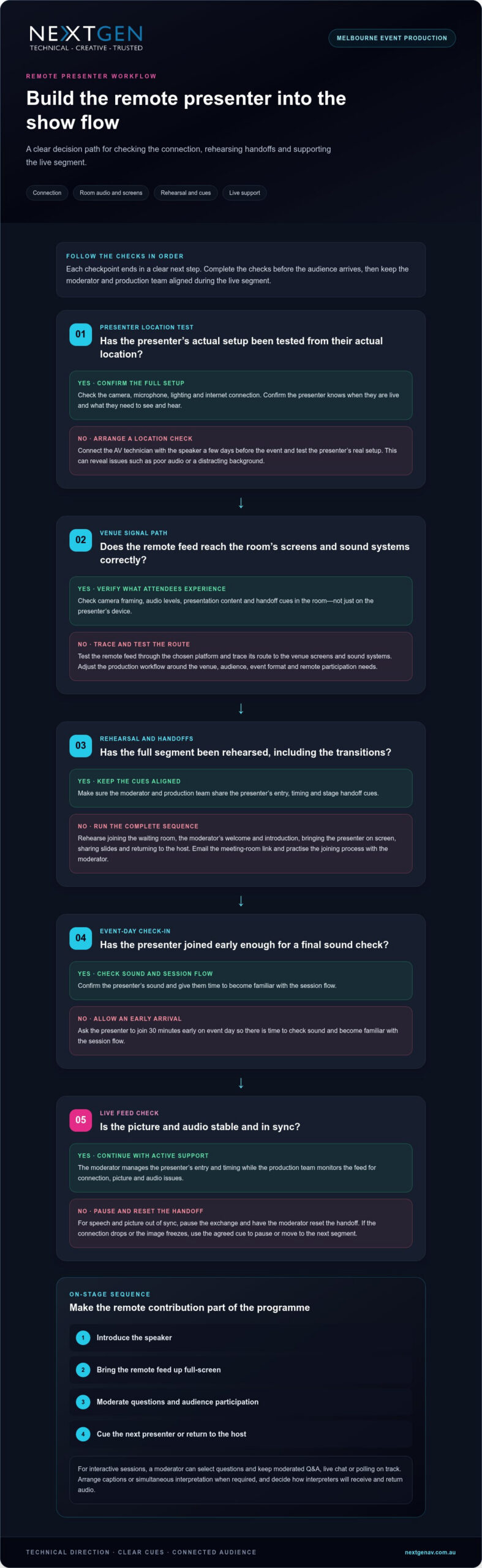
Test the presenter’s actual setup from their actual location, including their camera, microphone, lighting and internet connection. This reveals issues that a venue-only check can’t catch, such as a distracting background or poor audio. Connect the AV technician with the speaker a few days before the event, then confirm the presenter knows when they’re live and what they need to see and hear.
Pre-event Technical Checks
Before the event, test the remote feed through the chosen platform and trace its route to the room’s screens and sound systems. Confirm camera framing, audio levels, presentation content and handoff cues. Plan the venue, audience, event format, remote participation needs and preferred platform together before designing the production system.
A live webinar needs active technical operation, not just a meeting link. Assign a moderator to manage the presenter’s entry and timing, while the production team monitors for a dropped connection, frozen image or audio desynchronisation. Treat the remote feed as a production dependency, with a clear cue for pausing or moving to the next segment if it fails.
For a recording, tell the presenter in advance whether the session will be recorded, why it will be used, who can access it and how it will be shared. Obtain consent and limit access to authorised people. In Australia, consider privacy and data handling when recordings identify a person or capture personal information.
Across Melbourne, specialist event-production companies like NextGen AV with virtual and hybrid event capability coordinate remote feeds with in-room audio, screens and live production. Look for an integrated workflow that includes presenter testing, technical direction and support during sessions, rather than treating the connection as a standalone webinar.
How do you make a remote presenter feel integrated on stage?
Build the presenter’s connection, audio and stage cues into the running order. A clear workflow helps speakers engage with the room instead of simply appearing on screen.
Audio, Internet and Workspace Setup
Ask the presenter to use a wired internet connection where possible, along with headphones with a built-in microphone. If Wi-Fi is needed, choose the strongest signal in a quiet, well-lit room. Position the camera at eye level and frame the head and shoulders. Close windows and silence distracting devices to keep speech clear.
Integration Beyond a Video Call
A simple video call puts a speaker on screen; event integration connects their segment to the stage, audience and show cues. Plan the sequence: introduce the speaker, bring their feed up full-screen, manage questions, then cue the next presenter. A moderator can relay audience questions while the remote speaker sees the room and reads its reactions.
Make the remote feed part of the production mix, with a deliberate screen layout and audio route. This gives the audience a clear view and helps the presenter feel included. For interactive sessions, use moderated Q&A, live chat or polling, with a moderator selecting questions and keeping the exchange on track.
Managing Latency and Technical Failures
To limit audio feedback, avoid sending the room’s amplified sound back through the remote microphone. Coordinate mute cues and audio routing between the presenter and venue team. If speech and picture drift out of sync, pause the exchange and have the moderator reset the handoff instead of letting confusing audio continue.
Plan accessibility before the session: arrange captions or simultaneous interpretation when required, and decide how interpreters will receive and return audio. Congress Australia describes an event using interpretation and captioning for 9 languages, and provided seven simultaneous interpretation channels for the ASEAN – Australia Special Summit. Recording can support replay, training or future marketing; explain its purpose and obtain the presenter’s consent before recording.
Remote presenter testing, rehearsals and live event support
A rehearsal makes the presenter’s connection a planned part of the running order. Test the joining process, platform and stage handoffs before the live audience arrives.
Presenter Joining and Moderator Rehearsals
Send the meeting-room link by email and rehearse the presenter’s entry into the waiting room with the moderator. The moderator should practise welcoming the speaker, confirming they’re ready and cueing their introduction. Ask the presenter to join 30 minutes early on event day, allowing time to check their sound and become familiar with the session flow.
Platforms and AV Equipment
Microsoft Teams, Zoom, YouTube, Vimeo, Facebook Live and custom streaming platforms can carry remote sessions. The production setup may include cameras, streaming infrastructure, audio routing and systems to manage presentation content. Select the platform around the audience and event format, then test how its feed reaches the venue screen and sound systems. That lets technical operators monitor the picture and audio together.
Connection and Pre-event Testing
Connect the presenter using the event’s chosen platform, then test their actual camera, microphone and presentation content. Run the full segment, including the host’s introduction, the presenter’s speaking cues and the handoff back to the stage. Check the streaming feed in the room, not just on the presenter’s device, so operators can assess what attendees will see and hear.
Include transitions in the technical rehearsal. Practise bringing the presenter on screen, sharing slides and returning to the host; clear cues prevent dead air between speakers. The moderator and production team should agree on a pause signal if the feed freezes or drops.
During live streaming, assign an operator to monitor the connection, picture and audio while the moderator manages the speaker. If a technical failure interrupts the segment, the host can hold the room and follow the agreed running-order response. This coordinated support helps keep the session clear for attendees in Australia and online.
Remote and virtual speakers for hybrid conferences
A hybrid conference serves people in the room and participants joining virtually, so plan both experiences together. Choose a format that suits the meeting’s purpose, the speaker’s role and how each audience will participate.
For an investor relations event, a remote executive can address a Melbourne audience while other stakeholders join online. Set the speaking order, screen layout and question process in advance. Keep slides legible on smaller devices, and show the speaker clearly in the venue so their contribution feels connected to the meeting.
Hybrid formats can include a live in-room conference with remote speakers, a streamed stage programme or sessions designed for both audiences. Match the format to the content: a presentation may need a clear visual feed and slides, while a panel needs orderly turn-taking and a way for online participants to contribute. The production plan should coordinate camera coverage, audio, presentation management and streaming.
Moderated Q&A gives both audiences a way into the discussion. A moderator can collect questions from the room and online channels, group similar topics and direct them to the speaker. Explain how attendees can submit questions before the session begins, and give the moderator a clear view of the remote speaker and running order.
Online access can extend an organisation’s audience beyond those able to attend in person. Registration, passwords or private access links can control entry to a stream. To connect locations visually, show the remote speaker full-screen while they speak, then return to slides or a panel view as the programme moves on. These cues help remote and in-room participants follow the same conversation.
NextGen AV’s virtual and hybrid event solutions can bring the stage, speakers and streaming workflow together for conferences and investor events. Plan your hybrid event production around the experience you want both audiences to share.
NextGen AV: LED Video Walls
NextGen AV integrates remote presenters into the room with LED Video Walls planned around clear sightlines and the stage design. A well-framed presenter feed helps in-person attendees follow the conversation, while coordinated Professional Audio Systems keep speech clear across the venue.
For a hybrid conference or product launch, NextGen AV can coordinate these elements with Lighting Design and Equipment, Staging and Rigging, and technical production planning. The aim is a considered experience where the remote speaker’s image, audio and stage cues support the programme instead of feeling like separate elements.
If you’re planning a Melbourne event with remote speakers, contact NextGen AV to discuss your production requirements.
Design the next event around connection
Before finalising the running order, decide what the remote presenter should contribute to your event. A keynote, live product announcement and panel discussion each call for a different rhythm, visual treatment and relationship with the room. Shape the production around that purpose so the technology supports the message rather than becoming the focus.
That creative decision also gives your event team a clear brief: what the audience should see, how the speaker joins the conversation and what the moment needs to achieve. Strong remote presenter integration for events is more than putting a feed on screen. It makes distance feel intentional and gives the speaker a meaningful role in the experience.
For a Melbourne event, NextGen AV can help translate that vision into a coordinated production. Contact NextGen AV about your event to discuss the experience you want to create. Your next event can bring every speaker into the story.
Frequently Asked Questions
Can presenters join from different locations?
Yes. Speakers in different cities or countries can join the same event programme remotely, with each appearance scheduled into the running order. Supported platforms include Events Air, Cvent, YouTube Studio, Zoom, Microsoft Teams, Bettercast. For a Melbourne conference with interstate panellists, a moderator can coordinate each speaker’s turn while the production team switches between their feeds.
Can remote attendees participate in Q&A?
Yes. Remote attendees can submit questions through the event’s chosen participation channel, while a moderator selects and directs them to the speaker. For a product briefing, the moderator can group questions on the same topic and read them aloud, giving online contributors a voice alongside people in the room. Explain the process before the session starts.
How do you ensure a reliable connection for a remote presenter?
Match the presenter’s connection to the selected platform and planned video quality, then assess upload stability under realistic working conditions. Reduce competing network activity during the presentation, such as large file uploads. An independent backup connection, such as mobile data, can provide another route if the primary service fails. Test the switch so the team knows how to recover.
What is remote presenter integration for events?
Remote presenter integration for events is the planned connection between an off-site speaker and the live programme. It brings the presenter’s contribution into the event’s visual, audio and session flow, rather than treating it as a separate call. For example, a virtual panellist can join a discussion with an in-room chair and remote participants.
What internet bandwidth and backup connectivity are needed for remote presentations?
Bandwidth needs depend on the platform’s requirements, video quality, audio, screen sharing and other activity on the presenter’s network. Follow the platform’s published guidance, then test the actual connection with the presenter’s camera and presentation running. Plan an independent backup route, such as mobile data, based on local coverage and the presenter’s setup, and rehearse the switch.
The house lights dim and the opening cue is seconds away, yet instead of the stage manager’s voice, your headset fills with static or the muffled chatter of a nearby security team. It is the nightmare scenario for any production lead, where a simple lapse in your event communication systems rental choice transforms a high-stakes performance into a series of missed cues and frantic hand signals. You know that behind every flawless event is an invisible engine of coordination, and you shouldn’t have to worry about wireless blackspots or battery failure when the pressure is on.
We agree that your crew deserves the same level of precision in their headsets as the audience hears through the front-of-house speakers. This 2026 guide promises to show you how to choose and deploy a robust communication infrastructure that guarantees absolute synchronisation across lighting, audio, and stage departments. We will look at the latest full-duplex digital intercoms, how to ensure ACMA compliance for interference-free operation, and the technical strategies required to maintain professional-grade reliability for an 18-hour show day.
Key Takeaways
- Understand why professional communication serves as the vital nervous system for any high-stakes production, ensuring every cue is executed with absolute precision.
- Discover the technical differences between digital intercoms and two-way radios to determine which technology best suits your crew’s specific talk-paths and security needs.
- Learn how to optimise your event communication systems rental by conducting thorough site surveys and assessing the unique acoustic challenges of your venue.
- Navigate the complexities of ACMA frequency licensing to avoid interference from unlicensed gear and ensure your production remains compliant and crystal clear.
- Explore the benefits of integrating your comms infrastructure into a total audio-visual package, backed by 30 years of expertise in the Melbourne events industry.
The Critical Role of Event Communication Systems in Modern Production
Think of your event as a living organism. If the audio-visual elements are the muscles and the vision is the heart, then a professional event communication systems rental is the nervous system. It carries every pulse of data and every urgent command from the brain, the stage manager, to the extremities of the production. Without this connectivity, the most expensive LED walls and line arrays are just static hardware. Truly seamless production relies on the ability to transmit intent instantly. This allows a lighting operator to hit a blackout the exact millisecond the drummer strikes the final beat, creating a moment of pure, coordinated impact.
There is a profound difference between managing a crowd and calling a show. Simple two-way radios are fine for coordinating car park arrivals or security patrols, but they fall short when you’re choreographing a complex gala. Calling a show requires a continuous, open dialogue where the stage manager can hear the breath of the crew and anticipate their needs. This level of intimacy prevents the common AV glitches that haunt poorly planned events, such as mistimed video rolls or audio feedback during a critical keynote. When the crew feels connected, their stress levels drop significantly. They move from a state of reactive panic to one of proactive artistry, focusing on the prestige of the final result rather than fighting their equipment.
Beyond Walkie-Talkies: Defining Professional Comms
The evolution of production has pushed us past the era of simple push-to-talk devices. Modern digital intercom systems create integrated networks that allow for full-duplex conversation, meaning your team can talk and listen simultaneously just like a phone call. In high-interference environments like the Melbourne CBD, consumer-grade gear often buckles under the weight of RF noise from skyscrapers and mobile towers. A professional setup provides dedicated, discrete channels. This ensures the lighting department isn’t distracted by audio troubleshooting, and the stage manager has a direct, private line to the technical director to keep the schedule on track.
Risk Mitigation through Reliable Infrastructure
Reliability isn’t just a luxury; it’s a safety requirement. High-stakes corporate shows demand a zero-fail comms environment, which we define as a dedicated infrastructure where redundant signal paths and expert frequency management ensure every critical cue is delivered and acknowledged without exception. This infrastructure prevents the dead air that can ruin a live broadcast or the timing errors that turn a prestige award ceremony into a series of awkward silences. Beyond the creative flow, these systems act as a lifeline for emergency protocols. They ensure that if a situation arises, the entire team can be alerted and organised in seconds without the audience ever knowing there was a concern.
Key Technologies: From Two-Way Radio Hire to Digital Intercoms
The technical landscape of modern production has shifted, moving away from simple noise-makers toward sophisticated, low-latency networks. Selecting the right event communication systems rental depends entirely on the specific roles within your crew. For logistics and security teams, Digital Mobile Radio (DMR) remains the heavy lifter. These units provide robust, long-range coverage that ensures your front-of-house staff and loading dock crews remain connected across vast distances, even through the thick concrete walls of Melbourne’s premier convention centres.
At the heart of the production, wired intercom systems provide the rock-solid reliability required for stationary positions. Your technical director and lighting operator, situated at the ops desk, don’t need mobility; they need a connection that is immune to wireless interference. When Choosing the Right System for your mobile stage crew, wireless full-duplex technology is the gold standard. It allows for continuous, hands-free conversation, enabling a rigger or stage hand to use both hands for their craft while maintaining a crystal-clear dialogue with the stage manager.
For city-wide festivals or sprawling outdoor events, Push-to-Talk over Cellular (PTToC) offers an elegant solution. By leveraging existing mobile networks, PTToC bridges the gap where traditional radio frequencies might struggle, providing wide-area coverage that keeps your entire team synchronised across kilometres of urban terrain. Our team can help you organise a bespoke comms package that aligns perfectly with your show’s complexity and venue constraints.
Digital vs. Analogue Systems
Digital systems have rendered analogue units obsolete in professional circles. By converting voice into data packets, digital DMR units offer superior audio clarity and eliminate the background hiss associated with older technology. More importantly, digital channels allow for advanced encryption. This is a vital feature for high-profile corporate events where sensitive announcements must remain private. Professional-grade digital hardware also boasts significantly better battery life, often surviving an 18-hour show day on a single charge while withstanding the physical rigours of a frantic bump-in.
Specialised Accessories for Every Role
The right headset is just as important as the base station itself. In high-decibel environments like concerts or trade shows, heavy-duty noise-cancelling headsets are essential to protect crew hearing and ensure instructions are heard over the PA. Conversely, floor managers and VIP hosts often require discrete earpieces that provide clear audio without the bulky profile of a traditional headset. We also provide multi-unit charging stations and speaker microphones to ensure large-scale deployments remain powered and functional from the first briefing to the final pack-down.
Choosing the Right System: A Buyer’s Comparison Framework
Selecting your event communication systems rental is not merely a matter of counting heads. It is an exercise in mapping the pulse of your production. You must first audit the ratio of ‘talkers’ to ‘listeners’ within your crew. While a logistics team might only need to report status updates via simplex channels, where only one person can speak at a time, your core production crew requires the fluid, simultaneous exchange of a full-duplex system. Understanding this distinction is the first step in moving from a basic setup to a professional-grade infrastructure that supports the artistry of your show.
The venue itself dictates the hardware. An indoor ballroom in the Melbourne CBD presents different challenges than a sprawling outdoor festival site at the Sidney Myer Music Bowl. Physical barriers like thick concrete walls or massive steel rigging can swallow wireless signals, leading to the dreaded ‘dead air’ that puts a production at risk. Budgeting for your comms should be viewed as show insurance. The investment in a high-end, reliable rental is negligible when compared to the professional fallout and stress of a failed show caused by a missed cue or a battery dying at a critical moment.
The ‘Show-Caller’ Test
A show-caller is the conductor of your event’s orchestra. They require a full-duplex system to maintain the ‘rhythm’ of the event, allowing them to hear the breath and readiness of the crew in real time. This typically involves a multi-channel structure where the caller can toggle between discrete departments like lighting, audio, and stage management without cluttering the main feed. This level of technical direction is what bridges the gap between a standard event and a world-class experience. It is why we often integrate these comms with our Professional sound system hire to ensure every element of the production is perfectly aligned from the first cue to the final curtain.
Interference and Range Considerations
Melbourne’s premier event precincts are notorious for RF noise. From the skyscrapers of the CBD to the high-density wireless environments of Southbank, signal interference is a constant threat. If your event spans multiple levels or a vast outdoor area, you will likely need to deploy repeaters to extend the range of your two-way radio fleet. A technical site survey is essential to identify potential blackspots and ensure your signal penetrates the physical barriers of the venue. By planning for these environmental factors early, you ensure your crew remains connected, regardless of the architectural challenges of the space.

Planning Your Comms Infrastructure: Site Surveys and ACMA Compliance
A flawless production is never the result of luck; it is the product of meticulous preparation that begins long before the first road case enters the venue. For a high-impact event communication systems rental to succeed, a technical site survey is non-negotiable. This proactive assessment allows us to map the unique RF environment of your location, identifying potential blackspots created by heavy structural steel or subterranean concrete layers. By conducting a rigorous ‘walk-test’ protocol during the pre-show phase, we ensure that every corner of the site, from the green room to the loading dock, maintains a crystal-clear signal before the first cue is ever called.
Operating in Australia requires a deep understanding of the legal landscape governed by the Australian Communications and Media Authority (ACMA). Using unlicensed ‘grey market’ gear doesn’t just risk signal dropouts; it exposes your organisation to significant legal liability and potential fines. Professional systems must adhere to the Radiocommunications (Low Interference Potential Devices) Class Licence 2025, ensuring that your equipment operates on designated shared frequencies without disrupting emergency services or other vital broadcasts. We ensure all hired electronics meet strict RCM safety standards, providing you with the peace of mind that your infrastructure is both high-performing and fully compliant.
Frequency Management in Melbourne
The RF spectrum in Melbourne’s premier precincts, such as the MCEC or the major hotels along Southbank, is incredibly crowded. Without a co-ordinated frequency plan, your production comms could easily clash with nearby events or the venue’s internal security teams. For large-scale multi-AV projects, we act as your frequency coordinator, carving out dedicated space in the airwaves to prevent cross-talk and interference. This level of master-planning is a core component of our Full service event production, where we manage the technical heavy lifting so you can focus on the show’s creative execution.
Logistics and On-Site Support
While some choose ‘dry hire’ to save on initial costs, the complexity of modern intercom networks makes a turnkey solution far more efficient. A turnkey event communication systems rental includes the expertise of an on-site technician who manages the invisible details, from real-time troubleshooting to proactive battery swaps during critical show moments. Having a seasoned veteran on the ground ensures that any technical hiccups are resolved in seconds, maintaining the momentum of your event. If you are ready to secure a rock-solid foundation for your next production, contact our team to discuss a tailored comms strategy that guarantees absolute reliability.
Why Partner with NextGen AV for Your Melbourne Event Comms
Choosing a partner for your event communication systems rental is about more than just securing hardware; it is about finding an invisible expert who understands the heartbeat of a live production. We don’t view comms as an isolated utility. Instead, we integrate your intercom network directly into our total lighting and audio design. This holistic approach ensures that every department is perfectly synchronised, allowing the technical director to orchestrate the show with the precision of a master conductor. With over 30 years of experience navigating the specific RF challenges and logistical quirks of Victorian event venues, we have seen every possible scenario and developed the resilience to handle them all.
Our “Confident Orchestrator” philosophy means we take full ownership of the technical heavy lifting. You shouldn’t have to worry about frequency clashing or headset pairing while you are managing stakeholders and talent. Our solutions arrive custom-programmed and ready to use out of the box, configured specifically for your show’s unique talk-paths and department structures. This meticulous preparation eliminates the logistical grind of the bump-in, allowing your team to move straight into the creative flow of the event with absolute confidence in their connectivity.
The NextGen AV Advantage: Expert Technical Direction
A sophisticated comms network is only as effective as the hands that guide it. Our technical directors oversee the entire infrastructure, providing a level of oversight that ensures your peace of mind from the first briefing to the final pack-down. Whether you are hosting an intimate corporate meeting in the CBD or a massive community festival in regional Victoria, our solutions are inherently scalable. We provide the same elite-level reliability for a dozen headsets as we do for a hundred. This commitment to excellence is what defines our Audio visual hire Melbourne services, positioning us as a dedicated ally in your project’s success.
Ready to Organise Your Event Comms?
Organising a professional-grade communication setup is a straightforward process when you have the right experts by your side. To request a tailored quote, simply provide our team with your expected crew size, the layout of your chosen venue, and the total duration of the hire. This information allows us to architect a bespoke frequency plan and equipment list that meets your exact needs. You can rest easy knowing that your production is backed by professional-grade reliability and a team that takes personal pride in seamless execution. Let us handle the engine behind the scenes while you take centre stage.
Master the Rhythm of Your Next Production
The success of your next high-stakes event shouldn’t rest on the hope that your headsets will hold a charge. It requires a dedicated infrastructure built on technical mastery and a deep understanding of the unique RF challenges found across Melbourne. By selecting the right blend of digital intercoms for your show-callers and robust radios for your logistics team, you eliminate the friction that leads to missed cues. Remember that a professional site survey and strict ACMA compliance are the foundations of a zero-fail environment, protecting your production from signal interference and legal risk.
NextGen AV brings over 30 years of Melbourne event expertise to your project, offering end-to-end technical production management that allows you to focus on the prestige of the final result. We provide ACMA-compliant, professional-grade equipment that is custom-programmed to meet the specific demands of your venue. Choosing the right event communication systems rental is the final piece of the puzzle in delivering a world-class experience. It’s time to move past the logistical grind and experience the power of a perfectly synchronised crew.
Secure your seamless event comms with NextGen AV today and ensure your next production runs with absolute precision. We are ready to act as your invisible expert, driving the engine of your success from the first cue to the final curtain.
Frequently Asked Questions
What is the difference between simplex and full-duplex communication?
Simplex communication allows only one person to speak at a time while others listen; whereas full-duplex systems enable simultaneous two-way conversation just like a telephone call. This distinction is vital for production flow. Logistics and security teams typically use simplex radios, but show-callers and stage managers rely on full-duplex intercoms to maintain a continuous, uninterrupted dialogue during complex sequences.
Do I need a licence to use hired two-way radios in Australia?
You generally don’t need an individual licence for hired two-way radios because professional rental companies operate under ACMA class licences. These regulations ensure the equipment is compliant with Australian standards for power output and frequency use. We handle all the technical compliance and frequency co-ordination behind the scenes, so your team can focus on the event without worrying about regulatory hurdles.
How many radios should I hire for a corporate event with 500 guests?
The number of units required depends on your crew structure rather than the guest count. A typical corporate gala with 500 guests might require 15 to 25 units to cover stage management, audio-visual technicians, venue catering, and security teams. We recommend mapping out every department head and floor manager to ensure no critical link in your production chain is left without a headset.
What happens if our communication system experiences interference during the show?
If interference occurs, our technical directors immediately transition the crew to a secondary, pre-programmed backup channel. This is why a professional event communication systems rental includes a rigorous frequency management plan. By identifying potential RF clashes during the site survey, we create a redundant infrastructure that keeps your team connected even in the most crowded wireless environments.
Can event comms systems integrate with my existing sound system?
Event comms systems integrate seamlessly with your existing sound system to provide a “program feed” directly into crew headsets. This allows operators to hear the stage microphones while listening for cues from the stage manager. Using professional 4-wire interfaces, we can bridge your intercom network with your audio console to create a unified technical ecosystem that enhances the precision of every cue.
What is the range of a standard digital two-way radio in a city environment?
A standard digital two-way radio typically offers a range of 1 to 2 kilometres in a dense city environment like the Melbourne CBD. However, physical obstructions like high-rise buildings and steel structures can reduce this distance significantly. For events spanning larger urban areas or multiple venue levels, we deploy digital repeaters to boost signal penetration and ensure 100% coverage across your entire site.
Are wireless intercoms better than wired systems for stage management?
Wireless intercoms are superior for mobile stage managers who need to move between the wings and the green room, but wired systems remain the gold standard for stationary operators. Wired stations are immune to RF interference and battery failure; making them the most reliable choice for the lighting desk or technical director. Most high-stakes productions use a hybrid approach to balance mobility with absolute stability.
How long do the batteries last on professional event communication gear?
Professional event communication gear is designed to survive a standard 12 to 18-hour show day on a single charge. High-capacity lithium-ion batteries in modern digital beltpacks and radios provide reliable performance throughout a long bump-in and the final performance. We always provide multi-unit charging stations and spare batteries as part of our event communication systems rental packages to guarantee zero downtime during critical moments.

Make an
Enquiry
Let’s Get Your Event Sorted
Complete the enquiry form with your event date, venue, audience size, event type and budget. Our Melbourne AV team will review your requirements and recommend the right PA, screen, lighting, staging or production setup for your event.
What happens next?
1.We review your event details
Tell us your date, venue, audience size and event type.
2.We recommend the right setup
From PA hire to screens, lighting, staging and full AV production.
3. We come back with clear advice
You’ll receive practical recommendations and a fast quote from our Melbourne team.
Need help urgently?
Call 1300 792 922.