


What if the most profound insight of your event’s headline session is lost to the echo of a cavernous Melbourne ballroom or the jarring screech of a feedback loop? You’ve spent months meticulously organising every detail, yet the entire experience hinges on a signal path that most attendees only notice when it fails. It’s a high-stakes gamble that often keeps even the most seasoned event planners awake at night. Learning how to ensure clear audio for keynote speakers isn’t just about hiring expensive gear; it’s about the invisible orchestration of sound that allows a message to resonate without distraction.
We understand that nothing undermines a speaker’s authority faster than a muffled microphone or a sudden drop in volume as they move across the stage. You deserve the confidence that comes with a seamless, professional production where the technology serves as a silent partner rather than a technical hurdle. This 2026 planner’s guide reveals the technical essentials and professional secrets used by elite technical directors to deliver flawless, crystal-clear audio. We’ll explore advanced wireless microphone configurations, the nuances of managing sound in echo-prone venues, and the proactive engineering steps that guarantee your session earns glowing attendee feedback.
Key Takeaways
- Distinguish between simple volume and speech intelligibility to prevent audience fatigue and ensure every word resonates with clarity.
- Select the ideal microphone for your speaker’s physical presenting style, whether they prefer a discreet lapel or a high-stability headset.
- Master the professional sound check sequence and how to ensure clear audio for keynote speakers through rigorous frequency coordination.
- Deploy digital signal processing to eliminate feedback loops and manage the acoustic challenges of echo-prone Melbourne venues.
- Leverage 30 years of technical direction to remove the stress of live audio, leaving you free to focus on the event’s prestige.
Why Audio Quality is the Make-or-Break Factor for Keynote Success
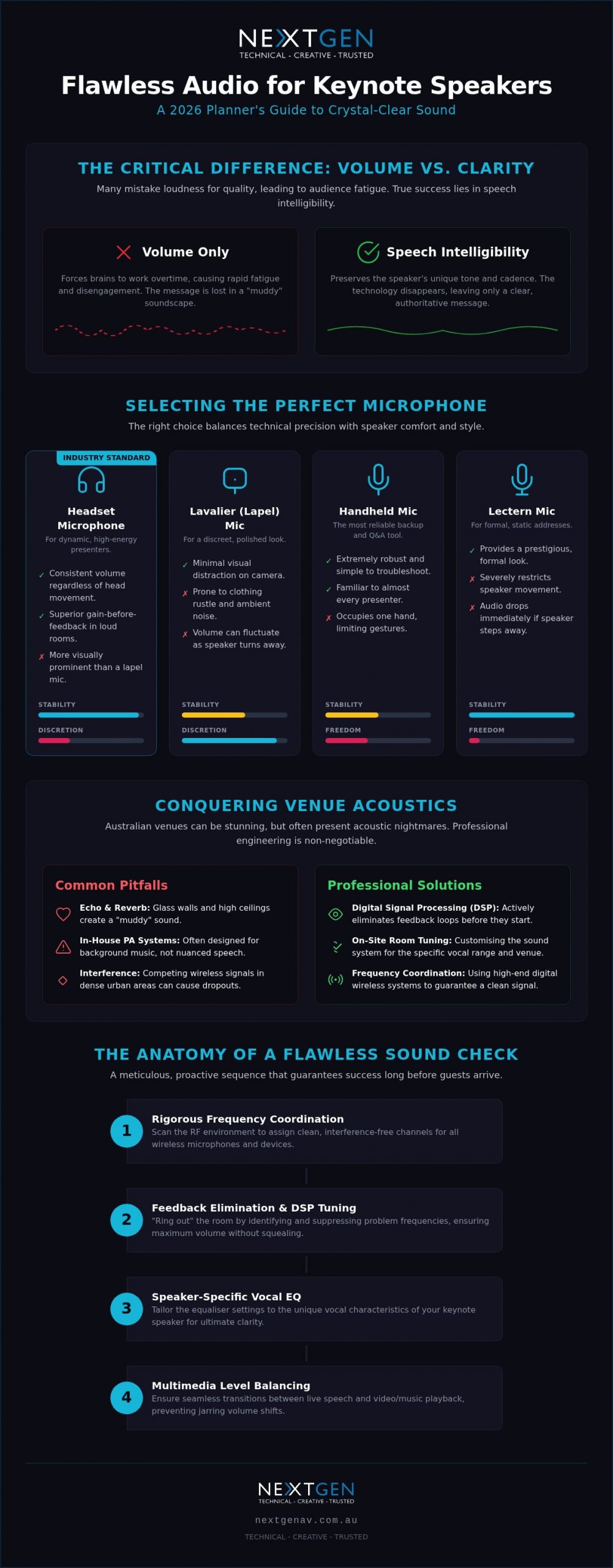
When a keynote speaker takes the stage, they carry the weight of your organisation’s vision. Every word is a strategic asset. If that message is garbled by a low-quality sound system, the investment in the speaker is essentially nullified. Many planners mistake sheer volume for clarity, but the two are worlds apart. Volume is simply sound pressure; clarity is the preservation of the speaker’s unique cadence and tone. Poor audio quality forces the audience’s brain to work overtime to fill in the gaps of missing syllables. This increased cognitive load leads to rapid audience fatigue, causing guests to check their phones or lose interest before the halfway mark. Ultimately, a speaker’s perceived authority is tied directly to the fidelity of their voice. If they sound thin, muffled, or distorted, their message loses its prestige.
The Psychology of Sound in Professional Presentations
High-fidelity sound creates an immediate sense of intimacy and trust between the presenter and the room. When the audio is pristine, the technology disappears, leaving only the speaker’s authority and the audience’s attention. This is the “Invisible Expert” approach, where technical mastery ensures the focus remains entirely on the message. Audio intelligibility serves as the fundamental bedrock of event ROI because a message that isn’t heard clearly is a message that cannot be acted upon. Crystal-clear sound allows for an emotional connection that resonates long after the session ends.
Identifying Common Audio Pitfalls in Australian Venues
Melbourne’s architectural landscape features stunning, glass-walled boardrooms and industrial-chic warehouses that are often acoustic nightmares. These spaces reflect sound waves, creating a “muddy” environment where voices overlap and lose definition. Relying solely on a venue’s “in-house” PA system is a common trap. These systems are often designed for background music or basic announcements, not for the nuanced requirements of a dynamic keynote. Understanding how to ensure clear audio for keynote speakers involves more than just plugging into a wall; it requires on-site engineering to tune the room for the specific vocal range of your talent.
Professional technical direction also manages the delicate transition between live speech and high-impact multimedia audio. Without this oversight, volume levels often fluctuate wildly, jarring the audience and breaking the flow of the presentation. Mastering how to ensure clear audio for keynote speakers means anticipating these environmental variables long before the first guest arrives, protecting your corporate reputation from the “good enough” audio trap.
Selecting the Perfect Microphone for Your Speaker’s Style
The choice of microphone is where technical precision meets the speaker’s personal comfort. It’s a decision that dictates how to ensure clear audio for keynote speakers while maintaining the visual polish of the stage. While many presenters prefer the discreet look of a lavalier (lapel) mic, these units come with technical trade-offs. Because the capsule is further from the mouth, they are more prone to picking up ambient room noise and clothing rustle. In contrast, headset microphones have become the industry gold standard for high-energy presenters. They keep the capsule at a fixed distance from the mouth, ensuring consistent volume regardless of where the speaker turns.
Handheld microphones remain the most reliable backup option in any technical rider. They are robust, simple to troubleshoot, and familiar to almost every speaker. For formal, static addresses, a lectern microphone provides a prestigious look but restricts the speaker’s movement. If the presenter steps away to point at a screen, the audio drops immediately. Choosing the right tool requires an understanding of the speaker’s movement and the room’s acoustics.
Headsets vs. Lavaliers: Making the Professional Choice
Headsets offer superior gain-before-feedback, which is crucial in loud rooms or venues with challenging acoustics. This technical advantage allows our engineers to push the volume higher before that dreaded squeal occurs. Lapel mics require specific attire; silk blouses or loose knits often lead to distracting rustle that no amount of engineering can fully remove. Briefing your keynote on placement is essential for their comfort and your peace of mind.
Wireless Reliability and Battery Management
In 2026, relying on outdated analogue wireless is a significant risk. High-end digital wireless systems are mandatory to avoid interference in crowded RF environments like the Melbourne CBD. Redundancy is the hallmark of a professional production. Every keynote should have a “plan B” microphone, usually a handheld, ready at the wings. Our team at NextGen AV utilises real-time telemetry to monitor signal strength and battery life down to the minute. If you want to partner with a team that specialises in professional audio systems, we provide the technical direction that ensures your event remains flawless.
The Anatomy of a Flawless Technical Sound Check
A sound check is the final barrier between a polished production and a technical disaster. It isn’t just a “check one, two” to see if the speakers are working. Instead, it’s a systematic protocol designed to stress-test the environment and the equipment before the first guest enters the room. This process allows our technical directors to identify potential points of failure and calibrate the system to the unique acoustics of the venue. A disciplined sound check ensures the speaker’s voice is the only thing the audience hears, free from the distractions of hums, pops, or signal dropouts.
Frequency Coordination in Urban Melbourne
The Melbourne CBD is one of the most crowded radio frequency (RF) environments in Australia. With hundreds of wireless devices operating simultaneously across Southbank, the Docklands, and the city centre, how to ensure clear audio for keynote speakers starts with rigorous frequency planning. Our engineers use dedicated software to scan the local RF spectrum, identifying clean channels and avoiding interference from nearby venues. This proactive approach protects your event from “walk-in” interference, a common issue in 2026 as wireless density continues to rise in urban hubs.
Once the RF is secure, we “ring out” the room. This technical procedure involves pushing the microphones to their limits to identify and neutralise the specific frequencies that cause feedback. By cutting these frequencies at the console, we create a stable environment where the speaker can move freely without the risk of a sudden squeal.
The “Speaker-Centred” Sound Check
Building rapport with your talent is a vital part of how to ensure clear audio for keynote speakers. Our technical directors work closely with the speaker to adjust EQ for their specific vocal characteristics. Whether they have a bass-heavy resonance that needs thinning or a sibilant tone that requires de-essing, we tailor the sound to ensure maximum intelligibility. We also provide a gentle brief on mic technique, ensuring they understand the “sweet spot” for their specific microphone without bruising their professional ego.
- Setting precise levels for both the front-of-house mix and stage foldback monitors to prevent audio lag.
- The speaker walk-through to test every corner of the stage, identifying potential dead zones where the wireless signal might dip.
- Final cue check for introductory videos and walk-on music to ensure levels are perfectly balanced against the live microphone.
This methodical process ensures the speaker feels completely supported by the technology. When they can hear themselves clearly in the monitors without distortion, their confidence on stage grows. This psychological safety allows them to focus on their delivery, while we remain the invisible expert driving the success of the session.
Eliminating Feedback and Environmental Interference
Feedback is the ultimate presentation killer. It occurs when a microphone captures its own output from the room’s speakers, creating a self-sustaining loop of screeching noise that instantly shatters the room’s atmosphere. Stopping it requires more than just turning down the fader; it requires an expert understanding of the room’s acoustic limits. Modern Digital Signal Processing (DSP) acts as the intelligent brain of the system, identifying these problematic frequencies in milliseconds and neutralising them before they become audible to the audience. This technology is also vital for managing “Room Bloom,” the build-up of muddy, low-end frequencies that often makes keynote speakers sound muffled in large Melbourne convention halls. You can see how professional sound system hire solves these issues by providing the precision tools and engineering expertise needed for high-stakes environments.
Strategic Speaker Placement and Room Tuning
Physics dictates how to ensure clear audio for keynote speakers. PA speakers must be positioned forward of the microphone line to minimise the risk of feedback loops. In longer venues, such as those found in Southbank’s larger hotels, relying on a single pair of speakers at the front leads to “hot spots” and “dead zones.” We deploy delay speakers further down the room, synchronised to the millisecond, to ensure even coverage for every guest. Just as importantly, we provide “Stage Fills” or foldback. These dedicated speakers allow the presenter to hear their own voice clearly, preventing them from over-projecting or losing their natural rhythm.
Managing External Noise and HVAC Interference
Environmental factors often introduce unwanted textures to the mix, especially in bustling city venues. The low-frequency hum of a heavy-duty air conditioning system or the constant whir of high-output projector fans can muddy a speaker’s clarity and increase audience fatigue. Our engineers use noise gates and precise filtering to keep the signal path pristine. These gates effectively “silence” the microphone the moment the speaker stops talking, preventing ambient venue noise from being amplified through the PA. This level of technical detail is a core part of how to ensure clear audio for keynote speakers in busy urban settings. When you choose to invest in professional technical direction, you ensure that external distractions never overshadow your speaker’s message, allowing the prestige of the event to remain the focus.
Partnering with NextGen AV for Seamless Keynote Production
Choosing the right partner means moving beyond simple equipment hire. It’s about securing a team that understands the high-stakes nature of live corporate events. At NextGen AV, we embrace the role of the “Invisible Expert.” We work tirelessly behind the scenes so that you can take the credit for a flawless, high-prestige production. With 30 years of experience across Melbourne’s most iconic venues, we’ve navigated every technical challenge imaginable. Our goal is to alleviate your stress by projecting absolute competence from the first site visit to the final applause. Discover our full service event production capabilities to see how we integrate every technical element into a single, cohesive experience.
Why Technical Direction is Essential for Keynotes
A Technical Director (TD) is the conductor of your event’s orchestra. While audio is critical, it must exist in perfect harmony with lighting design and high-resolution LED video walls. The TD synchronises these elements to ensure that when a speaker walks on stage, the transition is seamless and impactful. We manage the “Show Flow” with surgical precision, allowing for smooth switches between live speech and multimedia content. Beyond the technicalities, we act as a reassuring presence for your speakers. If a keynote presenter feels last-minute technical anxieties, our team is there to offer calm, professional support, ensuring they step onto the stage with total confidence.
Professional Audio Hire in Melbourne: Why Expertise Matters
Success in 2026 requires more than just a box of microphones. It requires access to world-class hardware from industry leaders like Shure, Sennheiser, and D&B Audiotechnik. However, even the best gear fails without expert calibration. This is why how to ensure clear audio for keynote speakers always involves a dedicated on-site sound engineer who can react in real-time to the room’s energy. We don’t just provide professional audio systems; we provide the technical direction that guarantees intelligibility in every seat. If you are ready to elevate your next production, contact NextGen AV for a bespoke audio solution for your next event.
Deliver a Flawless Message on Every Stage
Mastering the nuances of microphone selection and frequency coordination is the first step toward a distraction-free event. When you understand how to ensure clear audio for keynote speakers, you move from merely managing equipment to orchestrating a prestigious experience where every word carries weight. High-stakes presentations in 2026 demand more than just standard gear. They require a proactive approach to acoustics and signal integrity that only comes with seasoned expertise.
With 30+ years of industry experience and a reputation as Melbourne’s leading professional audio specialists, NextGen AV provides the expert on-site technical direction needed to secure your event’s success. We act as your invisible experts, handling the complex engineering so you can focus on the applause. Ensure your next keynote is heard perfectly with NextGen AV. Your speaker’s message is too important to be left to chance. Let’s make it unforgettable.
Frequently Asked Questions
Is a lapel microphone or a headset better for a keynote speaker?
Headset microphones are the professional choice for clarity and stability. Because the capsule stays at a fixed distance from the speaker’s mouth, the volume remains consistent even if they turn their head to look at a screen. Lapel microphones are discreet but often pick up distracting clothing rustle and are more prone to feedback in echoey Melbourne venues. For a high-stakes presentation, a headset provides the most reliable results.
Can I use the venue’s built-in sound system for a professional keynote?
In-house systems are typically designed for background music or basic paging rather than high-impact speech. They often lack the precision tuning and processing required for crystal-clear delivery in a crowded room. Bringing in a dedicated professional audio system ensures the equipment is tailored to your specific room layout and speaker’s vocal range. This is a vital step in how to ensure clear audio for keynote speakers without compromising on quality.
How much time should I allocate for a keynote sound check?
You should ideally allocate 15 to 20 minutes for each keynote speaker’s technical run. This time isn’t just for a basic volume check; it allows the speaker to get comfortable with the stage acoustics and the foldback monitors. A disciplined sound check gives our engineers the chance to fine-tune the EQ for the speaker’s unique voice, ensuring they sound authoritative and clear the moment they step on stage.
What happens if there is wireless interference during the speech?
Our engineers use real-time monitoring to identify interference before it becomes audible. If a signal conflict occurs, we can switch to a pre-coordinated backup frequency or a secondary “Plan B” microphone instantly. High-end digital systems allow for these seamless transitions, ensuring the audience remains focused on the message. This proactive management is why on-site technical direction is essential in the crowded radio environment of the Melbourne CBD.
How do I prevent audio feedback when the speaker walks near the speakers?
We prevent feedback through strategic PA placement and “ringing out” the room during setup. By identifying and cutting problematic frequencies at the console, we create a stable environment for the presenter to move freely. Directional microphones also help by rejecting sound from the rear. These technical measures are fundamental to how to ensure clear audio for keynote speakers who prefer to roam the stage or interact closely with the audience.
What is frequency coordination and why does it matter for my event?
Frequency coordination is the process of mapping the local radio spectrum to ensure no wireless devices overlap. In busy urban hubs like Southbank or the city centre, this prevents your microphones from picking up interference from nearby venues or emergency services. We use specialised software to scan for local traffic and assign clean, legal frequencies to every wireless unit. This level of precision is what guarantees a signal path free from dropouts.
Can NextGen AV provide audio for hybrid events with remote speakers?
Yes, we specialise in virtual and hybrid event solutions that seamlessly integrate remote presenters into the live environment. We use professional-grade audio interfaces to ensure remote speakers sound as clear as those physically present on the stage. Our technical directors balance the audio levels perfectly for both the in-room PA and the online stream, ensuring a unified experience for every attendee, regardless of their location.
A speaker’s authority isn’t just born from their expertise; it’s forged in the silence of a stage where they never have to look back. You’ve likely felt that spike of adrenaline when a presenter turns their back to the audience to squint at a slide, or when a cable-cluttered stage distracts from a high-stakes keynote. It’s an all-too-common frustration in the Melbourne corporate scene where the technical execution can either elevate or undermine a leader’s message. Securing a professional confidence monitor rental for stage is the invisible engine that prevents these friction points and ensures your production remains flawless.
We understand that the logistics of a live event are high-stakes, and you need a technical setup that projects absolute reliability. This guide will show you how to curate a fail-safe presentation ecosystem that empowers your speakers to maintain unwavering eye contact while commanding the room with ease. You’ll discover how to choose the right equipment to handle notes, timers, and Q&A feeds without the audience ever spotting the machinery behind the magic.
From selecting the ideal screen dimensions for your venue to mastering the “notes versus slides” feed with technical precision, we’ll explore the essential 2026 standards for a polished, professional stage presence. It’s time to move past the logistical grind and focus on the prestige of a truly seamless result.
Key Takeaways
- Learn why industrial-grade monitors between 32 and 55 inches are the professional standard for ensuring clarity and reducing glare during high-stakes keynotes.
- Discover how to synchronise PowerPoint notes and live Q&A feeds to create a seamless “Presenter View” that keeps your speakers on track.
- Optimise your stage presence with a confidence monitor rental for stage that utilises discreet floor wedges and professional cable management to maintain a polished aesthetic.
- Master the art of monitor placement to bridge the gap between technical reliability and natural audience engagement, ensuring your speakers never lose their place.
- Ensure a fail-safe event by partnering with technical experts who provide the precise show control needed to manage complex multi-content switching.
What is a Confidence Monitor and Why is it Essential for Your Stage?
Imagine standing on a stage in front of a room full of industry peers. The lights are bright, the stakes are high, and your next slide contains a complex graph you need to explain with absolute precision. In that moment, a confidence monitor acts as your invisible safety net. Often referred to in the technical world as a Downstage Monitor (DSM), this piece of technology allows you to see your content without ever breaking eye contact with your audience. While a traditional Teleprompter might scroll a word-for-word script, a confidence monitor provides a dynamic view of your slides, presenter notes, and even a countdown timer to keep the session on track.
Securing a professional confidence monitor rental for stage ensures your speaker remains the focal point of the room. When a presenter has to turn their back to the audience to check the main LED wall, they lose authority and break the vital connection with their listeners. By placing high-definition screens at the foot of the stage, we create a comfort zone that reduces anxiety. This psychological boost allows for a more natural, conversational delivery, as the speaker isn’t worried about forgetting their next point or losing their place in a complex deck.
It’s essential to distinguish these visual tools from “stage monitors” used in an audio context. While sound engineers use foldback speakers to help performers hear themselves, a confidence monitor is purely visual. It’s the orchestrator of timing and flow, keeping the technical direction of the show perfectly aligned with the live performance. For Melbourne planners, understanding this distinction is the first step toward a polished, professional production.
Confidence Monitors vs. Lectern Laptops
Placing a laptop on a lectern might seem like a simple solution, but it often creates a physical barrier between the speaker and the room. It forces the presenter to look down, which can muffle their voice and make them appear unprepared. A floor-mounted confidence monitor rental for stage offers a superior alternative. It maintains a clean, open stage aesthetic and allows the speaker to glance naturally toward the floor, keeping their posture upright and their presence commanding. This setup organises the stage for maximum impact without the clutter of bulky furniture.
When Does Your Event Require a Dedicated Monitor Hire?
Not every small meeting needs a DSM, but for high-stakes corporate events, they are non-negotiable. You should consider a dedicated hire for:
- Keynote Presentations: Where complex data or specific scripts require precise recall and a steady pace.
- Panel Discussions: To allow multiple speakers to see the current slide or live Q&A feed from a distance.
- Awards Nights: Where precise timing, names, and category cues must be delivered with zero margin for error.
Choosing the Right Hardware: A Buying Guide for Stage Monitors
Selecting the ideal hardware for a high-stakes event requires a shift in perspective. You aren’t just hiring a screen; you are investing in a high-performance tool designed to withstand the rigours of a live production environment. A professional confidence monitor rental for stage must balance technical specifications with the visual flow of your set design. While a consumer-grade television might suffice for a home lounge, the intense glare of a professional lighting rig will render a glossy screen useless. Industrial monitors feature high-nit brightness levels and matte finishes, ensuring your speaker can read every syllable even under the most demanding stage lights.
Resolution and connectivity are equally critical. When a presenter relies on detailed speaker notes, those characters must remain crisp and legible from several metres away. High-definition or 4K resolution improves audience understanding and memory by allowing the speaker to deliver complex data with total clarity. Behind the scenes, we prioritise SDI (Serial Digital Interface) connectivity over standard HDMI. SDI cables offer a locking, broadcast-grade connection that maintains signal integrity over long distances without the lag or dropouts common in domestic setups.
Standard Sizes for Different Stage Depths
The “right” size depends entirely on the distance between the speaker and the monitor. For small stages or intimate breakout rooms under 3 metres deep, a 32-inch monitor is the sweet spot. It provides enough real estate for notes without dominating the floor space. In medium-sized ballrooms, we typically scale up to 43-inch or 50-inch units to maintain legibility. For large-scale plenaries or wide stages, 55-inch monitors or multiple mirrored units across the stage front ensure the presenter never feels disconnected from their cues, regardless of where they stand.
Mounting Solutions: From Floor Wedges to Low-Profile Stands
Aesthetics define the professional experience. Floor-wedge mounts are the industry standard for a “stealth” look, angling the screen perfectly for the speaker while remaining invisible to the audience. If your event features a seated panel discussion, low-profile pole stands bring the monitor to eye level, preventing speakers from constantly looking at their feet. Our team can also integrate these solutions into custom stage furniture or set pieces to maintain a seamless brand environment. If you are ready to elevate your next production, you can explore our range of professional display solutions to find the perfect fit for your venue.
Content Management: What Your Presenter Sees
Think of the stage as a high-pressure cockpit where the presenter needs a clear, private dashboard to navigate their session. While the audience is captivated by the primary visuals, the speaker relies on a tailored stream of information that keeps them grounded. A professional confidence monitor rental for stage isn’t just about duplicating a slide; it’s about curated content delivery. By utilising “Presenter View” in software like PowerPoint or Keynote, we synchronise the speaker’s personal notes and a preview of the next slide directly to their line of sight. This allows them to transition between topics with a natural flow, as they can see exactly what’s coming before it hits the big screen.
The distinction between a “Mirror” feed and an “Independent” feed is where true professional production shines. A mirrored feed simply shows what the audience sees, which is useful for basic checks but lacks the strategic data a keynote speaker requires. An independent feed, however, can display a mix of current slides, speaker notes, and real-time countdown timers. These timers often utilise a “Traffic Light” system: green for active time, amber for the final two minutes, and red when the session must conclude. This visual cueing system is far more effective than a hand-signal from the back of the room, ensuring your event schedule remains airtight. Industry professionals often look for expert advice on confidence monitor placement to ensure these data-rich feeds are positioned at the perfect angle for a quick, natural glance.
Integrating Live Moderated Q&A
Modern corporate events thrive on interaction, but juggling a handheld tablet for Q&A can break a speaker’s poise. We eliminate this stage clutter by pushing moderated audience questions directly to the confidence monitor. An off-stage technician or moderator filters and edits the submissions in real-time, displaying only the most relevant queries for the speaker to address. This seamless integration allows the presenter to stay focused on the room while maintaining full control over the conversation.
The Importance of a Dedicated Video Switcher
Managing a confidence monitor rental for stage requires more than just a long cable; it demands a dedicated video switcher to handle the “Confidence Feed” separately from the audience’s LED video wall. A professional technical director uses this switcher to toggle between different content layouts without the audience ever noticing. This setup provides a fail-safe environment where the speaker never sees a messy desktop or a “blue screen” during a transition. Our technicians take personal pride in this “invisible expertise,” ensuring the technology serves the speaker’s message without ever becoming the story themselves.

Stagecraft and Aesthetics: Organising the Perfect View
A flawless presentation is as much about what the audience doesn’t see as what they do. While the digital data feeds drive the speaker’s narrative, the physical execution of your confidence monitor rental for stage defines the overall aesthetic of your production. A truly “stealth” setup requires meticulous attention to detail, utilising professional gaffer tape and custom cable looms to ensure every power and signal line remains invisible. We treat the stage as a canvas, where the technical equipment must integrate perfectly with your broader stage and lighting hire to maintain a premium brand image.
Placement is a craft in itself. The “sweet spot” typically sits just beyond the downstage edge, angled so the speaker can glance down without looking like they are staring at their feet. This positioning allows for a natural eye line that feels conversational rather than rehearsed. For presenters who prefer to roam, we often deploy dual monitor setups. This ensures they have a clear line of sight whether they are stage-left or stage-right, maintaining their momentum and authority regardless of their movement across the stage.
Avoiding Distractions for the Audience
A common mistake in amateur setups is allowing the monitor’s glow to bleed into the front row. We prevent this by using custom “blinkers” or shrouds that mask the screen from the audience’s perspective while keeping it perfectly visible to the speaker. Optimal angling also plays a vital role in minimising reflections from overhead lighting. During video playback or “lights down” moments, our technicians proactively manage brightness levels, ensuring the screen remains a helpful tool for the presenter without becoming a visual distraction for the room.
Cabling and Signal Integrity
In a high-stakes environment, reliability is non-negotiable. While wireless technology has advanced, it simply isn’t an option for a critical confidence monitor rental for stage due to potential interference and latency risks. We prioritise hardwired SDI connections for their absolute stability over long distances. For keynote sessions where failure isn’t an option, we implement full redundancy, running primary and backup signal lines along independent paths. This fail-safe approach, combined with trip-free cable management, creates a secure environment where the speaker can focus entirely on their delivery. If you need a partner who understands the nuance of elite stagecraft, contact our technical team today to discuss your requirements.
The NextGen AV Difference: Expert Melbourne Hire & Production
Execution at the highest level requires more than just high-end equipment; it demands a partner who understands the rhythm of a live environment. With over 30 years of industry experience, NextGen AV has established itself as the premier choice for full service event production in Melbourne. We don’t just provide hardware; we deliver a fail-safe ecosystem where every technical detail is managed with absolute precision. This mastery allows you to move past the logistical grind and focus on the prestige of your event’s final result, knowing the “Invisible Experts” are orchestrating the success from the wings.
Our inventory of industrial-grade monitors, ranging from 32-inch to 55-inch units, is specifically curated for the demanding conditions of corporate stages. These aren’t standard retail screens. They feature high-nit brightness and specialised matte coatings to combat the intense glare of professional lighting rigs. When you secure a confidence monitor rental for stage through us, you’re also gaining access to our specialised floor-wedge mounts. These mounts ensure a low-profile, “stealth” aesthetic that keeps the focus on your speaker rather than the machinery behind them.
Comprehensive Technical Support
The true value of our service lies in our technical direction and show control. Managing the “Notes vs. Slides” complexity is a high-stakes task that requires a seasoned hand. Our on-site technicians take personal pride in managing these feeds, ensuring your presenters always see the correct data at the right moment. This visual precision works in tandem with your professional sound system hire to create a cohesive sensory experience. We don’t just react to problems; we utilise proactive troubleshooting and redundant signal paths to ensure zero downtime during your live sessions.
Tailored Solutions for Melbourne’s Premier Venues
Every venue in Melbourne presents unique challenges, from the vast plenaries of major conference centres to the intimate ballrooms of elite hotels. Our team possesses deep familiarity with these spaces, allowing us to design customised confidence monitor rental for stage packages that scale perfectly to your environment. Whether you’re hosting a high-level boardroom briefing or a massive multi-day summit, we provide the technical powerhouse and reassuring guidance needed to empower your speakers. The result is a polished, professional stage presence that leaves a lasting impression on your audience. Contact NextGen AV today for a tailored confidence monitor quote.
Elevate Your Next Keynote with Technical Precision
The success of a high-stakes presentation is often determined by the tools that remain hidden from the audience. By choosing the right hardware and mastering the art of discreet stagecraft, you empower your speakers to lead with authority and maintain a genuine connection with the room. Strategic placement and industrial-grade clarity ensure that every keynote is delivered with unwavering confidence and professional poise.
Securing a professional confidence monitor rental for stage is the definitive way to ensure your presenters never lose their place or their connection with the audience. With over 30 years of technical event mastery and a commitment to expert on-site technical direction, NextGen AV provides the invisible engine behind Melbourne’s most prestigious corporate events. We manage the intricate balance of high-brightness hardware and complex content switching so you can focus on the prestige of the final result.
Secure your confidence monitor rental for your next Melbourne event and experience the difference that absolute technical precision makes. We look forward to partnering with you to create a seamless, world-class stage presence that commands the attention of every attendee.
Frequently Asked Questions
What is the difference between a confidence monitor and a teleprompter?
A confidence monitor provides a flexible view of slides, speaker notes, and timers, whereas a teleprompter typically displays a scrolling word-for-word script. While a teleprompter is excellent for formal speeches, a confidence monitor allows for a more natural, conversational delivery. It gives the speaker the freedom to react to the room while still having their key data points within their line of sight.
Can the audience see what is on the confidence monitor?
No, the audience shouldn’t see the screen if the setup is professionally managed. We utilise custom shrouds, also known as “blinkers,” and precise floor-wedge angling to mask the monitor’s glow from the front row. This ensures the technology remains an invisible aid for the speaker rather than a visual distraction for your guests.
Do I need a special laptop or software to use a confidence monitor?
You don’t need bespoke software, as standard programmes like PowerPoint and Keynote already include a “Presenter View” designed for this purpose. However, a professional confidence monitor rental for stage usually involves a dedicated video switcher and a technical operator. This setup allows us to manage the speaker’s feed independently from what the audience sees on the main LED wall.
How many confidence monitors do I need for a standard stage?
One monitor is often sufficient for an intimate stage or a fixed lectern setup. For a standard ballroom stage where the speaker might move around, we recommend two mirrored units placed at the downstage edges. This ensures the presenter always has a clear line of sight to their notes, regardless of their position in the room.
What happens if the speaker’s notes aren’t formatted correctly for the screen?
Our on-site technicians proactively review all presentation decks during the pre-production phase to identify these issues. If the notes are too small or poorly laid out, we can adjust the font size and layout in real-time. This ensures every syllable is crisp and legible from several metres away, preventing any squinting or hesitation on stage.
Can I show a countdown timer and my notes on the same monitor?
Yes, we can display multiple content streams simultaneously on a single screen. By using advanced video processing, our technical team can overlay a “Traffic Light” countdown timer or a live Q&A feed alongside your slides and notes. This gives the speaker a comprehensive dashboard that keeps the entire session on schedule and highly interactive.
Is it possible to hire a confidence monitor for a hybrid or virtual event?
It is highly recommended to include a confidence monitor rental for stage in your hybrid event planning. For a presenter in a physical studio or ballroom, the monitor can display the virtual gallery of remote attendees. This helps the speaker maintain a sense of connection with the digital audience, making the experience feel more cohesive for everyone involved.