
A seamless event is planned before the first guest arrives. An event production run sheet template turns the plan into a chronological working document that shows what happens, when and where, who is responsible, and how to reach key contacts. It should cover the full production, from the first onsite arrival to the final supplier leaving.
A schedule alone is not enough: the production team also needs clear responsibilities, technical cues, setup notes and a plan for disruptions. With those details in one place, everyone can follow the same sequence and keep the event moving when timings shift.
This guide explains what to include, how to verify timings, bookings and contacts, and how to prepare for changes such as weather or late arrivals. You’ll also find a copy-and-paste template to adapt for a Melbourne event, from bump-in and technical checks through to guest departure and pack-down.
Key Takeaways
- Separate the broad event timeline from the detailed operational run sheet so each team member can see the tasks, cues and responsibilities they need.
- Give every action a named owner, then align timings, supplier bookings and contact details in one current version.
- Plan clear responses to likely disruptions, including where guests move if weather affects an outdoor event.
- Adapt the copy-and-paste template to your event, adding production cues and operational details that keep delivery coordinated from bump-in to pack-down.
What Is an Event Run Sheet?
A run sheet is the central operational document for an event, tracking tasks from the first onsite arrival to the final supplier leaving. Build it alongside the event timeline and production schedule so activities, responsibilities and technical cues stay connected.
-
Distinguish Run Sheets from Event Schedules
First, define what each document needs to manage. An event schedule gives attendees or stakeholders the broad program, while a timeline maps milestones across the planning period. A production schedule focuses on technical work, such as lighting setup and rehearsals. The run sheet brings operational details together: timings, locations, task owners, contacts and cues. Keep these documents distinct so each team has the level of detail it needs.
-
Arrange the Schedule Chronologically
Order each entry by time, beginning with the first person arriving onsite and ending with the last supplier leaving. Include venue access, supplier arrivals, bump-in, technical setup, rehearsals, registration, guest arrival, program activities and pack-down. For a smaller event, 15-minute blocks can make tasks easy to scan; a larger production may need 5-minute increments. Check that setup and pack-down appear, not just guest-facing moments.
- Shape the run sheet around the event format. A conference may need separate entries for speaker arrivals, session changes, stage cues, audience movement and meal service. Record each session’s start and finish, speaker, location and handover. For a webinar, list the host, presenters, content changes and live Q&A in order. A virtual conference also needs clear transitions between sessions, so everyone knows when to join and who is responsible.
- Use a chronological schedule as the run sheet’s framework, then add columns for location, task owner, contact and notes. For example, list venue access before supplier arrival, then technical setup before rehearsal and guest entry. Use one time format consistently and show dependencies: a speaker rehearsal should follow stage preparation. This sequence helps event teams spot clashes before they affect the live program.
Checking timings, contacts and supplier bookings
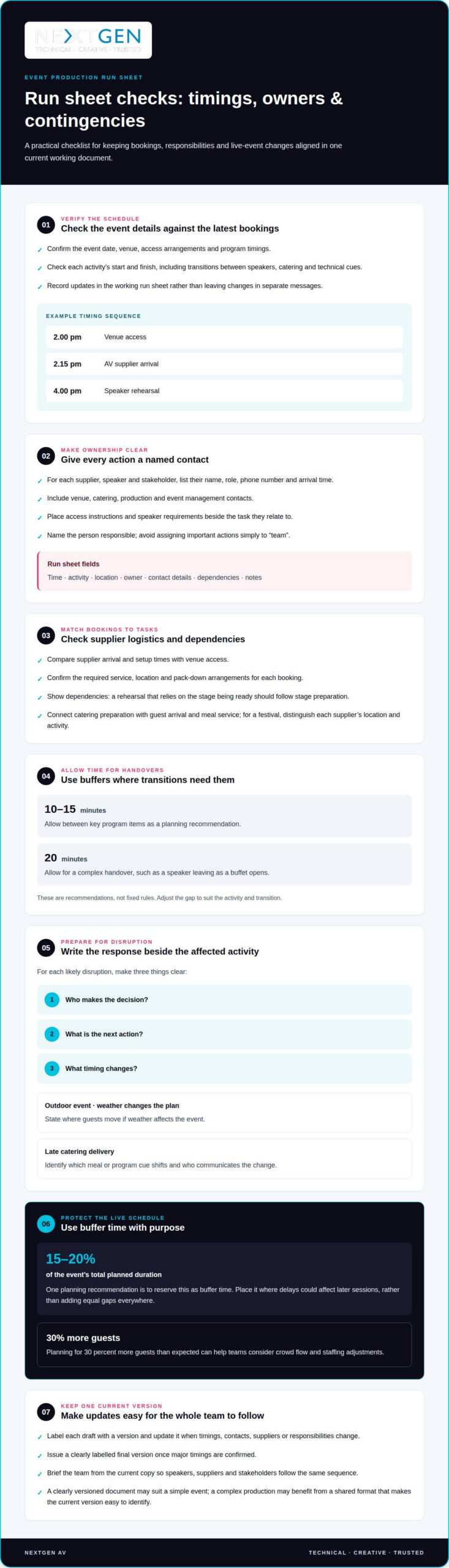
Use one working run sheet to align event details, bookings and responsibilities. Include columns for time, activity, location, owner, contact details, dependencies and notes, so each person can quickly find the information needed to act.
-
Check Timings and Event Details
Confirm the event date, venue, access arrangements and program timings against the latest booking details. Then check each activity’s start and finish, including transitions between speakers, catering and technical cues. For example, a sample schedule places venue access at 2.00 pm, AV supplier arrival at 2.15 pm and speaker rehearsal at 4.00 pm. Record changes in the working copy, not separate messages.
-
Add Contacts and Notes
Name a contact for each supplier, speaker and stakeholder, and include their role, phone number and arrival time. Add venue, catering, production and event management contacts, then note access instructions or speaker requirements beside the relevant task. Avoid assigning important actions to “team”: name the person responsible so everyone knows who owns the next step.
- Match supplier bookings to the tasks they support. Check arrival and setup times against venue access, then confirm the required service, location and pack-down arrangements. If your schedule involves delegate shuttles or VIP transfers, liaising with passenger transport providers such as Euro Taxis ensures travel times align with program cues. For a dinner, connect catering preparation with guest arrival and meal service; for a festival, distinguish each supplier’s location and activity. Flag dependencies, such as a rehearsal that relies on the stage being ready.
- Build sensible gaps around critical handovers. Allow 10 to 15 minutes between key program items, and allow 20 minutes for a complex handover, such as a speaker leaving as a buffet opens. These are planning recommendations, not fixed rules; adjust them to the activity and transition involved.
- Label each draft with a version and update it whenever timings, contacts, suppliers or responsibilities change. Share the working run sheet during planning, then issue a clearly labelled final version once major timings are confirmed. Before the event, brief the team using that current copy, so speakers, suppliers and stakeholders follow the same sequence.
Contingency planning for event disruptions
Add each contingency beside the activity it could affect. A clear response names the decision-maker, the next action and the revised timing.
- Identify likely disruptions and their dependencies. For an outdoor activation, state where guests move if weather changes the plan. If catering arrives late, identify which meal or program cue shifts and who communicates the change. Planning for 30 percent more guests than expected can also help teams consider crowd flow and staffing adjustments.
- Set a practical buffer around critical activities. One planning recommendation is to reserve 15 to 20 percent of the event’s total planned duration as buffer time. Place that allowance where delays would affect later sessions, rather than adding equal gaps everywhere. A late delivery or extended speaker session can then be absorbed without silently pushing every activity back.
- Choose a format that makes updates easy to coordinate. A template provides a reusable structure for timings, owners and contingency notes; software can support shared updates across a team. For a simple event, a clearly versioned document may be enough. For a complex production with multiple stakeholders, use a shared format that makes the current version easy to identify.
- Build the run sheet in sequence: list activities, assign an owner, map dependencies, add a response for likely disruptions, then confirm the timing. For a virtual conference, include what to do if a speaker cannot join, such as moving to the next session while the host updates attendees. Each response should explain what happens next, not simply label an item “contingency”.
- Share the working run sheet with the people responsible for each task, then circulate a labelled final version when major details are settled. Update it when a supplier, timing or response changes, and brief the team using the same copy. For example, if rain moves a festival performance indoors, everyone needs the revised location and sequence.
Copy-and-paste event run sheet template
Use this event production run sheet template as a working example for a conference or corporate event. It links guest-facing moments with the technical and catering actions that keep transitions smooth.
- Copy these columns into your document: Time | Activity | Location | Owner | Contact | Cue or dependency | Notes. Keep one activity per row so the person scanning the sheet can quickly find their next action.
- Enter the event’s operational sequence, then replace example details with confirmed timings and names. A sample evening schedule could read: 5.15 pm | Registration ready | Foyer | Registration lead | Contact details | Desk prepared | Guest list available.
- Add the audience arrival and live program as separate rows. For example: 5.30 pm | Guest arrival | Foyer | Guest services | Contact details | Registration ready | Welcome guests. Then add: 6.25 pm | Five-minute warning | Stage | Show caller | Contact details | Speaker ready | Signal the start.
- Record the program start and transitions. For a corporate dinner, use: 6.30 pm | Event begins | Main room | MC | Contact details | Guests seated | Opening remarks. Add each speaker, meal service and entertainment as its own activity, with a named owner and location.
- Close the sample with: 8.45 pm | Final remarks | Main room | MC | Contact details | Previous item complete | Thank guests. Then add: 9.00 pm | Event concludes | Main room | Event lead | Contact details | Final cue complete | Guest departure. Schedule technical teardown at 21:00 only when it matches the confirmed event plan.
- Adapt the template to the event format. A conference needs session changes and speaker cues; a dinner needs catering handovers. Add bump-in and pack-down rows, then remove fields that do not help anyone act.
For an event with remote presenters or online attendees, plan virtual and hybrid event delivery around the same clear sequence of cues and owners.
NextGen AV: Virtual and Hybrid Event Solutions
NextGen AV helps bring a clear run sheet to life through Virtual and Hybrid Event Solutions. For a Melbourne conference with remote speakers, the schedule can align presenter handovers, content changes and audience-facing transitions with the onsite program.
LED Video Walls, Professional Audio Systems, and Lighting Design and Equipment can support the experience when they suit the event format. The run sheet connects these elements to the audience journey, with clear cues for screen content, sound and lighting changes. This coordination helps presenters and production teams follow the same sequence, whether guests are in the room or joining online.
For coordinated virtual or hybrid production, discuss your run sheet and event requirements with NextGen AV.
Shape the experience from the outset
Your run sheet can do more than organise the day. Treat it as the bridge between the experience you want guests to have and the production decisions that shape it. As plans develop, keep the creative intent alongside the live cues, so timing changes support the experience rather than disrupt it. An event production run sheet template gives the team a practical framework to refine as the event takes shape.
NextGen AV can help translate that intent into production with LED Video Walls, Professional Audio Systems and Lighting Design and Equipment. Consider each visual, sound and lighting transition in the context of the program, so it supports the event’s atmosphere and audience experience rather than feeling like a disconnected technical detail. This gives your planning conversation a clear creative and operational starting point.
Bring your plans and production priorities together. Contact NextGen AV about your event and take the next step towards an experience your guests can connect with.
Frequently Asked Questions
Can I create a new Run Sheet using AI?
Yes. AI can draft a run sheet from the event format, program and task list you provide. Treat the result as a starting document, not the live control copy: check names, venue details, dependencies and cue ownership against confirmed event information. For a Melbourne conference, a draft can organise session changes, but the production team still needs to validate each technical handover.
How Detailed Should a Time-Based Run Sheet Be?
Make each entry detailed enough for its assigned person to act without interpreting vague instructions. “Prepare stage” needs clarification: specify the task, location and completion point. Give more space to activities with several handovers, such as a panel moving into audience questions. Keep simple transitions concise so the document is quick to scan during a live event.
How often should a run sheet be updated?
Update the working copy whenever a change affects an action, owner or sequence. For example, if a presenter changes, revise their session entry and any linked introduction or presentation cue. Mark superseded copies clearly and circulate the current version to relevant team members. This helps prevent an outdated printout or saved file from directing someone to the wrong task.
What is an event production run sheet and what should it include?
An event production run sheet is the working document that coordinates an event’s operations. Include event and venue details, timings, locations, task owners, contact information, production cues, dependencies and relevant notes. A useful event production run sheet template also gives crew members a clear place to find their responsibilities, such as who releases presentation content or signals a speaker’s entrance.
Is there a free event production run sheet template Australia download?
This article includes a copy-and-paste template you can transfer into a spreadsheet or document and adapt for an Australian event. Add your event name, venue, local contact details and time format, then tailor the rows to your program. You can adapt the template to suit your event and preferred document format.
How detailed should event run sheet timings and cues be?
Write timings and cues to show the action, the trigger and the person responsible. For example, a cue might tell the vision operator to display a speaker’s presentation after the MC’s introduction. State what should happen if the trigger is delayed, too. Keep routine actions brief, but spell out cues that affect presenters, audience movement or transitions between program elements.
A smooth event depends on two well-managed phases: bump-in and bump-out. If you’re wondering what bump-in and bump-out are for events, bump-in is the delivery and setup of equipment, staging and other event elements at the venue. Bump-out is the pack-down, removal and venue restoration that follow.
It’s easy to focus on the event itself, but the work around it shapes how smoothly the day runs. Supplier arrival times, access routes and a clear sequence of tasks help crews build safely and efficiently, while a well-planned pack-down keeps departures orderly.
This guide explains how event equipment and infrastructure are delivered and set up, what bump-out involves, how suppliers coordinate timings and what to include in your event plan. Practical planning links each stage, from the first delivery to the final venue handover, so the event itself can take centre stage.
Key Takeaways
- Plan deliveries, access routes and build order so staging is ready before AV installation begins.
- Give bump-out crews a clear sequence for dismantling, removing equipment, sorting items and restoring the venue.
- Stagger supplier arrival and departure times, with practical gaps between deliveries, setup tasks and rehearsals.
- Include bump-in and bump-out dates, timings, activities, responsible staff and key contacts in your event details.
1. Transporting and setting up event builds at the venue
Understanding what bump-in and bump-out involve for events helps you plan the full site transformation. Bump-in covers delivering infrastructure, building staging, installing AV and preparing the venue. After the event, bump-out crews dismantle structures, remove equipment and restore the site. The workload depends on the event’s scale, venue layout and available access.
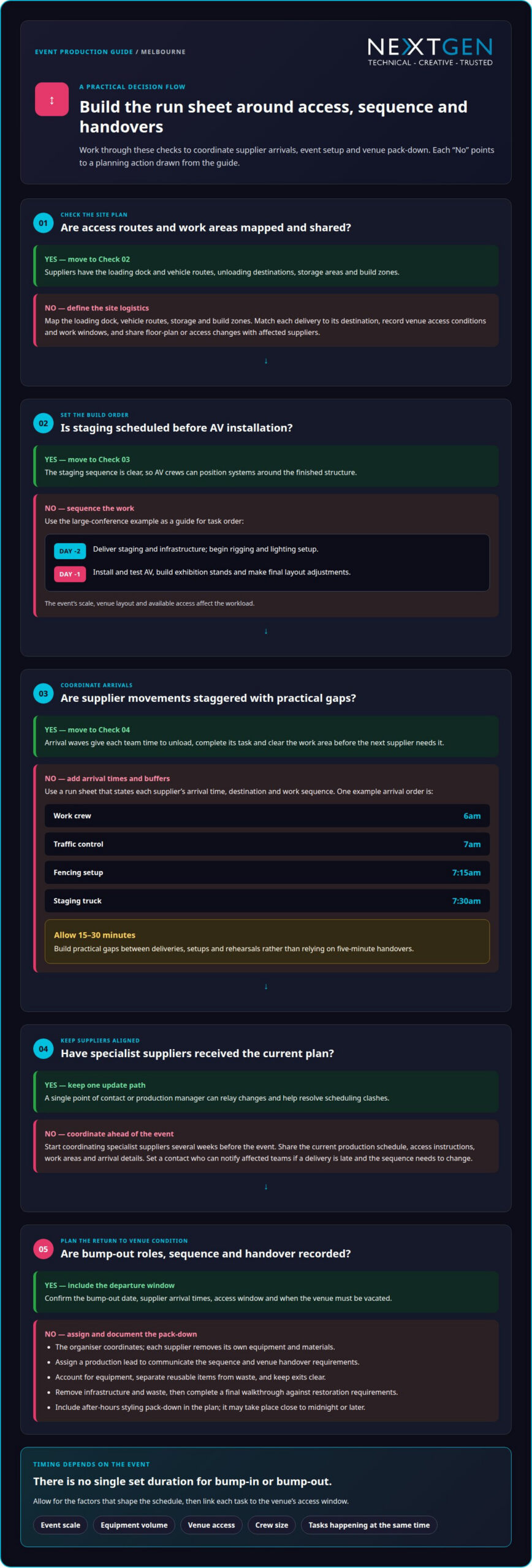
Before transport begins, map the loading dock, vehicle routes, storage areas and build zones. For an exhibition with 200+ stands, coordinated delivery schedules and clear zoning help prevent congestion. Match each delivery to its destination, and make sure crews know where equipment can be unloaded. Venue design and infrastructure affect how staging and technical elements can be positioned.
Venue rules and approvals vary by site and event. Include relevant access conditions, work windows and restoration expectations in the production plan. At a Melbourne venue, loading arrangements can shape the delivery sequence, so share any access or floor-plan changes with affected suppliers. Clear communication keeps every team working to the same layout.
Sequence the build to reduce rework. In a large-conference example, Day -2 is used for staging and infrastructure delivery, followed by initial rigging and lighting setup. On Day -1, crews install and test AV, build exhibition stands and make final layout adjustments. Completing staging before AV installation lets crews position systems around the finished structure.
Bump-in tasks include unloading vehicles, assembling staging, installing lighting and AV, and testing systems before attendees arrive. Identify the required vehicles, equipment and crew in the production plan. During bump-out, dismantle structures in sequence, remove equipment and materials, and keep exits clear. A final walkthrough checks the venue against restoration requirements before handover.
2. Bump-out crew responsibilities
The event organiser coordinates bump-out, and each supplier removes its own equipment and materials. A production lead can assign tasks, communicate the sequence and keep suppliers aligned with the venue’s handover requirements.
After guests leave, crews dismantle event elements and clear the site. They account for equipment as it comes down, separate reusable items from waste, and move materials along the agreed exit route. For a stage build, for example, the crew can clear loose items before dismantling larger sections, keeping the work area organised.
Floral and styling pack-down involves its own tasks. Depending on the design’s scale and the available time, it may need one to two staff members or more. Crews remove flowers and styling items, clean the venue, unload the van at the studio, clean containers, and sort green waste and recyclables.
The sequence matters. Crews can start with items no longer needed for the event, then pack remaining equipment once the programme ends. Styling pack-down often takes place after hours, close to midnight or later. The run sheet should state who leads each task and when suppliers can start clearing their areas.
Restoration is part of the job, not an afterthought. Crews remove event infrastructure, materials, equipment and waste, then return the venue to its pre-event condition. A final walkthrough helps the organiser spot remaining items, check cleared areas and record the handover. Keep exits safe and orderly as teams move equipment out.
Clear responsibilities allow organisers to focus on post-event assessment and future planning while crews manage dismantling. For example, a styling team can handle flowers and containers while technical suppliers pack their own equipment. Confirm the task sequence, item accounting and venue handover steps in the production schedule, so every crew knows its role after guests leave.
3. Coordinating supplier arrival and departure times
Bump-in and bump-out don’t have one standard duration. The schedule depends on the event’s scale, equipment volume, venue access, crew size and which tasks can happen at the same time. For a Melbourne event, map each supplier’s work to the venue’s access window, allowing time for handovers, testing and changes to the plan.
A run-sheet makes arrival order clear. One example schedules the work crew to arrive at 6am, traffic control at 7am, fencing setup at 7:15am and the staging truck at 7:30am. Staggering those movements helps manage shared access areas. It also gives suppliers a clear arrival time, destination and sequence for their work.
Build practical gaps between activities. Allow 15-30 minute blocks between deliveries, setups and rehearsals, rather than relying on five-minute handovers. Don’t schedule every worker to arrive at 8am. Use logical arrival waves so each team can unload, complete its assigned task and clear the work area before the next supplier needs it.
Start coordinating specialist suppliers several weeks before the event. Share the current production schedule, access instructions, work areas and arrival details. A single point of contact or production manager can relay updates and resolve scheduling clashes. If a delivery is late, that person can notify affected teams and adjust the sequence, rather than leaving suppliers to work through conflicting instructions.
Plan departures just as carefully. Remind suppliers of the bump-out date and their arrival times, then coordinate pack-down with the venue’s access arrangements. Make clear when site access begins and when the venue must be vacated. Floral and styling teams may pack down after hours, close to midnight or later, so include their departure window in the production plan.
There’s no fixed duration for bump-in or bump-out. It depends on the event’s scale, equipment volume, venue access, crew size and which tasks can happen at the same time.
4. Including bump-in and bump-out in event details
Record bump-in and bump-out dates, timings, activities and responsible staff in the event plan and running sheet. Labour requirements depend on the build’s scale, task sequence, venue access and crew needed. Document the site occupancy period and the operational arrangements that apply to the venue.
For a Melbourne event, tailor the schedule to the venue’s access conditions. Give every task an owner, start time, location and completion point. For example, list delivery separately from assembly, then name who confirms the work area is ready for the next supplier.
Build the checklist around the actual site and production plan. Include:
- Venue access details, loading areas and delivery instructions.
- Supplier names, on-site contacts and arrival or departure timings.
- Build and pack-down tasks, their sequence and responsible crew.
- Equipment and infrastructure checks before guests arrive.
- Waste removal, equipment accounting and venue restoration.
- Emergency contacts, including 000, in the event contact list.
Make the site occupancy period explicit. The schedule should show when the organiser’s access begins, when the event opens and when the venue must be completely vacated. This gives the production team and suppliers a shared reference for completing work within the agreed venue window. Keep these timings visible in the running sheet, not just in a separate checklist.
Maintain one current version and share it with the event team and suppliers. If a Melbourne venue changes an access instruction or the event layout shifts, update the affected task, its timing and its owner. For events with a visual production, align screen, lighting and staging requirements with the same schedule. Plan your event production requirements alongside the bump-in and bump-out details, so technical tasks sit within the wider run-sheet.
NextGen AV: LED Video Walls
NextGen AV can plan LED Video Walls as part of your event production, making screen placement, staging, lighting and supplier timings work together. Bring the team in during planning so the display is integrated into the production, not treated as a late addition.
For a product launch or conference, a well-planned LED wall can support presentations and add visual impact to the room. Professional Audio Systems, Lighting Design and Equipment, and Staging and Rigging can also be planned alongside the screen, with setup and pack-down included in the production schedule.
Share your event format, venue details and key timings with NextGen AV to shape the technical plan around the experience you want to create. Contact NextGen AV to discuss your event production requirements.
Shape the next step
Knowing what bump-in and bump-out are for events helps you plan beyond the run sheet. Treat the production schedule as a working document: connect the venue layout, technical requirements and audience experience, then keep the right people informed as plans take shape. This gives each decision a clear purpose, from the first build detail to the final handover.
When visual impact and technical delivery need to work together, involve your production partner while the plan is taking shape. An aligned technical approach can help turn your creative direction into a practical event experience, with fewer disconnected decisions for your team to manage.
Ready to discuss your event’s technical direction? Contact NextGen AV about your event and take the next step towards a well-orchestrated experience.
Frequently Asked Questions
What Is Bump-In and Bump-Out?
Bump-in is the period when a site is prepared for an event; bump-out is the work of clearing it afterwards. On the schedule, these terms mark the overall site-occupation phases, not just the time a particular supplier spends setting up. For example, a lighting supplier’s arrival and departure fall within the event’s bump-in and bump-out windows.
What do bump-in and bump-out mean for events?
For event teams, bump-in and bump-out mark the transitions from an empty venue to an event-ready space, and back again. They determine when suppliers can access work areas and when event spaces must be cleared. A supplier working across conference and exhibition areas, for example, needs timings that fit both zones and the overall event schedule.
What is the difference between bump-in, setup, pack-down and bump-out?
Bump-in is the broader arrival and preparation phase; setup is the assembly and preparation of a specific event element. Pack-down means dismantling or packing that element, while bump-out covers the wider removal and site-clearance phase. For example, a crew might set up a stage during bump-in, then pack it down before bump-out is complete.
What are the safety risks and requirements during event bump-in and bump-out?
Common risks include vehicle movements, lifting and carrying equipment, cable trip hazards and work in shared spaces. Follow the venue’s access instructions and agreed safety procedures, brief crew members before work starts, and keep walkways and exits clear. For example, separate delivery traffic from pedestrian routes and pause movement through a loading area while equipment is being transferred.
What are typical bump-in and bump-out schedules for Australian venues?
There is no standard duration; schedules depend on event scale, equipment volume, venue access, crew size and which tasks can overlap. One example staggers arrivals from the work crew at 6am to traffic control at 7am, fencing at 7:15am and the staging truck at 7:30am.
Successful event production for inexperienced planners starts with clear priorities, reliable communication and a detailed run sheet. Build project management, budgeting and negotiation skills, then confirm venue, supplier, guest and schedule arrangements. For corporate, virtual and hybrid events, plan how the team will respond to technology or connectivity problems.
When you’re new to planning, it can feel as though every detail rests on your shoulders. A structured process makes the work manageable: define the event’s goals, assign responsibilities and keep decisions visible to everyone involved.
This guide covers the skills to strengthen, the details to review as plans develop and ways to prepare for AV or connectivity problems. It also explains how production needs change across in-person, virtual and hybrid formats, helping you coordinate the moving parts while keeping the audience experience in focus.
Key Takeaways
- Strengthen organisation, communication and budgeting skills, then use your existing work experience to identify what you can bring to event planning.
- Review venue details, supplier commitments, schedules and responsibilities so every contributor understands their role.
- Plan how the event can continue if technology fails, with backup options suited to the format and audience.
- Match production support to the event’s needs, from staging and sound to lighting and visual content.
1. Project management, marketing and negotiation skills
Start with a clear event goal, then turn it into a schedule, budget and list of responsibilities. Project management means tracking decisions, deadlines and dependencies. For example, a delayed speaker brief can affect a corporate event’s run sheet. Marketing skills help you shape a message for your audience, choose suitable channels and write clear invitations. Negotiation helps you compare proposals, agree on deliverables and keep commitments within budget. Organisation, prioritisation and calm problem-solving support the whole team. These skills are a practical foundation for event production for inexperienced planners.
Formal qualifications aren’t a technical requirement for becoming an event planner. Australian study options include event management degrees or diplomas, as well as courses in public relations, communications, hospitality management, tourism, project management and business. Full-time event-management degrees usually take three years. Choose a course by identifying gaps in your experience, such as budgeting, health and safety or supplier coordination. Customer-facing, administrative, hospitality and sales-support work can also demonstrate transferable skills. These foundations make event production for inexperienced planners easier to organise and manage.
To create a crisis management strategy, list plausible disruptions, assign a decision-maker and record the first action for each scenario. If a speaker is delayed, for example, decide who will update attendees and who will adjust the schedule. Review the plan with those responsible before event day.
Assess event production companies against your brief. Compare each proposed scope, technical plan, communication process and approach to on-site coordination. A full-service production partner can bring staging, sound, lighting and vision together under one coordinated team. Separate vendors may suit a simpler event if you can manage schedules, responsibilities and handovers yourself.
Permits and approvals depend on the event, venue and planned activities. Identify the relevant venue and local authority requirements early, then assign responsibility for securing each permit. As the planner, make sure the approvals required for your event are arranged.
There’s no single booking lead time for production suppliers. Timing depends on the event date, venue access, technical scope and supplier coordination, so start planning as soon as those details take shape. Your brief should state the event goal, audience, format, venue, schedule, technical needs and budget allocation. Use it to assess proposals and manage changes.
2. Double-checking event arrangements and responsibilities
A daily planning routine turns scattered updates into decisions people can act on. Review the schedule, outstanding approvals, supplier messages and changes to guest numbers. Update one shared run sheet, recording an owner and deadline for every open task. For a wedding, confirm the ceremony start, arrival sequence and who will receive vendor deliveries. Clear communication stops small timing changes from cascading into problems.
Event planner responsibilities often include venue liaison, catering, transport, guest communication and supplier coordination. Check the venue against the event plan: review access routes, room layout, guest facilities and spaces needed for planned activities. Assign each arrangement to a named person, including who meets the caterer and directs speakers. Reliable contacts can help resolve gaps, while written responsibilities keep the team aligned.
In a final arrangements review, compare every supplier commitment with the latest schedule. Confirm the date, location, arrival time, service scope and on-site contact in writing. Make sure partners, volunteers and vendors understand their responsibilities, and assign an owner to every outstanding task. For a hybrid event, include speaker handovers and the online audience’s communication channel in the review.
Common mistakes include relying on verbal agreements, overlooking venue details and assuming everyone understands their role. Avoid them by recording decisions, assigning owners and updating the run sheet whenever arrangements change. After each event, note what caused delays and adjust your process before the next corporate function or wedding. This review can build confidence and transferable skills for a career in event planning.
For a virtual or hybrid program, map each handover between the room and online audience, then document who manages each transition. Virtual and hybrid event planning support can help align production planning with those audience handovers.
3. Preparing backup plans for technology failures
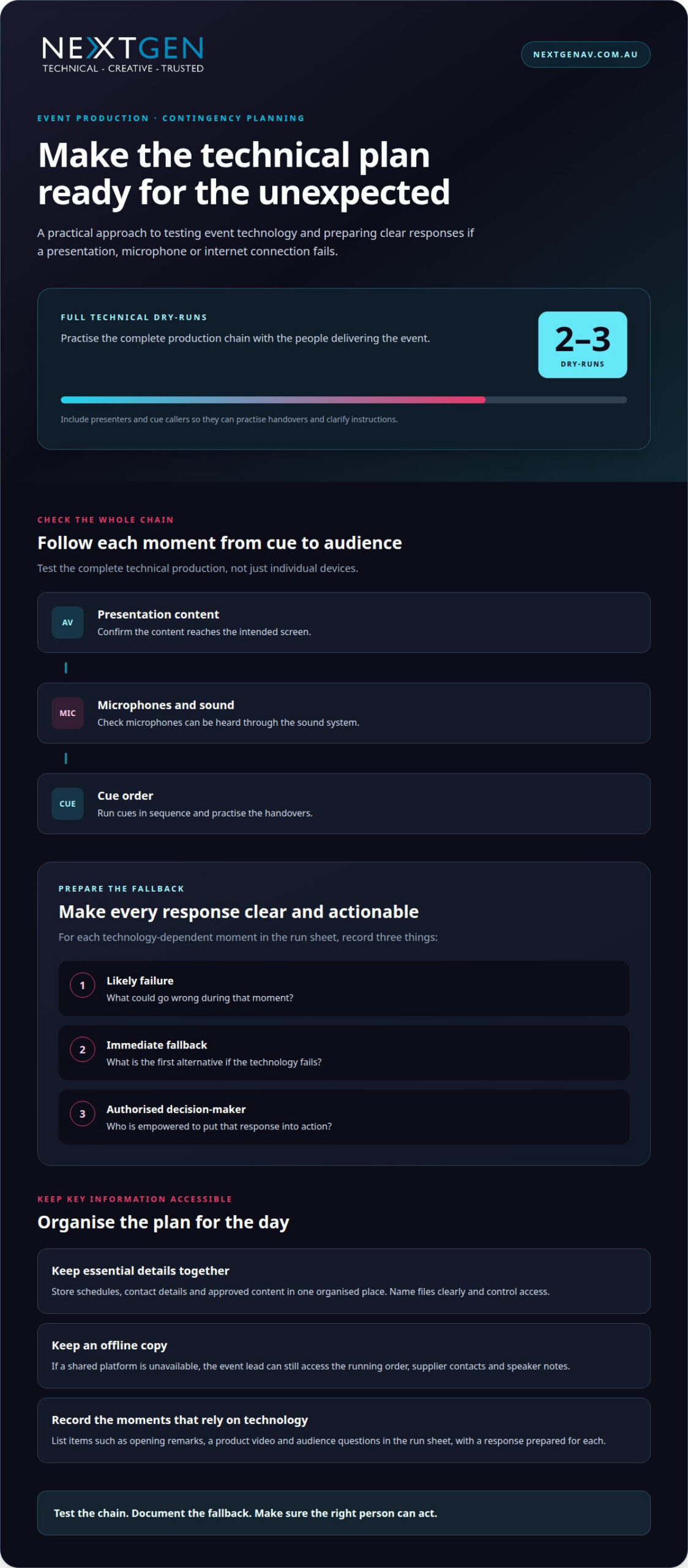
A successful event needs a clear response if a presentation, microphone or internet connection fails. List each technology-dependent moment in the run sheet, such as opening remarks, a product video or audience questions. For each one, record a likely failure, an immediate fallback and the person authorised to act. Planning a response in advance makes event production for inexperienced planners more manageable.
Use event-planning technology to keep schedules, contact details and approved content organised in one place. Name files clearly, control access and keep an offline copy of essential documents. If a shared platform is unavailable, the event lead can still access the running order, supplier contacts and speaker notes. Update the master schedule when changes are approved so everyone works from the same version.
Before event day, test the full technical production chain, not just individual devices. Confirm that presentation content reaches the intended screen, microphones can be heard through the sound system and cues happen in the right order. Organisers should conduct two to three dry-runs with all event technology. Include presenters and cue callers so they can practise handovers and clarify instructions.
Prepare a fallback for each high-impact failure. If a video won’t play, the presenter could continue with prepared talking points. If a remote speaker drops out, the host could move to the next agenda item. For a hybrid event, document how online attendees will receive updates if the stream is interrupted. Rehearse who communicates each change and through which channel.
Technical direction brings equipment, content and show timing together in one operating plan. Map each input, screen, microphone and cue to its purpose, then assign someone to monitor every transition. For event production for inexperienced planners, this helps the team catch mismatches during rehearsal rather than during a key client moment. Pair your schedule knowledge with AV integration expertise to manage problems in a controlled way.
4. What event production services should first-time planners hire?
Start with the parts of the event that shape what guests see and hear. A conference with several speakers may need staging, lighting, sound and vision coordinated as one production. A product launch may depend on a timed reveal, clear presenter audio and visual content that supports the story. Match services to the event format, audience and run sheet instead of hiring equipment without a defined purpose.
Event producers coordinate technical production, including staging, lighting, sound, vision and AV integration. This matters when one cue depends on several systems working together. A speaker’s introduction, for example, might trigger a lighting change, presentation slide and video playback. A production team can map those cues to the schedule, coordinate timing with speakers and vendors, and manage technical transitions on the day.
Choose technical services according to the audience experience. Staging gives presenters a defined focal point, while lighting supports visibility and atmosphere. Sound systems carry speech and other audio through the space; vision supports slides, video and visual messaging. For a hybrid conference, plan for the online audience too, including speaker handovers and how content will appear across in-person and remote formats.
Event planners also arrange non-technical services, such as food, flowers and photography. Keep those responsibilities distinct, but connect their timing to the production schedule. A room change, for instance, affects catering access and equipment placement, while a late speaker can shift programmed cues. Agree on who manages each handover, calls the next cue and shares changes with the wider team. A clearly scoped production plan links each technical service to an event outcome, helping first-time planners manage complexity and deliver a coherent experience.
NextGen AV: LED Video Walls
NextGen AV brings technical production into the planning process when your event’s visuals, sound and timing need to work together. LED Video Walls can provide a clear focal point for conference presentations, product content and live visuals, helping audiences follow the story from across the room.
For a coordinated event environment, Professional Audio Systems support clear speech, while Lighting Design and Equipment shape the atmosphere around key moments. Staging and Rigging create the physical framework for presenters and production elements. Aligning these services with the run sheet connects technical cues to the experience you want guests to have.
Consider production support when your event depends on integrated visuals, audio, lighting or staging, rather than treating each technical element as a separate task. To discuss your event production needs, contact NextGen AV or visit nextgenav.com.au.
Shape the experience from the start
Before adding another production detail, decide what you want people to feel, understand or remember. That intention gives creative choices a clear purpose and helps distinguish essential moments from distractions. For event production for inexperienced planners, it’s a useful way to move from managing tasks to shaping an experience with a coherent point of view.
Turn that intention into a short creative direction for the production team: describe the atmosphere, the audience’s journey and the moments that deserve emphasis. Keep it practical. A product reveal, leadership address and networking session each call for a different pace and focus. With clear direction, technical decisions can support the event’s story instead of competing with it.
Bring your event concept and priorities into a conversation with NextGen AV, then contact the team about your event. A considered first step can make the planning ahead feel purposeful, and help you lead the experience with confidence.
Frequently Asked Questions
So where do you go from here?
Start by turning your event idea into a short production brief. Define the audience, purpose, format, venue and most important moments, then share those priorities with the people planning delivery. For a Melbourne conference, explain whether remote attendees need to participate or simply watch. A clear starting point helps you decide which production details need attention first.
What Does an Event Producer Actually Do?
An event producer connects the creative concept with the technical and operational plan. They coordinate production design, sound, screens, lighting, staging, rigging, content playback and show operation. For a speaker session, that can mean aligning the presentation feed, microphone and lighting cue with the speaker’s entrance. The producer helps each element contribute to one audience experience.
What does an event production company do for inexperienced planners?
An event production company can translate your goals into a technical plan, coordinate production elements and manage delivery on site. NextGen AV provides technical direction and services including Professional Audio Systems, LED Video Walls and Lighting Design and Equipment. This support is useful when your event relies on coordinated technical cues or you need production specialists to manage those details.
What event safety, insurance and risk requirements apply in Australia?
Safety and risk planning should reflect the venue, event activities and site conditions; requirements vary accordingly. Identify potential hazards, set out practical controls, assign responsibility and establish how the team will communicate during an incident. Public liability insurance can protect an event-planning business when working at live events and venues. Clarify insurance responsibilities across the event team.
What questions should inexperienced planners ask event suppliers?
Ask each supplier to define their scope, delivery sequence and handover points in writing. Clarify who coordinates with the venue, installs and tests technical systems, operates them during the event and handles pack-down. For a presentation, confirm how the content reaches the screen and who manages playback. These details reveal gaps between tasks before they affect the run sheet.
