
A speaker’s confidence is often shaped before the first word is spoken. With confidence monitor hire Melbourne event organisers can give presenters a clear, well-timed reference on stage, helping them stay on track without turning away from the audience.
It’s natural for speakers to worry about losing their place or missing a cue. A monitor is most useful when its content, position and timing are planned around the presentation. Depending on the session, it might show the current or next slide, a timing reference, a handover prompt or audience questions.
This guide explains how confidence monitors work, how to choose their content and placement, and how to coordinate them with the run sheet and stage environment. NextGen AV brings more than 30 years of experience in Melbourne event production, combining technical direction with practical planning so the technology supports both the speaker and the audience. The aim is a composed presentation, a smooth programme and an event that keeps attention on the message.
Key Takeaways
- A confidence monitor can help presenters keep their place and stay connected with the audience when its content is matched to their needs.
- Coordinate monitor cues with the run sheet so slide changes, speaker handovers and stage transitions feel smooth.
- For confidence monitor hire melbourne, plan placement around the format, whether it’s a lectern talk, panel discussion or multi-speaker session.
- Prepare the running order, presentation files, speaker positions and agreed cues before the technical test and presenter briefing.
- Include monitor planning in the wider production plan, with technical direction and venue knowledge supporting a composed presentation.
Confidence monitor hire in Melbourne: why speaker confidence starts backstage
A presenter can know their subject inside out and still worry about losing the thread on stage. A missed cue, unexpected transition or uncertainty about what comes next can pull attention away from the audience. Thoughtful confidence monitor hire melbourne planning addresses that concern before the room fills, giving the speaker useful visual information in a position that suits the stage.
A confidence monitor is a display placed on or near the stage so a presenter can see agreed information while speaking. Its role is to support, not distract. The right content can help the speaker follow a presentation cue or programme transition without repeatedly looking away from the audience. The stage monitor system overview explains the general role of on-stage monitoring in helping performers hear or see information they need during a live event.
That support starts backstage. Organisers and the production team decide what information will help, where the presenter will stand and how the display fits the stage design. A monitor does not replace rehearsal, clear cues or a well-managed run sheet. It can reduce avoidable uncertainty, leaving the speaker more room to concentrate on delivery and connection.
What a confidence monitor helps a speaker do
A well-planned display keeps agreed presentation cues within the speaker’s natural view. A presenter at a lectern may need a discreet prompt for the next part of a talk, while someone moving across the stage may need information positioned where it remains easy to glance at. Specify what appears and when in the production brief, so cues support the talk rather than compete with it.
Preparation makes the difference. When presenters understand the display and have an opportunity to rehearse with it, it feels like part of the stage plan rather than a surprise. This can support a more composed delivery, but it does not remove nerves or guarantee a flawless presentation. Clear preparation and confident technical direction remain essential.
The presenter experience comes first
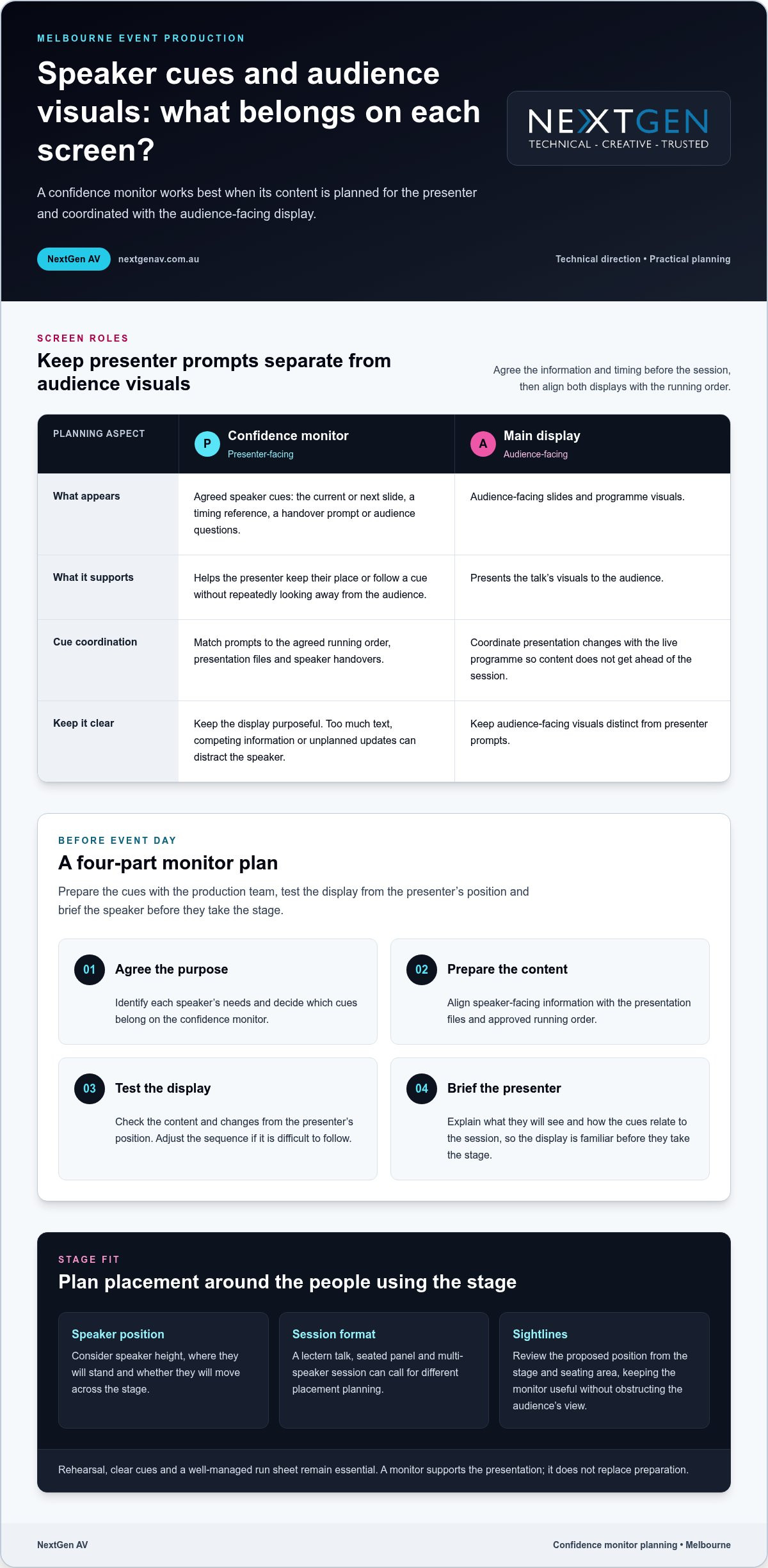
Speaker height, position and sightlines determine where a monitor can sit and how easily it can be read. A display that works for a seated panellist may not suit a standing presenter, and a lectern can change the speaker’s natural eyeline. Include these details in the production brief, alongside the session format and agreed cues, so the setup reflects how people will use the stage.
Placement should also protect the audience’s view. The monitor needs to be useful to the presenter without becoming an unnecessary visual obstacle. Consider the speaker’s movements, stage layout and audience sightlines together, then review the proposed position from both the stage and the seating area. This helps the production team support confident delivery while keeping the event in clear view.
How confidence monitors support speakers through a live presentation
A confidence monitor works best as part of a planned presentation workflow, not as an isolated screen. Before event day, the organiser and production team agree what the presenter needs to see, prepare the relevant content, test how it appears on stage and brief the speaker. This sequence aligns the display with the talk instead of leaving the presenter to interpret unfamiliar cues live.
Plan what the speaker needs to see
Start with the session format and identify what will genuinely help each presenter stay oriented. Speaker-facing cues might include the current or next slide, a timing reference or a handover prompt. Audience-facing slides and programme visuals belong on the main display. Keep names, timings and cue wording consistent with the approved event materials to reduce avoidable confusion.
- Agree the purpose. Identify each speaker’s needs and decide which cues belong on the confidence monitor.
- Prepare the content. Align speaker-facing information with the presentation files and approved running order.
- Test the display. Check the planned content and changes from the presenter’s position. Adjust the sequence if it is difficult to follow.
- Brief the presenter. Explain what they will see and how the cues relate to the session, so the display is familiar before they take the stage.
Keep the screen purposeful. Too much text, competing visual information or unplanned updates can draw a speaker’s attention away from delivery. Decide the content and technical arrangement based on the event format, presentation material and stage environment, rather than applying a one-size-fits-all template.
Coordinate content and cues
Map slide changes, speaker handovers and stage transitions against the running order. A cue for the next presenter should follow the agreed programme sequence, and each transition should match the correct presentation file and speaker. A clear cue plan gives the technical team a shared reference and helps prevent content from getting ahead of the live programme.
Technical direction brings these moving parts together. The team can coordinate confidence monitor content with presentation changes and stage cues, while keeping audience-facing visuals distinct from presenter prompts. This is part of sound event operations best practices, where planning and communication connect production decisions to the live experience.
For a Melbourne conference, confidence monitor hire melbourne planning should reflect the session’s demands. A single keynote and a sequence of speakers may need different cue timing and content. Monitor decisions also sit alongside audio planning. Clear speech and well-timed visual prompts work together, so organisers considering professional sound system hire should align the audio plan with presenter changes and the run sheet.
NextGen AV’s technical direction brings these details into one coordinated production plan. Explore how NextGen AV supports event production as you shape speaker cues, presentation content and the wider stage experience.
Confidence monitor hire Melbourne: compare the setup with the stage
The right confidence monitor arrangement depends on how speakers use the stage. A presenter fixed behind a lectern has different sightlines from panellists seated across a stage, while a multi-speaker programme adds handovers and changing cues. For confidence monitor hire melbourne, compare the session format, speaker positions and cue requirements before deciding what the display should show and where it should sit.
Match the monitor plan to the event format
Start with how people will present. At a lectern, the speaker’s position is relatively fixed, so the display should make agreed information easy to glance at without pulling focus from the audience. In a panel, speakers may look in different directions or take turns talking. Decide whether everyone needs the same cues and how each person will see them. A multi-session programme calls for consistent cue conventions and deliberate transitions between presenters.
| Event format | Speaker position | Content purpose | Programme complexity |
|---|---|---|---|
| Lectern presentation | One main, fixed position | Support the speaker with agreed presentation cues | Usually centred on one presenter and their talk |
| Panel discussion | Several seated or standing positions | Provide useful cues for speakers as they contribute | Includes changes in speaker and conversation flow |
| Multi-speaker session | Positions may change between presenters | Keep cues relevant to each speaker and presentation | Requires coordinated handovers and content transitions |
Use the comparison as a planning prompt, not a fixed formula. A short panel with a simple running order may need a different approach from a conference session with several presentations and speaker changes. Keep the display relevant to the person on stage at that moment. Unnecessary or competing information can make cues harder to follow.
Balance sightlines and stage design
Placement needs to work for the speaker and the room. Consider the stage layout, the presenter’s natural eyeline and the audience’s view from different parts of the venue. A monitor positioned for one speaker should not obstruct attendees or interfere with the intended set design. Reviewing the stage from the audience area as well as the presenter’s position can reveal conflicts early.
Screen placement also belongs within the wider stage and lighting plan. Lecterns, furniture, presentation screens and lighting positions all shape the available sightlines, so treating the monitor as a late addition can create avoidable compromises. Coordinating these elements helps the presenter access cues while preserving a clear, composed stage picture.
Include stage and lighting hire in Melbourne considerations in the same production conversation. Technical direction can bring monitor placement, set design and lighting decisions together, guided by the event format. This joined-up planning supports the presenter without asking the audience to look past unnecessary visual clutter.
How to prepare a confidence monitor plan before event day
A clear plan gives the presenter and production team a shared reference before the event begins. For confidence monitor hire melbourne, start with the programme and the people using the stage, then build the cue plan around approved content. This reduces last-minute uncertainty and gives the technical team a practical sequence to test.
Build the brief with the speaker in mind
Give the production team the running order, presentation files, speaker positions and agreed visual prompts. Record presenter names and speaking order, and note where each person will stand or sit. One format will not suit every speaker, so capture specific needs in the brief and identify who approves content and communicates changes.
- Gather the event details. Share the current running order, presentation files, speaker names and planned stage positions. Flag lectern talks, panels and speaker handovers.
- Agree the cues. Decide what each presenter should see and when. Keep cue wording, names and timings consistent with approved event materials, and distinguish speaker prompts from audience-facing slides.
- Set the change process. Name the person who approves presentation content and the channel for communicating updates to the production team. This gives late changes a clear owner.
- Walk through the stage. Give presenters an opportunity to stand or sit in their intended positions, view the cues and practise transitions. A walkthrough can reveal an awkward eyeline or unclear prompt while there is still time to refine the plan.
- Run the technical test. Check the approved content against the event sequence, then complete a final run-through with the organiser and production team before doors open.
Test and brief before doors open
During the test, follow the running order rather than checking each slide in isolation. Confirm that the intended content appears at the right point and that speaker handovers match the agreed cues. Invite presenters to view the display from their stage positions and explain how it supports their talks. Speakers should know what to expect before they are in front of an audience.
Include a simple contingency discussion in the production briefing. Agree who communicates a delayed speaker, a changed running order or an updated presentation, and how the team will keep the programme moving if a cue changes. Clear roles and concise updates help avoid conflicting instructions. The aim is not to script every possibility, but to give the organiser and technical team a calm, shared response.
NextGen AV brings technical direction and on-site event management into the planning process, aligning presenter needs with production cues. Plan your confidence monitor setup with a team focused on the speaker experience and the flow of your event.
Confidence monitor hire Melbourne: bring speaker support into event production
A confidence monitor has the greatest value when it is planned alongside the rest of the event, rather than added as a standalone screen. Technical direction brings speaker cues, presentation content and stage requirements into one production plan, so each element supports the live programme. For organisers planning confidence monitor hire melbourne, this joined-up approach keeps the presenter’s needs in view while the audience experiences a smooth, coherent event.
One production plan, from brief to stage
The monitor plan connects with sound, lighting, stage layout and presentation content. A cue may need to appear as a speaker takes position, while a handover depends on the running order and the next presentation being ready. Technical direction coordinates these decisions with the production team, helping presenters focus on their message instead of working out what happens next.
Melbourne venue knowledge adds practical context. Room layouts, stage arrangements and sightlines vary, so a plan should account for the actual space and how speakers will move through it. NextGen AV’s experience with Victorian venues informs planning from the initial brief through to the on-site details that shape the speaker experience.
Consider monitor placement as part of the wider audio visual hire in Melbourne plan. Sound systems need to serve the room, lighting needs to support the stage environment, and visual cues need to fit the programme. Coordinating these elements helps prevent decisions in one area from creating distractions or conflicts in another. The result is a considered stage and a production team working from a shared plan.
Take the next step with NextGen AV
To prepare for a production discussion, bring together the event format, venue, programme and speaker requirements. Include the presentation approach, planned stage positions and agreed cues, along with the key transitions in the running order. This gives the technical team a clear picture of how the monitor should support each session and connect with the wider event plan.
NextGen AV works as a proactive production partner, managing technical complexity behind the scenes and aligning the details with your event’s aims. Discuss your Melbourne event’s production requirements with NextGen AV, including its format, venue, programme and speaker needs, to shape a coordinated plan for the stage and audience.
Set your speakers up for the stage
A well-planned monitor setup gives presenters a clear reference point while they focus on delivering their message. Bring speaker support into the event brief early, so the production plan reflects the programme and the experience you want to create. For confidence monitor hire melbourne, thoughtful coordination helps the technology feel seamless on stage.
Consider what each presenter needs to feel prepared, how their session fits the event’s flow and what will help the audience stay engaged. Sharing those priorities with the production team gives them a practical foundation for shaping the technical details around your event.
Plan speaker support for your Melbourne event with NextGen AV and take the next step towards a composed, connected presentation.
Frequently Asked Questions
What does a confidence monitor show a speaker?
A confidence monitor shows information selected to support the speaker during their session. Depending on the plan, that may include a handover cue, a prompt tied to a key moment or a time reference. Decide what is genuinely useful for each presenter instead of filling the display with every available detail. The aim is a clear reference that complements the talk without competing for attention.
Can a confidence monitor help a nervous speaker?
Yes. It can give a nervous speaker a useful point of reference, though it will not remove nerves or replace preparation. Knowing where to look for an agreed cue may help a presenter feel less concerned about missing a transition. Let them see the display from their speaking position and explain each prompt before the session. Familiarity can make the technology feel like part of the plan, not another unknown.
Is a confidence monitor visible to the audience?
It may be visible from some audience seats, depending on its position and the stage layout. During planning, review the stage from the audience’s perspective as well as the presenter’s, including views around the room. The display should give the speaker a practical reference without drawing attention away from the talk. A venue walkthrough helps the production team assess sightlines and refine placement for the room.
How early should a speaker practise with a confidence monitor?
Give the speaker a chance to practise once the stage and monitor arrangement can be viewed in its intended configuration, ideally before the audience enters. There is no universal amount of rehearsal time. Allow enough for the presenter to check their eyeline, follow a cue and ask questions. If the programme changes, revisit affected prompts so the speaker is not relying on an outdated sequence.
Can a confidence monitor support a panel discussion?
Yes. A panel plan can provide shared information, such as a discussion transition cue, or prompts tailored to the moderator’s role. Consider who needs to see each cue and when, especially if panellists are seated at different angles or speakers take turns contributing. A briefing before the session helps everyone understand which prompts apply to them and keeps the display from becoming a distraction during conversation.
What should organisers do if monitor content changes on event day?
Route the change through the person responsible for approving presentation content, then notify the production team using the agreed communication channel. Confirm which speaker and cue are affected, update the approved material and test the changed moment in sequence. Brief the presenter on the revision before they go on stage. This clear handover helps the team respond calmly while keeping the programme on track.
A static camera parked at the back of an auditorium does not capture an event; it merely proves people showed up. When delegates tune in from across Australia or abroad, a flat wide shot makes your keynote feel like a forgotten video call. Professional multi-camera live streaming for conferences is no longer a decorative luxury; it is a strategic baseline to protect your brand authority. You have likely felt the stress of keeping remote viewers engaged while dreading technical hitches, particularly when justifying a skilled camera team over a single stationary lens.
You can eliminate that production anxiety and elevate your corporate conference with broadcast-standard delivery that captivates remote audiences and secures your prestige. This guide details how dynamic visual pacing, hardware vision switching, and meticulous technical direction ensure flawless execution across Melbourne in 2026, keeping your audience locked in from the opening address to the final panel.
Key Takeaways
- Discover how multi-camera live streaming for conferences elevates standard presentations into broadcast-grade productions that hold delegate attention from start to finish.
- Explore the strategic mix of manned camera platforms and discreet PTZ units designed to capture stage dynamics without disrupting your room layout.
- Review the engagement metrics demonstrating why multi-angle visual pacing significantly extends viewer watch time during corporate addresses and panel sessions.
- Identify Melbourne venue technical requirements, including the necessity of dedicated synchronous data lines and failover feeds for uninterrupted delivery.
- Learn how proactive technical direction and behind-the-scenes orchestration eliminate production stress, allowing your team to focus entirely on the stage.
Beyond the Static Lens: What is Multi-Camera Live Streaming for Conferences?
True multi-camera live streaming for conferences is not just pointing extra lenses at a podium. It is a live broadcast production orchestrated in real time through a dedicated hardware vision switcher. While a standard corporate webcast treats remote viewers as passive observers peering through a digital keyhole, a multi-camera live production actively directs their attention. It mirrors the visual rhythm of broadcast television, transforming an ordinary business presentation into an engaging, high-retention experience that upholds your brand’s prestige.
The Psychology of Visual Momentum
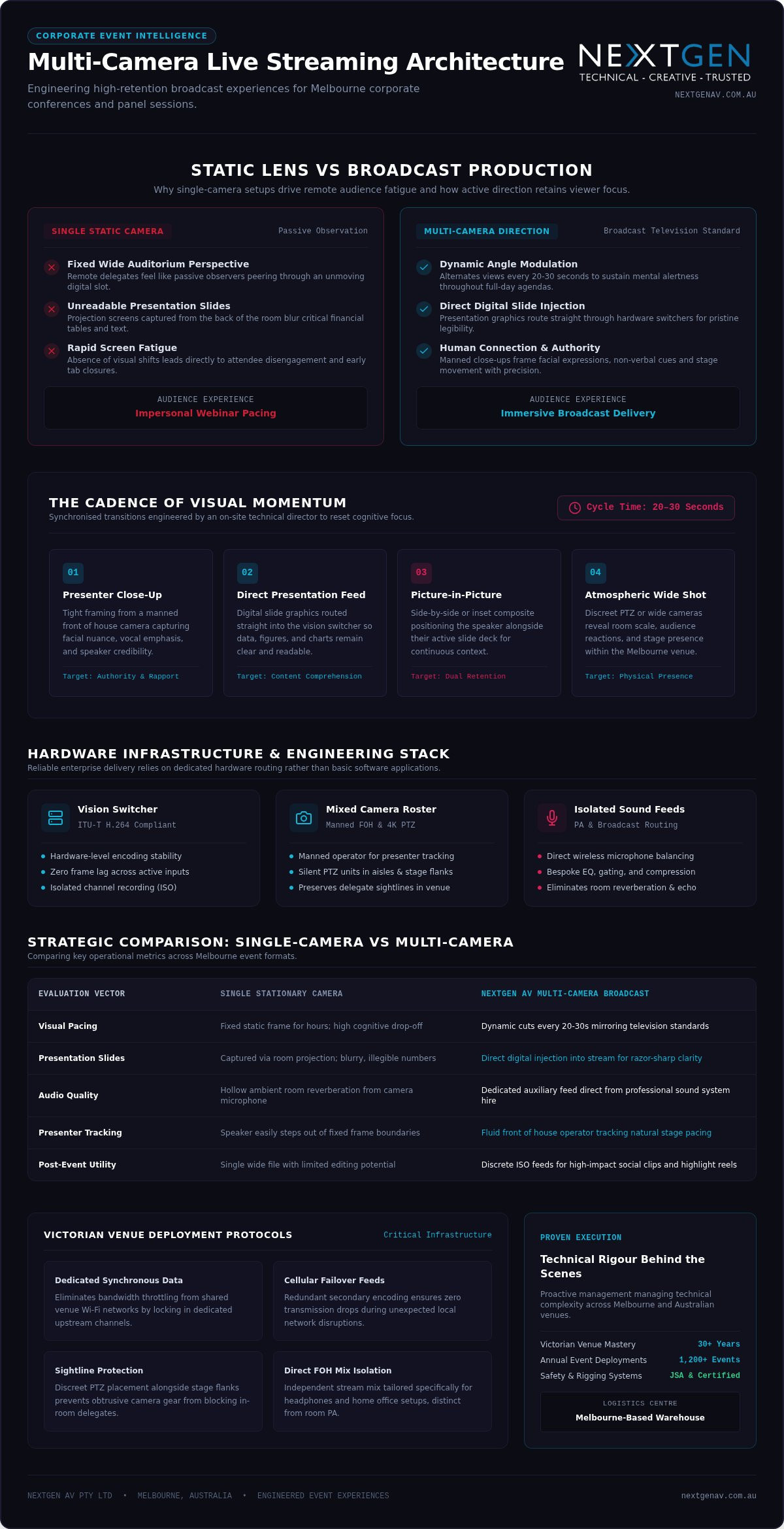
Online attendees battle constant digital distractions. To sustain focus, production teams create visual momentum by alternating perspectives every 20 to 30 seconds. Switching from an expressive medium close-up to an expansive wide shot captures the room’s energy inside your Melbourne conference venue while resetting cognitive focus. Grounded in the classic principles of a multi-camera production setup, this continuous visual variety dissolves screen fatigue, holding delegate interest across full-day corporate programmes.
Broadcast Standards vs. Basic Webconferencing
Relying on a lone, static camera perched at the back of an auditorium isolates remote delegates. Facial expressions disappear, nuanced delivery is lost, and presentation slides displayed on distant projection screens become an unreadable blur. Professional multi-camera live streaming for conferences overcomes this disconnect by routing discrete video feeds directly into a vision switcher operated by an experienced technical director.
Working behind the scenes, the technical director coordinates real-time transitions between critical visual assets:
- Presenter close-ups: Tight framing captures facial nuance, establishing an immediate human connection and conveying speaker authority.
- Digital presentation inputs: Direct slide feeds are integrated straight into the stream, ensuring text, financial tables, and diagrams remain razor-sharp.
- Picture-in-Picture compositions: Custom layouts keep the speaker’s delivery visible right beside their supporting visual data.
- Atmospheric audience views: Wide shots reveal audience reactions and room engagement, making remote delegates feel present on the convention floor.
The Technical Orchestration: Essential Hardware for a Flawless Stream
Flawless execution does not rely on a single laptop running software in the corner of a room. Enterprise-grade broadcasting requires dedicated hardware engineering. From hardware vision switchers encoding to compliant ITU-T video compression standards to synchronized stage lighting and isolated recording channels, every element must work as a unified ecosystem. When orchestrated correctly behind the scenes, high-end hardware ensures your stream remains rock-solid while your team focuses entirely on delivering the event.
Choosing the Right Camera Mix
Achieving broadcast depth requires pairing diverse camera technologies. A seasoned operator on a manned front of house camera delivers smooth presenter tracking, panning fluidly to capture gestures and spontaneous stage movements. In contrast, remote 4K PTZ (Pan-Tilt-Zoom) cameras provide discreet coverage in tighter venue spaces. Positioned silently along stage flanks or audience aisles, PTZs capture reaction shots and panel discussions without blocking attendee sightlines. Incorporating 4K sensors across all positions also captures pristine visual data for post-event highlight reels.
Audio: The Invisible Pillar of Streaming
Nothing prompts virtual delegates to close a browser tab faster than thin, echoey sound. High-definition video means nothing without clean, intelligible voice reproduction. Rather than capturing hollow ambient room reverberation through on-camera microphones, our technical team isolates and routes clean auxiliary feeds directly from the on-site professional sound system hire.
A front of house engineer works alongside a dedicated streaming audio technician to balance complex sound layers:
- Direct vocal isolation: Dedicated wireless microphone channels receive bespoke EQ, compression, and gating for broadcast clarity.
- Acoustic room management: Controlled ambient boundary microphones blend natural audience applause into the stream without introducing hollow room echo.
- Synchronised latency alignment: Digital audio signals are precisely delay-matched to the vision switcher outputs, eliminating distracting lip-sync drift.
Behind the switcher, hardware encoders route primary and secondary feeds across dual network paths with automated failover. If an uplink falters, the redundant line instantly takes over without viewer disruption. If you want to secure your brand’s prestige with broadcast-level reliability, consulting with the technical specialists at NextGen AV ensures multi-camera live streaming for conferences is engineered to absolute perfection.
Single-Camera vs. Multi-Camera Production: A Strategic Comparison
Weighing up production setups often comes down to perceived economy versus actual stakeholder impact. While a single tripod camera appears straightforward on paper, the true cost emerges in viewer abandonment and diluted brand perception. According to the Australian Business Events & Convention Industry Report (2025), 78% of Tier-1 Australian corporate conferences and national AGMs now require broadcast-grade live streaming to engage interstate and global delegates. For high-stakes presentations, professional multi-camera live streaming for conferences protects executive authority, demonstrating that remote delegates receive the exact same attention as in-room guests.
Engagement and Retention Metrics
Audience behaviour data reveals a striking contrast between basic and multi-angle feeds. Findings from the Enterprise Video Streaming & Live Event Analytics Survey (2024–2025) indicate delegates watch multi-camera broadcasts three to four times longer than static single-shot streams. Dynamic switching maintains visual momentum, particularly when presenting financial data or strategic roadmaps:
- Active retention: Alternating wide stage framing and tight speaker angles stops remote delegates from tab-switching or drifting away.
- Picture-in-Picture clarity: Remote audiences view executive speakers alongside presentation decks simultaneously, preserving context and visual connection.
- Dynamic Q&A integration: Dedicated audience cameras capture delegates asking questions on the floor, making online participants feel like genuine contributors.
The “Prestige Factor” in Corporate Comms
For executive summits and annual product launches, visual polish directly shapes brand perception. Integrating synchronized stage cameras with tailored hybrid event staging solutions unifies your physical auditorium with the digital broadcast. When coordinating logistics across metropolitan venues or reviewing municipal regulations like the City of Melbourne event planning requirements, professional production elevates the entire occasion into a polished broadcast.
High-end multi-camera live streaming for conferences also creates substantial post-event value. Capturing isolated video recordings (ISO recording) of every camera angle provides your marketing team with a versatile library of high-resolution footage. Instead of being stuck with a single flat wide shot, you walk away with broadcast-quality assets ready for executive highlight reels, corporate social channels, and future promotional campaigns.
Organising Your Melbourne Conference: Logistics and Venue Insights
Melbourne boasts some of the southern hemisphere’s finest corporate spaces, from heritage halls in Carlton to contemporary spaces along South Wharf. Delivering an uncompromised broadcast across these environments requires rigorous groundwork. Multi-camera live streaming for conferences introduces distinct infrastructure demands, specifically concerning unshared network paths, clean power distribution, and stage lighting balance. Managing these variables during pre-production ensures your broadcast runs smoothly when the live countdown hits zero.
Venue Bandwidth: The Critical Checklist
Never rely on public venue Wi-Fi for your broadcast. The Event Production Technical Review notes that 64% of corporate live streaming interruptions stem from using unmanaged, shared Wi-Fi networks instead of segregated local networks. When hundreds of attendees connect personal smartphones simultaneously, shared bandwidth evaporates instantly.
Executing an enterprise-grade broadcast requires negotiating a dedicated, hardwired Ethernet drop from the venue management:
- Symmetric upload speeds: Secure a minimum dedicated upload line of 20 Mbps for stable 1080p60 delivery, or 50 Mbps for 4K workflows to provide overhead safety margin.
- Synchronous routing: Confirm the venue provides dedicated synchronous bandwidth that remains unaffected by attendee web browsing.
- Cellular backup integration: Pair the venue’s physical drop with bonded 5G cellular modems running dual-path SRT or RTMPS encoding protocols for hitless network failover.
Lighting for the Lens
Stage visibility for the room does not automatically translate into clear imagery on camera. Human eyes adapt effortlessly to high-contrast conditions, but digital camera sensors require precise illumination balance. Integrating purposeful stage and lighting hire Melbourne services eliminates unflattering facial shadows through balanced three-point lighting schemes.
Our lighting designers work closely with our video engineers to calibrate stage colour temperatures with on-stage LED video walls. Uncalibrated LED screens easily wash out presenters or induce harsh moiré banding on camera feeds. Aligning camera shutter speeds with display refresh rates guarantees rich skin tones and crisp visuals for both live attendees and virtual viewers.
Securing elite production crews across Melbourne requires lock-in well ahead of peak convention dates. Partner with NextGen AV to lock in your multi-camera live streaming for conferences early, allowing our technical directors to manage venue logistics and deliver a flawless presentation.
Seamless Execution: Why NextGen AV is Your Live Streaming Partner
Delivering a high-stakes corporate event demands an experienced production ally. Backed by over 30 years of industry experience in Melbourne event production and managing 1,200+ events annually, NextGen AV acts as your invisible expert. We step into high-pressure environments to absorb the technical complexity, allowing your leadership team to concentrate purely on the stage. Operating from our dedicated Melbourne warehouse, our team coordinates every stage of delivery, anchoring your broadcast in proven full service event production.
The NextGen AV Difference: Precision and Passion
Precision separates an ordinary web feed from an authoritative broadcast experience. Our technical directors orchestrate your entire room, synchronising camera switchers, lighting arrays, and sound systems into a seamless digital output. Every deployment adheres to rigorous safety standards, backed by certified Job Safety Analysis procedures, strict Test and Tag compliance, and qualified rigging personnel holding valid High-Risk Work Licences. Having previously managed synchronised content across three modular walls during a Melbourne CBD activation, our crew understands how multi-camera live streaming for conferences thrives on disciplined preparation and creative execution.
Your Journey from Concept to Broadcast
Executing a flawless hybrid event follows a structured path that removes planning stress from your shoulders:
- Pre-production alignment: We storyboard camera sightlines, design branded lower-third graphics, inspect venue internet drops, and configure redundant streaming pathways.
- Live on-site direction: Operating with quiet power behind the control desk, our vision directors and engineers manage active camera transitions and audio balances in real time.
- Rapid post-event delivery: We hand over high-resolution master recordings alongside isolated camera feeds within 24 hours of pack-down, giving your marketing team instant access to broadcast-quality assets.
Whether you are staging an executive summit or a national AGM, multi-camera live streaming for conferences ensures your remote delegates experience every moment with absolute clarity and impact.
Elevate Your Event with Broadcast-Grade Precision
Corporate delegates no longer accept a passive viewing portal. Investing in professional multi-camera live streaming for conferences ensures visual momentum, clear presentation graphics, and hardwired network stability that protect your brand’s authority. Shifting away from static wide lenses keeps remote attendees engaged, elevates executive delivery, and generates pristine archival assets for your organisation’s ongoing comms strategy.
Executing an effortless broadcast demands seasoned orchestration behind the control desk. Drawing on 30+ years of industry experience navigating Victorian venues, our Melbourne-based expert crew provides full-service technical direction that eliminates operational stress. From pre-production site checks to real-time vision switching, we meticulously manage the complexity so your leadership team can own the spotlight. Enquire about your Melbourne conference streaming today and let us transform your next presentation into a seamless, high-impact broadcast.
Frequently Asked Questions
What is the minimum internet speed required for multi-camera live streaming in 2026?
Delivering broadcast-quality 1080p60 multi-camera live streaming for conferences requires a dedicated symmetric upload speed of at least 20 Mbps, while 4K workflows require a minimum of 50 Mbps. This dedicated allocation provides the necessary overhead margin to prevent frame drops. We always bypass shared public Wi-Fi in Melbourne venues in favour of segregated, hardwired Ethernet connections, often pairing them with bonded cellular backhaul to protect data transmission.
Do I need a separate crew for the livestream and the in-room AV?
You don’t need two disconnected teams when you partner with a full-service production provider. NextGen AV integrates in-room audiovisual management with virtual broadcast delivery under a single technical director. Our front of house audio engineers, lighting operators, and vision switchers collaborate seamlessly at the central control desk, managing both what your in-person Melbourne audience experiences and what goes out to the digital stream without doubling your logistical footprint.
Can I include remote speakers in a multi-camera conference stream?
Yes. We routinely integrate remote presenters into live conference feeds using low-latency broadcast bridges. Our technical team brings the virtual contributor onto the vision switcher as a dedicated input channel. This setup allows us to display the speaker alongside local presenters on stage LED video walls while concurrently feeding custom picture-in-picture layouts to the remote audience, ensuring two-way dialogue and panel discussions flow without delay or technical friction.
How much space does a multi-camera streaming setup take up in a venue?
The physical footprint depends on your venue layout and staging design. A typical configuration requires a dedicated production desk at front of house, occupying roughly two to three trestle tables. Manned cameras sit on compact risers behind the audience, while robotic PTZ cameras mount discreetly to stage trusses or perimeter walls without blocking delegate sightlines. We evaluate spatial clearances during our initial Melbourne site inspection to keep all equipment unobtrusive.
Is multi-camera streaming worth it for a small corporate meeting?
If the meeting involves high-stakes outcomes, executive announcements, or external board members, multi-camera live streaming for conferences provides distinct strategic value. Switching between close-ups of presenters and digital slide presentations maintains participant attention far better than a static laptop webcam. For sensitive internal briefings or boutique corporate roundtables, compact two-camera or three-camera PTZ setups deliver broadcast authority without feeling overbearing in an intimate boardroom setting.
Can you stream to multiple platforms like YouTube, LinkedIn, and a private website simultaneously?
Yes. Our hardware encoders split the master program feed to broadcast across multiple content delivery networks simultaneously. We can distribute your session across public social channels like YouTube and LinkedIn while routing an encrypted stream to a private, password-protected corporate portal. This simultaneous multi-destination routing happens upstream at our hardware encoders, which means your venue internet connection only requires bandwidth for a single primary transmission stream.
What happens if the venue internet fails during the livestream?
We protect your broadcast by deploying dual-redundant transmission pathways. Alongside the venue’s hardwired Ethernet connection, we configure secondary bonded cellular uplinks running broadcast-grade SRT or RTMPS streaming protocols. If the primary fixed-line network drops or encounters severe packet loss, our transmission encoders execute an automated failover to the backup link. The transition occurs in real time behind the scenes, keeping your stream uninterrupted for online attendees.
Do we need to adjust the stage lighting specifically for the cameras?
Yes. Lighting designed solely for the human eye in an auditorium often appears harsh or dim on camera sensors. Our lighting technicians configure a balanced three-point lighting profile with controlled colour temperatures across the stage. We also match lighting output levels with on-stage LED screens to prevent digital wash-out and flicker, ensuring speakers appear natural and sharp across all camera angles without blinding the physical audience.
