
A memorable corporate stage doesn’t need to transform the entire venue. The most effective corporate event stage design ideas start with your event’s purpose, then shape the stage around what the audience needs to see, hear and feel.
It’s understandable to want an impressive result while keeping the design practical and mindful of waste. Modular, reusable elements can create a polished setting that adapts to different event formats, without making an elaborate build the default.
This guide explains how to choose a stage design for your event, compare a simple stage with a broader venue transformation, and plan flexible options around your priorities. It also covers how staging, lighting and LED screens can support presentations and the audience experience, with environmental considerations included from the start.
Key Takeaways
- Start with the event’s purpose and audience, then shape the stage layout and brand details around the experience you want to create.
- Choose between a focused stage setup and a broader venue transformation by considering how screens, projections and immersive elements support your event’s message.
- Plan modular elements that can adapt to different formats, helping your stage design remain flexible and reduce reliance on single-use features.
- Keep the design aligned with your priorities by coordinating staging, lighting and visual elements as one considered production plan.
How can a professional stage design team determine the right stage for your event?
Effective corporate event stage design starts with the event’s purpose, audience and venue, rather than a one-size-fits-all template. A production team can turn those priorities into a practical layout and a clear visual identity.
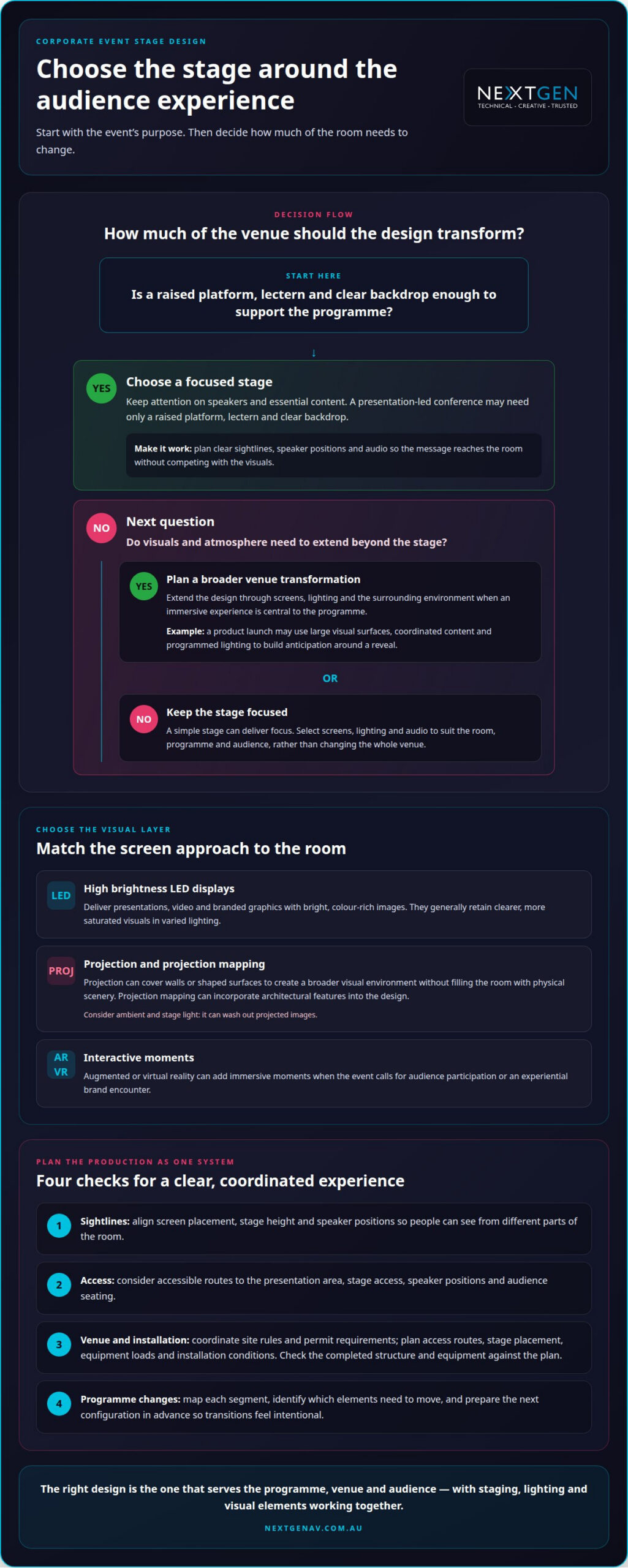
Start by defining the event’s key message and what attendees should take away. A product launch calls for a central reveal area, while a conference presentation needs clear views of speakers and content. Then consider audience movement, the venue footprint, and how speakers will enter and use the stage.
Brand identity should feel integrated, not added as an afterthought. A company logo, corporate colours and thematic graphics can inform the backdrop, stage fascia and screen content. A restrained logo treatment and consistent palette suit a leadership presentation, while bolder graphics support a product announcement. Align these elements so the stage supports the message without competing with it.
For 2026 events, a clean, adaptable stage with a branded screen backdrop, layered lighting or modular scenic panels delivers a considered setting. A circular layout suits sessions built around group interaction, while a central lectern anchors formal presentations. The right choice depends on the programme and audience, not a passing style.
Accessibility for stages and presentation areas
Plan an accessible route to the presentation area, considering stage access and speaker positions alongside audience seating. Preserve clear sightlines and give presenters room to use the stage comfortably. In Australia, the venue, room layout and event format inform the accessibility requirements addressed in the stage plan.
Design and installation planning
Venue rules and permit requirements depend on the site and proposed temporary structure. Coordinate approvals and plan around access routes, stage placement, equipment loads and installation conditions. Before the build, finalise the layout, technical requirements and run of show. During installation, check the completed structure and equipment against the plan to prevent clashes, unsafe access and event-day delays.
What’s the difference between a simple stage and a full venue transformation?
A simple stage keeps attention on speakers and essential content. A broader venue transformation extends the design through screens, lighting and the surrounding environment for a more immersive experience, often incorporating specialised elements such as immersive visual installations from Softmotion to captivate attendees throughout the space.
For a presentation-led conference, a raised platform, lectern and clear backdrop may be enough. A product launch might call for large visual surfaces, coordinated content and programmed lighting to build anticipation around a reveal. Choose an approach based on the event’s purpose, venue conditions and how much of the room needs to change.
Screens and immersive technology
High brightness LED displays deliver presentations, video and branded graphics with bright, colour-rich images. Projection can cover walls or shaped surfaces to create a broader visual environment without filling the room with physical scenery. Stage or ambient light can wash out projected images, while high brightness LED displays generally retain clearer, more saturated visuals in varied lighting. Projection mapping can incorporate architectural features into the design. Augmented or virtual reality adds interactive, immersive moments when the event calls for audience participation or an experiential brand encounter. For bespoke screen media and digital product reveals, working with a specialist studio like Line Creative allows organisers to produce high-end CGI animation and 3D rendering that elevate the entire stage presentation.
A production team can coordinate screen content with focused stage lighting and clear, evenly distributed audio. The right combination depends on the room, programme and audience, so each technical choice supports the experience rather than distracting from it.
Audience visibility and engagement
Good visibility starts with sightlines. Screen placement, stage height and speaker positions should work from different parts of the room. A wide screen, for example, can make presentation details easier to see from the sides, while directional lighting keeps attention on the presenter. Clear audio helps each message reach the audience without competing with the visuals.
To shape a coordinated screen, lighting and audio plan for your venue, explore event production solutions. A simple stage can deliver focus; a venue-wide design makes sense when visuals and atmosphere are central to the programme.
Modular stage elements for flexible event formats
For Australian events, reusable modular staging and considered material choices limit single-use elements. Natural details, such as foliage or timber finishes, bring warmth to a corporate setting while keeping the stage adaptable. Select elements to suit the venue, event purpose and intended look, rather than treating sustainability as a separate decorative layer.
Removable panels, modular platforms and versatile furniture allow one stage to serve different programme formats. A conference stage might use a central presentation area in the morning, then be reconfigured for a panel discussion later. Plan each change around speaker positions, screen sightlines and access so the next format feels intentional, not improvised.
Reusable components make a design more adaptable across future events. Instead of building a single-use scenic backdrop, combine modular panels with fresh graphics or selected natural elements. This creates a new visual treatment without replacing the core structure. Modular elements also suit different room layouts and event needs, limiting unnecessary waste from one-off builds.
Good planning makes transitions work. Map each event segment, identify which stage elements need to move, and prepare the next configuration in advance. A product briefing and an awards presentation, for instance, may need different furniture and stage arrangements even when they share a platform. Planning the changes helps avoid delays and keeps the programme moving.
When assessing sustainable, reusable options for an Australian event, consider the structure, finishes and intended reuse together. Choose modular components that can be reconfigured, then use replaceable graphics or natural accents to distinguish each format. The stage is tailored to the occasion while relying less on single-use scenic pieces.
Budget-friendly stage design
Budget-conscious corporate event stage design ideas begin with a clear production priority. For a Melbourne conference, decide what must work first: speaker visibility, clear audio or a strong focal point. Shape the stage plan around those needs instead of adding scenic features that do not support the programme.
The production scope depends on the venue, stage configuration, screen requirements, scenic fabrication and rigging. A branded lectern with a simple backdrop calls for a different plan from a product reveal with layered visuals. A production team can assess the contribution of each element and develop a design suited to the room and event format.
Protect the essentials before refining the look. If a product reveal carries the event’s message, direct visual attention to that moment. If speakers lead the programme, prioritise a legible presentation area and lighting that keeps them visible. Effective corporate event stage design ideas match production choices to audience needs, not decoration for its own sake.
Plan the run of show alongside the stage design. A leadership address followed by a panel discussion may require different furniture, presentation cues and lighting states. Mapping transitions early helps the technical team coordinate changes and keep the programme flowing without building a separate setup for every segment.
In Melbourne, venue access, existing features and rigging options also shape the production plan. A design that works with the room can create a clear focal point without unnecessary scenic additions. Set the event priorities first, then ask the production team to develop a technical scope around them.
To align stage lighting with your event priorities, plan your lighting design as part of the production brief.
NextGen AV: Lighting Design and Equipment
NextGen AV coordinates lighting design and equipment with your stage layout, helping keep speakers visible and visual elements cohesive. Turn to the team when your event needs a considered technical plan, rather than isolated production elements. Lighting cues can support transitions, focus attention during presentations and create a distinct atmosphere for a product launch or conference.
For events that need more than lighting, NextGen AV’s LED Video Walls can carry presentations and branded content, while Professional Audio Systems support clear communication. Virtual and Hybrid Event Solutions can connect remote participants with the programme. Each element is planned around the format, venue and audience experience so technical decisions serve the event’s purpose.
Share your event format, venue details and priorities with NextGen AV to discuss a stage production plan. Contact NextGen AV to discuss your event.
Turn your stage vision into a production plan
Strong corporate event stage design ideas work best when creative direction and technical planning move together. Shape your vision into a brief that connects the programme, venue and audience experience, giving each production decision a clear purpose.
NextGen AV brings together Lighting Design and Equipment, LED Video Walls and Professional Audio Systems to support a coordinated event environment. This joined-up approach aligns visual cues and sound with the run of show, whether you’re planning a conference, product launch or corporate presentation.
Share your event’s format, venue and priorities, and start a conversation about the production approach that suits them. Discuss your event with NextGen AV.
With a clear brief and experienced technical direction, you can focus on your guests and the message you want them to remember. Let the stage set the scene with purpose.
Frequently Asked Questions
Do you have options that are sustainable or environmentally friendly?
Yes. Sustainable choices can be included in the production plan, such as selecting reusable stage components and considering how scenic materials will be transported, stored and reused. For example, retain the core structure and change the event-specific graphics. This can reduce single-use elements while giving each event its own visual character.
How do I know if rigging will be needed for my stage design and how is that handled?
Rigging is required when a design suspends lighting or other production elements above the stage or audience. The production team reviews the venue’s rigging options, proposed equipment positions and technical plan, then coordinates the work with venue personnel and relevant contractors. This helps integrate overhead elements with the stage layout and event schedule.
What information should I prepare for a stage design brief?
Share the event date, venue, audience details, programme and content you expect to present. Include the run of show, speaker requirements and any venue documentation available. These details help the production team develop a design around the event format and technical needs, and identify questions that could affect planning before installation.
How can a professional stage design team align your stage with your corporate event’s brand and theme?
Provide current brand guidelines, approved logo files and campaign assets so the design team can work from the right materials. The team can coordinate these across the stage environment and presentation content, then check that graphics remain legible from audience viewing positions. A consistent visual treatment gives speakers and presentations a recognisable setting without distracting from the message.
What stage layouts work best for conferences, product launches, and awards nights?
Let the programme determine the layout. A conference may need space for a moderator and panellists, while a product launch may require a clear route for a reveal. An awards night needs room for presenters and recipients to enter, accept awards and pose for photographs. The production team can map these movements against the venue and run of show.
Can stage production support a hybrid event?
Yes. NextGen AV’s Virtual and Hybrid Event Solutions can connect an in-room programme with remote participants. Planning considers how presenters, presentation content and the live event are captured and shared so online attendees can follow the proceedings. For a hybrid conference, the technical team coordinates the stage presentation with the streaming setup and event schedule, aligning the experience for both audiences.
Clear audio takes more than choosing a microphone. It depends on consistent speaker levels, suitable equipment, rehearsals and a team ready to respond when sound changes. The best practices for virtual event audio also include clear roles, tested connections and a reliable way to communicate with speakers and attendees in real time. When these elements work together, audiences can follow the conversation without technical distractions.
Poor sound can distract from even the strongest presentation. Deliberate preparation makes virtual event audio more reliable and helps speakers feel supported on the day. This guide covers practical ways to improve sound quality, coordinate presenters and technical support, choose suitable equipment and manage real-time communication. Each decision contributes to a smoother, more engaging event, from the opening welcome to the final question.
Key Takeaways
- Keep speaker audio levels consistent and plan moments that invite audience participation.
- Use a rehearsal and clear run sheet so speakers, moderators and technical support know their roles.
- Choose microphones and audiovisual equipment suited to the event, then test each presenter’s setup.
- Plan how your team will communicate live and respond if sound, video or connectivity changes.
1. Audio quality and audience perception
The best practices for virtual event audio start with consistent levels across presenters. A sudden shift from a measured keynote voice to a louder panellist can distract viewers. During the sound check, have each speaker use their planned microphone and speak at presentation volume. Adjust levels so the audience can follow handovers without reaching for their own volume controls.
Clear sound also depends on how presenters engage people online. Ask speakers to look towards the camera, use direct language and pause after key points. For example, a presenter can invite attendees to respond to a poll before moving to the next slide. These deliberate exchanges make audience participation part of the session, not an afterthought.
Build audience interaction into the run sheet. A moderator can gather questions from chat, select them for live Q&A and relay them to presenters. Polls give attendees another way to contribute without interrupting a speaker. For networking, schedule a facilitated discussion or breakout conversation and provide a clear prompt to get participants talking.
Australian virtual events should offer accessibility options that help attendees follow spoken content and participate. Consider closed captions, language options and accessible content formats, including for recorded or on-demand presentations. Let attendees contribute through suitable event features, such as chat, written questions or live Q&A, so participation isn’t limited to speaking aloud.
Set out a clear communication route for attendees before the broadcast begins. Explain where to submit questions, how to request technical support and when networking will take place. During the event, have the moderator acknowledge questions and tell participants when answers are coming. Clear, real-time updates help maintain connection and keep the session running smoothly.
2. Coordinating speakers, moderators, and technical support teams
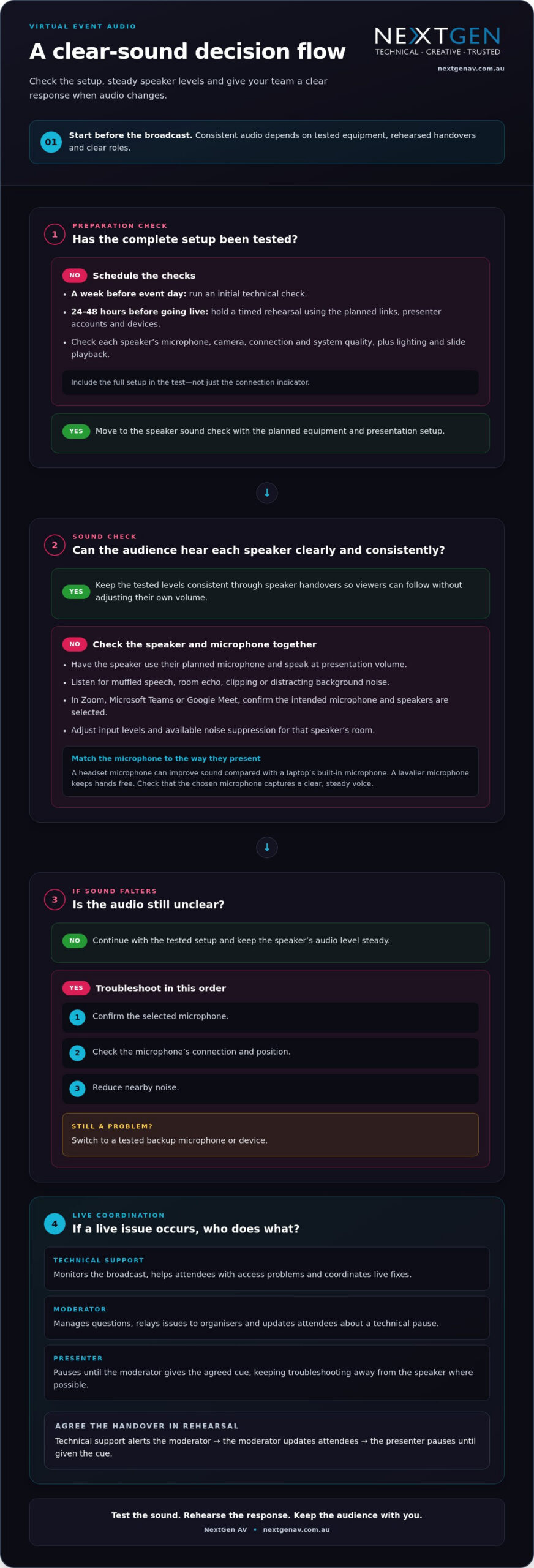
Assign roles before the event begins. Speakers focus on presenting, while a moderator introduces guests, manages questions and communicates issues to organisers. A technical support person should monitor the broadcast, help attendees with access problems and coordinate live fixes. Dividing responsibilities lets presenters stay focused on their message.
Add these responsibilities to the run sheet alongside speaker order, session timings and handover cues. Specify who advances slides, admits a late panellist and updates attendees about a short technical pause. A successful virtual event depends on every team member knowing what to do, rather than waiting for instructions during a live session.
Test the complete setup before event day. Schedule an initial technical check a week before event day, then run a timed rehearsal 24 to 48 hours before going live. Use the planned links, presenter accounts and devices. Check each speaker’s microphone, camera, connection and system quality, plus lighting and slide playback.
Give speakers concise written instructions in advance, with screenshots showing how to mute, share slides and access the session. Include practical on-camera tips, such as checking framing and lighting from the presentation position. Offer several opportunities to test, especially for presenters unfamiliar with the platform or equipment.
Prepare backup presentation files and agree how the team will switch systems if a file fails or connection quality drops. Practise the handover during rehearsal: technical support alerts the moderator, the moderator updates attendees, and the presenter pauses until given the cue. Keep troubleshooting away from the speaker whenever possible.
For a complex hosting plan, virtual event production planning can bring technical direction and presenter coordination into one workflow, helping the team manage transitions while speakers stay focused.
3. Investing in high-quality microphones and audiovisual equipment
Choose microphones and audiovisual equipment to suit the speakers, session format and production needs. A headset microphone can improve sound compared with a laptop’s built-in microphone, while a lavalier microphone keeps hands free during presentations. Match the microphone to how each speaker will move and present, then check that it captures a clear, steady voice. For teams capturing live discussions or interviews outside a traditional studio, professional setups such as Remote Podcast Recording and Production highlight how tailored equipment ensures consistent, high-fidelity sound across diverse environments.
For Zoom, Microsoft Teams and Google Meet, select the intended microphone and speakers in each platform’s audio settings. Test those selections during rehearsal, then adjust input levels and available noise suppression for the speaker’s room. Don’t assume a setting that works for one presenter will suit every device or space.
Assess audio and video together. Ask speakers to deliver a short section as they would during the live event, then listen for muffled speech, room echo, clipping or distracting background noise. Check that their face remains visible and well lit, and that slides are legible. This practical test reveals problems that a device’s connection indicator can’t.
If sound falters, troubleshoot in a simple order: confirm the selected microphone, check its connection and position, then reduce nearby noise. If the problem continues, switch to a tested backup microphone or device. For example, a presenter who moves too far from a desk microphone may sound quieter even though the meeting remains connected.
Professional Audio Systems can provide controlled sound for virtual and hybrid production, while coordinated lighting and visuals help presenters appear clearly on screen. For multi-speaker events, plan each setup around the room, microphone type and session format—principles also embraced by specialist facilities like Podcast Zurich to achieve reliable, broadcast-quality audio. This preparation supports natural interaction and a polished audience experience, without distracting technical interruptions.
4. Real-time audio and video communication
A virtual conference is a live exchange, not simply a sequence of presentations. Choose a format that lets the audience hear speakers clearly, see visual content and respond without interrupting the programme. For example, pair a keynote with moderated chat questions, then bring selected responses into a live discussion.
There’s no single bandwidth figure that suits every event. Connection demands depend on video quality, the number of simultaneous feeds, platform settings and other activity on the network. Test the presenter setup and stream format, then reduce competing uploads or use a stable wired connection where available.
Before going live, check audio and video together in the chosen platform. Confirm that the correct microphone and speakers are selected, listen for echo, and view the presenter and shared screen as attendees will see them. Keep the audio mix consistent, mute unused microphones and test any noise-processing setting with real speech.
Real-time communication needs a clear route in both directions. Tell attendees whether to use chat, live Q&A or a poll, and assign a moderator to relay questions. If a speaker’s connection drops, the moderator can acknowledge the pause while technical support restores the feed or moves to a prepared segment.
During the session, monitor what viewers actually receive, not just the presenter’s local preview. A delayed voice, frozen screen or missing slide can disrupt the message. Give the team a simple response sequence: identify the fault, inform the moderator, update the audience, then resume once sound and picture are aligned.
For an event where live feeds, audience interaction and visual content must work as one, plan virtual and hybrid event production with technical direction built into the delivery.
NextGen AV: LED Video Walls
NextGen AV brings Professional Audio Systems and LED Video Walls together for virtual and hybrid events, aligning clear sound with visuals audiences can follow. This coordinated technical production is a natural fit when speakers, presentations and live audience feeds need to work as one.
For Melbourne conferences and corporate events, the right setup depends on the session format, venue and content. Lighting Design and Equipment can support clear on-screen presentations, while Staging and Rigging helps shape the event environment. A coordinated production plan connects these elements to the audience experience and keeps technical decisions aligned with your programme.
Contact NextGen AV to discuss your event, or visit nextgenav.com.au.
Shape your next event
Applying the best practices for virtual event audio is part of a broader creative decision: how should your audience experience the event? Start with the impression you want attendees to take away, then shape the format and production around that purpose. A virtual event should feel intentionally designed, not like an in-person programme simply transferred to a screen.
Bring that intention into planning early. A shared vision gives speakers, organisers and production teams a clear point of reference, so technical choices support the content and audience experience. It also helps create a distinctive event identity that feels cohesive from the opening moment to the final sign-off.
As you shape your next programme, talk with NextGen AV about your event and explore how the production can support your vision. With a clear direction in place, you can focus on the people and ideas at the heart of the experience.
Frequently Asked Questions
What microphone and audio equipment work best for virtual events?
A headset or lavalier microphone usually gives speakers clearer, more consistent sound than a laptop’s built-in microphone. Choose according to how the presenter will move: a headset stays close to the speaker’s mouth, while a lavalier clips onto clothing. For a panel, give each speaker a dedicated microphone and test the full setup together so voices remain distinct during discussion.
How should speakers and presenters set up microphones for clear virtual event audio?
Place the microphone securely and keep it in a consistent position as you speak. For a headset, position the boom near the corner of your mouth, not directly in front of your breath. Clip a lavalier where clothing won’t rub against it. Select the correct input in your meeting platform, then listen to a short playback to catch distortion or handling noise.
How do you reduce echo, background noise, and feedback in a virtual event?
Use headphones, close unnecessary applications and ask speakers to mute when they aren’t talking. Echo often occurs when a microphone picks up sound from speakers in the same room, so avoid placing open speakers near the mic. Choose a quiet room, silence notifications and keep the microphone away from fans or other noise sources. If feedback starts, mute the affected channel first.
How should virtual event audio be tested before the event?
Test in the same room, with the devices and platform planned for the live session, then play back a recording to hear what attendees may receive. Include a speaker handover, shared presentation audio and audience questions in the test. Check for changes in loudness, interference and delay between voice and picture. For Melbourne events, consider whether a presenter’s location or network use could affect their connection.
What are best practices for managing audience microphones and Q&A audio?
Keep audience microphones muted by default, then invite participants to speak one at a time. A moderator should identify each questioner, confirm their microphone is active and return it to mute after the response. For a large or noisy session, accept questions through chat and have the moderator read them aloud. This gives speakers a clean audio path while preserving audience participation.
What backup audio equipment and connection plans should virtual events have?
Prepare a tested spare microphone, a second device and presentation files accessible to the technical team. Identify an alternative internet connection, such as a mobile hotspot, and decide who will announce a change if the main connection fails. Keep the backup microphone connected or within reach, and practise switching to it in rehearsal so the team can restore sound without leaving attendees uncertain.
